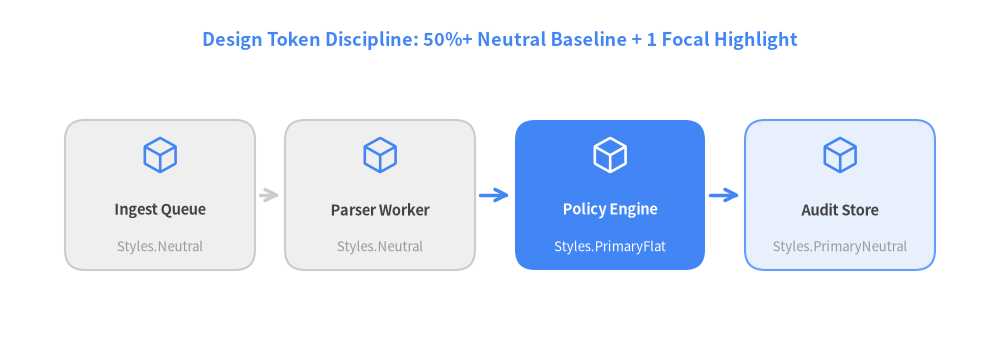
02. Style Tokens, 50%+ Neutral Rule & Primitives
Drawlib enforces a strict visual hierarchy: ground 50% or more of shapes in neutral surfaces (Styles.Neutral, Styles.PrimaryNeutral, Styles.SecondaryNeutral) and reserve saturated fills (Styles.PrimaryFlat, Styles.AccentFlat) for 1–2 focal elements.
View Drawlib Python Code
from drawlib.canvas import save, setup
from drawlib.icons import phosphor
from drawlib.lines import line
from drawlib.shapes import rectangle
from drawlib.styles import Styles
from drawlib.text import text

setup(width=100, height=34)

text(
    (50, 30),
    "Design Token Discipline: 50%+ Neutral Baseline + 1 Focal Highlight",
    style=Styles.PrimaryBold.patch(text_size=13),
)

nodes = [
    (16, "Ingest Queue", "Styles.Neutral", Styles.Neutral, False),
    (38, "Parser Worker", "Styles.Neutral", Styles.Neutral, False),
    (61, "Policy Engine", "Styles.PrimaryFlat", Styles.PrimaryFlat, True),
    (84, "Audit Store", "Styles.PrimaryNeutral", Styles.PrimaryNeutral, False),
]

for cx, label, token_name, box_style, is_dark in nodes:
    t_style = Styles.WhiteBold if is_dark else Styles.DarkBold
    s_style = Styles.White if is_dark else Styles.Muted
    icon_style = Styles.White if is_dark else Styles.Primary
    rectangle((cx, 14.5), width=19, height=15, style=box_style.patch(shape_r=2.0))
    phosphor.cube((cx, 18.5), width=4.0, style=icon_style)
    text((cx, 13.0), label, style=t_style.patch(text_size=10.5))
    text((cx, 9.3), token_name, style=s_style.patch(text_size=9.5))

line((26.0, 14.5), (28.0, 14.5), arrow_head="->", style=Styles.NeutralBold)
line((48.0, 14.5), (51.0, 14.5), arrow_head="->", style=Styles.PrimaryBold)
line((71.0, 14.5), (74.0, 14.5), arrow_head="->", style=Styles.PrimaryBold)

save()
1. Inspecting Styles & Colors in Python
Always import Colors and Styles in PascalCase (from drawlib.styles import Colors, Styles). Use .patch(...) to customize corner radius (shape_r), font size (text_size), or line width (line_width) without mutating global tokens:
In [setup]:
!pip install -q drawlib
In [1]:
from drawlib.styles import Colors, Styles

patched_card = Styles.PrimaryNeutral.patch(shape_r=2.5, line_width=1.8)
print("Primary RGB:", Colors.Primary)
print("Patched radius:", patched_card.shape_r)
Out [1]:
Primary RGB: r=66 g=133 b=244 alpha=1.0
Patched radius: 2.5
2. Combining Shapes, Lines & Phosphor Icons
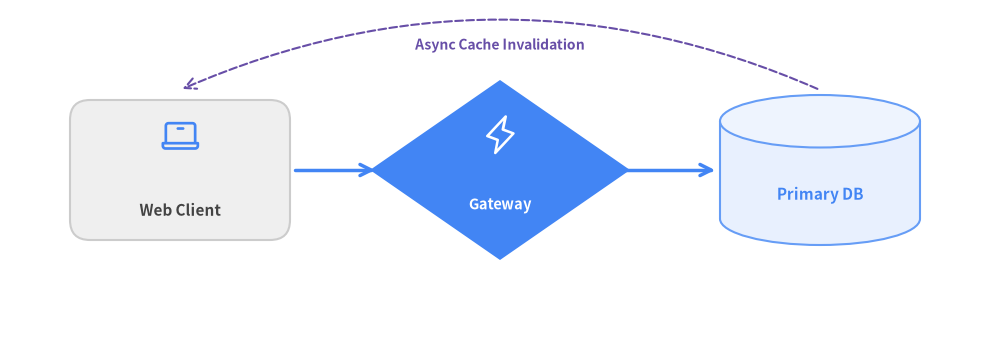
Every primitive shape (rectangle, circle, rhombus, cylinder), text, and phosphor icon uses a Center (cx, cy) coordinate anchor. Try running and modifying the code cell below:
In [2]:
from drawlib.canvas import show, setup
from drawlib.icons import phosphor
from drawlib.lines import line, line_curved
from drawlib.shapes import cylinder, rectangle, rhombus
from drawlib.styles import Styles
from drawlib.text import text

setup(width=100, height=34, cwd=True)

# Left: Client Rectangle
rectangle((18, 17), width=22, height=14, style=Styles.Neutral.patch(shape_r=2.0))
phosphor.laptop((18, 20.5), width=4.2, style=Styles.Primary)
text((18, 13.0), "Web Client", style=Styles.DarkBold.patch(text_size=11))

# Center: API Rhombus (Focal Point)
rhombus((50, 17), width=26, height=18, style=Styles.PrimaryFlat)
phosphor.lightning((50, 20.5), width=4.0, style=Styles.White)
text((50, 13.5), "Gateway", style=Styles.WhiteBold.patch(text_size=10.5))

# Right: Database Cylinder
cylinder((82, 17), width=20, height=15, style=Styles.PrimaryNeutral)
text((82, 14.5), "Primary DB", style=Styles.PrimaryBold.patch(text_size=11))

line((29.5, 17), (37.5, 17), arrow_head="->", style=Styles.PrimaryBold)
line((62.5, 17), (71.5, 17), arrow_head="->", style=Styles.PrimaryBold)
line_curved((82, 25), (18, 25), bend=0.22, arrow_head="->", style=Styles.SecondaryDashed)
text((50, 29.5), "Async Cache Invalidation", style=Styles.SecondaryBold.patch(text_size=10))

show()
Out [2]: