ChevronProcess Component
The ChevronProcess component draws horizontal, sequential process pipelines consisting of interlocking arrowhead blocks (chevrons).
It is the premier component for CI/CD delivery pipelines, phased development milestones, fulfillment lifecycles, and multi-step workflows.
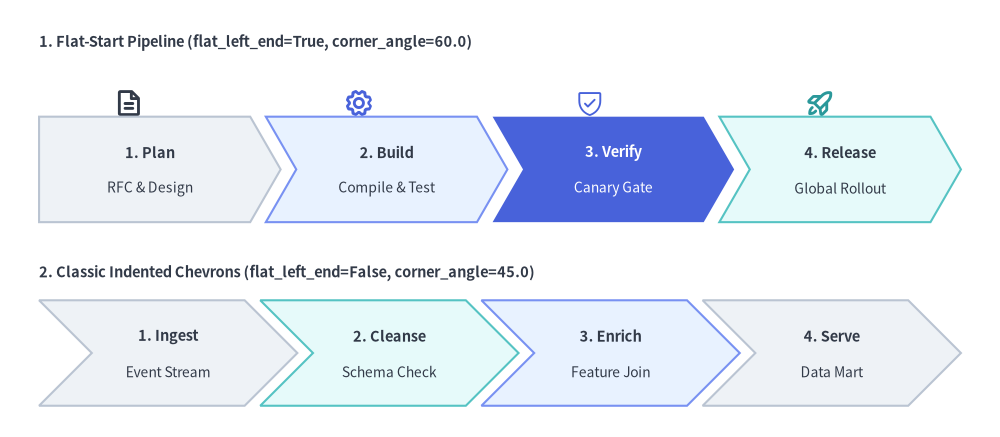
Source Code
from drawlib.canvas import save, setup
from drawlib.icons import phosphor
from drawlib.smartarts import ChevronProcess
from drawlib.styles import Styles
from drawlib.text import text

setup(width=128, height=56)

# 1. Top Row: Flat-Start Chevron Pipeline (flat_left_end=True, corner_angle=60.0)
text((5, 50.5), "1. Flat-Start Pipeline (flat_left_end=True, corner_angle=60.0)", style=Styles.DarkBold.patch(text_size=10.5, halign="left"))

# Stage icons above each chevron
phosphor.file_text(xy=(16.5, 42.8), width=3.8, style=Styles.DarkBold)
phosphor.gear(xy=(46.0, 42.8), width=3.8, style=Styles.PrimaryBold)
phosphor.shield_check(xy=(75.5, 42.8), width=3.8, style=Styles.PrimaryFlat)
phosphor.rocket_launch(xy=(105.0, 42.8), width=3.8, style=Styles.SecondaryBold)

flat_pipe = ChevronProcess(
    style=Styles.Neutral,
    text_style=Styles.DarkBold.patch(text_size=10.5),
    description_style=Styles.Dark.patch(text_size=10.0),
    corner_angle=60.0,
    spacing=2.0,
    flat_left_end=True,
)
flat_pipe.add("1. Plan", description="RFC & Design")
flat_pipe.add("2. Build", description="Compile & Test", style=Styles.PrimaryNeutral)
flat_pipe.add(
    "3. Verify",
    description="Canary Gate",
    style=Styles.PrimaryFlat,
    text_style=Styles.WhiteBold.patch(text_size=10.5),
    description_style=Styles.White.patch(text_size=10.0),
)
flat_pipe.add("4. Release", description="Global Rollout", style=Styles.SecondaryNeutral)
flat_pipe.draw(xy=(5, 27.5), width=118.0, height=13.5)

# 2. Bottom Row: Classic Indented Chevrons (flat_left_end=False, corner_angle=45.0)
text((5, 21.0), "2. Classic Indented Chevrons (flat_left_end=False, corner_angle=45.0)", style=Styles.DarkBold.patch(text_size=10.5, halign="left"))

indented_pipe = ChevronProcess(
    style=Styles.Neutral,
    text_style=Styles.DarkBold.patch(text_size=10.5),
    description_style=Styles.Dark.patch(text_size=10.0),
    corner_angle=45.0,
    spacing=2.0,
    flat_left_end=False,
)
indented_pipe.add("1. Ingest", description="Event Stream")
indented_pipe.add("2. Cleanse", description="Schema Check", style=Styles.SecondaryNeutral)
indented_pipe.add("3. Enrich", description="Feature Join", style=Styles.PrimaryNeutral)
indented_pipe.add("4. Serve", description="Data Mart")
indented_pipe.draw(xy=(5, 4.0), width=118.0, height=13.5)

save()
1. Core Concepts & Basic Usage
ChevronProcess constructs sequential interlocking pipelines step-by-step via .add(...), anchoring by default at the Bottom-Left (x, y) corner of the overall process bounding box (or its center when align="center"). You can customize start-edge and arrowhead tip geometry (flat_left_end, corner_angle, spacing), switch between auto-divided width and fixed per-stage item_width, and mutate or hide individual .items[i] stages in place without shifting sibling coordinates:

- Step-by-Step Construction & Anchor (
xy,align): Append stages in sequence via.add(text, description=..., style=...)and render atxy=(x, y)—anchored at the Bottom-Left bounding-box corner by default (align="bottom_left") or centered viaalign="center". - Start Edge & Tip Geometry (
flat_left_end,corner_angle,spacing): Setflat_left_end=Truefor a clean vertical left border on Stage 1 (orFalsefor a classic indented notch), and tunecorner_angle(10.0°–80.0°) andspacingto control arrowhead depth and inter-stage gaps. - Auto-Divided
widthvs. Fixeditem_width(scale): Leaveitem_width=Noneto automatically subdivide totalwidthacross all stages, pass an explicititem_widthto lock per-stage body width, or resize proportionally aroundxyviascale. - Live
.items[i]Mutation & Slot-Preserving.show: Mutatepipe.items[i].styleortext_stylebefore.draw()to spotlight active milestones, or setpipe.items[i].show = Falseto hide a stage while keeping sibling X coordinates completely unchanged.
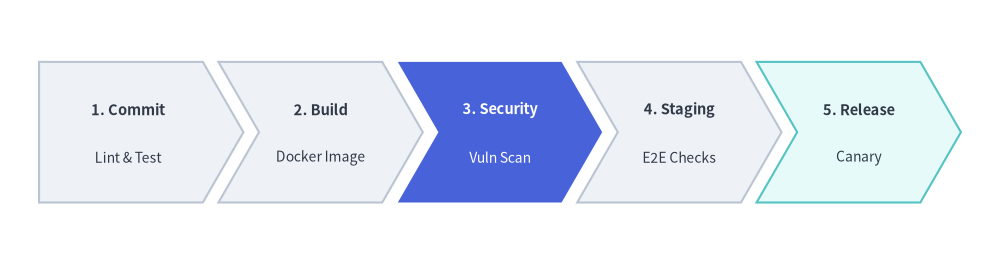
2. Quick Example: CI/CD Pipeline
from drawlib.canvas import setup
from drawlib.smartarts import ChevronProcess
from drawlib.styles import Styles

setup(width=128, height=34)

pipeline = ChevronProcess(
    style=Styles.Neutral,
    text_style=Styles.DarkBold.patch(text_size=10.5),
    description_style=Styles.Dark.patch(text_size=10.0),
    corner_angle=60.0,
    spacing=2.0,
    flat_left_end=True,
)
pipeline.add("1. Commit", description="Lint & Test")
pipeline.add("2. Build", description="Docker Image")
pipeline.add(
    "3. Security",
    description="Vuln Scan",
    style=Styles.PrimaryFlat,
    text_style=Styles.WhiteBold.patch(text_size=10.5),
    description_style=Styles.White.patch(text_size=10.0),
)
pipeline.add("4. Staging", description="E2E Checks")
pipeline.add("5. Release", description="Canary", style=Styles.SecondaryNeutral)

pipeline.draw(xy=(5, 8), width=118.0, height=18.0)
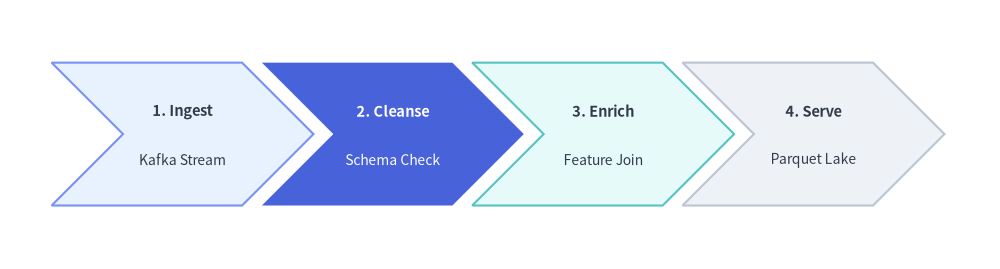
3. Classic Indented Chevrons with Explicit item_width & corner_angle
Setting flat_left_end=False (the default) renders every stage—including the first—as a classic indented chevron, while passing an explicit item_width to draw(...) gives every stage an exact fixed body width instead of auto-dividing a bounding container width. You can also adjust corner_angle (valid range: 10.0 to 80.0 degrees) to control arrowhead sharpness, and mutate returned ChevronItem instances before drawing.
from drawlib.canvas import save, setup
from drawlib.smartarts import ChevronProcess
from drawlib.styles import Styles

setup(width=126, height=34)

etl = ChevronProcess(
    style=Styles.Neutral,
    text_style=Styles.DarkBold.patch(text_size=10.5),
    description_style=Styles.Dark.patch(text_size=10.0),
    corner_angle=45.0,
    spacing=2.5,
    flat_left_end=False,
)

etl.add("1. Ingest", description="Kafka Stream", style=Styles.PrimaryNeutral)
transform_stage = etl.add("2. Cleanse", description="Schema Check")
etl.add("3. Enrich", description="Feature Join", style=Styles.SecondaryNeutral)
etl.add("4. Serve", description="Parquet Lake")

# Mutate a ChevronItem (or access via etl.items[1]) before calling draw()
transform_stage.style = Styles.PrimaryFlat
transform_stage.text_style = Styles.WhiteBold.patch(text_size=10.5)
transform_stage.description_style = Styles.White.patch(text_size=10.0)

etl.draw(xy=(6.5, 8.0), height=18.0, item_width=24.0)
save()
4. Geometry & Coordinate Anchor
- Coordinate Anchor (
xy&align): By default (align="bottom_left"),draw(xy=...)anchors the bottom-left corner(x, y)of the entire process bounding box. Passingalign="center"centers the overall bounding box horizontally and vertically onxy. flat_left_end:False(default): All stages—including the first—have an indented left notch matching the arrowhead tip angle.True: The first chevron is drawn as a flat-backed pentagon with a clean vertical left border.
corner_angle: Angle of the arrowhead tip in degrees (valid range:10.0to80.0, default60.0). Lower angles (45.0) produce deeper, sharper arrowheads; higher angles (70.0) produce flatter tips.- Automatic vs. Explicit Stage Width (
widthvs.item_width):- When
item_width=None(default),draw()automatically calculates each stage's body width from the totalwidth,spacing, and arrowhead indent (x_indent = (height / 2) / tan(corner_angle)):item_width = (width - (N - 1) * spacing - x_indent) / N - When
item_widthis explicitly provided,widthis ignored and each stage usesitem_widthdirectly (total_width = N * item_width + (N - 1) * spacing + x_indent).
- When
5. API Reference
Constructor (ChevronProcess)
ChevronProcess(
    *,
    style: Style,
    text_style: Style,
    description_style: Style,
    corner_angle: float = 60.0,
    spacing: float = 1.5,
    flat_left_end: bool = False,
)
| Parameter | Type | Default | Description |
|---|---|---|---|
style |
Style |
(Required) | Default shape style applied to chevron blocks. |
text_style |
Style |
(Required) | Default text style for primary stage titles. |
description_style |
Style |
(Required) | Default text style for secondary description lines. |
corner_angle |
float |
60.0 |
Arrowhead tip angle in degrees (10.0 <= corner_angle <= 80.0). |
spacing |
float |
1.5 |
Horizontal gap between consecutive chevrons (> 0). |
flat_left_end |
bool |
False |
If True, replaces the first chevron's left indent with a flat vertical edge. |
Adding & Inspecting Stages (.add() & .items)
pipeline.add(
    text: str,
    *,
    description: str = "",
    style: Style | None = None,
    text_style: Style | None = None,
    description_style: Style | None = None,
    show: bool = True,
) -> ChevronItem
| Parameter | Type | Default | Description |
|---|---|---|---|
text |
str |
(Required) | Primary stage title displayed inside the chevron. |
description |
str |
"" |
Optional secondary description line displayed below text. |
style |
Style | None |
None |
Custom shape style for this stage (falls back to constructor style). |
text_style |
Style | None |
None |
Custom title text style for this stage (falls back to constructor text_style). |
description_style |
Style | None |
None |
Custom description text style (falls back to constructor description_style). |
show |
bool |
True |
Whether to render this stage. Setting False hides the chevron while preserving layout slots for sibling stages. |
pipeline.items -> list[ChevronItem]: Returns the list of registeredChevronIteminstances in order.ChevronItemModel Fields: Each returned item exposes mutable attributes resolved atdraw()time:text: strstyle: Styletext_style: Styledescription_style: Styledescription: str = ""show: bool = True
Drawing (.draw())
pipeline.draw(
    xy: tuple[float, float],
    width: float = 90.0,
    height: float = 12.0,
    item_width: float | None = None,
    align: Literal["bottom_left", "center"] = "bottom_left",
    scale: float = 1.0,
) -> Self
| Parameter | Type | Default | Description |
|---|---|---|---|
xy |
tuple[float, float] |
(Required) | Anchor coordinate (x, y) of the process bounding box (bottom-left by default, or center when align="center"). |
width |
float |
90.0 |
Total bounding width allocated across all stages (used when item_width=None). |
height |
float |
12.0 |
Vertical height of each chevron block (> 0). |
item_width |
float | None |
None |
Explicit body width per chevron block. Overrides automatic width division when set. |
align |
Literal["bottom_left", "center"] |
"bottom_left" |
Anchor alignment of xy relative to the overall process bounding box. |
scale |
float |
1.0 |
Proportional scale factor around anchor xy (> 0). |