SequenceDiagram: Lifelines, Synchronous Calls & Condition Blocks
SequenceDiagram models chronological interactions and communication protocols between collaborating participants over time. Time progresses strictly downwards along vertical lifelines, with horizontal arrows representing messages.
Source Code
from drawlib.canvas import save, setup
from drawlib.diagrams.sequence import Participant, PhosphorIcon, SequenceDiagram
from drawlib.styles import Styles

setup(width=126, height=88)

d = SequenceDiagram(
    node_style=Styles.Primary,
    node_text_style=Styles.DarkBold.patch(text_size=10.5),
    edge_style=Styles.DarkBold,
    edge_text_style=Styles.Dark.patch(text_size=10.5),
    node_card_style=Styles.Neutral,
    col_width=40.0,
    step_y=8.5,
)

client = d.add(Participant("Client", width=22, height=15, icon=PhosphorIcon.LAPTOP, icon_size=6.5))
api = d.add(
    Participant("API Server", width=22, height=15, icon=PhosphorIcon.CLOUD, icon_size=6.5, card_style=Styles.PrimaryNeutral)
)
db = d.add(Participant("Database", width=22, height=15, icon=PhosphorIcon.DATABASE, icon_size=6.5))

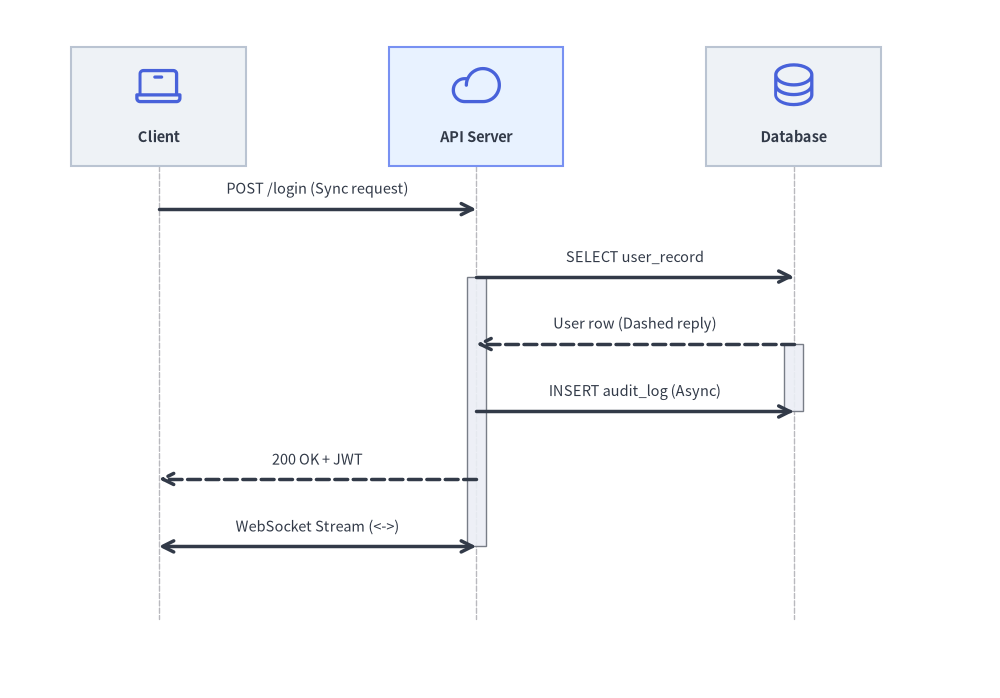
client.request(api, "POST /login (Sync request)")
api.activate()

api.request(db, "SELECT user_record")
db.activate()
db.reply(api, "User row (Dashed reply)")
db.deactivate()

api.request(db, "INSERT audit_log (Async)", is_async=True)
api.reply(client, "200 OK + JWT")
api.deactivate()

client.connect(api, "WebSocket Stream (<->)", arrow="<->")

d.draw(xy=(4.0, 3.0))
save()
1. Core Concepts & Basic Usage
SequenceDiagram arranges Participant header cards horizontally (col_width) and advances message arrows chronologically downward (step_y) from a default Bottom-Left (x0, y0) anchor (or align="center"). You can highlight execution spans with .activate() / .deactivate(), attach lifeline or spanning sticky notes, and wrap conditional or repeated steps inside Python with interaction frames (d.alt(), d.loop(), d.opt()):

- Vertical Lifelines & Groups (
Participant,ParticipantGroup,col_width,step_y): Header cards align along the top band with vertical dashed lifelines descending chronologically;ParticipantGroupclusters related backend services under a labeled boundary. - Message Semantics (
request,reply,connect, Self-Calls):request()draws synchronous calls (or open-stick async dispatches viais_async=True),reply()draws dashed return arrows,connect(..., arrow="<->")models full-duplex streams, andp.request(p, ...)loops onto the caller's own lifeline. - Execution Focus, Notes & Autonumbering (
activate,note,autonumber=True):p.activate()/p.deactivate()render execution focus rectangles,p.note()/d.note(..., over=[...])attach lifeline or spanning sticky notes, andautonumber=Trueprefixes steps (1.,2.,3., ...). - Context-Manager Frames & Stable Reveal (
with d.alt(),show=False,align): Wrap conditional or repeated flows insidewith d.alt()/d.else_()/d.loop()/d.opt(), toggleshow=Falseto reveal steps progressively without lifeline jitter, and anchor at bottom-left oralign="center".
2. Constructor & Participant Management
from drawlib.diagrams.sequence import (
    Block,
    GcpIcon,
    Participant,
    ParticipantGroup,
    PhosphorIcon,
    SequenceDiagram,
)
from drawlib.styles import Styles

d = SequenceDiagram(
    node_style=Styles.Primary,
    node_text_style=Styles.DarkBold,
    edge_style=Styles.DarkBold,
    edge_text_style=Styles.Dark,
    node_card_style=Styles.Neutral,
    title="Checkout Transaction Pipeline",
    autonumber=True,            # Auto-number messages (1., 2., 3., ...)
)

# Participant group for clustered backend services
vpc = d.add(ParticipantGroup(title="Google Cloud VPC", padding=4.0))
api = vpc.add(Participant("Cloud Run\n(Gateway)", width=22, height=16, icon=GcpIcon.CLOUD_RUN, card_style=Styles.PrimaryNeutral))
db = vpc.add(Participant("Cloud SQL", width=22, height=16, icon=GcpIcon.CLOUD_SQL))

# External participant
client = d.add(Participant("Web Browser", width=22, height=16, icon=PhosphorIcon.BROWSER))
Parameter Reference Tables
SequenceDiagram Class
| Parameter | Type | Default | Description |
|---|---|---|---|
node_style |
Style |
(Required) | Base Style object for participant icons and images. |
node_text_style |
Style |
(Required) | Base Style object for participant text labels. |
edge_style |
Style |
(Required) | Base Style object for message arrows and lifelines. |
edge_text_style |
Style |
(Required) | Base Style object for message labels. |
node_card_style |
Style | None |
None |
Optional base Style for participant header cards (transparent if None). |
title |
str |
"" |
Optional banner title displayed above the diagram. |
autonumber |
bool |
False |
When True, prefixes message labels with sequential numbers (1., 2., 3., ...). |
width |
float | None |
None |
Optional fixed canvas width (auto-calculated from lifelines if None). |
height |
float | None |
None |
Optional fixed canvas height (auto-calculated from timeline steps if None). |
col_width |
float |
20.0 |
Default horizontal center-to-center spacing between participant lifelines. |
step_y |
float |
7.0 |
Vertical distance advanced per chronological message or note step. |
margin |
float |
5.0 |
Outer margin surrounding all lifelines and headers. |
style |
Style | None |
None |
Optional Style for the overall diagram background card. |
title_style |
Style | None |
None |
Optional Style override for the diagram title text. |
Participant Class
| Parameter | Type | Default | Description |
|---|---|---|---|
text |
str |
"" |
Display name shown in the participant header card (supports \n). |
width |
float |
20.0 |
Header card width in canvas units. |
height |
float |
16.0 |
Header card height in canvas units. |
icon |
IconType |
None |
Any of the 34 *Icon Enums (PhosphorIcon, GcpIcon, AwsIcon, AzureIcon, AiIcon..OriginalWorkspaceIcon; see Icons Overview), CustomIcon, Dimage, PIL.Image, path, or icon callable. |
icon_size |
float |
8.0 |
Icon width/height in coordinate units. |
style |
Style | None |
None |
Optional Style override for the participant icon/image. |
text_style |
Style | None |
None |
Optional Style override for the participant label text. |
card_style |
Style | None |
None |
Optional Style override for the participant header card background/border. |
lifeline_style |
Style | None |
None |
Optional Style override for the vertical dashed lifeline. |
show |
bool |
True |
Visibility flag (hides header, lifeline, and attached messages/notes when False). |
- Horizontal Lifeline Pinning & Sizing:
d.add(participant, x: float | None = None, *, show: bool | None = None) -> Participant: Registers a participant, optionally pinning its lifeline to an explicit horizontal coordinatex.participant.set_x(x: float) -> Participant: Explicitly pins the participant's horizontal lifeline positionxand returnsself.participant.activate() -> Noneandparticipant.deactivate() -> None: Starts and ends an execution focus bar on the lifeline.participant.get_size() -> tuple[float, float]andparticipant.get_header_size() -> tuple[float, float]: Returns(width, height).
ParticipantGroup Class
| Parameter | Type | Default | Description |
|---|---|---|---|
title |
str |
"" |
Header title for the participant group boundary box. |
padding |
float |
4.0 |
Padding around enclosed participant header cards. |
style |
Style | None |
None |
Optional Style for the group boundary box. |
text_style |
Style | None |
None |
Optional Style for the group title text. |
show |
bool |
True |
Visibility flag (hides the group box when False while keeping column spacing fixed). |
group.add(participant: Participant, *, show: bool | None = None) -> Participant: Adds a participant to the group (and registers it with the parent diagram).
Messages, Notes, Spacing & Rendering API
- Participant-Level & Diagram-Level Messages:
a.request(b, label="", is_async=False, style=None, text_style=None, show=True) -> Messageord.request(a, b, ...) -> Message: Solid request arrow (->). Passing the same participant (a.request(a, "...")) renders a 3-segment self-call loop (msg.is_self_call == True).b.reply(a, label="", is_async=False, style=None, text_style=None, show=True) -> Messageord.reply(b, a, ...) -> Message: Dashed return arrow (-->).a.connect(b, label="", arrow="->", is_async=False, style=None, text_style=None, show=True) -> Messageord.connect(a, b, ...) -> Message: Custom directional or bidirectional (arrow="<->" | "->" | "-") message.
MessageFluent Mutators:msg.set_label(text: str) -> Messagemsg.set_reply(is_reply: bool = True) -> Messagemsg.set_async(is_async: bool = True) -> Messagemsg.set_arrow(arrow: Literal["->", "<->", "-"]) -> Messagemsg.set_style(style: Style) -> Messagemsg.set_text_style(text_style: Style) -> Messagemsg.set_padding(padding: float | tuple[float, float]) -> Message
- Sticky Notes (
d.note&p.note):d.note(text: str, on: Participant | None = None, over: list[Participant] | None = None, pos: Literal["left", "right", "over"] = "right", style: Style | None = None, show: bool = True) -> Note: Places a sticky note beside a single lifeline (on=p, pos="left"|"right") or spanning across multiple lifelines (over=[p1, p2]).p.note(text: str, pos: Literal["left", "right"] = "right", style: Style | None = None, show: bool = True) -> Note: Convenience shorthand ford.note(text, on=p, pos=pos, ...).NoteMutators:note.set_text(text) -> Note,note.set_style(style) -> Note,note.set_text_style(text_style) -> Note.
- Timeline Spacing, Sizing & Rendering:
d.space(dy: float = 5.0) -> None: Advances the vertical timeline by an extradyunits to add visual breathing room between phases.d.get_size() -> tuple[float, float]: Computes the total(width, height)of the sequence diagram.d.draw(xy=(0.0, 0.0), *, scale: float = 1.0) -> None: Renders the sequence diagram anchored at bottom-leftxy, proportionally scaling column widths, vertical steps, icons, and typography byscale.
3. Distributed Transaction Pipeline
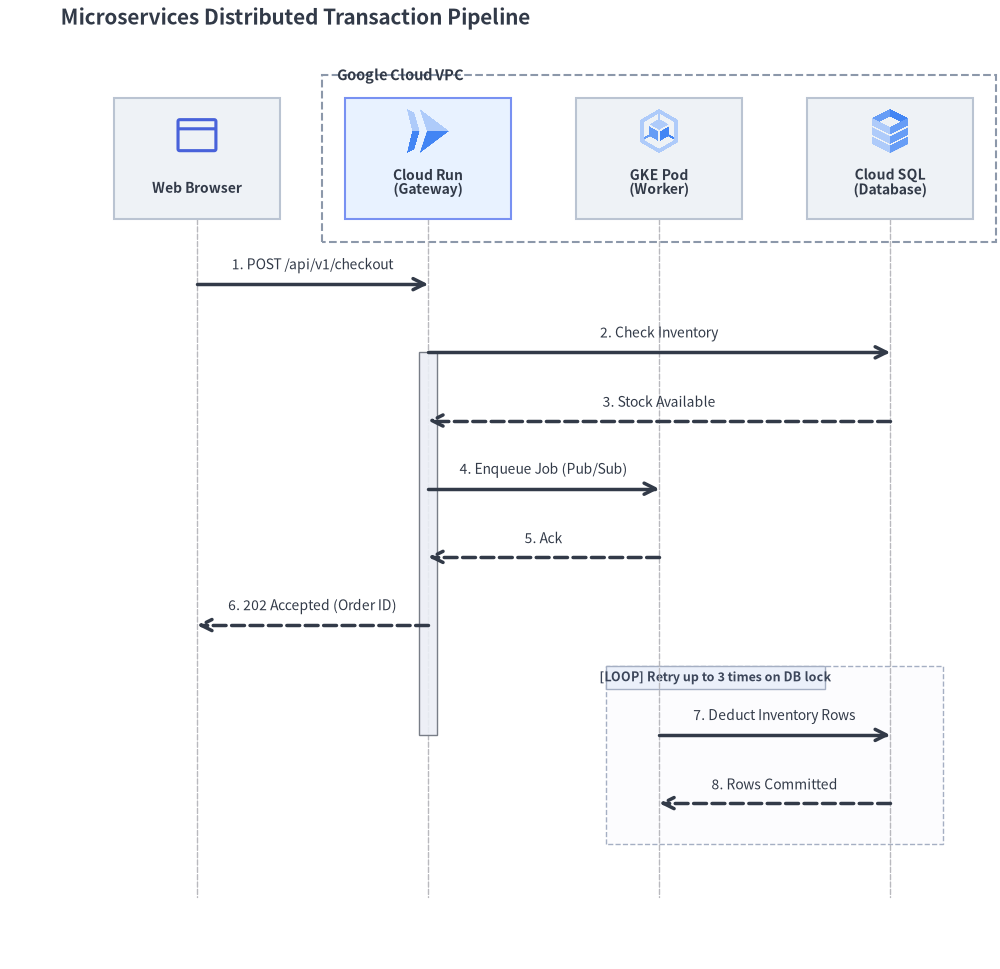
The following complete example showcases participant groups, cloud icons, activations, asynchronous dispatches, and a retry loop frame:
from drawlib.canvas import save, setup
from drawlib.diagrams.sequence import GcpIcon, Participant, ParticipantGroup, PhosphorIcon, SequenceDiagram
from drawlib.styles import Styles

setup(width=132, height=128)

d = SequenceDiagram(
    node_style=Styles.Primary,
    node_text_style=Styles.DarkBold.patch(text_size=10.0),
    edge_style=Styles.DarkBold,
    edge_text_style=Styles.Dark.patch(text_size=10.0),
    node_card_style=Styles.Neutral,
    title="Microservices Distributed Transaction Pipeline",
    autonumber=True,
    col_width=30.5,
    step_y=9.0,
)

# 1. Participants: Client on the left, Backend services in VPC group on the right
client = d.add(Participant("Web Browser", width=22, height=16, icon=PhosphorIcon.BROWSER, icon_size=6.5))

backend = d.add(
    ParticipantGroup(
        title="Google Cloud VPC",
        padding=3.0,
        style=Styles.MutedDashed,
        text_style=Styles.DarkBold.patch(text_size=10.5, halign="left", valign="top"),
    )
)
api = backend.add(
    Participant("Cloud Run\n(Gateway)", width=22, height=16, icon=GcpIcon.CLOUD_RUN, icon_size=6.5, card_style=Styles.PrimaryNeutral)
)
worker = backend.add(Participant("GKE Pod\n(Worker)", width=22, height=16, icon=GcpIcon.GOOGLE_KUBERNETES_ENGINE, icon_size=6.5))
db = backend.add(Participant("Cloud SQL\n(Database)", width=22, height=16, icon=GcpIcon.CLOUD_SQL, icon_size=6.5))

# 2. Interactions
client.request(api, "POST /api/v1/checkout")
api.activate()

api.request(db, "Check Inventory")
db.reply(api, "Stock Available")

api.request(worker, "Enqueue Job (Pub/Sub)", is_async=True)
worker.reply(api, "Ack", is_async=True)

api.reply(client, "202 Accepted (Order ID)")
api.deactivate()

with d.loop("Retry up to 3 times on DB lock"):
    worker.request(db, "Deduct Inventory Rows")
    db.reply(worker, "Rows Committed")

d.draw(xy=(3.0, 2.5))
save()
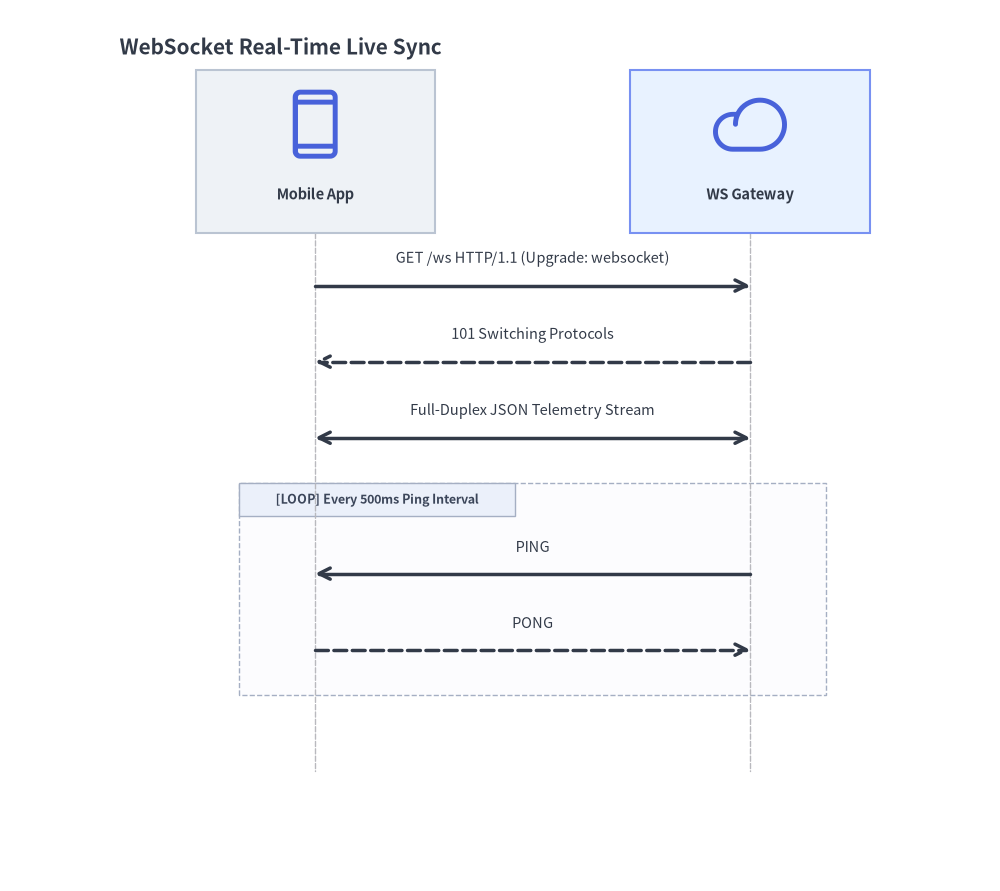
4. WebSocket Full-Duplex Streaming
For real-time bidirectional streams, use connect() with arrow="<->":
from drawlib.canvas import save, setup
from drawlib.diagrams.sequence import Participant, PhosphorIcon, SequenceDiagram
from drawlib.styles import Styles

setup(width=92, height=82)

d = SequenceDiagram(
    node_style=Styles.Primary,
    node_text_style=Styles.DarkBold.patch(text_size=10.5),
    edge_style=Styles.DarkBold,
    edge_text_style=Styles.Dark.patch(text_size=10.5),
    node_card_style=Styles.Neutral,
    title="WebSocket Real-Time Live Sync",
    col_width=40.0,
)

app = d.add(Participant("Mobile App", width=22, height=15, icon=PhosphorIcon.DEVICE_MOBILE, icon_size=7.0))
gateway = d.add(
    Participant("WS Gateway", width=22, height=15, icon=PhosphorIcon.CLOUD, icon_size=7.0, card_style=Styles.PrimaryNeutral)
)

app.request(gateway, "GET /ws HTTP/1.1 (Upgrade: websocket)")
gateway.reply(app, "101 Switching Protocols")

# Bidirectional streaming channel
app.connect(gateway, "Full-Duplex JSON Telemetry Stream", arrow="<->")

with d.loop("Every 500ms Ping Interval"):
    gateway.request(app, "PING", is_async=True)
    app.reply(gateway, "PONG", is_async=True)

d.draw(xy=(6.0, 4.0))
save()
5. Condition Frames (alt / else_), Self-Calls & Sticky Notes
Drawlib supports all 7 standard UML interaction operators (BlockType = Literal["loop", "alt", "else", "opt", "par", "critical", "break"]) via context managers on SequenceDiagram or direct Block(block_type, label="", diagram=d, style=None, text_style=None, show=True) instantiation:
| Frame Type | Context Manager / Constructor | Standard UML Operator |
|---|---|---|
| Loop | with d.loop("condition", show=True): |
loop |
| Alternative | with d.alt("condition", show=True):with d.else_("fallback", show=True): |
alt / else |
| Option | with d.opt("condition", show=True): |
opt |
| Parallel | with d.par("description", show=True): |
par |
| Critical Region | with Block("critical", "atomic lock", diagram=d): |
critical |
| Break | with Block("break", "fatal error", diagram=d): |
break |
Frames automatically compute their enclosing bounding box around all enclosed messages and notes, drawing the [OPERATOR] label tag in the top-left corner.
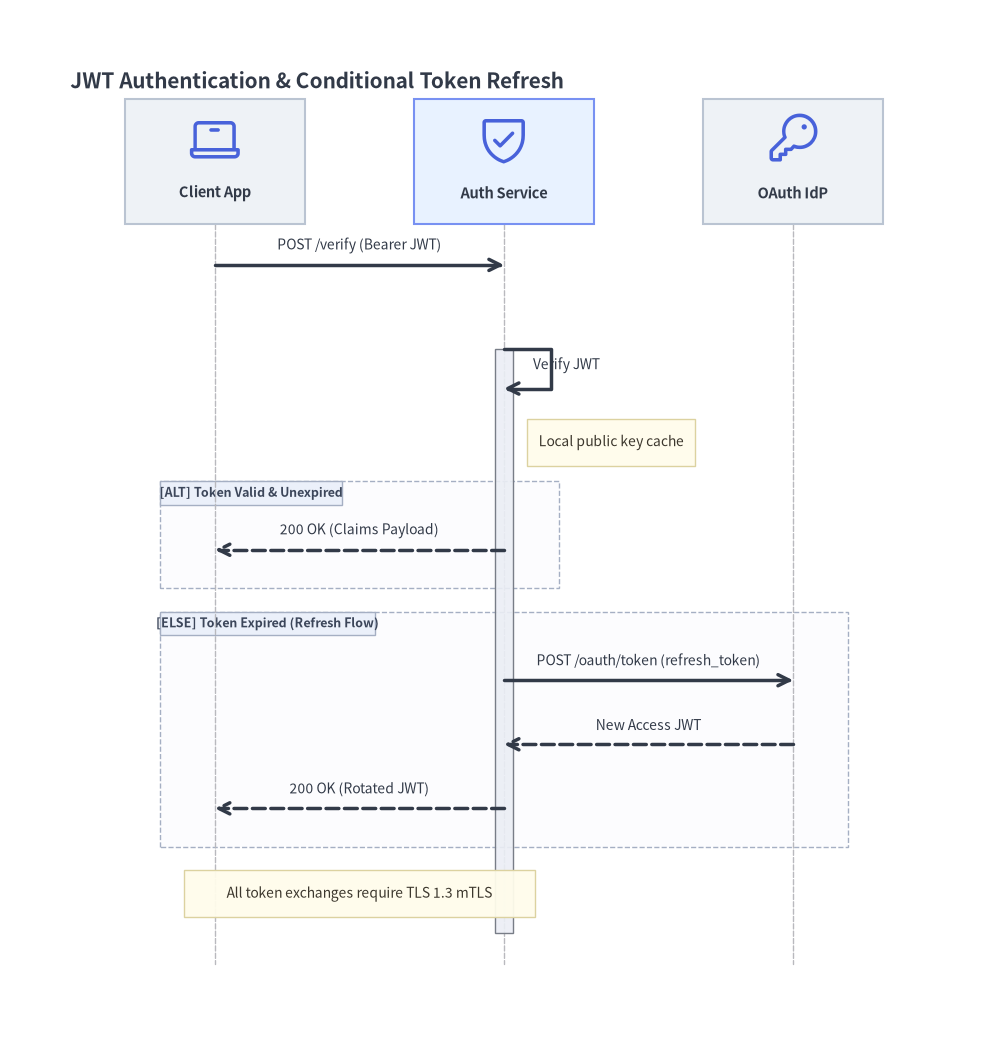
The following example demonstrates self-calls (auth.request(auth, ...)), sticky notes (auth.note(...) and d.note(..., over=[...])), and conditional alt / else_ branches:
from drawlib.canvas import save, setup
from drawlib.diagrams.sequence import Participant, PhosphorIcon, SequenceDiagram
from drawlib.styles import Styles

setup(width=128, height=134)

d = SequenceDiagram(
    node_style=Styles.Primary,
    node_text_style=Styles.DarkBold.patch(text_size=10.5),
    edge_style=Styles.DarkBold,
    edge_text_style=Styles.Dark.patch(text_size=10.0),
    node_card_style=Styles.Neutral,
    title="JWT Authentication & Conditional Token Refresh",
    col_width=37.0,
    step_y=8.2,
)

client = d.add(Participant("Client App", width=23, height=16, icon=PhosphorIcon.LAPTOP, icon_size=7.0))
auth = d.add(
    Participant("Auth Service", width=23, height=16, icon=PhosphorIcon.SHIELD_CHECK, icon_size=7.0, card_style=Styles.PrimaryNeutral)
)
idp = d.add(Participant("OAuth IdP", width=23, height=16, icon=PhosphorIcon.KEY, icon_size=7.0))

client.request(auth, "POST /verify (Bearer JWT)")
auth.activate()

# Self-call for local signature verification + attached participant note
auth.request(auth, "Verify JWT")
auth.note("Local public key cache", pos="right")

# Conditional alt / else_ blocks
with d.alt("Token Valid & Unexpired"):
    auth.reply(client, "200 OK (Claims Payload)")

with d.else_("Token Expired (Refresh Flow)"):
    auth.request(idp, "POST /oauth/token (refresh_token)")
    idp.reply(auth, "New Access JWT")
    auth.reply(client, "200 OK (Rotated JWT)")

auth.deactivate()

# Spanning note across multiple participants
d.note("All token exchanges require TLS 1.3 mTLS", over=[client, auth])

d.draw(xy=(4.0, 3.5))
save()