PieChart: Proportional Compositions & Donut Badges
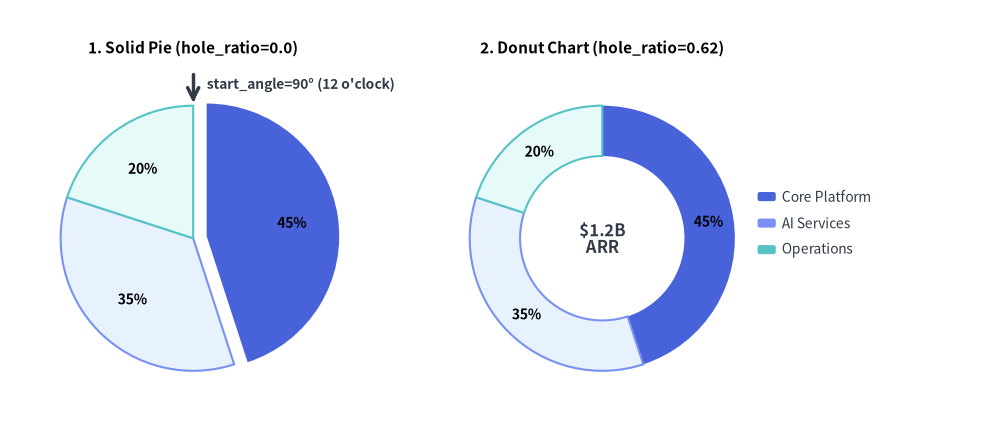
PieChart (drawlib.charts.pie) visualizes proportional compositions where slices represent parts of a whole (100%). It supports classic solid pie charts, modern donut rings with center KPI badges, outward slice explosion, custom angular orientations, and decoupled legend rendering.
Source Code
from drawlib.canvas import save, setup
from drawlib.charts.pie import PieChart
from drawlib.lines import line
from drawlib.styles import Styles
from drawlib.text import text

setup(width=132, height=58)

# Left: Solid Pie Chart (hole_ratio=0.0) with Exploded Slice
solid_pie = PieChart(
    radius=17.5,
    hole_ratio=0.0,
    start_angle=90.0,
    title="1. Solid Pie (hole_ratio=0.0)",
    title_style=Styles.BlackBold.patch(text_size=11.0),
    value_text_style=Styles.BlackBold.patch(text_size=10.0),
    value_format="{:.0f}%",
)
solid_pie.add_slice("Core Platform", 45.0, style=Styles.PrimaryFlat, explode=1.8)
solid_pie.add_slice("AI Services", 35.0, style=Styles.PrimaryNeutral)
solid_pie.add_slice("Operations", 20.0, style=Styles.SecondaryNeutral)
solid_pie.draw(xy=(4.0, 5.0))

# Callout for start_angle=90° (12 o'clock)
pie_w, pie_h = solid_pie.get_size()
pie_cx = 4.0 + pie_w / 2.0
pie_top_y = 5.0 + (pie_h - 6.0) / 2.0 + 17.5
line((pie_cx, pie_top_y + 4.2), (pie_cx, pie_top_y + 0.4), arrow_head="->", style=Styles.DarkBold)
text(
    (pie_cx + 1.8, pie_top_y + 2.8),
    "start_angle=90° (12 o'clock)",
    style=Styles.DarkBold.patch(text_size=10.0, halign="left"),
)

# Right: Donut Chart (hole_ratio=0.62) with Center KPI
donut_pie = PieChart(
    radius=17.5,
    hole_ratio=0.62,
    center_text="$1.2B\nARR",
    center_text_style=Styles.DarkBold.patch(text_size=12.0),
    title="2. Donut Chart (hole_ratio=0.62)",
    title_style=Styles.BlackBold.patch(text_size=11.0),
    value_text_style=Styles.BlackBold.patch(text_size=10.0),
    value_format="{:.0f}%",
)
donut_pie.add_slice("Core Platform", 45.0, style=Styles.PrimaryFlat)
donut_pie.add_slice("AI Services", 35.0, style=Styles.PrimaryNeutral)
donut_pie.add_slice("Operations", 20.0, style=Styles.SecondaryNeutral)
donut_pie.draw(xy=(58.0, 5.0))
donut_pie.draw_legend(xy=(100.0, 32.0), text_style=Styles.Dark.patch(text_size=10.0))

save()
1. Core Concepts & Basic Usage

PieChart builds proportional sector compositions via .add_slice(...), anchoring by default at the Bottom-Left (x, y) corner of its container box (or directly on the pie center when align="center"). You can morph solid pies into hollow donut rings (hole_ratio, center_text), radially offset focal wedges (explode) while automatically suppressing cramped < 4% inline labels, and animate angular sweeps (draw_ratio) or slot-preserving visibility (show=False):
- Slices, Anchor & Legend (
xy,add_slice,draw_legend): Register proportional wedges via.add_slice(name, value, style=...), render inline percentage badges (value_text_style,value_format), and pairchart.draw(xy=...)(defaultalign="bottom_left") withchart.draw_legend(...). - Solid Pie vs. Donut Center KPI (
hole_ratio,center_text): Keephole_ratio=0.0for full sectors or sethole_ratioin(0.0, 0.9](typically0.5–0.7) to open a donut ring for multilinecenter_text+center_text_styleKPI badges. - Radial Explode, Orientation &
< 4%Rule (explode,start_angle,clockwise): Offset focal wedges radially viaexplode > 0.0, customize radial orientation (start_angle,clockwise), and rely on automatic < 4% inline label suppression (while keeping minor slices visible indraw_legend()). - Partial Sweep, Visibility & Center Pinning (
draw_ratio,show,align="center"): Animate angular or radial progress viadraw_ratio(draw_direction), toggleslice.show = Falsewithout rescaling sibling angles, or passalign="center"to pinxy=(cx, cy)directly at the pie center.
2. Donut Chart with Center KPI Badge
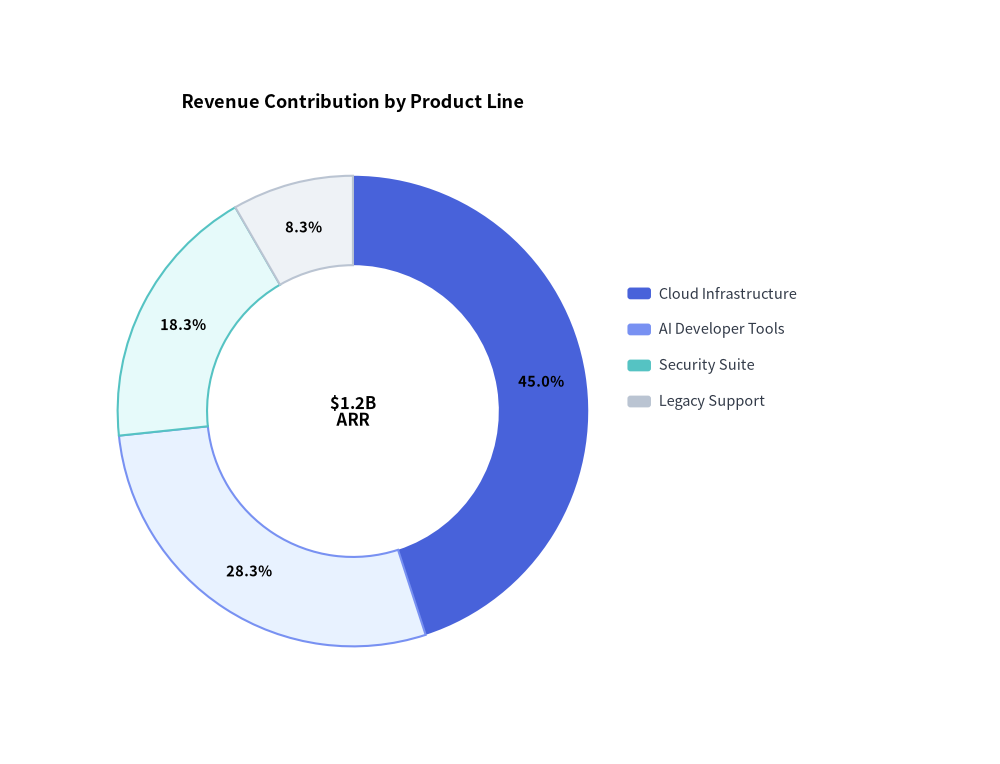
Donut charts are ideal for executive dashboards. Ground supporting slices in calm neutral tokens (Styles.PrimaryNeutral, Styles.SecondaryNeutral, Styles.Neutral) while reserving Styles.PrimaryFlat for the primary focal slice:
from drawlib.canvas import save, setup
from drawlib.charts.pie import PieChart
from drawlib.styles import Styles

setup(width=102, height=78)

chart = PieChart(
    radius=24.0,
    hole_ratio=0.62,
    center_text="$1.2B\nARR",
    center_text_style=Styles.BlackBold.patch(text_size=12.0),
    title="Revenue Contribution by Product Line",
    title_style=Styles.BlackBold.patch(text_size=13.0),
    value_text_style=Styles.BlackBold.patch(text_size=10.5),
)
chart.add_slice("Cloud Infrastructure", 540.0, style=Styles.PrimaryFlat)
chart.add_slice("AI Developer Tools", 340.0, style=Styles.PrimaryNeutral)
chart.add_slice("Security Suite", 220.0, style=Styles.SecondaryNeutral)
chart.add_slice("Legacy Support", 100.0, style=Styles.Neutral)

chart.draw(xy=(8.0, 8.0))
chart.draw_legend(xy=(64.0, 48.0), text_style=Styles.Dark.patch(text_size=10.5))
save()
3. Exploded Slice Allocation & Callable Formatter
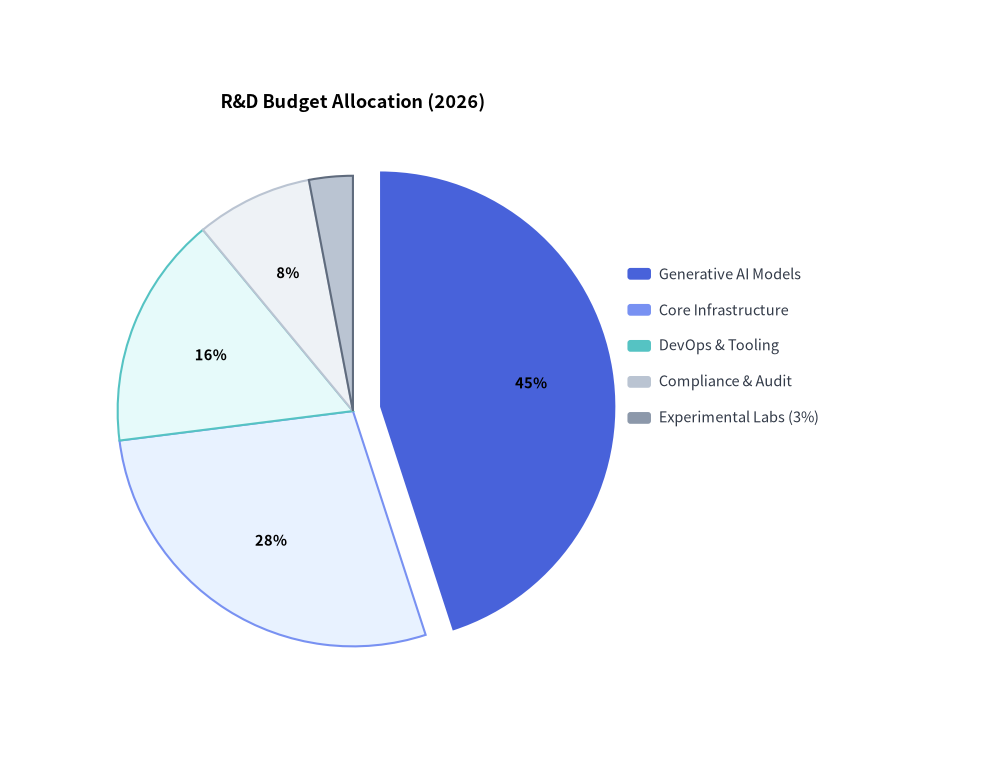
Setting explode > 0.0 radially displaces a slice away from the center origin. Here we also pass a callable value_format and include a minor 3% slice whose inline label is automatically suppressed by the < 4% threshold rule while remaining visible in the legend:
from drawlib.canvas import save, setup
from drawlib.charts.pie import PieChart
from drawlib.styles import Styles

setup(width=102, height=78)

chart = PieChart(
    radius=24.0,
    title="R&D Budget Allocation (2026)",
    title_style=Styles.BlackBold.patch(text_size=13.0),
    value_text_style=Styles.BlackBold.patch(text_size=10.5),
    value_format=lambda pct: f"{pct:.0f}%",
)
chart.add_slice("Generative AI Models", 45.0, style=Styles.PrimaryFlat, explode=2.8)
chart.add_slice("Core Infrastructure", 28.0, style=Styles.PrimaryNeutral)
chart.add_slice("DevOps & Tooling", 16.0, style=Styles.SecondaryNeutral)
chart.add_slice("Compliance & Audit", 8.0, style=Styles.Neutral)
chart.add_slice("Experimental Labs (3%)", 3.0, style=Styles.Muted)

chart.draw(xy=(8.0, 8.0))
chart.draw_legend(xy=(64.0, 50.0), text_style=Styles.Dark.patch(text_size=10.5))
save()
4. API Reference
Constructor (PieChart)
All constructor arguments are keyword-only (*):
from drawlib.charts.pie import DrawDirection, FormatterType, PieChart, Slice

chart = PieChart(
    *,
    radius: float = 20.0,
    hole_ratio: float = 0.0,
    start_angle: float = 90.0,
    clockwise: bool = True,
    value_text_style: Style | None = None,
    value_format: FormatterType = "{:.1f}%",
    center_text: str = "",
    center_text_style: Style | None = None,
    background_style: Style | None = None,
    title: str = "",
    title_style: Style | None = None,
    width: float | None = None,
    height: float | None = None,
)
| Parameter | Type | Default | Description |
|---|---|---|---|
radius |
float |
20.0 |
Outer radius of the pie circle in canvas units. |
hole_ratio |
float |
0.0 |
Inner hole radius ratio (0.0 for solid pie; clamped to [0.0, 0.9] for donut rings). |
start_angle |
float |
90.0 |
Starting radial angle in degrees (90.0 is 12 o'clock, 0.0 is 3 o'clock). |
clockwise |
bool |
True |
When True, slices progress clockwise from start_angle; when False, counter-clockwise. |
value_text_style |
Style | None |
None |
Style for percentage badges drawn inside wedges (>= 4% share). If None, badges are omitted. |
value_format |
FormatterType |
"{:.1f}%" |
Format string or Callable[[float], str] receiving the slice's percentage (0.0–100.0). |
center_text |
str |
"" |
Text rendered inside the donut hole (supports \n multiline strings; requires hole_ratio > 0). |
center_text_style |
Style | None |
None |
Typography style for center_text. Required for center badge text to render. |
background_style |
Style | None |
None |
Style for the outer chart background card. If None, card is omitted. |
title |
str |
"" |
Chart title text rendered at the top of the container. |
title_style |
Style | None |
None |
Typography style for title. Required for the title to render. |
width / height |
float | None |
None |
Explicit container dimensions. If None, computed automatically from radius and title. |
Methods & Properties
add_slice(name: str, value: float, style: Style, explode: float = 0.0, legend_text_style: Style | None = None, *, show: bool = True, draw_ratio: float = 1.0, draw_direction: DrawDirection = "left_to_right") -> Slice: Registers a proportional wedge and returns the mutableSliceinstance.explode: Outward radial offset distance along the slice's mid-angle (0.0= flush with center).legend_text_style: Optional customStylefor this slice's label indraw_legend().show: Toggles slice visibility while preserving the total pie sum across all slices so remaining wedges do not rescale.draw_ratio&draw_direction: Partial spatial rendering ("left_to_right"sweeps angularly acrossspan * draw_ratio;"bottom_to_top"grows radially outward from the inner edge towardradius).
get_size() -> tuple[float, float]: Returns the computed(width, height)bounding box of the chart container.draw(xy: tuple[float, float] = (0.0, 0.0), *, radius: float | None = None, width: float | None = None, height: float | None = None, align: Literal["bottom_left", "center"] = "bottom_left", scale: float = 1.0) -> None: Renders the chart anchored atxy("bottom_left"by default or"center"), with optional temporaryradius/width/heightoverrides and uniformscale.draw_legend(xy: tuple[float, float], text_style: Style, orientation: Literal["vertical", "horizontal"] = "vertical", swatch_width: float = 2.4, swatch_height: float = 1.2, item_gap: float = 4.0, *, scale: float = 1.0) -> None: Renders the decoupled slice legend atxy.- Properties:
chart.slices -> list[Slice]: Returns a copy of registeredSliceobjects.