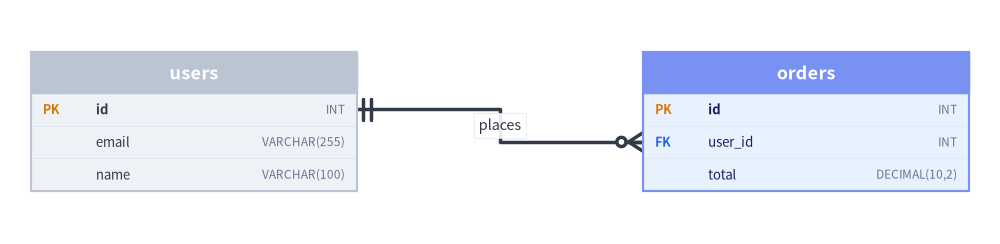
ERDiagram visualizes relational database architectures adhering strictly to Information Engineering (IE) / Crow's Foot notation—the industry standard for physical database schema modeling.
Entity-Relationship Tables with Row-Anchored Crow's Foot NotationSource Code

ERDiagram places relational Entity tables by their Center (cx, cy) via er.add(entity, xy=(cx, cy)), rendering typed schema rows with automatic PK and FK key badges as effective_height expands to fit every column. Relationships draw industry-standard Information Engineering (IE) Crow's Foot cardinality markers, snap directly to primary and foreign key rows via start_column and end_column, and support custom header_style bands, show=False hiding, and align="center" placement:
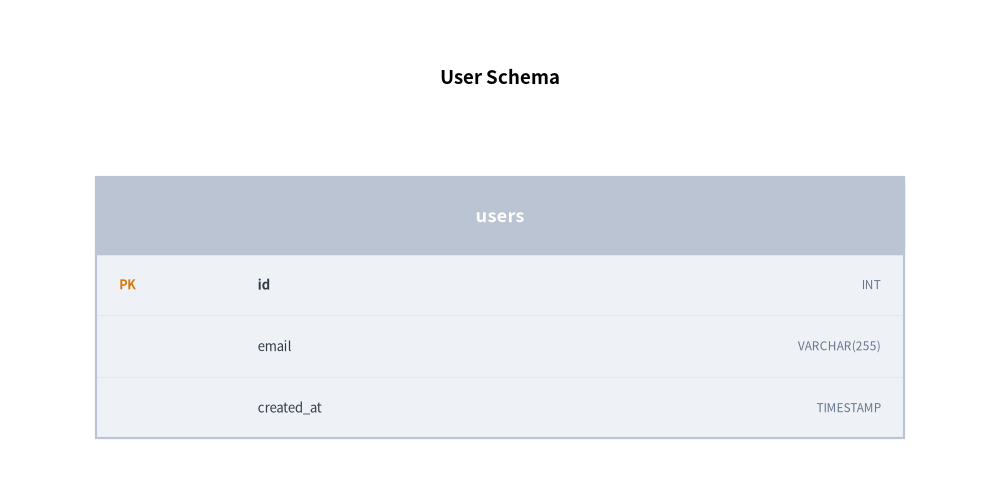
Center-Anchored Entity Cards & Key Badges (xy, pk, fk, nullable): er.add(entity, xy=(cx, cy)) places each table by its center while .add_column(...) adds amber PK and blue FK tags and expands effective_height automatically.
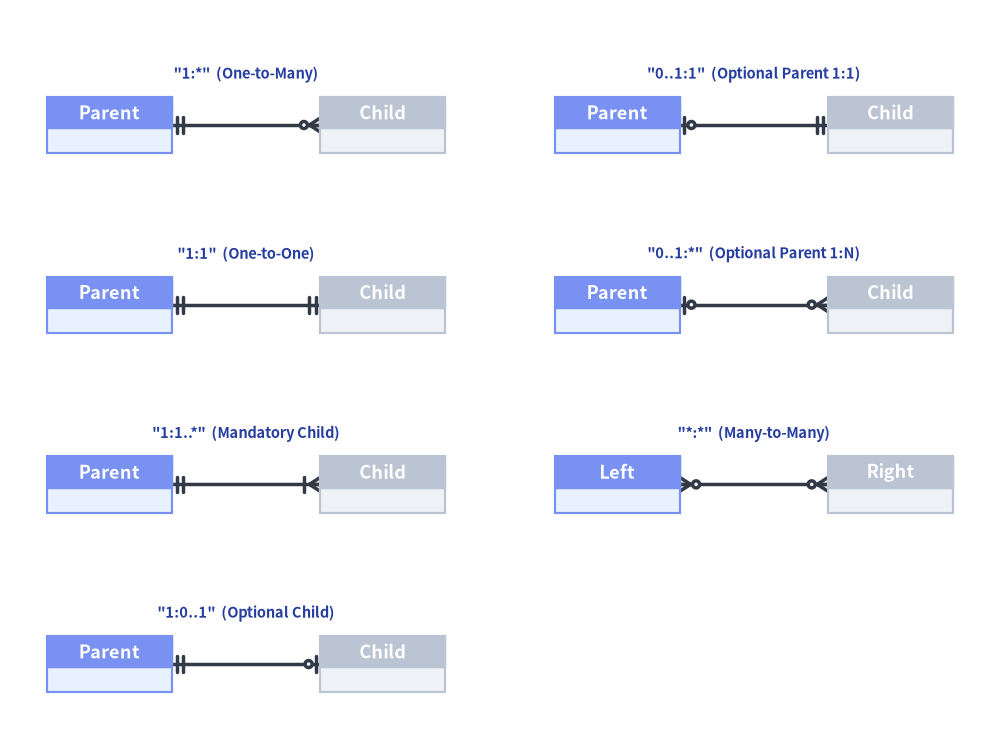
IE Crow's Foot Cardinalities (cardinality): entity.connect(...) and er.connect(...) draw Information Engineering vector markers across all 7 multiplicities ("1:*", "1:1", "1:1..*", "1:0..1", "0..1:1", "0..1:*", "*:*").
Row-Level Column Anchoring (start_column, end_column): Pin relationship wires directly to specific primary and foreign key rows on "left" / "right" sides instead of generic card midpoints.
Header Styling, Visibility & Centering (header_style, show=False, align="center"): Accentuate focal tables with header_style, hide entities and incident Crow's Foot wires in place via show=False, or center the schema on xy via align="center".
SQL data type string (e.g. "INT", "VARCHAR(255)").
pk
bool
False
When True, displays the [PK] primary key badge.
fk
bool
False
When True, displays the [FK] foreign key badge.
nullable
bool
True
Whether the column allows NULL values.
fromdrawlib.diagrams.erimportColumnInfo# Single column & batch column registrationentity.add_column(name:str,type:str="",pk:bool=False,fk:bool=False,nullable:bool=True)->Entityentity.add_columns(columns:Sequence[Sequence[Any]|ColumnInfo],# Each item is a ColumnInfo or tuple (name, [type, pk, fk, nullable]))->Entity
Relationship (entity.connect & er.connect)
Parameter
Type
Default
Description
start / target
Entity
(Required)
Source and target Entity tables (entity.connect(target, ...) or er.connect(start, end, ...)).
Optional column name in start entity to anchor the wire directly to that row.
end_column
str | None
None
Optional column name in end entity to anchor the wire directly to that row.
label
str
""
Optional relationship text label along the connection line.
style
Style | None
None
Optional Style override for the relationship line and Crow's Foot markers.
text_style
Style | None
None
Optional Style override for the relationship label text.
routing
Literal["orthogonal", "direct"]
"orthogonal"
Line routing strategy ("orthogonal" Z-bends or "direct" straight line).
padding
float | tuple[float, float]
0.0
Gap distance between entity borders and line endpoints.
show
bool
True
Visibility flag for the relationship line.
Registration, Sizing & Rendering Methods
er.add(entity, xy=(cx, cy), show: bool | None = None) -> Entity: Places an entity table centered at (cx, cy) and returns the mutable Entity.
entity.connect(target, cardinality="1:*", ..., show=True) -> Relationship or er.connect(start, end, cardinality="1:*", ..., show=True) -> Relationship (and er.add_relationship(rel) -> Relationship): Connects two entities with Crow's Foot notation and returns a mutable Relationship (rel.show, rel.style, rel.text_style).
er.get_size() -> tuple[float, float]: Returns the overall (width, height) of the diagram.
er.draw(xy=(0.0, 0.0), *, scale: float = 1.0) -> None: Renders the ER diagram anchored at bottom-left xy, proportionally scaling table geometry, Crow's Foot markers, and font sizes by scale.
3. Supported Cardinality Notations
Cardinality String
Parent Marker
Child Marker
Standard Semantics
"1:*"
One (double vertical bar)
Zero or Many (circle + crow's foot)
One-to-Many (Default)
"1:1"
One (double vertical bar)
One (double vertical bar)
One-to-One
"1:1..*"
One (double vertical bar)
One or Many (bar + crow's foot)
Mandatory Child One-to-Many
"1:0..1"
One (double vertical bar)
Zero or One (circle + bar)
Optional Child One-to-One
"0..1:1"
Zero or One (circle + bar)
One (double vertical bar)
Optional Parent One-to-One
"0..1:*"
Zero or One (circle + bar)
Zero or Many (circle + crow's foot)
Optional Parent One-to-Many
"*:*"
Zero or Many (circle + crow's foot)
Zero or Many (circle + crow's foot)
Many-to-Many
fromdrawlib.canvasimportsave,setupfromdrawlib.diagrams.erimportERDiagram,Entityfromdrawlib.stylesimportColors,Stylesfromdrawlib.textimporttextsetup(width=128,height=96)er=ERDiagram(node_style=Styles.Neutral,edge_style=Styles.DarkBold,edge_text_style=Styles.Dark.patch(text_size=10.5),)# 7 supported Crow's Foot cardinality strings arranged in a clean 2-column catalogspecs=[# Left column (x_src=14, x_dst=49)('"1:*" (One-to-Many)',"1:*",14.0,49.0,80.0,"Parent","Child"),('"1:1" (One-to-One)',"1:1",14.0,49.0,57.0,"Parent","Child"),('"1:1..*" (Mandatory Child)',"1:1..*",14.0,49.0,34.0,"Parent","Child"),('"1:0..1" (Optional Child)',"1:0..1",14.0,49.0,11.0,"Parent","Child"),# Right column (x_src=79, x_dst=114)('"0..1:1" (Optional Parent 1:1)',"0..1:1",79.0,114.0,80.0,"Parent","Child"),('"0..1:*" (Optional Parent 1:N)',"0..1:*",79.0,114.0,57.0,"Parent","Child"),('"*:*" (Many-to-Many)',"*:*",79.0,114.0,34.0,"Left","Right"),]lbl_style=Styles.DarkBold.patch(text_size=10.5,text_color=Colors.Primary5)for_title_str,card,x1,x2,y,src_name,dst_nameinspecs:e_src=er.add(Entity(name=src_name,width=16.0,style=Styles.PrimaryNeutral),xy=(x1,y))e_dst=er.add(Entity(name=dst_name,width=16.0,style=Styles.Neutral),xy=(x2,y))e_src.connect(e_dst,cardinality=card,start_side="right",end_side="left")er.draw(xy=(0.0,0.0))fortitle_str,_card,x1,x2,y,_src_name,_dst_nameinspecs:text(((x1+x2)/2.0,y+6.5),title_str,style=lbl_style)save()
All Seven Crow's Foot Cardinality Notations in ERDiagram
4. E-Commerce Relational Schema with Column Anchors
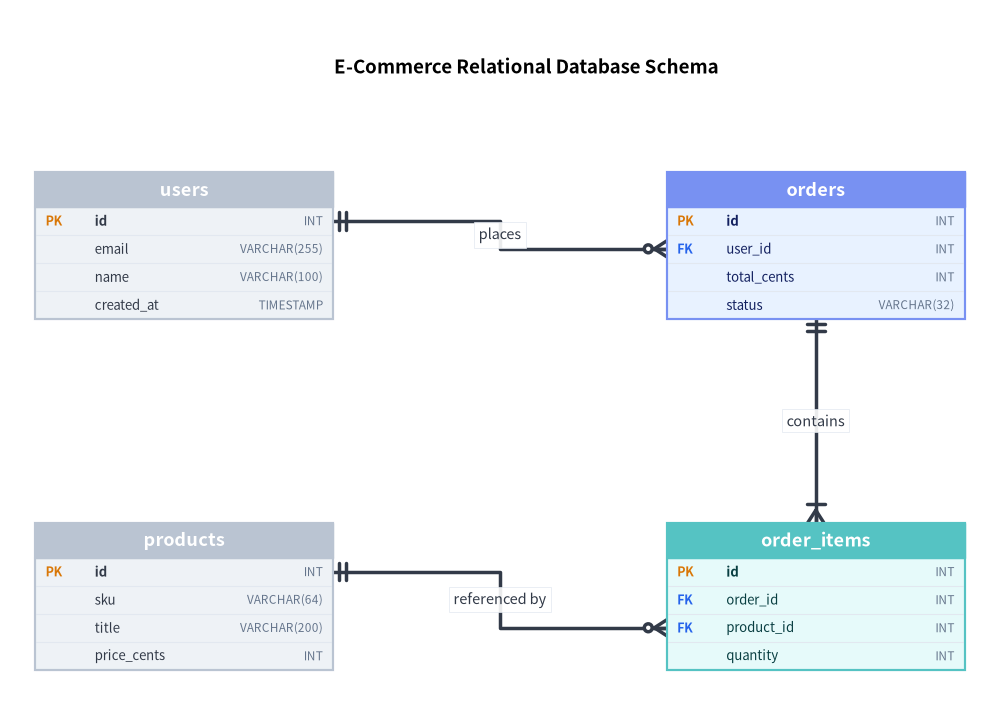
The following four-table schema (users, orders, order_items, and products) anchors every relationship directly to its primary and foreign key rows:
Always Use Column Anchoring: Supplying start_column and end_column visually connects the specific foreign key attribute to its referenced primary key, making schemas intuitive and professional.
Width Budgeting: Tables with long data types (e.g., VARCHAR(255)) look best with a width of 28.0 to 34.0 canvas units.
Cardinality Strings: Always use explicit cardinality strings ("1:*", "1:1", etc.) rather than manual arrow heads.