LineChart: Continuous Trends, Markers & Splines
The LineChart component (drawlib.charts.line) visualizes numerical trends over ordered categories or time intervals. It supports straight polygonal segments (smooth=False), smoothed spline curves (smooth=True), per-series vertex marker shapes ("circle", "square", "none"), configurable stroke patterns ("solid", "dashed", "dotted", "dashdot"), inline vertex value labels, and decoupled legend rendering.
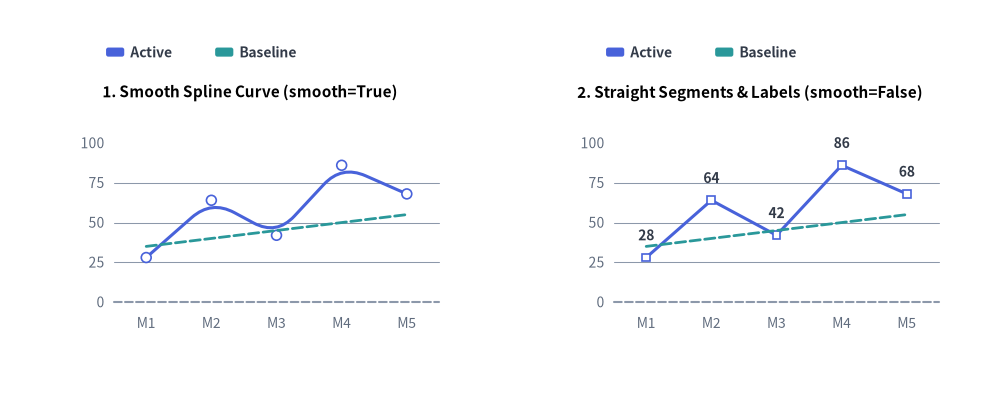
Source Code
from drawlib.canvas import save, setup
from drawlib.charts.line import LineChart
from drawlib.styles import Styles

setup(width=132, height=52)

categories = ["M1", "M2", "M3", "M4", "M5"]
active_vals = [28.0, 64.0, 42.0, 86.0, 68.0]
baseline_vals = [35.0, 40.0, 45.0, 50.0, 55.0]

# Left: Smooth Spline Curve (smooth=True)
smooth_chart = LineChart(
    axis_line_style=Styles.MutedDashed,
    categories=categories,
    axis_text_style=Styles.Muted.patch(text_size=10.0),
    grid_style=Styles.MutedThin,
    width=56.0,
    height=36.0,
    smooth=True,
    show_points=True,
    point_size=0.65,
    title="1. Smooth Spline Curve (smooth=True)",
    title_style=Styles.BlackBold.patch(text_size=11.0),
)
smooth_chart.add_series("Active", active_vals, style=Styles.PrimaryFlat, line_width=2.2)
smooth_chart.add_series("Baseline", baseline_vals, style=Styles.SecondaryFlat, line_style="dashed", point_shape="none")
smooth_chart.configure_y_axis(min_value=0.0, max_value=100.0, tick_step=25.0)
smooth_chart.draw(xy=(5.0, 6.0))
smooth_chart.draw_legend(xy=(14.0, 45.0), text_style=Styles.DarkBold.patch(text_size=10.0), orientation="horizontal")

# Right: Straight Segments & Value Labels (smooth=False)
straight_chart = LineChart(
    axis_line_style=Styles.MutedDashed,
    categories=categories,
    axis_text_style=Styles.Muted.patch(text_size=10.0),
    grid_style=Styles.MutedThin,
    value_text_style=Styles.DarkBold.patch(text_size=10.0),
    width=56.0,
    height=36.0,
    smooth=False,
    show_points=True,
    point_shape="square",
    point_size=0.65,
    title="2. Straight Segments & Labels (smooth=False)",
    title_style=Styles.BlackBold.patch(text_size=11.0),
)
straight_chart.add_series("Active", active_vals, style=Styles.PrimaryFlat, line_width=2.2)
straight_chart.add_series("Baseline", baseline_vals, style=Styles.SecondaryFlat, line_style="dashed", point_shape="none")
straight_chart.configure_y_axis(min_value=0.0, max_value=100.0, tick_step=25.0)
straight_chart.draw(xy=(71.0, 6.0))
straight_chart.draw_legend(xy=(80.0, 45.0), text_style=Styles.DarkBold.patch(text_size=10.0), orientation="horizontal")

save()
1. Core Concepts & Basic Usage
LineChart constructs multi-series categorical trends step-by-step via .add_series(...), anchoring by default at the Bottom-Left (x, y) corner of its (width, height) container (or centered via align="center"). You can switch between straight polygonal segments (smooth=False) and cubic splines (smooth=True), customize stroke patterns, vertex markers, and inline value labels, and sweep or hide series in place while keeping Y-axis bounds locked:

- Bottom-Left Anchor, Series & Legend (
xy,add_series,draw_legend): Anchors the(width, height)chart container at bottom-leftxyby default (align="bottom_left") and pairs.add_series(...)trend lines with a freely positioneddraw_legend(...). - Straight Segments vs. Smooth Splines & Strokes (
smooth,line_style,line_width): Switch between crisp polygonal segments (smooth=False) and rounded cubic splines (smooth=True, for 3+ points), with per-series"solid","dashed","dotted", or"dashdot"stroke patterns. - Vertex Markers & Inline Value Labels (
show_points,point_shape,value_text_style): Configure"circle","square", or"none"markers (point_size) per series (point_shape="none"suppresses both vertex markers andvalue_text_stylenumbers on flat target lines). - Horizontal Sweep, Fixed-Scale
.show, & Center Align (draw_ratio,align): Animate progressive left-to-right reveals viadraw_ratio, setseries.show = Falsewithout rescaling Y-axis auto-bounds, or center the chart box on(cx, cy)viaalign="center".
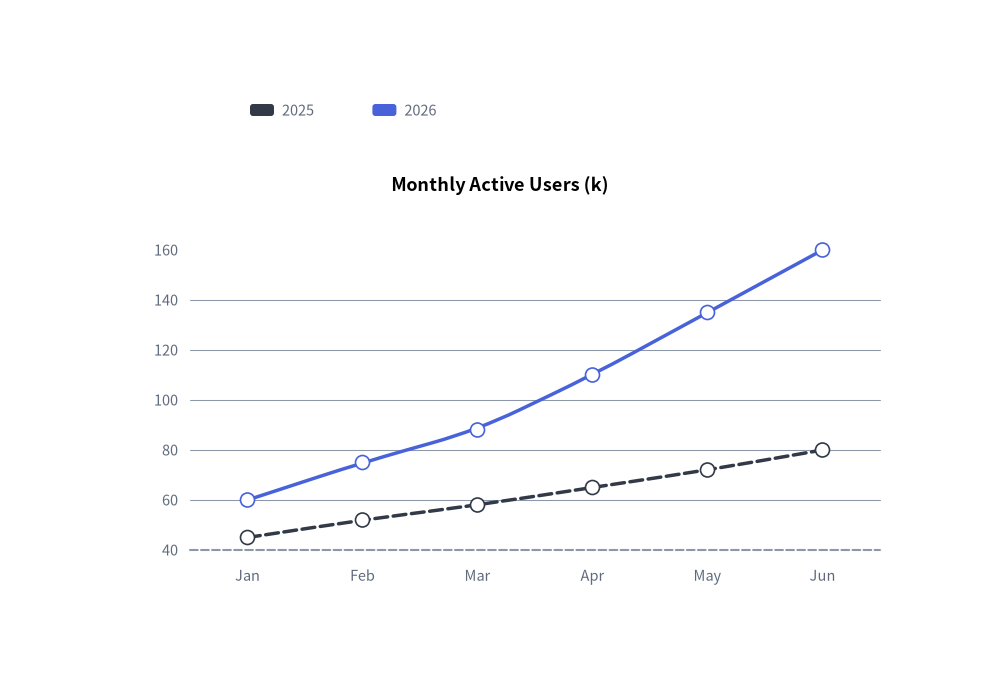
2. Quick Example: Smooth Spline User Growth Trends
from drawlib.canvas import save, setup
from drawlib.charts.line import LineChart
from drawlib.styles import Styles

setup(width=100, height=68)

chart = LineChart(
    axis_line_style=Styles.MutedDashed,
    categories=["Jan", "Feb", "Mar", "Apr", "May", "Jun"],
    axis_text_style=Styles.Muted.patch(text_size=10.5),
    grid_style=Styles.MutedThin,
    width=82,
    height=45,
    title="Monthly Active Users (k)",
    title_style=Styles.BlackBold.patch(text_size=13.0),
    smooth=True,
    show_points=True,
)
chart.add_series("2025", [45, 52, 58, 65, 72, 80], style=Styles.DarkFlat, line_width=2.5, line_style="dashed")
chart.add_series("2026", [60, 75, 88, 110, 135, 160], style=Styles.PrimaryFlat, line_width=2.5)

chart.draw(xy=(9, 7))
chart.draw_legend(xy=(25, 57), text_style=Styles.Muted.patch(text_size=10.5), orientation="horizontal")
save()
3. Straight Segments, Custom Markers, Stroke Styles & Vertex Labels
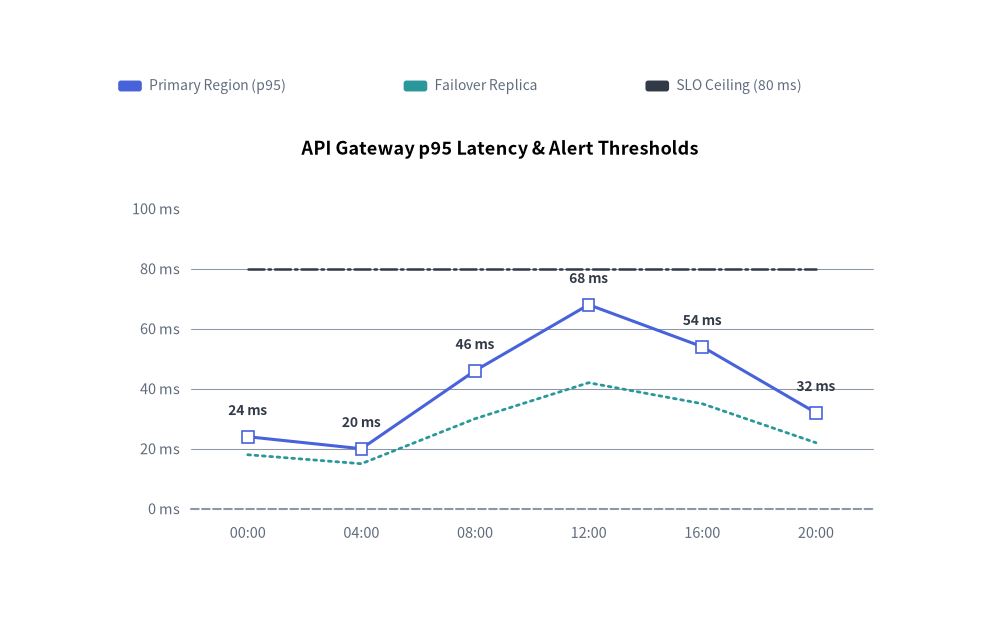
By combining smooth=False (straight segments) with value_text_style, per-series point_shape ("square", "circle", "none"), and distinct line_style patterns ("solid", "dotted", "dashdot"), you can plot telemetry metrics alongside SLA thresholds:
from drawlib.canvas import save, setup
from drawlib.charts.line import LineChart
from drawlib.styles import Styles

setup(width=110, height=70)

chart = LineChart(
    axis_line_style=Styles.MutedDashed,
    categories=["00:00", "04:00", "08:00", "12:00", "16:00", "20:00"],
    width=88.0,
    height=48.0,
    title="API Gateway p95 Latency & Alert Thresholds",
    title_style=Styles.BlackBold.patch(text_size=13.0),
    smooth=False,
    show_points=True,
    axis_text_style=Styles.Muted.patch(text_size=10.5),
    grid_style=Styles.MutedThin,
    value_text_style=Styles.DarkBold.patch(text_size=10.0),
)
chart.add_series(
    "Primary Region (p95)",
    [24.0, 20.0, 46.0, 68.0, 54.0, 32.0],
    style=Styles.PrimaryFlat,
    line_width=2.2,
    point_shape="square",
    point_size=0.8,
)
chart.add_series(
    "Failover Replica",
    [18.0, 15.0, 30.0, 42.0, 35.0, 22.0],
    style=Styles.SecondaryFlat,
    line_width=2.0,
    line_style="dotted",
    point_shape="none",
)
chart.add_series(
    "SLO Ceiling (80 ms)",
    [80.0, 80.0, 80.0, 80.0, 80.0, 80.0],
    style=Styles.DarkFlat,
    line_width=1.8,
    line_style="dashdot",
    point_shape="none",
)

chart.configure_y_axis(min_value=0.0, max_value=100.0, tick_step=20.0, format="{:.0f}", unit="ms")
chart.draw(xy=(11.0, 8.0))
chart.draw_legend(
    xy=(13.0, 60.5),
    text_style=Styles.Muted.patch(text_size=10.0),
    orientation="horizontal",
    swatch_width=2.6,
    swatch_height=1.2,
    item_gap=4.0,
)
save()
4. API Reference
Constructor (LineChart)
All constructor arguments are keyword-only (*):
from drawlib.charts.line import Axis, DrawDirection, FormatterType, LineChart, LineStyle, PointShape, Series

chart = LineChart(
    *,
    axis_line_style: Style,
    categories: list[str],
    width: float = 80.0,
    height: float = 50.0,
    show_points: bool = True,
    point_shape: PointShape = "circle",
    point_size: float = 0.7,
    smooth: bool = False,
    axis_text_style: Style | None = None,
    grid_style: Style | None = None,
    value_text_style: Style | None = None,
    background_style: Style | None = None,
    title: str = "",
    title_style: Style | None = None,
)
| Parameter | Type | Default | Description |
|---|---|---|---|
axis_line_style |
Style |
Required | Mandatory style anchor for the coordinate baseline stroke. |
categories |
list[str] |
Required | Ordered category labels along the horizontal X-axis. |
width / height |
float |
80.0 / 50.0 |
Total bounding box dimensions of the chart in canvas units. |
show_points |
bool |
True |
Whether to render markers at vertex coordinates. |
point_shape |
"circle" | "square" | "none" |
"circle" |
Default vertex marker shape (PointShape). |
point_size |
float |
0.7 |
Default marker radius (or half-width for squares) in canvas units. |
smooth |
bool |
False |
When True, interpolates smooth curved segments through vertices. |
axis_text_style |
Style | None |
None |
Style for Y-axis tick labels and X-axis category names. If None, labels are omitted. |
grid_style |
Style | None |
None |
Style for horizontal Y-axis gridlines. If None, gridlines are omitted. |
value_text_style |
Style | None |
None |
Style for numeric labels drawn above vertex markers. If None, value labels are omitted. |
background_style |
Style | None |
None |
Style for the outer chart background card. If None, card is omitted. |
title |
str |
"" |
Chart title text rendered at the top of the container. |
title_style |
Style | None |
None |
Typography style for title. Required for the title to render. |
Methods & Properties
add_series(name: str, values: list[float], style: Style, line_width: float = 2.0, line_style: LineStyle = "solid", point_shape: PointShape | None = None, point_size: float | None = None, legend_text_style: Style | None = None, *, show: bool = True, draw_ratio: float = 1.0, draw_direction: DrawDirection = "left_to_right") -> Series: Registers a line series and returns the mutableSeriesinstance.line_styleaccepts"solid","dashed","dotted", or"dashdot".point_shapeandpoint_sizeoverride chart-level defaults for that series.configure_y_axis(...) -> Axis/configure_x_axis(...) -> Axis: Configures the vertical value axis (scale,min_value,max_value,ticks,tick_step,format,unit,label) or horizontal category axis (show_axis_line,line_style,tick_label_style). See Axes, Scales & Legends.get_size() -> tuple[float, float]: Returns(width, height)of the chart container.draw(xy: tuple[float, float] = (0.0, 0.0), *, width: float | None = None, height: float | None = None, align: Literal["bottom_left", "center"] = "bottom_left", scale: float = 1.0) -> None: Renders the chart anchored atxy("bottom_left"by default or"center"), with optional temporary size overrides and proportionalscale.draw_legend(xy: tuple[float, float], text_style: Style, orientation: Literal["vertical", "horizontal"] = "vertical", swatch_width: float = 2.4, swatch_height: float = 1.2, item_gap: float = 4.0, *, scale: float = 1.0) -> None: Renders the decoupled series legend atxy.- Properties:
chart.series -> list[Series]: Returns a copy of registeredSeriesobjects.chart.x_axis -> Axis/chart.y_axis -> Axis: Direct access to the horizontal and verticalAxisinstances.