Documentation Project & Build Overview
Drawlib is not only a drawing library—it is a complete documentation compiler that bridges executable Python illustrations and version-controlled technical documentation.
The Documentation-as-Code Workflow
Instead of writing documentation in static wikis and manually copying and pasting PNG screenshots, Drawlib establishes a clean, repeatable human-in-the-loop workflow with AI coding agents:
- Day 1 — Initialize, Author & Commit: Ask your AI agent to create the initial project (
drawlib init doc, configuringdrawlib.toml,styles.py,utils.py, and optionaltemplate.html/style.css), then ask it to author and compile your specification (doc_src/<lang>/*.mdwith```drawlibblocks ->doc_markdown/,doc_html/,doc_<lang>.pdf,doc_<lang>.docx), and review & commit to Git. - Day 2+ — Daily Incremental Updates: Whenever application code evolves, simply ask the AI agent to update the project docs (editing
.mdchapters and running./doc_src/build.shwith.drawlib/cache.dbcaching) and commit the refreshed deliverables alongside your code.
The Golden Rule: <name>_src/ is the Single Source of Truth
- Always edit Markdown files and Python code inside the source directory (e.g.
docs_src/). - Never edit the output directories or deliverables (
docs_markdown/,docs_html/,*_<lang>.pdf,*_<lang>.docx,*_<lang>.pptx) directly; they are build artifacts completely overwritten during compilation.
1. Project Scaffolding (drawlib init)
Scaffold a complete project template with a single command:
# List available starter project templates
$ uv run drawlib init list

# Initialize a multi-page documentation website (creates docs_src/)
$ uv run drawlib init site

# Or scaffold into a custom target name (positional argument, e.g., mybook_src/ -> mybook_html/):
$ uv run drawlib init site mybook

# Optional flags: --style (-s) for theme and --lang (-l) for single or multi-locale (e.g. en,ja)
$ uv run drawlib init doc rbac -s google -l en,ja

Drawlib supports four starter project types (doc, site, and slide natively use <src_dir>/<lang>/ and [i18n] in drawlib.toml):
doc: Linear technical document / spec / RFC / report compiled to HTML (doc_html/), PDF (doc_<lang>.pdf), editable MS Word (doc_<lang>.docx), Markdown (doc_markdown/), and diagrams (doc_images/).site: Multi-page documentation website (docs_html/), Markdown site (docs_markdown/), and diagrams (docs_images/).slide: 16:9 presentation slide deck compiled to web deck (slide_html/), vector PDF (slide_<lang>.pdf), editable MS PowerPoint (slide_<lang>.pptx), and diagrams (slide_images/).images: Standalone Python illustration scripts (images_src/*.py) batch-compiled to image files (images/*.png).
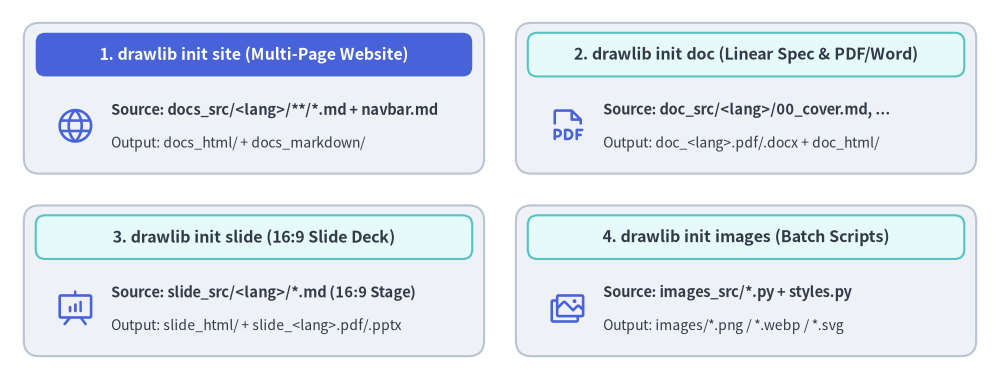
Source Code
from drawlib.canvas import save, setup
from drawlib.icons import phosphor
from drawlib.shapes import rectangle
from drawlib.styles import Styles
from drawlib.text import text

setup(width=126, height=48)

hdr_white = Styles.WhiteBold.patch(text_size=11.5)
hdr_dark = Styles.DarkBold.patch(text_size=11.5)
body_bold = Styles.DarkBold.patch(text_size=10.5, halign="left")
body_sub = Styles.Dark.patch(text_size=10.0, halign="left")

# 1. Top-Left: drawlib init site (Hero header)
rectangle((32.0, 35.5), width=58.0, height=19.0, style=Styles.Neutral.patch(shape_r=2.0))
rectangle((32.0, 41.0), width=55.0, height=5.5, style=Styles.PrimaryFlat.patch(shape_r=1.2), text="1. drawlib init site (Multi-Page Website)", text_style=hdr_white)
phosphor.globe((9.5, 32.0), width=5.2, style=Styles.Primary)
text((14.0, 34.0), "Source: docs_src/<lang>/**/*.md + navbar.md", style=body_bold)
text((14.0, 29.8), "Output: docs_html/ + docs_markdown/", style=body_sub)

# 2. Top-Right: drawlib init doc
rectangle((94.0, 35.5), width=58.0, height=19.0, style=Styles.Neutral.patch(shape_r=2.0))
rectangle((94.0, 41.0), width=55.0, height=5.5, style=Styles.SecondaryNeutral.patch(shape_r=1.2), text="2. drawlib init doc (Linear Spec & PDF/Word)", text_style=hdr_dark)
phosphor.file_pdf((71.5, 32.0), width=5.2, style=Styles.Primary)
text((76.0, 34.0), "Source: doc_src/<lang>/00_cover.md, ...", style=body_bold)
text((76.0, 29.8), "Output: doc_<lang>.pdf/.docx + doc_html/", style=body_sub)

# 3. Bottom-Left: drawlib init slide
rectangle((32.0, 12.5), width=58.0, height=19.0, style=Styles.Neutral.patch(shape_r=2.0))
rectangle((32.0, 18.0), width=55.0, height=5.5, style=Styles.SecondaryNeutral.patch(shape_r=1.2), text="3. drawlib init slide (16:9 Slide Deck)", text_style=hdr_dark)
phosphor.presentation_chart((9.5, 9.0), width=5.2, style=Styles.Primary)
text((14.0, 11.0), "Source: slide_src/<lang>/*.md (16:9 Stage)", style=body_bold)
text((14.0, 6.8), "Output: slide_html/ + slide_<lang>.pdf/.pptx", style=body_sub)

# 4. Bottom-Right: drawlib init images
rectangle((94.0, 12.5), width=58.0, height=19.0, style=Styles.Neutral.patch(shape_r=2.0))
rectangle((94.0, 18.0), width=55.0, height=5.5, style=Styles.SecondaryNeutral.patch(shape_r=1.2), text="4. drawlib init images (Batch Scripts)", text_style=hdr_dark)
phosphor.images((71.5, 9.0), width=5.2, style=Styles.Primary)
text((76.0, 11.0), "Source: images_src/*.py + styles.py", style=body_bold)
text((76.0, 6.8), "Output: images/*.png / *.webp / *.svg", style=body_sub)

save()
2. One-Command Compilation (drawlib build)
Once initialized, compile your documentation using the generated build.sh script or the drawlib build CLI:
# Run the project master build script
$ ./docs_src/build.sh

# Or compile using the CLI subcommands directly:
$ uv run drawlib build html docs_src/ -o docs_html/
$ uv run drawlib build markdown docs_src/ -o docs_markdown/
$ uv run drawlib build pdf doc_src/ -o doc.pdf --toc              # -> doc_<lang>.pdf
$ uv run drawlib build docx doc_src/ -o doc.docx --generate-index # -> doc_<lang>.docx
$ uv run drawlib build slide slide_src/ -o slide_html/
$ uv run drawlib build pptx slide_src/ -o slide.pptx              # -> slide_<lang>.pptx
$ uv run drawlib build image images_src/ -o images/

# Force a clean re-render bypassing the SQLite build cache (.drawlib/cache.db):
$ uv run drawlib build html docs_src/ -o docs_html/ --no-cache
During the build process:
- Drawlib detects all
drawlibcode blocks across your Markdown documents (or.pyscripts inimages_src/). - The code blocks are executed in isolated memory spaces to render vector/raster diagrams.
- Rendered images are cached deterministically in
.drawlib/cache.db(only modified code blocks or styles re-render; pass--no-cacheor runuv run drawlib cache clear --imagesto force re-rendering). - The final HTML website, slide deck, vector PDF, editable MS Word (
.docx), MS PowerPoint (.pptx), or rendered Markdown documents are generated with verified image links.
3. Local Live Preview & Link Verification (drawlib serve)
Preview your compiled HTML site locally with automatic pre-flight link and asset inspection:
# Start local HTTP preview server on http://localhost:8000
$ uv run drawlib serve docs_html/

# Run headless broken-link and missing-asset verification only (ideal for CI/CD)
$ uv run drawlib serve docs_html/ --check
Open http://localhost:8000 in your browser to inspect the full documentation site, navigation sidebar, and responsive styling.
[!NOTE] For in-depth guides on code block attributes (
code=show,code=fold,caption="..."), custom HTML templates, CSS theming, caching, and PDF / MS Word (.docx) / MS PowerPoint (.pptx) exports, see Chapter 8: Document Builder & CLI.