Zero-Install Workflow with uvx (Any Language & Non-Code Projects)
Although Drawlib's rendering engine is written in Python, you do not need a Python project—or even a software development repository—to manage diagrams, documentation sites, whitepapers, and slide decks with Drawlib. With uvx drawlib, you can scaffold, preview, and compile multi-format deliverables in Go, Rust, TypeScript, Java, C++, or Terraform repositories as well as standalone documentation and presentation folders without adding a pyproject.toml or .venv to your workspace.
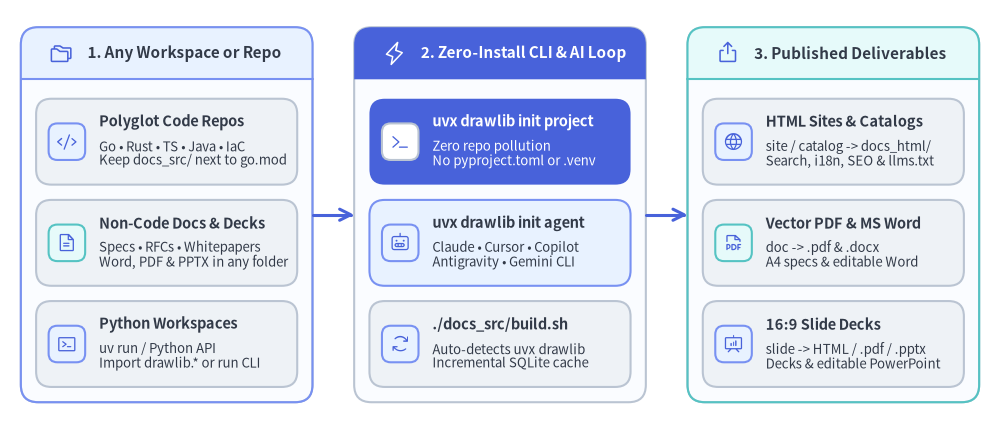
Source Code
from drawlib.canvas import save, setup
from drawlib.icons import phosphor
from drawlib.lines import line
from drawlib.smartarts import CardList, Panel
from drawlib.styles import Styles

setup(width=144, height=62)

body_frame = Styles.Neutral.patch(shape_fill_color=(250, 252, 255))

# 1. Left Panel: 3 Entry Contexts (Polyglot, Non-Code, Python)
p_in = Panel(
    "1. Any Workspace or Repo",
    style=body_frame,
    header_style=Styles.PrimaryNeutral,
    text_style=Styles.DarkBold.patch(text_size=11.0),
    icon=phosphor.folders,
    icon_style=Styles.Primary,
    header_height=7.5,
)
p_in.draw(xy=(3.0, 4.0), width=42.0, height=54.0)

in_cards = CardList(
    style=Styles.Neutral,
    text_style=Styles.DarkBold.patch(text_size=10.5),
    description_style=Styles.Dark.patch(text_size=9.5),
    badge_style=Styles.PrimaryNeutral,
    icon_style=Styles.Primary,
    spacing=2.2,
)
in_cards.add(
    "Polyglot Code Repos",
    "Go • Rust • TS • Java • IaC\nKeep docs_src/ next to go.mod",
    icon=phosphor.code,
)
in_cards.add(
    "Non-Code Docs & Decks",
    "Specs • RFCs • Whitepapers\nWord, PDF & PPTX in any folder",
    icon=phosphor.file_text,
    badge_style=Styles.SecondaryNeutral,
)
in_cards.add(
    "Python Workspaces",
    "uv run / Python API\nImport drawlib.* or run CLI",
    icon=phosphor.terminal_window,
)
in_cards.draw(xy=(5.2, 6.2), width=37.6, height=41.5)

# 2. Center Panel: Zero-Install uvx + AI Agent Engine
p_eng = Panel(
    "2. Zero-Install CLI & AI Loop",
    style=body_frame,
    header_style=Styles.PrimaryFlat,
    text_style=Styles.WhiteBold.patch(text_size=11.0),
    icon=phosphor.lightning,
    icon_style=Styles.White,
    header_height=7.5,
)
p_eng.draw(xy=(51.0, 4.0), width=42.0, height=54.0)

eng_cards = CardList(
    style=Styles.Neutral,
    text_style=Styles.DarkBold.patch(text_size=10.5),
    description_style=Styles.Dark.patch(text_size=9.5),
    badge_style=Styles.PrimaryNeutral,
    icon_style=Styles.Primary,
    spacing=2.2,
)
eng_cards.add(
    "uvx drawlib init project",
    "Zero repo pollution\nNo pyproject.toml or .venv",
    icon=phosphor.terminal,
    style=Styles.PrimaryFlat,
    text_style=Styles.WhiteBold.patch(text_size=10.5),
    description_style=Styles.White.patch(text_size=9.5),
    badge_style=Styles.Neutral.patch(shape_fill_color=(255, 255, 255)),
    icon_style=Styles.Primary,
)
eng_cards.add(
    "uvx drawlib init agent",
    "Claude • Cursor • Copilot\nAntigravity • Gemini CLI",
    icon=phosphor.robot,
    style=Styles.PrimaryNeutral,
)
eng_cards.add(
    "./docs_src/build.sh",
    "Auto-detects uvx drawlib\nIncremental SQLite cache",
    icon=phosphor.arrows_clockwise,
)
eng_cards.draw(xy=(53.2, 6.2), width=37.6, height=41.5)

# 3. Right Panel: Multi-Format Deliverables
p_out = Panel(
    "3. Published Deliverables",
    style=body_frame,
    header_style=Styles.SecondaryNeutral,
    text_style=Styles.DarkBold.patch(text_size=11.0),
    icon=phosphor.export,
    icon_style=Styles.Primary,
    header_height=7.5,
)
p_out.draw(xy=(99.0, 4.0), width=42.0, height=54.0)

out_cards = CardList(
    style=Styles.Neutral,
    text_style=Styles.DarkBold.patch(text_size=10.5),
    description_style=Styles.Dark.patch(text_size=9.5),
    badge_style=Styles.PrimaryNeutral,
    icon_style=Styles.Primary,
    spacing=2.2,
)
out_cards.add(
    "HTML Sites & Catalogs",
    "site / catalog -> docs_html/\nSearch, i18n, SEO & llms.txt",
    icon=phosphor.globe,
)
out_cards.add(
    "Vector PDF & MS Word",
    "doc -> .pdf & .docx\nA4 specs & editable Word",
    icon=phosphor.file_pdf,
    badge_style=Styles.SecondaryNeutral,
)
out_cards.add(
    "16:9 Slide Decks",
    "slide -> HTML / .pdf / .pptx\nDecks & editable PowerPoint",
    icon=phosphor.presentation_chart,
)
out_cards.draw(xy=(101.2, 6.2), width=37.6, height=41.5)

# Horizontal connectors between panels
line((45.0, 31.0), (51.0, 31.0), arrow_head="->", style=Styles.PrimaryBold.patch(line_width=2.2))
line((93.0, 31.0), (99.0, 31.0), arrow_head="->", style=Styles.PrimaryBold.patch(line_width=2.2))

save()
1. How uvx drawlib Works Without a Python Environment
uv is a single fast native binary (available via brew install uv, curl, or winget) that includes uvx—an ephemeral tool runner similar to npx in Node.js, but isolated in a global cache directory:
- Zero Repository Pollution: Running
uvx drawlib ...downloads and caches Python>=3.11and Drawlib inside your user-level~/.cache/uvdirectory. Your project root stays 100% free ofpyproject.toml,uv.lock,requirements.txt, or.venv/. - Smart
build.shAuto-Detection: Every script scaffolded bydrawlib init project(build.sh,build_html.sh,build_pdf.sh,build_docx.sh,build_pptx.sh,serve.sh) automatically checks foruv run drawlib, globaldrawlib, and falls back touvx drawlib. Once initialized, teammates and CI runners simply execute./docs_src/build.sh. - Full Feature Parity:
uvx drawlibincludes the complete Drawlib suite—all 34 icon modules, auto-layout graphs, SmartArts, quantitative charts, headless Chromium A4 PDF export, native MS Word (.docx) export, and native MS PowerPoint (.pptx) export.
| Execution Mode | Command Prefix | Best For | Files Added to Repo Root |
|---|---|---|---|
Zero-Install (uvx) |
uvx drawlib ... |
Go, Rust, TS, Java, Terraform repos & quick evaluation | None (0 Python config files) |
Global CLI (uv tool) |
drawlib ... |
Technical writers, PMs, architects authoring docs/slides daily across many folders | None (uv tool install drawlib once per machine) |
Python Project (uv run) |
uv run drawlib ... |
Python libraries/apps or custom scripts importing drawlib.* with IDE type checking |
pyproject.toml & uv.lock |
2. Two High-Impact Workflows Beyond Python Projects
Whether you are documenting a polyglot microservice or writing a standalone executive proposal in an empty folder, the directory layout stays clean and self-contained:
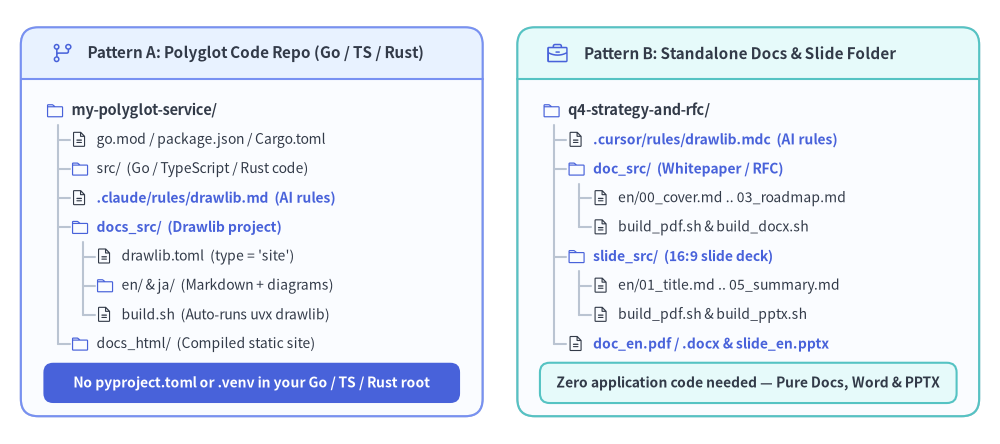
Source Code
from drawlib.canvas import save, setup
from drawlib.icons import phosphor
from drawlib.shapes import rectangle
from drawlib.smartarts import Panel, TreeNode
from drawlib.styles import Colors, Styles

setup(width=144, height=64)

TreeNode.register_drawing_item(
    name="dir",
    location="before",
    padding_width=3.8,
    function=phosphor.folder,
    style=Styles.Primary.patch(icon_color=Colors.Primary),
    args={"width": 2.8},
)
TreeNode.register_drawing_item(
    name="file",
    location="before",
    padding_width=3.8,
    function=phosphor.file_text,
    style=Styles.Dark,
    args={"width": 2.6},
)

root_kwargs = {
    "text_style": Styles.DarkBold.patch(text_size=10.5),
    "line_style": Styles.Neutral,
    "line_horizontal_margin": 1.8,
    "line_horizontal_length": 2.6,
    "line_vertical_margin": 4.2,
}
item_style = Styles.Dark.patch(text_size=10.0)
hl_style = Styles.PrimaryBold.patch(text_size=10.0)

# Left Panel: Pattern A — Polyglot Code Repository
p_left = Panel(
    "Pattern A: Polyglot Code Repo (Go / TS / Rust)",
    style=Styles.Neutral.patch(shape_fill_color=(250, 252, 255)),
    header_style=Styles.PrimaryNeutral,
    text_style=Styles.DarkBold.patch(text_size=11.0),
    icon=phosphor.git_branch,
    icon_style=Styles.Primary,
    header_height=7.5,
)
p_left.draw(xy=(3.0, 4.0), width=66.5, height=56.0)

t_poly = TreeNode("my-polyglot-service/", **root_kwargs).set_drawing_item("dir")
t_poly.add("go.mod / package.json / Cargo.toml", text_style=item_style).set_drawing_item("file")
t_poly.add("src/  (Go / TypeScript / Rust code)", text_style=item_style).set_drawing_item("dir")
t_poly.add(".claude/rules/drawlib.md  (AI rules)", text_style=hl_style).set_drawing_item("file")
t_docs = t_poly.add("docs_src/  (Drawlib project)", text_style=hl_style).set_drawing_item("dir")
t_docs.add("drawlib.toml  (type = 'site')", text_style=item_style).set_drawing_item("file")
t_docs.add("en/ & ja/  (Markdown + diagrams)", text_style=item_style).set_drawing_item("dir")
t_docs.add("build.sh  (Auto-runs uvx drawlib)", text_style=item_style).set_drawing_item("file")
t_poly.add("docs_html/  (Compiled static site)", text_style=item_style).set_drawing_item("dir")
t_poly.draw(xy=(6.5, 48.0))

rectangle(
    (36.25, 8.8),
    width=60.0,
    height=5.8,
    style=Styles.PrimaryFlat.patch(shape_r=1.4),
    text="No pyproject.toml or .venv in your Go / TS / Rust root",
    text_style=Styles.WhiteBold.patch(text_size=10.0),
)

# Right Panel: Pattern B — Non-Code Documentation & Slide Workspace
p_right = Panel(
    "Pattern B: Standalone Docs & Slide Folder",
    style=Styles.Neutral.patch(shape_fill_color=(250, 252, 255)),
    header_style=Styles.SecondaryNeutral,
    text_style=Styles.DarkBold.patch(text_size=11.0),
    icon=phosphor.briefcase,
    icon_style=Styles.Primary,
    header_height=7.5,
)
p_right.draw(xy=(74.5, 4.0), width=66.5, height=56.0)

t_doc = TreeNode("q4-strategy-and-rfc/", **root_kwargs).set_drawing_item("dir")
t_doc.add(".cursor/rules/drawlib.mdc  (AI rules)", text_style=hl_style).set_drawing_item("file")
t_dsrc = t_doc.add("doc_src/  (Whitepaper / RFC)", text_style=hl_style).set_drawing_item("dir")
t_dsrc.add("en/00_cover.md .. 03_roadmap.md", text_style=item_style).set_drawing_item("file")
t_dsrc.add("build_pdf.sh & build_docx.sh", text_style=item_style).set_drawing_item("file")
t_ssrc = t_doc.add("slide_src/  (16:9 slide deck)", text_style=hl_style).set_drawing_item("dir")
t_ssrc.add("en/01_title.md .. 05_summary.md", text_style=item_style).set_drawing_item("file")
t_ssrc.add("build_pdf.sh & build_pptx.sh", text_style=item_style).set_drawing_item("file")
t_doc.add("doc_en.pdf / .docx & slide_en.pptx", text_style=hl_style).set_drawing_item("file")
t_doc.draw(xy=(78.0, 48.0))

rectangle(
    (107.75, 8.8),
    width=60.0,
    height=5.8,
    style=Styles.SecondaryNeutral.patch(shape_r=1.4, shape_line_width=1.5),
    text="Zero application code needed — Pure Docs, Word & PPTX",
    text_style=Styles.DarkBold.patch(text_size=10.0),
)

save()
2.1 Pattern A: Managing Architecture Docs in Go, Rust, TypeScript, Java, or Terraform Repos
When building a service in Go, Rust, TypeScript/Next.js, Java, or Terraform, keeping architecture diagrams in external GUI tools causes them to drift from pull requests. With uvx drawlib, you can embed executable diagrams directly inside your repository's Markdown docs while keeping your build toolchain untouched:
# Run inside your existing Go, Rust, TypeScript, Java, or Terraform repository:
$ uvx drawlib init project site -l en,ja
$ uvx drawlib init agent claude cursor

# Compile HTML site + GitHub Markdown + embedded diagrams (auto-uses uvx drawlib):
$ ./docs_src/build.sh

# Launch local preview server or run headless broken-link verification:
$ ./docs_src/serve.sh
$ uvx drawlib serve docs_html/ --check
- AI Agent Synergy in Polyglot Repos: Once
uvx drawlib init agent claude(orcursor,antigravity,copilot) is initialized, your AI coding agent can read your Go structs, Rust traits, TypeScript interfaces, OpenAPI specs, or Terraform.tfmodules and autonomously generate accurateArchitectureDiagram,SequenceDiagram,ERDiagram, andClassDiagramblocks insidedocs_src/. - Zero-Config GitHub Actions CI: In CI/CD, you only need
astral-sh/setup-uv—no Python dependency management files are required in your repository:
# .github/workflows/docs.yml
name: Build Illustrated Docs
on: [push, pull_request]
permissions:
  contents: read
jobs:
  docs:
    runs-on: ubuntu-latest
    steps:
      - uses: actions/checkout@v4
      - uses: astral-sh/setup-uv@v5
      - name: Build documentation & verify links
        run: |
          ./docs_src/build.sh
          uvx drawlib serve docs_html/ --check
2.2 Pattern B: Standalone Documentation, Whitepapers, Proposals & Slide Decks (Non-Development Projects)
Drawlib is equally powerful when there is no software codebase at all—such as authoring product requirement documents (PRDs), security incident postmortems, research whitepapers, consulting proposals, or conference slide decks.
Instead of manually aligning boxes in PowerPoint or pasting screenshots into Word, create an empty folder, initialize a doc, slide, or catalog project via uvx, and let your AI agent draft both the prose and the data visualizations:
# Create a dedicated folder for a whitepaper, proposal, or presentation
$ mkdir security-postmortem && cd security-postmortem

# 1. Initialize a linear document project (HTML + A4 PDF + MS Word .docx)
$ uvx drawlib init project doc -l en,ja -s google

# 2. Or initialize a 16:9 presentation slide deck (HTML + PDF + MS PowerPoint .pptx)
$ uvx drawlib init project slide -l en,ja -s google

# 3. Configure AI agent instructions so your IDE/CLI agent authors diagrams & slides
$ uvx drawlib init agent claude

# 4. Export print-ready PDF, editable MS Word (.docx), and editable PowerPoint (.pptx)
$ ./doc_src/build.sh
$ ./doc_src/build_docx.sh
$ ./slide_src/build.sh
$ ./slide_src/build_pptx.sh
| Project Archetype | Init Command (uvx) |
Primary Non-Code Use Cases | Generated Deliverables |
|---|---|---|---|
Linear Document (doc) |
uvx drawlib init project doc |
Whitepapers, RFCs, security audits, consulting proposals, manuals | Merged HTML, A4 Vector PDF (*.pdf), Editable MS Word (*.docx) |
16:9 Slide Deck (slide) |
uvx drawlib init project slide |
Executive briefings, postmortem decks, tech talks, customer pitches | Interactive HTML deck, 16:9 PDF, Editable MS PowerPoint (*.pptx) |
Multi-Page Site (site) |
uvx drawlib init project site |
Team handbooks, product guides, internal engineering portals | Static HTML site with search, i18n switcher, SEO & llms.txt |
Reference Catalog (catalog) |
uvx drawlib init project catalog |
Service directories, data dictionaries, compliance control catalogs | Card-indexed reference site with sticky TOC and search |
Standalone Images (images) |
uvx drawlib init project images |
Blog illustrations, academic paper figures, social/OGP banners | High-DPI PNG, SVG, PDF & animated APNG / WebP assets |
Tip — Install Globally If You Author Docs Every Day: If you frequently create standalone documents and slide decks across many folders, run
uv tool install drawlibonce. This places thedrawlibbinary permanently on yourPATHinside an isolated tool environment while keeping every project folder completely clean.