Sharing Jupyter Notebooks via Google Drive & Colab (rclone)
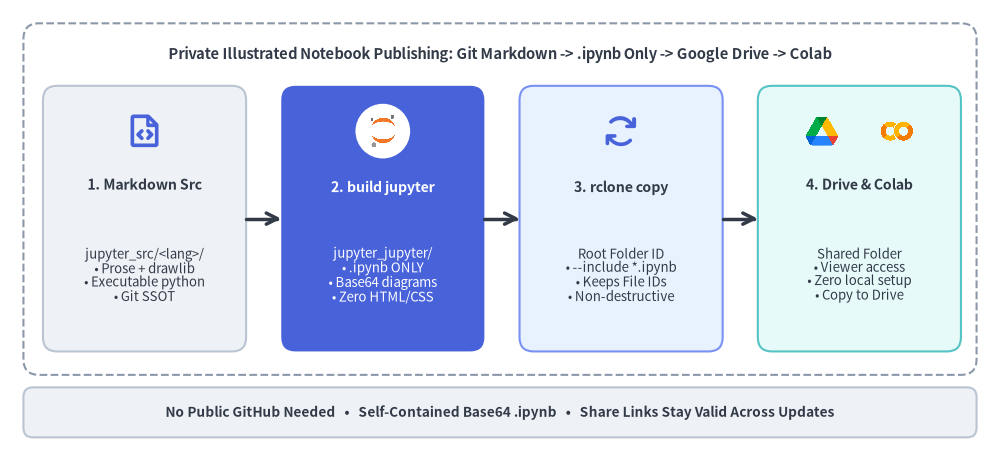
When you cannot publish notebooks to a public GitHub repository—such as client engagements, confidential deliverables, or internal team workshops—combine Drawlib's .ipynb-only build (drawlib build jupyter) with rclone to publish self-contained notebooks straight to a shared Google Drive folder that recipients open and run directly in Google Colab.
Source Code
from drawlib.canvas import save, setup
from drawlib.icons import ai, code as code_icons, phosphor, workspace
from drawlib.lines import line
from drawlib.shapes import circle, rectangle
from drawlib.styles import Styles
from drawlib.text import text

setup(width=128, height=58)

# Outer workflow container
rectangle((64, 32.5), width=122, height=45, style=Styles.MutedDashed.patch(shape_r=2.0))
text(
    (64, 51.0),
    "Private Illustrated Notebook Publishing: Git Markdown -> .ipynb Only -> Google Drive -> Colab",
    style=Styles.DarkBold.patch(text_size=10.6),
)

# Stage 1: Markdown Source
rectangle((18.5, 30.0), width=26, height=34, style=Styles.Neutral.patch(shape_r=1.8))
phosphor.file_code((18.5, 41.2), width=4.8, style=Styles.PrimaryBold)
text((18.5, 34.4), "1. Markdown Src", style=Styles.DarkBold.patch(text_size=10.2))
text(
    (18.5, 22.8),
    "jupyter_src/<lang>/\n• Prose + drawlib\n• Executable python\n• Git SSOT",
    style=Styles.Dark.patch(text_size=9.5),
)

line((31.5, 30.0), (36.0, 30.0), arrow_head="->", style=Styles.DarkBold)

# Stage 2: drawlib build jupyter (.ipynb only — Focal Hero)
rectangle((49.0, 30.0), width=26, height=34, style=Styles.PrimaryFlat.patch(shape_r=1.8))
circle((49.0, 41.2), radius=3.5, style=Styles.White.patch(shape_line_width=0))
ai.jupyter((49.0, 41.2), width=4.6, style=Styles.Neutral)
text((49.0, 34.0), "2. build jupyter", style=Styles.WhiteBold.patch(text_size=10.2))
text(
    (49.0, 22.8),
    "jupyter_jupyter/\n• .ipynb ONLY\n• Base64 diagrams\n• Zero HTML/CSS",
    style=Styles.White.patch(text_size=9.5),
)

line((62.0, 30.0), (66.5, 30.0), arrow_head="->", style=Styles.DarkBold)

# Stage 3: rclone copy
rectangle((79.5, 30.0), width=26, height=34, style=Styles.PrimaryNeutral.patch(shape_r=1.8))
phosphor.arrows_clockwise((79.5, 41.2), width=4.8, style=Styles.PrimaryBold)
text((79.5, 34.0), "3. rclone copy", style=Styles.DarkBold.patch(text_size=10.2))
text(
    (79.5, 22.8),
    "Root Folder ID\n• --include *.ipynb\n• Keeps File IDs\n• Non-destructive",
    style=Styles.Dark.patch(text_size=9.5),
)

line((92.5, 30.0), (97.0, 30.0), arrow_head="->", style=Styles.DarkBold)

# Stage 4: Google Drive -> Google Colab
rectangle((110.0, 30.0), width=26, height=34, style=Styles.SecondaryNeutral.patch(shape_r=1.8))
workspace.google_drive((105.2, 41.2), width=4.6, style=Styles.Neutral)
code_icons.colab((114.8, 41.2), width=4.6, style=Styles.Neutral)
text((110.0, 34.4), "4. Drive & Colab", style=Styles.DarkBold.patch(text_size=10.2))
text(
    (110.0, 22.8),
    "Shared Folder\n• Viewer access\n• Zero local setup\n• Copy to Drive",
    style=Styles.Dark.patch(text_size=9.5),
)

# Bottom key-guarantees ribbon
rectangle(
    (64, 5.2),
    width=122,
    height=6.4,
    style=Styles.Neutral.patch(shape_r=1.2),
    text="No Public GitHub Needed   •   Self-Contained Base64 .ipynb   •   Share Links Stay Valid Across Updates",
    text_style=Styles.DarkBold.patch(text_size=9.8),
)

save()
1. Overview & Why This Workflow Works
In enterprise consulting, customer workshops, and internal engineering onboarding, publishing .ipynb notebooks to a public GitHub repository is often impossible due to confidentiality or network policies. Pairing Drawlib's jupyter project with rclone and Google Drive solves this cleanly across macOS, Linux, Windows, and CI/CD pipelines—without brittle OS-dependent FUSE mounts.
- Clean
.ipynb-Only Output (drawlib build jupyter): Drawlib separatesdrawlib build jupyter(outputs onlyjupyter_jupyter/<lang>/**/*.ipynbwith zero HTML, CSS, or externalimages/files) fromdrawlib build html(outputs the 2-column HTML preview bundled with.ipynbinjupyter_html/) anddrawlib build image(extracts standalone PNGs intojupyter_images/). For Google Drive sharing, runbuild_jupyter.shso the build directory itself stays 100%.ipynb-only. - 100% Self-Contained Single-File Notebooks: Every
cell=markdown```drawlibdiagram and local Markdown image (_assets/...) is embedded directly into the.ipynbJSON as an inline Base64 Data URI (<img src="data:image/...;base64,..." />), so diagrams display immediately in Google Colab with zero external hosting or broken image links. - Zero Drawlib Runtime Dependency for Recipients: With
drawlib_cell_mode = "markdown"(the default), Drawlib is used strictly at authoring/build time to render architectural diagrams, while the executable Python cells recipients run in Colab can use pure Python, Pandas, PyTorch, or cloud SDKs with nopip install drawlibrequired. - Stable Google Drive Share Links (
rclone copy): Overwriting an existing.ipynbwithrclone copyupdates the file contents in place while preserving its Google Drive File ID, so bookmarks and shared URLs sent to clients never break when you publish updates.
(For general jupyter project authoring, dual code-block routing, and setup(..., cwd=True), see the Jupyter & Colab Notebook Project Guide.)
2. Step 1: Install rclone & Configure the Google Drive Remote
Install rclone on your workstation (or CI runner):
# macOS (Homebrew):
brew install rclone

# Linux (official install script):
curl https://rclone.org/install.sh | sudo bash

# Windows (winget):
winget install Rclone.Rclone
Next, run rclone config to create a Google Drive remote (for example, named gdrive):
- New remote: Choose
n, entergdrive, and select Storage typedrive(Google Drive). - Custom OAuth Credentials (Recommended for ongoing use): Supply your own Google Cloud OAuth
client_idandclient_secret(with the Google Drive API enabled) instead of leaving them blank. rclone's shared default client ID hits global rate limits during frequent team or CI syncs. - Scope: Select
1(scope = drive— full access to files you have permission to edit, required to upload into existing shared folders). - Authentication:
- On a local desktop with a browser, choose
auto config = yto complete OAuth in one click. - On a headless Linux server, SSH session, or devcontainer, choose
auto config = n, runrclone authorize "drive"on a machine with a browser, and paste the resulting JSON token back into the terminal.
- On a local desktop with a browser, choose
- Target Folder Type (My Drive vs. Shared Folder vs. Shared Drive): Retrieve
<FOLDER_ID>from the target Google Drive folder URL (https://drive.google.com/drive/folders/<FOLDER_ID>), and configure your remote according to where the folder lives:
| Target Location in Google Drive | rclone config (team_drive) |
CLI Flag / Behavior |
|---|---|---|
| My Drive subfolder | Leave team_drive empty (n at Shared Drive prompt) |
Pass --drive-root-folder-id="<FOLDER_ID>". |
| Shared with me folder (owned by another user) | Leave team_drive empty |
Pass --drive-root-folder-id="<FOLDER_ID>" (you must have Editor permission on that folder). |
| Google Workspace Shared Drive root | Choose y at "Configure this as a Shared Drive?" and select the drive (team_drive = <DRIVE_ID>) |
Omit --drive-root-folder-id (the remote root is already the Shared Drive), or pass --drive-team-drive="<DRIVE_ID>". |
| Subfolder inside a Shared Drive | Leave team_drive empty when targeting by --drive-root-folder-id |
Pass --drive-root-folder-id="<SUBFOLDER_ID>" (in rclone, combining a non-empty team_drive with a root_folder_id can fail with 404 or permission mismatches; test with rclone lsf below). |
Why --drive-root-folder-id="<FOLDER_ID>" is preferred over path names (gdrive:Client/Notebooks):
- Rename-proof: Even if someone renames the folder in Google Drive's web UI, syncing continues without breaking.
- Scoped safety: Locks
rclonestrictly inside<FOLDER_ID>, preventing accidental uploads to the root of your My Drive. - Cross-location portability: Works cleanly regardless of where the folder sits in your Drive hierarchy.
Verify connectivity before wiring up build scripts:
# List existing files inside the target Google Drive folder (should exit 0):
rclone lsf gdrive: --drive-root-folder-id="<FOLDER_ID>"
Tip — Duplicate Filenames on Google Drive: Unlike POSIX filesystems, Google Drive permits multiple files with the exact same name in one folder. If teammates previously uploaded
.ipynbfiles manually, runrclone dedupe gdrive: --drive-root-folder-id="<FOLDER_ID>" --dry-runonce to verify there are no duplicate filenames before automating syncs.
3. Step 2: Configure the Drawlib jupyter Project (.ipynb-Only Build)
Scaffold a jupyter project (single-locale or multi-locale):
# Single-locale project (creates jupyter_src/en/ or jupyter_src/ja/):
uv run drawlib init project jupyter -l en -s google

# Or multi-locale bilingual project (creates jupyter_src/en/ and jupyter_src/ja/):
uv run drawlib init project jupyter -l en,ja -s google
Configure jupyter_src/drawlib.toml for private Google Drive delivery:
[project]
name = "jupyter"
type = "jupyter"
title = "Client Analytics Playbook"
description = "Interactive Google Colab notebooks delivered via Google Drive."
style = "google"

[i18n]
default_lang = "en"
langs = ["en"]

[jupyter]
# Keep colab_base_url unset (empty) for Google Drive sharing!
# Setting a GitHub URL would inject a broken "Open in Colab" badge pointing outside Drive.
# colab_base_url = ""

drawlib_cell_mode = "markdown"  # Render ```drawlib blocks as embedded Base64 Markdown diagrams
execute = false                 # Set true for local pure-Python AI Dry-Run; false for google.colab-dependent notebooks
Key configuration choices for Google Drive + Colab projects:
- Leave
colab_base_urlunset (""): Whencolab_base_urlis set, Drawlib injects anOpen in Colabbadge pointing to that external URL at the top of each.ipynb. Leaving it unset avoids confusing or 404 badges inside Drive-hosted notebooks. execute = truevs.execute = false(and--dry-runbehavior):- Use
execute = truewhen your Python cells run locally without Colab-only modules so every build verifies zero runtime errors and zero[Geometry Warning]. - Use
execute = falsewhen cells importgoogle.colab(userdata,auth,drive.mount) or require interactive cloud login. Even withexecute = false,drawlib build jupyterstill renders everycell=markdown```drawlibdiagram and checks for[Geometry Warning]. - Note that passing
--dry-runtodrawlib build jupyterforces code cell execution even whenexecute = false. If you want local--dry-runto succeed on Colab notebooks, guard Colab imports cleanly:
- Use
import os

try:
    from google.colab import userdata

    API_KEY = userdata.get("MY_API_KEY")
except ImportError:
    API_KEY = os.environ.get("MY_API_KEY", "dry-run-placeholder")
- Keep Base64
.ipynbFiles Compact (-f webp): For diagram-heavy notebooks, pass-f webptodrawlib build jupyterto shrink Base64-embedded images significantly while keeping crisp rendering in modern browsers and Google Colab. - Single-Locale Flat vs. Multi-Locale Folder Structure:
drawlib build jupyteralways writesjupyter_jupyter/<lang>/*.ipynb. For a single-locale project (e.g.,langs = ["en"]), pointsync_gdrive.shatjupyter_jupyter/enso.ipynbfiles sit flat in the Drive shared folder. For multi-locale (langs = ["en", "ja"]), pointsync_gdrive.shatjupyter_jupyterso Google Drive cleanly displaysen/andja/subfolders. - Remove Stale Renamed/Deleted
.ipynbFiles Before Building: Becausedrawlib build jupyterwrites intojupyter_jupyter/, deleting or renaming a.mdsource file can leave an old.ipynbin the local output folder. Add a safe pre-clean step tojupyter_src/build_jupyter.sh(skipping cleanup on--dry-runor custom-oflags):
# Inside jupyter_src/build_jupyter.sh (before calling $DRAWLIB_CMD build jupyter):
IS_DRY_RUN=0
HAS_CUSTOM_OUT=0
for arg in "$@"; do
    case "$arg" in
        --dry-run) IS_DRY_RUN=1 ;;
        -o|--output|--output=*) HAS_CUSTOM_OUT=1 ;;
    esac
done
if [ "$IS_DRY_RUN" -eq 0 ] && [ "$HAS_CUSTOM_OUT" -eq 0 ] && [ -d "jupyter_jupyter" ]; then
    rm -rf "jupyter_jupyter"
fi

$DRAWLIB_CMD build jupyter jupyter_src/ -o jupyter_jupyter/ "$@"
Keep credentials, folder IDs, and generated .ipynb build artifacts out of Git in your repository .gitignore:
# Generated notebook build outputs (synced to Google Drive instead of Git)
jupyter_jupyter/
jupyter_html/
jupyter_images/

# Local environment overrides and rclone/GCP credentials — NEVER commit!
.env
.env.local
rclone.conf
*-service-account*.json
4. Step 3: Automate Sync with sync_gdrive.sh & build.sh
Create jupyter_src/sync_gdrive.sh using environment variables so no Google Drive folder IDs are ever hardcoded in Git:
#!/usr/bin/env bash
set -euo pipefail

SCRIPT_DIR="$(cd "$(dirname "${BASH_SOURCE[0]}")" && pwd)"
PARENT_DIR="$(cd "$SCRIPT_DIR/.." && pwd)"
cd "$PARENT_DIR"

# Load optional local .env (ignored by Git) if present
if [ -f ".env" ]; then
    set -a
    # shellcheck source=/dev/null
    source ".env"
    set +a
fi

RCLONE_REMOTE="${RCLONE_REMOTE:-gdrive}"
GDRIVE_FOLDER_ID="${GDRIVE_FOLDER_ID:-}"
# Single-locale: "jupyter_jupyter/en" (flat in Drive) | Multi-locale: "jupyter_jupyter" (en/ & ja/ folders)
JUPYTER_SRC_DIR="${JUPYTER_SRC_DIR:-jupyter_jupyter/en}"
# Default to non-destructive "copy" (preserves Drive File IDs and never deletes remote files).
# Opt into deletion mirroring explicitly via GDRIVE_SYNC_MODE=sync (always preview with --dry-run first!).
GDRIVE_SYNC_MODE="${GDRIVE_SYNC_MODE:-copy}"

if ! command -v rclone &> /dev/null; then
    echo "Error: rclone is not installed. See https://rclone.org/install/" >&2
    exit 1
fi
if [ -z "$GDRIVE_FOLDER_ID" ]; then
    echo "Error: GDRIVE_FOLDER_ID is not set (export it or define it in .env)." >&2
    exit 1
fi
if [ ! -d "$JUPYTER_SRC_DIR" ]; then
    echo "Error: Source directory '$JUPYTER_SRC_DIR' does not exist. Run ./jupyter_src/build_jupyter.sh first." >&2
    exit 1
fi
if [ "$GDRIVE_SYNC_MODE" != "copy" ] && [ "$GDRIVE_SYNC_MODE" != "sync" ]; then
    echo "Error: GDRIVE_SYNC_MODE must be 'copy' or 'sync', got '$GDRIVE_SYNC_MODE'." >&2
    exit 1
fi

echo "Syncing .ipynb notebooks ($GDRIVE_SYNC_MODE): $JUPYTER_SRC_DIR -> ${RCLONE_REMOTE}: (folder=$GDRIVE_FOLDER_ID)"
rclone "$GDRIVE_SYNC_MODE" \
    "$JUPYTER_SRC_DIR" \
    "${RCLONE_REMOTE}:" \
    --drive-root-folder-id="${GDRIVE_FOLDER_ID}" \
    --include "*.ipynb" \
    --stats-one-line \
    -v \
    "$@"
Why Keep
--include "*.ipynb"Even With.ipynb-Only Builds? Even thoughdrawlib build jupyteralready outputs exclusively.ipynbfiles locally, keeping--include "*.ipynb"acts as a critical safety guardrail on Google Drive: if you ever runGDRIVE_SYNC_MODE=sync ./jupyter_src/sync_gdrive.shto remove deleted notebooks,--include "*.ipynb"ensuresrclone syncnever deletes non-notebook files (such as Google Docs notes, Google Sheets, PDFs, or CSV datasets) that teammates or clients have placed in the same shared Drive folder. Always preview destructive syncs first withGDRIVE_SYNC_MODE=sync ./jupyter_src/sync_gdrive.sh --dry-run.
Next, customize jupyter_src/build.sh so a single ./jupyter_src/build.sh command compiles .ipynb files and automatically syncs to Google Drive—while consuming --no-sync before forwarding remaining CLI options to build_jupyter.sh and safely skipping sync in offline, dry-run, or unconfigured teammate environments:
#!/usr/bin/env bash
set -euo pipefail

SCRIPT_DIR="$(cd "$(dirname "${BASH_SOURCE[0]}")" && pwd)"

SKIP_SYNC="${SKIP_GDRIVE_SYNC:-0}"
IS_DRY_RUN=0
BUILD_ARGS=()

for arg in "$@"; do
    case "$arg" in
        --no-sync)
            SKIP_SYNC=1
            ;;
        --dry-run)
            IS_DRY_RUN=1
            BUILD_ARGS+=("$arg")
            ;;
        *)
            BUILD_ARGS+=("$arg")
            ;;
    esac
done

echo "=== Building Standalone Jupyter Notebooks (.ipynb only) ==="
"$SCRIPT_DIR/build_jupyter.sh" "${BUILD_ARGS[@]}"

if [ "$IS_DRY_RUN" -eq 1 ]; then
    echo "Skipping Google Drive sync (--dry-run)."
    exit 0
fi
if [ "$SKIP_SYNC" = "1" ]; then
    echo "Skipping Google Drive sync (--no-sync / SKIP_GDRIVE_SYNC=1)."
    exit 0
fi
if ! command -v rclone &> /dev/null; then
    echo "Skipping Google Drive sync (rclone not installed)."
    exit 0
fi
if [ -z "${GDRIVE_FOLDER_ID:-}" ] && [ ! -f "$SCRIPT_DIR/../.env" ]; then
    echo "Skipping Google Drive sync (GDRIVE_FOLDER_ID not configured)."
    exit 0
fi

echo "=== Syncing .ipynb Notebooks to Google Drive ==="
"$SCRIPT_DIR/sync_gdrive.sh"
echo "=== Build & Google Drive sync completed! ==="
(If you also want a local HTML preview while authoring, run ./jupyter_src/build_html.sh and ./jupyter_src/serve.sh at any time—the HTML site builds into jupyter_html/ without affecting the clean jupyter_jupyter/ folder synced to Drive.)
5. Step 4: End-User Execution Flow in Google Colab
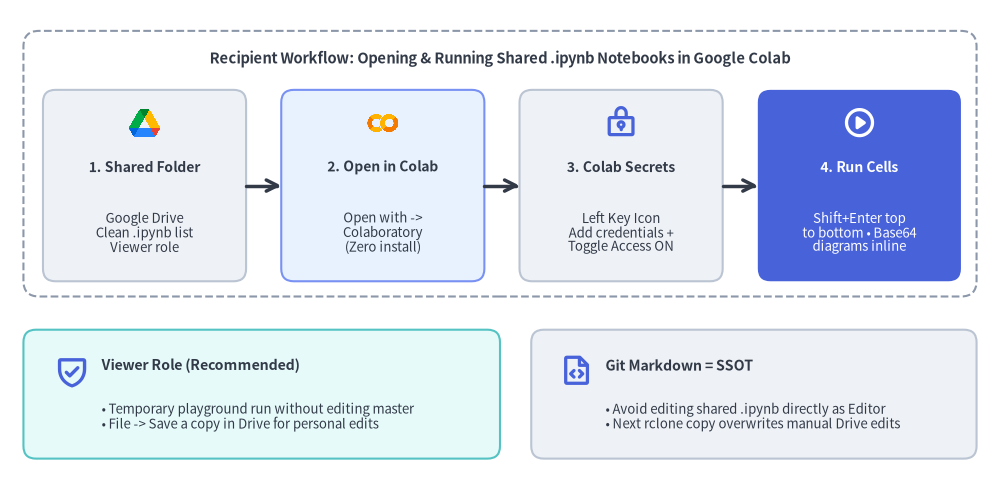
Once synced, recipients (clients or internal team members) never touch Git, Python virtual environments, or Drawlib—they work entirely inside their browser:
Source Code
from drawlib.canvas import save, setup
from drawlib.icons import code as code_icons, phosphor, workspace
from drawlib.lines import line
from drawlib.shapes import rectangle
from drawlib.styles import Styles
from drawlib.text import text

setup(width=128, height=62)

# Top Panel: 4-Step Recipient Execution Flow
rectangle((64, 41.0), width=122, height=34, style=Styles.MutedDashed.patch(shape_r=2.0))
text(
    (64, 54.4),
    "Recipient Workflow: Opening & Running Shared .ipynb Notebooks in Google Colab",
    style=Styles.DarkBold.patch(text_size=10.6),
)

steps = [
    (18.5, "1. Shared Folder", "Google Drive\nClean .ipynb list\nViewer role", Styles.Neutral, Styles.DarkBold, Styles.Dark, "drive"),
    (49.0, "2. Open in Colab", "Open with ->\nColaboratory\n(Zero install)", Styles.PrimaryNeutral, Styles.DarkBold, Styles.Dark, "colab"),
    (79.5, "3. Colab Secrets", "Left Key Icon\nAdd credentials +\nToggle Access ON", Styles.Neutral, Styles.DarkBold, Styles.Dark, "key"),
    (110.0, "4. Run Cells", "Shift+Enter top\nto bottom • Base64\ndiagrams inline", Styles.PrimaryFlat, Styles.WhiteBold, Styles.White, "play"),
]

for cx, title, body, st, tst, bst, icon_kind in steps:
    rectangle((cx, 38.2), width=26, height=24.5, style=st.patch(shape_r=1.6))
    if icon_kind == "drive":
        workspace.google_drive((cx, 46.2), width=4.4, style=Styles.Neutral)
    elif icon_kind == "colab":
        code_icons.colab((cx, 46.2), width=4.4, style=Styles.Neutral)
    elif icon_kind == "key":
        phosphor.lock_key((cx, 46.2), width=4.4, style=Styles.PrimaryBold)
    else:
        phosphor.play_circle((cx, 46.2), width=4.4, style=Styles.WhiteBold)
    text((cx, 40.6), title, style=tst.patch(text_size=10.0))
    text((cx, 32.2), body, style=bst.patch(text_size=9.5))

for x0, x1 in ((31.5, 36.0), (62.0, 66.5), (92.5, 97.0)):
    line((x0, 38.2), (x1, 38.2), arrow_head="->", style=Styles.DarkBold)

# Bottom Panel: Permission & Single Source of Truth Guardrails
rectangle((33.5, 11.5), width=61, height=16.5, style=Styles.SecondaryNeutral.patch(shape_r=1.6))
phosphor.shield_check((9.2, 14.5), width=4.6, style=Styles.PrimaryBold)
text((13.0, 15.2), "Viewer Role (Recommended)", style=Styles.DarkBold.patch(text_size=10.2, halign="left"))
text(
    (13.0, 8.6),
    "• Temporary playground run without editing master\n• File -> Save a copy in Drive for personal edits",
    style=Styles.Dark.patch(text_size=9.5, halign="left"),
)

rectangle((96.5, 11.5), width=57, height=16.5, style=Styles.Neutral.patch(shape_r=1.6))
phosphor.file_code((73.8, 14.5), width=4.4, style=Styles.PrimaryBold)
text((77.5, 15.2), "Git Markdown = SSOT", style=Styles.DarkBold.patch(text_size=10.2, halign="left"))
text(
    (77.5, 8.6),
    "• Avoid editing shared .ipynb directly as Editor\n• Next rclone copy overwrites manual Drive edits",
    style=Styles.Dark.patch(text_size=9.5, halign="left"),
)

save()
Share these five concise steps with your notebook recipients:
- Open the Shared Google Drive Folder: Recipients see a clean directory containing only
.ipynbnotebooks (numbered01_...,02_...in reading order). - Launch in Google Colaboratory: Double-click the target
.ipynbfile, or right-click -> Open with -> Google Colaboratory.- First-time setup: If Google Colaboratory does not appear in the menu, click Connect more apps, search for
Colaboratoryin Google Workspace Marketplace, and click Install.
- First-time setup: If Google Colaboratory does not appear in the menu, click Connect more apps, search for
- Run Safely with Viewer Access (or Save a Personal Copy):
- Grant recipients Viewer access (shared with specific accounts or a Google Group—avoid "Anyone with the link" for confidential work). Viewers can execute cells immediately in Colab's temporary session without modifying the shared master file.
- To keep outputs or experiment with edits, click File -> Save a copy in Drive.
- Important for Editors: Treat the Git Markdown source (
jupyter_src/) as the Single Source of Truth. Any manual edits saved directly onto a shared.ipynbby an Editor will be overwritten on the nextrclone copy.
- Configure Colab Secrets (When Using Cloud / API Credentials):
- Open the Key icon (Secrets) in Google Colab's left sidebar.
- Add each required secret name and value, and toggle Notebook access to ON so
google.colab.userdata.get("<KEY>")can read it.
- Run Cells Top-to-Bottom: Press
Shift + Enter(or Runtime -> Run all). All Drawlib architecture diagrams are embedded as Base64 Data URIs and render immediately with zero extra installation.- External data & cross-links: Base64 embedding makes diagrams self-contained, but if Python code cells read large CSV/Parquet files, mount Drive (
google.colab.drive.mount('/content/drive')) or fetch them from GCS/BigQuery/APIs. Likewise, prefer numbered filenames (01_...,02_...) instead of relative Markdown links (./02_next.md), which do not resolve to Drive File IDs inside Colab.
- External data & cross-links: Base64 embedding makes diagrams self-contained, but if Python code cells read large CSV/Parquet files, mount Drive (
6. Optional: Automated CI/CD Publishing (GitHub Actions)
To publish updated .ipynb notebooks automatically whenever changes merge to main, create a dedicated Google Cloud Service Account, share only the single target Google Drive folder with that service account's email as Editor (least privilege), and run drawlib build jupyter followed by rclone copy in GitHub Actions:
name: Publish Jupyter Notebooks to Google Drive

on:
  push:
    branches: [main]
    paths:
      - "jupyter_src/**"

jobs:
  publish-notebooks:
    runs-on: ubuntu-latest
    steps:
      - uses: actions/checkout@v4

      - name: Set up uv & Python
        uses: astral-sh/setup-uv@v5

      - name: Install rclone
        run: curl -fsSL https://rclone.org/install.sh | sudo bash

      - name: Build standalone .ipynb notebooks
        run: uv run drawlib build jupyter jupyter_src/ -o jupyter_jupyter/

      - name: Sync .ipynb notebooks to Google Drive
        env:
          GDRIVE_SA_JSON: ${{ secrets.GDRIVE_SERVICE_ACCOUNT_JSON }}
          GDRIVE_FOLDER_ID: ${{ secrets.GDRIVE_FOLDER_ID }}
          RCLONE_CONFIG_GDRIVE_TYPE: drive
          RCLONE_CONFIG_GDRIVE_SCOPE: drive
        run: |
          SA_FILE="$(mktemp)"
          trap 'rm -f "$SA_FILE"' EXIT
          printf '%s' "$GDRIVE_SA_JSON" > "$SA_FILE"
          chmod 600 "$SA_FILE"
          export RCLONE_CONFIG_GDRIVE_SERVICE_ACCOUNT_FILE="$SA_FILE"
          rclone copy jupyter_jupyter/en gdrive: \
            --drive-root-folder-id="${GDRIVE_FOLDER_ID}" \
            --include "*.ipynb" \
            -v
Enterprise Security & Caching Tips:
- Organizations Blocking Service Account Keys: If your Google Cloud organization enforces
iam.disableServiceAccountKeyCreation, authenticate via Workload Identity Federation (google-github-actions/auth) to mint short-lived OAuth access tokens instead of storing a static JSON key in GitHub Secrets.- Speed Up CI Builds: Persist Drawlib's 2-tier cache (
.drawlib/and~/.cache/drawlib/) withactions/cache@v4—see Caching Architecture & CI/CD for the complete cache configuration.