CLI Reference (drawlib)
The drawlib command-line interface compiles multi-locale documentation sites, API references, linear PDFs, MS Word (.docx) documents, 16:9 HTML/PowerPoint (.pptx) slide decks, and standalone Python illustrations, while managing project scaffolding, AI coding agent instructions, preset catalogs, and local asset caches. Every CLI workflow maps directly to the programmatic Python functions documented in drawlib.tools.
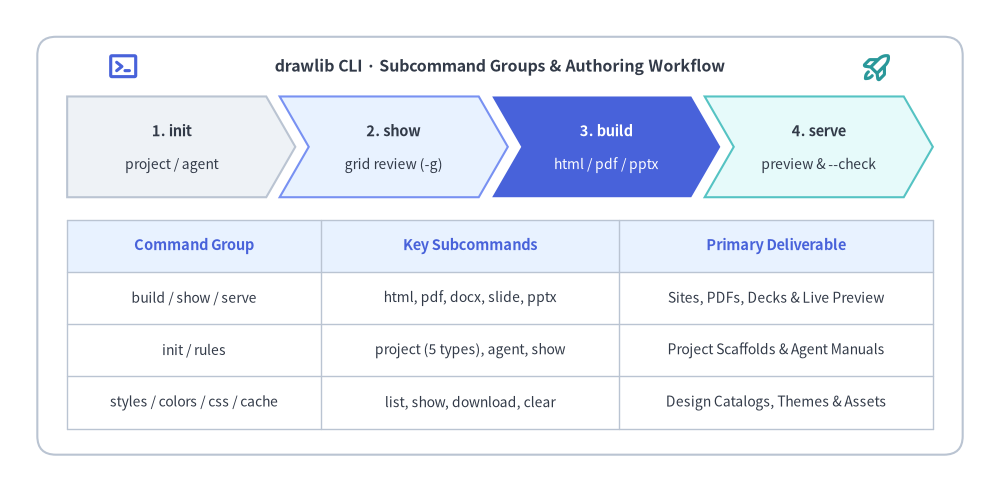
Source Code
from drawlib.canvas import save, setup
from drawlib.icons import phosphor
from drawlib.shapes import rectangle
from drawlib.smartarts import ChevronProcess, Table
from drawlib.styles import Colors, Styles
from drawlib.text import text

setup(width=134, height=66)

rectangle(
    (67, 33),
    width=124,
    height=56,
    style=Styles.Neutral.patch(shape_fill_color=Colors.Transparent, line_style="dashed", shape_r=2.5),
)
phosphor.terminal_window((16.5, 57.0), width=4.4, style=Styles.PrimaryBold)
text(
    (67.0, 57.0),
    "drawlib CLI · Subcommand Groups & Authoring Workflow",
    style=Styles.DarkBold.patch(text_size=11.5),
)
phosphor.rocket_launch((117.5, 57.0), width=4.4, style=Styles.SecondaryBold)

workflow = ChevronProcess(
    style=Styles.Neutral,
    text_style=Styles.DarkBold.patch(text_size=10.5),
    description_style=Styles.Dark.patch(text_size=10.0),
    corner_angle=60.0,
    spacing=1.8,
    flat_left_end=True,
)
workflow.add("1. init", description="project / agent")
workflow.add("2. show", description="grid review (-g)", style=Styles.PrimaryNeutral)
workflow.add(
    "3. build",
    description="html / pdf / pptx",
    style=Styles.PrimaryFlat,
    text_style=Styles.WhiteBold.patch(text_size=10.5),
    description_style=Styles.White.patch(text_size=10.0),
)
workflow.add("4. serve", description="preview & --check", style=Styles.SecondaryNeutral)
workflow.draw(xy=(9.0, 39.5), width=116.0, height=13.5)

summary = Table(
    cell_style=Styles.Neutral.patch(shape_fill_color=Colors.White),
    text_style=Styles.Dark.patch(text_size=10.0),
    header_cell_style=Styles.PrimaryNeutral,
    header_text_style=Styles.PrimaryBold.patch(text_size=10.5),
    border_style=Styles.Neutral.patch(line_width=1.0),
    has_header=True,
)
summary.draw_flexible(
    xy=(9.0, 36.5),
    column_widths=[34.0, 40.0, 42.0],
    row_heights=[7.0, 7.0, 7.0, 7.0],
    data=[
        ["Command Group", "Key Subcommands", "Primary Deliverable"],
        ["build / show / serve", "html, pdf, docx, slide, pptx", "Sites, PDFs, Decks & Live Preview"],
        ["init / rules", "project (5 types), agent, show", "Project Scaffolds & Agent Manuals"],
        ["styles / colors / css / cache", "list, show, download, clear", "Design Catalogs, Themes & Assets"],
    ],
    align="top_left",
)

save()
cmddrawlib#
Root entry point for the Drawlib CLI (drawlib, uv run drawlib, uvx drawlib, or python -m drawlib). Global logging and version flags must appear before the subcommand name.
drawlib [OPTIONS] COMMAND [ARGS]...

# Inspect installed version or top-level command groups
uv run drawlib --version
uv run drawlib --help

# Run any subcommand with verbose or developer-level diagnostics
uv run drawlib --verbose build html docs_src
uv run drawlib --developer show docs_src/en/index.md 1 -g -o preview.png
| Option | Type | Default | Description |
|---|---|---|---|
-v, --version |
bool |
False |
Print drawlib version <X.Y.Z> and exit immediately. |
--quiet |
bool |
False |
Enable quiet logging (errors only). Cannot be combined with --verbose, --debug, or --developer (exits with code 2). |
--verbose |
bool |
False |
Enable verbose diagnostic logging across build and rendering stages. |
--debug |
bool |
False |
Alias for --verbose; enable verbose diagnostic logging. |
--developer |
bool |
False |
Enable verbose logging and disable user-facing traceback suppression for internal debugging. |
-h, --help |
flag |
— | Show root help summary and exit. |
cmddrawlib build#
Command group for compiling documentation source directories (site, catalog, doc, slide) or executing standalone Python drawing scripts (images). Running drawlib build with no subcommand prints its help table.
drawlib build COMMAND [ARGS]...
| Subcommand | Output Deliverable |
|---|---|
drawlib build docx |
Editable Microsoft Word (.docx) document with high-DPI rasterized diagrams. |
drawlib build html |
Static multi-page or single-page HTML documentation site (site, catalog, doc). |
drawlib build image |
Standalone .png, .webp, .jpg, or .pdf illustrations from .py scripts. |
drawlib build markdown |
Rendered Markdown files with drawlib code fences replaced by <img> / ![]() tags. |
drawlib build pdf |
Print-ready vector PDF compiled via Headless Chromium (doc, .md, or slide). |
drawlib build pptx |
Editable Microsoft PowerPoint (.pptx) presentation deck (960×540 pt 16:9). |
drawlib build slide |
Interactive 16:9 HTML presentation deck with speaker notes and animations. |
cmddrawlib build docx#
Compile a directory of Markdown chapters (doc project) or a single Markdown file into an editable Microsoft Word (.docx) document. In multi-locale [i18n] projects, builds localized <stem>_<lang>.docx deliverables while sharing diagram renders across locales.
drawlib build docx [OPTIONS] INPUT

# Compile a doc project (auto-detects drawlib.toml, styles.py, and utils.py)
uv run drawlib build docx doc_src -o doc.docx --generate-index --dpi 240
| Argument / Option | Type | Default | Description |
|---|---|---|---|
INPUT |
str (required) |
— | Directory containing Markdown chapters (doc_src/) or path to a single .md file. |
-o, --output |
str | None |
None |
Output .docx file path (or base path/directory for multi-locale doc projects). Defaults to <base>.docx. |
--page-break / --no-page-break |
bool |
True |
Insert Word page breaks between merged chapter files. |
--generate-index / --no-generate-index |
bool |
False |
Generate a Table of Contents and insert it between the 1st and 2nd chapter documents. |
--title |
str | None |
None |
Document title override stored in Word core metadata. |
--dpi |
int |
200 |
Rasterization DPI for embedded drawlib diagrams. |
-s, --styles |
str | None |
None |
Path to custom styles.py script (auto-detected if present in INPUT). |
-u, --utils |
str | None |
None |
Path to custom utils.py script (auto-detected if present in INPUT). |
--no-cache |
bool |
False |
Disable reading and writing the SQLite build image cache (.drawlib/cache.db). |
--timestamp |
bool |
False |
Include current build timestamp in OpenXML metadata instead of deterministic normalization. |
cmddrawlib build html#
Compile a Markdown/HTML documentation source directory (site, catalog, or doc) into a static HTML website with rendered diagrams, sidebar navigation, client-side search index, and SEO metadata.
drawlib build html [OPTIONS] DIR

# Compile docs_src/ into docs_html/ (or output path configured in drawlib.toml)
uv run drawlib build html docs_src -o docs_html -f webp
| Argument / Option | Type | Default | Description |
|---|---|---|---|
DIR |
str (required) |
— | Documentation source directory containing Markdown/HTML files and optional drawlib.toml. |
-o, --output |
str | None |
None |
Destination HTML directory path (defaults to <base>_html/ or [build].html_dir in drawlib.toml). |
-f, --format |
'png' | 'webp' |
'png' |
Default image output format for drawlib code blocks without an explicit extension. |
-s, --styles |
str | None |
None |
Path to Python styles.py script injected before executing drawlib blocks. |
-u, --utils |
str | None |
None |
Path to Python utils.py script injected before executing drawlib blocks. |
--no-cache |
bool |
False |
Bypass reading and writing .drawlib/cache.db. |
cmddrawlib build image#
Execute a standalone Python drawing script (.py) or recursively execute all drawing scripts in a directory (images project) to generate raster or vector output files. Files named styles.py, utils.py, or prefixed with _ are automatically skipped during directory scans.
drawlib build image [OPTIONS] INPUT

# Render an entire images_src/ project with companion *_grid.png review overlays
uv run drawlib build image images_src -o images -g

# Render a single script to PDF
uv run drawlib build image images_src/architecture.py -o out/architecture.pdf
| Argument / Option | Type | Default | Description |
|---|---|---|---|
INPUT |
str (required) |
— | Target Python script (.py) or directory containing Python drawing scripts. |
-o, --output |
str | None |
None |
Output image file path (for single .py input) or output directory path. |
-f, --format |
'png' | 'webp' | 'jpg' | 'pdf' | None |
None |
Override the output format defined in save() calls. |
-s, --styles |
str | None |
None |
Path to shared styles.py executed before each drawing script. |
-u, --utils |
str | None |
None |
Path to shared utils.py executed before each drawing script. |
-g, --grid |
bool |
False |
Also save companion *_grid.<ext> files with the coordinate grid overlaid. |
--disable-auto-clear |
bool |
False |
Disable automatic clear() between consecutive drawing script executions. |
--enable-auto-initialize |
bool |
False |
Reset global config() state to library defaults before each drawing script. |
--no-cache |
bool |
False |
Disable reading and writing the SQLite build image cache. |
cmddrawlib build markdown#
Compile a directory containing Markdown files with embedded drawlib code fences into standard rendered Markdown files plus generated image assets (suitable for GitHub/GitLab repositories or external static site generators).
drawlib build markdown [OPTIONS] DIR

uv run drawlib build markdown doc_src -o doc_markdown -f png
| Argument / Option | Type | Default | Description |
|---|---|---|---|
DIR |
str (required) |
— | Source directory containing Markdown (.md) files. |
-o, --output |
str | None |
None |
Output Markdown directory path (defaults to <base>_markdown/). |
-f, --format |
'png' | 'webp' |
'png' |
Default output format for drawlib diagram blocks. |
-s, --styles |
str | None |
None |
Path to Python styles.py script. |
-u, --utils |
str | None |
None |
Path to Python utils.py script. |
--no-cache |
bool |
False |
Disable reading and writing the SQLite build image cache. |
cmddrawlib build pdf#
Compile a directory of Markdown chapters (doc project), a single Markdown file, or a 16:9 slide presentation directory (slide project) into a print-ready vector PDF via Playwright Headless Chromium. Automatically switches to slide PDF rendering when [project].type = "slide" is detected in drawlib.toml.
drawlib build pdf [OPTIONS] INPUT

# Build an A4 document PDF with a generated Table of Contents
uv run drawlib build pdf doc_src -o specification.pdf --generate-index

# Build a 16:9 landscape PDF handout from a slide project
uv run drawlib build pdf slide_src -o presentation.pdf
| Argument / Option | Type | Default | Description |
|---|---|---|---|
INPUT |
str (required) |
— | Markdown chapter directory, single .md file, or slide presentation directory. |
-o, --output |
str | None |
None |
Output PDF file path (or base path/directory for multi-locale doc / slide projects). |
--page-break / --no-page-break |
bool |
True |
Insert CSS page breaks between merged Markdown chapters (doc mode). |
--generate-index / --no-generate-index |
bool |
False |
Generate a Table of Contents and insert it between the 1st and 2nd documents (doc mode). |
--title |
str | None |
None |
Document title override embedded in PDF metadata. |
-s, --styles |
str | None |
None |
Path to Python styles.py script. |
-u, --utils |
str | None |
None |
Path to Python utils.py script. |
--no-cache |
bool |
False |
Disable reading and writing the SQLite build image cache. |
--timestamp |
bool |
False |
Include current build timestamp in PDF /CreationDate and /ModDate metadata instead of normalizing. |
cmddrawlib build pptx#
Compile a slide project directory into native, editable Microsoft PowerPoint (.pptx) widescreen decks (960×540 pt, mapped from the 1920×1080 HTML stage via Headless Chromium layout measurement). Multi-frame Animation diagrams are flattened to either their 'first' or 'last' frame.
drawlib build pptx [OPTIONS] DIR

uv run drawlib build pptx slide_src -o deck.pptx --theme google --dpi 240 --anim-frame last
| Argument / Option | Type | Default | Description |
|---|---|---|---|
DIR |
str (required) |
— | Slide project root directory containing drawlib.toml and Markdown slide files. |
-o, --output |
str | None |
None |
Output .pptx file path (or base path generating <stem>_<lang>.pptx per locale). |
-t, --theme |
str | None |
None |
Slide CSS theme override ('google', 'default', 'google-dark', 'default-dark', 'monochrome'). |
--title |
str | None |
None |
Presentation title override stored in PowerPoint metadata. |
--dpi |
int |
240 |
Rasterization DPI for embedded drawlib diagrams. |
--anim-frame |
'first' | 'last' |
'last' |
Keyframe extracted when flattening multi-frame Animation blocks into static slide images. |
-s, --styles |
str | None |
None |
Path to Python styles.py script. |
-u, --utils |
str | None |
None |
Path to Python utils.py script. |
--no-cache |
bool |
False |
Disable reading and writing the SQLite build image cache. |
--timestamp |
bool |
False |
Include current build timestamp in PowerPoint OpenXML metadata. |
cmddrawlib build slide#
Compile a slide project directory of Markdown slide files (--- slide separators, ::: block columns, and ::: note speaker notes) into a standalone 16:9 HTML presentation deck with keyboard navigation, presenter view, and locale switcher.
drawlib build slide [OPTIONS] DIR

uv run drawlib build slide slide_src -o slide_html --theme google -f svg
| Argument / Option | Type | Default | Description |
|---|---|---|---|
DIR |
str (required) |
— | Slide project source directory containing drawlib.toml and .md slide files. |
-o, --output |
str | None |
None |
Output directory path for the compiled HTML deck (defaults to <base>_html/). |
-t, --theme |
str | None |
None |
Slide CSS theme preset ('google', 'default', 'google-dark', 'default-dark', 'monochrome'). |
-f, --format |
'svg' | 'webp' | 'png' |
'svg' |
Default diagram image format ('svg' keeps static diagrams crisp at any projector zoom). |
-s, --styles |
str | None |
None |
Path to Python styles.py script. |
-u, --utils |
str | None |
None |
Path to Python utils.py script. |
--no-cache |
bool |
False |
Disable reading and writing the SQLite build image cache. |
cmddrawlib cache#
Command group for inspecting, pre-downloading, and clearing cached fonts, icon packs, GeoJSON map topologies, Headless Chromium binaries, and workspace SQLite build caches.
drawlib cache COMMAND [ARGS]...
| Subcommand | Description |
|---|---|
drawlib cache clear |
Remove cached font/icon/map packages and/or workspace .drawlib/cache.db. |
drawlib cache download |
Pre-download fonts, icons, maps, and/or Headless Chromium for offline builds. |
drawlib cache list |
Display all external font, icon, and map packages with their local cache status. |
cmddrawlib cache clear#
Delete locally cached font, icon, and map archives (~/.drawlib/) and/or clear the current project's SQLite diagram build cache (.drawlib/cache.db). When invoked with neither --all nor --images, clears global downloadable font/icon/map caches while preserving workspace image caches.
drawlib cache clear [OPTIONS]

# Clear only the workspace SQLite diagram cache after editing external helpers
uv run drawlib cache clear --images

# Clear all global font/icon/map caches AND the workspace image cache
uv run drawlib cache clear --all
| Option | Type | Default | Description |
|---|---|---|---|
-a, --all |
bool |
False |
Clear all global font, icon, and map caches plus the workspace .drawlib/cache.db image cache. |
-i, --images |
bool |
False |
Clear only the workspace SQLite build image cache (.drawlib/cache.db). |
cmddrawlib cache download#
Pre-download external font archives, icon suites, GeoMap datasets, and Playwright Headless Chromium into the local cache so CI runners, Docker images, and air-gapped environments can render without network access. Passing any category flag (--fonts, --icons, --maps, --browser) downloads only the selected categories; omitting all flags downloads everything (--all).
drawlib cache download [OPTIONS]

# Pre-download all fonts, icons, maps, and Headless Chromium
uv run drawlib cache download --all

# Download only font and icon packages (skip Chromium browser binary)
uv run drawlib cache download --fonts --icons
| Option | Type | Default | Description |
|---|---|---|---|
--all |
bool |
True |
Download all font, icon, map, and Headless Chromium browser assets (default when no category flag is passed). |
--fonts |
bool |
False |
Download font packages only. |
--icons |
bool |
False |
Download icon packages (phosphor, gcp, aws, azure, domain packs) only. |
--maps |
bool |
False |
Download GeoMap geographic boundary packages only. |
--browser |
bool |
False |
Download Playwright Headless Chromium browser binary only. |
cmddrawlib cache list#
Display a formatted Rich status table of all downloadable font, icon, and map packages along with whether each archive is currently cached locally.
uv run drawlib cache list
Accepts no positional arguments or command-specific options (-h, --help only).
cmddrawlib colors#
Command group for listing and visually inspecting Drawlib's built-in color palettes (default, google, monochrome, and css).
drawlib colors COMMAND [ARGS]...
| Subcommand | Description |
|---|---|
drawlib colors list |
Print a summary table of all built-in color preset catalogs. |
drawlib colors show |
Open or export a visual swatch chart for a specified color preset. |
cmddrawlib colors list#
List all built-in color preset catalogs (default, default1–default6, google, monochrome, and css) with their descriptions.
uv run drawlib colors list
Accepts no positional arguments or command-specific options (-h, --help only).
cmddrawlib colors show#
Render and display (or export headlessly with -o) a visual color swatch chart showing every token name and RGB/hex value in a preset color catalog.
drawlib colors show [OPTIONS] PRESET

# Export the Google palette sorted by HSV hue to a PNG file
uv run drawlib colors show google --sort hsv -o google_colors.png
| Argument / Option | Type | Default | Description |
|---|---|---|---|
PRESET |
str (required) |
— | Preset name: 'default' (alias 'def', 'default1'–'default6'), 'google', 'monochrome' (alias 'mono'), or 'css'. |
-o, --output |
str | None |
None |
Save the rendered swatch chart to an image file instead of opening the interactive GUI viewer. |
--sort |
'hsv' | 'name' | 'raw' |
'hsv' |
Swatch ordering mode: HSV perceptual hue ('hsv'), alphabetical ('name'), or declaration order ('raw'). |
-g, --grid |
bool |
False |
Overlay the Drawlib coordinate grid on the rendered chart. |
--no-cache |
bool |
False |
Bypass reading and writing the cached color chart image. |
cmddrawlib css#
Command group for listing, previewing, and exporting Drawlib's built-in CSS theme stylesheets for HTML sites, catalog/reference sites, slide decks, and PDF documents.
drawlib css COMMAND [ARGS]...
| Subcommand | Description |
|---|---|
drawlib css list |
List available built-in CSS presets across HTML, Catalog, Slide, and PDF targets. |
drawlib css show |
Print a synthesized CSS stylesheet to stdout or export it to a .css file. |
cmddrawlib css list#
List available built-in CSS presets (default, google, monochrome, default-dark, google-dark, etc.) either as a cross-target summary table or filtered to a single document target.
drawlib css list [TARGET]

# Show combined HTML & PDF preset matrix
uv run drawlib css list

# Show presets for a specific target format
uv run drawlib css list slide
uv run drawlib css list catalog
| Argument | Type | Default | Description |
|---|---|---|---|
TARGET |
str | None |
None |
Optional target filter: 'html', 'pdf', 'site', 'doc', 'slide', 'catalog', or 'all'. Omitting prints the summary matrix. |
cmddrawlib css show#
Display a built-in CSS preset stylesheet in the terminal (with syntax highlighting on TTYs) or export it to a destination .css file via -o / --output with locale-appropriate @font-face / typography stacks.
drawlib css show [OPTIONS] [TARGET] PRESET

# Print the Google HTML stylesheet to stdout
uv run drawlib css show google

# Export a Japanese-tuned PDF stylesheet to doc_src/pdf_style.css
uv run drawlib css show pdf google -l ja -o doc_src/pdf_style.css --force

# Export a catalog/reference stylesheet
uv run drawlib css show catalog google -o catalog_src/style.css --force
| Argument / Option | Type | Default | Description |
|---|---|---|---|
[TARGET] PRESET |
str (required) |
— | Either <PRESET> alone (defaults TARGET to 'html') or <TARGET> <PRESET> where TARGET is 'html', 'catalog', 'site', 'doc', 'slide', or 'pdf'. |
PRESET |
str | None |
None |
Built-in CSS preset name ('default', 'google', 'monochrome', 'default-dark', 'google-dark', etc.) when TARGET is given first. |
-o, --output |
str | None |
None |
Destination .css file path. When omitted, prints the CSS stylesheet to stdout. |
-f, --force |
bool |
False |
Overwrite the destination file if it already exists. |
-l, --lang |
str |
'en' |
Language code ('en', 'ja', 'zh-cn', 'ko', 'th', etc.) selecting localized font stacks. |
cmddrawlib init#
Command group for scaffolding starter Drawlib projects (doc, site, catalog, slide, images) and generating per-IDE AI coding agent rule files.
drawlib init COMMAND [ARGS]...
| Subcommand | Description |
|---|---|
drawlib init agent |
Generate Drawlib authoring rules for AI coding agents (claude, cursor, antigravity, gemini, etc.). |
drawlib init agents |
Plural alias for drawlib init agent. |
drawlib init project |
Subgroup for scaffolding the 5 Drawlib project archetypes. |
cmddrawlib init agent#
Generate tailored Drawlib instruction files (.agents/rules/, CLAUDE.md / .claude/rules/, .cursor/rules/, .github/copilot-instructions.md, GEMINI.md, etc.) so AI coding agents follow Drawlib coordinate, style, and multimodal review workflows automatically.
drawlib init agent [OPTIONS] [AGENTS...]

# List all supported AI coding agent targets
uv run drawlib init agent --list

# Auto-detect existing agent config folders in the workspace and write rules
uv run drawlib init agent --detect

# Initialize rules for Claude Code and Antigravity/Jetski with overwrite
uv run drawlib init agent claude antigravity --mode auto --force
| Argument / Option | Type | Default | Description |
|---|---|---|---|
AGENTS... |
list[str] | None |
None |
One or more targets: 'antigravity', 'claude', 'cursor', 'copilot', 'windsurf', 'cline', 'roo', 'codex', 'gemini', 'all', or 'list'. |
-m, --mode |
'auto' | 'always' |
'auto' |
Activation mode for frontmatter-capable agents: 'auto' (glob/on-demand) or 'always' (always loaded). |
-g, --global |
bool |
False |
Write instruction file(s) into the user's home global agent config directory instead of --dir. |
--detect |
bool |
False |
Scan --dir for existing AI agent config directories/files and initialize all detected targets. |
--list |
bool |
False |
Print a table of supported AI agent targets, output file paths, and formats, then exit. |
-d, --dir |
str |
'.' |
Target workspace root directory. |
-o, --output |
str | None |
None |
Explicit destination file path (valid only when initializing a single agent target). |
-f, --force |
bool |
False |
Overwrite existing rule files or refresh existing Drawlib marker blocks in shared files. |
cmddrawlib init agents#
Convenience plural alias for drawlib init agent. Accepts the exact same positional AGENTS... arguments and options.
uv run drawlib init agents all --force
| Argument / Option | Type | Default | Description |
|---|---|---|---|
AGENTS... |
list[str] | None |
None |
Target agent name(s), 'all', or 'list' (identical to drawlib init agent). |
-m, --mode |
'auto' | 'always' |
'auto' |
Trigger mode ('auto' or 'always'). |
-g, --global |
bool |
False |
Write to user-level global agent configuration directory. |
--detect |
bool |
False |
Auto-detect existing agent configurations in --dir. |
--list |
bool |
False |
List supported AI agent targets and exit. |
-d, --dir |
str |
'.' |
Target workspace root directory. |
-o, --output |
str | None |
None |
Explicit output file path (single agent only). |
-f, --force |
bool |
False |
Overwrite or update existing agent instruction files. |
cmddrawlib init project#
Command group for scaffolding complete Drawlib projects (<target>_src/ with drawlib.toml, styles.py, utils.py, _assets/, starter content, and build.sh / serve.sh scripts).
drawlib init project COMMAND [ARGS]...
| Subcommand | Default Folder | Project Archetype |
|---|---|---|
drawlib init project catalog |
catalog_src/ |
Illustrated catalog & reference website (APIs, CLI, schemas, services, runbooks). |
drawlib init project doc |
doc_src/ |
Linear technical document (HTML, PDF, .docx, Markdown). |
drawlib init project image |
images_src/ |
Singular alias for drawlib init project images. |
drawlib init project images |
images_src/ |
Standalone Python illustration scripts repository. |
drawlib init project list |
— | List all 5 project types and their generated deliverables. |
drawlib init project site |
docs_src/ |
Multi-page documentation website with navbar.md sidebar. |
drawlib init project slide |
slide_src/ |
16:9 presentation slide deck (HTML, PDF, .pptx). |
cmddrawlib init project catalog#
Scaffold an illustrated catalog & reference website (project_type = "catalog", creating <target>_src/ with drawlib.toml, styles.py, utils.py, style.css, template.html, build.sh, serve.sh, and H1-category / H2-badge starter Markdown pages for APIs, CLI flags, schemas, services, or runbooks).
drawlib init project catalog [OPTIONS] [TARGET]

# Scaffold a bilingual EN/JA API or service catalog in api_src/ with the Google theme
uv run drawlib init project catalog api -l en,ja -s google
| Argument / Option | Type | Default | Description |
|---|---|---|---|
TARGET |
str |
'catalog' |
Base name for the catalog project (creates <target>_src/ and outputs to <target>_html/). |
-s, --style |
str | None |
None |
Built-in theme preset ('default', 'google', 'monochrome') or path to a custom CSS file. |
-l, --lang |
str |
'en' |
Single locale ('en', 'ja', etc.) or comma-separated multi-locale list ('en,ja'). |
-f, --force |
bool |
False |
Overwrite existing files in <target>_src/ if present. |
cmddrawlib init project doc#
Scaffold a linear technical document project (project_type = "doc", creating <target>_src/ with numbered Markdown chapters, drawlib.toml, styles.py, utils.py, build.sh, build_docx.sh, and serve.sh) for compiling A4 PDFs, MS Word (.docx) files, single-page HTML, and Markdown.
drawlib init project doc [OPTIONS] [TARGET]

uv run drawlib init project doc spec -l en,ja -s google
| Argument / Option | Type | Default | Description |
|---|---|---|---|
TARGET |
str |
'doc' |
Base name for the document project (creates <target>_src/). |
-s, --style |
str | None |
None |
Style preset theme ('default', 'google', 'monochrome') or custom CSS path. |
-l, --lang |
str |
'en' |
Single locale code ('en', 'ja') or comma-separated multi-locale codes ('en,ja'). |
-f, --force |
bool |
False |
Overwrite existing files in <target>_src/. |
cmddrawlib init project image#
Convenience singular alias for drawlib init project images. Scaffolds a standalone Python illustrations project in <target>_src/.
uv run drawlib init project image diagrams -s google
| Argument / Option | Type | Default | Description |
|---|---|---|---|
TARGET |
str |
'images' |
Base name for the illustrations folder (creates <target>_src/). |
-s, --style |
str | None |
None |
Style preset theme ('default', 'google', 'monochrome'). |
-l, --lang |
str |
'en' |
Starter template and font configuration language code ('en', 'ja', 'zh-cn', 'ko', etc.). |
-f, --force |
bool |
False |
Overwrite existing files in <target>_src/. |
cmddrawlib init project images#
Scaffold a standalone Python illustrations project (project_type = "images", creating <target>_src/ with drawlib.toml, styles.py, utils.py, _assets/, sample.py, and build.sh). Ideal when generating pure .png, .webp, .jpg, or .pdf diagram assets without surrounding documentation pages.
drawlib init project images [OPTIONS] [TARGET]

uv run drawlib init project images arch_diagrams -l ja -s google
| Argument / Option | Type | Default | Description |
|---|---|---|---|
TARGET |
str |
'images' |
Base name for the illustrations repository and source folder (creates <target>_src/). |
-s, --style |
str | None |
None |
Style preset theme ('default', 'google', 'monochrome') or custom CSS path. |
-l, --lang |
str |
'en' |
Single language code ('en', 'ja', 'zh-cn', 'ko', etc.) configuring CJK/locale fonts in styles.py. |
-f, --force |
bool |
False |
Overwrite existing files in <target>_src/. |
cmddrawlib init project list#
List all available Drawlib project archetypes (doc, site, catalog, slide, images), their default source directories, and output formats.
uv run drawlib init project list
Accepts no positional arguments or command-specific options (-h, --help only).
cmddrawlib init project site#
Scaffold a multi-page documentation website (project_type = "site", creating <target>_src/ with navbar.md sidebar navigation, drawlib.toml, styles.py, utils.py, style.css, build.sh, and serve.sh).
drawlib init project site [OPTIONS] [TARGET]

uv run drawlib init project site docs -l en,ja -s google
| Argument / Option | Type | Default | Description |
|---|---|---|---|
TARGET |
str |
'docs' |
Base name for the documentation website (creates <target>_src/ and outputs to <target>_html/). |
-s, --style |
str | None |
None |
Style preset theme ('default', 'google', 'monochrome') or custom CSS path. |
-l, --lang |
str |
'en' |
Single locale code ('en', 'ja') or comma-separated multi-locale codes ('en,ja'). |
-f, --force |
bool |
False |
Overwrite existing files in <target>_src/. |
cmddrawlib init project slide#
Scaffold a 16:9 presentation slide deck (project_type = "slide", creating <target>_src/ with drawlib.toml, styles.py, utils.py, style.css, build.sh, build_pptx.sh, and serve.sh) compilable to interactive HTML slides, vector PDF handouts, and editable MS PowerPoint (.pptx) decks.
drawlib init project slide [OPTIONS] [TARGET]

uv run drawlib init project slide pitch -l en,ja -s google
| Argument / Option | Type | Default | Description |
|---|---|---|---|
TARGET |
str |
'slide' |
Base name for the presentation deck (creates <target>_src/). |
-s, --style |
str | None |
None |
Slide style theme ('default', 'default-dark', 'google', 'google-dark', 'monochrome'). |
-l, --lang |
str |
'en' |
Single locale code ('en', 'ja') or comma-separated multi-locale codes ('en,ja'). |
-f, --force |
bool |
False |
Overwrite existing files in <target>_src/. |
cmddrawlib rules#
Command group for browsing, pre-rendering, and managing Drawlib's embedded AI agent manuals, module API guides, and visual coordinate examples (~/.drawlib/cache/rules/).
drawlib rules COMMAND [ARGS]...
| Subcommand | Description |
|---|---|
drawlib rules build |
Pre-render and cache example illustrations for one or all rule topics. |
drawlib rules clear |
Delete cached rule illustrations under ~/.drawlib/cache/rules/. |
drawlib rules list |
List all available rule topic names, summaries, and illustration cache states. |
drawlib rules show |
Output the complete Markdown manual and local example image paths for a topic. |
cmddrawlib rules build#
Pre-build and cache embedded rule illustrations (~/.drawlib/cache/rules/) for a specific topic or across 'all' topics so subsequent drawlib rules show lookups return instantaneously.
drawlib rules build [OPTIONS] [TOPIC]

# Pre-build illustrations for all embedded rule manuals
uv run drawlib rules build all

# Force-rebuild illustrations for a single topic
uv run drawlib rules build lib-smartarts-overview --force
| Argument / Option | Type | Default | Description |
|---|---|---|---|
TOPIC |
str | None |
None |
Specific rule topic name (e.g. 'overview', 'style-guide') or 'all' (defaults to 'all' when omitted). |
-f, --force |
bool |
False |
Rebuild and overwrite cached rule illustrations even if already cached. |
cmddrawlib rules clear#
Remove the cached rule illustrations directory (~/.drawlib/cache/rules/).
uv run drawlib rules clear
Accepts no positional arguments or command-specific options (-h, --help only).
cmddrawlib rules list#
List every embedded rule manual topic (workflow guides, project archetypes, CLI reference, and lib-* component manuals) together with its description and local illustration cache status.
uv run drawlib rules list
Accepts no positional arguments or command-specific options (-h, --help only).
cmddrawlib rules show#
Display the Markdown documentation and rendered local illustration paths for a given rule topic (such as overview, style-guide, review-guide, project-catalog, cli, or lib-graph-overview).
drawlib rules show [OPTIONS] TOPIC

uv run drawlib rules show overview
uv run drawlib rules show lib-diagrams-overview --raw
| Argument / Option | Type | Default | Description |
|---|---|---|---|
TOPIC |
str (required) |
— | Rule topic identifier to display (run drawlib rules list to inspect all topic names). |
-r, --rebuild |
bool |
False |
Force rebuilding embedded rule illustrations even if cached images already exist. |
--raw |
bool |
False |
Print raw Markdown source immediately without building or resolving illustration caches. |
cmddrawlib serve#
Start a local HTTP preview server for built HTML documentation (docs_html/, catalog_html/, slide_html/), or run a headless broken-link and missing-asset verification pass via --check for CI/CD and Stage 3 review.
drawlib serve [OPTIONS] DIRECTORY

# Start local preview server on port 8080 without opening a browser window
uv run drawlib serve docs_html -p 8080 --no-browser

# Run headless link & asset integrity verification and exit (exit code 1 on broken links)
uv run drawlib serve docs_html --check
| Argument / Option | Type | Default | Description |
|---|---|---|---|
DIRECTORY |
str (required) |
— | Directory containing compiled HTML documentation to serve or validate. |
-p, --port |
int |
8000 |
TCP port for the local HTTP server. |
--no-browser |
bool |
False |
Do not launch the system web browser automatically when starting the server. |
--skip-check |
bool |
False |
Skip the pre-startup broken-link and asset scan before serving. |
--check |
bool |
False |
Scan DIRECTORY for broken internal links/missing assets and exit immediately without starting the server. |
cmddrawlib show#
Execute a single drawlib code block inside a Markdown/HTML file—or execute a standalone .py script—and either open it in a GUI preview window or export it headlessly via -o / --output. Combining -g / --grid with -o is the standard Stage 2 visual review command.
drawlib show [OPTIONS] FILE [TARGET]

# Export a specific Markdown diagram block by filename with the 10/5-unit coordinate grid
uv run drawlib show docs_src/en/architecture.md hero.png -s docs_src/styles.py -u docs_src/utils.py -g -o .drawlib/scratch/hero_grid.png

# Export the 1st drawlib block in a Markdown file by 1-based index
uv run drawlib show docs_src/en/architecture.md 1 -g -o .drawlib/scratch/block1_grid.png
| Argument / Option | Type | Default | Description |
|---|---|---|---|
FILE |
str (required) |
— | Target Markdown (.md), HTML (.html), or Python drawing script (.py) path. |
TARGET |
str | None |
None |
Optional 1-based block index (e.g. 1) or file=... attribute name (e.g. hero.png) when FILE contains multiple blocks. |
-o, --output |
str | None |
None |
Headlessly save the rendered image (or multi-frame .webp/.png) to this file path without opening a GUI window. |
-g, --grid |
bool |
False |
Overlay the Drawlib coordinate grid (10-unit major / 5-unit minor lines) for geometry inspection. |
-s, --styles |
str | None |
None |
Path to Python styles.py script executed prior to the target block. |
-u, --utils |
str | None |
None |
Path to Python utils.py script executed prior to the target block. |
--no-cache |
bool |
False |
Disable reading and writing the SQLite build image cache. |
cmddrawlib styles#
Command group for listing and visually inspecting Drawlib's preset Styles.* design matrices (default, monochrome, and google).
drawlib styles COMMAND [ARGS]...
| Subcommand | Description |
|---|---|
drawlib styles list |
Print a table of all built-in style preset catalogs. |
drawlib styles show |
Render or export a paginated visual matrix of Styles.* tokens for a preset. |
cmddrawlib styles list#
List all available built-in style preset catalogs (default, default1–default6, monochrome, and google).
uv run drawlib styles list
Accepts no positional arguments or command-specific options (-h, --help only).
cmddrawlib styles show#
Display or export a visual style matrix showcasing shape fills, borders, lines, and typography variants across Styles.* tokens (paginated at 25 base colors per page, or filtered by hue via -c / --color).
drawlib styles show [OPTIONS] PRESET [PAGE]

# Export page 1 of the Google style matrix to PNG
uv run drawlib styles show google 1 -o styles_google_p1.png

# Export only blue-family style tokens
uv run drawlib styles show google --color blue -o styles_google_blue.png
| Argument / Option | Type | Default | Description |
|---|---|---|---|
PRESET |
str (required) |
— | Style preset name: 'default' (alias 'def', 'default1'–'default6'), 'monochrome' (alias 'mono'), or 'google'. |
PAGE |
int |
1 |
1-based page index (25 color rows per page). |
-a, --all |
bool |
False |
Export all pages at once (producing numbered files such as styles_google_1.png, styles_google_2.png, ...). |
-o, --output |
str | None |
None |
Save the rendered matrix to an image file instead of opening the interactive GUI viewer. |
-c, --color |
str | None |
None |
Filter matrix rows to a specific base color or hue substring (e.g. 'blue', 'red', 'neutral'). |
-g, --grid |
bool |
False |
Overlay the Drawlib coordinate grid on the rendered style matrix. |
--no-cache |
bool |
False |
Bypass reading and writing the cached style matrix image. |