drawlib.images & drawlib.math
drawlib.images embeds raster graphics onto the canvas via image(), transforms bitmaps non-destructively via Dimage, and renders isolated sub-diagrams via get_dimage_from_code(). drawlib.math provides 2D vector, bounding-box, ellipse, rotation, trajectory interpolation, and orthogonal routing functions (from drawlib.images import Dimage, get_dimage_from_code, image / from drawlib.math import ...).
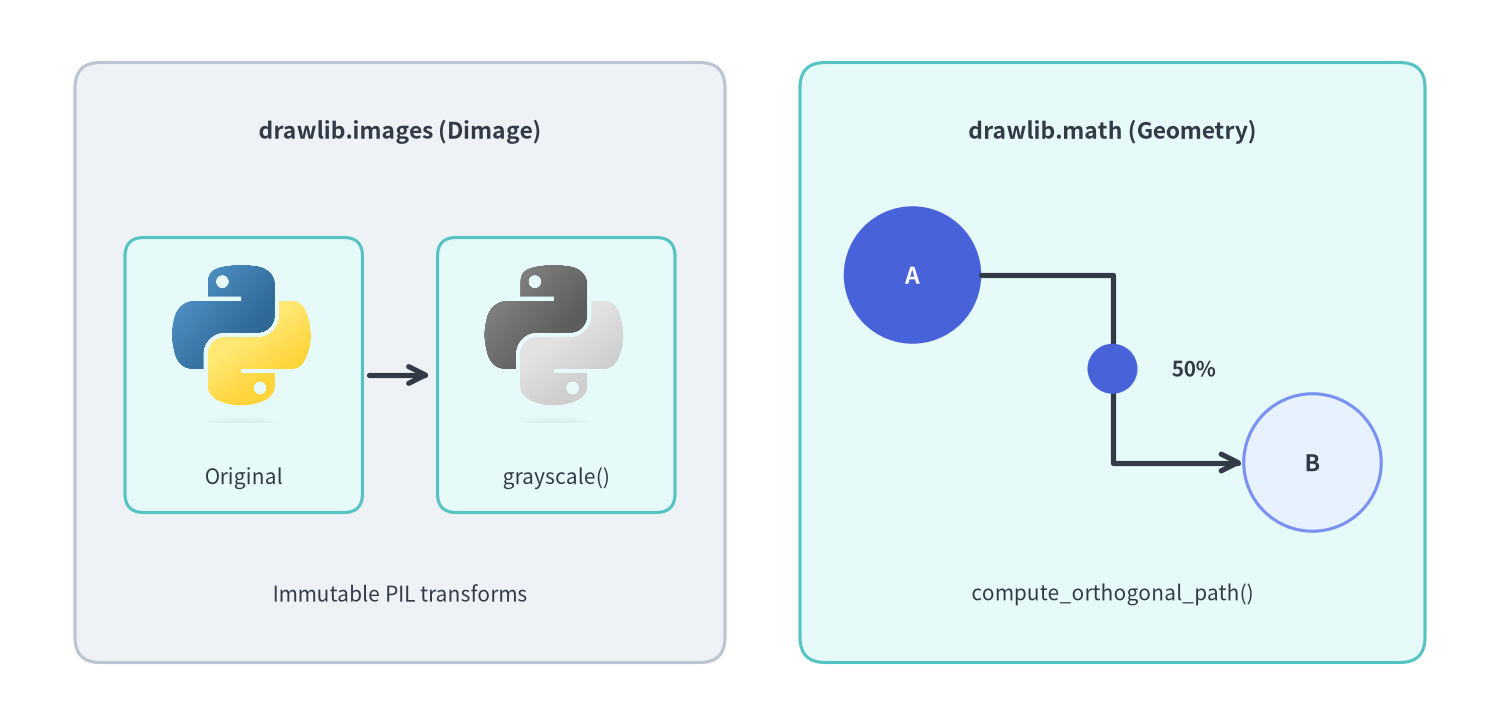
Source Code
from drawlib.canvas import save, setup
from drawlib.images import Dimage, image
from drawlib.lines import line, lines
from drawlib.math import compute_orthogonal_path, get_intermediate_path_point
from drawlib.shapes import circle, rectangle
from drawlib.styles import Colors, Styles
from drawlib.text import text

setup(width=120, height=58, dpi=150)

# Left panel: drawlib.images (Dimage pipeline)
rectangle((32, 29), width=52, height=48, style=Styles.Neutral.patch(shape_r=2.0))
text((32, 47.5), "drawlib.images (Dimage)", style=Styles.DarkBold.patch(text_size=11.0))

src_img = Dimage("_assets/python.png")
fx_img = src_img.grayscale()

rectangle((19.5, 28), width=19, height=22, style=Styles.SecondaryNeutral.patch(shape_r=1.5))
image((19.5, 30.5), width=11.5, image=src_img)
text((19.5, 19.8), "Original", style=Styles.Dark.patch(text_size=10.0))

line((29.5, 28), (34.5, 28), arrow_head="->", style=Styles.DarkBold)

rectangle((44.5, 28), width=19, height=22, style=Styles.SecondaryNeutral.patch(shape_r=1.5))
image((44.5, 30.5), width=11.5, image=fx_img)
text((44.5, 19.8), "grayscale()", style=Styles.Dark.patch(text_size=10.0))

text((32, 10.5), "Immutable PIL transforms", style=Styles.Dark.patch(text_size=10.0))

# Right panel: drawlib.math (Orthogonal routing + arc-length midpoint)
rectangle((89, 29), width=50, height=48, style=Styles.SecondaryNeutral.patch(shape_r=2.0))
text((89, 47.5), "drawlib.math (Geometry)", style=Styles.DarkBold.patch(text_size=11.0))

circle(
    (73, 36),
    radius=5.5,
    style=Styles.PrimaryFlat,
    text="A",
    text_style=Styles.WhiteBold.patch(text_size=11.0, text_color=Colors.White),
)
circle(
    (105, 21),
    radius=5.5,
    style=Styles.PrimaryNeutral,
    text="B",
    text_style=Styles.DarkBold.patch(text_size=11.0),
)

waypoints = compute_orthogonal_path((78.5, 36), (99.5, 21), start_side="right", end_side="left")
lines(waypoints, arrow_head="->", style=Styles.DarkBold)

mid_pt = get_intermediate_path_point(waypoints)
circle(mid_pt, radius=2.0, style=Styles.PrimaryFlat)
text((mid_pt[0] + 6.5, mid_pt[1]), "50%", style=Styles.DarkBold.patch(text_size=10.0))
text((89, 10.5), "compute_orthogonal_path()", style=Styles.Dark.patch(text_size=10.0))

save()
classDimage#
Immutable wrapper around PIL.Image.Image (drawlib.images) for reading, inspecting, saving, and chaining non-destructive geometric and color effects. Every transformation method returns a new Dimage instance without mutating the original.
class Dimage:
    def __init__(
        self,
        image: ExistingFilePath | Dimage | Image.Image,
        copy: bool = False,
    ) -> None: ...
Constructor Parameters#
| Parameter | Type | Default | Description |
|---|---|---|---|
image |
ExistingFilePath | Dimage | Image.Image |
Required | Relative/portable image file path (.png, .jpg, .webp, etc.), existing Dimage, or PIL.Image.Image. |
copy |
bool |
False |
Whether to defensively copy the input Dimage or PIL.Image.Image buffer on initialization. |
Public Methods (21 Methods)#
| Method | Signature | Description |
|---|---|---|
alpha |
(alpha: Alpha) -> Dimage |
Return a new Dimage with pixel opacity capped at alpha (0.0–1.0), preserving more-transparent pixels. |
blur |
() -> Dimage |
Return a new Dimage with a blur filter applied (ImageFilter.BLUR). |
brightness |
(brightness: PosFloat = 0.5) -> Dimage |
Return a new Dimage with scaled brightness (1.0 = original, < 1.0 = darker, > 1.0 = brighter). |
colorize |
(from_black_to: ColorType, from_white_to: ColorType, from_mid_to: ColorType | None = None) -> Dimage |
Map grayscale luminance from black to from_black_to and white to from_white_to (plus optional mid-tone from_mid_to), preserving alpha. |
copy |
() -> Dimage |
Return an independent copied Dimage. |
crop |
(x: PosInt, y: PosInt, width: PosInt, height: PosInt) -> Dimage |
Crop a (width, height) pixel region starting at (x, y) where (0, 0) is the bottom-left pixel of the image. |
fill |
(color: ColorType) -> Dimage |
Fill transparent pixels (alpha == 0) and blend semi-transparent pixels over solid color. |
flip |
() -> Dimage |
Flip the image vertically (top-to-bottom). |
get_image_size |
() -> tuple[int, int] |
Return pixel dimensions (width, height). |
get_pil_image |
() -> Image.Image |
Return a defensive copy of the underlying PIL.Image.Image. |
grayscale |
() -> Dimage |
Convert RGB channels to grayscale while preserving the alpha channel. |
invert |
() -> Dimage |
Invert RGB color channels while preserving the alpha channel. |
line_extraction |
() -> Dimage |
Extract dark contour edges on a white background while preserving alpha. |
make_transparent |
(color: str | Color | tuple | Literal['auto'] = 'auto', tolerance: int = 0) -> Dimage |
Convert matching background pixels ('auto' detects corner color) within tolerance (0–255) to transparent RGBA. |
mirror |
() -> Dimage |
Mirror the image horizontally (left-to-right). |
mosaic |
(block_size: PosInt = 8) -> Dimage |
Pixelate the image into square blocks of block_size pixels. |
posterize |
(num_colors: PosInt = 4) -> Dimage |
Quantize color channels to num_colors levels while preserving alpha. |
resize |
(width: PosInt, height: PosInt, resample: ImageResample = 'lanczos') -> Dimage |
Resize to (width, height) pixels ('nearest', 'box', 'bilinear', 'hamming', 'bicubic', 'lanczos'). |
save |
(file: FilePath, quality: ImageQuality = 95) -> None |
Write the image to file (creating parent directories if needed) with compression quality (0–100). |
sepia |
() -> Dimage |
Apply a warm sepia tone filter while preserving alpha. |
trim |
(color: str | Color | tuple | None = 'auto', tolerance: int = 0) -> Dimage |
Crop uniform border margins ('auto' detects corner color/alpha; None trims transparent borders). |
defget_dimage_from_code(code, timeout=None)#
Execute a Drawlib Python drawing snippet inside an isolated subprocess (ignoring any save() calls inside code) and return the rendered canvas as a Dimage without mutating the parent process's canvas or styles (drawlib.images).
def get_dimage_from_code(
    code: str,
    timeout: float | None = None,
) -> Dimage
| Parameter | Type | Default | Description |
|---|---|---|---|
code |
str |
Required | Self-contained Drawlib Python snippet calling setup(...) and drawing primitives. |
timeout |
float | None |
None |
Maximum child-process execution time in seconds (TimeoutError if exceeded; RuntimeError on script failure). |
defimage(xy, width, image, *, style=None)#
Place a raster image file, PIL.Image.Image, or Dimage onto the canvas (drawlib.images), preserving aspect ratio automatically from width. By default (halign="center", valign="center"), xy = (cx, cy) is the geometric center of the image.
def image(
    xy: Coordinate,
    width: PosFloat,
    image: FilePath | Image.Image | Dimage,
    *,
    style: Style | None = None,
) -> None
| Parameter | Type | Default | Description |
|---|---|---|---|
xy |
Coordinate |
Required | Anchor coordinate (x, y) (Center (cx, cy) by default; override via style.patch(halign=..., valign=...)). |
width |
PosFloat |
Required | Target horizontal width in canvas units (height scales automatically by aspect ratio). |
image |
FilePath | Image.Image | Dimage |
Required | Relative asset path (e.g. "_assets/python.png"), PIL.Image.Image, or Dimage. |
style |
Style | None |
None |
Optional Style controlling alpha, angle, halign, valign, image_tint_color, and image_border_* (image_border_width, image_border_color, image_border_style). |
typeRoutingType#
Literal type alias in drawlib.math selecting straight-line or Manhattan right-angle connector generation in compute_orthogonal_path().
RoutingType = Literal["direct", "orthogonal"]
| Allowed Literal | Description |
|---|---|
'direct' |
Returns a 2-point straight segment [start_pt, end_pt]. |
'orthogonal' |
Generates horizontal/vertical right-angled Manhattan waypoints respecting start_side and end_side. |
typeSide#
Literal type alias in drawlib.math specifying which boundary edge a connector exits or enters on a node.
Side = Literal["left", "right", "top", "bottom"]
| Allowed Literal | Description |
|---|---|
'left' / 'right' / 'top' / 'bottom' |
Outward cardinal direction at start_pt or inward cardinal approach side at end_pt. |
defcompute_orthogonal_path(start_pt, end_pt, ...)#
Compute an ordered list of 2D polyline waypoints connecting start_pt to end_pt via right-angled Manhattan segments or a direct segment (drawlib.math). Pass the returned list directly to lines() or lines_curved().
def compute_orthogonal_path(
    start_pt: tuple[float, float],
    end_pt: tuple[float, float],
    start_side: Side = "right",
    end_side: Side = "left",
    routing: RoutingType = "orthogonal",
    offset: float = 3.0,
) -> list[tuple[float, float]]
| Parameter | Type | Default | Description |
|---|---|---|---|
start_pt |
tuple[float, float] |
Required | Starting port coordinate (x1, y1). |
end_pt |
tuple[float, float] |
Required | Ending port coordinate (x2, y2). |
start_side |
Side |
'right' |
Node boundary side from which the path exits ('left', 'right', 'top', 'bottom'). |
end_side |
Side |
'left' |
Node boundary side into which the path enters ('left', 'right', 'top', 'bottom'). |
routing |
RoutingType |
'orthogonal' |
'orthogonal' for right-angled turns or 'direct' for a 2-point segment. |
offset |
float |
3.0 |
Minimum outward clearance distance in canvas units when routing around ports. |
defget_angle(xy1, xy2)#
Calculate the counter-clockwise angle in degrees ([0.0, 360.0)) of the vector from xy1 to xy2 relative to the positive X-axis (0° = right, 90° = up) (drawlib.math).
def get_angle(
    xy1: Coordinate,
    xy2: Coordinate,
) -> Angle
| Parameter | Type | Default | Description |
|---|---|---|---|
xy1 |
Coordinate |
Required | Origin point (x1, y1). |
xy2 |
Coordinate |
Required | Target point (x2, y2). |
defget_center_and_size(xys)#
Compute the geometric bounding-box center (cx, cy) and dimensions (width, height) enclosing a non-empty sequence of 2D coordinates (drawlib.math). Ideal for sizing dynamic cluster boundary rectangles around nodes.
def get_center_and_size(
    xys: Coordinates,
) -> tuple[Coordinate, Coordinate]
| Parameter | Type | Default | Description |
|---|---|---|---|
xys |
Coordinates |
Required | Non-empty sequence of (x, y) points. Returns ((center_x, center_y), (width, height)) (raises ValueError if empty). |
defget_distance(xy1, xy2)#
Calculate the Euclidean distance $\sqrt{(x_2 - x_1)^2 + (y_2 - y_1)^2}$ between two 2D points (drawlib.math).
def get_distance(
    xy1: Coordinate,
    xy2: Coordinate,
) -> float
| Parameter | Type | Default | Description |
|---|---|---|---|
xy1 |
Coordinate |
Required | First point (x1, y1). |
xy2 |
Coordinate |
Required | Second point (x2, y2). |
defget_intermediate_path_point(xys)#
Calculate the exact 50% total-arc-length midpoint (mx, my) along a multi-segment polyline xys (drawlib.math). Equivalent to get_intermediate_path_points(xys, num=1)[0].
def get_intermediate_path_point(
    xys: Coordinates,
) -> Coordinate
| Parameter | Type | Default | Description |
|---|---|---|---|
xys |
Coordinates |
Required | Polyline trajectory with 2 or more (x, y) coordinates (raises ValueError if < 2 points). |
defget_intermediate_path_points(xys, num=1, *, include_ends=False)#
Sample num evenly spaced coordinates by cumulative arc length along a multi-segment polyline xys (drawlib.math). Useful for placing badges or animating moving packets along L/U-shaped routes.
def get_intermediate_path_points(
    xys: Coordinates,
    num: int = 1,
    *,
    include_ends: bool = False,
) -> Coordinates
| Parameter | Type | Default | Description |
|---|---|---|---|
xys |
Coordinates |
Required | Polyline trajectory with >= 2 (x, y) coordinates. |
num |
int |
1 |
Number of interior sample points (>= 1), dividing total path length into num + 1 equal intervals. |
include_ends |
bool |
False |
When True, prepends xys[0] and appends xys[-1] (num + 2 total coordinates). |
defget_intermediate_paths(xys, num=1, *, include_ends=False)#
Generate progressive partial prefix polylines along xys divided into num + 1 equal arc-length steps (drawlib.math). Every returned sub-path starts at xys[0], preserves intermediate corners reached so far, and contains at least 2 points for direct use in lines(), lines_curved(), or arrow_polyline().
def get_intermediate_paths(
    xys: Coordinates,
    num: int = 1,
    *,
    include_ends: bool = False,
) -> list[Coordinates]
| Parameter | Type | Default | Description |
|---|---|---|---|
xys |
Coordinates |
Required | Full polyline trajectory with >= 2 (x, y) coordinates. |
num |
int |
1 |
Number of partial interior prefix paths to generate (>= 1). |
include_ends |
bool |
False |
When True, appends the complete xys path as the final element (num + 1 paths). |
defget_intermediate_point(xy1, xy2)#
Calculate the 50% linear midpoint ((x1 + x2) / 2, (y1 + y2) / 2) between xy1 and xy2 (drawlib.math).
def get_intermediate_point(
    xy1: Coordinate,
    xy2: Coordinate,
) -> Coordinate
| Parameter | Type | Default | Description |
|---|---|---|---|
xy1 |
Coordinate |
Required | Start coordinate (x1, y1). |
xy2 |
Coordinate |
Required | End coordinate (x2, y2). |
defget_intermediate_points(xy1, xy2, num=1, *, include_ends=False)#
Divide the straight segment from xy1 to xy2 into num + 1 equal intervals and return the num interior coordinates (drawlib.math).
def get_intermediate_points(
    xy1: Coordinate,
    xy2: Coordinate,
    num: int = 1,
    *,
    include_ends: bool = False,
) -> Coordinates
| Parameter | Type | Default | Description |
|---|---|---|---|
xy1 |
Coordinate |
Required | Start coordinate (x1, y1). |
xy2 |
Coordinate |
Required | End coordinate (x2, y2). |
num |
int |
1 |
Number of interior points (>= 1). |
include_ends |
bool |
False |
When True, includes xy1 first and xy2 last (num + 2 points). |
defget_point_on_ellipse(center, width, height, angle)#
Compute the exact boundary coordinate (x, y) on an axis-aligned ellipse centered at center = (cx, cy) with diameters (width, height) at polar angle angle degrees (drawlib.math).
def get_point_on_ellipse(
    center: Coordinate,
    width: float,
    height: float,
    angle: Angle,
) -> Coordinate
| Parameter | Type | Default | Description |
|---|---|---|---|
center |
Coordinate |
Required | Ellipse center (cx, cy). |
width |
float |
Required | Full horizontal width (2 * rx). |
height |
float |
Required | Full vertical height (2 * ry). |
angle |
Angle |
Required | Counter-clockwise angle in degrees (0° = right, 90° = top). |
defget_rotated_path_points(path_points, center, angle)#
Rotate a PathPoints sequence (including straight vertices and nested quadratic/cubic Bézier control-point tuples) counter-clockwise around center by angle degrees (drawlib.math).
def get_rotated_path_points(
    path_points: PathPoints,
    center: Coordinate,
    angle: Angle,
) -> PathPoints
| Parameter | Type | Default | Description |
|---|---|---|---|
path_points |
PathPoints |
Required | Mixed straight and Bézier path points as accepted by shape() or lines_bezier(). |
center |
Coordinate |
Required | Pivot coordinate (cx, cy) for rotation. |
angle |
Angle |
Required | Counter-clockwise rotation angle in degrees. |
defget_rotated_points(xys, center, angle)#
Rotate a list of 2D coordinates xys counter-clockwise around center by angle degrees (drawlib.math).
def get_rotated_points(
    xys: Coordinates,
    center: Coordinate,
    angle: Angle,
) -> Coordinates
| Parameter | Type | Default | Description |
|---|---|---|---|
xys |
Coordinates |
Required | Sequence of (x, y) points to rotate. |
center |
Coordinate |
Required | Pivot coordinate (cx, cy) for rotation. |
angle |
Angle |
Required | Counter-clockwise rotation angle in degrees. |
defminus_2points(xy1, xy2)#
Subtract xy2 from xy1 component-wise, returning (x1 - x2, y1 - y2) (drawlib.math).
def minus_2points(
    xy1: Coordinate,
    xy2: Coordinate,
) -> Coordinate
| Parameter | Type | Default | Description |
|---|---|---|---|
xy1 |
Coordinate |
Required | Minuend coordinate (x1, y1). |
xy2 |
Coordinate |
Required | Subtrahend coordinate (x2, y2). |
defplus_2points(xy1, xy2)#
Add two 2D coordinates component-wise, returning (x1 + x2, y1 + y2) (drawlib.math).
def plus_2points(
    xy1: Coordinate,
    xy2: Coordinate,
) -> Coordinate
| Parameter | Type | Default | Description |
|---|---|---|---|
xy1 |
Coordinate |
Required | First coordinate (x1, y1). |
xy2 |
Coordinate |
Required | Second coordinate / offset vector (x2, y2). |
defrotate_point(xy, angle, center=(0.0, 0.0))#
Rotate a single 2D coordinate xy counter-clockwise by angle degrees around center (drawlib.math).
def rotate_point(
    xy: Coordinate,
    angle: Angle,
    center: Coordinate = (0.0, 0.0),
) -> Coordinate
| Parameter | Type | Default | Description |
|---|---|---|---|
xy |
Coordinate |
Required | Point (x, y) to rotate. |
angle |
Angle |
Required | Counter-clockwise rotation angle in degrees. |
center |
Coordinate |
(0.0, 0.0) |
Rotation pivot (cx, cy). |