drawlib.images & drawlib.math(画像処理と幾何計算)
drawlib.images は image() によるラスター画像配置、不変ラッパー Dimage による非破壊フィルタ変換、get_dimage_from_code() による分離プロセスでのサブ図生成を提供します。drawlib.math は 2D ベクトル・外接矩形・楕円・回転・経路補間・直交ルーティング計算を提供します(from drawlib.images import Dimage, get_dimage_from_code, image / from drawlib.math import ...)。
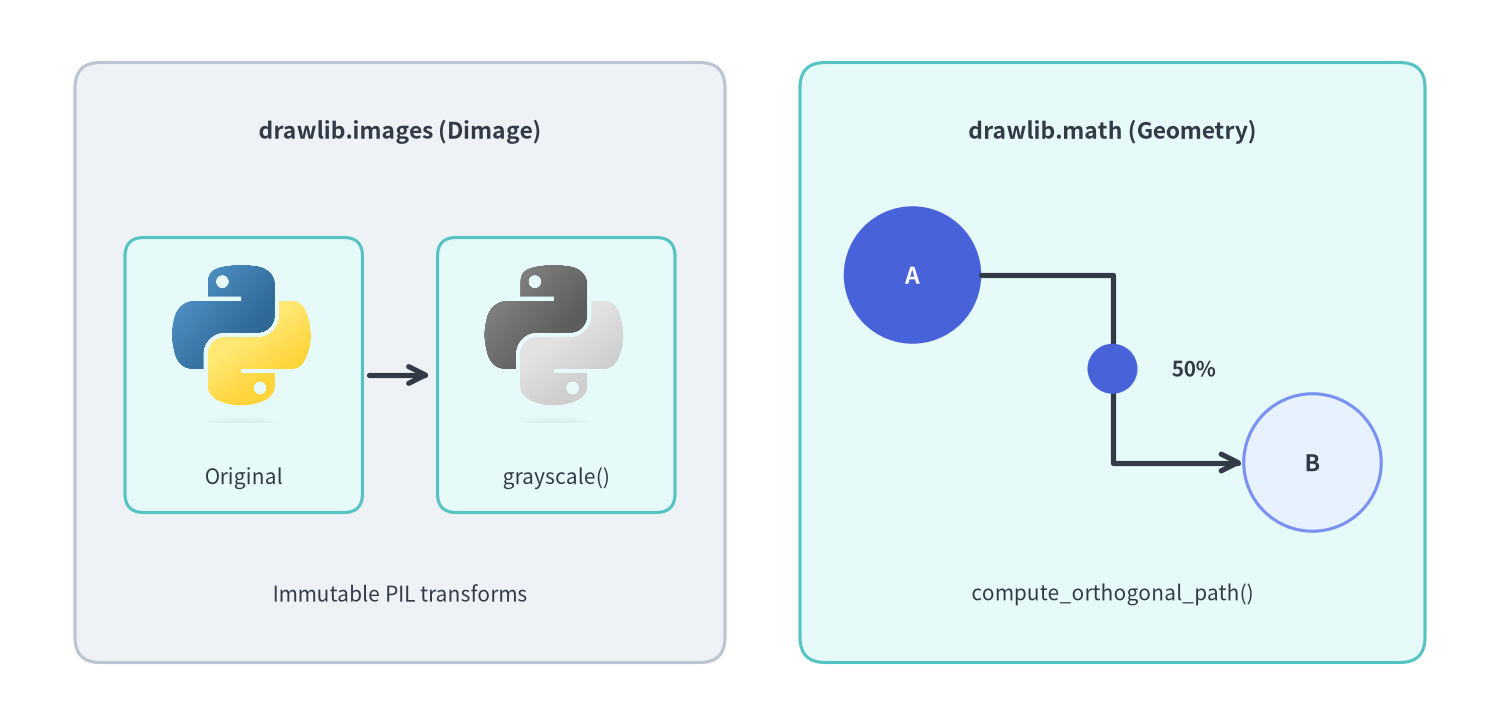
Source Code
from drawlib.canvas import save, setup
from drawlib.images import Dimage, image
from drawlib.lines import line, lines
from drawlib.math import compute_orthogonal_path, get_intermediate_path_point
from drawlib.shapes import circle, rectangle
from drawlib.styles import Colors, Styles
from drawlib.text import text

setup(width=120, height=58, dpi=150)

# Left panel: drawlib.images (Dimage pipeline)
rectangle((32, 29), width=52, height=48, style=Styles.Neutral.patch(shape_r=2.0))
text((32, 47.5), "drawlib.images (Dimage)", style=Styles.DarkBold.patch(text_size=11.0))

src_img = Dimage("_assets/python.png")
fx_img = src_img.grayscale()

rectangle((19.5, 28), width=19, height=22, style=Styles.SecondaryNeutral.patch(shape_r=1.5))
image((19.5, 30.5), width=11.5, image=src_img)
text((19.5, 19.8), "Original", style=Styles.Dark.patch(text_size=10.0))

line((29.5, 28), (34.5, 28), arrow_head="->", style=Styles.DarkBold)

rectangle((44.5, 28), width=19, height=22, style=Styles.SecondaryNeutral.patch(shape_r=1.5))
image((44.5, 30.5), width=11.5, image=fx_img)
text((44.5, 19.8), "grayscale()", style=Styles.Dark.patch(text_size=10.0))

text((32, 10.5), "Immutable PIL transforms", style=Styles.Dark.patch(text_size=10.0))

# Right panel: drawlib.math (Orthogonal routing + arc-length midpoint)
rectangle((89, 29), width=50, height=48, style=Styles.SecondaryNeutral.patch(shape_r=2.0))
text((89, 47.5), "drawlib.math (Geometry)", style=Styles.DarkBold.patch(text_size=11.0))

circle(
    (73, 36),
    radius=5.5,
    style=Styles.PrimaryFlat,
    text="A",
    text_style=Styles.WhiteBold.patch(text_size=11.0, text_color=Colors.White),
)
circle(
    (105, 21),
    radius=5.5,
    style=Styles.PrimaryNeutral,
    text="B",
    text_style=Styles.DarkBold.patch(text_size=11.0),
)

waypoints = compute_orthogonal_path((78.5, 36), (99.5, 21), start_side="right", end_side="left")
lines(waypoints, arrow_head="->", style=Styles.DarkBold)

mid_pt = get_intermediate_path_point(waypoints)
circle(mid_pt, radius=2.0, style=Styles.PrimaryFlat)
text((mid_pt[0] + 6.5, mid_pt[1]), "50%", style=Styles.DarkBold.patch(text_size=10.0))
text((89, 10.5), "compute_orthogonal_path()", style=Styles.Dark.patch(text_size=10.0))

save()
classDimage#
PIL.Image.Image をラップし、画像の読み込み・サイズ取得・保存・非破壊エフェクト処理をメソッドチェーンで提供する不変(イミュータブル)クラスです(drawlib.images)。すべての変換メソッドは元の Dimage を変更せず、新しい Dimage インスタンスを返します。
class Dimage:
    def __init__(
        self,
        image: ExistingFilePath | Dimage | Image.Image,
        copy: bool = False,
    ) -> None: ...
コンストラクタ引数#
| 引数 | 型 | デフォルト | 説明 |
|---|---|---|---|
image |
ExistingFilePath | Dimage | Image.Image |
必須 | 相対画像ファイルパス(.png, .jpg, .webp 等)、既存の Dimage、または PIL.Image.Image。 |
copy |
bool |
False |
初期化時に入力画像バッファの防御的コピーを作成するかどうか。 |
公開メソッド一覧(全 21 メソッド)#
| メソッド | シグネチャ | 説明 |
|---|---|---|
alpha |
(alpha: Alpha) -> Dimage |
ピクセル不透明度の上限を alpha(0.0〜1.0)に制限した新しい Dimage を返します(元の透過部は保持)。 |
blur |
() -> Dimage |
ぼかしフィルタ(ImageFilter.BLUR)を適用した新しい Dimage を返します。 |
brightness |
(brightness: PosFloat = 0.5) -> Dimage |
明度を倍率変更(1.0=元の明度、< 1.0=暗く、> 1.0=明るく)した新しい Dimage を返します。 |
colorize |
(from_black_to: ColorType, from_white_to: ColorType, from_mid_to: ColorType | None = None) -> Dimage |
輝度の黒を from_black_to、白を from_white_to(任意で中間調を from_mid_to)へマッピングして着色します(アルファ保持)。 |
copy |
() -> Dimage |
独立した複製 Dimage インスタンスを返します。 |
crop |
(x: PosInt, y: PosInt, width: PosInt, height: PosInt) -> Dimage |
画像の左下を (0, 0) として (x, y) から (width, height) ピクセル領域を切り出します。 |
fill |
(color: ColorType) -> Dimage |
透明ピクセル(alpha == 0)および半透明ピクセルの背景を指定色 color で塗りつぶします。 |
flip |
() -> Dimage |
画像を上下反転した新しい Dimage を返します。 |
get_image_size |
() -> tuple[int, int] |
ピクセル単位の画像サイズ (width, height) を返します。 |
get_pil_image |
() -> Image.Image |
内部の PIL.Image.Image のコピーを返します。 |
grayscale |
() -> Dimage |
アルファチャンネルを維持したままグレースケール化した新しい Dimage を返します。 |
invert |
() -> Dimage |
アルファチャンネルを維持したまま RGB 色を階調反転した新しい Dimage を返します。 |
line_extraction |
() -> Dimage |
白背景上に輪郭線を抽出した新しい Dimage を返します。 |
make_transparent |
(color: str | Color | tuple | Literal['auto'] = 'auto', tolerance: int = 0) -> Dimage |
背景色('auto' で四隅から自動検出)との色差が tolerance(0〜255)以内のピクセルを透明化します。 |
mirror |
() -> Dimage |
画像を左右反転(ミラーリング)した新しい Dimage を返します。 |
mosaic |
(block_size: PosInt = 8) -> Dimage |
block_size ピクセル四方のモザイク処理を適用した新しい Dimage を返します。 |
posterize |
(num_colors: PosInt = 4) -> Dimage |
各チャンネルの階調数を num_colors 段階へポスタリゼーションします(アルファ保持)。 |
resize |
(width: PosInt, height: PosInt, resample: ImageResample = 'lanczos') -> Dimage |
(width, height) ピクセルへリサイズします(補間法: 'nearest', 'box', 'bilinear', 'hamming', 'bicubic', 'lanczos')。 |
save |
(file: FilePath, quality: ImageQuality = 95) -> None |
必要に応じて親ディレクトリを作成し、圧縮品質 quality(0〜100)で file に保存します。 |
sepia |
() -> Dimage |
アルファチャンネルを維持したままセピア調フィルタを適用します。 |
trim |
(color: str | Color | tuple | None = 'auto', tolerance: int = 0) -> Dimage |
周囲の余白を自動トリミングします('auto' は四隅の色/透明を自動判定、None は透明余白のみ除去)。 |
defget_dimage_from_code(code, timeout=None)#
分離された子プロセス内で Drawlib の Python 描画コード文字列を実行し(コード内の save() は自動的に無視されます)、親プロセスのキャンバス状態やスタイル設定に一切影響を与えずにレンダリング結果を Dimage として取得します(drawlib.images)。
def get_dimage_from_code(
    code: str,
    timeout: float | None = None,
) -> Dimage
| 引数 | 型 | デフォルト | 説明 |
|---|---|---|---|
code |
str |
必須 | setup(...) および描画処理を含む自己完結した Drawlib Python コード文字列。 |
timeout |
float | None |
None |
サブプロセス実行の最大秒数(超過時は TimeoutError、実行失敗時は RuntimeError)。 |
defimage(xy, width, image, *, style=None)#
画像ファイルパス・PIL.Image.Image・Dimage を縦横比を維持したままキャンバス上に配置します(drawlib.images)。デフォルト(halign="center", valign="center")では xy = (cx, cy) が画像の中心アンカーとなります。
def image(
    xy: Coordinate,
    width: PosFloat,
    image: FilePath | Image.Image | Dimage,
    *,
    style: Style | None = None,
) -> None
| 引数 | 型 | デフォルト | 説明 |
|---|---|---|---|
xy |
Coordinate |
必須 | 配置アンカー座標 (x, y)(デフォルトは中心 (cx, cy)。style.patch(halign=..., valign=...) で変更可)。 |
width |
PosFloat |
必須 | キャンバス単位での画像幅(高さは元画像のアスペクト比から自動算出)。 |
image |
FilePath | Image.Image | Dimage |
必須 | 相対ファイルパス(例: "_assets/python.png")、PIL.Image.Image、または Dimage。 |
style |
Style | None |
None |
不透明度 alpha、回転 angle、位置揃え、背景塗り image_tint_color、枠線 image_border_* を制御する Style。 |
typeRoutingType#
compute_orthogonal_path() における経路探索モードを表す drawlib.math のリテラル型エイリアスです。
RoutingType = Literal["direct", "orthogonal"]
| 指定可能なリテラル値 | 説明 |
|---|---|
'direct' |
始点と終点を直線で結ぶ 2 点リスト [start_pt, end_pt] を返します。 |
'orthogonal' |
start_side と end_side に従い水平・垂直セグメントで構成される直角(マンハッタン)経路を生成します。 |
typeSide#
ノード境界からの出発辺・到着辺を表す drawlib.math のリテラル型エイリアスです。
Side = Literal["left", "right", "top", "bottom"]
| 指定可能なリテラル値 | 説明 |
|---|---|
'left' / 'right' / 'top' / 'bottom' |
start_pt から外向きに出る辺、または end_pt へ外側から入る辺の方向。 |
defcompute_orthogonal_path(start_pt, end_pt, ...)#
始点 start_pt と終点 end_pt の出入り方向に基づき、直角(マンハッタン)または直線の 2D ポリライン頂点リストを算出します(drawlib.math)。戻り値はそのまま lines() や lines_curved() に渡せます。
def compute_orthogonal_path(
    start_pt: tuple[float, float],
    end_pt: tuple[float, float],
    start_side: Side = "right",
    end_side: Side = "left",
    routing: RoutingType = "orthogonal",
    offset: float = 3.0,
) -> list[tuple[float, float]]
| 引数 | 型 | デフォルト | 説明 |
|---|---|---|---|
start_pt |
tuple[float, float] |
必須 | 出発ポート座標 (x1, y1)。 |
end_pt |
tuple[float, float] |
必須 | 到着ポート座標 (x2, y2)。 |
start_side |
Side |
'right' |
出発ノードから線が出る辺('left', 'right', 'top', 'bottom')。 |
end_side |
Side |
'left' |
到着ノードへ線が入る辺('left', 'right', 'top', 'bottom')。 |
routing |
RoutingType |
'orthogonal' |
'orthogonal'(直角折れ線)または 'direct'(2 点直線)。 |
offset |
float |
3.0 |
回り込みルーティング時にポートから外側へ確保するクリアランス距離。 |
defget_angle(xy1, xy2)#
点 xy1 から点 xy2 へ向かうベクトルの角度を、X 軸正方向(右=0°、上=90°)基準の反時計回り度数法 [0.0, 360.0) で算出します(drawlib.math)。
def get_angle(
    xy1: Coordinate,
    xy2: Coordinate,
) -> Angle
| 引数 | 型 | デフォルト | 説明 |
|---|---|---|---|
xy1 |
Coordinate |
必須 | 基準となる始点座標 (x1, y1)。 |
xy2 |
Coordinate |
必須 | 対象となる終点座標 (x2, y2)。 |
defget_center_and_size(xys)#
複数の 2D 座標群 xys を囲む外接矩形(バウンディングボックス)の中心座標 (cx, cy) とサイズ (width, height) を算出します(drawlib.math)。複数ノードを囲むグループ枠の自動計算に便利です。
def get_center_and_size(
    xys: Coordinates,
) -> tuple[Coordinate, Coordinate]
| 引数 | 型 | デフォルト | 説明 |
|---|---|---|---|
xys |
Coordinates |
必須 | 1 点以上の (x, y) 座標リスト。戻り値は ((center_x, center_y), (width, height))(空リスト時は ValueError)。 |
defget_distance(xy1, xy2)#
2 点 xy1・xy2 間のユークリッド距離 $\sqrt{(x_2 - x_1)^2 + (y_2 - y_1)^2}$ を算出します(drawlib.math)。
def get_distance(
    xy1: Coordinate,
    xy2: Coordinate,
) -> float
| 引数 | 型 | デフォルト | 説明 |
|---|---|---|---|
xy1 |
Coordinate |
必須 | 第 1 点 (x1, y1)。 |
xy2 |
Coordinate |
必須 | 第 2 点 (x2, y2)。 |
defget_intermediate_path_point(xys)#
複数セグメントからなる折れ線経路 xys の総経路長(弧長)におけるちょうど 50% の中間点座標 (mx, my) を算出します(drawlib.math)。get_intermediate_path_points(xys, num=1)[0] の簡易ラッパーです。
def get_intermediate_path_point(
    xys: Coordinates,
) -> Coordinate
| 引数 | 型 | デフォルト | 説明 |
|---|---|---|---|
xys |
Coordinates |
必須 | 2 点以上の (x, y) からなる折れ線経路(2 点未満は ValueError)。 |
defget_intermediate_path_points(xys, num=1, *, include_ends=False)#
折れ線経路 xys の総経路長を num + 1 等分し、経路上に等間隔で並ぶ num 個の中間座標を返します(drawlib.math)。L 字・U 字経路上のラベル配置やパケット移動アニメーションに最適です。
def get_intermediate_path_points(
    xys: Coordinates,
    num: int = 1,
    *,
    include_ends: bool = False,
) -> Coordinates
| 引数 | 型 | デフォルト | 説明 |
|---|---|---|---|
xys |
Coordinates |
必須 | 2 点以上の (x, y) 折れ線経路。 |
num |
int |
1 |
生成する内部中間点の個数(>= 1)。 |
include_ends |
bool |
False |
True の場合、先頭に xys[0]、末尾に xys[-1] を含めた計 num + 2 点を返します。 |
defget_intermediate_paths(xys, num=1, *, include_ends=False)#
折れ線経路 xys の総経路長を num + 1 等分し、始点 xys[0] から各ステップの先端まで途中角を保持しながら段階的に伸びる部分ポリラインのリストを返します(drawlib.math)。各要素は必ず 2 点以上を含むため、lines()・lines_curved()・arrow_polyline() にそのまま渡せます。
def get_intermediate_paths(
    xys: Coordinates,
    num: int = 1,
    *,
    include_ends: bool = False,
) -> list[Coordinates]
| 引数 | 型 | デフォルト | 説明 |
|---|---|---|---|
xys |
Coordinates |
必須 | 2 点以上の (x, y) 折れ線経路。 |
num |
int |
1 |
生成する段階的部分経路の個数(>= 1)。 |
include_ends |
bool |
False |
True の場合、末尾に完全経路 xys を追加した計 num + 1 個の経路を返します。 |
defget_intermediate_point(xy1, xy2)#
2 点 xy1・xy2 を結ぶ線分の 50% 中点座標 ((x1 + x2) / 2, (y1 + y2) / 2) を算出します(drawlib.math)。
def get_intermediate_point(
    xy1: Coordinate,
    xy2: Coordinate,
) -> Coordinate
| 引数 | 型 | デフォルト | 説明 |
|---|---|---|---|
xy1 |
Coordinate |
必須 | 始点座標 (x1, y1)。 |
xy2 |
Coordinate |
必須 | 終点座標 (x2, y2)。 |
defget_intermediate_points(xy1, xy2, num=1, *, include_ends=False)#
2 点 xy1・xy2 間の線分を num + 1 等分する num 個の内部補間座標リストを算出します(drawlib.math)。
def get_intermediate_points(
    xy1: Coordinate,
    xy2: Coordinate,
    num: int = 1,
    *,
    include_ends: bool = False,
) -> Coordinates
| 引数 | 型 | デフォルト | 説明 |
|---|---|---|---|
xy1 |
Coordinate |
必須 | 始点座標 (x1, y1)。 |
xy2 |
Coordinate |
必須 | 終点座標 (x2, y2)。 |
num |
int |
1 |
生成する内部補間点の個数(>= 1)。 |
include_ends |
bool |
False |
True の場合、先頭に xy1、末尾に xy2 を含めた計 num + 2 点を返します。 |
defget_point_on_ellipse(center, width, height, angle)#
中心 center = (cx, cy)、水平幅 width、垂直高さ height の楕円周上における角度 angle(度)の境界座標 (x, y) を算出します(drawlib.math)。
def get_point_on_ellipse(
    center: Coordinate,
    width: float,
    height: float,
    angle: Angle,
) -> Coordinate
| 引数 | 型 | デフォルト | 説明 |
|---|---|---|---|
center |
Coordinate |
必須 | 楕円の中心座標 (cx, cy)。 |
width |
float |
必須 | 楕円の水平直径(2 * rx)。 |
height |
float |
必須 | 楕円の垂直直径(2 * ry)。 |
angle |
Angle |
必須 | X 軸正方向基準の反時計回り角度(度:0°=右、90°=上)。 |
defget_rotated_path_points(path_points, center, angle)#
直線頂点および 2 次/3 次ベジェ制御点タプルを含む PathPoints 列全体を、center を中心に反時計回りで angle 度回転させます(drawlib.math)。
def get_rotated_path_points(
    path_points: PathPoints,
    center: Coordinate,
    angle: Angle,
) -> PathPoints
| 引数 | 型 | デフォルト | 説明 |
|---|---|---|---|
path_points |
PathPoints |
必須 | shape() や lines_bezier() で使用するパス頂点・制御点リスト。 |
center |
Coordinate |
必須 | 回転中心の座標 (cx, cy)。 |
angle |
Angle |
必須 | 反時計回りの回転角度(度)。 |
defget_rotated_points(xys, center, angle)#
2D 座標リスト xys の各点を、center を中心として反時計回りに angle 度回転させた新しい座標リストを返します(drawlib.math)。
def get_rotated_points(
    xys: Coordinates,
    center: Coordinate,
    angle: Angle,
) -> Coordinates
| 引数 | 型 | デフォルト | 説明 |
|---|---|---|---|
xys |
Coordinates |
必須 | 回転対象の (x, y) 座標リスト。 |
center |
Coordinate |
必須 | 回転中心の座標 (cx, cy)。 |
angle |
Angle |
必須 | 反時計回りの回転角度(度)。 |
defminus_2points(xy1, xy2)#
2 つの 2D 座標の要素ごとの差ベクトル (x1 - x2, y1 - y2) を返します(drawlib.math)。
def minus_2points(
    xy1: Coordinate,
    xy2: Coordinate,
) -> Coordinate
| 引数 | 型 | デフォルト | 説明 |
|---|---|---|---|
xy1 |
Coordinate |
必須 | 被減数座標 (x1, y1)。 |
xy2 |
Coordinate |
必須 | 減数座標 (x2, y2)。 |
defplus_2points(xy1, xy2)#
2 つの 2D 座標の要素ごとの和ベクトル (x1 + x2, y1 + y2) を返します(drawlib.math)。
def plus_2points(
    xy1: Coordinate,
    xy2: Coordinate,
) -> Coordinate
| 引数 | 型 | デフォルト | 説明 |
|---|---|---|---|
xy1 |
Coordinate |
必須 | 第 1 座標 (x1, y1)。 |
xy2 |
Coordinate |
必須 | 第 2 座標/オフセットベクトル (x2, y2)。 |
defrotate_point(xy, angle, center=(0.0, 0.0))#
単一の 2D 座標 xy を center を中心として反時計回りに angle 度回転させた座標を返します(drawlib.math)。
def rotate_point(
    xy: Coordinate,
    angle: Angle,
    center: Coordinate = (0.0, 0.0),
) -> Coordinate
| 引数 | 型 | デフォルト | 説明 |
|---|---|---|---|
xy |
Coordinate |
必須 | 回転対象の座標 (x, y)。 |
angle |
Angle |
必須 | 反時計回りの回転角度(度)。 |
center |
Coordinate |
(0.0, 0.0) |
回転中心 (cx, cy)。 |