drawlib.anim & drawlib.slide(アニメーションとスライド)
drawlib.anim は Animation フレームマネージャを通じてロスレスなマルチフレーム APNG(.png)および Animated WebP(.webp)イラストを生成し、drawlib.slide は 1920×1080 プレゼンテーションステージ用のヘルパー(current_slide・draw_page_number・draw_section_header)と HTML/編集可能 PowerPoint コンパイラ(build_slide・build_pptx)を提供します。
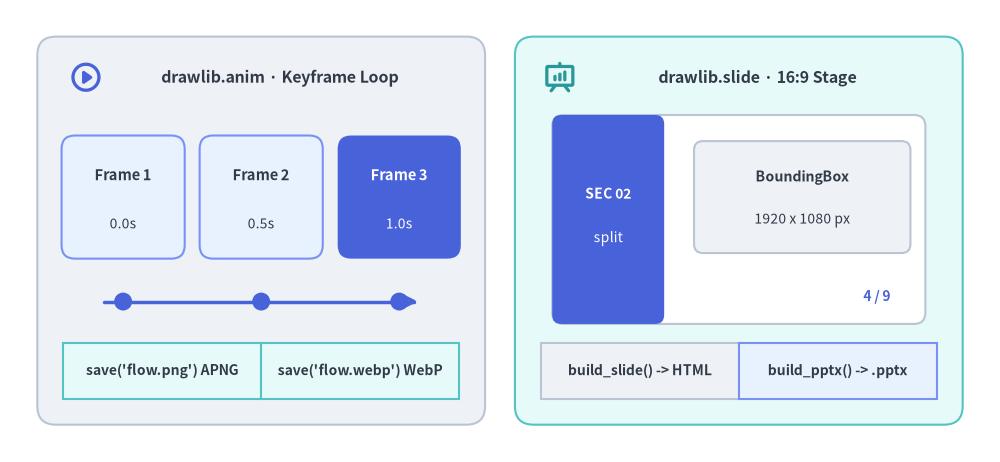 drawlib.anim のキーフレームタイムラインと drawlib.slide の 16:9 ステージ構成の概要図
Source Code
from drawlib.canvas import save, setup
from drawlib.icons import phosphor
from drawlib.lines import line
from drawlib.shapes import circle, rectangle
from drawlib.smartarts import BoxList
from drawlib.styles import Colors, Styles
from drawlib.text import text

setup(width=134, height=62)

# Left Panel: drawlib.anim Keyframe Timeline
rectangle((35, 31), width=60, height=52, style=Styles.Neutral.patch(shape_r=2.5))
phosphor.play_circle((11.5, 51.5), width=4.6, style=Styles.PrimaryBold)
text((37.5, 51.5), "drawlib.anim · Keyframe Loop", style=Styles.DarkBold.patch(text_size=11.5))

frames = [
    (16.5, "Frame 1", "0.0s", Styles.PrimaryNeutral, Styles.DarkBold, Styles.Dark),
    (35.0, "Frame 2", "0.5s", Styles.PrimaryNeutral, Styles.DarkBold, Styles.Dark),
    (53.5, "Frame 3", "1.0s", Styles.PrimaryFlat, Styles.WhiteBold, Styles.White),
]
for fx, title, ts, fst, tst, sst in frames:
    rectangle((fx, 35.5), width=16.5, height=16.5, style=fst.patch(shape_r=1.8))
    text((fx, 38.5), title, style=tst.patch(text_size=10.5))
    text((fx, 32.0), ts, style=sst.patch(text_size=10.0))

line((14, 21.5), (56, 21.5), arrow_head="->", style=Styles.PrimaryBold)
for fx in (16.5, 35.0, 53.5):
    circle((fx, 21.5), radius=1.2, style=Styles.PrimaryFlat)

anim_out = BoxList(style=Styles.SecondaryNeutral, text_style=Styles.DarkBold.patch(text_size=10.0))
anim_out.add("save('flow.png') APNG")
anim_out.add("save('flow.webp') WebP")
anim_out.draw(xy=(8.5, 8.5), box_width=26.5, box_height=7.5, direction="left")

# Right Panel: drawlib.slide 16:9 Presentation Stage
rectangle((99, 31), width=60, height=52, style=Styles.SecondaryNeutral.patch(shape_r=2.5))
phosphor.presentation_chart((75.0, 51.5), width=4.6, style=Styles.SecondaryBold)
text((101.5, 51.5), "drawlib.slide · 16:9 Stage", style=Styles.DarkBold.patch(text_size=11.5))

# Miniature 16:9 Stage (50 x 28)
rectangle(
    (99, 32.5),
    width=50,
    height=28,
    style=Styles.Neutral.patch(shape_fill_color=Colors.White, shape_r=1.5),
)
rectangle((81.5, 32.5), width=15, height=28, style=Styles.PrimaryFlat.patch(shape_r=1.2))
text((81.5, 36.0), "SEC 02", style=Styles.WhiteBold.patch(text_size=10.0))
text((81.5, 30.0), "split", style=Styles.White.patch(text_size=10.0))

rectangle((107.5, 35.5), width=29, height=15, style=Styles.Neutral.patch(line_style="dashed", shape_r=1.2))
text((107.5, 38.2), "BoundingBox", style=Styles.DarkBold.patch(text_size=10.2))
text((107.5, 32.5), "1920 x 1080 px", style=Styles.Dark.patch(text_size=10.0))
text((117.5, 22.2), "4 / 9", style=Styles.PrimaryBold.patch(text_size=10.0))

slide_out = BoxList(style=Styles.Neutral, text_style=Styles.DarkBold.patch(text_size=10.0))
slide_out.add("build_slide() -> HTML")
slide_out.add("build_pptx() -> .pptx", style=Styles.PrimaryNeutral)
slide_out.draw(xy=(72.5, 8.5), box_width=26.5, box_height=7.5, direction="left")

save()
classAnimation
drawlib.anim からインポートされるマルチフレーム・アニメーション管理クラスです。インスタンス化するとアクティブな Drawlib キャンバスへ自動登録され、通常の drawlib.canvas.save() を呼ぶだけで蓄積された全フレームをロスレスな APNG(.png / .apng)または Animated WebP(.webp)として書き出します。
from drawlib.anim import Animation

Animation(
    fps: float | None = None,
    frame_rate: float | None = None,
    loop: PosInt = 0,
) -> None
| パラメータ |
型 |
デフォルト |
説明 |
fps |
float | None |
None(10.0) |
1 秒あたりの再生フレームレート(> 0)。省略時は 10.0 fps になります。 |
frame_rate |
float | None |
None |
fps のエイリアス(両方指定された場合は fps が優先されます)。 |
loop |
PosInt(int >= 0) |
0 |
再生ループ回数(0 は無限ループ再生)。 |
プロパティとパブリックメソッド
| メンバー |
種別 |
シグネチャ/型 |
説明 |
fps |
property |
float |
有効なフレームレート(fps)を取得します。 |
frame_rate |
property |
float |
fps と同じ値を返すエイリアスプロパティです。 |
frame |
method |
(duration: float | None = None, clear: bool = True) -> Generator[None, None, None] |
1 フレームを定義・キャプチャするコンテキストマネージャ(with anim.frame(...):)です。clear=True で毎フレーム初期化、clear=False で前フレームの描画を保持する累積モードになります。duration は秒単位(None 時は 1 / fps)。 |
add_frame |
method |
(duration: float | None = None, clear: bool = True) -> None |
現在のキャンバス状態を即座にフレームとしてキャプチャし、clear=True の場合はキャプチャ後にキャンバス要素をクリアします。 |
classBoundingBox
drawlib.slide からインポートされる、1920×1080 プレゼンテーションステージ上の矩形領域を表すイミュータブルなデータクラスです。
from drawlib.slide import BoundingBox

BoundingBox(
    x: float,
    y: float,
    width: float,
    height: float,
) -> None
| 属性 |
型 |
デフォルト |
説明 |
x |
float |
(必須) |
左上コーナーの水平ステージ座標(ピクセル単位、0〜1920)。 |
y |
float |
(必須) |
左上コーナーの垂直ステージ座標(ピクセル単位、0〜1080)。 |
width |
float |
(必須) |
境界ボックスの幅(ステージピクセル単位)。 |
height |
float |
(必須) |
境界ボックスの高さ(ステージピクセル単位)。 |
classSlideContext
drawlib.slide からインポートされる、デッキのビルド中に現在の 1 始まりスライド番号と総スライド数を保持するイミュータブルなデータクラスです(contextvars.ContextVar に保持され、current_slide 経由で参照されます)。
from drawlib.slide import SlideContext

SlideContext(
    index: int = 1,
    total: int = 1,
) -> None
| 属性 |
型 |
デフォルト |
説明 |
index |
int |
1 |
ソート済みデッキ順序における現在のスライド番号(1 始まり)。 |
total |
int |
1 |
プレゼンテーションデッキ全体の総スライド数。 |
プロパティとパブリックメソッド
| メンバー |
種別 |
シグネチャ/型 |
説明 |
text |
property |
str |
標準フォーマットのスライド番号文字列 "{index} / {total}"(例: "4 / 9")。 |
format |
method |
(template: str = "{index} / {total}") -> str |
{index} と {total} プレースホルダを展開して任意の番号文字列を生成します。 |
defbuild_pptx(input_dir, output_file=None, *, ...)
i18n 対応の Markdown slide プロジェクトディレクトリ(drawlib.toml + <lang>/ スライド群)を、ネイティブ編集可能な 16:9(960×540 pt)Microsoft PowerPoint(<stem>_<lang>.pptx)へコンパイルします。ヘッドレス Chromium(playwright)で 1920×1080 ステージレイアウトを計測し、::: block カード・テキスト・リスト・表・コードブロック・::: note スピーカーノート・高 DPI 静的 PNG 図解を python-pptx で出力します(drawlib.tools からも再エクスポートされています)。
from drawlib.slide import build_pptx

build_pptx(
    input_dir: str,
    output_file: str | None = None,
    *,
    title: str | None = None,
    theme: str | None = None,
    dpi: int = 240,
    anim_frame: Literal["first", "last"] = "last",
    styles_path: str | None = None,
    utils_path: str | None = None,
    no_cache: bool = False,
    timestamp: bool = False,
) -> str
| パラメータ |
型 |
デフォルト |
説明 |
input_dir |
str |
(必須) |
drawlib.toml(type = "slide"、[i18n])と <lang>/ スライドを含むプロジェクトルートディレクトリ。 |
output_file |
str | None |
None |
出力先 .pptx のベースパスまたはディレクトリ(言語ごとに <stem>_<lang>.pptx を出力)。 |
title |
str | None |
None |
.pptx メタデータに設定するプレゼンテーションタイトルの上書き指定。 |
theme |
str | None |
None |
CSS テーマプリセットの上書き指定("google"、"default"、"google-dark"、"default-dark"、"monochrome")。 |
dpi |
int |
240 |
埋め込み drawlib 静的 PNG 図解のラスタライズ解像度(> 0)。 |
anim_frame |
Literal["first", "last"] |
"last" |
Animation を含むブロックから抽出する静的フレーム(先頭 "first" または最終 "last")。 |
styles_path |
str | None |
None |
カスタム styles.py スクリプトへのパス。 |
utils_path |
str | None |
None |
カスタム utils.py スクリプトへのパス。 |
no_cache |
bool |
False |
.drawlib/cache.db の SQLite ビルド画像キャッシュを無効化します。 |
timestamp |
bool |
False |
決定論的正規化の代わりに現在時刻を OpenXML メタデータへ記録します。 |
- 戻り値(
str): 生成されたデフォルト言語の <stem>_<default_lang>.pptx ファイルの絶対パス。
- 送出例外:
input_dir 不正・drawlib.toml 欠落・dpi <= 0・anim_frame 不正時は ValueError、Playwright/Chromium/python-pptx 実行失敗時は RuntimeError。
defbuild_slide(input_dir, output_dir=None, *, ...)
i18n 対応の Markdown slide プロジェクトディレクトリを、プレゼンタービュー(?presenter=1)・キーボード HUD・インライン SVG フォント自動バンドル・<canvas> アニメーション再生を備えた多言語 16:9 HTML スライドデッキへコンパイルします(drawlib.tools からも再エクスポートされています)。
from drawlib.slide import build_slide

build_slide(
    input_dir: str,
    output_dir: str | None = None,
    *,
    title: str | None = None,
    theme: str | None = None,
    image_format: str = "svg",
    dpi: int | None = None,
    force_image_format: bool = False,
    static_anim_frame: Literal["first", "last"] | None = None,
    styles_path: str | None = None,
    utils_path: str | None = None,
    no_cache: bool = False,
) -> str
| パラメータ |
型 |
デフォルト |
説明 |
input_dir |
str |
(必須) |
drawlib.toml(type = "slide"、[i18n])と <lang>/ スライド群を含むプロジェクトルートディレクトリ。 |
output_dir |
str | None |
None |
出力先ディレクトリ(省略時は <base>_html)。 |
title |
str | None |
None |
HTML <title> の上書き指定。 |
theme |
str | None |
None |
CSS テーマプリセットの上書き指定("google"、"default"、"google-dark"、"default-dark"、"monochrome")。 |
image_format |
str |
"svg" |
埋め込み drawlib ブロックのデフォルト画像形式("svg"、"webp"、"png")。 |
dpi |
int | None |
None |
ラスター画像出力時の DPI 上書き指定。 |
force_image_format |
bool |
False |
True の場合、明示指定されたブロック拡張子(.svg 等)も image_format へ強制変換します。 |
static_anim_frame |
Literal["first", "last"] | None |
None |
"first" または "last" を指定すると、マルチフレームアニメーションを静的 PNG 画像へ平坦化します。 |
styles_path |
str | None |
None |
カスタム styles.py スクリプトへのパス。 |
utils_path |
str | None |
None |
カスタム utils.py スクリプトへのパス。 |
no_cache |
bool |
False |
SQLite 画像ビルドキャッシュの読み書きを無効化します。 |
- 戻り値(
str): <output_dir>/<default_lang>/index.html の絶対パス(ルートの <output_dir>/index.html リダイレクトも同時に生成されます)。
- 送出例外:
input_dir 不正・drawlib.toml 欠落・多言語構造パリティ不一致時は ValueError。
constcurrent_slide
build_slide() や build_pptx() の実行中にアクティブな SlideContext を動的に参照するランタイムプロキシ(drawlib.slide の _CurrentSlideProxy インスタンス)です。スライドビルド外(単体スクリプトや drawlib show 実行時など)では安全に SlideContext(index=1, total=1) へフォールバックします。
from drawlib.slide import current_slide

counter_str: str = current_slide.text
custom_str: str = current_slide.format("Slide {index} of {total}")
| メンバー |
型 |
説明 |
current_slide.index |
int |
現在レンダリング中の 1 始まりスライド番号。 |
current_slide.total |
int |
アクティブロケールのデッキ全体の総スライド数。 |
current_slide.text |
str |
標準フォーマット文字列 "{index} / {total}"(str(current_slide) と同等)。 |
current_slide.format(template="{index} / {total}") |
str |
{index} と {total} プレースホルダを用いたカスタム文字列を返します。 |
defdraw_page_number(width=14, height=3, *, ...)
current_slide を用いて透明背景の標準ページ番号バッジ(デフォルト 14×3 キャンバス)を描画するヘルパー関数です。スライド右下の ::: block xy=(1700, 1010) width=140 height=30 ブロック内での利用に最適化されています。
from drawlib.slide import draw_page_number

draw_page_number(
    width: PosInt = 14,
    height: PosInt = 3,
    *,
    template: str = "{index} / {total}",
    style: Style | None = None,
    auto_setup: bool = True,
) -> None
| パラメータ |
型 |
デフォルト |
説明 |
width |
PosInt |
14 |
バッジキャンバスの幅(座標単位、> 0)。 |
height |
PosInt |
3 |
バッジキャンバスの高さ(座標単位、> 0)。 |
template |
str |
"{index} / {total}" |
{index} と {total} を含むページ番号テンプレート文字列。 |
style |
Style | None |
None |
テキスト用 Style の上書き指定(省略時は Styles.Muted.patch(text_size=65.0))。 |
auto_setup |
bool |
True |
描画前に自動で clear() と setup(width=width, height=height, alpha=0.0) を呼び出します。 |
4 種類のレイアウトバリアント("split"・"centered"・"banner"・"minimal")、トピックプレビューカード、進捗ドット、自動ページ番号を備えたフルブリード 16:9 セクション区切りスライド(192.0×108.0 キャンバス、::: block xy=(0, 0) width=1920 height=1080 向け)を描画します。
from drawlib.slide import draw_section_header

draw_section_header(
    section_num: PosInt,
    title: str,
    subtitle: str = "",
    topics: Sequence[str | tuple[str, str]] = (),
    total_sections: PosInt = 0,
    *,
    variant: Literal["split", "centered", "banner", "minimal"] = "split",
    section_label: str = "SECTION",
    badge_text: str | None = None,
    show_page_number: bool = True,
    show_decorations: bool = True,
    auto_setup: bool = True,
    left_panel_style: Style | None = None,
    right_panel_style: Style | None = None,
    divider_bar_style: Style | None = None,
    decoration_style: Style | None = None,
    section_label_style: Style | None = None,
    section_num_style: Style | None = None,
    active_dot_style: Style | None = None,
    completed_dot_style: Style | None = None,
    upcoming_dot_style: Style | None = None,
    badge_style: Style | None = None,
    badge_text_style: Style | None = None,
    title_style: Style | None = None,
    subtitle_style: Style | None = None,
    line_style: Style | None = None,
    topic_card_style: Style | None = None,
    topic_text_style: Style | None = None,
    topic_description_style: Style | None = None,
    topic_badge_style: Style | None = None,
    topic_badge_text_style: Style | None = None,
    page_number_style: Style | None = None,
) -> None
| パラメータ |
型 |
デフォルト |
説明 |
section_num |
PosInt |
(必須) |
1 始まりのセクション番号(>= 1、1 未満の場合は ValueError)。 |
title |
str |
(必須) |
スライド上に大きく表示するセクションタイトル。 |
subtitle |
str |
"" |
タイトル直下に表示するオプションの 1 行サブタイトル。 |
topics |
Sequence[str | tuple[str, str]] |
() |
CardList プレビューカードとして描画するトピック文字列または (title, description) タプルの列。 |
total_sections |
PosInt |
0 |
デッキ全体の総セクション数(> 0 の場合に進捗ドットと "Part X of Y" バッジを自動表示)。 |
variant |
Literal["split", "centered", "banner", "minimal"] |
"split" |
レイアウトパターン: "split"(左ダークパネル+右ニュートラル領域)、"centered"(中央バッジ+横並びカード)、"banner"(上部ダークバナー)、"minimal"(左アクセントライン付きライト構成)。 |
section_label |
str |
"SECTION" |
セクション番号の上または横に表示するラベル文字列。 |
badge_text |
str | None |
None |
自動生成される "Part X of Y" を上書きするカスタムバッジ文字列。 |
show_page_number |
bool |
True |
True の場合、右下に current_slide.text を描画します。 |
show_decorations |
bool |
True |
True の場合、背景に控えめな幾何学装飾円を描画します。 |
auto_setup |
bool |
True |
描画前に自動で clear() と setup(width=192, height=108) を呼び出します。 |
*_style |
Style | None |
None |
パネル(left_panel_style、right_panel_style)、区切り線・装飾(divider_bar_style、line_style、decoration_style)、進捗ドット(active_dot_style、completed_dot_style、upcoming_dot_style)、見出し・バッジ(section_label_style、section_num_style、badge_style、badge_text_style、title_style、subtitle_style)、トピックカード(topic_card_style、topic_text_style、topic_description_style、topic_badge_style、topic_badge_text_style)、および page_number_style の個別 Style 上書き指定。 |