drawlib.diagrams.architecture(アーキテクチャ構成図)
アイコン付きサービスカード、ネスト可能な境界グループ、直交バスルーティングを備えた、クラウド・インフラ・分散システム向けの宣言的アーキテクチャ構成図モジュールです。標準インポート: from drawlib.diagrams.architecture import ArchitectureDiagram, Edge, GcpIcon, Junction, Node, NodeGroup, PhosphorIcon。
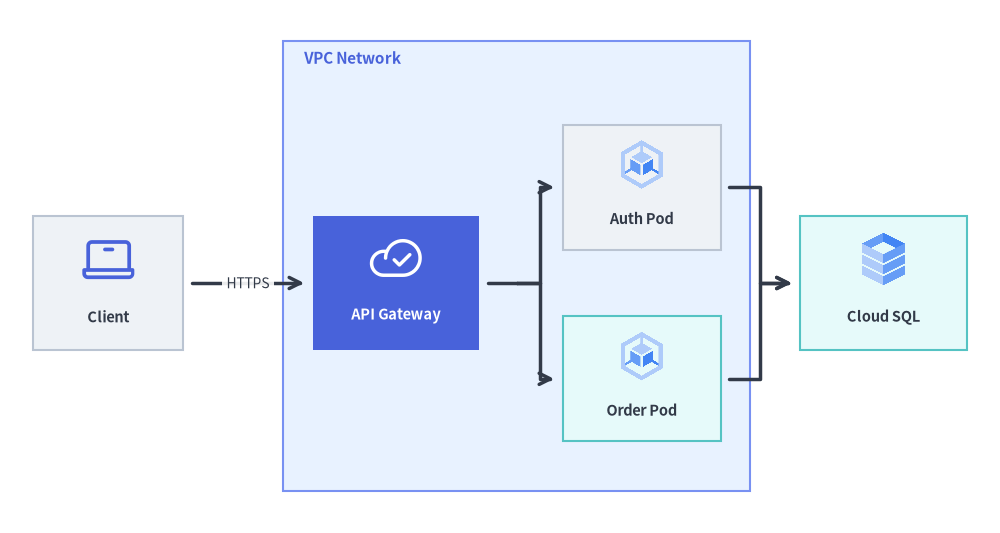 NodeGroup の階層境界と直交バス分岐を用いたクラウド VPC アーキテクチャ構成図
Source Code
from drawlib.canvas import save, setup
from drawlib.diagrams.architecture import ArchitectureDiagram, GcpIcon, Node, NodeGroup, PhosphorIcon
from drawlib.styles import Colors, Styles

setup(width=120, height=64)

d = ArchitectureDiagram(
    node_style=Styles.Primary,
    node_text_style=Styles.DarkBold.patch(text_size=10.5),
    edge_style=Styles.DarkBold,
    edge_text_style=Styles.Dark.patch(text_size=10.0),
    node_card_style=Styles.Neutral,
)

client = d.add(
    Node("Client", width=18, height=16, icon=PhosphorIcon.LAPTOP, icon_size=7.0),
    xy=(9.0, 25.0),
)

vpc = d.add(
    NodeGroup(
        title="VPC Network",
        width=56,
        height=54,
        padding=5.0,
        style=Styles.PrimaryNeutral.patch(line_style="dashed"),
        text_style=Styles.PrimaryBold.patch(text_size=11.0, halign="left"),
    ),
    xy=(30.0, 0.0),
)
gateway = vpc.add(
    Node(
        "API Gateway",
        width=20,
        height=16,
        icon=PhosphorIcon.CLOUD_CHECK,
        icon_size=6.5,
        style=Styles.White,
        text_style=Styles.WhiteBold.patch(text_color=Colors.White, text_size=10.5),
        card_style=Styles.PrimaryFlat,
    ),
    xy=(13.5, 25.0),
)
auth_pod = vpc.add(
    Node("Auth Pod", width=19, height=15, icon=GcpIcon.GOOGLE_KUBERNETES_ENGINE, icon_size=6.5),
    xy=(43.0, 36.5),
)
order_pod = vpc.add(
    Node(
        "Order Pod",
        width=19,
        height=15,
        icon=GcpIcon.GOOGLE_KUBERNETES_ENGINE,
        icon_size=6.5,
        card_style=Styles.SecondaryNeutral,
    ),
    xy=(43.0, 13.5),
)

db = d.add(
    Node("Cloud SQL", width=20, height=16, icon=GcpIcon.CLOUD_SQL, icon_size=7.0, card_style=Styles.SecondaryNeutral),
    xy=(102.0, 25.0),
)

d.connect(client, gateway, label="HTTPS", padding=1.0)
gateway.fork([auth_pod, order_pod], at_x=58.0, padding=1.0)
d.connect(auth_pod, db, padding=1.0)
d.connect(order_pod, db, padding=1.0)

d.draw(xy=(60.0, 32.0), align="center")
save()
classArchitectureDiagram
サービスノード、ネストされた境界グループ、ジャンクション(分岐・合流点)、およびエッジルーティングを統合管理するアーキテクチャ構成図のトップレベルコンテナです。
ArchitectureDiagram(
    *,
    node_style: Style,
    node_text_style: Style,
    edge_style: Style,
    edge_text_style: Style,
    node_card_style: Style | None = None,
    title: str = "",
    title_style: Style | None = None,
    width: float | None = None,
    height: float | None = None,
    style: Style | None = None,
) -> None
- 座標アンカー:
draw(xy=(0.0, 0.0), align="bottom_left") は図のローカル左下原点 (0.0, 0.0) をキャンバス座標 xy に配置します(align="center" の場合は図全体のバウンディングボックス中心を xy に配置)。自動トポロジ座標計算については ArchitectureGraph.get_layout() を参照してください。
コンストラクタ引数
| 引数 |
型 |
デフォルト |
説明 |
node_style |
Style |
(必須) |
ベクターアイコンの着色やフォールバック図形に適用される基本スタイル(キーワード専用)。 |
node_text_style |
Style |
(必須) |
ノードラベルおよびグループ見出しに適用される基本テキストスタイル(キーワード専用)。 |
edge_style |
Style |
(必須) |
接続エッジの線と矢印に適用される基本スタイル(キーワード専用)。 |
edge_text_style |
Style |
(必須) |
エッジラベルに適用される基本テキストスタイル(キーワード専用)。 |
node_card_style |
Style | None |
None |
Node カードのデフォルト背景・枠線スタイル(None の場合は背景透過)。 |
title |
str |
"" |
図の上部中央に描画される任意のタイトル文字列。 |
title_style |
Style | None |
None |
title 用の任意のテキストスタイル上書き。 |
width |
float | None |
None |
ローカル単位での固定幅(None の場合は登録要素から自動算出)。 |
height |
float | None |
None |
ローカル単位での固定高さ(None の場合は登録要素から自動算出)。 |
style |
Style | None |
None |
図全体を囲む外枠カードの任意の背景・枠線スタイル。 |
パブリックメソッド・プロパティ
| メンバー |
種別 |
シグネチャ |
説明 |
add |
method |
(self, item: ItemT, xy: tuple[float, float], *, show: bool | None = None) -> ItemT |
図のローカル座標 xy に Node(中心 xy)、NodeGroup(左下 xy)、または Junction を登録します。 |
add_edge |
method |
(self, edge: Edge, *, show: bool | None = None) -> Edge |
構築済みの Edge インスタンスを図に登録します。 |
connect |
method |
(self, start: Connectable, end: Connectable, label: str = "", arrow: ArrowType = "->", routing: RoutingType = "orthogonal", style: Style | None = None, text_style: Style | None = None, padding: PaddingType = 0.0, show: bool = True) -> Edge |
任意の接続可能要素(Node、NodeGroup、Junction)間に Edge を生成して登録します。 |
draw |
method |
(self, xy: tuple[float, float] = (0.0, 0.0), *, align: Literal["bottom_left", "center"] = "bottom_left", scale: PosFloat = 1.0) -> None |
アクティブなキャンバス上のアンカー xy にアーキテクチャ構成図を描画します。 |
edges |
property |
-> list[Edge] |
登録された Edge のリストを宣言順で返します。 |
get_size |
method |
(self) -> tuple[float, float] |
スケール適用前のローカル単位での図全体の (width, height) を返します。 |
items |
property |
-> list[Node | NodeGroup | Junction] |
図直下に登録されたトップレベル要素のリストを返します。 |
junction |
method |
(self, xy: tuple[float, float], *, show: bool = True) -> Junction |
ローカル座標 xy に面積ゼロの中継・分岐点 Junction を生成・登録します。 |
classNode
アーキテクチャ構成図内のサービス、アクター、コンピュートインスタンス、マネージドテスト・DB リソースを表すノードカード要素です。
Node(
    text: str = "",
    width: float = 20.0,
    height: float = 16.0,
    icon: IconType = None,
    icon_size: float = 8.0,
    style: Style | None = None,
    text_style: Style | None = None,
    card_style: Style | None = None,
    show: bool = True,
) -> None
- 座標アンカー: 中心
(cx, cy)。d.add(node, xy=(cx, cy)) では図ルート座標、group.add(node, xy=(lx, ly)) では親 NodeGroup の左下 (0, 0) からのグループ相対中心座標で指定します。
コンストラクタ引数
| 引数 |
型 |
デフォルト |
説明 |
text |
str |
"" |
カード下部に描画される表示ラベル(\n による複数行改行に対応)。 |
width |
float |
20.0 |
カードのバウンディングボックス幅(ローカル単位)。 |
height |
float |
16.0 |
カードのバウンディングボックス高さ(ローカル単位)。 |
icon |
IconType |
None |
34 種類のアイコン列挙型、アイコン描画関数(drawlib.icons.*)、CustomIcon、Dimage、PIL.Image.Image、または画像パス(str | Path)。 |
icon_size |
float |
8.0 |
描画されるアイコンの幅・高さ(ローカル単位)。 |
style |
Style | None |
None |
ベクターアイコン着色用のスタイル上書き(未指定時は diagram.node_style)。 |
text_style |
Style | None |
None |
text ラベル用のテキストスタイル上書き(未指定時は diagram.node_text_style)。 |
card_style |
Style | None |
None |
カード背景・枠線のスタイル上書き(未指定時は diagram.node_card_style)。 |
show |
bool |
True |
表示フラグ(False の場合、レイアウト座標を維持したままノードと接続エッジを非表示化)。 |
パブリックメソッド・プロパティ
| メンバー |
種別 |
シグネチャ |
説明 |
bottom |
property |
-> tuple[float, float] |
図ルート座標系におけるカード下辺中央のアンカー座標。 |
center |
property |
-> tuple[float, float] |
図ルート座標系におけるカード中心座標。 |
connect |
method |
(self, target: Connectable, label: str = "", arrow: ArrowType = "->", routing: RoutingType = "orthogonal", style: Style | None = None, padding: PaddingType = 0.0, show: bool = True) -> Edge |
このノードから target への Edge を生成し、親の図に登録します。 |
fork |
method |
(self, targets: list[Connectable], at_x: float | None = None, at_y: float | None = None, style: Style | None = None, padding: PaddingType = 0.0, show: bool = True) -> list[Edge] |
at_x または at_y に配置した直交 Junction を経由して複数の targets へファンアウト接続します。 |
get_absolute_xy |
method |
(self) -> tuple[float, float] |
ネストされた親 NodeGroup 階層を辿り、図ルート基準の絶対中心座標 (x, y) を算出します。 |
get_bounds |
method |
(self) -> tuple[float, float, float, float] |
ノード中心 (0, 0) 基準のローカル境界 (-width/2, -height/2, width/2, height/2) を返します。 |
get_size |
method |
(self) -> tuple[float, float] |
カードの (width, height) を返します。 |
left |
property |
-> tuple[float, float] |
図ルート座標系におけるカード左辺中央のアンカー座標。 |
right |
property |
-> tuple[float, float] |
図ルート座標系におけるカード右辺中央のアンカー座標。 |
top |
property |
-> tuple[float, float] |
図ルート座標系におけるカード上辺中央のアンカー座標。 |
xy |
property |
-> tuple[float, float] |
親コンテナへの登録時に指定された相対中心座標 (x, y)。 |
classNodeGroup
Node カード、Junction、およびネストされたサブグループを束ねる階層的境界コンテナです(クラウドリージョン、VPC、サブネット、Kubernetes クラスタ等の表現に最適)。
NodeGroup(
    title: str = "",
    width: float | None = None,
    height: float | None = None,
    padding: float = 5.0,
    style: Style | None = None,
    text_style: Style | None = None,
    show: bool = True,
) -> None
- 座標アンカー: 左下
(x0, y0)。group.add(child, xy=(lx, ly)) に渡す座標 (lx, ly) は、その group 自身の左下隅 (0, 0) を基準とするグループ相対座標になります(子要素が Node なら中心、ネストされた NodeGroup なら左下)。
コンストラクタ引数
| 引数 |
型 |
デフォルト |
説明 |
title |
str |
"" |
境界ボックス内の左上付近に描画されるグループ見出しラベル。 |
width |
float | None |
None |
境界ボックスの固定幅(None の場合は内包する子要素と padding から自動算出)。 |
height |
float | None |
None |
境界ボックスの固定高さ(None の場合は内包する子要素と padding から自動算出)。 |
padding |
float |
5.0 |
自動サイズ算出時に子要素の周囲に確保する内側余白。 |
style |
Style | None |
None |
境界矩形の背景・枠線スタイル(未指定時は破線ボーダー)。 |
text_style |
Style | None |
None |
title のテキストスタイル上書き(左揃えを維持する場合は halign="left" を併用)。 |
show |
bool |
True |
グループ枠とタイトルの表示フラグ(子要素は個別の show フラグに従います)。 |
パブリックメソッド・プロパティ
| メンバー |
種別 |
シグネチャ |
説明 |
add |
method |
(self, item: ItemT, xy: tuple[float, float], *, show: bool | None = None) -> ItemT |
グループ相対座標 xy に子要素(Node、ネストされた NodeGroup、Junction)を追加します。 |
bottom |
property |
-> tuple[float, float] |
図ルート座標系におけるグループ境界下辺の中点アンカー。 |
center |
property |
-> tuple[float, float] |
図ルート座標系におけるグループ境界の中心座標。 |
connect |
method |
(self, target: Connectable, label: str = "", arrow: ArrowType = "->", routing: RoutingType = "orthogonal", style: Style | None = None, padding: PaddingType = 0.0, show: bool = True) -> Edge |
このグループの外枠から target への Edge を生成・登録します。 |
get_bounds |
method |
(self) -> tuple[float, float, float, float] |
グループ左下 (0, 0) 基準のローカル境界 (min_x, min_y, max_x, max_y) を返します。 |
get_size |
method |
(self) -> tuple[float, float] |
グループ境界の視覚サイズ (width, height) を返します。 |
items |
property |
-> list[Node | NodeGroup | Junction] |
このグループ直下に登録された子要素のリストを返します。 |
left |
property |
-> tuple[float, float] |
図ルート座標系におけるグループ境界左辺の中点アンカー。 |
right |
property |
-> tuple[float, float] |
図ルート座標系におけるグループ境界右辺の中点アンカー。 |
top |
property |
-> tuple[float, float] |
図ルート座標系におけるグループ境界上辺の中点アンカー。 |
xy |
property |
-> tuple[float, float] |
親コンテナに対するグループの左下相対座標 (x, y)。 |
classEdge
2 つの接続可能要素(Node、NodeGroup、Junction)を結ぶ単方向・双方向・無方向の接続エッジです。
Edge(
    start: Connectable,
    end: Connectable,
    label: str = "",
    arrow: ArrowType = "->",
    routing: RoutingType = "orthogonal",
    style: Style | None = None,
    text_style: Style | None = None,
    padding: PaddingType = 0.0,
    show: bool = True,
) -> None
- 座標アンカー:
start と end の外周境界アンカーに自動接続されます。.points()、.via()、.add_point() に渡す中間ウェイポイントは図ルート座標系 (x, y) を使用します。
コンストラクタ引数
| 引数 |
型 |
デフォルト |
説明 |
start |
Node | NodeGroup | Junction |
(必須) |
始点となる接続可能要素。 |
end |
Node | NodeGroup | Junction |
(必須) |
終点となる接続可能要素。 |
label |
str |
"" |
エッジ経路上に描画されるプロトコル名や説明ラベル。 |
arrow |
Literal["->", "<-", "<->", "-"] |
"->" |
矢印マーカーの向き。 |
routing |
Literal["orthogonal", "direct", "curved"] |
"orthogonal" |
経路ルーティング方式("orthogonal" 直交折れ線、"direct" 直線、"curved" 曲線)。 |
style |
Style | None |
None |
線スタイルの任意上書き(未指定時は diagram.edge_style)。 |
text_style |
Style | None |
None |
ラベルテキストスタイルの任意上書き(未指定時は diagram.edge_text_style)。 |
padding |
float | tuple[float, float] |
0.0 |
要素境界とエッジ端点の間に設ける対称余白または (start_pad, end_pad)。 |
show |
bool |
True |
このエッジを描画するかどうか。 |
パブリックメソッド・プロパティ
| メンバー |
種別 |
シグネチャ |
説明 |
add_point |
method |
(self, xy: tuple[float, float]) -> Junction |
中間ウェイポイント xy を追加し、分岐・合流用の Junction を生成・登録して返します。 |
points |
method |
(self, waypoints: list[tuple[float, float]]) -> Edge |
明示的な中間ウェイポイント列 (x, y) を設定し、self を返します。 |
set_arrow |
method |
(self, arrow: ArrowType) -> Edge |
矢印マーカー("->"、"<-"、"<->"、"-")を更新し、self を返します。 |
set_label |
method |
(self, text: str, pos: float = 0.5) -> Edge |
エッジラベル text と経路上の正規化位置 pos(0.0〜1.0)を設定し、self を返します。 |
set_padding |
method |
(self, padding: PaddingType) -> Edge |
端点のクリアランス余白を更新し、self を返します。 |
set_style |
method |
(self, style: Style) -> Edge |
線の Style を上書きし、self を返します。 |
set_text_style |
method |
(self, text_style: Style) -> Edge |
エッジラベルの Style を上書きし、self を返します。 |
via |
method |
(self, *waypoints: tuple[float, float]) -> Edge |
.points(list(waypoints)) の可変長引数ショートハンドです。self を返します。 |
waypoints |
property |
-> list[tuple[float, float]] |
設定されている中間ウェイポイント座標 (x, y) のリストコピーを返します。 |
classJunction
アーキテクチャ構成図内でエッジの折れ曲がり制御や複数エッジの分岐・合流に用いる面積ゼロの接続ポイントです。
Junction(
    xy: tuple[float, float],
    *,
    show: bool = True,
) -> None
- 座標アンカー: 親コンテナ(
ArchitectureDiagram または NodeGroup)内の厳密な点座標 (x, y)。通常は d.junction(xy) または edge.add_point(xy) から生成します。
コンストラクタ引数
| 引数 |
型 |
デフォルト |
説明 |
xy |
tuple[float, float] |
(必須) |
ジャンクションのローカル座標 (x, y)。 |
show |
bool |
True |
このジャンクションを経由するエッジを表示するかどうか(キーワード専用)。 |
パブリックメソッド・プロパティ
| メンバー |
種別 |
シグネチャ |
説明 |
bottom |
property |
-> tuple[float, float] |
下側アンカー座標(ジャンクション自身の絶対座標 (x, y) と同一)。 |
center |
property |
-> tuple[float, float] |
中心アンカー座標(ジャンクション自身の絶対座標 (x, y) と同一)。 |
connect |
method |
(self, target: Connectable, label: str = "", arrow: ArrowType = "->", routing: RoutingType = "orthogonal", style: Style | None = None, padding: PaddingType = 0.0, show: bool = True) -> Edge |
このジャンクションから target への Edge を生成し、親の図に登録します。 |
get_bounds |
method |
(self) -> tuple[float, float, float, float] |
面積ゼロのローカル境界 (0.0, 0.0, 0.0, 0.0) を返します。 |
get_size |
method |
(self) -> tuple[float, float] |
視覚サイズ (0.0, 0.0) を返します。 |
left |
property |
-> tuple[float, float] |
左側アンカー座標(ジャンクション自身の絶対座標 (x, y) と同一)。 |
right |
property |
-> tuple[float, float] |
右側アンカー座標(ジャンクション自身の絶対座標 (x, y) と同一)。 |
top |
property |
-> tuple[float, float] |
上側アンカー座標(ジャンクション自身の絶対座標 (x, y) と同一)。 |
xy |
property |
-> tuple[float, float] |
親コンテナに対するローカル座標 (x, y)。 |
classCustomIcon
任意のラスター画像ファイル、Dimage オブジェクト、または PIL.Image.Image インスタンスをラップし、Node(..., icon=CustomIcon(...)) として利用可能にするアダプタクラスです。
CustomIcon(
    image: str | Path | Dimage | Image | CustomIcon,
) -> None
- 座標アンカー: ホストとなる
Node カード内のアイコンスロット中央に icon_size で自動配置されます。
コンストラクタ引数
| 引数 |
型 |
デフォルト |
説明 |
image |
str | Path | Dimage | Image | CustomIcon |
(必須) |
PNG/JPEG 画像パス、Dimage インスタンス、PIL.Image.Image、または既存の CustomIcon。 |
パブリックメソッド・プロパティ
| メンバー |
種別 |
シグネチャ |
説明 |
copy |
method |
(self) -> CustomIcon |
この CustomIcon の独立したディープコピーを返します。 |
dimage |
property |
-> Dimage |
内部画像バッファを保持する Dimage インスタンスを返します。 |
typeicons
CustomIcon、IconType、および全 34 種類の構成図アイコン列挙型をまとめて提供する再エクスポート・サブモジュール名前空間(drawlib.diagrams.architecture.icons)です。
from drawlib.diagrams.architecture import icons

# サブモジュール名前空間経由でのアクセス:
node = Node("Gateway", icon=icons.GcpIcon.API_GATEWAY)
- 座標アンカー: 該当なし(40 個のアイコン型およびヘルパーを再公開する名前空間モジュール)。
| 公開グループ |
公開シンボル |
説明 |
| アイコン列挙型 (34) |
icons.AiIcon .. icons.WorkspaceIcon |
Icon Enums (34 Suites) に一覧されている全 34 種類の StrEnum カタログ。 |
| カスタムラッパー |
icons.CustomIcon |
カスタム画像・ネスト図アイコン用の CustomIcon エイリアス。 |
| 型エイリアス・ヘルパー |
icons.IconType, icons.draw_node_icon |
Node(icon=...) が受け付ける Union 型エイリアスおよび内部描画ヘルパー。 |
enumIcon Enums (34 Suites)
Node(..., icon=<Enum>.<MEMBER>) で宣言的に指定可能な、全 34 種類の標準アイコン StrEnum クラス群です(drawlib.diagrams.architecture 直下および drawlib.diagrams.architecture.icons の双方から再エクスポートされています)。PhosphorIcon は node.style / diagram.node_style で任意の色に着色可能な単色ベクターフォントアイコンであり、残り 33 スイートは drawlib.icons のマルチカラー/パステル PNG アセットを描画します。