drawlib.tools(ビルド・キャッシュ・エージェント連携 API)
drawlib.tools は、drawlib CLI のバックエンドを担う遅延ロード式のプログラマティック Python 開発者 API(全 28 関数)です。多言語対応の HTML・Markdown・PDF・MS Word(.docx)・HTML スライド・MS PowerPoint(.pptx)のビルド、単一図解ブロックの抽出、プロジェクト/AI エージェント規約の雛形生成、リンク切れ検査、CSS テーマ合成、およびアセットキャッシュ管理を Python スクリプト・CI/CD パイプライン・pytest スイートへ直接組み込めます。
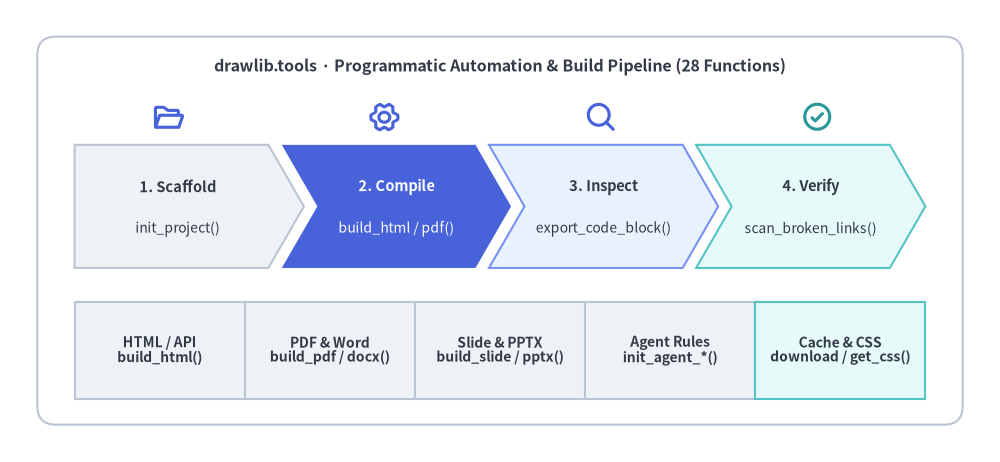
Source Code
from drawlib.canvas import save, setup
from drawlib.icons import phosphor
from drawlib.shapes import rectangle
from drawlib.smartarts import BoxList, ChevronProcess
from drawlib.styles import Colors, Styles
from drawlib.text import text

setup(width=134, height=62)

rectangle(
    (67, 31),
    width=124,
    height=52,
    style=Styles.Neutral.patch(shape_fill_color=Colors.Transparent, line_style="dashed", shape_r=2.5),
)
text(
    (67, 53.0),
    "drawlib.tools · Programmatic Automation & Build Pipeline (28 Functions)",
    style=Styles.DarkBold.patch(text_size=11.5),
)

stage_icons = [
    (22.5, phosphor.folder_open, Styles.PrimaryBold),
    (51.5, phosphor.gear_six, Styles.PrimaryBold),
    (80.5, phosphor.magnifying_glass, Styles.PrimaryBold),
    (109.5, phosphor.check_circle, Styles.SecondaryBold),
]
for ix, icon_fn, ist in stage_icons:
    icon_fn((ix, 46.2), width=4.4, style=ist)

pipeline = ChevronProcess(
    style=Styles.Neutral,
    text_style=Styles.DarkBold.patch(text_size=10.5),
    description_style=Styles.Dark.patch(text_size=10.0),
    corner_angle=60.0,
    spacing=1.8,
    flat_left_end=True,
)
pipeline.add("1. Scaffold", description="init_project()")
pipeline.add(
    "2. Compile",
    description="build_html / pdf()",
    style=Styles.PrimaryFlat,
    text_style=Styles.WhiteBold.patch(text_size=10.5),
    description_style=Styles.White.patch(text_size=10.0),
)
pipeline.add("3. Inspect", description="export_code_block()", style=Styles.PrimaryNeutral)
pipeline.add("4. Verify", description="scan_broken_links()", style=Styles.SecondaryNeutral)
pipeline.draw(xy=(10.0, 26.0), width=114.0, height=16.5)

domains = BoxList(
    style=Styles.Neutral,
    text_style=Styles.DarkBold.patch(text_size=10.0),
)
domains.add("HTML / API\nbuild_html()")
domains.add("PDF & Word\nbuild_pdf / docx()")
domains.add("Slide & PPTX\nbuild_slide / pptx()")
domains.add("Agent Rules\ninit_agent_*()")
domains.add("Cache & CSS\ndownload / get_css()", style=Styles.SecondaryNeutral)
domains.draw(xy=(10.0, 8.5), box_width=22.8, box_height=13.0, direction="left")

save()
defbuild_document(input_dir, output_path=None, output_format=None, *, ...)#
output_format または output_path の拡張子に応じて、ドキュメントソースディレクトリを HTML・PDF・MS Word(.docx)・GitHub 向け Markdown へ一括コンパイルする統合ディスパッチャ関数です。
from drawlib.tools import build_document

build_document(
    input_dir: str,
    output_path: str | None = None,
    output_format: str | None = None,
    *,
    image_format: str = "png",
    css_mode: str = "external",
    styles_path: str | None = None,
    utils_path: str | None = None,
    no_cache: bool = False,
    timestamp: bool = False,
) -> str
| パラメータ | 型 | デフォルト | 説明 |
|---|---|---|---|
input_dir |
str |
(必須) | 入力ドキュメントのソースディレクトリ。 |
output_path |
str | None |
None |
出力先ディレクトリまたはファイルパス(.pdf・.docx・.md 拡張子から output_format を自動推定)。 |
output_format |
str | None |
None |
出力フォーマット("html"、"pdf"、"docx"、"markdown"。省略時は "html")。 |
image_format |
str |
"png" |
埋め込み図解の画像形式("png" または "webp")。 |
css_mode |
str |
"external" |
HTML 出力時の CSS リンク方式("external" または "embed")。 |
styles_path |
str | None |
None |
カスタム styles.py ファイルのパス。 |
utils_path |
str | None |
None |
カスタム utils.py ファイルのパス。 |
no_cache |
bool |
False |
True の場合、SQLite 画像ビルドキャッシュを無効化します。 |
timestamp |
bool |
False |
True の場合、PDF や Word メタデータに現在時刻を記録します。 |
- 戻り値(
str): 生成された出力ディレクトリまたはファイルの絶対パス。
defbuild_docx(input_path=None, output_file=None, *, ...)#
リニア文書 doc プロジェクトディレクトリ(言語ごとに <base>_<lang>.docx を出力)または単一の Markdown ファイル(.md)を、python-docx を用いて編集可能な Microsoft Word(.docx)文書へコンパイルします。
from drawlib.tools import build_docx

build_docx(
    input_path: str | None = None,
    output_file: str | None = None,
    *,
    input_dir: str | None = None,
    title: str | None = None,
    page_break: bool = True,
    generate_index: bool = False,
    dpi: int = 200,
    styles_path: str | None = None,
    utils_path: str | None = None,
    no_cache: bool = False,
    timestamp: bool = False,
) -> str
| パラメータ | 型 | デフォルト | 説明 |
|---|---|---|---|
input_path |
str | None |
None |
doc プロジェクトディレクトリ(drawlib.toml)または単一 .md ファイルパス。 |
output_file |
str | None |
None |
出力 .docx パス(doc プロジェクトではベースパスまたは出力ディレクトリ)。 |
input_dir |
str | None |
None |
input_path のキーワードエイリアス。 |
title |
str | None |
None |
文書タイトルの上書き指定。 |
page_break |
bool |
True |
章のマージ境界に Word の改ページを挿入します。 |
generate_index |
bool |
False |
第 1 章と第 2 章の間に目次(Table of Contents)を自動生成します。 |
dpi |
int |
200 |
埋め込み drawlib 静的 PNG 図解のラスタライズ DPI。 |
styles_path |
str | None |
None |
カスタム styles.py スクリプトへのパス。 |
utils_path |
str | None |
None |
カスタム utils.py スクリプトへのパス。 |
no_cache |
bool |
False |
.drawlib/cache.db の SQLite ビルド画像キャッシュを無効化します。 |
timestamp |
bool |
False |
決定論的正規化の代わりに現在時刻を .docx メタデータへ記録します。 |
- 戻り値(
str): 生成された.docxファイル(docプロジェクト時はdefault_langの.docx)の絶対パス。
defbuild_html(input_dir, output_dir=None, *, ...)#
i18n 対応の site・doc・catalog プロジェクトディレクトリ(drawlib.toml + <lang>/ ソース)を、共有図解の重複排除・ロケール別フォントスタイルシート・言語スイッチャー(2 言語以上時)・ルート index.html を備えた静的 HTML へコンパイルします。
from drawlib.tools import build_html

build_html(
    input_dir: str,
    output_dir: str | None = None,
    *,
    image_format: str = "png",
    styles_path: str | None = None,
    utils_path: str | None = None,
    no_cache: bool = False,
    css_mode: str = "external",
) -> str
| パラメータ | 型 | デフォルト | 説明 |
|---|---|---|---|
input_dir |
str |
(必須) | drawlib.toml(type = "site"、"doc"、または "catalog")と <lang>/ フォルダを含むプロジェクトルート。 |
output_dir |
str | None |
None |
出力先 HTML ディレクトリ(省略時は <base>_html)。 |
image_format |
str |
"png" |
埋め込み drawlib ブロックの出力画像形式("png" または "webp")。 |
styles_path |
str | None |
None |
カスタム styles.py スクリプトへのパス。 |
utils_path |
str | None |
None |
カスタム utils.py スクリプトへのパス。 |
no_cache |
bool |
False |
SQLite 画像ビルドキャッシュの読み書きを無効化します。 |
css_mode |
str |
"external" |
CSS リンク方式("external" または "embed")。 |
- 戻り値(
str): 生成された HTML 出力ディレクトリの絶対パス。
defbuild_image(input_path, output_path=None, *, ...)#
単体 Python 描画スクリプト(.py)・スクリプトディレクトリ・プロジェクト内の埋め込みブロックをバッチ実行して画像アセットを生成します(実行前に静的 AST 解析による出力ファイル名衝突チェックを行います)。
from drawlib.tools import build_image

build_image(
    input_path: str | Sequence[str],
    output_path: str | None = None,
    *,
    format: Literal["png", "webp", "jpg", "pdf"] | None = None,
    styles_path: str | None = None,
    utils_path: str | None = None,
    grid: bool = False,
    disable_auto_clear: bool = False,
    enable_auto_initialize: bool = False,
    no_cache: bool = False,
) -> list[str]
| パラメータ | 型 | デフォルト | 説明 |
|---|---|---|---|
input_path |
str | Sequence[str] |
(必須) | 対象の Python スクリプト、Markdown ファイル、またはディレクトリパス。 |
output_path |
str | None |
None |
出力画像ファイルパス(単一ファイル時)または出力先ディレクトリパス。 |
format |
Literal["png", "webp", "jpg", "pdf"] | None |
None |
出力画像フォーマットの一括上書き指定(None 時はスクリプト側の設定を維持)。 |
styles_path |
str | None |
None |
カスタム styles.py スクリプトへのパス。 |
utils_path |
str | None |
None |
カスタム utils.py スクリプトへのパス。 |
grid |
bool |
False |
座標グリッドを重ねた *_grid.<ext> 画像を同時に出力します。 |
disable_auto_clear |
bool |
False |
ファイル実行ごとのキャンバス自動クリアを無効化します。 |
enable_auto_initialize |
bool |
False |
ファイル実行ごとにキャンバスの完全再初期化を行います。 |
no_cache |
bool |
False |
SQLite 画像ビルドキャッシュを無効化します。 |
- 戻り値(
list[str]): 実行されたターゲットファイルパスのリスト。
defbuild_markdown(input_dir, output_dir=None, *, ...)#
i18n 対応の site・doc・catalog プロジェクトディレクトリを GitHub 閲覧向けのレンダリング済み Markdown(<output_dir>/<lang>/ + 共有 <output_dir>/images/)へコンパイルします(入力ソースの上書きは安全に拒否されます)。
from drawlib.tools import build_markdown

build_markdown(
    input_dir: str,
    output_dir: str | None = None,
    *,
    image_format: str = "png",
    styles_path: str | None = None,
    utils_path: str | None = None,
    no_cache: bool = False,
) -> str
| パラメータ | 型 | デフォルト | 説明 |
|---|---|---|---|
input_dir |
str |
(必須) | drawlib.toml と <lang>/ Markdown ソースを含むプロジェクトルート。 |
output_dir |
str | None |
None |
出力先 Markdown ディレクトリ(省略時は <base>_markdown)。 |
image_format |
str |
"png" |
画像出力形式("png" または "webp")。 |
styles_path |
str | None |
None |
カスタム styles.py スクリプトへのパス。 |
utils_path |
str | None |
None |
カスタム utils.py スクリプトへのパス。 |
no_cache |
bool |
False |
SQLite 画像ビルドキャッシュを無効化します。 |
- 戻り値(
str): 生成された Markdown 出力ディレクトリの絶対パス。
defbuild_pdf(input_path=None, output_file=None, *, ...)#
doc プロジェクトディレクトリ、slide プロジェクトディレクトリ、または単一 Markdown/HTML ファイルをヘッドレス Chromium(playwright)経由で印刷品質のベクター PDF へコンパイルします(プロジェクトビルド時はロケールごとに <base>_<lang>.pdf を出力)。
from drawlib.tools import build_pdf

build_pdf(
    input_path: str | None = None,
    output_file: str | None = None,
    *,
    input_dir: str | None = None,
    title: str | None = None,
    page_break: bool = True,
    generate_index: bool = False,
    styles_path: str | None = None,
    utils_path: str | None = None,
    no_cache: bool = False,
    timestamp: bool = False,
) -> str
| パラメータ | 型 | デフォルト | 説明 |
|---|---|---|---|
input_path |
str | None |
None |
doc/slide プロジェクトディレクトリ、または単一 .md/.html ファイルパス。 |
output_file |
str | None |
None |
出力 PDF パス(プロジェクトビルド時はベースパスまたは出力ディレクトリ)。 |
input_dir |
str | None |
None |
input_path のキーワードエイリアス。 |
title |
str | None |
None |
文書またはプレゼンテーションタイトルの上書き指定。 |
page_break |
bool |
True |
マージされた doc 章間に CSS 改ページを挿入します。 |
generate_index |
bool |
False |
doc の第 1 章と第 2 章の間に目次(Table of Contents)を自動挿入します。 |
styles_path |
str | None |
None |
カスタム styles.py スクリプトへのパス。 |
utils_path |
str | None |
None |
カスタム utils.py スクリプトへのパス。 |
no_cache |
bool |
False |
SQLite 画像ビルドキャッシュを無効化します。 |
timestamp |
bool |
False |
決定論的正規化の代わりに現在時刻を PDF メタデータへ記録します。 |
- 戻り値(
str): 生成された PDF ファイル(プロジェクト指定時はdefault_langの PDF)の絶対パス。
defbuild_pptx(input_dir, output_file=None, *, ...)#
i18n 対応の Markdown slide プロジェクトディレクトリを、編集可能な 16:9(960×540 pt)Microsoft PowerPoint(<stem>_<lang>.pptx)へコンパイルします(drawlib.slide からの再エクスポート)。
from drawlib.tools import build_pptx

build_pptx(
    input_dir: str,
    output_file: str | None = None,
    *,
    title: str | None = None,
    theme: str | None = None,
    dpi: int = 240,
    anim_frame: Literal["first", "last"] = "last",
    styles_path: str | None = None,
    utils_path: str | None = None,
    no_cache: bool = False,
    timestamp: bool = False,
) -> str
| パラメータ | 型 | デフォルト | 説明 |
|---|---|---|---|
input_dir |
str |
(必須) | drawlib.toml と <lang>/ スライド群を含むプロジェクトルートディレクトリ。 |
output_file |
str | None |
None |
出力 .pptx のベースパスまたはディレクトリ(<stem>_<lang>.pptx)。 |
title |
str | None |
None |
.pptx メタデータに設定するタイトルの上書き指定。 |
theme |
str | None |
None |
CSS テーマプリセットの上書き指定("google"、"default"、"google-dark"、"default-dark")。 |
dpi |
int |
240 |
埋め込み静的 PNG 図解のラスタライズ DPI(> 0)。 |
anim_frame |
Literal["first", "last"] |
"last" |
アニメーションブロックから抽出する静的フレーム("first" または "last")。 |
styles_path |
str | None |
None |
カスタム styles.py スクリプトへのパス。 |
utils_path |
str | None |
None |
カスタム utils.py スクリプトへのパス。 |
no_cache |
bool |
False |
SQLite 画像ビルドキャッシュを無効化します。 |
timestamp |
bool |
False |
現在時刻を OpenXML メタデータへ記録します。 |
- 戻り値(
str): 生成された<stem>_<default_lang>.pptxファイルの絶対パス。
defbuild_slide(input_dir, output_dir=None, *, ...)#
i18n 対応のプレゼンテーションプロジェクトディレクトリを多言語 16:9 HTML スライドデッキへコンパイルします(drawlib.slide からの再エクスポート)。
from drawlib.tools import build_slide

build_slide(
    input_dir: str,
    output_dir: str | None = None,
    *,
    title: str | None = None,
    theme: str | None = None,
    image_format: str = "svg",
    dpi: int | None = None,
    force_image_format: bool = False,
    static_anim_frame: Literal["first", "last"] | None = None,
    styles_path: str | None = None,
    utils_path: str | None = None,
    no_cache: bool = False,
) -> str
| パラメータ | 型 | デフォルト | 説明 |
|---|---|---|---|
input_dir |
str |
(必須) | drawlib.toml と <lang>/ スライド群を含むプロジェクトルートディレクトリ。 |
output_dir |
str | None |
None |
出力先ディレクトリ(省略時は <base>_html)。 |
title |
str | None |
None |
HTML <title> の上書き指定。 |
theme |
str | None |
None |
CSS テーマプリセットの上書き指定。 |
image_format |
str |
"svg" |
埋め込み図解の標準フォーマット("svg"、"webp"、"png")。 |
dpi |
int | None |
None |
ラスター図解生成時の DPI 上書き指定。 |
force_image_format |
bool |
False |
True の場合、ブロックで明示指定された拡張子も image_format へ書き換えます。 |
static_anim_frame |
Literal["first", "last"] | None |
None |
"first" または "last" 指定時、アニメーションを静的 PNG 画像へ平坦化します。 |
styles_path |
str | None |
None |
カスタム styles.py スクリプトへのパス。 |
utils_path |
str | None |
None |
カスタム utils.py スクリプトへのパス。 |
no_cache |
bool |
False |
SQLite ビルドキャッシュを無効化します。 |
- 戻り値(
str):<output_dir>/<default_lang>/index.htmlの絶対パス。
defclear_cache()#
GitHub Releases からローカルへダウンロードされたフォント・アイコン・GeoJSON マップの全キャッシュファイルを削除します。
from drawlib.tools import clear_cache

clear_cache() -> None
| パラメータ | 型 | デフォルト | 説明 |
|---|---|---|---|
| (なし) | — | — | 引数はなく、None を返します。 |
defdetect_agent_targets(destination=".")#
指定されたワークスペースルートを検査し、設定済みの AI コーディングエージェント用ディレクトリまたは規約ファイル(.agents/・.agent/・.claude/・.cursor/・.github/instructions/・.windsurf/・.clinerules/・.roo/・AGENTS.md・GEMINI.md)を自動検出します。
from drawlib.tools import detect_agent_targets

detect_agent_targets(
    destination: str | Path = ".",
) -> list[str]
| パラメータ | 型 | デフォルト | 説明 |
|---|---|---|---|
destination |
str | Path |
"." |
検査対象のワークスペースルートディレクトリパス。 |
- 戻り値(
list[str]): 検出された AI コーディングエージェントの正規名リスト(例:["antigravity", "claude"])。
defdetect_document_type(file_path, content=None)#
入力された Markdown(.md / .markdown)または HTML(.html / .htm)ファイルを 4 種類の正規ドキュメント種別("markdown_drawlib"・"markdown"・"html_drawlib"・"html")のいずれかに分類します。
from drawlib.tools import detect_document_type

detect_document_type(
    file_path: str,
    content: str | None = None,
) -> DocumentInputInfo
| パラメータ | 型 | デフォルト | 説明 |
|---|---|---|---|
file_path |
str |
(必須) | 入力ドキュメント(.md・.markdown・.html・.htm)へのパス。 |
content |
str | None |
None |
事前読み込み済みのテキスト文字列(None の場合は file_path から読み込み)。 |
- 戻り値(
DocumentInputInfo):path・doc_type・has_drawlib・is_markdown・is_html・is_full_html・block_countを保持するイミュータブルな Pydantic モデル。
defdownload_cache(all_assets=True, fonts=False, icons=False, maps=False, browser=False)#
オフライン環境・Docker コンテナ・CI/CD ランナー向けに、フォント・アイコン・GeoJSON マップ・ヘッドレス Chromium(chromium-headless-shell)をローカルキャッシュへ事前ダウンロードします。
from drawlib.tools import download_cache

download_cache(
    all_assets: bool = True,
    fonts: bool = False,
    icons: bool = False,
    maps: bool = False,
    browser: bool = False,
) -> None
| パラメータ | 型 | デフォルト | 説明 |
|---|---|---|---|
all_assets |
bool |
True |
個別カテゴリが指定されていない場合に全アセット(フォント・アイコン・マップ・ブラウザ)を一括取得します。 |
fonts |
bool |
False |
フォントパッケージのみをダウンロードします。 |
icons |
bool |
False |
アイコンパッケージのみをダウンロードします。 |
maps |
bool |
False |
GeoJSON マップパッケージのみをダウンロードします。 |
browser |
bool |
False |
Playwright 経由でヘッドレス Chromium(chromium-headless-shell)のみをダウンロードします。 |
defexport_code_block(file_path=None, target=None, output_path=None, ...)#
Markdown/HTML ファイル内の指定 drawlib ブロック(画像ファイル名 file=... または 1 始まりインデックス)や単体 .py スクリプトを GUI ウィンドウを開かずにヘッドレス実行し、画像ファイルへ書き出します。
from drawlib.tools import export_code_block

export_code_block(
    file_path: str | None = None,
    target: str | None = None,
    output_path: str | None = None,
    styles_path: str | None = None,
    utils_path: str | None = None,
    grid: bool = False,
    no_cache: bool = False,
) -> str
| パラメータ | 型 | デフォルト | 説明 |
|---|---|---|---|
file_path |
str | None |
None |
対象の Markdown(.md)・HTML(.html)・Python(.py)ファイルパス。 |
target |
str | None |
None |
ブロック画像名(例: "arch.png")または 1 始まり番号("1")。.md/.html で省略時はブロック一覧を表示して "" を返します。 |
output_path |
str | None |
None |
出力先の画像ファイルまたはディレクトリパス。 |
styles_path |
str | None |
None |
カスタム styles.py スクリプトへのパス。 |
utils_path |
str | None |
None |
カスタム utils.py スクリプトへのパス。 |
grid |
bool |
False |
10/5 単位の座標検証グリッドを重ねて出力します。 |
no_cache |
bool |
False |
SQLite 画像ビルドキャッシュの読み書きを無効化します。 |
- 戻り値(
str): 書き出された画像ファイルの絶対パス(一覧表示モード時は"")。
defexport_css(name, output_path=None, target="html", force=False, lang="en")#
組み込み CSS テーマプリセットを合成してファイルへ書き出します。
from drawlib.tools import export_css

export_css(
    name: str,
    output_path: str | None = None,
    target: CssTarget = "html",
    force: bool = False,
    lang: str = "en",
) -> str
| パラメータ | 型 | デフォルト | 説明 |
|---|---|---|---|
name |
str |
(必須) | 組み込み CSS プリセット名("default"、"google"、"default-dark"、"monochrome" など)。 |
output_path |
str | None |
None |
出力先ファイルパス(省略時は docs_src/style.css が存在すればそちら、なければ style.css)。 |
target |
CssTarget |
"html" |
対象レイアウト形式("html"、"pdf"、"slide"、"site"、"doc"、または "catalog")。 |
force |
bool |
False |
既存ファイルを上書きします(False で既存ファイルがある場合は FileExistsError)。 |
lang |
str |
"en" |
タイポグラフィ用フォントスタックの言語コード("en"、"ja"、"zh-cn" など)。 |
- 戻り値(
str): 書き出された CSS ファイルの絶対パス。
defget_agent_instruction(agent, mode="auto", global_scope=False)#
指定した AI コーディングエージェント向けの Drawlib 指示書(ツール固有の YAML フロントマターを含む Markdown/MDC 文字列)をメモリ上で生成して返します。
from drawlib.tools import get_agent_instruction

get_agent_instruction(
    agent: str,
    mode: AgentTriggerMode = "auto",
    global_scope: bool = False,
) -> str
| パラメータ | 型 | デフォルト | 説明 |
|---|---|---|---|
agent |
str |
(必須) | 対象エージェント名またはエイリアス("antigravity"、"claude"、"cursor"、"copilot"、"windsurf"、"cline"、"roo"、"codex"、"gemini")。 |
mode |
AgentTriggerMode |
"auto" |
フロントマターの有効化モード("auto" オンデマンド読み込み、または "always" 常時読み込み)。 |
global_scope |
bool |
False |
True の場合、ユーザーホームのグローバル設定向けにフォーマットします。 |
- 戻り値(
str): フォーマット済みのルール文字列。
defget_css(name=None, target="html", lang="en")#
テーマトークン・UI コンポーネント・ターゲットレイアウト層を統合した自己完結型の CSS スタイルシート文字列を取得します。
from drawlib.tools import get_css

get_css(
    name: str | None = None,
    target: CssTarget = "html",
    lang: str = "en",
) -> str
| パラメータ | 型 | デフォルト | 説明 |
|---|---|---|---|
name |
str | None |
None |
組み込みテーマ名またはカスタム CSS ファイルパス(省略時は "default")。 |
target |
CssTarget |
"html" |
対象レイアウト形式("html"、"site"、"doc"、"pdf"、"slide"、または "catalog")。 |
lang |
str |
"en" |
フォントスタック置換用の言語コードまたはエイリアス。 |
- 戻り値(
str): 合成された CSS スタイルシート文字列。
definit_agent_instruction(agent, destination=".", mode="auto", ...)#
モジュール型ルールディレクトリ(.agents/rules/・.claude/rules/・.cursor/rules/・.github/instructions/・.windsurf/rules/・.clinerules/・.roo/rules/)への専用ファイル出力、または共有ファイル(AGENTS.md・GEMINI.md)への非破壊マーカーマージによって AI コーディングエージェント用指示書を生成します。
from drawlib.tools import init_agent_instruction

init_agent_instruction(
    agent: str | Sequence[str],
    destination: str | Path = ".",
    mode: AgentTriggerMode = "auto",
    global_scope: bool = False,
    output_path: str | Path | None = None,
    force: bool = False,
) -> list[Path]
| パラメータ | 型 | デフォルト | 説明 |
|---|---|---|---|
agent |
str | Sequence[str] |
(必須) | エージェント名、カンマ区切り文字列、名前のシーケンス、または "all"。 |
destination |
str | Path |
"." |
プロジェクトスコープ出力先のワークスペースルートディレクトリ。 |
mode |
AgentTriggerMode |
"auto" |
フロントマター対応エージェントのトリガーモード("auto" または "always")。 |
global_scope |
bool |
False |
True の場合、ユーザーホームのグローバルルールパスへ出力します。 |
output_path |
str | Path | None |
None |
明示的な出力ファイルパス上書き(単一エージェント指定時のみ有効)。 |
force |
bool |
False |
True の場合、既存の専用ルールファイルまたはマーカーブロックを上書き更新します。 |
- 戻り値(
list[Path]): 生成または更新された指示書ファイルの解決済みPathリスト。
definit_project(project_type, destination=".", target=None, ...)#
drawlib.toml・styles.py・utils.py・_assets/・テンプレート・build*.sh を備えた Drawlib スタータープロジェクト(<target>_src/)を自動生成します。
from drawlib.tools import init_project

init_project(
    project_type: str,
    destination: str | Path = ".",
    target: str | None = None,
    output: str | None = None,
    force: bool = False,
    lang: str = "en",
    style: str | None = None,
    here: bool = False,
) -> list[Path]
| パラメータ | 型 | デフォルト | 説明 |
|---|---|---|---|
project_type |
str |
(必須) | プロジェクト種別: "doc"、"site"、"catalog"、"slide"、"images"、"image"。 |
destination |
str | Path |
"." |
<target>_src/ を作成する親ディレクトリパス。 |
target |
str | None |
None |
プロジェクトのベース名(省略時は "doc"・"docs"・"catalog"・"slide"・"images")。 |
output |
str | None |
None |
target の後方互換エイリアス。 |
force |
bool |
False |
True の場合、出力先の競合ファイルを上書きします。 |
lang |
str |
"en" |
言語コード("en"、"ja" 等)または多言語指定のカンマ区切りコード("en,ja"、doc/site/catalog/slide 対応)。 |
style |
str | None |
None |
スタイルプリセット("default"、"google"、"monochrome" 等)またはカスタム CSS パス。 |
here |
bool |
False |
非推奨のレガシー引数(無視され、常に <target>_src/ が作成されます)。 |
- 戻り値(
list[Path]): 生成されたプロジェクトファイルのPathリスト。
deflist_agent_targets()#
サポートされている全 AI コーディングエージェントターゲットのメタデータ辞書リストを返します。
from drawlib.tools import list_agent_targets

list_agent_targets() -> list[dict[str, str]]
| 戻り値辞書のキー | 型 | 説明 |
|---|---|---|
name |
str |
正規ターゲット識別子("antigravity"、"claude"、"cursor" など)。 |
label |
str |
表示用ツール名。 |
project_path |
str |
ワークスペース内の標準出力ファイルパス。 |
global_path |
str |
ユーザーホームのグローバル設定ファイルパス。 |
format |
str |
ファイル形式およびフロントマター仕様。 |
description |
str |
ルール読み込み方式の概要。 |
deflist_cache()#
ダウンロード可能な全フォント・アイコン・GeoJSON マップパッケージとローカルキャッシュ状態・容量の一覧を返します。
from drawlib.tools import list_cache

list_cache() -> list[dict[str, Any]]
| 戻り値辞書のキー | 型 | 説明 |
|---|---|---|
name |
str |
パッケージ識別子(例: "icon_phosphor"、"font_japanese")。 |
category |
str |
アセット種別("font"、"icon"、"map")。 |
cached |
bool |
ローカルキャッシュに展開済みの場合は True。 |
file_count |
int |
キャッシュ済みファイル数(未取得時は 0)。 |
size_bytes |
int |
キャッシュが占有している合計バイト数。 |
deflist_css(target="html")#
指定された target 向けの組み込み CSS プリセット一覧をメタデータ辞書リストとして返します。
from drawlib.tools import list_css

list_css(
    target: CssTarget = "html",
) -> list[dict[str, str]]
| パラメータ | 型 | デフォルト | 説明 |
|---|---|---|---|
target |
CssTarget |
"html" |
対象フォーマット("html"、"pdf"、"slide"、"site"、"doc"、または "catalog")。 |
- 戻り値(
list[dict[str, str]]):"name"・"file"・"description"を持つ辞書のリスト。
deflist_html_css()#
組み込み HTML CSS プリセットのメタデータ一覧を返すショートカット関数です(list_css(target="html") と同等)。
from drawlib.tools import list_html_css

list_html_css() -> list[dict[str, str]]
| パラメータ | 型 | デフォルト | 説明 |
|---|---|---|---|
| (なし) | — | — | 組み込み HTML CSS プリセット辞書リストを返します。 |
deflist_pdf_css()#
組み込み PDF CSS プリセットのメタデータ一覧を返すショートカット関数です(list_css(target="pdf") と同等)。
from drawlib.tools import list_pdf_css

list_pdf_css() -> list[dict[str, str]]
| パラメータ | 型 | デフォルト | 説明 |
|---|---|---|---|
| (なし) | — | — | 組み込み PDF CSS プリセット辞書リストを返します。 |
deflist_project_types()#
利用可能なスタータープロジェクト種別名("site"・"catalog"・"doc"・"slide"・"images")と説明文のマッピング辞書を返します。
from drawlib.tools import list_project_types

list_project_types() -> dict[str, str]
| パラメータ | 型 | デフォルト | 説明 |
|---|---|---|---|
| (なし) | — | — | プロジェクト種別名をキー、説明文を値とする dict[str, str] を返します。 |
deflist_slide_css()#
組み込みスライド CSS プリセットのメタデータ一覧を返すショートカット関数です(list_css(target="slide") と同等)。
from drawlib.tools import list_slide_css

list_slide_css() -> list[dict[str, str]]
| パラメータ | 型 | デフォルト | 説明 |
|---|---|---|---|
| (なし) | — | — | 組み込みスライド CSS プリセット辞書リストを返します。 |
defscan_broken_links(root_dir)#
root_dir 配下のビルド済み .html ファイルを再帰的に走査し、内部相対リンク・#slug フラグメントアンカー・画像/静的アセット参照のリンク切れを検査します。
from drawlib.tools import scan_broken_links

scan_broken_links(
    root_dir: str,
) -> tuple[int, int, list[tuple[str, str, str]]]
| パラメータ | 型 | デフォルト | 説明 |
|---|---|---|---|
root_dir |
str |
(必須) | 検査対象のビルド済み HTML ルートディレクトリ(例: "docs_html"、"catalog_html")。 |
- 戻り値(
tuple[int, int, list[tuple[str, str, str]]]):(total_html_files, total_links_checked, broken_links)を返し、broken_linksの各要素は(html_rel_path, tag_name, target_url)タプルです。
defserve_docs(directory, port=8000, open_browser=True, skip_check=False, check_only=False)#
directory 内のビルド済み HTML サイトを配信するローカル開発用 HTTP サーバーを起動します(check_only=True 指定時はサーバーを起動せずリンク切れ検査のみを実行して終了します)。
from drawlib.tools import serve_docs

serve_docs(
    directory: str,
    port: int = 8000,
    open_browser: bool = True,
    skip_check: bool = False,
    check_only: bool = False,
) -> None
| パラメータ | 型 | デフォルト | 説明 |
|---|---|---|---|
directory |
str |
(必須) | 配信対象の HTML ルートディレクトリ(存在しない場合は ValueError)。 |
port |
int |
8000 |
HTTP サーバーが待ち受けるローカルポート番号。 |
open_browser |
bool |
True |
起動時にデフォルトの Web ブラウザを自動で開きます。 |
skip_check |
bool |
False |
起動前の scan_broken_links() 事前スキャンをスキップします。 |
check_only |
bool |
False |
リンク切れスキャンのみを実行して即座に終了します。 |
defshow_code_block(file_path=None, target=None, styles_path=None, ...)#
Markdown/HTML ファイル内の drawlib ブロックまたは単体 .py スクリプトを実行してデスクトップ GUI ビューアに表示します(output_path 指定時は GUI を開かずヘッドレスの export_code_block() へ委譲します)。
from drawlib.tools import show_code_block

show_code_block(
    file_path: str | None = None,
    target: str | None = None,
    styles_path: str | None = None,
    utils_path: str | None = None,
    grid: bool = False,
    output_path: str | None = None,
    no_cache: bool = False,
) -> None
| パラメータ | 型 | デフォルト | 説明 |
|---|---|---|---|
file_path |
str | None |
None |
対象の Markdown(.md)・HTML(.html)・Python(.py)ファイルパス。 |
target |
str | None |
None |
ブロック画像名(例: "hero.png")または 1 始まり番号("1")。省略時はブロック一覧を表示します。 |
styles_path |
str | None |
None |
カスタム styles.py スクリプトへのパス。 |
utils_path |
str | None |
None |
カスタム utils.py スクリプトへのパス。 |
grid |
bool |
False |
表示・出力画像に座標グリッドを重ねます。 |
output_path |
str | None |
None |
保存先ファイルパス(指定時は GUI ウィンドウを抑止して直接ディスクへ保存)。 |
no_cache |
bool |
False |
SQLite 画像ビルドキャッシュの読み書きを無効化します。 |