drawlib.smartarts(フロー・ツリー・マップ・カレンダー)
from drawlib.smartarts import ... からインポートできる高水準 SmartArt コンポーネントのうち、シェブロン工程図・円形サイクル・階層ピラミッド・マイルストーンロードマップ・ディレクトリツリー・放射状マインドマップ・GeoJSON ベクター地図・日次/週次/月次スケジュールカレンダーを網羅します。ボックスリスト・箇条書き・バッジ付きカード・パネル・KPI カード・グリッド・ソースコード・テーブルについては drawlib.smartarts(リスト・カード・KPI・テーブル) を参照してください。
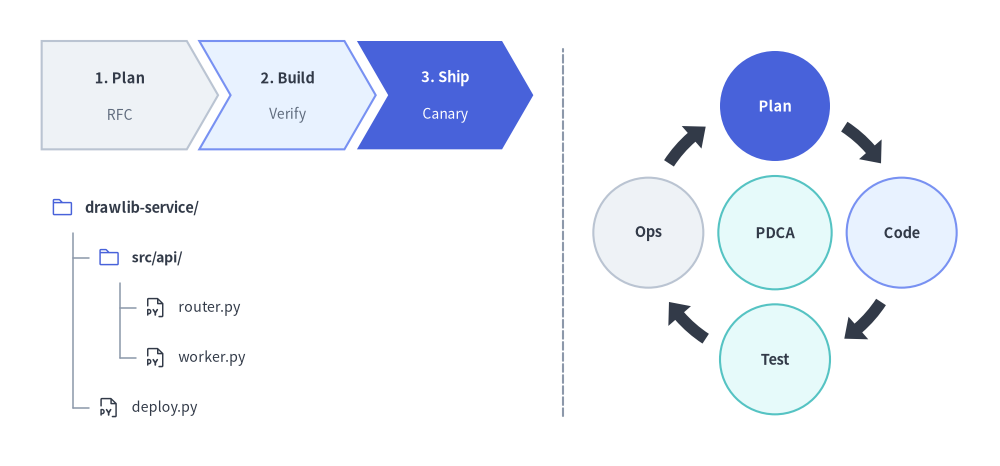
SmartArts パート2 — ChevronProcess・TreeNode・放射状 Cycle
Source Code
from drawlib.canvas import save , setup
from drawlib.icons import phosphor
from drawlib.lines import line
from drawlib.smartarts import ChevronProcess , Cycle , TreeNode
from drawlib.styles import Colors , Styles
setup ( width = 120 , height = 56 )
# Left Top: Sequential ChevronProcess Pipeline (Bottom-Left at (5, 38))
pipeline = ChevronProcess (
style = Styles . Neutral ,
text_style = Styles . DarkBold . patch ( text_size = 10.5 ),
description_style = Styles . Muted . patch ( text_size = 10.0 ),
corner_angle = 60.0 ,
spacing = 1.5 ,
flat_left_end = True ,
)
pipeline . add ( "1. Plan" , description = "RFC" )
pipeline . add ( "2. Build" , description = "Verify" , style = Styles . PrimaryNeutral )
pipeline . add (
"3. Ship" ,
description = "Canary" ,
style = Styles . PrimaryFlat ,
text_style = Styles . WhiteBold . patch ( text_size = 10.5 ),
description_style = Styles . White . patch ( text_size = 10.0 ),
)
pipeline . draw ( xy = ( 5.0 , 38.0 ), width = 59.0 , height = 13.0 , align = "bottom_left" )
# Left Bottom: TreeNode Hierarchy with Phosphor Icons (Top-Left at (6, 31))
TreeNode . register_drawing_item (
name = "hero_dir" ,
location = "before" ,
padding_width = 4.2 ,
function = phosphor . folder ,
style = Styles . Primary . patch ( icon_color = Colors . Primary ),
args = { "width" : 2.8 },
)
TreeNode . register_drawing_item (
name = "hero_py" ,
location = "before" ,
padding_width = 4.2 ,
function = phosphor . file_py ,
style = Styles . Dark ,
args = { "width" : 2.8 },
)
root = TreeNode (
"drawlib-service/" ,
text_style = Styles . DarkBold . patch ( text_size = 10.5 ),
line_style = Styles . Muted . patch ( line_width = 1.1 ),
line_horizontal_margin = 2.8 ,
line_horizontal_length = 2.8 ,
line_vertical_margin = 6.0 ,
children = [
TreeNode (
"src/api/" ,
text_style = Styles . DarkBold . patch ( text_size = 10.2 ),
children = [
TreeNode ( "router.py" , text_style = Styles . Dark . patch ( text_size = 10.2 )) . set_drawing_item ( "hero_py" ),
TreeNode ( "worker.py" , text_style = Styles . Dark . patch ( text_size = 10.2 )) . set_drawing_item ( "hero_py" ),
],
) . set_drawing_item ( "hero_dir" ),
TreeNode ( "deploy.py" , text_style = Styles . Dark . patch ( text_size = 10.2 )) . set_drawing_item ( "hero_py" ),
],
) . set_drawing_item ( "hero_dir" )
root . draw ( xy = ( 6.0 , 31.0 ))
line (( 67.5 , 6.0 ), ( 67.5 , 50.0 ), style = Styles . MutedDashed )
# Right: Radial Cycle with Central Hub (Center anchored at (93, 28))
cycle = Cycle (
style = Styles . Neutral ,
text_style = Styles . DarkBold . patch ( text_size = 10.5 ),
arrow_style = Styles . DarkFlat ,
clockwise = True ,
start_angle = 90.0 ,
node_shape = "circle" ,
node_radius = 6.6 ,
arrow_type = "arc" ,
arrow_width = 1.4 ,
arrow_head_width = 3.6 ,
arrow_color_mode = "monochrome" ,
arrow_gap = 2.2 ,
)
cycle . add ( "Plan" , style = Styles . PrimaryFlat , text_style = Styles . WhiteBold . patch ( text_size = 10.5 ))
cycle . add ( "Code" , style = Styles . PrimaryNeutral )
cycle . add ( "Test" , style = Styles . SecondaryNeutral )
cycle . add ( "Ops" , style = Styles . Neutral )
cycle . set_center (
"PDCA" ,
radius = 6.8 ,
style = Styles . SecondaryNeutral ,
text_style = Styles . DarkBold . patch ( text_size = 10.5 ),
)
cycle . draw ( xy = ( 93.0 , 28.0 ), radius = 15.2 , align = "center" )
save ()
class ChevronProcess 矢羽根型(シェブロン)ブロックが水平方向に噛み合う順次プロセスパイプラインを描画します。各ステップへの補足説明(description)・先頭左端の垂直フラット化(flat_left_end=True)・特定フェーズのハイライト装飾に対応します。
座標アンカー: デフォルトは 左下(Bottom-Left) (x, y)(align="bottom_left")、または 中央(Center) (cx, cy)(align="center")。
ChevronProcess (
* ,
style : Style ,
text_style : Style ,
description_style : Style ,
corner_angle : Angle90 = 60.0 ,
spacing : PosFloat = 1.5 ,
flat_left_end : bool = False ,
) -> None
パラメータ
型
デフォルト
説明
styleStyle必須 シェブロン多角形のデフォルト塗り・枠線スタイル。
text_styleStyle必須 ステップ主タイトルのデフォルトテキストスタイル。
description_styleStyle必須 ステップ補足説明のデフォルトテキストスタイル。
corner_angleAngle9060.0矢羽根先端の傾斜角(度数法 10.0〜80.0、先端の食い込み深さを制御)。
spacingPosFloat1.5隣接シェブロン間の水平ギャップ(キャンバス単位)。
flat_left_endboolFalseTrue の場合、先頭シェブロンの左端をくぼみなしの垂直線として描画します。
メソッド・プロパティ
pipeline . items -> list [ ChevronItem ]
pipeline . add (
text : str ,
* ,
description : str = "" ,
style : Style | None = None ,
text_style : Style | None = None ,
description_style : Style | None = None ,
show : bool = True ,
) -> ChevronItem
pipeline . draw (
xy : Coordinate ,
width : PosFloat = 90.0 ,
height : PosFloat = 12.0 ,
item_width : PosFloat | None = None ,
align : Literal [ "bottom_left" , "center" ] = "bottom_left" ,
scale : PosFloat = 1.0 ,
) -> Self
メンバ
種別
説明
itemsproperty登録済み ChevronItem インスタンスのリスト(list[ChevronItem])を返します。
add(text, *, description="", style=None, text_style=None, description_style=None, show=True)methodプロセスステップを追加し、ChevronItem を返します。show=False にすると他のステップ幅・座標を保ったまま非表示にします。
draw(xy, width=90.0, height=12.0, item_width=None, align="bottom_left", scale=1.0)methodxy にパイプラインを描画します(item_width=None 時は全体幅 width から各ブロック幅を均等自動配分)。self を返します。
class ChevronItem ChevronProcess 内の単一ステップのテキスト・スタイル・表示状態を保持する可変 Pydantic モデルです。
座標アンカー: 親 ChevronProcess の水平軸上に自動配置されます。
ChevronItem (
* ,
text : str ,
style : Style ,
text_style : Style ,
description_style : Style ,
description : str = "" ,
show : bool = True ,
) -> None
属性
型
デフォルト
説明
textstr必須 シェブロン中央に描画される主タイトル文字列。
styleStyle必須 シェブロン多角形の塗り・枠線スタイル。
text_styleStyle必須 text のテキストスタイル。
description_styleStyle必須 description のテキストスタイル。
descriptionstr""text の下に描画される任意の補足説明文字列。
showboolTrue表示フラグ。False の場合、パイプライン全体の配置を保ったまま描画をスキップします。
メソッド・プロパティ
item . model_copy ( * , update : Mapping [ str , Any ] | None = None , deep : bool = False ) -> Self
item . model_dump ( * , mode : Literal [ "json" , "python" ] | str = "python" , ** kwargs : Any ) -> dict [ str , Any ]
メンバ
種別
説明
model_copy(*, update=None, deep=False)methodフィールド更新を伴うステップモデルの複製を返します(pydantic.BaseModel)。
model_dump(**kwargs) / model_validate(obj)methodPydantic 標準の直列化・検証メソッド群(model_dump_json, model_validate_json, model_json_schema, model_fields_set, model_extra)。
class Cycle PDCA ループ・SRE インシデント対応ライフサイクル・トークン更新サイクルなどの循環プロセスを描画するコンポーネントです。円形・矩形・枠なしの周回ノード、円弧ブロック矢印または曲線矢印、さらに中央ハブノード(CycleCenter)に対応します。
座標アンカー: デフォルトは周回軌道の 中央(Center) (cx, cy)(align="center")、または全体外接枠の 左下(Bottom-Left) (x, y)(align="bottom_left")。
Cycle (
* ,
style : Style ,
text_style : Style ,
description_style : Style | None = None ,
arrow_style : Style | None = None ,
clockwise : bool = True ,
start_angle : Angle = 90.0 ,
node_shape : Literal [ "circle" , "rectangle" , "none" ] = "circle" ,
node_radius : PosFloat = 8.0 ,
node_width : PosFloat = 18.0 ,
node_height : PosFloat = 10.0 ,
description_placement : Literal [ "inside" , "outside" ] = "inside" ,
arrow_type : Literal [ "arc" , "line" , "none" ] = "arc" ,
arrow_width : PosFloat = 2.0 ,
arrow_head_width : PosFloat = 4.5 ,
arrow_color_mode : Literal [ "monochrome" , "match_source" , "match_target" ] = "match_source" ,
arrow_gap : PosFloat = 2.5 ,
center_text : str = "" ,
center_description : str = "" ,
center_radius : PosFloat = 10.0 ,
center_style : Style | None = None ,
center_text_style : Style | None = None ,
center_description_style : Style | None = None ,
) -> None
パラメータ
型
デフォルト
説明
styleStyle必須 周回ノードのデフォルト塗り・枠線スタイル。
text_styleStyle必須 周回ノードタイトルのデフォルトテキストスタイル。
description_styleStyle | NoneNone周回ノード補足説明のデフォルトテキストスタイル。
arrow_styleStyle | NoneNone矢印のデフォルトスタイル(arrow_color_mode="monochrome" かつ arrow_type != "none" 時は必須)。
clockwiseboolTrueTrue は start_angle から時計回り、False は反時計回りに配置します。
start_angleAngle90.0先頭要素 items[0] の極座標角度(90.0 で12時方向)。
node_shapeLiteral["circle", "rectangle", "none"]"circle"周回ノードの図形種別("none" は枠なしテキストのみ)。
node_radiusPosFloat8.0node_shape="circle" 時の各ノード半径。
node_widthPosFloat18.0node_shape="rectangle" 時の各ノード幅。
node_heightPosFloat10.0node_shape="rectangle" 時の各ノード高さ。
description_placementLiteral["inside", "outside"]"inside"description をノード内部に配置するか、軌道外側へ放射配置するか。
arrow_typeLiteral["arc", "line", "none"]"arc"ノード間矢印の種別("arc" 円弧ブロック矢印、"line" 曲線矢印、"none" 非表示)。
arrow_widthPosFloat2.0円弧ブロック矢印(arrow_type="arc")の胴体太さ。
arrow_head_widthPosFloat4.5円弧ブロック矢印(arrow_type="arc")の矢じり幅。
arrow_color_modeLiteral["monochrome", "match_source", "match_target"]"match_source"矢印色の決定モード(単色指定、始点ノード追従、終点ノード追従)。
arrow_gapPosFloat2.5ノード境界と矢印端点の間のクリアランス距離(キャンバス単位)。
center_textstr""中央ハブ円の主テキスト(set_center() でも設定可能)。
center_descriptionstr""中央ハブ内の補足説明テキスト。
center_radiusPosFloat10.0中央ハブ円の半径。
center_styleStyle | NoneNone中央ハブ円の図形スタイル。
center_text_styleStyle | NoneNonecenter_text のテキストスタイル。
center_description_styleStyle | NoneNonecenter_description のテキストスタイル。
メソッド・プロパティ
cycle . items -> list [ CycleItem ]
cycle . center -> CycleCenter
cycle . add (
text : str ,
* ,
style : Style | None = None ,
description : str = "" ,
text_style : Style | None = None ,
description_style : Style | None = None ,
arrow_style : Style | None = None ,
show : bool = True ,
) -> CycleItem
cycle . set_center (
text : str ,
* ,
style : Style | None = None ,
description : str = "" ,
radius : PosFloat | None = None ,
text_style : Style | None = None ,
description_style : Style | None = None ,
show : bool = True ,
) -> CycleCenter
cycle . draw (
xy : Coordinate ,
radius : PosFloat = 35.0 ,
align : Literal [ "center" , "bottom_left" ] = "center" ,
scale : PosFloat = 1.0 ,
) -> Self
メンバ
種別
説明
itemsproperty登録済み CycleItem モデルのリスト(list[CycleItem])を返します。
centerproperty中央ハブを表す可変 CycleCenter モデルを返します。
add(text, *, style=None, description="", text_style=None, description_style=None, arrow_style=None, show=True)method周回ステップを追加し、CycleItem を返します。
set_center(text, *, style=None, description="", radius=None, text_style=None, description_style=None, show=True)method中央ハブノードを設定・有効化し、CycleCenter を返します。
draw(xy, radius=35.0, align="center", scale=1.0)method軌道半径 radius で xy("center" または "bottom_left")にサイクル図を描画し、self を返します。
class CycleCenter 放射状 Cycle の中央ハブノードを表す可変 Pydantic モデルです(cycle.center プロパティまたは cycle.set_center() の戻り値として取得できます)。
座標アンカー: 親 Cycle の軌道中心 (cx, cy) に配置されます。
CycleCenter (
* ,
text : str ,
description : str = "" ,
radius : float = 10.0 ,
style : Style | None = None ,
text_style : Style | None = None ,
description_style : Style | None = None ,
show : bool = True ,
) -> None
属性
型
デフォルト
説明
textstr必須 中央ハブの主タイトル文字列(空文字列 "" の場合は描画されません)。
descriptionstr""中央ハブ内の補足サブタイトル文字列。
radiusfloat10.0中央ハブ円の半径(キャンバス単位)。
styleStyle | NoneNone中央ハブ円の塗り・枠線スタイル。
text_styleStyle | NoneNonetext のテキストスタイル。
description_styleStyle | NoneNonedescription のテキストスタイル。
showboolTrue中央ハブノードの表示フラグ。
メソッド・プロパティ
center . model_copy ( * , update : Mapping [ str , Any ] | None = None , deep : bool = False ) -> Self
center . model_dump ( * , mode : Literal [ "json" , "python" ] | str = "python" , ** kwargs : Any ) -> dict [ str , Any ]
メンバ
種別
説明
model_copy(*, update=None, deep=False)methodフィールド更新を伴う中央ハブモデルの複製を返します(pydantic.BaseModel)。
model_dump(**kwargs) / model_validate(obj)methodPydantic 標準の直列化・検証メソッド群(model_dump_json, model_validate_json, model_json_schema, model_fields_set, model_extra)。
class CycleItem Cycle 内の単一周回ノードおよび送出矢印スタイルを保持する可変 Pydantic モデルです。
座標アンカー: 親 Cycle の中心から距離 radius、極角 $\theta_i = \text{start_angle} \mp i \cdot (360^\circ / N)$ の位置に配置されます。
CycleItem (
* ,
text : str ,
style : Style ,
description : str = "" ,
text_style : Style | None = None ,
description_style : Style | None = None ,
arrow_style : Style | None = None ,
show : bool = True ,
) -> None
属性
型
デフォルト
説明
textstr必須 周回ノード内に表示される主ラベル文字列。
styleStyle必須 この周回ノードの塗り・枠線スタイル。
descriptionstr""任意の補足説明文字列(Cycle 設定に従い "inside" または "outside" に配置)。
text_styleStyle | NoneNonetext スタイルの個別オーバーライド。
description_styleStyle | NoneNonedescription スタイルの個別オーバーライド。
arrow_styleStyle | NoneNoneこのノードから次ノードへ向かう矢印の個別スタイルオーバーライド。
showboolTrue表示フラグ。False の場合、他のノードの角度位置を維持したままこのノードと接続矢印を非表示にします。
メソッド・プロパティ
item . model_copy ( * , update : Mapping [ str , Any ] | None = None , deep : bool = False ) -> Self
item . model_dump ( * , mode : Literal [ "json" , "python" ] | str = "python" , ** kwargs : Any ) -> dict [ str , Any ]
メンバ
種別
説明
model_copy(*, update=None, deep=False)methodフィールド更新を伴うサイクル要素モデルの複製を返します(pydantic.BaseModel)。
model_dump(**kwargs) / model_validate(obj)methodPydantic 標準の直列化・検証メソッド群(model_dump_json, model_validate_json, model_json_schema, model_fields_set, model_extra)。
class Pyramid 頂点の三角形と底辺に向かって広がる台形スライスで構成される階層ピラミッドを4方向("bottom", "top", "left", "right")で描画します。均等段高(draw)と段ごとの高さ指定(draw_flexible)の両方に対応します。
座標アンカー: デフォルトは 左下(Bottom-Left) (x, y)(align="bottom_left")、または 中央(Center) (cx, cy)(align="center")。
Pyramid (
* ,
style : Style ,
text_style : Style ,
) -> None
パラメータ
型
デフォルト
説明
styleStyle必須 ピラミッド各段のデフォルト塗り・枠線スタイル。
text_styleStyle必須 各段ラベルのデフォルトテキストスタイル。
メソッド・プロパティ
pyramid . items -> list [ PyramidItem ]
pyramid . add (
text : str ,
* ,
style : Style | None = None ,
text_style : Style | None = None ,
show : bool = True ,
) -> PyramidItem
pyramid . draw (
xy : Coordinate ,
width : PosFloat ,
height : PosFloat ,
margin : PosFloat ,
direction : Literal [ "bottom" , "top" , "left" , "right" ] = "bottom" ,
order : Literal [ "vertex_to_base" , "base_to_vertex" ] = "vertex_to_base" ,
align : Literal [ "bottom_left" , "center" ] = "bottom_left" ,
scale : PosFloat = 1.0 ,
) -> Self
pyramid . draw_flexible (
xy : Coordinate ,
width : PosFloat ,
item_heights : list [ PosFloat ],
margins : list [ PosFloat ],
direction : Literal [ "bottom" , "top" , "left" , "right" ] = "bottom" ,
order : Literal [ "vertex_to_base" , "base_to_vertex" ] = "vertex_to_base" ,
align : Literal [ "bottom_left" , "center" ] = "bottom_left" ,
scale : PosFloat = 1.0 ,
) -> Self
メンバ
種別
説明
itemsproperty登録済み PyramidItem インスタンスのリスト(list[PyramidItem])を返します。
add(text, *, style=None, text_style=None, show=True)methodピラミッドの段を追加し、PyramidItem を返します。
draw(xy, width, height, margin, direction="bottom", order="vertex_to_base", align="bottom_left", scale=1.0)method均等段高でピラミッドを描画します(direction は底辺の位置、order は items[0] を頂点側・底辺側のどちらに置くかを指定)。self を返します。
draw_flexible(xy, width, item_heights, margins, direction="bottom", order="vertex_to_base", align="bottom_left", scale=1.0)method段ごとの高さリスト item_heights(長さ N)と段間余白リスト margins(長さ N - 1)を指定して描画し、self を返します。
class PyramidItem Pyramid 内の単一段のテキスト・多角形スタイル・表示状態を保持する可変 Pydantic モデルです。
座標アンカー: 親 Pyramid のバウンディングボックス内に自動配置されます。
PyramidItem (
* ,
style : Style ,
text : str ,
text_style : Style ,
show : bool = True ,
) -> None
属性
型
デフォルト
説明
styleStyle必須 この段の三角形/台形の塗り・枠線スタイル。
textstr必須 スライス中央に描画されるラベル文字列。
text_styleStyle必須 text のテキストスタイル。
showboolTrue表示フラグ。False の場合、他の段の形状・位置を保ったまま非表示にします。
メソッド・プロパティ
item . model_copy ( * , update : Mapping [ str , Any ] | None = None , deep : bool = False ) -> Self
item . model_dump ( * , mode : Literal [ "json" , "python" ] | str = "python" , ** kwargs : Any ) -> dict [ str , Any ]
メンバ
種別
説明
model_copy(*, update=None, deep=False)methodフィールド更新を伴うピラミッド段モデルの複製を返します(pydantic.BaseModel)。
model_dump(**kwargs) / model_validate(obj)methodPydantic 標準の直列化・検証メソッド群(model_dump_json, model_validate_json, model_json_schema, model_fields_set, model_extra)。
class Roadmap 直線または2次ベジェ曲線の垂直スパイン(direction="vertical")、あるいは単列/上下交互配置の水平スパイン(direction="horizontal")に沿って、スパイン上のバッジ(badge_text)と角丸矩形・ピル型のマイルストーンカードを接続描画するタイムラインコンポーネントです。
座標アンカー: デフォルトは 左下(Bottom-Left) (x, y)(align="bottom_left")、または 中央(Center) (cx, cy)(align="center")。
Roadmap (
* ,
style : Style ,
text_style : Style ,
spine_style : Style ,
badge_style : Style ,
badge_text_style : Style ,
description_style : Style | None = None ,
icon_style : Style | None = None ,
direction : Literal [ "vertical" , "horizontal" ] = "vertical" ,
curve_bend : float = 0.0 ,
card_shape : Literal [ "pill" , "rounded_rect" ] = "rounded_rect" ,
alternating : bool = False ,
spacing : PosFloat = 2.5 ,
) -> None
パラメータ
型
デフォルト
説明
styleStyle必須 マイルストーンカード外枠のデフォルトスタイル。
text_styleStyle必須 マイルストーンタイトルのデフォルトテキストスタイル。
spine_styleStyle必須 タイムライン軸(スパイン)矢印および接続枝線の線スタイル。
badge_styleStyle必須 スパイン上のマイルストーンバッジ図形のデフォルトスタイル。
badge_text_styleStyle必須 バッジラベル(badge_text)のデフォルトテキストスタイル。
description_styleStyle | NoneNone補足説明のデフォルトテキストスタイル(description 指定時は必須)。
icon_styleStyle | NoneNoneカード内 icon 関数へ渡すデフォルトスタイル(icon 指定時は必須)。
directionLiteral["vertical", "horizontal"]"vertical"スパインの向き("vertical" 上から下、"horizontal" 左から右)。
curve_bendfloat0.0direction="vertical" 時の2次ベジェ湾曲率(-0.5〜0.5、0.0 は直線)。
card_shapeLiteral["pill", "rounded_rect"]"rounded_rect"マイルストーンカードの形状。
alternatingboolFalsedirection="horizontal" 時に True にすると、中央水平軸の上下にカードを交互配置します。
spacingPosFloat2.5マイルストーンカード間の余白幅(キャンバス単位)。
メソッド・プロパティ
rm . items -> list [ RoadmapItem ]
rm . add (
text : str ,
description : str = "" ,
* ,
badge_text : str | None = None ,
icon : Callable [ ... , Any ] | None = None ,
style : Style | None = None ,
text_style : Style | None = None ,
description_style : Style | None = None ,
badge_style : Style | None = None ,
badge_text_style : Style | None = None ,
icon_style : Style | None = None ,
show : bool = True ,
) -> RoadmapItem
rm . draw (
xy : Coordinate ,
width : PosFloat = 100.0 ,
height : PosFloat = 60.0 ,
* ,
align : Literal [ "bottom_left" , "center" ] = "bottom_left" ,
scale : PosFloat = 1.0 ,
) -> Self
メンバ
種別
説明
itemsproperty登録済み RoadmapItem モデルのリスト(list[RoadmapItem])を返します。
add(text, description="", *, badge_text=None, icon=None, ...)methodマイルストーンを追加し(badge_text=None 時は "1", "2", ... を自動採番)、RoadmapItem を返します。
draw(xy, width=100.0, height=60.0, *, align="bottom_left", scale=1.0)methodxy を基準とする (width, height) 領域内にロードマップを描画し、self を返します。
class RoadmapItem Roadmap 内の単一マイルストーンバッジ・カードを表す可変 Pydantic モデルです。
座標アンカー: 親 Roadmap の垂直または水平スパインに沿って自動配置されます。
RoadmapItem (
* ,
text : str ,
description : str = "" ,
badge_text : str | None = None ,
icon : Callable [ ... , Any ] | None = None ,
style : Style ,
text_style : Style ,
description_style : Style | None = None ,
badge_style : Style ,
badge_text_style : Style ,
icon_style : Style | None = None ,
show : bool = True ,
) -> None
属性
型
デフォルト
説明
textstr必須 マイルストーンまたはフェーズの主タイトル文字列。
descriptionstr""任意のサブタイトル・詳細説明テキスト。
badge_textstr | NoneNoneスパイン上のバッジに表示される短いラベル(例: "1", "Q1", "T+0m")。
iconCallable[..., Any] | NoneNoneカード内に表示される任意のアイコン描画関数。
styleStyle必須 マイルストーンカード外枠のスタイル。
text_styleStyle必須 text のテキストスタイル。
description_styleStyle | NoneNonedescription のテキストスタイル。
badge_styleStyle必須 スパイン上のバッジ図形スタイル。
badge_text_styleStyle必須 badge_text のテキストスタイル。
icon_styleStyle | NoneNoneicon に渡されるスタイル。
showboolTrue表示フラグ。False の場合、スパインと他マイルストーン位置を保ったまま非表示にします。
メソッド・プロパティ
item . model_copy ( * , update : Mapping [ str , Any ] | None = None , deep : bool = False ) -> Self
item . model_dump ( * , mode : Literal [ "json" , "python" ] | str = "python" , ** kwargs : Any ) -> dict [ str , Any ]
メンバ
種別
説明
model_copy(*, update=None, deep=False)methodフィールド更新を伴うロードマップ要素モデルの複製を返します(pydantic.BaseModel)。
model_dump(**kwargs) / model_validate(obj)methodPydantic 標準の直列化・検証メソッド群(model_dump_json, model_validate_json, model_json_schema, model_fields_set, model_extra)。
class TreeNode 直交L字コネクタ線・ルートノードからのスタイル継承・前後に付与可能なアイコン要素(register_drawing_item + set_drawing_item)を備えた、ディレクトリ構造・ファイルツリー描画クラスです。
座標アンカー: 左上固定(Top-Left) (x, y) — ルートラベルが xy に描画され、子孫行は下方向(-line_vertical_margin)へ順に展開されます。ルートノードには text_style, line_style, line_horizontal_margin, line_horizontal_length, line_vertical_margin の5項目すべての指定が必須です。
TreeNode (
text : str ,
* ,
text_style : Style | None = None ,
line_style : Style | None = None ,
line_horizontal_margin : PosFloat | None = None ,
line_horizontal_length : PosFloat | None = None ,
line_vertical_margin : PosFloat | None = None ,
children : list [ TreeNode ] | None = None ,
show : bool = True ,
) -> None
パラメータ
型
デフォルト
説明
textstr必須 ノードの表示ラベル(例: "src/", "main.py")。
text_styleStyle | NoneNoneノードテキストのスタイル(ルートでは必須、None の子ノードは親から継承)。
line_styleStyle | NoneNone直交コネクタ線のスタイル(ルートでは必須、None の子ノードは親から継承)。
line_horizontal_marginPosFloat | NoneNone垂直幹線の開始位置までの水平インデント幅(ルートでは必須、子へ継承)。
line_horizontal_lengthPosFloat | NoneNone垂直幹線から子ラベルへ向かう水平枝線の長さ(ルートでは必須、子へ継承)。
line_vertical_marginPosFloat | NoneNone連続するツリー行間の垂直送り幅(ルートでは必須、子へ継承)。
childrenlist[TreeNode] | NoneNone構築済み子 TreeNode インスタンスのリスト。
showboolTrue表示フラグ。show=False にすると後続行の高さを維持したまま該当ノードと枝線を非表示にします。
メソッド・プロパティ
node . text -> str
node . text_style -> Style | None
node . line_style -> Style | None
node . children -> list [ TreeNode ]
node . add (
text : str ,
* ,
text_style : Style | None = None ,
line_style : Style | None = None ,
line_horizontal_margin : PosFloat | None = None ,
line_horizontal_length : PosFloat | None = None ,
line_vertical_margin : PosFloat | None = None ,
show : bool = True ,
) -> Self
TreeNode . register_drawing_item (
name : str ,
location : Literal [ "before" , "after" ],
padding_width : float ,
function : Callable [ ... , Any ],
style : Style ,
args : dict [ str , Any ],
) -> None
node . set_drawing_item ( name : str ) -> Self
node . draw (
xy : Coordinate ,
scale : PosFloat = 1.0 ,
) -> Self
メンバ
種別
説明
textpropertyノード文字列の取得・設定(str)。
text_stylepropertyノードテキストスタイルの取得・設定(Style | None)。
line_stylepropertyコネクタ線スタイルの取得・設定(Style | None)。
childrenproperty子 TreeNode のリスト(list[TreeNode])を返します。
add(text, *, ...)methodラベル文字列 text: str から新しい子 TreeNode を生成・追加し、生成した子ノードを返します(構築済み TreeNode は children=[...] で渡します)。
register_drawing_item(name, location, padding_width, function, style, args)classmethodテキストの前("before")または後("after")に描画する再利用可能なアイコン/図形を name で登録します。
set_drawing_item(name)method登録済み描画アイテム name をこのノードに紐付け、メソッドチェーン用に self を返します。
draw(xy, scale=1.0)method左上座標 xy を起点にツリー全体を描画し、self を返します。
class MindMapNode 2パスの部分木バウンディング計測と自動直交フォーク配線により、階層ツリー・組織図・4方向放射状マインドマップ(branch="bottom" | "top" | "left" | "right")を描画するクラスです。
座標アンカー: ルート中心固定(Center) (cx, cy) — draw(xy) はルートノードの中心点を xy に配置します。ルートノードには style, text_style, line_style の指定が必須です。
MindMapNode (
text : str ,
* ,
branch : Literal [ "bottom" , "top" , "left" , "right" ] | None = None ,
shape : Literal [ "rectangle" , "ellipse" , "none" ] | None = None ,
width : PosFloat | None = None ,
height : PosFloat | None = None ,
style : Style | None = None ,
text_style : Style | None = None ,
line_style : Style | None = None ,
horizontal_margin : PosFloat | None = None ,
vertical_margin : PosFloat | None = None ,
line_length : PosFloat | None = None ,
xy_shift : Coordinate | None = None ,
children : list [ MindMapNode ] | None = None ,
show : bool = True ,
) -> None
パラメータ
型
デフォルト
説明
textstr必須 ノードの表示ラベル。
branchLiteral["bottom", "top", "left", "right"] | NoneNoneこのノードおよび部分木の展開方向(ルート直下の子ノードごとに異なる方向を指定すると4方向放射マインドマップになります)。
shapeLiteral["rectangle", "ellipse", "none"] | NoneNoneノード図形(ルート省略時は "rectangle"、"none" は枠線なしのテキストノード)。
widthPosFloat | NoneNoneノード幅(キャンバス単位、子孫へカスケード継承)。
heightPosFloat | NoneNoneノード高さ(キャンバス単位、子孫へカスケード継承)。
styleStyle | NoneNoneノード図形の塗り・枠線スタイル(ルートでは必須、子へ継承)。
text_styleStyle | NoneNoneノードテキストスタイル(ルートでは必須、子へ継承)。
line_styleStyle | NoneNone直交フォーク接続線のスタイル(ルートでは必須、子へ継承)。
horizontal_marginPosFloat | NoneNone兄弟ノード間の水平マージン(キャンバス単位)。
vertical_marginPosFloat | NoneNone兄弟ノード間の垂直マージン(キャンバス単位)。
line_lengthPosFloat | NoneNone親子階層間の接続線長(キャンバス単位)。
xy_shiftCoordinate | NoneNoneレイアウト計算後に適用する位置微調整オフセット (dx, dy)。
childrenlist[MindMapNode] | NoneNone構築済み子 MindMapNode インスタンスのリスト。
showboolTrue表示フラグ。False の場合、兄弟ノードの2パス配置座標を固定したまま非表示にします。
メソッド・プロパティ
node . text -> str
node . branch -> Literal [ "bottom" , "top" , "left" , "right" ] | None
node . shape -> Literal [ "rectangle" , "ellipse" , "none" ] | None
node . width -> float | None
node . height -> float | None
node . style -> Style | None
node . text_style -> Style | None
node . line_style -> Style | None
node . children -> list [ MindMapNode ]
node . add (
text : str ,
* ,
branch : Literal [ "bottom" , "top" , "left" , "right" ] | None = None ,
shape : Literal [ "rectangle" , "ellipse" , "none" ] | None = None ,
width : PosFloat | None = None ,
height : PosFloat | None = None ,
style : Style | None = None ,
text_style : Style | None = None ,
line_style : Style | None = None ,
horizontal_margin : PosFloat | None = None ,
vertical_margin : PosFloat | None = None ,
line_length : PosFloat | None = None ,
xy_shift : Coordinate | None = None ,
show : bool = True ,
) -> Self
node . draw (
xy : Coordinate ,
branch : Literal [ "bottom" , "top" , "left" , "right" ] = "bottom" ,
scale : PosFloat = 1.0 ,
) -> Self
メンバ
種別
説明
text, branch, shape, width, height, style, text_style, line_stylepropertyフレーム間でノード形状やスタイルを参照・変更できる読み書きプロパティ群。
childrenproperty子 MindMapNode のリスト(list[MindMapNode])を返します。
add(text, *, ...)methodラベル文字列 text: str から新しい子 MindMapNode を生成・追加し、生成した子ノードを返します。
draw(xy, branch="bottom", scale=1.0)methodルート中心座標 xy を基準に2パスレイアウト計算と描画を実行し、self を返します(branch は未指定ノードの既定方向)。
class GeoMap 外部 GIS ライブラリ不要でベクター地図を描画するコンポーネントです。世界・地域プリセット(GeoMap.World.*:All, Asia, Europe, NorthAmerica 等)、215の国と地域(GeoMap.Countries.*)、主要16都市圏(GeoMap.Cities.*)、および任意の .geojson ファイルパスや辞書データをサポートします。
座標アンカー: デフォルトは 左下(Bottom-Left) (x, y)(align="bottom_left")、または 中央(Center) (cx, cy)(align="center")。draw() 呼び出し時には width または height の少なくとも一方の指定が必須です。
GeoMap (
target : World | type [ World ] | Countries | Cities | str | Path | dict [ str , Any ],
* ,
area_style : Style | None = None ,
background_style : Style | None = None ,
id_key : str | None = None ,
name_key : str | None = None ,
) -> None
パラメータ
型
デフォルト
説明
targetWorld | type[World] | Countries | Cities | str | Path | dict[str, Any]必須 地図プリセット(GeoMap.World.Asia, GeoMap.Countries.Japan, GeoMap.Cities.Japan_Tokyo 等)または GeoJSON パス/dict。
area_styleStyle | NoneNone各リージョン多角形のデフォルト塗り・境界線スタイル(None 時は内部で Styles.Neutral を使用)。
background_styleStyle | NoneNone地図背面に描画する海域・外枠背景矩形のスタイル。
id_keystr | NoneNoneカスタム GeoJSON の properties から識別子を取得するキー名。
name_keystr | NoneNoneカスタム GeoJSON の properties から表示名を取得するキー名。
メソッド・プロパティ
m . data -> GeoData
m . get_areas () -> list [ str ]
m . set_area_styles (
areas : list [ str ],
style : Style ,
) -> Self
m . draw (
xy : tuple [ float , float ] = ( 0.0 , 0.0 ),
width : float | None = None ,
height : float | None = None ,
* ,
lon_range : tuple [ float , float ] | None = None ,
lat_range : tuple [ float , float ] | None = None ,
align : Literal [ "bottom_left" , "center" ] = "bottom_left" ,
scale : float = 1.0 ,
) -> Self
m . get_area_xy ( area : str ) -> tuple [ float , float ]
m . lonlat_to_xy ( lon : float , lat : float ) -> tuple [ float , float ]
メンバ
種別
説明
dataproperty正規化済みポリゴン・境界ボックス・ビューポート情報を保持する GeoData モデルを返します。
get_areas()method地図に含まれる正規化エリア名の一覧を返します(draw() の前後どちらでも呼び出し可能)。
set_area_styles(areas, style)method英語名・ISO コード("JP", "JPN")・日本語名("日本")で指定した地域に style を割り当て、self を返します。
draw(xy=(0.0, 0.0), width=None, height=None, *, lon_range=None, lat_range=None, align="bottom_left", scale=1.0)method地図をキャンバスへ描画します(片方の寸法のみ渡すと緯度コサイン補正アスペクト比で自動算出)。self を返します。
get_area_xy(area)method指定エリアの代表キャンバス座標 (x, y) を返します(必ず draw() 実行後に呼び出してください )。
lonlat_to_xy(lon, lat)method経度・緯度 (lon, lat) を直近に描画した地図上のキャンバス座標 (x, y) に変換します(必ず draw() 実行後に呼び出してください )。
class DayCalendar 単一日のスケジュールを縦タイムライン(direction="vertical":上から下へ時間軸、重複予定は水平レーンへ自動分割)または横タイムライン(direction="horizontal":左から右へ時間軸、重複予定は垂直レーンへ自動分割)で描画します。厳密な ISO 8601 形式("YYYY-MM-DD" および "YYYY-MM-DD HH:MM")のみを受け付けます(sunday_text_style / saturday_text_style 引数はありません)。
座標アンカー: デフォルトは 左下(Bottom-Left) (x, y)(align="bottom_left")、または "center" / "top_left"。
DayCalendar (
* ,
date : str = "2026-10-13" ,
direction : Literal [ "vertical" , "horizontal" ] = "vertical" ,
start_hour : int = 9 ,
end_hour : int = 18 ,
hour_step : PosInt = 1 ,
show_all_day : bool | None = None ,
all_day_label : str | None = None ,
title : str | None = None ,
lang : Literal [ "en" , "ja" ] = "en" ,
cell_style : Style ,
text_style : Style ,
header_style : Style ,
header_text_style : Style ,
border_style : Style ,
event_style : Style | None = None ,
event_text_style : Style | None = None ,
title_style : Style | None = None ,
title_text_style : Style | None = None ,
) -> None
パラメータ
型
デフォルト
説明
datestr"2026-10-13"対象日付(厳密な "YYYY-MM-DD" 形式)。
directionLiteral["vertical", "horizontal"]"vertical"時間軸の方向("vertical" 縦軸、"horizontal" 横軸)。
start_hourint9時間グリッドの開始時刻(0〜23)。
end_hourint18時間グリッドの終了時刻(> start_hour、最大 24)。
hour_stepPosInt1時刻ラベルの表示間隔(時間単位、>= 1)。
show_all_daybool | NoneNoneNone の場合は終日予定が1件以上ある時に終日欄を自動表示し、True/False で強制切り替えします。
all_day_labelstr | NoneNone終日欄のカスタムラベル(省略時は "en" が "All-day"、"ja" が "全日")。
titlestr | NoneNoneタイトルバー文字列(None で日付+曜日を自動生成、"" で非表示)。
langLiteral["en", "ja"]"en"自動生成される曜日・終日ラベルの表示言語。
cell_styleStyle必須 時間セルの背景スタイル。
text_styleStyle必須 時刻目盛りラベルのテキストスタイル。
header_styleStyle必須 時刻・列ヘッダーの背景スタイル。
header_text_styleStyle必須 ヘッダーラベルのテキストスタイル。
border_styleStyle必須 グリッドおよび外枠の罫線スタイル。
event_styleStyle | NoneNone追加予定ブロックのデフォルト図形スタイル。
event_text_styleStyle | NoneNone予定タイトルのデフォルトテキストスタイル。
title_styleStyle | NoneNone上部タイトルバー背景スタイルのオーバーライド。
title_text_styleStyle | NoneNone上部タイトルバー文字スタイルのオーバーライド。
メソッド・プロパティ
dcal . items -> list [ CalendarItem ]
dcal . add (
start : str ,
end : str | None = None ,
text : str = "" ,
* ,
description : str = "" ,
all_day : bool | None = None ,
style : Style | None = None ,
text_style : Style | None = None ,
description_style : Style | None = None ,
show : bool = True ,
) -> CalendarItem
dcal . get_time_xy (
dt : str ,
xy : Coordinate ,
width : PosFloat = 100.0 ,
height : PosFloat = 60.0 ,
* ,
align : Literal [ "bottom_left" , "center" , "top_left" ] = "bottom_left" ,
scale : PosFloat = 1.0 ,
) -> tuple [ float , float ]
dcal . draw (
xy : Coordinate ,
width : PosFloat = 100.0 ,
height : PosFloat = 60.0 ,
* ,
align : Literal [ "bottom_left" , "center" , "top_left" ] = "bottom_left" ,
scale : PosFloat = 1.0 ,
) -> Self
メンバ
種別
説明
itemsproperty登録済み CalendarItem モデルのリスト(list[CalendarItem])を返します。
add(start, end=None, text="", *, description="", all_day=None, style=None, text_style=None, description_style=None, show=True)method時間指定ブロック("YYYY-MM-DD HH:MM")または終日バナー("YYYY-MM-DD")を登録し、CalendarItem を返します。
get_time_xy(dt, xy, width=100.0, height=60.0, *, align="bottom_left", scale=1.0)method"YYYY-MM-DD"(終日欄)または "YYYY-MM-DD HH:MM"(指定時刻)に対応するキャンバス中心座標 (cx, cy) を返します。
draw(xy, width=100.0, height=60.0, *, align="bottom_left", scale=1.0)method日次スケジュールをキャンバスに描画し、self を返します。
class WeekCalendar 7日間・平日5日間・または任意の期間(start_date..end_date/カスタム列見出し columns)の時間軸グリッドカレンダーを描画します。上部の終日(All-day / 全日)横断バーと、複数日またぎの時間指定予定に対する3種の描画モード(span_mode="columns" | "box" | "all_day")を備えます。
座標アンカー: デフォルトは 左下(Bottom-Left) (x, y)(align="bottom_left")、または "center" / "top_left"。
WeekCalendar (
* ,
start_date : str = "2026-10-11" ,
end_date : str | None = None ,
num_days : PosInt = 7 ,
columns : list [ str ] | None = None ,
start_hour : int = 9 ,
end_hour : int = 18 ,
hour_step : PosInt = 1 ,
show_all_day : bool | None = None ,
all_day_label : str | None = None ,
title : str | None = None ,
lang : Literal [ "en" , "ja" ] = "en" ,
cell_style : Style ,
text_style : Style ,
header_style : Style ,
header_text_style : Style ,
border_style : Style ,
event_style : Style | None = None ,
event_text_style : Style | None = None ,
sunday_text_style : Style | None = None ,
saturday_text_style : Style | None = None ,
title_style : Style | None = None ,
title_text_style : Style | None = None ,
) -> None
パラメータ
型
デフォルト
説明
start_datestr"2026-10-11"表示開始日(厳密な "YYYY-MM-DD" 形式)。
end_datestr | NoneNone任意の表示終了日("YYYY-MM-DD"、指定時は num_days より優先)。
num_daysPosInt7end_date=None 時に表示する日数列数。
columnslist[str] | NoneNone表示日数に対応するカスタム列ヘッダー文字列のリスト。
start_hourint9縦時間グリッドの開始時刻(0〜23)。
end_hourint18縦時間グリッドの終了時刻(> start_hour、最大 24)。
hour_stepPosInt1左ガター時刻ラベルの間隔(時間単位)。
show_all_daybool | NoneNoneNone で終日予定がある場合に自動表示、True/False で明示制御。
all_day_labelstr | NoneNone終日ガターのラベル文字列(既定は "All-day" / "全日")。
titlestr | NoneNone上部タイトルバー文字列(None で期間見出しを自動生成、"" で非表示)。
langLiteral["en", "ja"]"en"曜日見出しおよび既定ラベルの言語。
cell_styleStyle必須 時間スロットセルの背景スタイル。
text_styleStyle必須 時刻ガターおよび標準テキストのスタイル。
header_styleStyle必須 日付列ヘッダーの背景スタイル。
header_text_styleStyle必須 日付列ヘッダーのテキストスタイル。
border_styleStyle必須 グリッド罫線のスタイル。
event_styleStyle | NoneNone予定ブロック/バーのデフォルト図形スタイル。
event_text_styleStyle | NoneNone予定タイトルのデフォルトテキストスタイル。
sunday_text_styleStyle | NoneNone日曜日列ヘッダーのテキストスタイルオーバーライド。
saturday_text_styleStyle | NoneNone土曜日列ヘッダーのテキストスタイルオーバーライド。
title_styleStyle | NoneNone上部タイトルバー背景スタイルのオーバーライド。
title_text_styleStyle | NoneNone上部タイトルバー文字スタイルのオーバーライド。
メソッド・プロパティ
wcal . items -> list [ CalendarItem ]
wcal . add (
start : str ,
end : str | None = None ,
text : str = "" ,
* ,
description : str = "" ,
all_day : bool | None = None ,
span_mode : Literal [ "columns" , "box" , "all_day" ] = "columns" ,
style : Style | None = None ,
text_style : Style | None = None ,
description_style : Style | None = None ,
show : bool = True ,
) -> CalendarItem
wcal . get_slot_xy (
dt : str ,
xy : Coordinate ,
width : PosFloat = 100.0 ,
height : PosFloat = 60.0 ,
* ,
align : Literal [ "bottom_left" , "center" , "top_left" ] = "bottom_left" ,
scale : PosFloat = 1.0 ,
) -> tuple [ float , float ]
wcal . draw (
xy : Coordinate ,
width : PosFloat = 100.0 ,
height : PosFloat = 60.0 ,
* ,
align : Literal [ "bottom_left" , "center" , "top_left" ] = "bottom_left" ,
scale : PosFloat = 1.0 ,
) -> Self
メンバ
種別
説明
itemsproperty登録済み CalendarItem モデルのリスト(list[CalendarItem])を返します。
add(start, end=None, text="", *, description="", all_day=None, span_mode="columns", ...)method終日バーまたは時間指定予定(span_mode="columns", "box", "all_day")を登録し、CalendarItem を返します。
get_slot_xy(dt, xy, width=100.0, height=60.0, *, align="bottom_left", scale=1.0)method"YYYY-MM-DD"(終日セル)または "YYYY-MM-DD HH:MM"(時間スロット)のキャンバス座標 (cx, cy) を返します。
draw(xy, width=100.0, height=60.0, *, align="bottom_left", scale=1.0)method週次カレンダーをキャンバスに描画し、self を返します。
class MonthCalendar Outlook / Google カレンダー風の7列月間グリッド(end_date=None)または月またぎ複数週グリッド(end_date="YYYY-MM-DD")を描画します。週をまたぐ長期イベントバーの自動折り返し(← / →)と複数段レーン積み上げ(max_tracks)に対応します。
座標アンカー: デフォルトは 左下(Bottom-Left) (x, y)(align="bottom_left")、または "center" / "top_left"。
MonthCalendar (
* ,
start_date : str = "2026-10-01" ,
end_date : str | None = None ,
first_weekday : Literal [ "sun" , "mon" ] = "sun" ,
title : str | None = None ,
lang : Literal [ "en" , "ja" ] = "en" ,
max_tracks : PosInt = 3 ,
cell_style : Style ,
text_style : Style ,
header_style : Style ,
header_text_style : Style ,
border_style : Style ,
event_style : Style | None = None ,
event_text_style : Style | None = None ,
sunday_text_style : Style | None = None ,
saturday_text_style : Style | None = None ,
title_style : Style | None = None ,
title_text_style : Style | None = None ,
) -> None
パラメータ
型
デフォルト
説明
start_datestr"2026-10-01"対象月の基準日(end_date 指定時は表示開始日、"YYYY-MM-DD" 形式)。
end_datestr | NoneNone月またぎ・複数週表示を行う場合の終了日("YYYY-MM-DD")。None 時は start_date の月全体を表示。
first_weekdayLiteral["sun", "mon"]"sun"週の左端曜日("sun" 日曜始まり、または "mon" 月曜始まり)。
titlestr | NoneNone上部タイトル文字列(None で年月見出しを自動生成、"" で非表示)。
langLiteral["en", "ja"]"en"年月タイトルおよび曜日ヘッダーの表示言語。
max_tracksPosInt3各週行内に積み上げ表示するイベントバーの最大段数(>= 1)。
cell_styleStyle必須 日付セルの背景スタイル。
text_styleStyle必須 日付番号のテキストスタイル。
header_styleStyle必須 曜日ヘッダー行の背景スタイル。
header_text_styleStyle必須 曜日ヘッダー行のテキストスタイル。
border_styleStyle必須 カレンダーセル格子の罫線スタイル。
event_styleStyle | NoneNone横断イベントバーのデフォルトスタイル。
event_text_styleStyle | NoneNoneイベントバー文字列のデフォルトテキストスタイル。
sunday_text_styleStyle | NoneNone日曜日の日付・曜日テキストスタイルオーバーライド。
saturday_text_styleStyle | NoneNone土曜日の日付・曜日テキストスタイルオーバーライド。
title_styleStyle | NoneNone上部タイトルバー背景スタイルのオーバーライド。
title_text_styleStyle | NoneNone上部タイトルバー文字スタイルのオーバーライド。
メソッド・プロパティ
mcal . items -> list [ CalendarItem ]
mcal . add (
start : str ,
end : str | None = None ,
text : str = "" ,
* ,
description : str = "" ,
style : Style | None = None ,
text_style : Style | None = None ,
description_style : Style | None = None ,
show : bool = True ,
) -> CalendarItem
mcal . get_date_xy (
date : str ,
xy : Coordinate ,
width : PosFloat = 100.0 ,
height : PosFloat = 60.0 ,
* ,
align : Literal [ "bottom_left" , "center" , "top_left" ] = "bottom_left" ,
scale : PosFloat = 1.0 ,
) -> tuple [ float , float ]
mcal . draw (
xy : Coordinate ,
width : PosFloat = 100.0 ,
height : PosFloat = 60.0 ,
* ,
align : Literal [ "bottom_left" , "center" , "top_left" ] = "bottom_left" ,
scale : PosFloat = 1.0 ,
) -> Self
メンバ
種別
説明
itemsproperty登録済み CalendarItem モデルのリスト(list[CalendarItem])を返します。
add(start, end=None, text="", *, description="", style=None, text_style=None, description_style=None, show=True)method単日または複数日横断のイベントバーを登録し、CalendarItem を返します。
get_date_xy(date, xy, width=100.0, height=60.0, *, align="bottom_left", scale=1.0)method指定日 "YYYY-MM-DD" のセル中心座標 (cx, cy) を返します。
draw(xy, width=100.0, height=60.0, *, align="bottom_left", scale=1.0)method月間/複数週カレンダーをキャンバスへ描画し、self を返します。
class CalendarItem DayCalendar・WeekCalendar・MonthCalendar で共通利用される予定ブロック/終日横断バーの可変 Pydantic モデルです。
座標アンカー: ISO 8601 形式の start / end 日時から親カレンダーの日付・時刻グリッドへ自動マッピングされます。
CalendarItem (
* ,
start : str ,
end : str | None = None ,
text : str = "" ,
description : str = "" ,
all_day : bool | None = None ,
span_mode : Literal [ "columns" , "box" , "all_day" ] = "columns" ,
style : Style ,
text_style : Style ,
description_style : Style | None = None ,
show : bool = True ,
) -> None
属性
型
デフォルト
説明
startstr必須 開始日("YYYY-MM-DD")または開始日時("YYYY-MM-DD HH:MM")。
endstr | NoneNone終了日または終了日時(単日イベントで None の場合は start と同日扱い)。
textstr""イベント枠内に表示される主タイトル文字列。
descriptionstr""任意の補足サブタイトル・時刻メモ。
all_daybool | NoneNone終日欄への明示的オーバーライド(None の場合、"YYYY-MM-DD" は True、"YYYY-MM-DD HH:MM" は False と自動判定)。
span_modeLiteral["columns", "box", "all_day"]"columns"WeekCalendar における複数日時間指定イベントの描画方式("columns" 列分割、"box" 単一矩形横断、"all_day" 上部終日欄)。
styleStyle必須 イベント枠/バーの塗り・枠線スタイル。
text_styleStyle必須 text のテキストスタイル。
description_styleStyle | NoneNonedescription のテキストスタイル。
showboolTrue表示フラグ。False の場合、カレンダートラック/レーン配置を保ったまま非表示にします。
メソッド・プロパティ
item . model_copy ( * , update : Mapping [ str , Any ] | None = None , deep : bool = False ) -> Self
item . model_dump ( * , mode : Literal [ "json" , "python" ] | str = "python" , ** kwargs : Any ) -> dict [ str , Any ]
メンバ
種別
説明
model_copy(*, update=None, deep=False)methodフィールド更新を伴うカレンダー予定モデルの複製を返します(pydantic.BaseModel)。
model_dump(**kwargs) / model_validate(obj)methodPydantic 標準の直列化・検証メソッド群(model_dump_json, model_validate_json, model_json_schema, model_fields_set, model_extra)。