drawlib.diagrams.flow(フローチャート・スイムレーン)
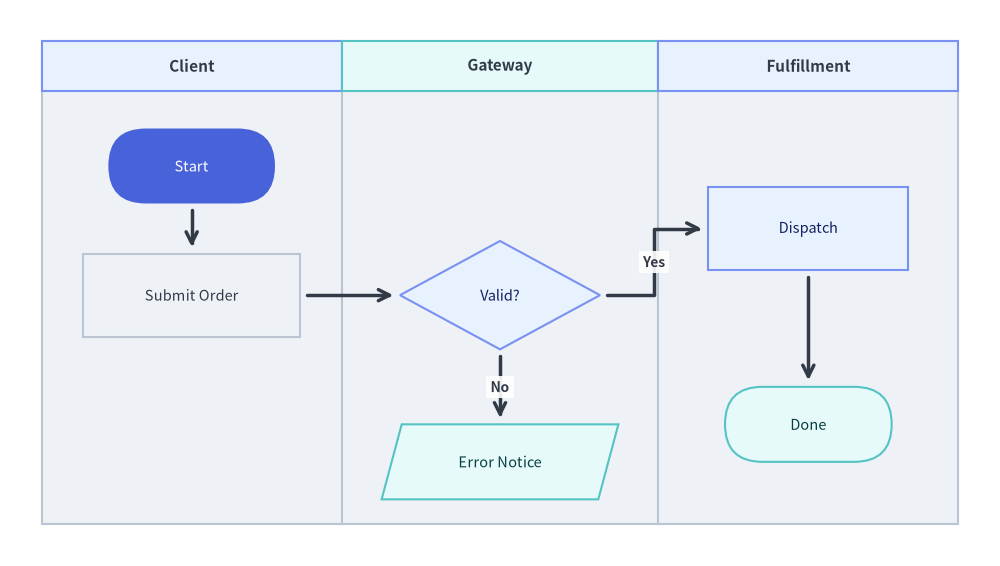
ISO 5807 / JIS X 0121 準拠のフローチャート記号、条件分岐、直交ルーティング、および部門横断スイムレーン(縦・横レーン)を備えたワークフロー図モジュールです。標準インポート: from drawlib.diagrams.flow import Data, Decision, End, FlowDiagram, Process, Start。
条件分岐を含む部門横断スイムレーン・フローチャート
Source Code
from drawlib.canvas import save , setup
from drawlib.diagrams.flow import Data , Decision , End , FlowDiagram , Process , Start
from drawlib.styles import Colors , Styles
setup ( width = 120 , height = 68 )
flow = FlowDiagram (
node_style = Styles . Neutral . patch ( text_size = 10.5 ),
edge_style = Styles . DarkBold ,
edge_text_style = Styles . DarkBold . patch ( text_size = 10.0 ),
width = 110 ,
height = 58 ,
lane_orientation = "vertical" ,
)
flow . add_lane (
"Client" ,
width = 36 ,
style = Styles . Neutral ,
header_style = Styles . PrimaryNeutral ,
text_style = Styles . DarkBold . patch ( text_size = 11.0 ),
)
flow . add_lane (
"Gateway" ,
width = 38 ,
style = Styles . Neutral ,
header_style = Styles . SecondaryNeutral ,
text_style = Styles . DarkBold . patch ( text_size = 11.0 ),
)
flow . add_lane (
"Fulfillment" ,
width = 36 ,
style = Styles . Neutral ,
header_style = Styles . PrimaryNeutral ,
text_style = Styles . DarkBold . patch ( text_size = 11.0 ),
)
start = flow . add (
Start ( "Start" , width = 20 , height = 9 , style = Styles . PrimaryFlat . patch ( text_color = Colors . White , text_size = 10.5 )),
xy = ( 18.0 , 43.0 ),
)
submit = flow . add ( Process ( "Submit Order" , width = 26 , height = 10 ), xy = ( 18.0 , 27.5 ))
check = flow . add (
Decision ( "Valid?" , width = 24 , height = 13 , style = Styles . PrimaryNeutral . patch ( text_size = 10.5 )),
xy = ( 55.0 , 27.5 ),
)
reject = flow . add (
Data ( "Error Notice" , width = 26 , height = 9 , style = Styles . SecondaryNeutral . patch ( text_size = 10.5 )),
xy = ( 55.0 , 7.5 ),
)
ship = flow . add (
Process ( "Dispatch" , width = 24 , height = 10 , style = Styles . PrimaryNeutral . patch ( text_size = 10.5 )),
xy = ( 92.0 , 35.5 ),
)
done = flow . add (
End ( "Done" , width = 20 , height = 9 , style = Styles . SecondaryNeutral . patch ( text_size = 10.5 )),
xy = ( 92.0 , 12.0 ),
)
start . connect ( submit , padding = 0.8 )
submit . connect ( check , padding = 0.8 )
check . connect ( ship , label = "Yes" , start_side = "right" , end_side = "left" , padding = 0.8 )
check . connect ( reject , label = "No" , start_side = "bottom" , end_side = "top" , padding = 0.8 )
ship . connect ( done , padding = 0.8 )
flow . draw ( xy = ( 5.0 , 5.0 ))
save ()
type ArrowType FlowEdge
ArrowType = Literal [ "->" , "<-" , "<->" , "-" ] | str
リテラル値
描画形状
主な用途
"->"end 側に矢印標準的な順方向の制御・データフロー(ノード宛のデフォルト)。
"<-"start 側に矢印逆方向のリンク表現。
"<->"start と end 両端に矢印双方向の同期ステップ。
"-"矢印なしの実線
中間 Junction
type Connectable FlowEdgestart または終点 end として指定可能なフローチャート要素を表す Union 型エイリアスです。
Connectable = FlowNode | Junction
class Data データ入力・出力ペイロード・外部ストレージレコードを表す平行四辺形の入出力ノードです。FlowNode
Data (
text : str = "" ,
width : float = 24.0 ,
height : float = 12.0 ,
style : Style | None = None ,
text_style : Style | None = None ,
show : bool = True ,
) -> None
座標アンカー : flow.add(node, xy=(cx, cy)) で登録する際の中心座標 (cx, cy) 。
コンストラクタ引数
引数
型
デフォルト
説明
textstr""平行四辺形の中央に描画されるラベル文字列(\n 改行対応)。
widthfloat24.0外接バウンディング幅(ローカル単位)。
heightfloat12.0外接バウンディング高さ(ローカル単位)。
styleStyle | NoneNone図形の塗り・枠線・文字スタイル上書き(未指定時は flow.node_style)。
text_styleStyle | NoneNonetext 専用のタイポグラフィスタイル上書き。
showboolTrue表示フラグ(False の場合、このノードと接続エッジを非表示化)。
パブリックメソッド・プロパティ
メンバー
種別
シグネチャ
説明
bottomproperty-> tuple[float, float]下辺中央の境界アンカー座標。
centerproperty-> tuple[float, float]ノードの中心座標 (x, y)。
connectmethod(self, target: Connectable, label: str = "", arrow: ArrowType | None = None, routing: RoutingType = "orthogonal", start_side: Side = "auto", end_side: Side = "auto", style: Style | None = None, text_style: Style | None = None, padding: PaddingType = 0.0, show: bool = True) -> FlowEdgeこのノードから target への FlowEdge
forkmethod(self, targets: list[Connectable], at_x: float | None = None, at_y: float | None = None, style: Style | None = None, padding: PaddingType = 0.0, show: bool = True) -> list[FlowEdge]中間 Junctiontargets へ分岐接続します。
get_anchormethod(self, side: Side = "auto") -> tuple[float, float]指定した side("left"、"right"、"top"、"bottom"、"auto")の境界ポート座標を返します。
get_boundsmethod(self) -> tuple[float, float, float, float]中心 (0, 0) 基準のローカル境界 (-width/2, -height/2, width/2, height/2) を返します。
leftproperty-> tuple[float, float]傾斜した左辺の中点アンカー座標。
rightproperty-> tuple[float, float]傾斜した右辺の中点アンカー座標。
topproperty-> tuple[float, float]上辺中央の境界アンカー座標。
xyproperty-> tuple[float, float]図に対する中心座標 (x, y)。
class Decision 4 つの頂点アンカーを持つひし形(ダイヤモンド)として描画される条件分岐ノードです。FlowNode
Decision (
text : str = "" ,
width : float = 22.0 ,
height : float = 14.0 ,
style : Style | None = None ,
text_style : Style | None = None ,
show : bool = True ,
) -> None
座標アンカー : flow.add(node, xy=(cx, cy)) で登録する際の中心座標 (cx, cy) 。"Yes" と "No" の出力分岐が重ならないよう、.connect() で start_side="right" / start_side="bottom" 等を明示指定することを推奨します。
コンストラクタ引数
引数
型
デフォルト
説明
textstr""ひし形の中央に描画される判定条件ラベル(\n 改行対応)。
widthfloat22.0左右の頂点間の幅(ローカル単位)。
heightfloat14.0上下の頂点間の高さ(ローカル単位)。
styleStyle | NoneNone図形の塗り・枠線・文字スタイル上書き(未指定時は flow.node_style)。
text_styleStyle | NoneNonetext 専用のタイポグラフィスタイル上書き。
showboolTrue表示フラグ(False の場合、このノードと接続エッジを非表示化)。
パブリックメソッド・プロパティ
メンバー
種別
シグネチャ
説明
bottomproperty-> tuple[float, float]ひし形の下頂点アンカー座標。
centerproperty-> tuple[float, float]ノードの中心座標 (x, y)。
connectmethod(self, target: Connectable, label: str = "", arrow: ArrowType | None = None, routing: RoutingType = "orthogonal", start_side: Side = "auto", end_side: Side = "auto", style: Style | None = None, text_style: Style | None = None, padding: PaddingType = 0.0, show: bool = True) -> FlowEdgeこの分岐ノードから target への FlowEdge
forkmethod(self, targets: list[Connectable], at_x: float | None = None, at_y: float | None = None, style: Style | None = None, padding: PaddingType = 0.0, show: bool = True) -> list[FlowEdge]中間 Junctiontargets へ分岐接続します。
get_anchormethod(self, side: Side = "auto") -> tuple[float, float]指定した side のひし形頂点座標を返します。
get_boundsmethod(self) -> tuple[float, float, float, float]中心 (0, 0) 基準のローカル境界 (-width/2, -height/2, width/2, height/2) を返します。
leftproperty-> tuple[float, float]ひし形の左頂点アンカー座標。
rightproperty-> tuple[float, float]ひし形の右頂点アンカー座標。
topproperty-> tuple[float, float]ひし形の上頂点アンカー座標。
xyproperty-> tuple[float, float]図に対する中心座標 (x, y)。
class End スタジアム型(カプセル/ピル形状)として描画されるフローチャート終了端子ノードです。FlowNode
End (
text : str = "End" ,
width : float = 20.0 ,
height : float = 10.0 ,
style : Style | None = None ,
text_style : Style | None = None ,
show : bool = True ,
) -> None
座標アンカー : flow.add(node, xy=(cx, cy)) で登録する際の中心座標 (cx, cy) 。
コンストラクタ引数
引数
型
デフォルト
説明
textstr"End"ピル形状の中央に描画される終了端子ラベル。
widthfloat20.0スタジアム形状の幅(ローカル単位)。
heightfloat10.0スタジアム形状の高さ(ローカル単位)。
styleStyle | NoneNone図形の塗り・枠線・文字スタイル上書き(未指定時は flow.node_style)。
text_styleStyle | NoneNonetext 専用のタイポグラフィスタイル上書き。
showboolTrue表示フラグ(False の場合、このノードと接続エッジを非表示化)。
パブリックメソッド・プロパティ
メンバー
種別
シグネチャ
説明
bottomproperty-> tuple[float, float]下辺中央の境界アンカー座標。
centerproperty-> tuple[float, float]ノードの中心座標 (x, y)。
connectmethod(self, target: Connectable, label: str = "", arrow: ArrowType | None = None, routing: RoutingType = "orthogonal", start_side: Side = "auto", end_side: Side = "auto", style: Style | None = None, text_style: Style | None = None, padding: PaddingType = 0.0, show: bool = True) -> FlowEdgeこのノードから target への FlowEdge
forkmethod(self, targets: list[Connectable], at_x: float | None = None, at_y: float | None = None, style: Style | None = None, padding: PaddingType = 0.0, show: bool = True) -> list[FlowEdge]中間 Junctiontargets へ分岐接続します。
get_anchormethod(self, side: Side = "auto") -> tuple[float, float]指定した side の境界ポート座標を返します。
get_boundsmethod(self) -> tuple[float, float, float, float]中心 (0, 0) 基準のローカル境界 (-width/2, -height/2, width/2, height/2) を返します。
leftproperty-> tuple[float, float]左端円弧の中点アンカー座標。
rightproperty-> tuple[float, float]右端円弧の中点アンカー座標。
topproperty-> tuple[float, float]上辺中央の境界アンカー座標。
xyproperty-> tuple[float, float]図に対する中心座標 (x, y)。
class FlowDiagram フローチャートおよび部門横断スイムレーン図のトップレベルコンテナです。スイムレーン利用時も全ノードは単一の共通グローバル座標空間を共有します。
FlowDiagram (
* ,
node_style : Style ,
edge_style : Style ,
edge_text_style : Style ,
title : str = "" ,
title_style : Style | None = None ,
width : float | None = None ,
height : float | None = None ,
style : Style | None = None ,
lane_orientation : Orientation = "vertical" ,
) -> None
座標アンカー : draw(xy=(0.0, 0.0), align="bottom_left") は図のローカル左下隅 (0.0, 0.0) をキャンバス座標 xy に配置します(align="center" の場合は図全体の中心を xy に配置)。
コンストラクタ引数
引数
型
デフォルト
説明
node_styleStyle(必須) フローノードのデフォルト塗り・枠線・文字スタイル(キーワード専用)。
edge_styleStyle(必須) FlowEdge
edge_text_styleStyle(必須) 分岐ラベルおよびエッジラベルのデフォルト文字スタイル(キーワード専用)。
titlestr""図の上部中央に描画される任意のタイトル。
title_styleStyle | NoneNonetitle 用の任意のテキストスタイル上書き。
widthfloat | NoneNone図の明示的な固定幅(None の場合はレーンおよびノードから自動算出)。
heightfloat | NoneNone図の明示的な固定高さ(None の場合はレーンおよびノードから自動算出)。
styleStyle | NoneNoneフローチャート全体を囲む外枠の任意の背景・枠線スタイル。
lane_orientationOrientation"vertical"スイムレーンの並び方向("vertical": 横並びの縦列レーン、"horizontal": 縦積みの横行レーン)。
パブリックメソッド・プロパティ
メンバー
種別
シグネチャ
説明
addmethod(self, item: ItemT, xy: tuple[float, float], *, show: bool | None = None) -> ItemTローカル座標 xy を中心として FlowNodeJunction
add_edgemethod(self, edge: FlowEdge, *, show: bool | None = None) -> FlowEdge構築済みの FlowEdge
add_lanemethod(self, title: str, size: float | None = None, width: float | None = None, height: float | None = None, style: Style | None = None, text_style: Style | None = None, header_size: float = 6.0, header_style: Style | None = None, show: bool = True) -> Lane背景スイムレーングリッドに縦列または横行の Lane
connectmethod(self, start: Connectable, end: Connectable, label: str = "", arrow: ArrowType | None = None, routing: RoutingType = "orthogonal", start_side: Side = "auto", end_side: Side = "auto", style: Style | None = None, text_style: Style | None = None, padding: PaddingType = 0.0, show: bool = True) -> FlowEdge2 つの ConnectableFlowEdge
drawmethod(self, xy: tuple[float, float] = (0.0, 0.0), *, align: Literal["bottom_left", "center"] = "bottom_left", scale: PosFloat = 1.0) -> Noneアクティブなキャンバス上のアンカー xy にフローチャート全体を描画します。
edgesproperty-> list[FlowEdge]登録済みの FlowEdge
get_sizemethod(self) -> tuple[float, float]スケール適用前のローカル単位での全体サイズ (width, height) を返します。
itemsproperty-> list[FlowNode | Junction]登録済みのノードおよびジャンクションのリストを返します。
junctionmethod(self, xy: tuple[float, float], *, show: bool = True) -> Junctionローカル座標 xy に Junction
lanesproperty-> list[Lane]登録順の Lane
class FlowEdge FlowDiagramConnectable
FlowEdge (
start : Connectable ,
end : Connectable ,
label : str = "" ,
arrow : ArrowType | None = None ,
routing : RoutingType = "orthogonal" ,
start_side : Side = "auto" ,
end_side : Side = "auto" ,
style : Style | None = None ,
text_style : Style | None = None ,
padding : PaddingType = 0.0 ,
show : bool = True ,
) -> None
座標アンカー : start の start_side ポートと end の end_side ポートを接続します。中間ウェイポイントは図のローカル座標 (x, y) で指定します。
コンストラクタ引数
引数
型
デフォルト
説明
startConnectable(必須) 始点となる FlowNodeJunction
endConnectable(必須) 終点となる FlowNodeJunction
labelstr""エッジ上に描画される分岐条件ラベル("Yes" / "No" 等)。
arrowArrowType| NoneNone矢印マーカー(None の場合、end が Junction なら "-"、それ以外は "->")。
routingRoutingType"orthogonal"経路ルーティング方式("orthogonal" または "direct")。
start_sideSide"auto"start 側の出発ポート("left"、"right"、"top"、"bottom"、"auto")。
end_sideSide"auto"end 側の到着ポート("left"、"right"、"top"、"bottom"、"auto")。
styleStyle | NoneNone線スタイルの任意上書き(未指定時は flow.edge_style)。
text_styleStyle | NoneNoneラベル文字スタイルの任意上書き(未指定時は flow.edge_text_style)。
paddingPaddingType0.0ノード境界とエッジ端点間の対称余白または (start_pad, end_pad)。
showboolTrueこのエッジを描画するかどうか。
パブリックメソッド・プロパティ
メンバー
種別
シグネチャ
説明
add_pointmethod(self, xy: tuple[float, float]) -> Junction中間ウェイポイント xy を追加し、分岐用の登録済み Junction
pointsmethod(self, waypoints: list[tuple[float, float]]) -> FlowEdge明示的な中間ウェイポイント列 (x, y) を設定し、self を返します。
viamethod(self, *waypoints: tuple[float, float]) -> FlowEdge.points(list(waypoints)) の可変長引数ショートハンドです。self を返します。
waypointsproperty-> list[tuple[float, float]]設定されている中間ウェイポイント (x, y) のリストコピーを返します。
class FlowNode すべてのフローチャート記号("process"、"decision"、"start"、"end"、"data")を表す基底ノードクラスです。通常は shape_type と標準サイズが設定済みの具象サブクラス StartEndProcessDecisionData
FlowNode (
text : str = "" ,
width : float = 24.0 ,
height : float = 12.0 ,
style : Style | None = None ,
text_style : Style | None = None ,
shape_type : ShapeType = "process" ,
show : bool = True ,
) -> None
座標アンカー : flow.add(node, xy=(cx, cy)) で登録する際の中心座標 (cx, cy) 。
コンストラクタ引数
引数
型
デフォルト
説明
textstr""図形中央に描画されるラベル文字列(\n 改行対応)。
widthfloat24.0バウンディングボックス幅(ローカル単位)。
heightfloat12.0バウンディングボックス高さ(ローカル単位)。
styleStyle | NoneNone図形の塗り・枠線・文字スタイル上書き(未指定時は flow.node_style)。
text_styleStyle | NoneNonetext 専用のタイポグラフィスタイル上書き。
shape_typeShapeType"process"フローチャート記号の形状種別("process"、"decision"、"start"、"end"、"data")。
showboolTrue表示フラグ(False の場合、このノードと接続エッジを非表示化)。
パブリックメソッド・プロパティ
メンバー
種別
シグネチャ
説明
bottomproperty-> tuple[float, float]下辺の境界アンカー座標。
centerproperty-> tuple[float, float]ノードの中心座標 (x, y)。
connectmethod(self, target: Connectable, label: str = "", arrow: ArrowType | None = None, routing: RoutingType = "orthogonal", start_side: Side = "auto", end_side: Side = "auto", style: Style | None = None, text_style: Style | None = None, padding: PaddingType = 0.0, show: bool = True) -> FlowEdgeこのノードから target への FlowEdge
forkmethod(self, targets: list[Connectable], at_x: float | None = None, at_y: float | None = None, style: Style | None = None, padding: PaddingType = 0.0, show: bool = True) -> list[FlowEdge]中間 Junctiontargets へ分岐接続します。
get_anchormethod(self, side: Side = "auto") -> tuple[float, float]指定した side の境界ポート座標を返します。
get_boundsmethod(self) -> tuple[float, float, float, float]中心 (0, 0) 基準のローカル境界 (-width/2, -height/2, width/2, height/2) を返します。
leftproperty-> tuple[float, float]左辺の境界アンカー座標。
rightproperty-> tuple[float, float]右辺の境界アンカー座標。
topproperty-> tuple[float, float]上辺の境界アンカー座標。
xyproperty-> tuple[float, float]図に対する中心座標 (x, y)。
class Junction FlowDiagram
Junction (
xy : tuple [ float , float ],
* ,
show : bool = True ,
) -> None
座標アンカー : 図ローカル座標系における厳密な点 (x, y)。flow.junction(xy) または edge.add_point(xy) で生成します。
コンストラクタ引数
引数
型
デフォルト
説明
xytuple[float, float](必須) ジャンクションの図ローカル座標 (x, y)。
showboolTrueこのジャンクションを経由するエッジを描画するかどうか(キーワード専用)。
パブリックメソッド・プロパティ
メンバー
種別
シグネチャ
説明
bottomproperty-> tuple[float, float]下側アンカー座標(xy を返します)。
centerproperty-> tuple[float, float]中心アンカー座標(xy を返します)。
connectmethod(self, target: Connectable, label: str = "", arrow: ArrowType | None = None, routing: RoutingType = "orthogonal", start_side: Side = "auto", end_side: Side = "auto", style: Style | None = None, text_style: Style | None = None, padding: PaddingType = 0.0, show: bool = True) -> FlowEdgeこのジャンクションから target への FlowEdge
get_anchormethod(self, side: Side = "auto") -> tuple[float, float]指定した side のアンカー座標(常に xy)を返します。
get_boundsmethod(self) -> tuple[float, float, float, float]面積ゼロの境界 (0.0, 0.0, 0.0, 0.0) を返します。
get_sizemethod(self) -> tuple[float, float]視覚サイズ (0.0, 0.0) を返します。
leftproperty-> tuple[float, float]左側アンカー座標(xy を返します)。
rightproperty-> tuple[float, float]右側アンカー座標(xy を返します)。
topproperty-> tuple[float, float]上側アンカー座標(xy を返します)。
xyproperty-> tuple[float, float]ジャンクションの図ローカル座標 (x, y)。
class Lane FlowDiagramlane_orientation="vertical")またはスイムレーン行(lane_orientation="horizontal")です。通常は flow.add_lane(...) から生成します。
Lane (
title : str ,
size : float ,
style : Style | None = None ,
text_style : Style | None = None ,
header_size : float = 6.0 ,
header_style : Style | None = None ,
show : bool = True ,
) -> None
座標アンカー : 図の (0, 0) グローバル座標系上に順番に自動タイリングされます(縦列レーンは左から右、横行レーンは上から下)。幅 $W_0, W_1, \dots$ の縦列レーンの場合、各列の中心 X 座標は $X_0 = W_0 / 2$、$X_1 = W_0 + W_1 / 2$ となります。
コンストラクタ引数・属性
引数
型
デフォルト
説明
titlestr(必須) レーンヘッダー帯に表示されるアクター・部門・サブシステム名。
sizefloat(必須) レーンの主スパン寸法(縦列レーンの場合は幅 width、横行レーンの場合は高さ height)。
styleStyle | NoneNoneレーン本体の背景塗り・枠線スタイル。
text_styleStyle | NoneNonetitle 用のテキストスタイル上書き。
header_sizefloat6.0ヘッダー帯の厚み(縦列レーンなら高さ、横行レーンなら幅)。
header_styleStyle | NoneNoneヘッダー帯の塗り・枠線スタイル上書き。
showboolTrueこのスイムレーン帯を描画するかどうか。
type Orientation FlowDiagram
Orientation = Literal [ "vertical" , "horizontal" ]
座標アンカー : Lane
リテラル値
レイアウト動作
"vertical"上部にヘッダーを持つ縦列スイムレーンを左から右へ横並びに配置(デフォルト)。
"horizontal"左端にヘッダーを持つ横行スイムレーンを上から下へ縦積みに配置。
type PaddingType FlowEdge
PaddingType = float | tuple [ float , float ]
座標アンカー : start および end ノード境界からエッジ端点までの離隔距離を指定します。
指定形式
意味
floatstart と end の双方に均等適用する対称クリアランス距離。
tuple[float, float](start_padding, end_padding) の非対称クリアランス距離。
class Process アクション・タスク・業務処理ステップを表す長方形ノードです。FlowNode
Process (
text : str = "" ,
width : float = 24.0 ,
height : float = 12.0 ,
style : Style | None = None ,
text_style : Style | None = None ,
show : bool = True ,
) -> None
座標アンカー : flow.add(node, xy=(cx, cy)) で登録する際の中心座標 (cx, cy) 。
コンストラクタ引数
引数
型
デフォルト
説明
textstr""長方形の中央に描画される処理ステップ名(\n 改行対応)。
widthfloat24.0長方形の幅(ローカル単位)。
heightfloat12.0長方形の高さ(ローカル単位)。
styleStyle | NoneNone図形の塗り・枠線・文字スタイル上書き(未指定時は flow.node_style)。
text_styleStyle | NoneNonetext 専用のタイポグラフィスタイル上書き。
showboolTrue表示フラグ(False の場合、このノードと接続エッジを非表示化)。
パブリックメソッド・プロパティ
メンバー
種別
シグネチャ
説明
bottomproperty-> tuple[float, float]下辺の中点アンカー座標。
centerproperty-> tuple[float, float]ノードの中心座標 (x, y)。
connectmethod(self, target: Connectable, label: str = "", arrow: ArrowType | None = None, routing: RoutingType = "orthogonal", start_side: Side = "auto", end_side: Side = "auto", style: Style | None = None, text_style: Style | None = None, padding: PaddingType = 0.0, show: bool = True) -> FlowEdgeこの処理ノードから target への FlowEdge
forkmethod(self, targets: list[Connectable], at_x: float | None = None, at_y: float | None = None, style: Style | None = None, padding: PaddingType = 0.0, show: bool = True) -> list[FlowEdge]中間 Junctiontargets へ分岐接続します。
get_anchormethod(self, side: Side = "auto") -> tuple[float, float]指定した side の辺中点座標を返します。
get_boundsmethod(self) -> tuple[float, float, float, float]中心 (0, 0) 基準のローカル境界 (-width/2, -height/2, width/2, height/2) を返します。
leftproperty-> tuple[float, float]左辺の中点アンカー座標。
rightproperty-> tuple[float, float]右辺の中点アンカー座標。
topproperty-> tuple[float, float]上辺の中点アンカー座標。
xyproperty-> tuple[float, float]図に対する中心座標 (x, y)。
type RoutingType FlowEdge
RoutingType = Literal [ "orthogonal" , "direct" ]
座標アンカー : 解決された start と end のポート座標間の補間経路を制御します。
リテラル値
経路ジオメトリ
"orthogonal"水平・垂直の直角マンハッタン L 字/Z 字折れ線ルーティング(デフォルト)。
"direct"解決された境界ポート間を直線で結ぶユークリッド線分。
type ShapeType FlowNode
ShapeType = Literal [ "process" , "decision" , "start" , "end" , "data" ]
座標アンカー : すべての形状はノードの中心座標 (cx, cy) を基準に描画されます。
リテラル値
描画される図形
対応する具象サブクラス
"process"長方形(処理)
Process
"decision"ひし形(条件分岐)
Decision
"start"スタジアム/ピル形状(開始端子)
Start
"end"スタジアム/ピル形状(終了端子)
End
"data"平行四辺形(入出力データ)
Data
type Side FlowNode
Side = Literal [ "left" , "right" , "top" , "bottom" , "auto" ]
座標アンカー : 対応する辺の中点(Decision では各頂点)に解決されます。"auto" の場合は対向する最短辺を自動選択します。
class Start スタジアム型(カプセル/ピル形状)として描画されるフローチャート開始端子ノードです。FlowNode
Start (
text : str = "Start" ,
width : float = 20.0 ,
height : float = 10.0 ,
style : Style | None = None ,
text_style : Style | None = None ,
show : bool = True ,
) -> None
座標アンカー : flow.add(node, xy=(cx, cy)) で登録する際の中心座標 (cx, cy) 。
コンストラクタ引数
引数
型
デフォルト
説明
textstr"Start"ピル形状の中央に描画される開始端子ラベル。
widthfloat20.0スタジアム形状の幅(ローカル単位)。
heightfloat10.0スタジアム形状の高さ(ローカル単位)。
styleStyle | NoneNone図形の塗り・枠線・文字スタイル上書き(未指定時は flow.node_style)。
text_styleStyle | NoneNonetext 専用のタイポグラフィスタイル上書き。
showboolTrue表示フラグ(False の場合、このノードと接続エッジを非表示化)。
パブリックメソッド・プロパティ
メンバー
種別
シグネチャ
説明
bottomproperty-> tuple[float, float]下辺中央の境界アンカー座標。
centerproperty-> tuple[float, float]ノードの中心座標 (x, y)。
connectmethod(self, target: Connectable, label: str = "", arrow: ArrowType | None = None, routing: RoutingType = "orthogonal", start_side: Side = "auto", end_side: Side = "auto", style: Style | None = None, text_style: Style | None = None, padding: PaddingType = 0.0, show: bool = True) -> FlowEdgeこの開始ノードから target への FlowEdge
forkmethod(self, targets: list[Connectable], at_x: float | None = None, at_y: float | None = None, style: Style | None = None, padding: PaddingType = 0.0, show: bool = True) -> list[FlowEdge]中間 Junctiontargets へ分岐接続します。
get_anchormethod(self, side: Side = "auto") -> tuple[float, float]指定した side の境界ポート座標を返します。
get_boundsmethod(self) -> tuple[float, float, float, float]中心 (0, 0) 基準のローカル境界 (-width/2, -height/2, width/2, height/2) を返します。
leftproperty-> tuple[float, float]左端円弧の中点アンカー座標。
rightproperty-> tuple[float, float]右端円弧の中点アンカー座標。
topproperty-> tuple[float, float]上辺中央の境界アンカー座標。
xyproperty-> tuple[float, float]図に対する中心座標 (x, y)。