drawlib.lines & drawlib.text(線・曲線・テキスト)
drawlib.lines は接線方向へ自動整列する矢印付きの直線・円弧・2 次/3 次ベジェ曲線・角丸ポリラインを描画し、drawlib.text は横書き・回転・複数行・縦書きテキストを描画します。from drawlib.lines import line, line_curved, lines, lines_curved, ... および from drawlib.text import text, text_vertical でインポートします。
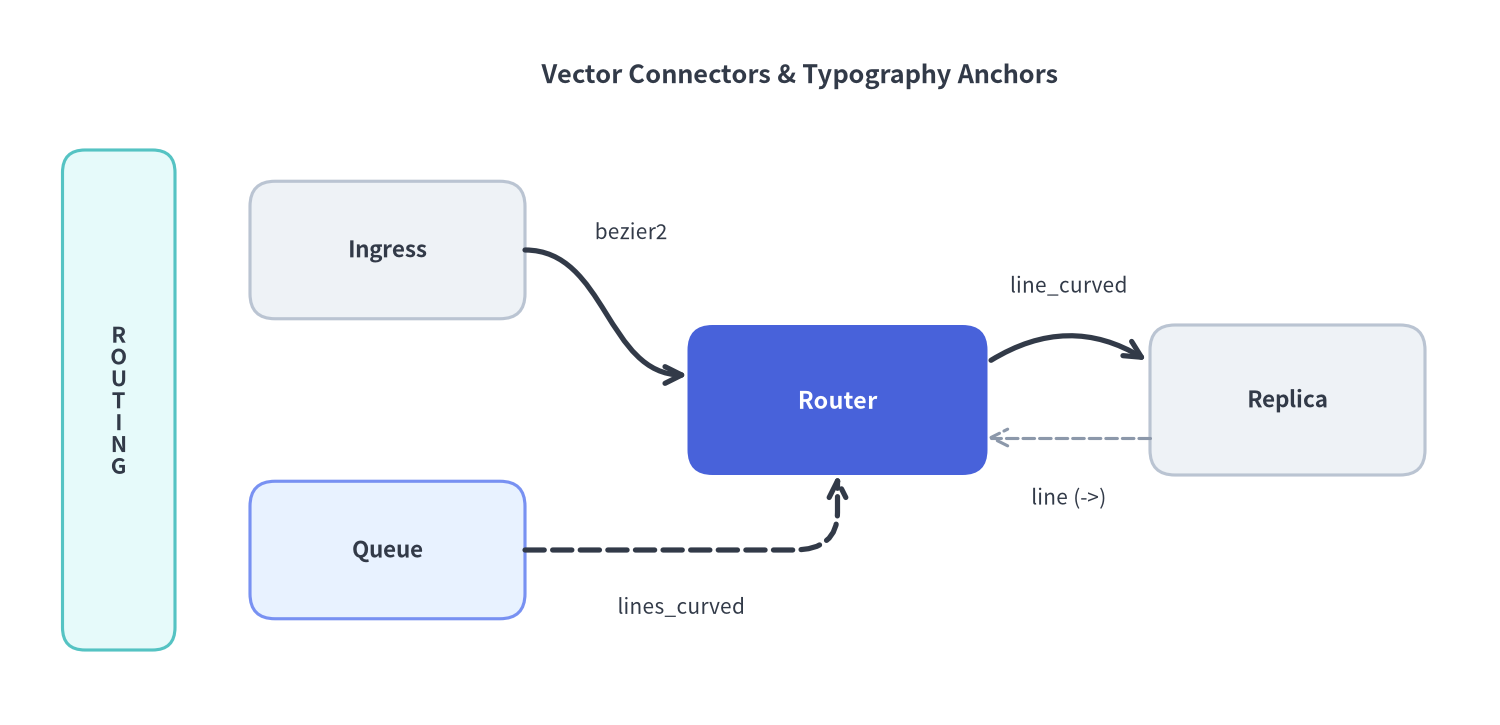
Source Code
from drawlib.canvas import save, setup
from drawlib.lines import line, line_bezier2, line_curved, lines_curved
from drawlib.shapes import rectangle
from drawlib.styles import Colors, Styles
from drawlib.text import text, text_vertical

setup(width=120, height=58, dpi=150)

# Title header
text(
    (64, 52.0),
    "Vector Connectors & Typography Anchors",
    style=Styles.DarkBold.patch(text_size=12.2),
)

# Left vertical tier banner demonstrating text_vertical()
rectangle((9.5, 26), width=9, height=40, style=Styles.SecondaryNeutral.patch(shape_r=1.8))
text_vertical((9.5, 26), "ROUTING", style=Styles.DarkBold.patch(text_size=10.5))

# Nodes (3 Neutral + 1 PrimaryFlat Hero)
rectangle(
    (31, 38),
    width=22,
    height=11,
    style=Styles.Neutral.patch(shape_r=2.0),
    text="Ingress",
    text_style=Styles.DarkBold.patch(text_size=10.8),
)
rectangle(
    (31, 14),
    width=22,
    height=11,
    style=Styles.PrimaryNeutral.patch(shape_r=2.0),
    text="Queue",
    text_style=Styles.DarkBold.patch(text_size=10.8),
)
rectangle(
    (67, 26),
    width=24,
    height=12,
    style=Styles.PrimaryFlat.patch(shape_r=2.0),
    text="Router",
    text_style=Styles.WhiteBold.patch(text_size=11.2, text_color=Colors.White),
)
rectangle(
    (103, 26),
    width=22,
    height=12,
    style=Styles.Neutral.patch(shape_r=2.0),
    text="Replica",
    text_style=Styles.DarkBold.patch(text_size=10.8),
)

# 1. Cubic S-curve (line_bezier2)
line_bezier2(
    xy1=(42, 38),
    xy2=(55, 28),
    cp1=(48.5, 38),
    cp2=(48.5, 28),
    arrow_head="->",
    style=Styles.DarkBold,
)
text((50.5, 39.5), "bezier2", style=Styles.Dark.patch(text_size=10.0))

# 2. Filleted orthogonal path (lines_curved)
lines_curved(
    [(42, 14), (67, 14), (67, 20)],
    r=3.5,
    arrow_head="->",
    style=Styles.DarkBold.patch(line_style="dashed"),
)
text((54.5, 9.5), "lines_curved", style=Styles.Dark.patch(text_size=10.0))

# 3. Smooth arc spline (line_curved) + straight return (line)
line_curved((79, 29), (92, 29), bend=-0.32, arrow_head="->", style=Styles.DarkBold)
text((85.5, 35.2), "line_curved", style=Styles.Dark.patch(text_size=10.0))

line((92, 23), (79, 23), arrow_head="->", style=Styles.MutedDashed.patch(line_width=1.5))
text((85.5, 18.2), "line (->)", style=Styles.Dark.patch(text_size=10.0))

save()
defline(xy1, xy2, *, style, arrow_head='')#
始点 xy1 から終点 xy2 へ 1 次元の直線セグメントを描画します(drawlib.lines)。線幅・破線パターン・色・矢印の塗りつぶしやサイズは style.patch(line_width=..., line_style=..., line_arrow_head_fill=..., line_arrow_head_scale=...) で調整します。
def line(
    xy1: Coordinate,
    xy2: Coordinate,
    *,
    style: Style,
    arrow_head: ArrowHead = "",
) -> None
| 引数 | 型 | デフォルト | 説明 |
|---|---|---|---|
xy1 |
Coordinate |
必須 | 始点座標 (x1, y1)。 |
xy2 |
Coordinate |
必須 | 終点座標 (x2, y2)。 |
style |
Style |
必須 | キーワード専用の線 Style(例: Styles.DarkBold, Styles.MutedDashed)。 |
arrow_head |
ArrowHead |
'' |
端点矢印の種類: '' / '-'(なし)、'->'(終点)、'<-'(始点)、'<->'(両端)。 |
defline_arc(xy, width, height, *, style, ...)#
中心座標 xy = (cx, cy) を基準とする楕円または円の外周上に開いた円弧線を描画します(drawlib.lines)。角度は X 軸正方向(右=0°)を基準とする反時計回り(90°=上)の度数法です。
def line_arc(
    xy: Coordinate,
    width: PosFloat,
    height: PosFloat,
    *,
    style: Style,
    angle_start: Angle = 0,
    angle_end: Angle = 180,
    angle: Angle = 0,
    arrow_head: ArrowHead = "",
    ccw: bool = True,
) -> None
| 引数 | 型 | デフォルト | 説明 |
|---|---|---|---|
xy |
Coordinate |
必須 | 基準楕円の中心座標 (cx, cy)。 |
width |
PosFloat |
必須 | 楕円の水平直径(2 * rx)。 |
height |
PosFloat |
必須 | 楕円の垂直直径(2 * ry。width == height で真円弧)。 |
style |
Style |
必須 | キーワード専用の線 Style。 |
angle_start |
Angle |
0 |
開始角度(度)。 |
angle_end |
Angle |
180 |
終了角度(度)。 |
angle |
Angle |
0 |
楕円全体の反時計回り回転角度(度)。 |
arrow_head |
ArrowHead |
'' |
接線方向へ自動整列する端点矢印('', '->', '<-', '<->')。 |
ccw |
bool |
True |
True で反時計回り、False で時計回りに弧を描画します。 |
defline_bezier1(xy1, xy2, cp, *, style, arrow_head='')#
1 つの制御点 cp を用いて xy1 から xy2 へ 2 次ベジェ曲線を描画します(drawlib.lines)。位置引数の順序は (xy1, xy2, cp) です。
def line_bezier1(
    xy1: Coordinate,
    xy2: Coordinate,
    cp: Coordinate,
    *,
    style: Style,
    arrow_head: ArrowHead = "",
) -> None
| 引数 | 型 | デフォルト | 説明 |
|---|---|---|---|
xy1 |
Coordinate |
必須 | 曲線の始点座標 (x1, y1)。 |
xy2 |
Coordinate |
必須 | 曲線の終点座標 (x2, y2)。 |
cp |
Coordinate |
必須 | 曲線の膨らみと両端の接線方向を決める制御点 (cx, cy)。 |
style |
Style |
必須 | キーワード専用の線 Style。 |
arrow_head |
ArrowHead |
'' |
接線方向へ自動整列する端点矢印('', '->', '<-', '<->')。 |
defline_bezier2(xy1, xy2, cp1, cp2, *, style, arrow_head='')#
2 つの制御点 cp1・cp2 を用いて xy1 から xy2 へ滑らかな S 字カーブ等の 3 次ベジェ曲線を描画します(drawlib.lines)。位置引数の順序は (xy1, xy2, cp1, cp2) です。
def line_bezier2(
    xy1: Coordinate,
    xy2: Coordinate,
    cp1: Coordinate,
    cp2: Coordinate,
    *,
    style: Style,
    arrow_head: ArrowHead = "",
) -> None
| 引数 | 型 | デフォルト | 説明 |
|---|---|---|---|
xy1 |
Coordinate |
必須 | 曲線の始点座標 (x1, y1)。 |
xy2 |
Coordinate |
必須 | 曲線の終点座標 (x2, y2)。 |
cp1 |
Coordinate |
必須 | xy1 からの出発接線を制御する第 1 制御点。 |
cp2 |
Coordinate |
必須 | xy2 への進入接線を制御する第 2 制御点。 |
style |
Style |
必須 | キーワード専用の線 Style。 |
arrow_head |
ArrowHead |
'' |
接線方向へ自動整列する端点矢印('', '->', '<-', '<->')。 |
defline_curved(xy1, xy2, *, style, bend=0, arrow_head='')#
単一のスカラー曲率係数 bend で xy1 から xy2 へ円弧スプライン曲線を描画します(drawlib.lines)。xy1 から xy2 へ向かう進行方向に対して、bend > 0 で左側、bend < 0 で右側へ膨らみます。
def line_curved(
    xy1: Coordinate,
    xy2: Coordinate,
    *,
    style: Style,
    bend: Bend = 0,
    arrow_head: ArrowHead = "",
) -> None
| 引数 | 型 | デフォルト | 説明 |
|---|---|---|---|
xy1 |
Coordinate |
必須 | 始点座標 (x1, y1)。 |
xy2 |
Coordinate |
必須 | 終点座標 (x2, y2)。 |
style |
Style |
必須 | キーワード専用の線 Style。 |
bend |
Bend (float) |
0 |
曲率係数(0 で直線、±0.2〜±0.4 が標準的なアーキテクチャ曲線)。 |
arrow_head |
ArrowHead |
'' |
接線方向へ自動整列する端点矢印('', '->', '<-', '<->')。 |
deflines(xys, *, style, arrow_head='')#
2 点以上の頂点列 xys を順に接続する折れ線(ポリライン)を描画します(drawlib.lines)。連続する重複頂点や同一直線上の冗長な中間点は描画前に自動正規化されます。
def lines(
    xys: Coordinates,
    *,
    style: Style,
    arrow_head: ArrowHead = "",
) -> None
| 引数 | 型 | デフォルト | 説明 |
|---|---|---|---|
xys |
Coordinates |
必須 | 2 点以上の (x, y) 座標リスト(compute_orthogonal_path() の戻り値など)。 |
style |
Style |
必須 | キーワード専用の線 Style。 |
arrow_head |
ArrowHead |
'' |
始点・終点に付与する矢印スタイル。 |
deflines_bezier(xy, path_points, *, style, arrow_head='')#
始点 xy から開始し、直線セグメント (x, y)、2 次ベジェセグメント ((cp_x, cp_y), (x, y))、3 次ベジェセグメント ((cp1_x, cp1_y), (cp2_x, cp2_y), (x, y)) を自在に連結した複合パスを描画します(drawlib.lines)。
def lines_bezier(
    xy: Coordinate,
    path_points: PathPoints,
    *,
    style: Style,
    arrow_head: ArrowHead = "",
) -> None
| 引数 | 型 | デフォルト | 説明 |
|---|---|---|---|
xy |
Coordinate |
必須 | パスの開始座標 (x0, y0)。 |
path_points |
PathPoints |
必須 | 直線座標 (x, y)、2 次制御付き (cp, end)、または 3 次制御付き (cp1, cp2, end) のリスト。 |
style |
Style |
必須 | キーワード専用の線 Style。 |
arrow_head |
ArrowHead |
'' |
接線方向へ自動整列する端点矢印('', '->', '<-', '<->')。 |
deflines_curved(xys, r, *, style, arrow_head='')#
頂点列 xys の各折れ曲がり角をフィレット半径 r の 2 次ベジェ曲線で自動的に角丸化したポリラインを描画します(drawlib.lines)。r は隣接頂点間の最短距離の半分未満に設定してください。
def lines_curved(
    xys: Coordinates,
    r: PosFloat,
    *,
    style: Style,
    arrow_head: ArrowHead = "",
) -> None
| 引数 | 型 | デフォルト | 説明 |
|---|---|---|---|
xys |
Coordinates |
必須 | 3 点以上の (x, y) ポリライン頂点リスト。 |
r |
PosFloat |
必須 | 角丸フィレット半径(正の浮動小数点数)。 |
style |
Style |
必須 | キーワード専用の線 Style。 |
arrow_head |
ArrowHead |
'' |
接線方向へ自動整列する端点矢印('', '->', '<-', '<->')。 |
deftext(xy, text, *, style)#
座標 xy を基準に単一行または \n 区切りの複数行テキスト(style.angle による回転対応)を描画します(drawlib.text)。デフォルト(halign="center", valign="center")では xy = (cx, cy) がテキストブロックの中心アンカーとなります。フォントサイズ・書体・揃え・回転・行間・背景ボックスは style.patch(...) で指定します。
def text(
    xy: Coordinate,
    text: str,
    *,
    style: Style,
) -> None
| 引数 | 型 | デフォルト | 説明 |
|---|---|---|---|
xy |
Coordinate |
必須 | 基準アンカー座標 (x, y)(デフォルトは中心 (cx, cy)。style.patch(halign=..., valign=...) で変更可)。 |
text |
str |
必須 | 描画する文字列(\n で改行)。 |
style |
Style |
必須 | キーワード専用のテキスト Style(text_size >= 10.0、text_color、text_font、halign、valign、angle、text_line_spacing、text_bg_*)。 |
deftext_vertical(xy, text, *, style)#
文字を上から下へ 1 文字ずつ縦積みにした縦書きテキストを座標 xy に描画します(drawlib.text)。デフォルト(valign="center")では xy = (cx, cy) が縦書き列の中心アンカーとなり、文字中心線を揃えるため halign は自動的に "center" に固定されます。
def text_vertical(
    xy: Coordinate,
    text: str,
    *,
    style: Style,
) -> None
| 引数 | 型 | デフォルト | 説明 |
|---|---|---|---|
xy |
Coordinate |
必須 | 基準アンカー座標 (x, y)(デフォルトは中心 (cx, cy)。縦方向の位置揃えは valign で指定)。 |
text |
str |
必須 | 上から下へ縦方向に並べる文字列。 |
style |
Style |
必須 | キーワード専用のテキスト Style(text_size、text_color、text_font、valign、angle、text_bg_*)。 |