drawlib.lines & drawlib.text
drawlib.lines renders 1D straight, curved, Bézier, elliptical-arc, and corner-filleted vector connectors with tangent-aligned arrowheads, while drawlib.text renders horizontal, rotated, multi-line, and vertical typography. Import primitives via from drawlib.lines import line, line_curved, lines, lines_curved, ... and from drawlib.text import text, text_vertical.
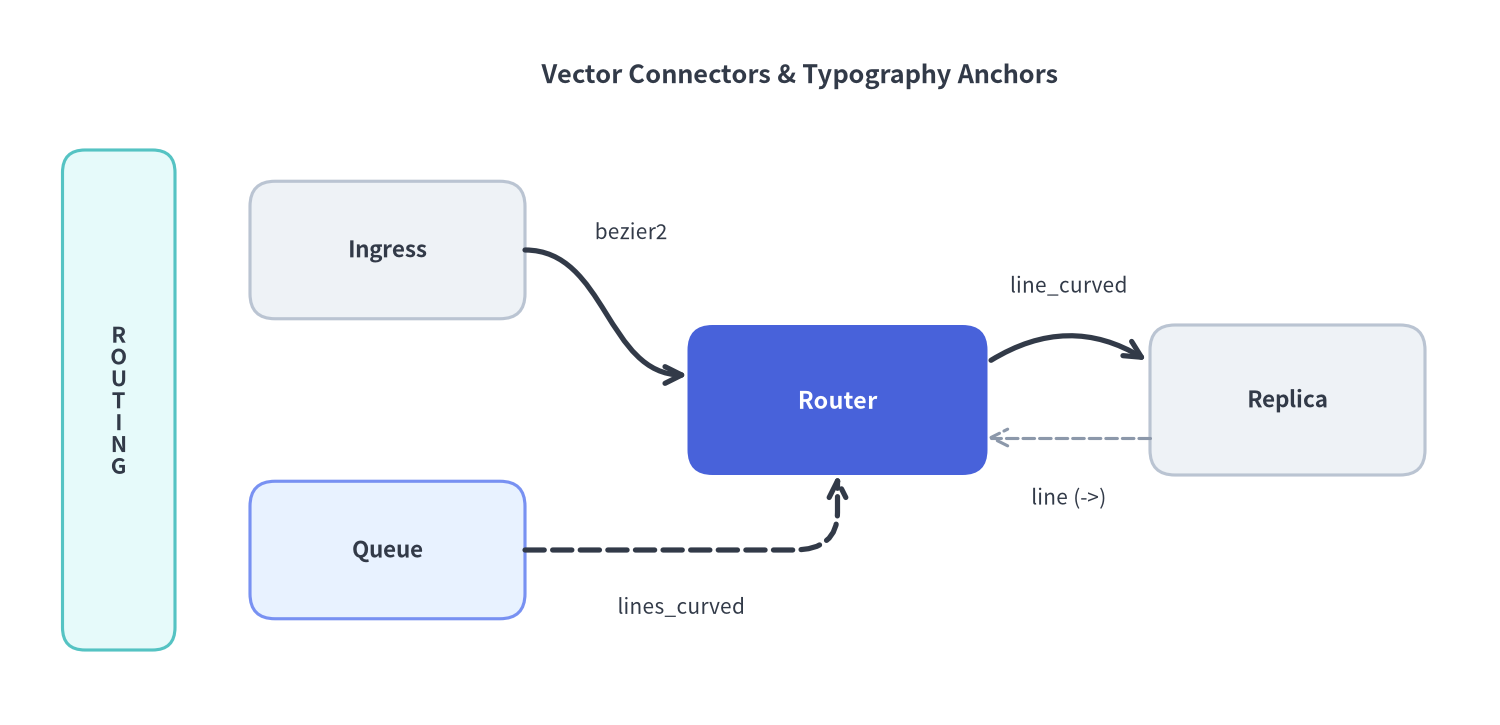
Source Code
from drawlib.canvas import save, setup
from drawlib.lines import line, line_bezier2, line_curved, lines_curved
from drawlib.shapes import rectangle
from drawlib.styles import Colors, Styles
from drawlib.text import text, text_vertical

setup(width=120, height=58, dpi=150)

# Title header
text(
    (64, 52.0),
    "Vector Connectors & Typography Anchors",
    style=Styles.DarkBold.patch(text_size=12.2),
)

# Left vertical tier banner demonstrating text_vertical()
rectangle((9.5, 26), width=9, height=40, style=Styles.SecondaryNeutral.patch(shape_r=1.8))
text_vertical((9.5, 26), "ROUTING", style=Styles.DarkBold.patch(text_size=10.5))

# Nodes (3 Neutral + 1 PrimaryFlat Hero)
rectangle(
    (31, 38),
    width=22,
    height=11,
    style=Styles.Neutral.patch(shape_r=2.0),
    text="Ingress",
    text_style=Styles.DarkBold.patch(text_size=10.8),
)
rectangle(
    (31, 14),
    width=22,
    height=11,
    style=Styles.PrimaryNeutral.patch(shape_r=2.0),
    text="Queue",
    text_style=Styles.DarkBold.patch(text_size=10.8),
)
rectangle(
    (67, 26),
    width=24,
    height=12,
    style=Styles.PrimaryFlat.patch(shape_r=2.0),
    text="Router",
    text_style=Styles.WhiteBold.patch(text_size=11.2, text_color=Colors.White),
)
rectangle(
    (103, 26),
    width=22,
    height=12,
    style=Styles.Neutral.patch(shape_r=2.0),
    text="Replica",
    text_style=Styles.DarkBold.patch(text_size=10.8),
)

# 1. Cubic S-curve (line_bezier2)
line_bezier2(
    xy1=(42, 38),
    xy2=(55, 28),
    cp1=(48.5, 38),
    cp2=(48.5, 28),
    arrow_head="->",
    style=Styles.DarkBold,
)
text((50.5, 39.5), "bezier2", style=Styles.Dark.patch(text_size=10.0))

# 2. Filleted orthogonal path (lines_curved)
lines_curved(
    [(42, 14), (67, 14), (67, 20)],
    r=3.5,
    arrow_head="->",
    style=Styles.DarkBold.patch(line_style="dashed"),
)
text((54.5, 9.5), "lines_curved", style=Styles.Dark.patch(text_size=10.0))

# 3. Smooth arc spline (line_curved) + straight return (line)
line_curved((79, 29), (92, 29), bend=-0.32, arrow_head="->", style=Styles.DarkBold)
text((85.5, 35.2), "line_curved", style=Styles.Dark.patch(text_size=10.0))

line((92, 23), (79, 23), arrow_head="->", style=Styles.MutedDashed.patch(line_width=1.5))
text((85.5, 18.2), "line (->)", style=Styles.Dark.patch(text_size=10.0))

save()
defline(xy1, xy2, *, style, arrow_head='')#
Draw a straight 1D line segment from starting point xy1 to ending point xy2 (drawlib.lines). Customize stroke width, dash pattern, color, and filled/scaled arrowheads via style.patch(line_width=..., line_style=..., line_arrow_head_fill=..., line_arrow_head_scale=...).
def line(
    xy1: Coordinate,
    xy2: Coordinate,
    *,
    style: Style,
    arrow_head: ArrowHead = "",
) -> None
| Parameter | Type | Default | Description |
|---|---|---|---|
xy1 |
Coordinate |
Required | Starting point (x1, y1) in canvas coordinates. |
xy2 |
Coordinate |
Required | Ending point (x2, y2) in canvas coordinates. |
style |
Style |
Required | Keyword-only stroke Style (e.g. Styles.DarkBold, Styles.MutedDashed). |
arrow_head |
ArrowHead |
'' |
Terminal arrowhead: '' or '-' (none), '->' (at xy2), '<-' (at xy1), '<->' (both ends). |
defline_arc(xy, width, height, *, style, ...)#
Draw an open elliptical or circular arc stroke centered at xy = (cx, cy) (drawlib.lines). Angles follow standard Cartesian degrees counter-clockwise from the positive X-axis (0° = East, 90° = North).
def line_arc(
    xy: Coordinate,
    width: PosFloat,
    height: PosFloat,
    *,
    style: Style,
    angle_start: Angle = 0,
    angle_end: Angle = 180,
    angle: Angle = 0,
    arrow_head: ArrowHead = "",
    ccw: bool = True,
) -> None
| Parameter | Type | Default | Description |
|---|---|---|---|
xy |
Coordinate |
Required | Center (cx, cy) of the reference ellipse. |
width |
PosFloat |
Required | Full horizontal diameter (2 * rx) of the ellipse. |
height |
PosFloat |
Required | Full vertical diameter (2 * ry) of the ellipse (width == height draws a circular arc). |
style |
Style |
Required | Keyword-only stroke Style. |
angle_start |
Angle |
0 |
Starting angle in degrees. |
angle_end |
Angle |
180 |
Ending angle in degrees. |
angle |
Angle |
0 |
Counter-clockwise rotation of the entire ellipse frame in degrees. |
arrow_head |
ArrowHead |
'' |
Terminal arrowhead ('', '->', '<-', '<->'), automatically tangent-aligned. |
ccw |
bool |
True |
Sweep direction: True for counter-clockwise, False for clockwise. |
defline_bezier1(xy1, xy2, cp, *, style, arrow_head='')#
Draw a quadratic Bézier curve from xy1 to xy2 pulled toward a single control point cp (drawlib.lines). Note that cp is the third positional parameter after xy1 and xy2.
def line_bezier1(
    xy1: Coordinate,
    xy2: Coordinate,
    cp: Coordinate,
    *,
    style: Style,
    arrow_head: ArrowHead = "",
) -> None
| Parameter | Type | Default | Description |
|---|---|---|---|
xy1 |
Coordinate |
Required | Curve start coordinate (x1, y1). |
xy2 |
Coordinate |
Required | Curve end coordinate (x2, y2). |
cp |
Coordinate |
Required | Quadratic control point (cx, cy) governing departure and arrival tangents. |
style |
Style |
Required | Keyword-only stroke Style. |
arrow_head |
ArrowHead |
'' |
Tangent-aligned terminal arrowhead ('', '->', '<-', '<->'). |
defline_bezier2(xy1, xy2, cp1, cp2, *, style, arrow_head='')#
Draw a cubic Bézier curve (such as smooth S-curves between ports) from xy1 to xy2 using two control points cp1 and cp2 (drawlib.lines). Note the positional order (xy1, xy2, cp1, cp2).
def line_bezier2(
    xy1: Coordinate,
    xy2: Coordinate,
    cp1: Coordinate,
    cp2: Coordinate,
    *,
    style: Style,
    arrow_head: ArrowHead = "",
) -> None
| Parameter | Type | Default | Description |
|---|---|---|---|
xy1 |
Coordinate |
Required | Curve start coordinate (x1, y1). |
xy2 |
Coordinate |
Required | Curve end coordinate (x2, y2). |
cp1 |
Coordinate |
Required | First control point governing the tangent leaving xy1. |
cp2 |
Coordinate |
Required | Second control point governing the tangent arriving at xy2. |
style |
Style |
Required | Keyword-only stroke Style. |
arrow_head |
ArrowHead |
'' |
Tangent-aligned terminal arrowhead ('', '->', '<-', '<->'). |
defline_curved(xy1, xy2, *, style, bend=0, arrow_head='')#
Draw a circular arc spline between xy1 and xy2 controlled by a scalar curvature factor bend (drawlib.lines). Positive bend bulges left relative to travel from xy1 to xy2; negative bend bulges right.
def line_curved(
    xy1: Coordinate,
    xy2: Coordinate,
    *,
    style: Style,
    bend: Bend = 0,
    arrow_head: ArrowHead = "",
) -> None
| Parameter | Type | Default | Description |
|---|---|---|---|
xy1 |
Coordinate |
Required | Starting coordinate (x1, y1). |
xy2 |
Coordinate |
Required | Ending coordinate (x2, y2). |
style |
Style |
Required | Keyword-only stroke Style. |
bend |
Bend (float) |
0 |
Arc deflection factor (0 = straight; ±0.2–±0.4 = standard architectural curve). |
arrow_head |
ArrowHead |
'' |
Tangent-aligned terminal arrowhead ('', '->', '<-', '<->'). |
deflines(xys, *, style, arrow_head='')#
Draw a multi-segment polyline through an ordered sequence of 2 or more vertices xys (drawlib.lines). Consecutive duplicate vertices and redundant collinear midpoints are automatically sanitized before rendering.
def lines(
    xys: Coordinates,
    *,
    style: Style,
    arrow_head: ArrowHead = "",
) -> None
| Parameter | Type | Default | Description |
|---|---|---|---|
xys |
Coordinates |
Required | Sequence of 2 or more (x, y) waypoints (e.g. from compute_orthogonal_path()). |
style |
Style |
Required | Keyword-only stroke Style. |
arrow_head |
ArrowHead |
'' |
Terminal arrowhead placed at the start and/or end of the polyline. |
deflines_bezier(xy, path_points, *, style, arrow_head='')#
Draw an arbitrary multi-segment path starting at xy and chaining straight segments (x, y), quadratic Bézier segments ((cp_x, cp_y), (x, y)), and cubic Bézier segments ((cp1_x, cp1_y), (cp2_x, cp2_y), (x, y)) (drawlib.lines).
def lines_bezier(
    xy: Coordinate,
    path_points: PathPoints,
    *,
    style: Style,
    arrow_head: ArrowHead = "",
) -> None
| Parameter | Type | Default | Description |
|---|---|---|---|
xy |
Coordinate |
Required | Initial starting vertex (x0, y0) of the path. |
path_points |
PathPoints |
Required | Sequence of (x, y) straight points, 2-tuples (cp, end) for quadratic curves, or 3-tuples (cp1, cp2, end) for cubic curves. |
style |
Style |
Required | Keyword-only stroke Style. |
arrow_head |
ArrowHead |
'' |
Tangent-aligned terminal arrowhead ('', '->', '<-', '<->'). |
deflines_curved(xys, r, *, style, arrow_head='')#
Draw a multi-point polyline through xys with automatic quadratic Bézier corner rounding of fillet radius r at each interior turn (drawlib.lines). Ensure r is smaller than half the shortest segment length in xys.
def lines_curved(
    xys: Coordinates,
    r: PosFloat,
    *,
    style: Style,
    arrow_head: ArrowHead = "",
) -> None
| Parameter | Type | Default | Description |
|---|---|---|---|
xys |
Coordinates |
Required | Sequence of 3 or more (x, y) polyline vertices. |
r |
PosFloat |
Required | Corner fillet radius in canvas units (> 0). |
style |
Style |
Required | Keyword-only stroke Style. |
arrow_head |
ArrowHead |
'' |
Tangent-aligned terminal arrowhead ('', '->', '<-', '<->'). |
deftext(xy, text, *, style)#
Draw single-line or \n-delimited multi-line horizontal (or style.angle-rotated) text anchored at xy (drawlib.text). By default (halign="center", valign="center"), xy = (cx, cy) is the geometric center of the text block; customize font size, font family, alignment, rotation, line spacing, and background framing via style.patch(...).
def text(
    xy: Coordinate,
    text: str,
    *,
    style: Style,
) -> None
| Parameter | Type | Default | Description |
|---|---|---|---|
xy |
Coordinate |
Required | Anchor coordinate (x, y) (Center (cx, cy) by default; override via style.patch(halign=..., valign=...)). |
text |
str |
Required | String content to render (\n creates multi-line paragraphs). |
style |
Style |
Required | Keyword-only typography Style controlling text_size (keep >= 10.0), text_color, text_font, halign, valign, angle, text_line_spacing, and text_bg_* box framing. |
deftext_vertical(xy, text, *, style)#
Draw top-to-bottom vertically stacked glyphs anchored at xy (drawlib.text). By default (valign="center"), xy = (cx, cy) is the center of the vertical column; halign is automatically enforced as "center" so glyph centerlines stay aligned.
def text_vertical(
    xy: Coordinate,
    text: str,
    *,
    style: Style,
) -> None
| Parameter | Type | Default | Description |
|---|---|---|---|
xy |
Coordinate |
Required | Anchor coordinate (x, y) (Center (cx, cy) by default; vertical alignment controlled via valign). |
text |
str |
Required | String whose characters are stacked vertically from top to bottom. |
style |
Style |
Required | Keyword-only typography Style (text_size, text_color, text_font, valign, angle, text_bg_*). |