drawlib.preset_styles & preset_colors(プリセットテーマと配色)
組み込みスタイルテーマカタログ(DefaultStyles, DefaultStyles1〜DefaultStyles6, GoogleStyles, MonochromeStyles)とカラーパレット(DefaultColors, DefaultColors1〜DefaultColors6, GoogleColors, MonochromeColors, CssColors)を提供します。styles.py にて from drawlib.preset_styles import DefaultStyles, GoogleStyles, MonochromeStyles および from drawlib.preset_colors import CssColors, DefaultColors, GoogleColors, MonochromeColors をインポートしてプロジェクト全体のテーマを構成します。
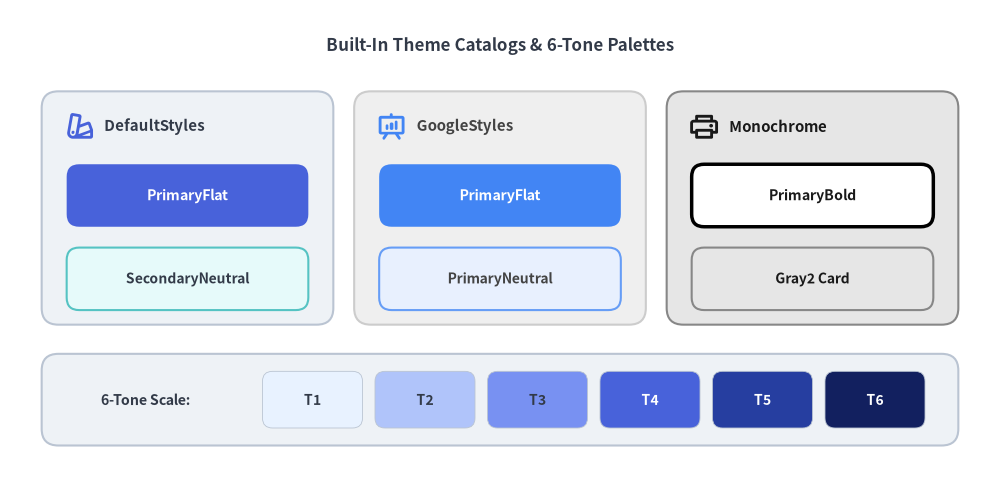
Source Code
from drawlib.canvas import save, setup
from drawlib.icons import phosphor
from drawlib.preset_styles import DefaultStyles, GoogleStyles, MonochromeStyles
from drawlib.shapes import rectangle
from drawlib.styles import Colors, Styles
from drawlib.text import text

setup(width=120, height=58)

ds = DefaultStyles()
gs = GoogleStyles()
ms = MonochromeStyles()

text(
    (60.0, 52.5),
    "Built-In Theme Catalogs & 6-Tone Palettes",
    style=Styles.DarkBold.patch(text_size=12.2),
)

# Column 1: DefaultStyles
rectangle((22.5, 33.0), width=35, height=28, style=ds.Neutral.patch(shape_r=2.0))
phosphor.swatches((9.5, 42.8), width=3.6, style=ds.PrimaryBold)
text((12.5, 42.8), "DefaultStyles", style=ds.DarkBold.patch(text_size=10.8, halign="left"))
rectangle(
    (22.5, 34.5),
    width=29,
    height=7.5,
    style=ds.PrimaryFlat.patch(shape_r=1.5),
    text="PrimaryFlat",
    text_style=ds.WhiteBold.patch(text_size=10.2),
)
rectangle(
    (22.5, 24.5),
    width=29,
    height=7.5,
    style=ds.SecondaryNeutral.patch(shape_r=1.5),
    text="SecondaryNeutral",
    text_style=ds.DarkBold.patch(text_size=10.0),
)

# Column 2: GoogleStyles
rectangle((60.0, 33.0), width=35, height=28, style=gs.Neutral.patch(shape_r=2.0))
phosphor.presentation_chart((47.0, 42.8), width=3.6, style=gs.PrimaryBold)
text((50.0, 42.8), "GoogleStyles", style=gs.DarkBold.patch(text_size=10.8, halign="left"))
rectangle(
    (60.0, 34.5),
    width=29,
    height=7.5,
    style=gs.PrimaryFlat.patch(shape_r=1.5),
    text="PrimaryFlat",
    text_style=gs.WhiteBold.patch(text_size=10.2),
)
rectangle(
    (60.0, 24.5),
    width=29,
    height=7.5,
    style=gs.PrimaryNeutral.patch(shape_r=1.5),
    text="PrimaryNeutral",
    text_style=gs.DarkBold.patch(text_size=10.0),
)

# Column 3: MonochromeStyles
rectangle((97.5, 33.0), width=35, height=28, style=ms.Neutral.patch(shape_r=2.0))
phosphor.printer((84.5, 42.8), width=3.6, style=ms.DarkBold)
text((87.5, 42.8), "Monochrome", style=ms.DarkBold.patch(text_size=10.8, halign="left"))
rectangle(
    (97.5, 34.5),
    width=29,
    height=7.5,
    style=ms.PrimaryBold.patch(shape_r=1.5),
    text="PrimaryBold",
    text_style=ms.DarkBold.patch(text_size=10.2),
)
rectangle(
    (97.5, 24.5),
    width=29,
    height=7.5,
    style=ms.Gray2.patch(shape_r=1.5),
    text="Gray2 Card",
    text_style=ms.DarkBold.patch(text_size=10.0),
)

# Bottom Strip: 6-Tone Scale (DefaultColors1..6 / Blue1..6)
rectangle((60.0, 10.0), width=110, height=11.0, style=Styles.Neutral.patch(shape_r=2.0))
text((17.5, 10.0), "6-Tone Scale:", style=Styles.DarkBold.patch(text_size=10.2))
tones = [Colors.Blue1, Colors.Blue2, Colors.Blue3, Colors.Blue4, Colors.Blue5, Colors.Blue6]
for idx, tone_color in enumerate(tones, start=1):
    tx = 37.5 + (idx - 1) * 13.5
    label_style = Styles.DarkBold.patch(text_size=10.0) if idx <= 3 else Styles.WhiteBold.patch(text_size=10.0)
    swatch = Styles.NeutralFlat.patch(
        shape_fill_color=tone_color,
        shape_line_color=Colors.Gray4,
        shape_line_width=0.6,
        shape_r=1.2,
    )
    rectangle((tx, 10.0), width=12.0, height=6.8, style=swatch, text=f"T{idx}", text_style=label_style)

save()
classDefaultStyles#
drawlib.styles.Styles の既定値となる標準プリセットスタイルカタログ(BaseStyles のサブクラス、drawlib.toml の style = "default")です。Tone 4(DefaultColors4)を基準色としつつ、6 段階の明度スケール(Primary1〜Primary6・Blue1〜Blue6)、8 つのセマンティックロール × 17 バリアント、および落ち着いた *Neutral カードトークン(計 2,239 トークン)を備えます。
# styles.py
from drawlib.preset_colors import DefaultColors
from drawlib.preset_styles import DefaultStyles

Colors = DefaultColors()
Styles = DefaultStyles()
| 属性 / トークン群 | 型 / 構成 | 説明 |
|---|---|---|
width / height / dpi |
140 / 70 / 100 |
キャンバスの既定サイズと解像度(DPI)。 |
background_color |
(255, 255, 255, 1.0) |
不透明ホワイトのキャンバス背景色。 |
sourcecode_font |
FontSourceCode.SOURCECODEPRO |
ソースコード表示用の既定等幅フォント。 |
Primary..Success(8 ロール) |
Style(各 17 派生) |
""(Bordered), Bold, Thin, Flat, Outline(Solid), Dashed, Dotted と太さ派生。 |
*Neutral / *NeutralFlat |
Style |
50%+ 基調設計を支える低彩度カードスタイル(Neutral, PrimaryNeutral, SecondaryNeutral, BlueNeutral 等)。 |
| 公開メソッド | BaseStyles から継承 |
patch(**kwargs), patch_font(regular=None, *, bold=None, thin=None, sourcecode=None, size=None), styles(), field_names(), get(key, default=None)。 |
classDefaultStyles1#
標準テーマの Tone 1(極淡パステル)ビュークラス(drawlib.preset_styles.DefaultStyles1、BaseStyles 継承)です。番号なしのロール・色名トークン(Primary, Secondary, Blue, Green 等)が Tone 1(#e8f2ff 等)に解決され、淡い背景コンテナ主体の図解に適しています。
from drawlib.preset_styles import DefaultStyles1

Styles = DefaultStyles1()  # Primary 塗り -> #e8f2ff (Tone 1)
| 項目 | 内容 | 説明 |
|---|---|---|
| 基準トーン | Tone 1(極淡パステル) |
Primary = #e8f2ff、Secondary = #e6fafa、Accent = #f5e8ff。 |
| 対応パレット | DefaultColors1 |
Tone 1 を基準とした全 2,239 スタイルトークンを提供。 |
| 公開メソッド | BaseStyles から継承 |
patch(), patch_font(), styles(), field_names(), get()。 |
classDefaultStyles2#
標準テーマの Tone 2(淡色カード背景)ビュークラス(drawlib.preset_styles.DefaultStyles2、BaseStyles 継承)です。基本ロールおよび色名トークンが Tone 2(#b0c4fa 等)に解決され、黒文字ラベルと相性の良い柔らかなカード表現を実現します。
from drawlib.preset_styles import DefaultStyles2

Styles = DefaultStyles2()  # Primary 塗り -> #b0c4fa (Tone 2)
| 項目 | 内容 | 説明 |
|---|---|---|
| 基準トーン | Tone 2(ライト/カード背景) |
Primary = #b0c4fa、Secondary = #9edede、Accent = #cda8f8。 |
| 対応パレット | DefaultColors2 |
Tone 2 を基準とした全 2,239 スタイルトークンを提供。 |
| 公開メソッド | BaseStyles から継承 |
patch(), patch_font(), styles(), field_names(), get()。 |
classDefaultStyles3#
標準テーマの Tone 3(ミディアムソフト)ビュークラス(drawlib.preset_styles.DefaultStyles3、BaseStyles 継承)です。基本ロールおよび色名トークンが Tone 3(#7891f2 等)に解決され、穏やかな中間トーンのチャートや図解に適しています。
from drawlib.preset_styles import DefaultStyles3

Styles = DefaultStyles3()  # Primary 塗り -> #7891f2 (Tone 3)
| 項目 | 内容 | 説明 |
|---|---|---|
| 基準トーン | Tone 3(ミディアムソフト) |
Primary = #7891f2、Secondary = #55c3c3、Accent = #a56eeb。 |
| 対応パレット | DefaultColors3 |
Tone 3 を基準とした全 2,239 スタイルトークンを提供。 |
| 公開メソッド | BaseStyles から継承 |
patch(), patch_font(), styles(), field_names(), get()。 |
classDefaultStyles4#
標準テーマの Tone 4(標準・高コントラスト基準)ビュークラス(drawlib.preset_styles.DefaultStyles4、BaseStyles 継承)です。DefaultStyles と同一の基準トーン(#4862da)を持ち、*Flat 強調カード上で白抜き文字(WhiteBold)が鮮明に映えます。
from drawlib.preset_styles import DefaultStyles4

Styles = DefaultStyles4()  # DefaultStyles() と同じ Tone 4 基準
| 項目 | 内容 | 説明 |
|---|---|---|
| 基準トーン | Tone 4(標準基準/高コントラスト) |
Primary = #4862da、Secondary = #2a989a、Accent = #8037c3。 |
| 対応パレット | DefaultColors4 |
Tone 4 を基準とした全 2,239 スタイルトークンを提供。 |
| 公開メソッド | BaseStyles から継承 |
patch(), patch_font(), styles(), field_names(), get()。 |
classDefaultStyles5#
標準テーマの Tone 5(ディープトーン)ビュークラス(drawlib.preset_styles.DefaultStyles5、BaseStyles 継承)です。基本ロールおよび色名トークンが落ち着いた深色 Tone 5(#263ea0 等)に解決されます。
from drawlib.preset_styles import DefaultStyles5

Styles = DefaultStyles5()  # Primary 塗り -> #263ea0 (Tone 5)
| 項目 | 内容 | 説明 |
|---|---|---|
| 基準トーン | Tone 5(ディープトーン) |
Primary = #263ea0、Secondary = #16686c、Accent = #5c2091。 |
| 対応パレット | DefaultColors5 |
Tone 5 を基準とした全 2,239 スタイルトークンを提供。 |
| 公開メソッド | BaseStyles から継承 |
patch(), patch_font(), styles(), field_names(), get()。 |
classDefaultStyles6#
標準テーマの Tone 6(最濃シェード)ビュークラス(drawlib.preset_styles.DefaultStyles6、BaseStyles 継承)です。基本ロールおよび色名トークンが最も深い Tone 6(#12205f 等)に解決され、重厚なヘッダー帯や高コントラスト枠線に適しています。
from drawlib.preset_styles import DefaultStyles6

Styles = DefaultStyles6()  # Primary 塗り -> #12205f (Tone 6)
| 項目 | 内容 | 説明 |
|---|---|---|
| 基準トーン | Tone 6(最濃シェード) |
Primary = #12205f、Secondary = #083e41、Accent = #3a1462。 |
| 対応パレット | DefaultColors6 |
Tone 6 を基準とした全 2,239 スタイルトークンを提供。 |
| 公開メソッド | BaseStyles から継承 |
patch(), patch_font(), styles(), field_names(), get()。 |
classGoogleStyles#
Google Workspace・Google スライド・Material Design の配色体系に準拠したプリセットスタイルカタログ(drawlib.preset_styles.GoogleStyles、BaseStyles 継承、drawlib.toml の style = "google")です。8 つの共通セマンティックロールに加え、GoogleBlue・GoogleGreen・GoogleYellow・GoogleRed・CornflowerBlue・RedBerry 等の専用トークン(計 2,596 トークン)を提供します。
# styles.py
from drawlib.preset_colors import GoogleColors
from drawlib.preset_styles import GoogleStyles

Colors = GoogleColors()
Styles = GoogleStyles()
| トークン群 | 代表的なトークン | 説明 |
|---|---|---|
| セマンティックロール | Primary(#4285f4), Secondary(#674ea7), Accent(#f57c00), Success(#34a853), Warning(#fbbc04), Danger(#ea4335) |
Styles.* を用いるすべての既存スクリプトと完全互換。 |
| ニュートラルカード | Neutral, PrimaryNeutral, SecondaryNeutral, BlueNeutral, GreenNeutral |
Google スライド・ドキュメントに自然に馴染む淡色カードトークン。 |
| Google 固有色トークン | GoogleBlue*, GoogleGreen*, GoogleYellow*, GoogleRed*, CornflowerBlue1..6, RedBerry1..6 |
各色とも 17 種類の塗り・枠線・太さバリアントを展開。 |
| 公開メソッド | BaseStyles から継承 |
patch(), patch_font(), styles(), field_names(), get()。 |
classMonochromeStyles#
白黒印刷・学術論文・特許図面・電子ペーパー向けに設計されたグレースケール専用プリセットスタイルカタログ(drawlib.preset_styles.MonochromeStyles、BaseStyles 継承、drawlib.toml の style = "monochrome"、計 335 トークン)です。
# styles.py
from drawlib.preset_colors import MonochromeColors
from drawlib.preset_styles import MonochromeStyles

Colors = MonochromeColors()
Styles = MonochromeStyles()
| トークン群 | 視覚的解決 | 説明 |
|---|---|---|
Primary / PrimaryBold / PrimaryThin |
白塗り+黒実線枠(1.5pt / 2.5pt / 0.75pt) |
色に頼らず線幅で階層を表現する白黒ワイヤーフレームカード。 |
PrimaryFlat / DarkFlat |
純黒ベタ塗り(#000000)+枠線なし |
MonochromeStyles().WhiteBold と組み合わせて反転強調バッジを表現。 |
Neutral / Gray1〜Gray8 |
#f5f5f5(Gray1)〜#191919(Gray8) |
8 段階の明度差によるグレースケール階層表現。 |
| 公開メソッド | BaseStyles から継承 |
patch(), patch_font(), styles(), field_names(), get()。 |
classCssColors#
W3C CSS Color Module の標準名前付きカラー全 140 色と Transparent(計 141 トークン)を収録したカラーパレットクラス(drawlib.preset_colors.CssColors、BaseColors 継承)です。
from drawlib.preset_colors import CssColors

colors = CssColors()
fill = colors.AliceBlue       # Color(240, 248, 255, 1.0)
stroke = colors.MidnightBlue  # Color(25, 25, 112, 1.0)
clear = colors.Transparent    # Color(0, 0, 0, 0.0)
| 代表的な属性 | RGB / RGBA | Hex | 説明 |
|---|---|---|---|
AliceBlue |
(240, 248, 255) |
#f0f8ff |
クールな極淡ブルー背景色。 |
CornflowerBlue |
(100, 149, 237) |
#6495ed |
鮮やかなミディアムブルー。 |
DarkSlateGray |
(47, 79, 79) |
#2f4f4f |
落ち着いたダークスレート文字・枠線色。 |
MediumSeaGreen |
(60, 179, 113) |
#3cb371 |
視認性の高いグリーンアクセント。 |
SteelBlue |
(70, 130, 180) |
#4682b4 |
技術図解向けの落ち着いたスチールブルー。 |
Transparent |
(0, 0, 0, 0.0) |
#00000000 |
完全透明な RGBA カラー定数。 |
| 公開メソッド | BaseColors から継承 |
— | colors() -> dict[str, Color], get(key, default=None), patch(**kwargs)。 |
classDefaultColors#
drawlib.styles.Colors の既定値となる標準カラーパレットクラス(drawlib.preset_colors.DefaultColors、BaseColors 継承、計 149 色)です。8 色相 × 6 段階のトーンパレット、8 段階のグレー、セマンティックロール基準色(Tone 4)、および落ち着いた *Neutral カード背景色を提供します。
from drawlib.preset_colors import DefaultColors

palette = DefaultColors()
hero_hex = palette.Primary.hex        # '#4862da'
card_fill = palette.SecondaryNeutral  # ティールがかった淡色ニュートラル Color
| カテゴリ | 代表トークンと Hex | 説明 |
|---|---|---|
| セマンティック基準色 | Primary(#4862da), Secondary(#2a989a), Accent(#8037c3), Success(#3a964b), Warning(#d78614), Danger(#be3a44) |
番号付きの Primary1..6〜Danger1..6 もすべて収録。 |
| ニュートラルカード色 | Neutral(#eef2f6), PrimaryNeutral, SecondaryNeutral, BlueNeutral, TealNeutral, AmberNeutral |
濃色テキストの可読性を最大化する低彩度カード背景色。 |
| 6 段階トーンパレット | Blue1..6, Green1..6, Red1..6, Orange1..6, Amber1..6, Purple1..6, Teal1..6, Pink1..6 |
Blue1(#e8f2ff)から Blue6(#12205f)までの段階的スケール。 |
| グレースケール・基本色 | White(#ffffff), Gray1〜Gray8, Black(#000000), Transparent |
構造枠線・テキスト・背景用の無彩色群。 |
| 公開メソッド | BaseColors から継承 |
colors(), get(key, default=None), patch(**kwargs)。 |
classDefaultColors1#
標準パレットの Tone 1(極淡パステル)カラークラス(drawlib.preset_colors.DefaultColors1、BaseColors 継承)です。番号なしのロール・色名属性(Primary, Secondary, Blue, Green 等)を Tone 1 に解決します。
from drawlib.preset_colors import DefaultColors1

c1 = DefaultColors1()
assert c1.Primary.hex == "#e8f2ff"
| 代表トークン | Hex | RGB | 公開メソッド |
|---|---|---|---|
Primary / Blue |
#e8f2ff |
(232, 242, 255) |
colors(), get(), patch()(BaseColors 継承)。 |
Secondary / Teal |
#e6fafa |
(230, 250, 250) |
— |
Accent / Purple |
#f5e8ff |
(245, 232, 255) |
— |
classDefaultColors2#
標準パレットの Tone 2(淡色カード背景)カラークラス(drawlib.preset_colors.DefaultColors2、BaseColors 継承)です。基本ロールおよび色名属性を Tone 2 に解決します。
from drawlib.preset_colors import DefaultColors2

c2 = DefaultColors2()
assert c2.Primary.hex == "#b0c4fa"
| 代表トークン | Hex | RGB | 公開メソッド |
|---|---|---|---|
Primary / Blue |
#b0c4fa |
(176, 196, 250) |
colors(), get(), patch()(BaseColors 継承)。 |
Secondary / Teal |
#9edede |
(158, 222, 222) |
— |
Accent / Purple |
#cda8f8 |
(205, 168, 248) |
— |
classDefaultColors3#
標準パレットの Tone 3(ミディアムソフト)カラークラス(drawlib.preset_colors.DefaultColors3、BaseColors 継承)です。基本ロールおよび色名属性を Tone 3 に解決します。
from drawlib.preset_colors import DefaultColors3

c3 = DefaultColors3()
assert c3.Primary.hex == "#7891f2"
| 代表トークン | Hex | RGB | 公開メソッド |
|---|---|---|---|
Primary / Blue |
#7891f2 |
(120, 145, 242) |
colors(), get(), patch()(BaseColors 継承)。 |
Secondary / Teal |
#55c3c3 |
(85, 195, 195) |
— |
Accent / Purple |
#a56eeb |
(165, 110, 235) |
— |
classDefaultColors4#
標準パレットの Tone 4(標準・高コントラスト基準)カラークラス(drawlib.preset_colors.DefaultColors4、BaseColors 継承)です。DefaultColors の基準トーンと一致します。
from drawlib.preset_colors import DefaultColors4

c4 = DefaultColors4()
assert c4.Primary.hex == "#4862da"
| 代表トークン | Hex | RGB | 公開メソッド |
|---|---|---|---|
Primary / Blue |
#4862da |
(72, 98, 218) |
colors(), get(), patch()(BaseColors 継承)。 |
Secondary / Teal |
#2a989a |
(42, 152, 154) |
— |
Accent / Purple |
#8037c3 |
(128, 55, 195) |
— |
classDefaultColors5#
標準パレットの Tone 5(ディープトーン)カラークラス(drawlib.preset_colors.DefaultColors5、BaseColors 継承)です。基本ロールおよび色名属性を Tone 5 に解決します。
from drawlib.preset_colors import DefaultColors5

c5 = DefaultColors5()
assert c5.Primary.hex == "#263ea0"
| 代表トークン | Hex | RGB | 公開メソッド |
|---|---|---|---|
Primary / Blue |
#263ea0 |
(38, 62, 160) |
colors(), get(), patch()(BaseColors 継承)。 |
Secondary / Teal |
#16686c |
(22, 104, 108) |
— |
Accent / Purple |
#5c2091 |
(92, 32, 145) |
— |
classDefaultColors6#
標準パレットの Tone 6(最濃シェード)カラークラス(drawlib.preset_colors.DefaultColors6、BaseColors 継承)です。基本ロールおよび色名属性を Tone 6 に解決します。
from drawlib.preset_colors import DefaultColors6

c6 = DefaultColors6()
assert c6.Primary.hex == "#12205f"
| 代表トークン | Hex | RGB | 公開メソッド |
|---|---|---|---|
Primary / Blue |
#12205f |
(18, 32, 95) |
colors(), get(), patch()(BaseColors 継承)。 |
Secondary / Teal |
#083e41 |
(8, 62, 65) |
— |
Accent / Purple |
#3a1462 |
(58, 20, 98) |
— |
classGoogleColors#
GoogleStyles と対になる Google Workspace・Google スライド準拠のカラーパレットクラス(drawlib.preset_colors.GoogleColors、BaseColors 継承、計 170 色)です。
from drawlib.preset_colors import GoogleColors

gc = GoogleColors()
blue = gc.GoogleBlue    # '#4285f4'
green = gc.GoogleGreen  # '#34a853'
| カテゴリ | 代表トークンと Hex | 説明 |
|---|---|---|
| ブランド基本色 | GoogleBlue(#4285f4), GoogleGreen(#34a853), GoogleYellow(#fbbc04), GoogleRed(#ea4335), GoogleOrange, GooglePurple, GoogleGray |
Google Workspace 公式プレゼンテーション配色。 |
| セマンティックロール | Primary(#4285f4), Secondary(#674ea7), Accent(#f57c00), Success(#34a853), Warning(#fbbc04), Danger(#ea4335), Neutral(#efefef) |
DefaultColors と完全なロール名互換性を維持。 |
| 拡張 6 段階スケール | CornflowerBlue1..6, RedBerry1..6, Cyan1..6, Magenta1..6, Blue1..6, Green1..6 |
Google スライドのカラーマトリクスに対応する段階色と Transparent。 |
| 公開メソッド | BaseColors から継承 |
colors(), get(key, default=None), patch(**kwargs)。 |
classMonochromeColors#
MonochromeStyles と対になる白黒印刷・論文・特許図面向けのグレースケールカラーパレットクラス(drawlib.preset_colors.MonochromeColors、BaseColors 継承、計 37 トークン)です。
from drawlib.preset_colors import MonochromeColors

mc = MonochromeColors()
card = mc.Gray2   # Color(230, 230, 230, 1.0) -> '#e6e6e6'
ink = mc.Black    # Color(0, 0, 0, 1.0) -> '#000000'
| トークン | RGB / RGBA | Hex | 視覚的役割 |
|---|---|---|---|
White / Primary |
(255, 255, 255) |
#ffffff |
純白のカード塗りおよびキャンバス背景。 |
Gray1 / Gray2(Neutral) |
(245, 245, 245) / (230, 230, 230) |
#f5f5f5 / #e6e6e6 |
淡いグレーカードおよびニュートラル領域(*Neutral エイリアスを含む)。 |
Gray3 / Gray4 / Gray5 |
(210, 210, 210) / (175, 175, 175) / (135, 135, 135) |
#d2d2d2 / #afafaf / #878787 |
中間グレーの境界線・区切り線・サブネット表現。 |
Gray6 / Gray7 / Gray8 |
(95, 95, 95) / (55, 55, 55) / (25, 25, 25) |
#5f5f5f / #373737 / #191919 |
高コントラストな濃色ストローク・見出しテキスト。 |
Black / Transparent |
(0, 0, 0) / (0, 0, 0, 0.0) |
#000000 / #00000000 |
メインの黒インク線・文字および完全透明色。 |
| 公開メソッド | BaseColors から継承 |
— | colors(), get(key, default=None), patch(**kwargs)。 |
classStyle#
styles.py 内で単一インポートからカスタムプリセットを定義できるよう drawlib.preset_styles.Style として再エクスポートされているスタイル指定クラスです。全フィールドおよびメソッド(.copy(), .patch())の詳細は drawlib.styles の Style を参照してください。
classColor#
カスタムカラーパレット定義向けに drawlib.preset_colors.Color として再エクスポートされている不変 RGBA カラークラスです。コンストラクタ引数や .hex、.alpha() の詳細は drawlib.styles の Color を参照してください。
defget_intermediate_color(color1, color2, ratio=0.5)#
drawlib.preset_colors.get_intermediate_color として再エクスポートされている RGBA 線形補間ヘルパー関数です。引数の詳細は drawlib.styles の get_intermediate_color() を参照してください。
defget_intermediate_colors(color1, color2, num=1, *, include_ends=False)#
drawlib.preset_colors.get_intermediate_colors として再エクスポートされている複数段階 RGBA グラデーション生成関数です。引数の詳細は drawlib.styles の get_intermediate_colors() を参照してください。