drawlib.canvas(キャンバスと座標制御)
drawlib.canvas は左下を原点 (0, 0) とするデカルト座標空間(X 軸は右方向、Y 軸は上方向)、出力解像度(dpi)、座標確認グリッド、および画像出力のライフサイクルを管理します。主要関数は from drawlib.canvas import canvas, clear, get_dimage, save, setup, show でインポートします。
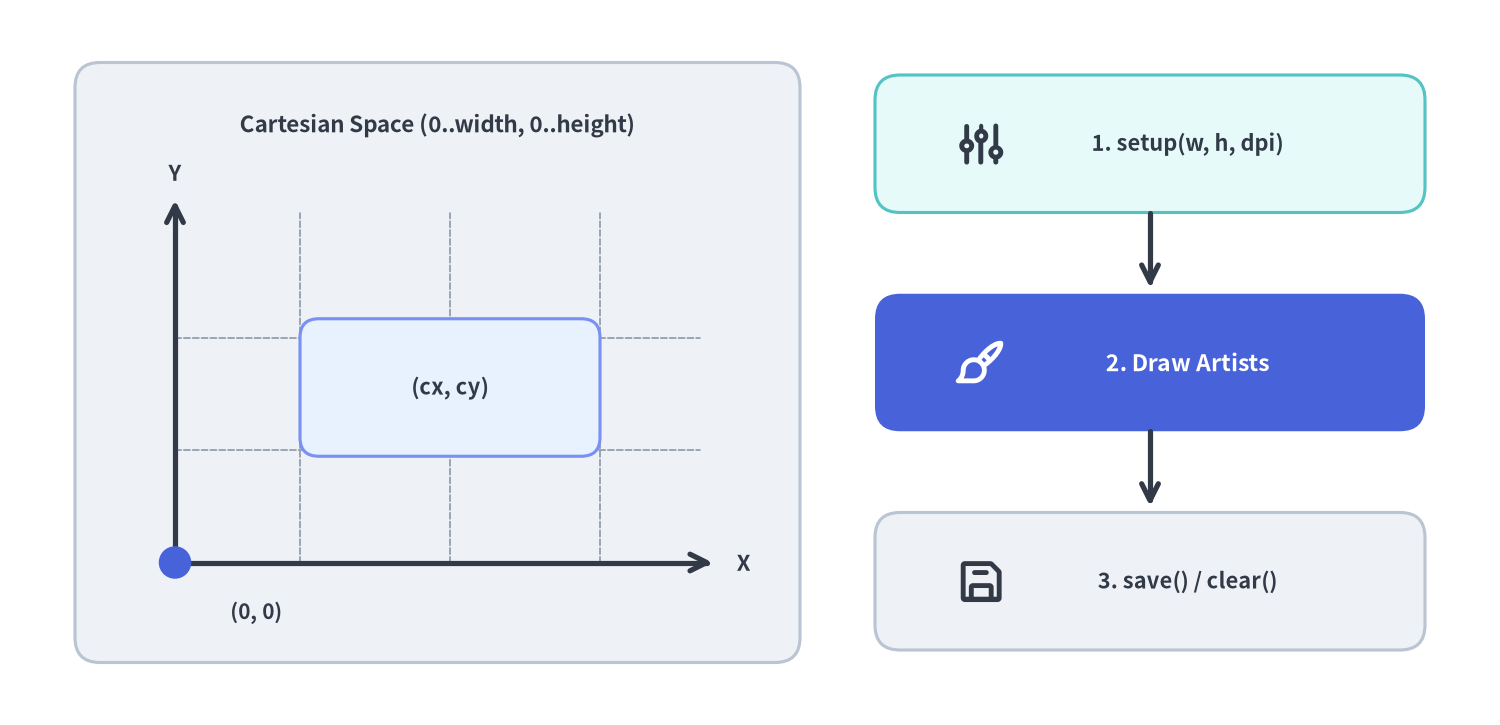
Source Code
from drawlib.canvas import save, setup
from drawlib.icons import phosphor
from drawlib.lines import line
from drawlib.shapes import circle, rectangle
from drawlib.styles import Colors, Styles
from drawlib.text import text

setup(width=120, height=58, dpi=150)

# Left panel: Cartesian coordinate space
rectangle((35, 29), width=58, height=48, style=Styles.Neutral.patch(shape_r=2.0))
text(
    (35, 48.0),
    "Cartesian Space (0..width, 0..height)",
    style=Styles.DarkBold.patch(text_size=10.8),
)

# Subtle internal coordinate grid
for gx in (24, 36, 48):
    line((gx, 13), (gx, 41), style=Styles.MutedDashed.patch(line_width=0.8))
for gy in (22, 31):
    line((14, gy), (56, gy), style=Styles.MutedDashed.patch(line_width=0.8))

# X and Y axes from bottom-left origin (14, 13)
line((14, 13), (57, 13), arrow_head="->", style=Styles.DarkBold)
line((14, 13), (14, 42), arrow_head="->", style=Styles.DarkBold)
circle((14, 13), radius=1.3, style=Styles.PrimaryFlat)
text((20.5, 9.0), "(0, 0)", style=Styles.DarkBold.patch(text_size=10.0))
text((59.5, 13.0), "X", style=Styles.DarkBold.patch(text_size=10.5))
text((14.0, 44.2), "Y", style=Styles.DarkBold.patch(text_size=10.5))

# Center-anchored shape inside coordinate space
rectangle(
    (36, 27),
    width=24,
    height=11,
    style=Styles.PrimaryNeutral.patch(shape_r=1.5),
    text="(cx, cy)",
    text_style=Styles.DarkBold.patch(text_size=10.5),
)

# Right panel: 3-stage Canvas lifecycle
rectangle((92, 46.5), width=44, height=11, style=Styles.SecondaryNeutral.patch(shape_r=2.0))
phosphor.sliders((78.5, 46.5), width=4.0, style=Styles.DarkBold)
text((95.0, 46.5), "1. setup(w, h, dpi)", style=Styles.DarkBold.patch(text_size=10.5))

line((92, 41.0), (92, 35.0), arrow_head="->", style=Styles.DarkBold)

rectangle((92, 29.0), width=44, height=11, style=Styles.PrimaryFlat.patch(shape_r=2.0))
phosphor.paint_brush((78.5, 29.0), width=4.0, style=Styles.WhiteBold)
text(
    (95.0, 29.0),
    "2. Draw Artists",
    style=Styles.WhiteBold.patch(text_size=11.0, text_color=Colors.White),
)

line((92, 23.5), (92, 17.5), arrow_head="->", style=Styles.DarkBold)

rectangle((92, 11.5), width=44, height=11, style=Styles.Neutral.patch(shape_r=2.0))
phosphor.floppy_disk((78.5, 11.5), width=4.0, style=Styles.DarkBold)
text((95.0, 11.5), "3. save() / clear()", style=Styles.DarkBold.patch(text_size=10.5))

save()
constcanvas#
すべてのモジュールレベル描画関数およびライフサイクル関数の実体となるシングルトン Canvas インスタンスです。setup()・clear()・save()・show()・get_dimage() や全 54 個の図形・線・テキスト・画像描画メソッドに加え、スコープ付き座標変換コンテキストマネージャ canvas.transform(...) および文字幅計算メソッドを提供します。
from drawlib.canvas import canvas

# with ブロック内の描画要素を一括で拡大縮小・平行移動:
with canvas.transform(origin=(0.0, 0.0), scale=0.9, translate=(10.0, 5.0)):
    ...
Canvas の公開メソッド・定数#
| メソッド・定数 | シグネチャ / 値 | 説明 |
|---|---|---|
canvas.transform |
(origin: Coordinate = (0.0, 0.0), scale: float = 1.0, translate: tuple[float, float] = (0.0, 0.0)) -> Generator[None, None, None] |
with ブロック内で追加されたすべての描画要素を origin 基準で scale 倍(> 0)し、translate 分だけ平行移動するコンテキストマネージャ。 |
canvas.get_charwidth_from_fontsize |
(size: PosFloat) -> float |
フォントサイズ(pt)から論理キャンバス座標系での推定 1 文字幅を算出します。 |
canvas.get_fontsize_from_charwidth |
(width: PosFloat) -> float |
目標とする論理 1 文字幅 width に対応するフォントサイズ(pt)を算出します。 |
canvas.setup |
(width=None, height=None, dpi=None, ...) -> None |
キャンバスのサイズ・背景色・DPI・グリッドを設定します(setup() と同等)。 |
canvas.clear |
() -> None |
登録済み描画要素をすべて削除し、設定を初期値へリセットします(clear() と同等)。 |
canvas.save |
(file=None, format=None) -> None |
キャンバスをレンダリングしてファイルに保存します(save() と同等)。 |
canvas.get_dimage |
() -> Dimage |
キャンバスをメモリ上でレンダリングし、Dimage を返します(get_dimage() と同等)。 |
canvas.show |
() -> None |
デスクトップ GUI ウィンドウでプレビューを表示します(show() と同等)。 |
DEFAULT_WIDTH / DEFAULT_HEIGHT / DEFAULT_DPI |
100 / 100 / 100 |
デフォルトの論理幅・論理高さ・出力 DPI。 |
FIGURE_WIDTH_INCHES / POINTS_PER_INCH |
10.0 / 72.0 |
物理描画幅を 10.0 inch(720 pt)に固定するための基準定数。 |
defclear()#
アクティブな canvas の状態を初期化し、登録済みのすべての描画要素(アーティスト)を消去してサイズ・背景色・グリッド等の設定をシステム初期値へ戻します。1 つの Python スクリプト内で複数の画像を連続生成する際は、必ず各描画の間に clear() を呼び出してください。
def clear() -> None
| 引数 | 型 | デフォルト | 説明 |
|---|---|---|---|
| (なし) | — | — | 引数は受け取らず、None を返します。 |
defget_dimage()#
現在キャンバスに登録されている描画要素をディスクへ書き出さずにメモリ上でレンダリングし、不変の Dimage オブジェクトとして返します(キャンバスのクリアは自動実行されません)。
def get_dimage() -> Dimage
| 戻り値の型 | 説明 |
|---|---|
Dimage |
画像フィルタ適用やサブダイアグラム合成にそのまま利用できる Dimage インスタンス。 |
defsave(file=None, format=None)#
現在のキャンバスをレンダリングして画像ファイルとしてディスクに保存します。Markdown 内の ```drawlib コードブロックでは、drawlib build エンジンがキャンバスを自動キャプチャし、コード内の save() 呼び出しを安全に no-op として扱うため、単体 .py スクリプトと完全に互換なコードを記述できます。
def save(
    file: str | None = None,
    format: ImageFormat | None = None,
) -> None
| 引数 | 型 | デフォルト | 説明 |
|---|---|---|---|
file |
str | None |
None |
保存先ファイルパス。None の場合は呼び出し元スクリプトと同じディレクトリに "<スクリプト名>.png" として保存されます。 |
format |
Literal["png", "jpg", "jpeg", "webp", "pdf"] | None |
None |
出力フォーマット。省略時は file の拡張子から自動判定され、拡張子もない場合は "png" となります。 |
defsetup(width=None, height=None, dpi=None, ...)#
左下 (0, 0) を原点とするキャンバスの論理サイズ(横 0..width、縦 0..height)、解像度 dpi、背景色・不透明度、および座標検証用グリッドを設定します。必ず図形やテキストを描画する前に呼び出してください(描画後に呼び出すと RuntimeError が送出されます。再設定する場合は先に clear() を呼び出します)。
def setup(
    width: PosInt | None = None,
    height: PosInt | None = None,
    dpi: PosInt | None = None,
    color: ColorType | None = None,
    alpha: Alpha | None = None,
    background_color: ColorType | None = None,
    background_alpha: Alpha | None = None,
    grid: bool | None = None,
    grid_only: bool | None = None,
    grid_style: Style | None = None,
    grid_centerstyle: Style | None = None,
    grid_xpitch: PosInt | None = None,
    grid_ypitch: PosInt | None = None,
) -> None
| 引数 | 型 | デフォルト | 説明 |
|---|---|---|---|
width |
PosInt | None |
100 |
X 軸方向の論理キャンバス幅(正の整数)。 |
height |
PosInt | None |
100 |
Y 軸方向の論理キャンバス高さ(正の整数)。 |
dpi |
PosInt | None |
100 |
出力画像の解像度(物理幅が 10.0 inch 固定のため、出力ピクセル幅は 10 * dpi になります)。 |
color |
ColorType | None |
(255, 255, 255) |
キャンバス背景色(Color、RGB/RGBA タプル、16 進カラーコード、CSS 色名)。 |
alpha |
Alpha | None |
1.0 |
背景の不透明度 [0.0, 1.0](0.0 で透過 PNG/WebP 背景を生成)。 |
background_color |
ColorType | None |
None |
color の明示的エイリアス。 |
background_alpha |
Alpha | None |
None |
alpha の明示的エイリアス。 |
grid |
bool | None |
False |
座標確認用のグリッド線および軸目盛りを重ねて描画するかどうか。 |
grid_only |
bool | None |
False |
描画要素を非表示にし、グリッドのみを出力するかどうか。 |
grid_style |
Style | None |
グレー破線 | 通常グリッド線の Style。 |
grid_centerstyle |
Style | None |
太めグレー破線 | 中心軸(x = width / 2、y = height / 2)グリッド線の Style。 |
grid_xpitch |
PosInt | None |
10(または width // 10) |
垂直グリッド線の X 軸間隔。 |
grid_ypitch |
PosInt | None |
10(または height // 10) |
水平グリッド線の Y 軸間隔。 |
defshow()#
現在のキャンバス描画結果をローカルデスクトップの Matplotlib プレビューウィンドウに表示します。CI/CD・コンテナ・リモート環境などのヘッドレス環境では、save() または CLI の drawlib show <file> -o preview.png を使用してください。
def show() -> None
| 引数 | 型 | デフォルト | 説明 |
|---|---|---|---|
| (なし) | — | — | 引数は受け取らず、None を返します。 |