drawlib.styles & drawlib.types(スタイルトークンと基底型)
アクティブなテーマファサード(Styles・Colors)、イミュータブルなスタイル/カラーモデル(Style・Color)、RGBA 線形補間ユーティリティ、およびカスタムテーマ構築用の基底クラス(BaseColors・BaseStyles・FontBase)を提供します。描画コードでは from drawlib.styles import Colors, Style, Styles、基底型の拡張では from drawlib.types import BaseColors, BaseStyles, Color, FontBase, Style をインポートします。
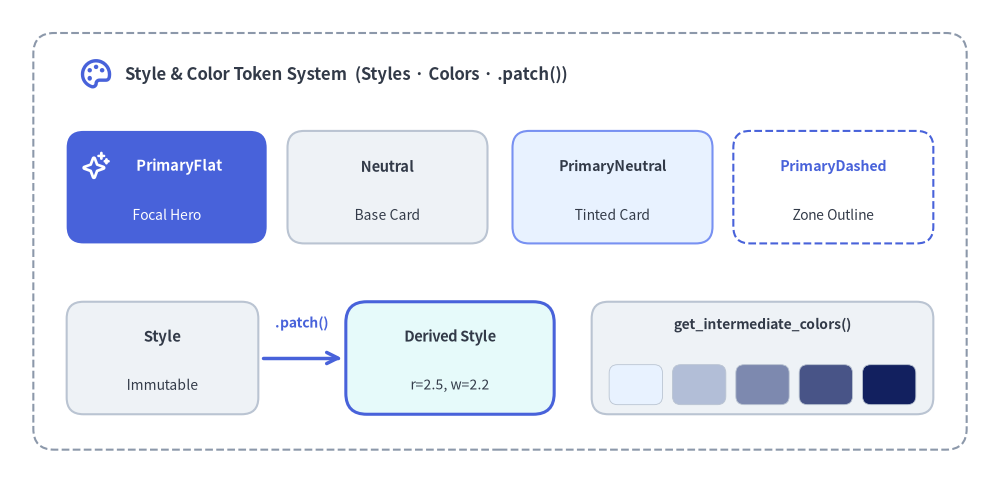 スタイルトークンとカラーシステム — ニュートラル基調・PrimaryFlat 強調・.patch() 派生・カラー補間
Source Code
from drawlib.canvas import save, setup
from drawlib.icons import phosphor
from drawlib.lines import line
from drawlib.shapes import rectangle
from drawlib.styles import Colors, Styles, get_intermediate_colors
from drawlib.text import text

setup(width=120, height=58)

# Outer boundary container
rectangle((60, 29), width=112, height=50, style=Styles.MutedDashed.patch(shape_r=2.5))
phosphor.palette((11.5, 49.0), width=4.2, style=Styles.PrimaryBold)
text(
    (15.0, 49.0),
    "Style & Color Token System  (Styles · Colors · .patch())",
    style=Styles.DarkBold.patch(text_size=12.0, halign="left"),
)

# Row 1: Semantic & Neutral Token Hierarchy (50%+ neutral baseline + 1 focal hero)
rectangle((20.0, 35.5), width=24, height=13.5, style=Styles.PrimaryFlat.patch(shape_r=2.0))
phosphor.sparkle((11.5, 38.0), width=3.4, style=Styles.WhiteBold)
text((21.5, 38.0), "PrimaryFlat", style=Styles.WhiteBold.patch(text_size=10.5))
text((20.0, 32.2), "Focal Hero", style=Styles.White.patch(text_size=10.0))

rectangle((46.5, 35.5), width=24, height=13.5, style=Styles.Neutral.patch(shape_r=2.0))
text((46.5, 38.0), "Neutral", style=Styles.DarkBold.patch(text_size=10.5))
text((46.5, 32.2), "Base Card", style=Styles.Dark.patch(text_size=10.0))

rectangle((73.5, 35.5), width=24, height=13.5, style=Styles.PrimaryNeutral.patch(shape_r=2.0))
text((73.5, 38.0), "PrimaryNeutral", style=Styles.DarkBold.patch(text_size=10.2))
text((73.5, 32.2), "Tinted Card", style=Styles.Dark.patch(text_size=10.0))

rectangle((100.0, 35.5), width=24, height=13.5, style=Styles.PrimaryDashed.patch(shape_r=2.0))
text((100.0, 38.0), "PrimaryDashed", style=Styles.PrimaryBold.patch(text_size=10.2))
text((100.0, 32.2), "Zone Outline", style=Styles.Dark.patch(text_size=10.0))

# Row 2 Left: Immutable .patch() derivation
rectangle((19.5, 15.0), width=23, height=13.5, style=Styles.Neutral.patch(shape_r=2.0))
text((19.5, 17.5), "Style", style=Styles.DarkBold.patch(text_size=10.8))
text((19.5, 11.8), "Immutable", style=Styles.Dark.patch(text_size=10.0))

line((31.5, 15.0), (41.0, 15.0), arrow_head="->", style=Styles.PrimaryBold)
text((36.2, 19.2), ".patch()", style=Styles.PrimaryBold.patch(text_size=10.0))

derived_style = Styles.SecondaryNeutral.patch(
    shape_line_color=Colors.Primary,
    shape_line_width=2.2,
    shape_r=2.5,
)
rectangle((54.0, 15.0), width=25, height=13.5, style=derived_style)
text((54.0, 17.5), "Derived Style", style=Styles.DarkBold.patch(text_size=10.5))
text((54.0, 11.8), "r=2.5, w=2.2", style=Styles.Dark.patch(text_size=10.0))

# Row 2 Right: Linear RGBA color ramp via get_intermediate_colors()
rectangle((91.5, 15.0), width=41, height=13.5, style=Styles.Neutral.patch(shape_r=2.0))
text((91.5, 19.0), "get_intermediate_colors()", style=Styles.DarkBold.patch(text_size=10.0))
ramp = get_intermediate_colors(Colors.Blue1, Colors.Blue6, num=3, include_ends=True)
for idx, swatch in enumerate(ramp):
    sx = 76.3 + idx * 7.6
    swatch_style = Styles.NeutralFlat.patch(
        shape_fill_color=swatch,
        shape_line_color=Colors.Gray4,
        shape_line_width=0.6,
        shape_r=1.0,
    )
    rectangle((sx, 11.8), width=6.4, height=4.8, style=swatch_style)

save()
classColor
drawlib.styles、drawlib.types、および drawlib.preset_colors から公開されるイミュータブルな RGBA カラーモデル(frozen=True)です。8bit 整数 RGB チャネル(0〜255)と不透明度 alpha(0.0〜1.0)の厳密なバリデーション、3/4/6/8 桁の 16 進カラーコード解析、および .patch() による非破壊なチャネル派生をサポートします。
from drawlib.styles import Color, Colors

# RGBA 値・16進文字列・タプルから生成
brand_blue = Color(26, 115, 232, alpha=1.0)
from_hex = Color.from_hex("#1a73e8", alpha=0.85)
shorthand = Color("#3498db80")

# 元のトークンを変更せず不透明度のみ調整した新しい Color を派生
backdrop = Colors.Primary.patch(alpha=0.15)
属性・プロパティ
| 属性 / プロパティ |
型 |
説明 |
r |
int |
赤チャネル(0〜255)。 |
g |
int |
緑チャネル(0〜255)。 |
b |
int |
青チャネル(0〜255)。 |
alpha |
float |
アルファ(不透明度)チャネル(0.0 完全透明〜1.0 完全不透明、既定値 1.0)。 |
a |
float |
alpha の読み取り専用エイリアス(0.0〜1.0)。 |
rgb |
tuple[int, int, int] |
RGB 3 要素タプル (r, g, b)。 |
rgba |
tuple[int, int, int, float] |
RGBA 4 要素タプル (r, g, b, alpha)。 |
hex |
str |
小文字 16 進数表現(alpha == 1.0 の場合は "#rrggbb"、それ以外は "#rrggbbaa")。 |
公開メソッド
| メソッド |
シグネチャ |
説明 |
from_hex |
(hexcode: str, alpha: float | None = None) -> Color |
"#rgb"・"#rgba"・"#rrggbb"・"#rrggbbaa" を解析して Color を生成するクラスメソッド(alpha 上書き可)。 |
patch |
(*, r: int | None = None, g: int | None = None, b: int | None = None, alpha: float | None = None) -> Color |
指定したチャネルのみを更新した新しい Color インスタンスを返します。 |
to_mplot_rgba |
() -> tuple[float, float, float, float] |
Matplotlib 描画用に正規化された (0.0..1.0) の RGBA タプルを返します。 |
constColors
drawlib.styles が公開するプロジェクト共通のアクティブカラーパレット(既定は DefaultColors インスタンス)です。プロジェクト直下の styles.py(または CLI --styles / -s)で Colors を定義すると、描画コードを変更せずに全図解の配色が自動的に切り替わります。
from drawlib.styles import Colors

border_color = Colors.Primary
subtle_fill = Colors.PrimaryNeutral
glass_tint = Colors.Blue4.patch(alpha=0.2)
| トークン分類 |
代表的なトークン |
用途 |
| セマンティックロール |
Primary, Secondary, Accent, Warning, Danger, Success, Neutral, Muted, Light, Dark, Canvas |
テーマ連動の意味論カラー(Primary1..6〜Warning1..6 の明度段階を含む)。 |
| ニュートラルカード背景 |
PrimaryNeutral, SecondaryNeutral, AccentNeutral, BlueNeutral, TealNeutral, AmberNeutral, GrayNeutral |
Styles.*Neutral に対応する低彩度で落ち着いたカード塗りつぶし色。 |
| 6 段階トーンパレット |
Blue1..6, Green1..6, Red1..6, Orange1..6, Amber1..6, Purple1..6, Teal1..6, Pink1..6 |
Tone 1(極淡色)から Tone 6(濃色)までの体系的カラースケール。 |
| グレースケール・基本色 |
White, Gray1〜Gray8, Black, Transparent, Red, Green, Blue, Teal, Navy, Gold |
無彩色ランプ、完全透明 (0, 0, 0, 0.0)、および標準基本色。 |
classStyle
drawlib.styles、drawlib.types、および drawlib.preset_styles から公開されるイミュータブルな汎用スタイルモデル(frozen=True, extra="forbid")です。図形(shape_*)・線(line_*)・テキスト(text_*)・アイコン(icon_*)・画像(image_*)のドメイン別属性と配置・回転属性を一元管理し、単一の Style オブジェクトで多様な描画要素を安全に装飾できます。
from drawlib.fonts import FontRoboto
from drawlib.styles import Colors, Style, Styles

# 既存のプリセットトークンから .patch() で派生(推奨)
card_style = Styles.Neutral.patch(
    shape_line_color=Colors.Primary,
    shape_line_width=2.0,
    shape_r=2.5,
)

# 新規 Style インスタンスを直接定義
badge_style = Style(
    shape_fill_color=Colors.Primary,
    shape_line_width=0.0,
    shape_r=3.0,
    text_color=Colors.White,
    text_font=FontRoboto.ROBOTO_BOLD,
    text_size=11.5,
)
属性一覧
| 属性 |
型 |
説明 |
supports |
frozenset[Literal["shape", "line", "text", "icon", "image"]] |
適用可能な描画対象(省略時は指定された属性から自動推論)。 |
shape_fill_color |
Color | tuple | str | None |
図形の塗りつぶし色(枠線のみにする場合は Colors.Transparent)。 |
shape_line_color |
Color | tuple | str | None |
図形の枠線カラー。 |
shape_line_width |
float | None |
図形の枠線幅(pt 単位、0.0 で枠線なし)。 |
shape_line_style |
Literal["solid", "dashed", "dotted", "dashdot"] | None |
図形の枠線スタイル(実線・破線・点線・一点鎖線)。 |
shape_r |
float | tuple[float, ...] | None |
多角形・矩形の角丸半径(全頂点共通の数値または頂点数分のタプル)。 |
line_color |
Color | tuple | str | None |
線・コネクタのストローク色。 |
line_width |
float | None |
線の太さ(pt 単位)。 |
line_style |
Literal["solid", "dashed", "dotted", "dashdot"] | None |
線の破線パターン。 |
line_arrow_head_fill |
bool | None |
矢印先端を塗りつぶし三角形にするか(True)、開いた線矢印にするか(False)。 |
line_arrow_head_scale |
float | None |
矢印先端のサイズ倍率(>= 0.0)。 |
text_color |
Color | tuple | str | None |
text() や図形内ラベルの文字色。 |
text_size |
float | Literal["small", "medium", "large"] | None |
フォントサイズ(pt 単位、本文互換には >= 10.0 推奨)またはサイズキーワード。 |
text_font |
FontBase | FontFile | None |
drawlib.fonts のフォント列挙体または外部 FontFile。 |
text_flip |
bool | None |
回転時に文字が上下逆さまになるのを自動反転するかどうか。 |
text_line_spacing |
float | None |
複数行テキストの行間倍率(>= 0.0)。 |
text_bg_fill_color |
Color | tuple | str | None |
テキストラベル背面の背景ボックス塗りつぶし色。 |
text_bg_line_color |
Color | tuple | str | None |
テキスト背景ボックスの枠線色。 |
text_bg_line_width |
float | None |
テキスト背景ボックスの枠線幅(pt 単位)。 |
text_bg_line_style |
Literal["solid", "dashed", "dotted", "dashdot"] | None |
テキスト背景ボックスの枠線パターン。 |
icon_color |
Color | tuple | str | None |
ベクターフォントアイコン(phosphor・font_icon)の描画色。 |
icon_style |
Literal["thin", "light", "regular", "bold", "fill"] | None |
Phosphor ベクターアイコンのウェイト/塗りスタイル。 |
image_tint_color |
Color | tuple | str | None |
ラスター画像や PNG アイコン背面の背景塗り・ティント色。 |
image_border_color |
Color | tuple | str | None |
ラスター画像や PNG アイコン外周フレームの枠線色。 |
image_border_width |
float | None |
画像・PNG アイコン外周フレームの枠線幅(pt 単位)。 |
image_border_style |
Literal["solid", "dashed", "dotted", "dashdot"] | None |
画像・PNG アイコン外周フレームの枠線パターン。 |
halign |
Literal["left", "center", "right"] | None |
基準座標 xy に対する水平アライメント。 |
valign |
Literal["bottom", "center", "top"] | None |
基準座標 xy に対する垂直アライメント。 |
xy_shift |
tuple[float, float] | None |
要素の angle 回転座標系に沿った相対オフセット (dx, dy)。 |
xy_abs_shift |
tuple[float, float] | None |
回転角に依存しないキャンバス絶対座標オフセット (dx, dy)。 |
angle |
float | None |
反時計回りの回転角(度数法、[0.0, 360.0) に正規化)。 |
alpha |
float | None |
要素全体の不透明度(0.0〜1.0)。 |
公開メソッド
| メソッド |
シグネチャ |
説明 |
patch |
(other: Style | None = None, **kwargs) -> Style |
別の Style またはキーワード引数で指定属性を上書きした新しい Style を返します。 |
validate_for |
(target: Literal["shape", "line", "text", "icon", "image"]) -> None |
この Style が指定された target をサポートしているか検証します(非対応時は ValueError)。 |
constStyles
drawlib.styles が公開するプロジェクト共通のアクティブスタイルカタログ(既定は DefaultStyles インスタンス)です。スクリプト内で DefaultStyles を直接固定せず from drawlib.styles import Styles を使用することで、styles.py ひとつで DefaultStyles・GoogleStyles・MonochromeStyles や独自ブランドテーマへ一括切り替えできます。
from drawlib.shapes import rectangle
from drawlib.styles import Styles

# 50%以上をニュートラルカードに据え、主役1〜2箇所のみ PrimaryFlat で強調
rectangle((35, 25), width=36, height=18, style=Styles.Neutral, text="Worker Node")
rectangle(
    (85, 25),
    width=36,
    height=18,
    style=Styles.PrimaryFlat,
    text="API Gateway",
    text_style=Styles.WhiteBold,
)

# 辞書キーによる動的トークン取得
dynamic_style = Styles["SecondaryNeutral"]
| トークン体系 |
代表例 |
視覚的特徴 |
| ニュートラルカード(50%+ 基調) |
Styles.Neutral, Styles.PrimaryNeutral, Styles.SecondaryNeutral, Styles.BlueNeutral, Styles.TealNeutral |
濃色テキストが読みやすい淡色背景+細枠線(*NeutralFlat は枠線なし)。 |
枠線付き塗り(<Role>) |
Styles.Primary, Styles.Secondary, Styles.Warning, Styles.Success, Styles.Danger |
塗り+実線枠(1.5pt)・標準ウェイト(*Thin = 0.75pt、*Bold = 2.5pt)。 |
枠線なしベタ塗り(<Role>Flat) |
Styles.PrimaryFlat, Styles.AccentFlat, Styles.DarkFlat |
shape_line_width=0.0(濃色背景には Styles.WhiteBold を併用。塗りアイコンには .patch(icon_style="fill") を指定)。 |
| 透明背景アウトライン |
Styles.PrimaryOutline(PrimarySolid), Styles.MutedDashed, Styles.WarningDotted |
背景透明+実線・破線・点線の境界枠(VPC やクラスタ境界に最適)。 |
| キャンバストークン |
Styles.Canvas, Styles.CanvasFlat |
キャンバス背景と同色の塗りトークン(交差線のマスク処理などに使用)。 |
2 つの色のちょうど中間(50% 地点)にあたる RGBA Color を線形補間で算出します。drawlib.styles および drawlib.preset_colors の両方からインポート可能です。
from drawlib.styles import Colors, get_intermediate_color

mid_blue = get_intermediate_color(Colors.Blue1, Colors.Blue6)
mid_hex = get_intermediate_color("#ffffff", "#1a73e8")
| 引数 |
型 |
デフォルト |
説明 |
color1 |
Color | tuple[int, int, int] | tuple[int, int, int, float] | str |
必須 |
開始色(Color、RGB/RGBA タプル、または 16 進カラーコード)。 |
color2 |
Color | tuple[int, int, int] | tuple[int, int, int, float] | str |
必須 |
終了色(Color、RGB/RGBA タプル、または 16 進カラーコード)。 |
| 戻り値 |
Color |
— |
補間された中間色(get_intermediate_colors(color1, color2, num=1)[0] と等価)。 |
color1 から color2 までの区間を num + 1 等分し、均等に配置された中間色のリストを生成します。ヒートマップ、カスタムグラデーション、アニメーションの色遷移に最適です。
from drawlib.styles import Colors, get_intermediate_colors

# 両端を除いた 3 段階の中間色リスト(計 3 個)
interior = get_intermediate_colors(Colors.Neutral, Colors.Primary, num=3)

# 両端を含むカラーランプ(color1 + 中間 3 色 + color2 = 計 5 個)
full_ramp = get_intermediate_colors(Colors.Blue1, Colors.Blue6, num=3, include_ends=True)
| 引数 |
型 |
デフォルト |
説明 |
color1 |
Color | tuple[int, int, int] | tuple[int, int, int, float] | str |
必須 |
開始色(Color、RGB/RGBA タプル、または 16 進文字列)。 |
color2 |
Color | tuple[int, int, int] | tuple[int, int, int, float] | str |
必須 |
終了色(Color、RGB/RGBA タプル、または 16 進文字列)。 |
num |
int |
1 |
生成する中間色の数(>= 1、1 未満の場合は ValueError)。 |
include_ends |
bool |
False |
True の場合、先頭に color1・末尾に color2 を含めた num + 2 色を返します。 |
| 戻り値 |
list[Color] |
— |
線形補間された Color インスタンスの順序付きリスト。 |
classBaseColors
プリセット配色および独自カラーパレットの基底となる Pydantic モデル(drawlib.types.BaseColors)です。属性アクセス、辞書風インデックス参照(palette["BrandBlue"])、in 判定、(name, color) 反復、および .patch() による非破壊更新を提供します。
from drawlib.types import BaseColors, Color


class BrandColors(BaseColors):
    Navy: Color = Color.from_hex("#0d1b2a")
    Teal: Color = Color.from_hex("#00a896")
    Surface: Color = Color.from_hex("#f4f6f9")


Colors = BrandColors()
all_named = Colors.colors()  # dict[str, Color]
公開メソッド
| メソッド |
シグネチャ |
説明 |
colors |
() -> dict[str, Color] |
このパレットインスタンスに定義された全 Color トークンの辞書を返します。 |
get |
(key: str, default: Any = None) -> Any |
トークン名から安全に色または属性を取得します(未定義時は default を返却)。 |
patch |
(**kwargs: Any) -> Self |
指定したカラートークンを上書きした新しいパレットインスタンスを返します。 |
classBaseStyles
プリセットテーマ(DefaultStyles・GoogleStyles・MonochromeStyles)および独自デザインシステムの基底となる Pydantic モデル(drawlib.types.BaseStyles)です。キャンバスの既定サイズ・解像度・背景色・ソースコード用フォントと、型安全な Style トークン群を統合管理します。
from drawlib.fonts import FontRoboto, FontSourceCode
from drawlib.preset_styles import DefaultStyles
from drawlib.types import BaseStyles, Style

# テーマ内の全スタイルトークンのフォント設定を一括変更
Styles = DefaultStyles().patch_font(
    FontRoboto.ROBOTO_REGULAR,
    bold=FontRoboto.ROBOTO_BOLD,
    thin=FontRoboto.ROBOTO_THIN,
    sourcecode=FontSourceCode.ROBOTO_MONO,
)
設定属性
| 属性 |
型 |
デフォルト |
説明 |
width |
int |
140 |
setup() で使用される既定のキャンバス幅(座標単位)。 |
height |
int |
70 |
setup() で使用される既定のキャンバス高さ(座標単位)。 |
dpi |
int |
100 |
既定のレンダリング解像度(DPI)。 |
background_color |
Color | tuple | str |
(255, 255, 255, 1.0) |
既定のキャンバス背景色。 |
sourcecode_font |
FontSourceCode |
FontSourceCode.SOURCECODEPRO |
SourceCode コンポーネントで使用される既定の等幅フォント。 |
colors |
type[BaseColors] | BaseColors |
DefaultColors |
このスタイルカタログに紐づくカラーパレット。 |
公開メソッド
| メソッド |
シグネチャ |
説明 |
patch |
(**kwargs: Any) -> Self |
キャンバス既定値や任意の Style トークンを上書きした新しいテーマインスタンスを返します。 |
patch_font |
(regular: FontBase | FontFile | None = None, *, bold: FontBase | FontFile | None = None, thin: FontBase | FontFile | None = None, sourcecode: FontSourceCode | None = None, size: float | None = None) -> Self |
標準・*Bold・*Thin・sourcecode_font のフォントファミリや文字サイズを一括変更した新しいテーマを返します。 |
styles |
() -> dict[str, Style] |
定義されているすべての Style トークンを {トークン名: Style} 辞書として抽出します。 |
field_names |
() -> list[str] |
インスタンス上のフィールド名および動的生成された全スタイルトークン名を順序付きで返します。 |
get |
(key: str, default: Any = None) -> Any |
トークン名でスタイルや属性を安全に取得します(未定義時は default を返却)。 |
enumFontBase
drawlib.fonts に含まれる全 12 種類の組み込みフォント列挙体(Font, FontSansSerif, FontSerif, FontMonoSpace, FontRoboto, FontSourceCode, FontJapanese, FontChinese, FontKorean, FontArabic, FontThai, FontBrahmic)が継承する抽象 StrEnum 基底クラスです(drawlib.types と drawlib.fonts の双方から公開)。
from drawlib.fonts import Font, FontRoboto
from drawlib.types import FontBase, Style


def make_label_style(font: FontBase) -> Style:
    return Style(text_font=font, text_size=12.0)


header_style = make_label_style(FontRoboto.ROBOTO_BOLD)
body_style = make_label_style(Font.SANSSERIF_REGULAR)
| 項目 |
仕様 |
| 基底型 |
enum.StrEnum(直接の列挙メンバは持たず、drawlib.fonts の全フォント列挙体の共通親クラスとして機能)。 |
| 主な用途 |
Style.text_font(FontBase | FontFile | None)および BaseStyles.patch_font() の型アノテーション・実行時型判定。 |