drawlib.diagrams.class_diagram(UML クラス図)
3 区画(ヘッダー・属性・メソッド)のクラス/インターフェースカード、可視性記号(+、-、#、~)、および標準 UML 2.0 関連マーカーを備えたオブジェクト指向クラス図モジュールです。標準インポート: from drawlib.diagrams.class_diagram import ClassDiagram, ClassNode, ClassRelationship。
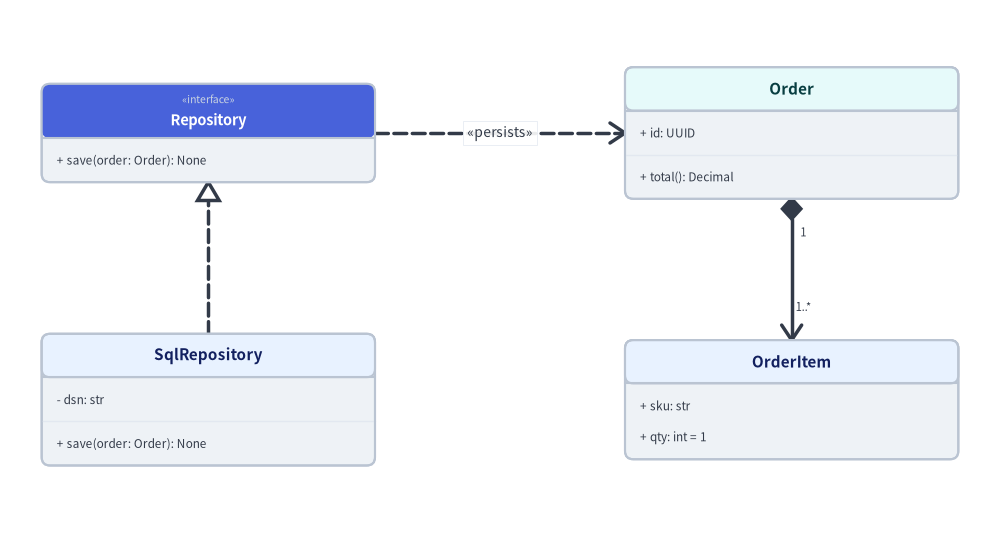
Source Code
from drawlib.canvas import save, setup
from drawlib.diagrams.class_diagram import ClassDiagram, ClassNode
from drawlib.fonts import FontRoboto, FontSourceCode
from drawlib.styles import Colors, Styles

setup(width=120, height=64)

cd = ClassDiagram(
    node_style=Styles.Neutral.patch(text_font=FontSourceCode.ROBOTO_MONO, text_size=10.0),
    header_style=Styles.PrimaryNeutral.patch(
        text_font=FontRoboto.ROBOTO_BOLD, text_size=11.0, shape_line_color=Styles.Neutral.shape_line_color
    ),
    edge_style=Styles.DarkBold,
    edge_text_style=Styles.Dark.patch(text_size=10.0),
    margin=4.0,
)

repo_iface = cd.add(
    ClassNode(
        "Repository",
        stereotype="interface",
        width=40,
        row_height=3.8,
        header_style=Styles.PrimaryFlat.patch(
            text_color=Colors.White, text_font=FontRoboto.ROBOTO_BOLD, text_size=11.0
        ),
    ).add_method("save", "order: Order", "None"),
    xy=(25.0, 49.0),
)

sql_repo = cd.add(
    ClassNode("SqlRepository", width=40, row_height=3.8)
    .add_attribute("dsn", "str", visibility="-")
    .add_method("save", "order: Order", "None"),
    xy=(25.0, 17.0),
)

order = cd.add(
    ClassNode(
        "Order",
        width=40,
        row_height=3.8,
        header_style=Styles.SecondaryNeutral.patch(
            text_font=FontRoboto.ROBOTO_BOLD, text_size=11.0, shape_line_color=Styles.Neutral.shape_line_color
        ),
    )
    .add_attribute("id", "UUID", visibility="+")
    .add_method("total", "", "Decimal"),
    xy=(95.0, 49.0),
)

item = cd.add(
    ClassNode("OrderItem", width=40, row_height=3.8)
    .add_attribute("sku", "str", visibility="+")
    .add_attribute("qty", "int", default_value="1", visibility="+"),
    xy=(95.0, 17.0),
)

cd.connect(sql_repo, repo_iface, "realization", start_side="top", end_side="bottom")
cd.connect(repo_iface, order, "dependency", label="«persists»", start_side="right", end_side="left")
cd.connect(
    order,
    item,
    "composition",
    start_multiplicity="1",
    end_multiplicity="1..*",
    directed=True,
    start_side="bottom",
    end_side="top",
)

cd.draw(xy=(60.0, 32.0), align="center")
save()
classAttributeInfo#
ClassNode の属性区画(中段)内の 1 フィールド行を表すバリデーション付き Pydantic データモデルです。通常は node.add_attribute(...) または node.add_attributes([...]) から生成します。
AttributeInfo(
    *,
    name: str,
    type: str = "",
    is_public: bool = True,
    visibility: str | None = None,
    default_value: str = "",
    is_static: bool = False,
) -> None
- 座標アンカー:
ClassNodeの中段コンパートメント内に左揃えの行として順番に描画されます。
コンストラクタ引数・フィールド#
| 引数 | 型 | デフォルト | 説明 |
|---|---|---|---|
name |
str |
(必須) | 属性・フィールド名(キーワード専用)。 |
type |
str |
"" |
型注釈文字列(例: "UUID"、"list[Item]")。 |
is_public |
bool |
True |
visibility 未指定時に True なら "+"、False なら "-" に解決されます。 |
visibility |
str | None |
None |
明示的な UML 可視性記号("+" public、"-" private、"#" protected、"~" package)。is_public より優先されます。 |
default_value |
str |
"" |
末尾に = <default_value> として付加される任意のデフォルト値文字列。 |
is_static |
bool |
False |
クラスレベルの静的フィールドとしてマークします(UML 仕様に従い下線付きで描画)。 |
パブリックメソッド・プロパティ#
| メンバー | 種別 | シグネチャ | 説明 |
|---|---|---|---|
display_text |
property |
-> str |
フォーマット済みの UML 属性文字列("{symbol} {name}: {type} = {default_value}")。 |
symbol |
property |
-> str |
解決された 1 文字の UML 可視性記号("+"、"-"、"#"、"~")。 |
model_copy |
method |
(self, *, update: Mapping[str, Any] | None = None, deep: bool = False) -> Self |
任意のフィールド更新を伴う浅い/深いコピーを生成します(pydantic.BaseModel)。 |
model_dump |
method |
(self, *, mode: str = "python", ...) -> dict[str, Any] |
フィールドを Python 辞書へシリアライズします(pydantic.BaseModel)。 |
model_dump_json |
method |
(self, *, indent: int | None = None, ...) -> str |
フィールドを JSON 文字列へシリアライズします(pydantic.BaseModel)。 |
model_validate |
classmethod |
(obj: Any, *, strict: bool | None = None, ...) -> Self |
任意の辞書やオブジェクトを検証して AttributeInfo を生成します。 |
model_validate_json |
classmethod |
(json_data: str | bytes | bytearray, ...) -> Self |
JSON データをパース・検証して AttributeInfo を生成します。 |
model_validate_strings |
classmethod |
(obj: Any, ...) -> Self |
文字列値辞書を検証して AttributeInfo を生成します。 |
model_construct |
classmethod |
(_fields_set: set[str] | None = None, **values: Any) -> Self |
バリデーションを省略してフィールド値から直接インスタンスを構築します。 |
model_json_schema |
classmethod |
(by_alias: bool = True, ...) -> dict[str, Any] |
AttributeInfo の JSON Schema 辞書を生成します。 |
(このほか pydantic.BaseModel 標準の互換メンバー model_extra、model_fields_set、model_parametrized_name、model_post_init、model_rebuild、construct、copy、dict、from_orm、json、parse_file、parse_obj、parse_raw、schema、schema_json、update_forward_refs、validate を継承します。)
classClassDiagram#
ClassNode カード、ClassRelationship コネクタ、および全体のバウンディングボックス配置を統合管理する UML 2.0 クラス図のトップレベルコンテナです。
ClassDiagram(
    *,
    node_style: Style,
    edge_style: Style,
    edge_text_style: Style,
    title: str = "",
    title_style: Style | None = None,
    style: Style | None = None,
    width: float | None = None,
    height: float | None = None,
    margin: float = 5.0,
    header_style: Style | None = None,
) -> None
- 座標アンカー:
draw(xy=(0.0, 0.0), align="bottom_left")はローカル座標をxy分シフトして描画します(align="center"の場合は全クラスの包含境界中心をxyに配置)。
コンストラクタ引数#
| 引数 | 型 | デフォルト | 説明 |
|---|---|---|---|
node_style |
Style |
(必須) | クラスカード本体、区切り線、メンバー文字列の基本スタイル(キーワード専用)。 |
edge_style |
Style |
(必須) | ClassRelationship の線および UML マーカーの基本スタイル(キーワード専用)。 |
edge_text_style |
Style |
(必須) | 関連ラベル、多重度、ロール名の基本テキストスタイル(キーワード専用)。 |
title |
str |
"" |
上部境界の上方に中央揃えで描画される任意のタイトル。 |
title_style |
Style | None |
None |
title 用の任意のテキストスタイル上書き。 |
style |
Style | None |
None |
図全体を囲む外枠コンテナの任意の背景・枠線スタイル。 |
width |
float | None |
None |
固定幅の任意上書き(None の場合は get_bounds() + margin から自動算出)。 |
height |
float | None |
None |
固定高さの任意上書き(None の場合は get_bounds() + margin から自動算出)。 |
margin |
float |
5.0 |
登録された全クラスカード周囲の外側マージン余白。 |
header_style |
Style | None |
None |
個別指定がないクラスカードの上部ヘッダー区画に適用されるデフォルトスタイル。 |
パブリックメソッド・プロパティ#
| メンバー | 種別 | シグネチャ | 説明 |
|---|---|---|---|
add |
method |
(self, class_node: ClassNode, xy: tuple[float, float] = (0.0, 0.0), show: bool | None = None) -> ClassNode |
ローカル座標 xy を中心として ClassNode を登録し、そのインスタンスを返します。 |
add_relationship |
method |
(self, rel: ClassRelationship) -> ClassRelationship |
構築済みの ClassRelationship をこの図に登録します。 |
connect |
method |
(self, source: ClassNode, target: ClassNode, relationship_type: RelationshipType = "association", *, type: RelationshipType | None = None, label: str = "", start_side: Side = "auto", end_side: Side = "auto", start_multiplicity: str = "", end_multiplicity: str = "", start_role: str = "", end_role: str = "", directed: bool = False, style: Style | None = None, text_style: Style | None = None, routing: RoutingType = "orthogonal", padding: PaddingType = 0.0, show: bool = True) -> ClassRelationship |
source と target の間に UML ClassRelationship を生成して登録します。 |
draw |
method |
(self, xy: tuple[float, float] = (0.0, 0.0), *, align: Literal["bottom_left", "center"] = "bottom_left", scale: PosFloat = 1.0) -> None |
アクティブなキャンバス上のアンカー xy にクラス図全体を描画します。 |
get_bounds |
method |
(self) -> tuple[float, float, float, float] |
登録された全クラスカードを囲む (min_x, min_y, max_x, max_y) を算出します。 |
get_size |
method |
(self) -> tuple[float, float] |
margin を含めた図全体の (width, height) を算出します。 |
classClassNode#
具象クラス、抽象クラス、インターフェース、列挙型、データクラスを表す UML 2.0 の 3 区画カード要素です。
ClassNode(
    name: str,
    stereotype: str = "",
    is_abstract: bool = False,
    width: float = 28.0,
    height: float | None = None,
    header_height: float | None = None,
    row_height: float = 3.2,
    style: Style | None = None,
    header_style: Style | None = None,
    show: bool = True,
) -> None
- 座標アンカー:
cd.add(node, xy=(cx, cy))で登録する際の中心座標(cx, cy)。Styles.PrimaryFlat等の濃いヘッダー背景を使用する場合は、header_style=Styles.PrimaryFlat.patch(text_color=Colors.White, text_size=11.0)で白文字を指定してください。
コンストラクタ引数#
| 引数 | 型 | デフォルト | 説明 |
|---|---|---|---|
name |
str |
(必須) | 上段ヘッダー区画に表示されるクラス名またはインターフェース名。 |
stereotype |
str |
"" |
任意の UML ステレオタイプ("interface" 等の指定で «interface» として整形表示)。 |
is_abstract |
bool |
False |
抽象クラスとしてマークします(stereotype が空の場合に «abstract» を表示)。 |
width |
float |
28.0 |
クラスカードの幅(ローカル単位)。 |
height |
float | None |
None |
固定高さの上書き(None の場合はヘッダー+属性・メソッド行数から自動伸長)。 |
header_height |
float | None |
None |
ヘッダー区画の固定高さ(None の場合は通常 5.2、ステレオタイプありで 6.5)。 |
row_height |
float |
3.2 |
属性・メソッド 1 行あたりの垂直高さ。 |
style |
Style | None |
None |
カード本体・枠線・メンバー文字列のスタイル上書き(未指定時は cd.node_style)。 |
header_style |
Style | None |
None |
上段ヘッダー区画の塗り・枠線・文字スタイル上書き(未指定時は cd.header_style)。 |
show |
bool |
True |
表示フラグ(False の場合、このクラスカードと接続関連線を非表示化)。 |
パブリックメソッド・プロパティ#
| メンバー | 種別 | シグネチャ | 説明 |
|---|---|---|---|
add_attribute |
method |
(self, name: str, type: str = "", is_public: bool = True, visibility: str | None = None, default_value: str = "", is_static: bool = False) -> ClassNode |
属性区画にフィールド行(AttributeInfo)を追加し、self を返します。 |
add_attributes |
method |
(self, attributes: Sequence[Sequence[Any] | AttributeInfo]) -> ClassNode |
タプル列 (name, type, ...) または AttributeInfo のシーケンスを一括追加し、self を返します。 |
add_method |
method |
(self, name: str, params: str = "", return_type: str = "", is_public: bool = True, visibility: str | None = None, is_static: bool = False, is_abstract: bool = False) -> ClassNode |
メソッド区画に操作行(MethodInfo)を追加し、self を返します。 |
add_methods |
method |
(self, methods: Sequence[Sequence[Any] | MethodInfo]) -> ClassNode |
タプル列 (name, params, return_type, ...) または MethodInfo のシーケンスを一括追加し、self を返します。 |
center |
property |
-> tuple[float, float] |
クラスカードの相対中心座標 (cx, cy)。 |
effective_height |
property |
-> float |
全区画を合算したクラスカードの実効描画高さ。 |
get_anchor |
method |
(self, side: Side) -> tuple[float, float] |
指定した side("left"、"right"、"top"、"bottom"、"auto")の辺中点座標を返します。 |
get_bounds |
method |
(self) -> tuple[float, float, float, float] |
中心 (0, 0) 基準のローカル境界 (-width/2, -effective_height/2, width/2, effective_height/2) を返します。 |
xy |
property |
-> tuple[float, float] |
クラスカードの相対中心座標 (cx, cy) を返すエイリアス。 |
classClassRelationship#
白抜き三角形、黒塗り/白抜きひし形、開いた矢印、多重度、およびロール名を用いて 2 つの ClassNode を結ぶ UML 2.0 関連エッジです。
ClassRelationship(
    start: ClassNode,
    end: ClassNode,
    relationship_type: RelationshipType = "association",
    start_side: Side = "auto",
    end_side: Side = "auto",
    label: str = "",
    start_multiplicity: str = "",
    end_multiplicity: str = "",
    start_role: str = "",
    end_role: str = "",
    directed: bool = False,
    style: Style | None = None,
    text_style: Style | None = None,
    routing: RoutingType = "orthogonal",
    padding: PaddingType = 0.0,
    show: bool = True,
) -> None
- 座標アンカー:
startのstart_side境界ポートからendのend_side境界ポートへ接続されます。cd.connect(...)またはcd.add_relationship(rel)で登録します。
コンストラクタ引数・属性#
| 引数 | 型 | デフォルト | 説明 |
|---|---|---|---|
start |
ClassNode |
(必須) | 始点クラス(継承・実現ではサブクラス側、コンポジション・集約では全体/所有側)。 |
end |
ClassNode |
(必須) | 終点クラス(継承・実現では親クラス/インターフェース側、コンポジション・集約では部分/要素側)。 |
relationship_type |
RelationshipType |
"association" |
実線/破線および両端マーカー形状を決定する UML 関連種別。 |
start_side |
Side |
"auto" |
start 側の接続辺("left"、"right"、"top"、"bottom"、"auto")。 |
end_side |
Side |
"auto" |
end 側の接続辺("left"、"right"、"top"、"bottom"、"auto")。 |
label |
str |
"" |
エッジ中央に描画されるステレオタイプや動詞句ラベル(例: "«persists»")。 |
start_multiplicity |
str |
"" |
start アンカー付近に描画される多重度(例: "1"、"0..1")。 |
end_multiplicity |
str |
"" |
end アンカー付近に描画される多重度(例: "*"、"1..*")。 |
start_role |
str |
"" |
start アンカー付近に描画されるロール名。 |
end_role |
str |
"" |
end アンカー付近に描画されるロール名。 |
directed |
bool |
False |
"association"、"aggregation"、"composition" の end 側に誘導可能な開いた V 字矢印を描画します。 |
style |
Style | None |
None |
線スタイルの任意上書き(未指定時は cd.edge_style)。 |
text_style |
Style | None |
None |
ラベル・多重度・ロール名の文字スタイル上書き(未指定時は cd.edge_text_style)。 |
routing |
RoutingType |
"orthogonal" |
経路ルーティング方式("orthogonal" または "direct")。 |
padding |
float | tuple[float, float] |
0.0 |
クラス枠線とエッジ端点間のクリアランス余白。 |
show |
bool |
True |
この関連エッジを描画するかどうか。 |
classMethodInfo#
ClassNode のメソッド区画(下段)内の 1 操作行を表すバリデーション付き Pydantic データモデルです。通常は node.add_method(...) または node.add_methods([...]) から生成します。
MethodInfo(
    *,
    name: str,
    params: str = "",
    return_type: str = "",
    is_public: bool = True,
    visibility: str | None = None,
    is_static: bool = False,
    is_abstract: bool = False,
) -> None
- 座標アンカー:
ClassNodeの下段コンパートメント内に左揃えの行として順番に描画されます。
コンストラクタ引数・フィールド#
| 引数 | 型 | デフォルト | 説明 |
|---|---|---|---|
name |
str |
(必須) | メソッド名(括弧なし/あり両方に対応、キーワード専用)。 |
params |
str |
"" |
引数リスト文字列(例: "order_id: UUID")。 |
return_type |
str |
"" |
戻り値の型注釈文字列(例: "Order | None")。 |
is_public |
bool |
True |
visibility 未指定時に True なら "+"、False なら "-" に解決されます。 |
visibility |
str | None |
None |
明示的な UML 可視性記号("+"、"-"、"#"、"~")。is_public より優先されます。 |
is_static |
bool |
False |
静的メソッド(@staticmethod / @classmethod)としてマークします(下線付きで描画)。 |
is_abstract |
bool |
False |
抽象メソッドとしてマークします({abstract} 接尾辞/斜体セマンティクス)。 |
パブリックメソッド・プロパティ#
| メンバー | 種別 | シグネチャ | 説明 |
|---|---|---|---|
display_text |
property |
-> str |
フォーマット済みの UML 操作文字列("{symbol} {name}({params}): {return_type}")。 |
symbol |
property |
-> str |
解決された 1 文字の UML 可視性記号("+"、"-"、"#"、"~")。 |
model_copy |
method |
(self, *, update: Mapping[str, Any] | None = None, deep: bool = False) -> Self |
任意のフィールド更新を伴う浅い/深いコピーを生成します(pydantic.BaseModel)。 |
model_dump |
method |
(self, *, mode: str = "python", ...) -> dict[str, Any] |
フィールドを Python 辞書へシリアライズします(pydantic.BaseModel)。 |
model_dump_json |
method |
(self, *, indent: int | None = None, ...) -> str |
フィールドを JSON 文字列へシリアライズします(pydantic.BaseModel)。 |
model_validate |
classmethod |
(obj: Any, *, strict: bool | None = None, ...) -> Self |
任意の辞書やオブジェクトを検証して MethodInfo を生成します。 |
model_validate_json |
classmethod |
(json_data: str | bytes | bytearray, ...) -> Self |
JSON データをパース・検証して MethodInfo を生成します。 |
model_validate_strings |
classmethod |
(obj: Any, ...) -> Self |
文字列値辞書を検証して MethodInfo を生成します。 |
model_construct |
classmethod |
(_fields_set: set[str] | None = None, **values: Any) -> Self |
バリデーションを省略してフィールド値から直接インスタンスを構築します。 |
model_json_schema |
classmethod |
(by_alias: bool = True, ...) -> dict[str, Any] |
MethodInfo の JSON Schema 辞書を生成します。 |
(このほか pydantic.BaseModel 標準の互換メンバー model_extra、model_fields_set、model_parametrized_name、model_post_init、model_rebuild、construct、copy、dict、from_orm、json、parse_file、parse_obj、parse_raw、schema、schema_json、update_forward_refs、validate を継承します。)
typeRelationshipType#
ClassDiagram.connect() および ClassRelationship で指定可能な UML 2.0 標準の 6 種類のクラス間関連(および短縮エイリアス)を表す Literal 型です。
RelationshipType = Literal[
    "inheritance",
    "realization",
    "composition",
    "aggregation",
    "association",
    "dependency",
    "inherit",
    "realize",
    "composite",
    "aggregate",
    "associate",
    "depend",
]
- 座標アンカー:
start側(ひし形マーカー)およびend側(白抜き三角形・開いた矢印)のマーカー形状を決定します。
| 正規名 | 短縮別名 | 線種 | start マーカー |
end マーカー |
UML での意味 |
|---|---|---|---|---|---|
"inheritance" |
"inherit" |
実線 | なし | 白抜き三角形(▷) |
サブクラス start が親クラス end を継承。 |
"realization" |
"realize" |
破線 | なし | 白抜き三角形(▷) |
具象クラス start がインターフェース end を実装。 |
"composition" |
"composite" |
実線 | 黒塗りひし形(◆) |
directed=True 時に開いた矢印 |
全体 start が部分 end のライフサイクルを強い所有で管理。 |
"aggregation" |
"aggregate" |
実線 | 白抜きひし形(◇) |
directed=True 時に開いた矢印 |
全体 start が独立生存可能な要素 end を共有参照。 |
"association" |
"associate" |
実線 | なし | directed=True 時に開いた矢印 |
start と end の構造的な関連・参照。 |
"dependency" |
"depend" |
破線 | なし | 開いた V 字矢印(>) |
start が引数・戻り値等で一時的に end に依存。 |
typeRoutingType#
ClassRelationship コネクタの経路計算方式を指定する Literal 型です。
RoutingType = Literal["orthogonal", "direct"]
- 座標アンカー: 解決された
startとendのクラス境界ポート間のルーティングを制御します。
| リテラル値 | 経路ジオメトリ |
|---|---|
"orthogonal" |
水平・垂直の直角マンハッタン折れ線セグメント(デフォルト)。 |
"direct" |
解決された境界ポート間を結ぶ直線セグメント。 |
typeSide#
ClassNode ボックス上の接続辺を指定する Literal 型です。
Side = Literal["left", "right", "top", "bottom", "auto"]
- 座標アンカー:
"left"、"right"、"top"、"bottom"は各辺の中点に接続し、"auto"は対向する最近傍の辺を自動選択します。