3D コンテナ・フロー・グルーピング
drawlib.shapes の 3D コンテナ・フロー・グルーピング カテゴリは、6 種類のアーキテクチャ・パイプライン向けプリミティブ を提供します。マルチディスク対応の 3D ストレージシリンダー(cylinder)、3 面シェーディング付きの 3D キューブ(cube)、単枚または積層ドキュメント/ファイルカード(document)、データフィルタリングおよびコンバージョンファネル(funnel)、3 次ベジェ曲線によるクラウドノード・VPC 境界(cloud)、そして波括弧・角括弧・丸括弧のグルーピング括弧(brace)を利用できます。
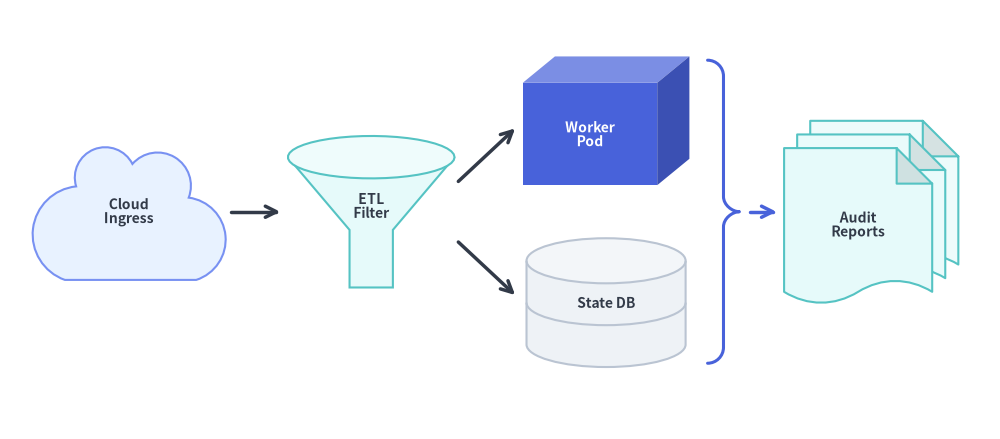
クラウド Ingress・3D フィルタリングファネル・キューブ・DB シリンダー・ブレース・積層ドキュメントの組み合わせ
Source Code
from drawlib.canvas import save , setup
from drawlib.lines import line
from drawlib.shapes import brace , cloud , cube , cylinder , document , funnel
from drawlib.styles import Styles
from drawlib.text import text
setup ( width = 132 , height = 58 )
lbl_dark = Styles . DarkBold . patch ( text_size = 10.0 )
lbl_white = Styles . WhiteBold . patch ( text_size = 10.0 )
# 1. Cloud Ingress
cloud (
( 17 , 30 ),
width = 26 ,
height = 18 ,
variant = "flat" ,
style = Styles . PrimaryNeutral ,
text = "Cloud \n Ingress" ,
text_style = lbl_dark ,
)
# 2. 3D Filtering Funnel
funnel (
( 49 , 30 ),
width = 22 ,
height = 20 ,
variant = "3d" ,
style = Styles . SecondaryNeutral ,
text = "ETL \n Filter" ,
text_style = lbl_dark . patch ( xy_shift = ( 0 , - 1.8 )),
)
# 3. 3D Worker Cube & 2-Disk State DB Cylinder
cube (
( 80 , 42 ),
width = 22 ,
height = 17 ,
depth_ratio = 0.25 ,
style = Styles . PrimaryFlat ,
text = "Worker \n Pod" ,
text_style = lbl_white ,
)
cylinder (
( 80 , 18 ),
width = 21 ,
height = 17 ,
disks = 2 ,
style = Styles . Neutral ,
text = "State DB" ,
text_style = lbl_dark ,
)
# 4. Curly Brace + Stacked Audit Documents
brace (
( 95.5 , 30 ),
width = 4.2 ,
height = 40 ,
symbol = "}" ,
style = Styles . PrimaryBold . patch ( line_width = 2.2 ),
)
document (
( 115 , 30 ),
width = 23 ,
height = 24 ,
variant = "folded_wave" ,
stacked = 3 ,
style = Styles . SecondaryNeutral ,
text = "Audit \n Reports" ,
text_style = lbl_dark ,
)
line (( 30.5 , 30 ), ( 37 , 30 ), arrow_head = "->" , style = Styles . DarkBold )
line (( 60.5 , 34 ), ( 68 , 41 ), arrow_head = "->" , style = Styles . DarkBold )
line (( 60.5 , 26 ), ( 68 , 19 ), arrow_head = "->" , style = Styles . DarkBold )
line (( 99 , 30 ), ( 102.5 , 30 ), arrow_head = "->" , style = Styles . PrimaryBold )
save ()
1. 基本の幾何構造とコンセプト
このカテゴリの全 6 プリミティブは、外接バウンディングボックスの中心座標 xy を基準(アンカー)とし、3D 投影・波形・クラウドのローブ・括弧のスパインをすべて厳密に (width, height) の内側へ正規化します。マルチプラッタの disks や angle=-90 回転、3 面自動陰影の depth_ratio、document の各バリエーションとシート積層、funnel のネック比率、正規化された cloud ローブ、そして先端位置をスライドできる brace が各コンポーネントをどのように変形させるかを確認してみましょう。

パラメータ&ジオメトリツアー: cylinder・cube・document・funnel・cloud・brace のライブ変形(APNG アニメーション)
3D の奥行きとプラッタ段数(cylinder, cube) : cylinder は disks によって円弧状のディスク継ぎ目線を追加し(angle=-90 で水平キューに回転可能)、cube は depth_ratio に応じて 3 面の陰影を自動付与します。ドキュメント形状とシート積層(document) : 波状の底辺や暗色化された右上の角折れフラップ("wave", "folded", "folded_wave")を組み合わせ、stacked > 1 では明度を上げた背面シートをカスケード積層します。注ぎ口比率と正規化されたクラウドローブ(funnel, cloud) : funnel は neck_width_ratio と neck_height_ratio で下部スパウトの寸法を調整し、cloud の全 variant は 3 次ベジェ曲線のローブを厳密に (width, height) の内側へ正規化します。グルーピング括弧とスライド可能な先端(brace) : 波括弧("{}")、角括弧("[]"、shape_r で 90° 角を丸め可能)、丸括弧("()")に対応し、tip_position_ratio(0.0〜1.0)によって波括弧の先端突起を狙ったターゲットノードへ合わせられます。
2. 3D コンテナ・フロー・グルーピングプリミティブの早見表
全 6 関数のアンカー基準、主なアーキテクチャ上の役割、形状引数、自動シェーディング・テキスト配置を以下のマトリクスで比較できます。
関数
デフォルトアンカー
主なアーキテクチャ上の役割
バリエーションと主要な形状引数
シェーディングとテキスト配置
cylinder中央 (cx, cy)
リレーショナル DB、ディスクアレイ、オブジェクトストレージ、FIFO キュー
disks: int = 1, style.patch(angle=-90)上部の楕円キャップを自動で明度アップ。テキストはボディ中央に配置。
cube中央 (cx, cy)
3D コンピュートノード、コンテナ、ハードウェアアプライアンス
depth_ratio: float | None = None(デフォルト 0.25)3 面の自動シェーディング(正面・明度アップ上面・暗色化右側面)。テキストは正面中央に配置。
document中央 (cx, cy)
帳票出力、設定ファイル、ログ断片、レポート束
variant("wave", "folded", "double_wave", "folded_wave"), stacked: int = 1, wave_ratio, fold_ratio暗色化された角折れフラップと明度アップした背面スタックシート。テキストは最前面シートの中央に配置。
funnel中央 (cx, cy)
データフィルタリング段、イベント絞り込み、コンバージョンファネル
variant("standard", "3d", "curved"), neck_width_ratio, neck_height_ratio"3d" は陰影付きの楕円上部リムを描画。テキストは上部コーン中央に配置。
cloud中央 (cx, cy)
外部クラウド/SaaS ノード、VPC/WAN の破線境界領域
variant("standard", "flat", "fluffy", "simple"), bump_ratio(width, height) に厳密に正規化された滑らかな 3 次ベジェローブ。
brace中央 (cx, cy)
波括弧・角括弧・丸括弧によるグルーピング装飾
symbol("{}", "[]", "()"), direction("left", "right", "top", "bottom"), tip_ratio, tip_position_ratiostyle.line_width と style.line_color で制御される開いたベクターストローク。
3. 3D シリンダーとデータベーススタック (cylinder)
リレーショナルデータベース、オブジェクトストレージバケット、ディスクアレイ、メッセージキュー向けに、cylinder は自動的に明るくシェーディングされた楕円形の上面キャップを持つ 3D 円筒コンテナを描画します。
cylinder (
xy : tuple [ float , float ],
width : float ,
height : float ,
* ,
style : Style ,
disks : int = 1 ,
text : str = "" ,
text_style : Style | None = None ,
) -> None
パラメータリファレンス
パラメータ
型
デフォルト
説明
xytuple[float, float]必須 シリンダー外接バウンディングボックスの中心座標 (x, y)。
widthfloat必須 シリンダーの水平全幅(> 0)。
heightfloat必須 上下の楕円キャップを含むシリンダーの垂直全高(> 0)。
disksint1積層されるストレージディスクの段数(>= 1)。disks >= 2 を指定すると、マルチプラッタのデータベースストレージを表す円弧状の水平分割線がボディに描画されます。
styleStyle必須 塗りつぶしと枠線のスタイル。上部の楕円キャップは style.shape_fill_color から自動的に明度アップされます。FIFO メッセージキューやパイプライン向けに水平横向きへ回転させるには style.patch(angle=-90) を指定します。
text / text_stylestr / Style | None"" / None中央配置されるテキストラベルと任意のタイポグラフィ上書き設定。
from drawlib.canvas import save , setup
from drawlib.shapes import cylinder
from drawlib.styles import Styles
setup ( width = 118 , height = 48 )
# 1. Single-tier cache cylinder
cylinder (
( 22 , 24 ),
width = 26 ,
height = 34 ,
style = Styles . Neutral ,
text = "Cache" ,
text_style = Styles . DarkBold . patch ( text_size = 11.5 ),
)
# 2. 3-disk database stack (disks=3)
cylinder (
( 60 , 24 ),
width = 28 ,
height = 36 ,
disks = 3 ,
style = Styles . PrimaryFlat ,
text = "Primary \n DB" ,
text_style = Styles . WhiteBold . patch ( text_size = 11.5 ),
)
# 3. Horizontal rotated cylinder (angle=-90 for message queue)
cylinder (
( 97 , 24 ),
width = 20 ,
height = 32 ,
style = Styles . SecondaryNeutral . patch ( angle =- 90 ),
text = "Queue" ,
text_style = Styles . DarkBold . patch ( text_size = 11.5 ),
)
save ()
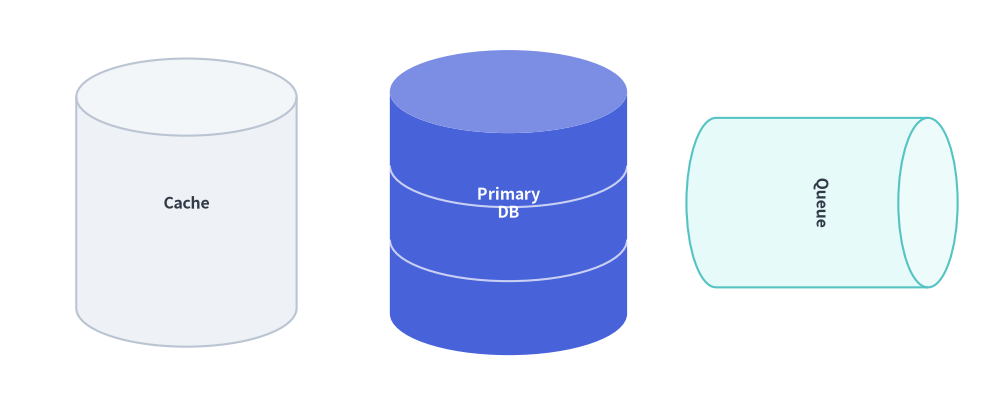
単一シリンダー、3 ディスクのデータベーススタック、水平回転させたメッセージキュー
4. 3D キューブと直方体ブロック (cube)
cylinder を補完するプリミティブとして、cube は中心座標 xy のバウンディングボックス (width, height) に厳密に収まる斜投影(オブリーク)の 3D キューブまたは直方体ボックスを描画します。
cube (
xy : tuple [ float , float ],
width : float ,
height : float ,
* ,
depth_ratio : float | None = None ,
style : Style ,
text : str = "" ,
text_style : Style | None = None ,
) -> None
パラメータリファレンス
パラメータ
型
デフォルト
説明
xytuple[float, float]必須 外接 3D バウンディングボックスの中心座標 (x, y)。
widthfloat必須 右側面への斜投影部分を含む 3D ボックスの厳密な外接水平幅(> 0)。
heightfloat必須 上面への斜投影部分を含む 3D ボックスの厳密な外接垂直高さ(> 0)。
depth_ratiofloat | NoneNonemin(width, height) に対する 3D 斜投影の奥行き比率を (0.0, 1.0) で指定します。None の場合はデフォルトの 0.25 になります。小さい値(0.15)では薄い 3D カードになり、大きい値(0.40)では奥行きのある立体ブロックになります。
styleStyle必須 塗りつぶし、枠線(shape_line_color, shape_line_width, shape_line_style)、および回転(angle)を制御するスタイル。
text / text_stylestr / Style | None"" / None外接ボックス全体ではなく 正面(フロントフェイス) の中央に自動配置されるラベル。3D の稜線とテキストが干渉しません。
3 面の自動シェーディングとストロークの仕組み
3 面の自動陰影付け : style.shape_fill_color を基に、Drawlib が 3 つの面の明度を自動計算します。
正面(Front Face) : 基準となる style.shape_fill_color。上面(Top Face) : 上方からのライティングを再現するよう白方向へ明度アップ(標準塗りで +28%、高輝度なニュートラル塗りで +55%)。右側面(Right Side Face) : 自然な立体影を生むよう暗色化(標準塗りで ×0.82、ニュートラル塗りで ×0.92)。
単一統合ストロークパス : 外周の輪郭線と内部の 3 本の Y 字稜線は単一の統合 PathPatch として描画されるため、Dashed や Dotted の破線・点線スタイルでも共有辺で線が二重に重なることはありません。
from drawlib.canvas import save , setup
from drawlib.shapes import cube
from drawlib.styles import Styles
from drawlib.text import text
setup ( width = 126 , height = 48 )
# 1. Standard Flat Cube (depth_ratio=0.25 default)
cube (
( 18 , 27 ),
width = 23 ,
height = 23 ,
style = Styles . PrimaryFlat ,
text = "Pod A" ,
text_style = Styles . WhiteBold . patch ( text_size = 10.5 ),
)
text (( 18 , 9 ), "depth_ratio=0.25 (Flat)" , style = Styles . DarkBold . patch ( text_size = 9.5 ))
# 2. Shallow 3D Block (depth_ratio=0.15)
cube (
( 49 , 27 ),
width = 23 ,
height = 23 ,
depth_ratio = 0.15 ,
style = Styles . PrimaryNeutral ,
text = "Shallow" ,
text_style = Styles . DarkBold . patch ( text_size = 10.5 ),
)
text (( 49 , 9 ), "depth_ratio=0.15" , style = Styles . DarkBold . patch ( text_size = 9.5 ))
# 3. Deep 3D Cube (depth_ratio=0.40)
cube (
( 80 , 27 ),
width = 23 ,
height = 23 ,
depth_ratio = 0.40 ,
style = Styles . SecondaryNeutral ,
text = "Deep" ,
text_style = Styles . DarkBold . patch ( text_size = 10.5 ),
)
text (( 80 , 9 ), "depth_ratio=0.40" , style = Styles . DarkBold . patch ( text_size = 9.5 ))
# 4. Wide Hardware Appliance Block (26x19, dashed)
cube (
( 111 , 27 ),
width = 26 ,
height = 19 ,
depth_ratio = 0.24 ,
style = Styles . Neutral . patch ( shape_line_style = "dashed" ),
text = "Appliance" ,
text_style = Styles . DarkBold . patch ( text_size = 10.0 ),
)
text (( 111 , 9 ), "Wide Block (Dashed)" , style = Styles . DarkBold . patch ( text_size = 9.5 ))
save ()
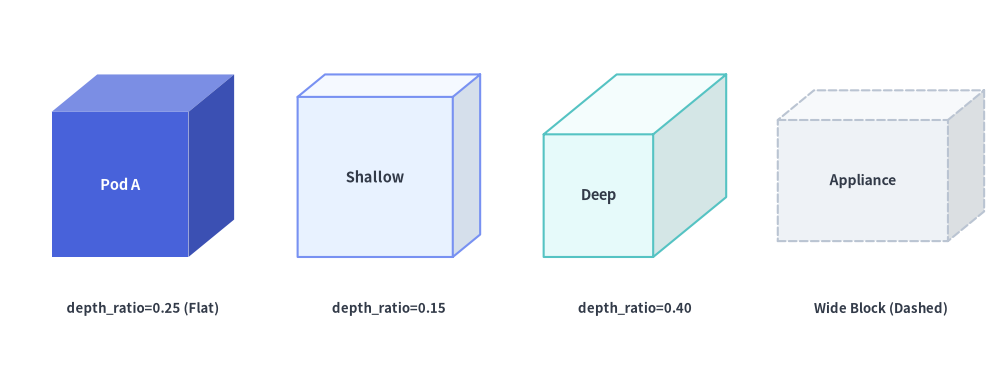
多様なスタイルと depth_ratio による 3D キューブおよび直方体ブロック
5. ドキュメント・ファイル・複数枚スタック (document)
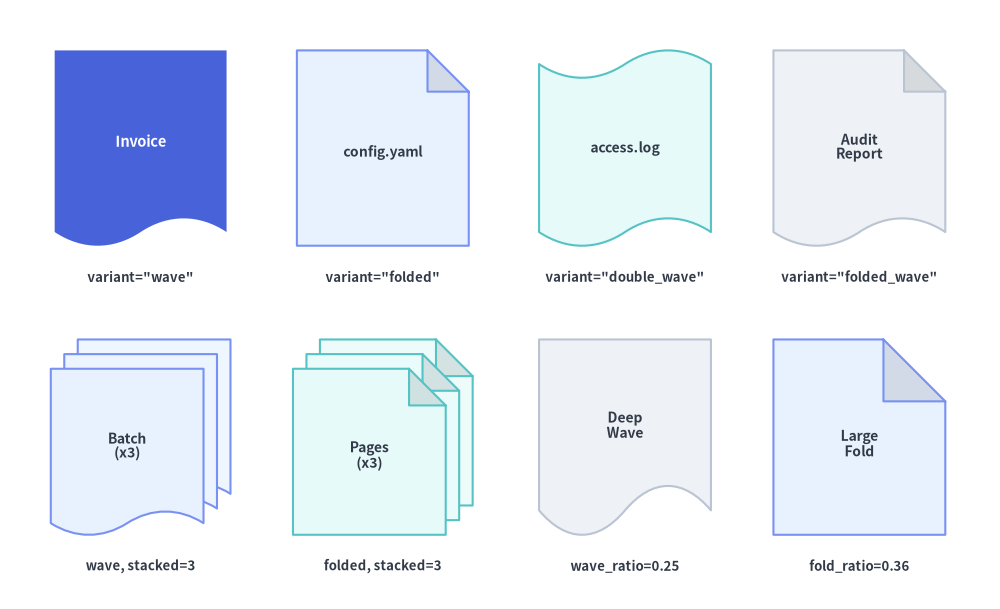
フローチャートの出力工程、設定/ソースファイル、ログストリームの断片、複数ページのレポート束向けに、document は 4 種類の variant シルエットと複数シートのカスケード積層(stacked >= 1)を提供します。
document (
xy : tuple [ float , float ],
width : float ,
height : float ,
* ,
variant : Literal [
"wave" , "standard" ,
"folded" , "page" , "note" ,
"double_wave" , "snippet" ,
"folded_wave" , "report" ,
] = "wave" ,
stacked : int = 1 ,
wave_ratio : float | None = None ,
fold_ratio : float | None = None ,
style : Style ,
text : str = "" ,
text_style : Style | None = None ,
) -> None
パラメータリファレンス
パラメータ
型
デフォルト
説明
xytuple[float, float]必須 外接ドキュメントバウンディングボックス(積層された全シートを含む)の中心座標 (x, y)。
widthfloat必須 ドキュメントバウンディングボックスの水平全幅(> 0)。
heightfloat必須 ドキュメントバウンディングボックスの垂直全高(> 0)。
variantDocumentVariant"wave"ドキュメントシートのシルエットスタイル(下記の Document の variant リファレンス を参照)。
stackedint1重ねて表示するドキュメントシートの枚数(>= 1)。stacked > 1(例: 2 や 3)を指定すると、(width, height) の内側に収まるよう奥の右上から手前の左下へ向かってシートがカスケード配置され、背面シートは自動的に明るくシェーディングされます。
wave_ratiofloat | NoneNoneシート高さに対する波形の上下振幅比率を (0.0, 1.0) で指定します。デフォルトは 0.14。"wave", "double_wave", "folded_wave" で有効です。
fold_ratiofloat | NoneNonemin(sheet_w, sheet_h) に対する右上の角折れ(ドッグイヤー)サイズ比率を (0.0, 1.0) で指定します。デフォルトは 0.24。"folded" および "folded_wave" で有効です。
styleStyle必須 塗りつぶし、枠線、および回転(angle)を制御するスタイル。角折れ付きの variant では、立体的なコントラストを生むよう三角形の折り返しフラップが自動的に暗色化されます。
text / text_stylestr / Style | None"" / None最前面のシート 上で視覚的に中央配置されるテキストラベル(下端の波や右上の角折れと干渉しないよう自動オフセット補正されます)。
Document の variant リファレンス
variant使用可能なエイリアス
上辺
下辺
有効な比率引数
主なユースケース
"wave"(デフォルト) "standard"直線
3 次ベジェ S 字波形
wave_ratio定番の ISO フローチャート帳票/出力シンボル、請求書、生成アーティファクト。
"folded""page", "note"右上の角折れ(ドッグイヤー)
直線
fold_ratio設定ファイル(config.yaml)、ソースコードファイル、Markdown/PDF ページ、UML ノート。
"double_wave""snippet"3 次ベジェ S 字波形
3 次ベジェ S 字波形
wave_ratio連続するログストリーム(access.log)、抜粋テキスト断片、データストリームチャンク。
"folded_wave""report"右上の角折れ(ドッグイヤー)
3 次ベジェ S 字波形
wave_ratio, fold_ratioファイルらしさと帳票の波形表現を兼ね備えた複数ページの技術レポート、仕様書、監査ログ。
from drawlib.canvas import save , setup
from drawlib.shapes import document
from drawlib.styles import Styles
from drawlib.text import text
setup ( width = 128 , height = 78 )
# Row 1: The 4 Document Variants (stacked=1)
row1 = [
( "wave" , "Invoice" , 18 , Styles . PrimaryFlat , Styles . WhiteBold . patch ( text_size = 10.5 ), 'variant="wave"' ),
( "folded" , "config.yaml" , 49 , Styles . PrimaryNeutral , Styles . DarkBold . patch ( text_size = 10.0 ), 'variant="folded"' ),
( "double_wave" , "access.log" , 80 , Styles . SecondaryNeutral , Styles . DarkBold . patch ( text_size = 10.0 ), 'variant="double_wave"' ),
( "folded_wave" , "Audit \n Report" , 110 , Styles . Neutral , Styles . DarkBold . patch ( text_size = 10.0 ), 'variant="folded_wave"' ),
]
for var , lbl , cx , st , tst , cap in row1 :
document (( cx , 59 ), width = 22 , height = 25 , variant = var , style = st , text = lbl , text_style = tst )
text (( cx , 42.5 ), cap , style = Styles . DarkBold . patch ( text_size = 9.5 ))
# Row 2: Multi-sheet stacking (stacked=3) and wave_ratio / fold_ratio customization
document (
( 18 , 22 ),
width = 23 ,
height = 25 ,
variant = "wave" ,
stacked = 3 ,
style = Styles . PrimaryNeutral ,
text = "Batch \n (x3)" ,
text_style = Styles . DarkBold . patch ( text_size = 10.0 ),
)
text (( 18 , 5.5 ), "wave, stacked=3" , style = Styles . DarkBold . patch ( text_size = 9.5 ))
document (
( 49 , 22 ),
width = 23 ,
height = 25 ,
variant = "folded" ,
stacked = 3 ,
style = Styles . SecondaryNeutral ,
text = "Pages \n (x3)" ,
text_style = Styles . DarkBold . patch ( text_size = 10.0 ),
)
text (( 49 , 5.5 ), "folded, stacked=3" , style = Styles . DarkBold . patch ( text_size = 9.5 ))
document (
( 80 , 22 ),
width = 22 ,
height = 25 ,
variant = "wave" ,
wave_ratio = 0.25 ,
style = Styles . Neutral ,
text = "Deep \n Wave" ,
text_style = Styles . DarkBold . patch ( text_size = 10.0 ),
)
text (( 80 , 5.5 ), "wave_ratio=0.25" , style = Styles . DarkBold . patch ( text_size = 9.5 ))
document (
( 110 , 22 ),
width = 22 ,
height = 25 ,
variant = "folded" ,
fold_ratio = 0.36 ,
style = Styles . PrimaryNeutral ,
text = "Large \n Fold" ,
text_style = Styles . DarkBold . patch ( text_size = 10.0 ),
)
text (( 110 , 5.5 ), "fold_ratio=0.36" , style = Styles . DarkBold . patch ( text_size = 9.5 ))
save ()
4 種類のドキュメント variant(上段)と複数枚スタック・比率のカスタマイズ(下段)
6. データフィルタリングとコンバージョンファネル (funnel)
ETL データフィルタリングパイプライン、イベント重複排除ステージ、レートリミッタ、コンバージョンファネル向けに、funnel は広い上部コーンから細い下部スパウト(注ぎ口)へと絞り込まれる漏斗形状を描画します。
funnel (
xy : tuple [ float , float ],
width : float ,
height : float ,
* ,
variant : Literal [
"standard" , "flat" ,
"3d" , "cylinder" ,
"curved" ,
] = "standard" ,
neck_width_ratio : float | None = None ,
neck_height_ratio : float | None = None ,
style : Style ,
text : str = "" ,
text_style : Style | None = None ,
) -> None
パラメータおよび variant リファレンス
パラメータ
型
デフォルト
説明
xytuple[float, float]必須 ファネルバウンディングボックスの中心座標 (x, y)。
width / heightfloat必須 上端リムの水平全幅(> 0)と垂直全高(> 0)。
variantFunnelVariant"standard"ファネルのシルエットおよびシェーディング形式(下記の表を参照)。
neck_width_ratiofloat | NoneNonewidth に対する下部ネック幅の比率を [0.08, 0.85] で指定します。None の場合はデフォルトの 0.28 になります。
neck_height_ratiofloat | NoneNoneheight に対する下部ネック高さの比率を [0.05, 0.75] で指定します。None の場合はデフォルトの 0.36 になります。
styleStyle必須 塗りつぶし、枠線、および回転(angle、例: 左から右への水平フィルタには angle=90 または -90)を制御するスタイル。
text / text_stylestr / Style | None"" / None広い上部コーン領域に自動で中央配置されるテキストラベルと任意のスタイル。
variant使用可能なエイリアス
幾何構造とシェーディング
主なユースケース
"standard"(デフォルト) "flat"フラットな 2D 台形の上部コーン+垂直な矩形スパウト
すっきりした 2D フローチャートのフィルタゲート、SQL WHERE フィルタ、水平パイプラインの絞り込み段。
"3d""cylinder"暗色シェーディングされた楕円形の上部開口リムを持つ 3D ファネル
データレイクのインジェストファネル、テレメトリコレクタ、cylinder や cube と並べる 3D アーキテクチャ図。
"curved"—
ネック部へ滑らかに繋がる 3 次ベジェ S 字カーブの側壁
マーケティング/分析のコンバージョンファネル、滑らかなストリーム集約ノード。
from drawlib.canvas import save , setup
from drawlib.shapes import funnel
from drawlib.styles import Styles
from drawlib.text import text
setup ( width = 128 , height = 48 )
lbl = Styles . DarkBold . patch ( text_size = 9.5 )
# 1. Standard 2D funnel
funnel (
( 18 , 27 ),
width = 24 ,
height = 23 ,
variant = "standard" ,
style = Styles . PrimaryFlat ,
text = "Filter" ,
text_style = Styles . WhiteBold . patch ( text_size = 10.5 ),
)
text (( 18 , 8.5 ), 'variant="standard"' , style = lbl )
# 2. 3D shaded elliptical-top funnel
funnel (
( 49 , 27 ),
width = 24 ,
height = 23 ,
variant = "3d" ,
style = Styles . PrimaryNeutral ,
text = "Ingest" ,
text_style = Styles . DarkBold . patch ( text_size = 10.5 ),
)
text (( 49 , 8.5 ), 'variant="3d"' , style = lbl )
# 3. Smooth cubic-Bézier curved funnel
funnel (
( 80 , 27 ),
width = 24 ,
height = 23 ,
variant = "curved" ,
style = Styles . SecondaryNeutral ,
text = "Convert" ,
text_style = Styles . DarkBold . patch ( text_size = 10.0 ),
)
text (( 80 , 8.5 ), 'variant="curved"' , style = lbl )
# 4. Horizontal rotated funnel (angle=90 -> left-to-right reducer)
funnel (
( 111 , 27 ),
width = 22 ,
height = 24 ,
variant = "standard" ,
neck_width_ratio = 0.35 ,
neck_height_ratio = 0.28 ,
style = Styles . Neutral . patch ( angle = 90 ),
text = "Sample" ,
text_style = Styles . DarkBold . patch ( text_size = 9.5 , angle = 0 , xy_shift = ( 0 , 1.5 )),
)
text (( 111 , 8.5 ), "angle=90 (Horizontal)" , style = lbl )
save ()
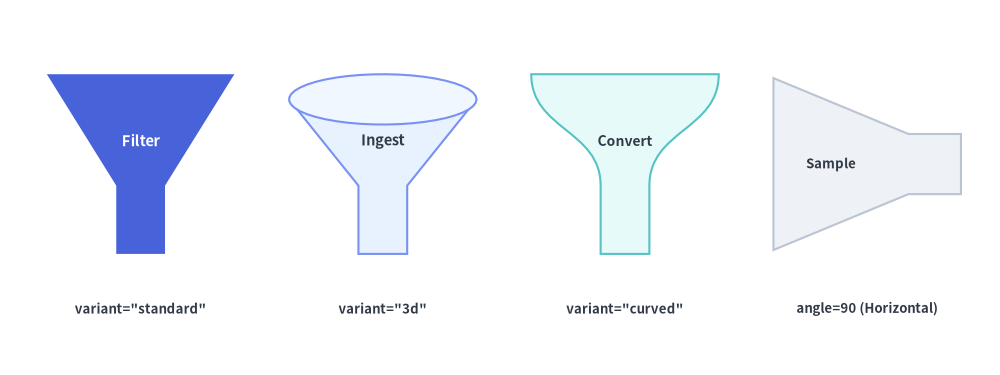
3 種類のファネル variant(standard・3d・curved)、ネック比率の調整、水平回転
7. クラウドノードとネットワーク境界 (cloud)
cloud は、中心座標 xy の外接バウンディングボックス (width, height) に厳密に収まるよう正規化された滑らかな 3 次ベジェ曲線のクラウドシルエットを描画します。
cloud (
xy : tuple [ float , float ],
width : float ,
height : float ,
* ,
variant : Literal [
"standard" ,
"flat" , "flat_bottom" ,
"fluffy" , "dense" ,
"simple" , "minimal" ,
] = "standard" ,
bump_ratio : float | None = None ,
style : Style ,
text : str = "" ,
text_style : Style | None = None ,
) -> None
パラメータリファレンス
パラメータ
型
デフォルト
説明
xytuple[float, float]必須 クラウドバウンディングボックスの中心座標 (x, y)。
widthfloat必須 クラウドの厳密な外接水平幅(> 0)。
heightfloat必須 クラウドの厳密な外接垂直高さ(> 0)。
variantCloudVariant"standard"クラウドのシルエットスタイル(下記の Cloud の variant リファレンス を参照)。
bump_ratiofloat | NoneNone外向きローブ(もこもこした膨らみ)の深さ比率を (0.0, 1.0) で指定します。None の場合は選択した variant に最適なデフォルト値(0.20〜0.24)が使用されます。小さい値(0.12)では控えめで浅いクラウドになり、大きい値(0.34)では深く際立ったローブになります。
styleStyle必須 塗りつぶし、枠線(VPC/サブネット境界には Dashed が最適)、および回転(angle)を制御するスタイル。
text / text_stylestr / Style | None"" / None中央配置されるテキストラベルと任意のタイポグラフィ上書き設定。
Cloud の variant リファレンス
variant使用可能なエイリアス
ローブ構造
デフォルト bump_ratio
主なユースケース
"standard"(デフォルト) —
全周にわたる 8 個の非対称ローブ
0.22汎用的な「インターネット」、SaaS、外部ネットワークノード。
"flat""flat_bottom"平坦な水平底辺+上部の 4 個のドーム
0.24内部のテキストやアイコンに高い視覚的安定感を与える独立クラウドサービスカードやゲートウェイノード。
"fluffy""dense"全周にわたる 12 個の細かいローブ
0.20大規模な VPC、WAN、マルチノードクラスタの境界領域(特に shape_line_style="dashed" との併用が効果的)。
"simple""minimal"幅広で対称な 6 個のローブ
0.24コンパクトなクラウドバッジ、小型アイコン、思考の吹き出し。
from drawlib.canvas import save , setup
from drawlib.shapes import cloud , rectangle
from drawlib.styles import Styles
from drawlib.text import text
setup ( width = 126 , height = 74 )
# Row 1: The 4 Cloud Variants
variants = [
( "standard" , 18 , Styles . PrimaryFlat , Styles . WhiteBold . patch ( text_size = 10.5 )),
( "flat" , 48 , Styles . PrimaryNeutral , Styles . DarkBold . patch ( text_size = 10.5 )),
( "fluffy" , 78 , Styles . SecondaryNeutral , Styles . DarkBold . patch ( text_size = 10.5 )),
( "simple" , 108 , Styles . Neutral , Styles . DarkBold . patch ( text_size = 10.5 )),
]
for v_name , cx , st , tst in variants :
cloud (( cx , 57 ), width = 26 , height = 17 , variant = v_name , style = st , text = v_name , text_style = tst )
text (( cx , 43 ), f 'variant=" { v_name } "' , style = Styles . DarkBold . patch ( text_size = 9.5 ))
# Row 2 Left: Shallow vs Deep bump_ratio
cloud (
( 20 , 22 ),
width = 26 ,
height = 17 ,
variant = "standard" ,
bump_ratio = 0.12 ,
style = Styles . Neutral ,
text = "Shallow" ,
text_style = Styles . DarkBold . patch ( text_size = 10.0 ),
)
text (( 20 , 7.5 ), "bump_ratio=0.12" , style = Styles . DarkBold . patch ( text_size = 9.5 ))
cloud (
( 52 , 22 ),
width = 26 ,
height = 17 ,
variant = "standard" ,
bump_ratio = 0.35 ,
style = Styles . PrimaryNeutral ,
text = "Deep Lobes" ,
text_style = Styles . DarkBold . patch ( text_size = 10.0 ),
)
text (( 52 , 7.5 ), "bump_ratio=0.35" , style = Styles . DarkBold . patch ( text_size = 9.5 ))
# Row 2 Right: Large fluffy dashed VPC enclosure containing service cards
cloud (( 96 , 22 ), width = 50 , height = 24 , variant = "fluffy" , style = Styles . SecondaryNeutral . patch ( shape_line_style = "dashed" ))
rectangle (( 86 , 21 ), width = 14 , height = 10 , style = Styles . Neutral . patch ( shape_r = 1.5 ), text = "API" , text_style = Styles . DarkBold . patch ( text_size = 9.5 ))
rectangle (( 106 , 21 ), width = 14 , height = 10 , style = Styles . PrimaryFlat . patch ( shape_r = 1.5 ), text = "App" , text_style = Styles . WhiteBold . patch ( text_size = 9.5 ))
text (( 96 , 7.5 ), 'variant="fluffy" (Dashed VPC Boundary)' , style = Styles . DarkBold . patch ( text_size = 9.5 ))
save ()
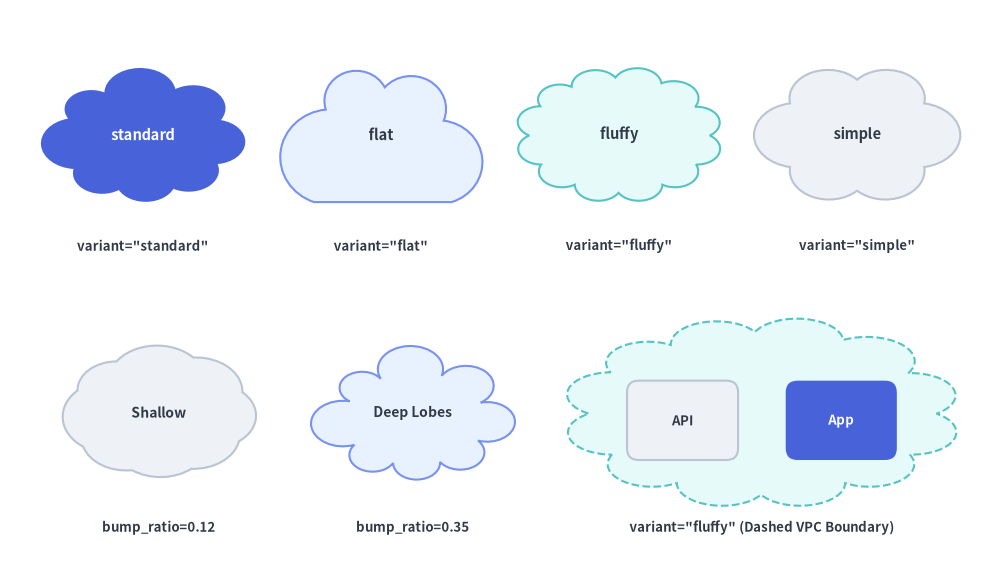
4 種類のクラウド variant(上段)と bump_ratio の比較・破線 VPC 境界での利用例(下段)
8. グルーピング用の波括弧・角括弧・丸括弧 (brace)
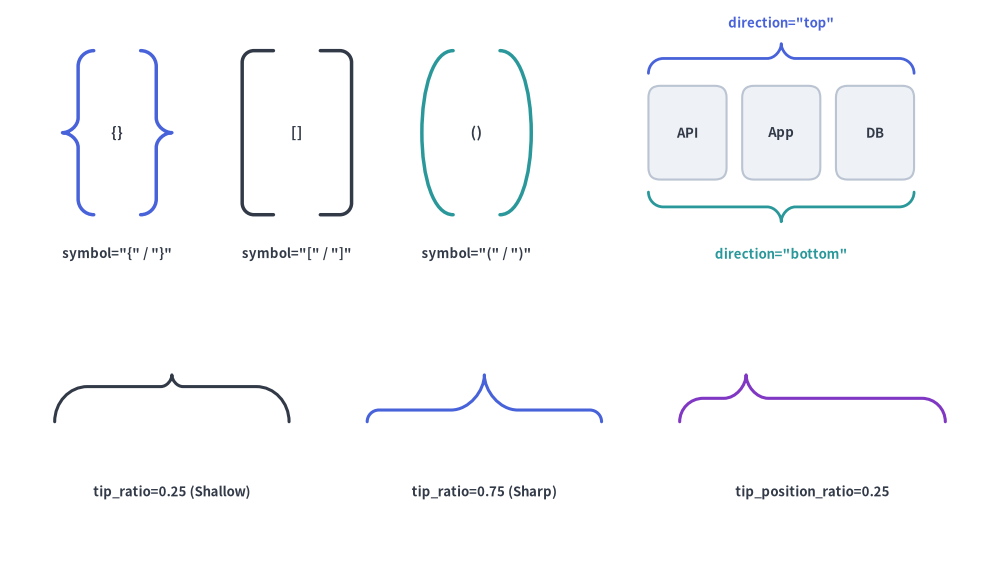
brace は、波括弧({, })・角括弧([, ])・丸括弧((, ))のグルーピング括弧を上下左右の 4 方向("left", "right", "top", "bottom")のいずれにも描画します。線の太さは style.line_width で制御します。
brace (
xy : tuple [ float , float ],
width : float ,
height : float ,
* ,
symbol : Literal [
"{" , "}" , " {} " , "curly" ,
"[" , "]" , "[]" , "square" ,
"(" , ")" , "()" , "round" ,
] = "{" ,
direction : Literal [ "left" , "right" , "top" , "bottom" ] | None = None ,
tip_ratio : float | None = None ,
tip_position_ratio : float | None = None ,
style : Style ,
text : str = "" ,
text_style : Style | None = None ,
) -> None
パラメータリファレンス
パラメータ
型
デフォルト
説明
xytuple[float, float]必須 ブレースの外接バウンディングボックスの中心座標 (x, y)。
widthfloat必須 バウンディングボックスの水平幅(> 0)。縦向きブレース("left" / "right")では括弧の奥行き、横向きブレース("top" / "bottom")ではスパン長になります。
heightfloat必須 バウンディングボックスの垂直高さ(> 0)。縦向きブレース("left" / "right")ではスパン長、横向きブレース("top" / "bottom")では括弧の奥行きになります。
symbolBraceSymbol"{"括弧ファミリーおよびデフォルトの向き(下記の symbol と direction のバリエーション
directionBraceDirection | NoneNoneグループ対象領域のどの辺に括弧を配置するか(外側の背/先端が向く方向)を "left", "right", "top", "bottom" から指定します(下記の表を参照)。
tip_ratiofloat | NoneNone波括弧({})専用 : 括弧の奥行きのうち中央の外向き突起(ティップ)が占める割合を (0.0, 1.0) で指定します。デフォルトは 0.50。大きい値(0.70)では鋭く突き出た先端になり、小さい値(0.25)では控えめな先端になります。
tip_position_ratiofloat | NoneNone波括弧({})専用 : スパン軸に沿った中央突起の位置を (0.0, 1.0) で指定します("left" / "right" では下から上、"top" / "bottom" では左から右へ計測)。デフォルトは 0.50(対称な中央)。
styleStyle必須 線の太さは style.line_width(または style.shape_line_width)、色は style.line_color(または style.shape_line_color)、線種は style.line_style、回転は style.angle で制御します。角括弧 "square"([, ])では、style.shape_r により 2 つの 90° 角を丸められます。
text / text_stylestr / Style | None"" / Nonexy の中央に配置される任意のテキストラベルとタイポグラフィ上書き設定。
symbol と direction のバリエーション
symbol の値括弧ファミリー
自動 direction(direction=None 時)
対応する形状モディファイア
"{""{}""curly"波括弧 {
"left"(先端が左を向き、両端が右へカール)tip_ratio, tip_position_ratio
"}"波括弧 }
"right"(先端が右を向き、両端が左へカール)tip_ratio, tip_position_ratio
"[""[]""square"角括弧 [
"left"(背が左側、両端が右向き)style.patch(shape_r=...) による角丸め
"]"角括弧 ]
"right"(背が右側、両端が左向き)style.patch(shape_r=...) による角丸め
"(""()""round"丸括弧 (
"left"(弧が左へ膨らみ、両端が右向き)滑らかな 3 次ベジェ曲線アーチ
")"丸括弧 )
"right"(弧が右へ膨らみ、両端が左向き)滑らかな 3 次ベジェ曲線アーチ
direction の値向き
背/先端が向く方向
開口端が向く方向
"left"縦向き(span = height)
左(-X)
右(+X、右側の要素群を囲む)
"right"縦向き(span = height)
右(+X)
左(-X、左側の要素群を囲む)
"top"横向き(span = width)
上(+Y)
下(-Y、下側の要素群を囲む)
"bottom"横向き(span = width)
下(-Y)
上(+Y、上側の要素群を囲む)
from drawlib.canvas import save , setup
from drawlib.shapes import brace , rectangle
from drawlib.styles import Styles
from drawlib.text import text
setup ( width = 128 , height = 74 )
# Row 1 Left: Three Bracket Families: { } , [ ] , ( )
families = [
( " {} " , "{" , "}" , 15 , Styles . PrimaryBold . patch ( line_width = 2.5 )),
( "[]" , "[" , "]" , 38 , Styles . DarkBold . patch ( line_width = 2.5 , shape_r = 1.5 )),
( "()" , "(" , ")" , 61 , Styles . SecondaryBold . patch ( line_width = 2.5 )),
]
for label , sym_l , sym_r , cx , st in families :
brace (( cx - 5 , 57 ), width = 4.0 , height = 21 , symbol = sym_l , style = st )
brace (( cx + 5 , 57 ), width = 4.0 , height = 21 , symbol = sym_r , style = st )
text (( cx , 57 ), label , style = Styles . DarkBold . patch ( text_size = 10.5 ))
text (( cx , 41.5 ), f 'symbol=" { sym_l } " / " { sym_r } "' , style = Styles . DarkBold . patch ( text_size = 9.5 ))
# Row 1 Right: All 4 Directions (top, bottom, left, right) around a card group
for idx , name in enumerate (( "API" , "App" , "DB" )):
rx = 88 + idx * 12
rectangle (( rx , 57 ), width = 10 , height = 12 , style = Styles . Neutral . patch ( shape_r = 1.5 ), text = name , text_style = Styles . DarkBold . patch ( text_size = 9.5 ))
brace (( 100 , 66.5 ), width = 34 , height = 3.8 , symbol = "{" , direction = "top" , style = Styles . PrimaryBold . patch ( line_width = 2.0 ))
text (( 100 , 71.0 ), 'direction="top"' , style = Styles . PrimaryBold . patch ( text_size = 9.5 ))
brace (( 100 , 47.5 ), width = 34 , height = 3.8 , symbol = "{" , direction = "bottom" , style = Styles . SecondaryBold . patch ( line_width = 2.0 ))
text (( 100 , 41.5 ), 'direction="bottom"' , style = Styles . SecondaryBold . patch ( text_size = 9.5 ))
# Row 2: Curly brace tip_ratio & tip_position_ratio variations
brace (( 22 , 23 ), width = 30 , height = 6.0 , symbol = "{" , direction = "top" , tip_ratio = 0.25 , style = Styles . DarkBold . patch ( line_width = 2.2 ))
text (( 22 , 11 ), "tip_ratio=0.25 (Shallow)" , style = Styles . DarkBold . patch ( text_size = 9.5 ))
brace (( 62 , 23 ), width = 30 , height = 6.0 , symbol = "{" , direction = "top" , tip_ratio = 0.75 , style = Styles . PrimaryBold . patch ( line_width = 2.2 ))
text (( 62 , 11 ), "tip_ratio=0.75 (Sharp)" , style = Styles . DarkBold . patch ( text_size = 9.5 ))
brace (( 104 , 23 ), width = 34 , height = 6.0 , symbol = "{" , direction = "top" , tip_position_ratio = 0.25 , style = Styles . AccentBold . patch ( line_width = 2.2 ))
text (( 104 , 11 ), "tip_position_ratio=0.25" , style = Styles . DarkBold . patch ( text_size = 9.5 ))
save ()
括弧ファミリー({}, [], ())、4 方向の配置(left, right, top, bottom)、波括弧の先端比率