SourceCode(ソースコードカード)
SourceCode コンポーネントは、Pygments を用いてシンタックスハイライトされたソースコード断片を、鮮明なベクター図形およびタイポグラフィとして Drawlib キャンバス上に直接描画します。
組み込みのシンタックステーマ、任意の行番号ガター、CJK 対応の等幅フォント、およびトークンごとの色カスタマイズに対応しています。
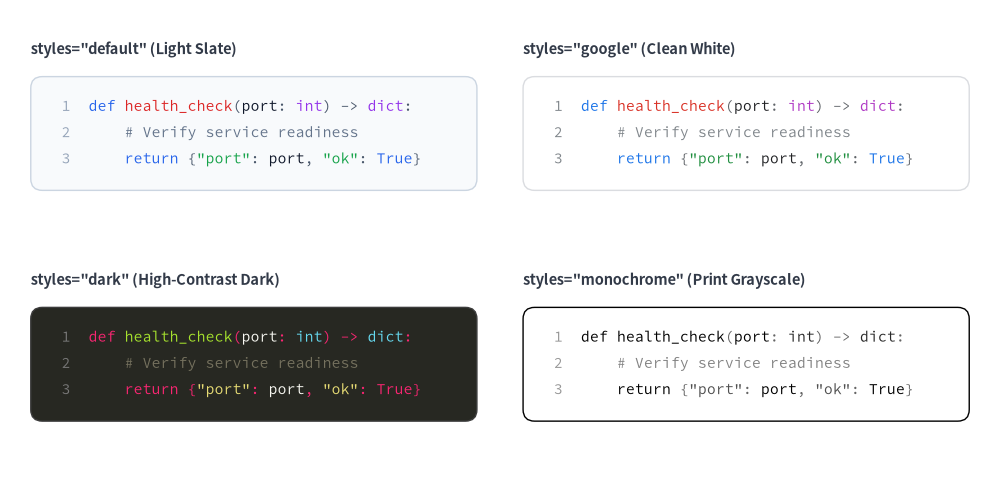
Source Code
from drawlib.canvas import save, setup
from drawlib.smartarts import SourceCode, SourceCodeStyles
from drawlib.styles import Styles
from drawlib.text import text

setup(width=130, height=64)

snippet = """def health_check(port: int) -> dict:
    # Verify service readiness
    return {"port": port, "ok": True}"""

themes = [
    ("default", (4, 54), 'styles="default" (Light Slate)'),
    ("google", (68, 54), 'styles="google" (Clean White)'),
    ("dark", (4, 24), 'styles="dark" (High-Contrast Dark)'),
    ("monochrome", (68, 24), 'styles="monochrome" (Print Grayscale)'),
]

for theme_name, (x, y), label in themes:
    text((x, y + 3.5), label, style=Styles.DarkBold.patch(text_size=10.5, halign="left"))
    sc_styles = SourceCodeStyles.get(theme_name, font_lang="en", text_size=10.5)
    SourceCode.draw(
        xy=(x, y),
        width=58,
        code=snippet,
        styles=sc_styles,
        code_lang="python",
        show_linenum=True,
    )

save()
吹き出しやコールアウトをお探しですか?
bubblespeech()プリミティブについては 吹き出し・バッジ・ステータス を参照してください。
1. 基本概念と基本的な使い方
SourceCode.draw(...)(または sourcecode(...))は、Pygments でトークン化されたコードブロックをステートレスに描画します。デフォルトでは左上 xy=(x, y) をアンカーとし(align="top_left")、右方向 +X へ width 分広がり、下方向 -Y のコンテナ高さをコード行数と text_size から自動計算します。SourceCodeStyles.get(...) と .patch(...) を組み合わせることで、組み込みテーマ("default"、"google"、"dark"、"monochrome")の切り替え、20 以上の言語のハイライト、行番号ガター(show_linenum)の表示切り替え、アンカー位置揃え("bottom_left"、"center")の変更を行えます。

- ステートレスな左上描画(
SourceCode.draw/sourcecode): インスタンス状態を持たずにcodeまたはfileから直接描画します。デフォルトでxyを左上に固定して下方向-Yへ高さを自動算出し、show_linenum=Trueの場合は行番号ガター領域を確保します。 - 組み込みテーマと CJK フォント(
SourceCodeStyles.get): 任意のtext_sizeで"default"、"google"、"dark"、"monochrome"のプリセットを選択でき、font_langに"ja"、"zh-cn"、"zh-tw"、"ko"を指定すると CJK 対応の等幅フォントへ自動的に切り替わります。 - 多言語レキサーと
.patch()(code_lang,box_style): Pygments を通じて 20 以上の言語("python"、"yaml"、"sql"、"go"など)をハイライトし、styles.patch(...)によってコンテナ枠線・角丸半径(shape_r)・個別トークンスタイルを自在にカスタマイズできます。 - 柔軟なアンカーと行単位の注釈(
align):align="top_left"(デフォルト)、"bottom_left"、"center"をサポートします。共有ベクターキャンバス上に描画されるため、特定の行へ直接矢印や吹き出しを向けることができます。
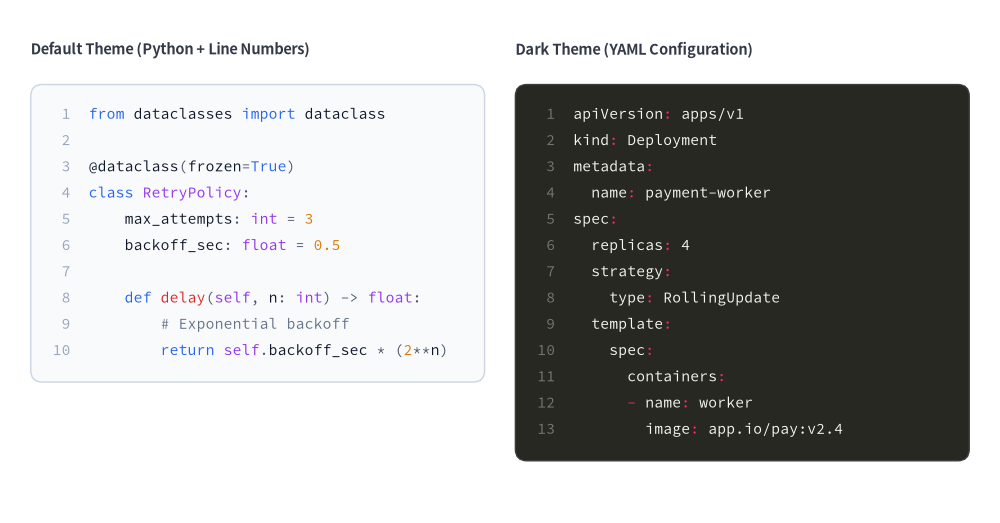
2. 行番号付きシンタックスハイライトコード(SourceCode.draw)
SourceCode.draw(...)(または関数エイリアスの sourcecode(...))は、デフォルトで左上角 xy=(x, y) をアンカーとする(align="top_left")シンタックスハイライト付きのコードブロックを描画します。トークン色・コンテナスタイル・フォントサイズ・CJK 言語フォントは SourceCodeStyles.get(...) で設定します。
from drawlib.canvas import save, setup
from drawlib.smartarts import SourceCode, SourceCodeStyles
from drawlib.styles import Styles
from drawlib.text import text

setup(width=130, height=68)

# 1. Left: Default Light Theme with Python Code
text((4, 61.5), "Default Theme (Python + Line Numbers)", style=Styles.DarkBold.patch(text_size=10.5, halign="left"))

py_code = """from dataclasses import dataclass

@dataclass(frozen=True)
class RetryPolicy:
    max_attempts: int = 3
    backoff_sec: float = 0.5

    def delay(self, n: int) -> float:
        # Exponential backoff
        return self.backoff_sec * (2**n)"""

light_styles = SourceCodeStyles.get("default", font_lang="en", text_size=10.5)
SourceCode.draw(
    xy=(4, 57),
    width=59,
    code=py_code,
    styles=light_styles,
    code_lang="python",
    show_linenum=True,
)

# 2. Right: Dark Theme with Kubernetes YAML Config
text((67, 61.5), "Dark Theme (YAML Configuration)", style=Styles.DarkBold.patch(text_size=10.5, halign="left"))

yaml_code = """apiVersion: apps/v1
kind: Deployment
metadata:
  name: payment-worker
spec:
  replicas: 4
  strategy:
    type: RollingUpdate
  template:
    spec:
      containers:
      - name: worker
        image: app.io/pay:v2.4"""

dark_styles = SourceCodeStyles.get("dark", font_lang="en", text_size=10.5)
SourceCode.draw(
    xy=(67, 57),
    width=59,
    code=yaml_code,
    styles=dark_styles,
    code_lang="yaml",
    show_linenum=True,
)
save()
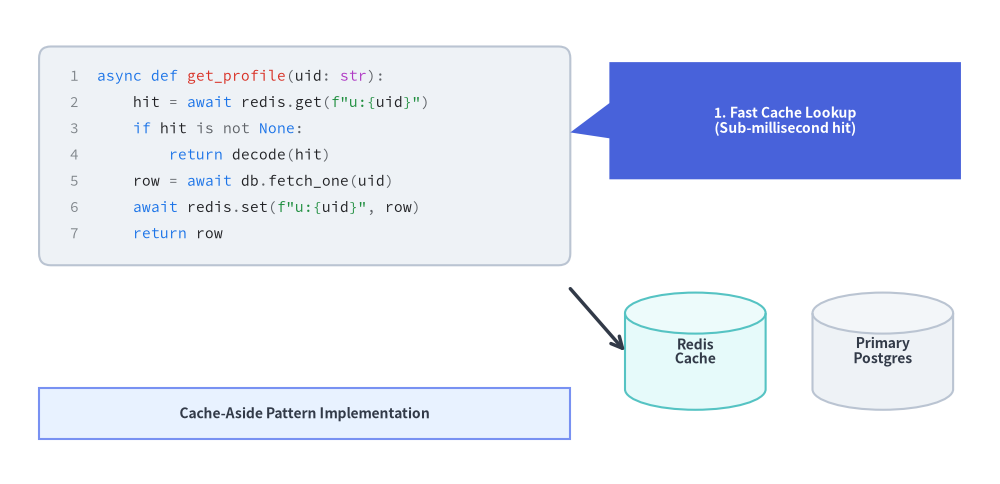
3. アーキテクチャ図・チュートリアル図でのコード注釈
SourceCode.draw() は共有ベクターキャンバス上に直接描画されるため、吹き出し(bubblespeech)・アーキテクチャノード・矢印とコードコンテナを組み合わせて、注釈付きのコード解説図を作成できます。
from drawlib.canvas import save, setup
from drawlib.lines import line
from drawlib.shapes import bubblespeech, cylinder, rectangle
from drawlib.smartarts import SourceCode, SourceCodeStyles
from drawlib.styles import Styles

setup(width=128, height=62)

# 1. Left: Syntax-Highlighted Code Block
snippet = """async def get_profile(uid: str):
    hit = await redis.get(f"u:{uid}")
    if hit is not None:
        return decode(hit)
    row = await db.fetch_one(uid)
    await redis.set(f"u:{uid}", row)
    return row"""

code_styles = SourceCodeStyles.get("google", font_lang="en", text_size=10.5).patch(
    box_style=Styles.Neutral.patch(shape_r=1.5),
)
SourceCode.draw(
    xy=(5, 56),
    width=68,
    code=snippet,
    styles=code_styles,
    code_lang="python",
    show_linenum=True,
)

# 2. Callout Bubble pointing to the cache-aside lookup line
bubblespeech(
    xy=(78, 39),
    width=45,
    height=15,
    tail_edge="left",
    tail_start_ratio=0.35,
    tail_end_ratio=0.65,
    tail_vertex_xy=(73, 45),
    style=Styles.PrimaryFlat.patch(shape_r=1.2),
    text="1. Fast Cache Lookup\n(Sub-millisecond hit)",
    text_style=Styles.WhiteBold.patch(text_size=10.0),
)

# 3. Downstream Persistence Nodes referenced by the code
cylinder(
    xy=(89, 17),
    width=18,
    height=15,
    style=Styles.SecondaryNeutral,
    text="Redis\nCache",
    text_style=Styles.DarkBold.patch(text_size=10.0),
)
cylinder(
    xy=(113, 17),
    width=18,
    height=15,
    style=Styles.Neutral,
    text="Primary\nPostgres",
    text_style=Styles.DarkBold.patch(text_size=10.0),
)

line((73, 25), (80, 17), arrow_head="->", style=Styles.DarkBold)
rectangle(
    (39, 9),
    width=68,
    height=6.5,
    style=Styles.PrimaryNeutral,
    text="Cache-Aside Pattern Implementation",
    text_style=Styles.DarkBold.patch(text_size=10.0),
)
save()
4. テーマ・対応言語・トークンのカスタマイズ(SourceCodeStyles)
組み込みテーマと CJK フォント選択
SourceCodeStyles.get(styles, font_lang, *, font=None, text_size=12.0)(または get_source_code_styles(...))を使用します。
styles(テーマ名):"default": 落ち着いたライトスレートの背景に、青・緑・赤のシンタックスカラーを配したテーマ。"google": クリーンな白地カードに Google スタイルのシンタックスパレットを組み合わせたテーマ。"dark"(または"monokai"、"github-dark"): ハイコントラストなダークテーマ。"monochrome": 印刷に適したグレースケールテーマ。
font_lang:"en"(デフォルト):FontSourceCode.SOURCECODEPROを使用します。"ja","zh-cn","zh-tw","ko":FontSourceCode.SOURCEHANCODEJPを自動選択し、日本語や CJK のコメント・文字列が豆腐(文字化け)になるのを防ぎます。
code_lang:"python","yaml","json","sql","bash","go","rust","typescript","javascript","html","css","dockerfile","toml","protobuf","c","cpp","java","kotlin","swift","markdown"、またはNone(fileの拡張子やコード内容から自動判定)をサポートします。
トークンスタイルのカスタマイズ(SourceCodeStyles と .patch())
SourceCodeStyles は、外側コンテナ・行番号ガター・8 種類のシンタックストークン区分を定義するイミュータブルな Pydantic モデルです。styles.patch(...) を呼び出すと、指定したフィールドを更新した新しい SourceCodeStyles インスタンスが返されます。
from drawlib.smartarts import SourceCodeStyles
from drawlib.styles import Styles

custom_styles = SourceCodeStyles.get("default", font_lang="en", text_size=10.5).patch(
    box_style=Styles.Neutral.patch(shape_r=2.0),
    keyword=Styles.PrimaryBold,
    comment=Styles.Muted,
    text_size=10.5,  # Updates font size across all token types and line numbers
)
フィールド / .patch() 引数 |
型 | 説明 |
|---|---|---|
box_style |
Style |
外側のコードコンテナ矩形の図形スタイル(角丸半径は shape_r で制御、デフォルト 1.5)。 |
linenum_style |
Style |
左側ガターの右揃え行番号(show_linenum=True)のテキストスタイル。 |
default |
Style |
標準コードテキストおよび未分類の識別子のテキストスタイル。 |
keyword |
Style |
言語キーワード(def、class、return、if、import など)のテキストスタイル。 |
string |
Style |
文字列リテラルのテキストスタイル。 |
comment |
Style |
単一行および複数行コメントのテキストスタイル。 |
number |
Style |
整数および浮動小数点数値リテラルのテキストスタイル。 |
function |
Style |
関数名およびメソッド名のテキストスタイル。 |
type_ (.patch() では type も可) |
Style |
クラス名、型アノテーション、組み込み識別子のテキストスタイル。 |
operator |
Style |
演算子および句読点記号のテキストスタイル。 |
text_size (.patch() 内) |
float | None |
.patch(text_size=...) の簡易パラメータ。linenum_style と全 8 種類のトークンスタイルの text_size を一括更新します。 |
5. API リファレンス
コードの描画(SourceCode.draw / sourcecode)
SourceCode.draw(
    xy: tuple[float, float],           # Anchor coordinate (x, y) of the code container (interpreted via `align`)
    width: float,                      # Total container width in canvas units
    code: str | None = None,           # Source code string (mutually exclusive with `file`)
    *,
    styles: SourceCodeStyles,          # Required style configuration
    file: str | Path | None = None,    # Path to external source file (mutually exclusive with `code`)
    code_lang: str | None = None,      # Lexer language name (e.g. "python", "yaml", "sql")
    show_linenum: bool = False,        # Render line numbers in a left gutter
    align: Literal["top_left", "bottom_left", "center"] = "top_left",
    scale: float = 1.0,                # Proportional scale factor anchored at `xy`
) -> type[SourceCode]
- 関数エイリアス:
sourcecode(...)はSourceCode.draw(...)のトップレベル関数エイリアスであり、get_source_code_styles(...)はSourceCodeStyles.get(...)のトップレベル関数エイリアスです。 - アンカー位置揃え(
align): デフォルトは"top_left"(xyが左上角を固定し、下方向-Yへ展開)です。"bottom_left"を渡すと左下角を固定(上方向+Yへ展開)し、"center"を渡すとwidthと自動計算された高さの両方をxy中心に配置します。 - 高さの自動計算: コンテナの高さは、
code(またはfile)の行数とstyles.default.text_sizeから自動的に算出されます。 - 外部ファイルの読み込み:
SourceCode.draw(...)に直接file="path/to/example.py"を渡すか、SourceCode.get_text(file, strip=True)でファイル文字列を読み込めます。