UML クラス図 (ClassDiagram): UML 2.0 クラス階層とリレーションシップ
ClassDiagram は、標準的な UML 2.0 オブジェクト指向構造モデリングを実装します。3 区画のクラスカード(クラス名、属性、メソッド)、ステレオタイプ、抽象クラス、および全 6 種類の標準 UML リレーションシップを備えています。
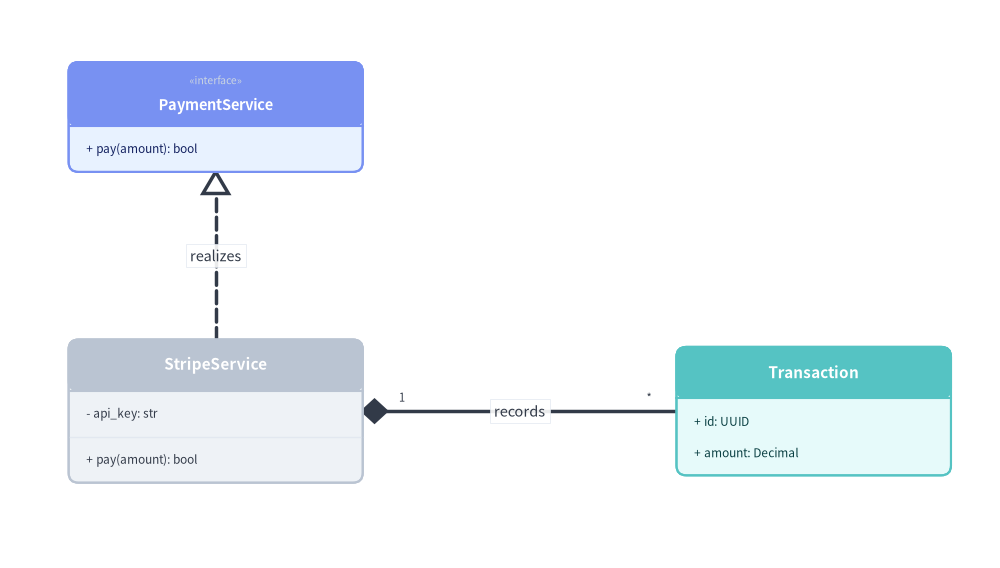
Source Code
from drawlib.canvas import save, setup
from drawlib.diagrams.class_diagram import ClassDiagram, ClassNode
from drawlib.styles import Styles

setup(width=102, height=58)

cd = ClassDiagram(
    node_style=Styles.Neutral,
    edge_style=Styles.DarkBold,
    edge_text_style=Styles.Dark.patch(text_size=10.5),
)

payment_svc = cd.add(
    ClassNode(name="PaymentService", stereotype="interface", width=30.0, style=Styles.PrimaryNeutral),
    xy=(20.0, 44.0),
)
payment_svc.add_method("pay", params="amount", return_type="bool")

stripe_svc = cd.add(
    ClassNode(name="StripeService", width=30.0, style=Styles.Neutral),
    xy=(20.0, 14.0),
)
stripe_svc.add_attribute("api_key", type="str", is_public=False)
stripe_svc.add_method("pay", params="amount", return_type="bool")

tx = cd.add(
    ClassNode(name="Transaction", width=28.0, style=Styles.SecondaryNeutral),
    xy=(81.0, 14.0),
)
tx.add_attribute("id", type="UUID", is_public=True)
tx.add_attribute("amount", type="Decimal", is_public=True)

cd.connect(
    stripe_svc,
    payment_svc,
    relationship_type="realization",
    start_side="top",
    end_side="bottom",
    label="realizes",
)
cd.connect(
    stripe_svc,
    tx,
    relationship_type="composition",
    start_side="right",
    end_side="left",
    start_multiplicity="1",
    end_multiplicity="*",
    label="records",
)

cd.draw(xy=(2.0, 2.0))
save()
1. 基本概念と基本的な使い方

ClassDiagram は、cd.add(node, xy=(cx, cy)) によって 3 区画構造の ClassNode カードを中心 (cx, cy) 基準で配置し、UML 可視性修飾子(+、-、#、~)付きの属性やメソッドが登録されるにつれて effective_height を動的に拡張します。ヘッダーへのギュメ付き stereotype バッジ・is_abstract・カスタム header_style 塗りつぶしの付与、多重度を備えた全 6 種類の標準 UML relationship_type マーカーによるクラス接続、および接続面・show=False 表示制御・align="center" 配置の制御をサポートします。
- 3 区画の
ClassNodeと動的な高さ (xy,effective_height):cd.add(node, xy=(cx, cy))は各クラスカードを中心座標で配置し、add_attribute(...)およびadd_method(...)が区画にメンバを追加するにつれてnode.effective_heightを自動的に拡張します。 - 可視性・ステレオタイプ・ヘッダースタイル (
+/-/#/~,stereotype,is_abstract,header_style): UML アクセス修飾子付きでメンバを整形し、ギュメ付きヘッダー(«interface»、«abstract»)を表示するほか、header_styleで注目クラスのヘッダーを装飾できます。 - 6 種類の標準 UML リレーションシップ (
relationship_type, 多重度, ロール):cd.connect(...)は"inheritance"、"realization"、"composition"、"aggregation"、"association"(directed=True対応)、および"dependency"を、start_multiplicity、end_multiplicity、start_role、end_role、labelとともに描画します。 - ポートルーティング・段階的表示・中央配置 (
start_side/end_side,routing,show=False,align="center"):"orthogonal"または"direct"経路で正確な接続面を固定したり、show=Falseで位置を変えずにノードと接続エッジを非表示にしたり、align="center"でxyを中心にダイアグラムを配置したりできます。
2. コンストラクタ・ClassNode・メンバ定義
from drawlib.canvas import save, setup
from drawlib.diagrams.class_diagram import ClassDiagram, ClassNode
from drawlib.styles import Styles

setup(width=76, height=36)

cd = ClassDiagram(
    node_style=Styles.Neutral,
    edge_style=Styles.DarkBold,
    edge_text_style=Styles.Dark.patch(text_size=10.5),
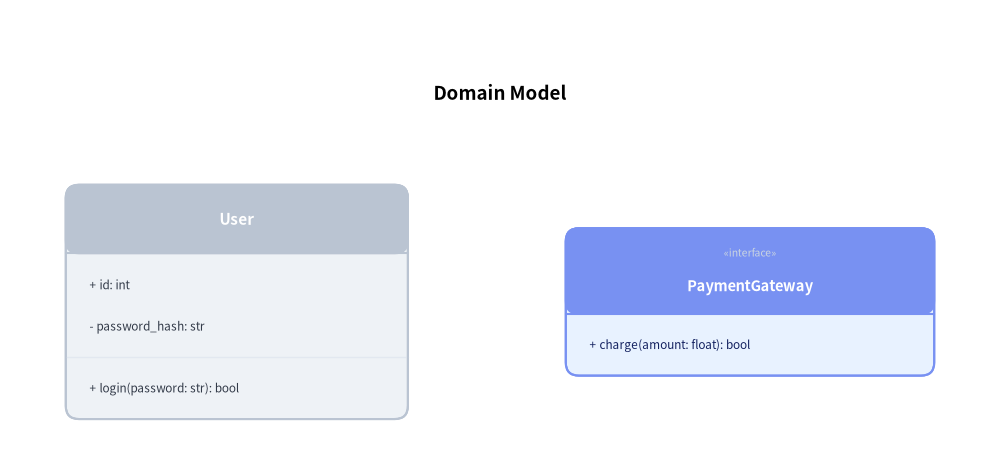
    title="Domain Model",
    title_style=Styles.BlackBold.patch(text_size=13.5),
)

# Class with attributes and methods
user = cd.add(ClassNode(name="User", width=26.0), xy=(18.0, 13.0))
user.add_attribute("id", type="int", is_public=True)
user.add_attribute("password_hash", type="str", is_public=False)
user.add_method("login", params="password: str", return_type="bool")

# Interface with stereotype
gateway = cd.add(
    ClassNode(name="PaymentGateway", stereotype="interface", width=28.0, style=Styles.PrimaryNeutral),
    xy=(57.0, 13.0),
)
gateway.add_method("charge", params="amount: float", return_type="bool")

cd.draw(xy=(0.0, 0.0))
save()
パラメータリファレンス
ClassDiagram クラス
| パラメータ | 型 | デフォルト | 説明 |
|---|---|---|---|
node_style |
Style |
(必須) | ダイアグラム内のクラスカードの基本 Style オブジェクト。 |
edge_style |
Style |
(必須) | リレーションシップ線および UML マーカーの基本 Style オブジェクト。 |
edge_text_style |
Style |
(必須) | リレーションシップのラベル、ロール、多重度の基本 Style オブジェクト。 |
title |
str |
"" |
ダイアグラム上部に表示する任意のタイトル。 |
title_style |
Style | None |
None |
ダイアグラムタイトル用の任意の Style オブジェクト。 |
style |
Style | None |
None |
ダイアグラム全体の背景を上書きする任意の Style。 |
width |
float | None |
None |
キャンバスの任意の固定幅(None の場合はコンテンツから自動算出)。 |
height |
float | None |
None |
キャンバスの任意の固定高さ(None の場合はコンテンツから自動算出)。 |
margin |
float |
5.0 |
サイズ自動算出時に全クラスの外周を囲む外側余白パディング。 |
header_style |
Style | None |
None |
ダイアグラム全体のクラスカードヘッダー区画を上書きする任意の Style。 |
ClassNode クラス
| パラメータ | 型 | デフォルト | 説明 |
|---|---|---|---|
name |
str |
(必須) | クラス名またはインターフェース名。 |
stereotype |
str |
"" |
«stereotype» として描画される任意の UML ステレオタイプ(例: "interface"、"abstract"、"enumeration")。 |
is_abstract |
bool |
False |
True の場合、クラス名をイタリック体フォントで描画します。 |
width |
float |
28.0 |
キャンバス単位でのクラスカードの幅。 |
height |
float | None |
None |
任意の最小高さの上書き設定(None または不足する場合は属性・メソッドが収まるよう自動拡張)。 |
size |
tuple[float, float] | None |
None |
width と height をまとめて上書きする任意の (width, height) 短縮タプル。 |
header_height |
float | None |
None |
ヘッダー区画の高さ(stereotype 指定時は 6.5、それ以外は 5.2)。 |
row_height |
float |
3.2 |
各属性行およびメソッド行の垂直高さ。 |
style |
Style | None |
None |
カードの枠線および本体塗りつぶし用の任意の Style 上書き設定。 |
header_style |
Style | None |
None |
このカードのヘッダー区画の背景およびテキスト用の任意の Style 上書き設定。 |
show |
bool |
True |
表示フラグ(False の場合、接続された ClassRelationship エッジも自動的に非表示になります)。 |
属性・メソッド定義 API (AttributeInfo & MethodInfo)
from drawlib.diagrams.class_diagram import AttributeInfo, MethodInfo

# Single attribute & batch attributes
node.add_attribute(
    name: str,
    type: str = "",
    is_public: bool = True,
    visibility: str | None = None,      # "+", "-", "#", or "~" (overrides is_public if set)
    default_value: str = "",            # Rendered as " = <default_value>"
    is_static: bool = False,
) -> ClassNode

node.add_attributes(
    attributes: Sequence[Sequence[Any] | AttributeInfo],
    # Each tuple is (name, [type, is_public, visibility, default_value]) or an AttributeInfo instance
) -> ClassNode

# Single method & batch methods
node.add_method(
    name: str,
    params: str = "",
    return_type: str = "",
    is_public: bool = True,
    visibility: str | None = None,      # "+", "-", "#", or "~" (overrides is_public if set)
    is_static: bool = False,
    is_abstract: bool = False,
) -> ClassNode

node.add_methods(
    methods: Sequence[Sequence[Any] | MethodInfo],
    # Each tuple is (name, [return_type, params, is_public, visibility]) or a MethodInfo instance
) -> ClassNode
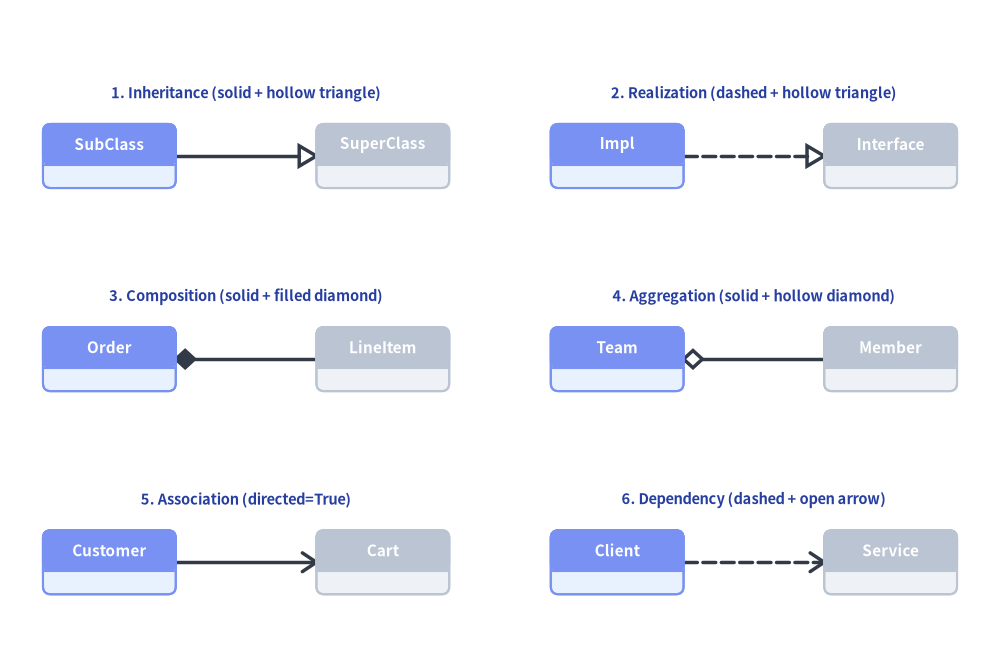
3. 6 種類の UML リレーションシップ (ClassRelationship)
クラス間のリレーションシップは、ダイアグラムレベルの cd.connect(source, target, relationship_type=...)(または cd.add_relationship(rel: ClassRelationship) -> ClassRelationship)を使って登録します。
relationship_type |
短縮エイリアス | リレーションシップ | 線種 | マーカー | 意味 |
|---|---|---|---|---|---|
"inheritance" |
"inherit" |
継承 (Inheritance) | 実線 | 白抜き三角形(target 側) |
スーパークラスの汎化 |
"realization" |
"realize" |
実現 (Realization) | 破線 | 白抜き三角形(target 側) |
インターフェースの実装 |
"composition" |
"composite" |
コンポジション (Composition) | 実線 | 塗りつぶしひし形(source 側) |
強いライフサイクル所有関係 |
"aggregation" |
"aggregate" |
集約 (Aggregation) | 実線 | 白抜きひし形(source 側) |
共有ライフサイクル / 全体と部分 |
"association" |
"associate" |
関連 (Association) | 実線 | なし(directed=True の場合は開いた矢印) |
構造的な参照 |
"dependency" |
"depend" |
依存 (Dependency) | 破線 | 開いた矢印(target 側) |
一時的な利用依存(Uses-a) |
from drawlib.canvas import save, setup
from drawlib.diagrams.class_diagram import ClassDiagram, ClassNode
from drawlib.styles import Colors, Styles
from drawlib.text import text

setup(width=128, height=84)

cd = ClassDiagram(
    node_style=Styles.Neutral,
    edge_style=Styles.DarkBold,
    edge_text_style=Styles.Dark.patch(text_size=10.5),
)

# 2x3 Grid of the 6 UML Relationship Types
specs = [
    # Left column (x_src=14, x_dst=49)
    ("1. Inheritance (solid + hollow triangle)", "inheritance", False, 14.0, 49.0, 64.0, "SubClass", "SuperClass"),
    ("3. Composition (solid + filled diamond)", "composition", False, 14.0, 49.0, 38.0, "Order", "LineItem"),
    ("5. Association (directed=True)", "association", True, 14.0, 49.0, 12.0, "Customer", "Cart"),
    # Right column (x_src=79, x_dst=114)
    ("2. Realization (dashed + hollow triangle)", "realization", False, 79.0, 114.0, 64.0, "Impl", "Interface"),
    ("4. Aggregation (solid + hollow diamond)", "aggregation", False, 79.0, 114.0, 38.0, "Team", "Member"),
    ("6. Dependency (dashed + open arrow)", "dependency", False, 79.0, 114.0, 12.0, "Client", "Service"),
]

lbl_style = Styles.DarkBold.patch(text_size=10.5, text_color=Colors.Primary5)

for _title_str, rel_type, is_dir, x1, x2, y, src_name, dst_name in specs:
    n_src = cd.add(ClassNode(name=src_name, width=17.0, style=Styles.PrimaryNeutral), xy=(x1, y))
    n_dst = cd.add(ClassNode(name=dst_name, width=17.0, style=Styles.Neutral), xy=(x2, y))
    cd.connect(
        n_src,
        n_dst,
        relationship_type=rel_type,
        directed=is_dir,
        start_side="right",
        end_side="left",
    )

cd.draw(xy=(0.0, 0.0))

for title_str, _rel_type, _is_dir, x1, x2, y, _src_name, _dst_name in specs:
    text(((x1 + x2) / 2.0, y + 8.0), title_str, style=lbl_style)

save()
cd.connect(...) のシグネチャ
cd.connect(
    source: ClassNode,
    target: ClassNode,
    relationship_type: RelationshipType = "association",
    *,
    type: RelationshipType | None = None,              # Keyword alias for relationship_type
    label: str = "",
    start_side: Literal["left", "right", "top", "bottom", "auto"] = "auto",
    end_side: Literal["left", "right", "top", "bottom", "auto"] = "auto",
    start_multiplicity: str = "",                      # e.g. "1", "0..1"
    end_multiplicity: str = "",                        # e.g. "*", "1..*"
    start_role: str = "",
    end_role: str = "",
    directed: bool = False,                            # Draws open navigability arrow at target
    style: Style | None = None,
    text_style: Style | None = None,
    routing: Literal["orthogonal", "direct"] = "orthogonal",
    padding: float | tuple[float, float] = 0.0,
    show: bool = True,
) -> ClassRelationship
登録・サイズ取得・描画ライフサイクル
cd.add(class_node, xy=(cx, cy), show: bool | None = None) -> ClassNode: クラスカードを中心(cx, cy)に登録し、ミュータブルなClassNode(node.show、node.style、node.header_style)を返します。クラスを非表示(show=False)にすると、ダイアグラム全体の外接サイズは固定したまま、接続されているすべてのClassRelationshipエッジも自動的に非表示になります。cd.get_bounds() -> tuple[float, float, float, float]: 登録された全クラスを囲む(min_x, min_y, max_x, max_y)を返します。cd.get_size() -> tuple[float, float]: ダイアグラムの(width, height)(marginを含む)を返します。cd.draw(xy=(0.0, 0.0), *, scale: float = 1.0) -> None: 左下xyを基準として、カード幅、区画高さ、UML マーカー、タイポグラフィをscale倍に比例スケーリングしてクラス図を描画します。
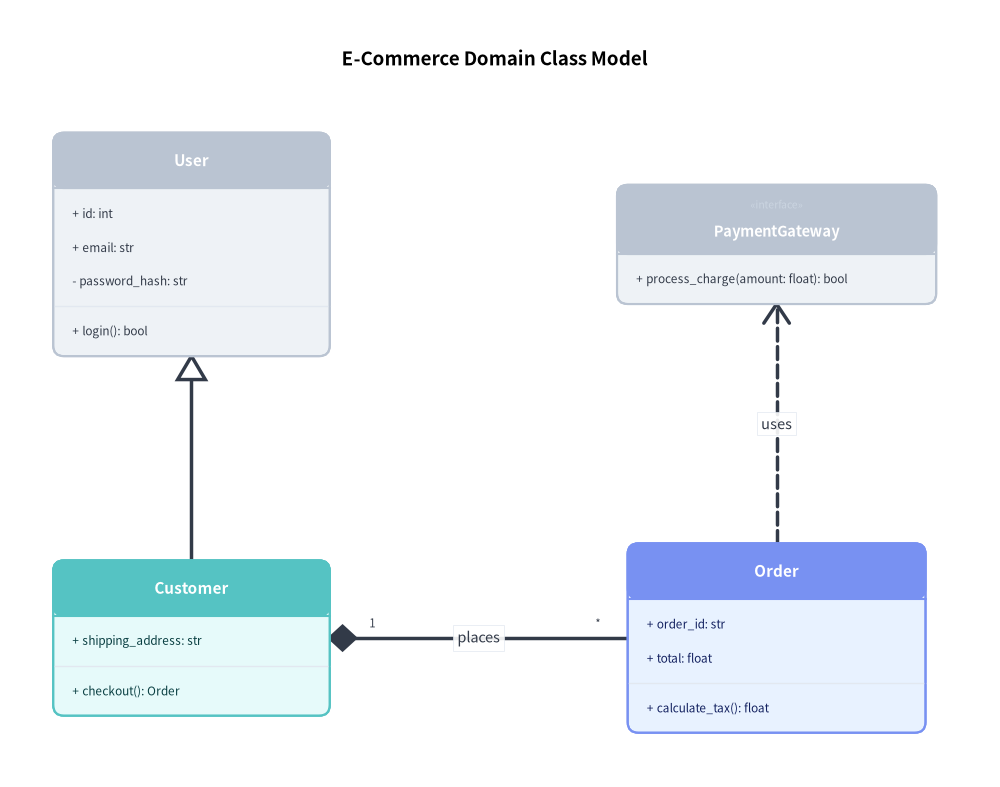
4. EC ドメインモデル
次のサンプルでは、継承(汎化)、コンポジション、およびインターフェース依存を組み合わせています。
from drawlib.canvas import save, setup
from drawlib.diagrams.class_diagram import ClassDiagram, ClassNode
from drawlib.styles import Styles

setup(width=94, height=74)

cd = ClassDiagram(
    node_style=Styles.Neutral,
    edge_style=Styles.DarkBold,
    edge_text_style=Styles.Dark.patch(text_size=10.5),
    title="E-Commerce Domain Class Model",
    title_style=Styles.BlackBold.patch(text_size=13.5),
)

# 1. Define classes
user = cd.add(ClassNode(name="User", width=26.0), xy=(18.0, 51.0))
user.add_attribute("id", type="int", is_public=True)
user.add_attribute("email", type="str", is_public=True)
user.add_attribute("password_hash", type="str", is_public=False)
user.add_method("login", return_type="bool")

customer = cd.add(ClassNode(name="Customer", width=26.0, style=Styles.SecondaryNeutral), xy=(18.0, 14.0))
customer.add_attribute("shipping_address", type="str")
customer.add_method("checkout", return_type="Order")

order = cd.add(ClassNode(name="Order", width=28.0, style=Styles.PrimaryNeutral), xy=(73.0, 14.0))
order.add_attribute("order_id", type="str")
order.add_attribute("total", type="float")
order.add_method("calculate_tax", return_type="float")

iface = cd.add(ClassNode(name="PaymentGateway", stereotype="interface", width=30.0), xy=(73.0, 51.0))
iface.add_method("process_charge", params="amount: float", return_type="bool")

# 2. Connect relationships using diagram.connect
cd.connect(customer, user, "inheritance", start_side="top", end_side="bottom")
cd.connect(
    customer,
    order,
    "composition",
    start_side="right",
    end_side="left",
    start_multiplicity="1",
    end_multiplicity="*",
    label="places",
)
cd.connect(order, iface, "dependency", start_side="top", end_side="bottom", label="uses")

cd.draw(xy=(0.0, 0.0))
save()
5. デザインパターンのモデリング: Observer パターン
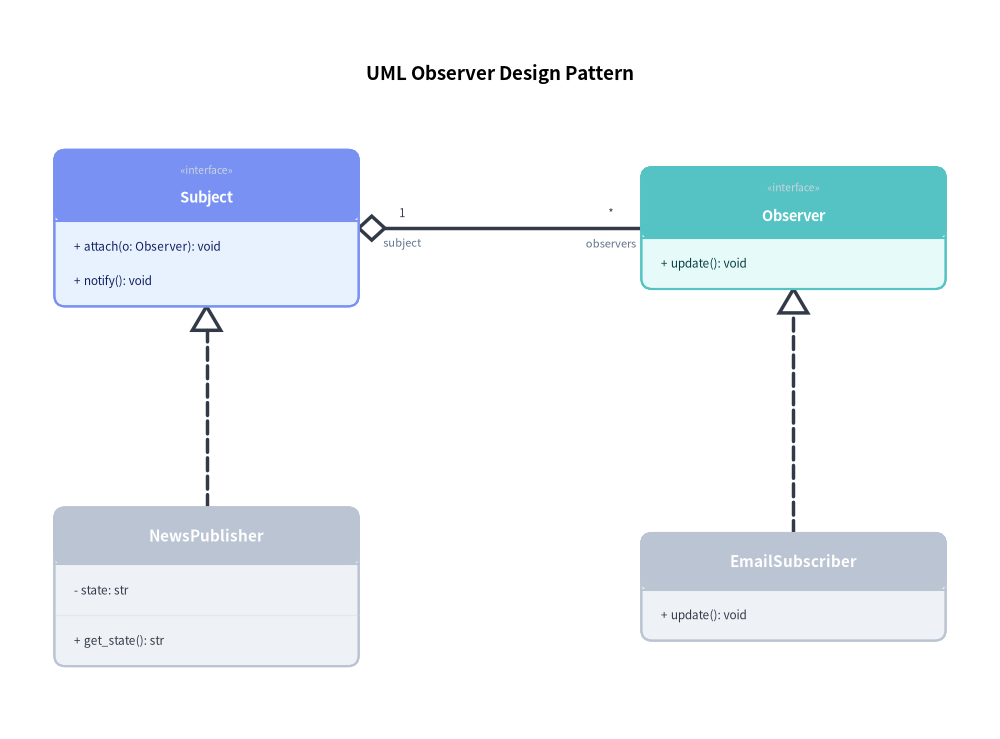
クラス図は、Observer パターンをはじめとするソフトウェアデザインパターンの図解に最適です。
from drawlib.canvas import save, setup
from drawlib.diagrams.class_diagram import ClassDiagram, ClassNode
from drawlib.styles import Styles

setup(width=92, height=68)

cd = ClassDiagram(
    node_style=Styles.Neutral,
    edge_style=Styles.DarkBold,
    edge_text_style=Styles.Dark.patch(text_size=10.5),
    title="UML Observer Design Pattern",
    title_style=Styles.BlackBold.patch(text_size=13.5),
)

subj_iface = cd.add(
    ClassNode(name="Subject", stereotype="interface", width=28.0, style=Styles.PrimaryNeutral),
    xy=(19.0, 47.0),
)
subj_iface.add_method("attach", params="o: Observer", return_type="void")
subj_iface.add_method("notify", return_type="void")

obs_iface = cd.add(
    ClassNode(name="Observer", stereotype="interface", width=28.0, style=Styles.SecondaryNeutral),
    xy=(73.0, 47.0),
)
obs_iface.add_method("update", return_type="void")

concrete_subj = cd.add(ClassNode(name="NewsPublisher", width=28.0), xy=(19.0, 14.0))
concrete_subj.add_attribute("state", type="str", is_public=False)
concrete_subj.add_method("get_state", return_type="str")

concrete_obs = cd.add(ClassNode(name="EmailSubscriber", width=28.0), xy=(73.0, 14.0))
concrete_obs.add_method("update", return_type="void")

cd.connect(concrete_subj, subj_iface, "realization", start_side="top", end_side="bottom")
cd.connect(concrete_obs, obs_iface, "realization", start_side="top", end_side="bottom")
cd.connect(
    subj_iface,
    obs_iface,
    "aggregation",
    start_side="right",
    end_side="left",
    start_multiplicity="1",
    end_multiplicity="*",
    start_role="subject",
    end_role="observers",
)

cd.draw(xy=(0.0, 0.0))
save()
6. ベストプラクティスとガイドライン
- カード幅の統一: 水平方向に並べるクラス間では、視覚的なバランスを保つために一貫したカード幅(
26.0〜30.0単位)を設定してください。 - 接続辺の明示指定:
start_sideとend_sideを明示的に指定することで、直交配線がテキスト区画を横切らずカードの周囲をきれいに迂回します。