キャッシュ機構と CI/CD
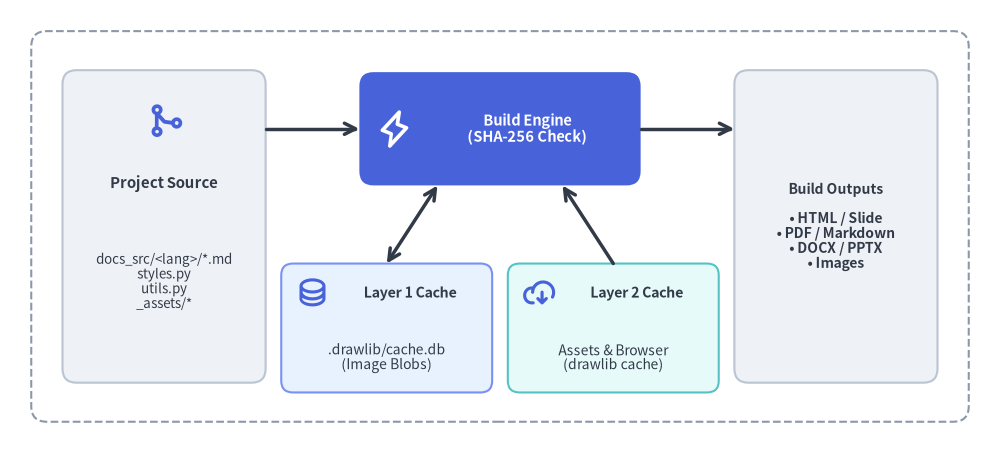
Drawlib は 2 層構造のキャッシュアーキテクチャ を採用しており、ローカルでの反復ビルドを瞬時に完了させるとともに、CI/CD パイプラインを決定論的・高速・オフライン実行可能にします。
Source Code
from drawlib.canvas import save, setup
from drawlib.icons import phosphor
from drawlib.lines import line
from drawlib.shapes import rectangle
from drawlib.styles import Styles
from drawlib.text import text

setup(width=128, height=58)

# Outer pipeline boundary
rectangle((64, 29), width=120, height=50, style=Styles.MutedDashed.patch(shape_r=2.0))

# Left: Source inputs
rectangle((21, 29), width=26, height=40, style=Styles.Neutral.patch(shape_r=1.8))
phosphor.git_merge((21, 42.5), width=4.8, style=Styles.PrimaryBold)
text((21, 34.5), "Project Source", style=Styles.DarkBold.patch(text_size=10.8))
text((21, 22.0), "docs_src/<lang>/*.md\nstyles.py\nutils.py\n_assets/*", style=Styles.Dark.patch(text_size=9.6))

# Center: Drawlib Compiler (Hero focal point)
rectangle((64, 41.5), width=36, height=14.5, style=Styles.PrimaryFlat.patch(shape_r=1.8))
phosphor.lightning((50.5, 41.5), width=4.8, style=Styles.WhiteBold)
text((67.5, 41.5), "Build Engine\n(SHA-256 Check)", style=Styles.WhiteBold.patch(text_size=10.5))

# Bottom Center: Two Cache Tiers
rectangle((49.5, 16.0), width=27, height=16.5, style=Styles.PrimaryNeutral.patch(shape_r=1.5))
phosphor.database((40.0, 20.5), width=4.2, style=Styles.PrimaryBold)
text((52.5, 20.5), "Layer 1 Cache", style=Styles.DarkBold.patch(text_size=10.2))
text((49.5, 12.2), ".drawlib/cache.db\n(Image Blobs)", style=Styles.Dark.patch(text_size=10.0))

rectangle((78.5, 16.0), width=27, height=16.5, style=Styles.SecondaryNeutral.patch(shape_r=1.5))
phosphor.cloud_arrow_down((69.0, 20.5), width=4.2, style=Styles.PrimaryBold)
text((81.5, 20.5), "Layer 2 Cache", style=Styles.DarkBold.patch(text_size=10.2))
text((78.5, 12.2), "Assets & Browser\n(drawlib cache)", style=Styles.Dark.patch(text_size=10.0))

# Right: Published Artifacts
rectangle(
    (107, 29),
    width=26,
    height=40,
    style=Styles.Neutral.patch(shape_r=1.8),
    text="Build Outputs\n\n• HTML / Slide\n• PDF / Markdown\n• DOCX / PPTX\n• Images",
    text_style=Styles.DarkBold.patch(text_size=10.0),
)

# Connectors
line((34, 41.5), (46, 41.5), arrow_head="->", style=Styles.DarkBold)
line((82, 41.5), (94, 41.5), arrow_head="->", style=Styles.DarkBold)
line((56, 34.25), (49.5, 24.25), arrow_head="<->", style=Styles.DarkBold)
line((72, 34.25), (78.5, 24.25), arrow_head="<-", style=Styles.DarkBold)

save()
- レイヤー 1 — 差分ビルドキャッシュ (
.drawlib/cache.db): レンダリング済みの図解バイナリを SHA-256 コンテンツハッシュでキャッシュし、変更のない図解を 1 ミリ秒未満で復元するプロジェクトローカルな SQLite データベースです。 - レイヤー 2 — グローバルアセット&ブラウザキャッシュ (
drawlib cache): 外部フォントファミリー、ベクター/PNG アイコンパック、Natural Earth 地図データセット、および Playwright のヘッドレス Chromium バイナリ(chromium-headless-shell)を管理するパッケージキャッシュです。

1. インタラクティブな 2 層キャッシュ&CI/CD ツアー
レイヤー 1 の SHA-256 SQLite キャッシュ、キャッシュキーの自動無効化、レイヤー 2 のオフラインアセット事前取得、そして GitHub Actions やエアギャップ Docker パイプラインがエンドツーエンドでどのように連携するかを確認しましょう。
2. レイヤー 1: SQLite 差分ビルドキャッシュ (.drawlib/cache.db)
drawlib build または drawlib show を実行すると、Drawlib は .drawlib/cache.db にローカル SQLite データベースを自動作成します(キャッシュバイナリが誤って Git にコミットされないよう、* を含む .drawlib/.gitignore と .drawlib/CACHEDIR.TAG も同時に自動生成されます)。
2.1. SHA-256 キャッシュキーに含まれる要素
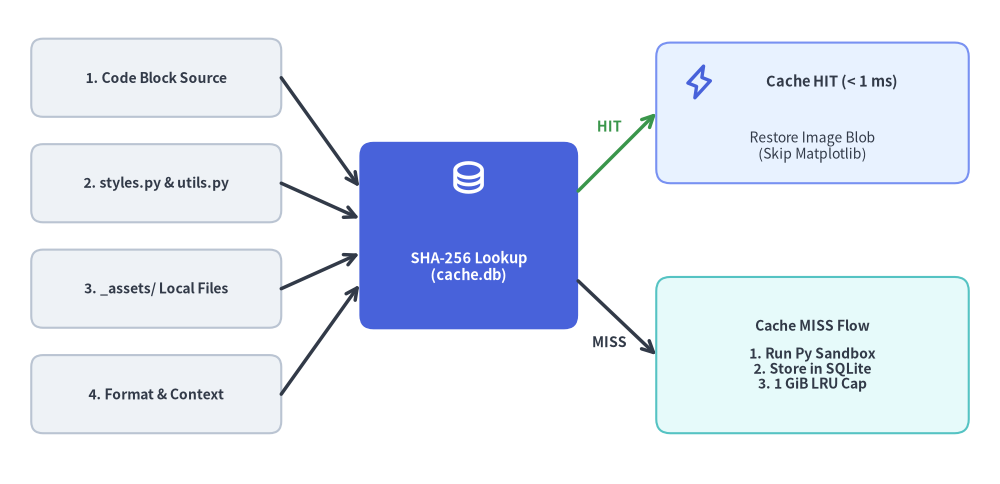
埋め込み drawlib ブロックまたは単体の .py スクリプトを実行する前に、Drawlib は以下の要素全体に対する決定論的な SHA-256 ダイジェストを計算します。
- 描画コード本文: ブロックまたはスクリプト内の正確な Python コード文字列。
- プロジェクトの
styles.py&utils.py: 有効な--stylesおよび--utilsスクリプトのファイル内容全体。 - 参照されているローカルアセット: コード内で文字列リテラルとして参照されているローカルファイルの内容(Markdown ファイル、プロジェクトルート、または
_assets/からの相対パスで解決)。 - 実行コンテキスト: ソース/ターゲットパス、出力フォーマット(
png、webp、svg)、およびプレゼンテーションの総スライド枚数(total_slides)。
ダイジェストが .drawlib/cache.db 内のエントリと一致した場合、Drawlib は Python や Matplotlib を一切起動することなく、レンダリング済み画像バイナリを 1 ミリ秒未満 で SQLite から直接復元します。
Source Code
from drawlib.canvas import save, setup
from drawlib.icons import phosphor
from drawlib.lines import line
from drawlib.shapes import rectangle
from drawlib.styles import Styles
from drawlib.text import text

setup(width=128, height=62)

# Left Stack: 4 Input Cards
inputs = [
    (52.0, "1. Code Block Source"),
    (38.5, "2. styles.py & utils.py"),
    (25.0, "3. _assets/ Local Files"),
    (11.5, "4. Format & Context"),
]
for iy, ilabel in inputs:
    rectangle(
        (20, iy),
        width=32,
        height=10.0,
        style=Styles.Neutral.patch(shape_r=1.5),
        text=ilabel,
        text_style=Styles.DarkBold.patch(text_size=10.0),
    )

# Center Focal Card: SHA-256 Digest Lookup
rectangle((60, 31.8), width=28, height=24, style=Styles.PrimaryFlat.patch(shape_r=1.8))
phosphor.database((60, 39.2), width=4.8, style=Styles.WhiteBold)
text((60, 27.8), "SHA-256 Lookup\n(cache.db)", style=Styles.WhiteBold.patch(text_size=10.5))

# Converging arrows from 4 inputs to SHA-256 Digest Lookup
line((36, 52.0), (46, 38.0), arrow_head="->", style=Styles.DarkBold)
line((36, 38.5), (46, 34.0), arrow_head="->", style=Styles.DarkBold)
line((36, 25.0), (46, 29.5), arrow_head="->", style=Styles.DarkBold)
line((36, 11.5), (46, 25.5), arrow_head="->", style=Styles.DarkBold)

# Top Branch: Cache HIT
line((74, 37.5), (84, 47.5), arrow_head="->", style=Styles.SuccessBold)
text((78.0, 45.8), "HIT", style=Styles.SuccessBold.patch(text_size=10.2))
rectangle((104, 47.5), width=40, height=18, style=Styles.PrimaryNeutral.patch(shape_r=1.8))
phosphor.lightning((89.5, 51.5), width=4.6, style=Styles.PrimaryBold)
text((106.5, 51.5), "Cache HIT (< 1 ms)", style=Styles.DarkBold.patch(text_size=10.5))
text((104, 43.2), "Restore Image Blob\n(Skip Matplotlib)", style=Styles.Dark.patch(text_size=10.0))

# Bottom Branch: Cache MISS
line((74, 26.0), (84, 16.5), arrow_head="->", style=Styles.DarkBold)
text((78.0, 18.2), "MISS", style=Styles.DarkBold.patch(text_size=10.2))
rectangle(
    (104, 16.5),
    width=40,
    height=20,
    style=Styles.SecondaryNeutral.patch(shape_r=1.8),
    text="Cache MISS Flow\n\n1. Run Py Sandbox\n2. Store in SQLite\n3. 1 GiB LRU Cap",
    text_style=Styles.DarkBold.patch(text_size=10.0),
)

save()
2.2. 自動キャッシュメンテナンスと環境変数
- ライブラリバージョン更新時の自動無効化: インストールされている
drawlibまたはmatplotlibのバージョンが変更されると、キャッシュテーブルは自動的に無効化されます。 - 1 GiB の容量上限: キャッシュされた画像バイナリの合計が
1 GiBを超えると、古い方から 50% のエントリが自動的に削除(LRU 方式)されます。 - カスタムキャッシュパス: CI/CD ランナーでは、
DRAWLIB_CACHE_DB=/path/to/cache.dbまたはDRAWLIB_CACHE_DIR=/path/to/dir環境変数によって SQLite データベースの保存先を上書きできます。
2.3. レイヤー 1 キャッシュをバイパスまたはクリアすべきケース
描画スクリプトが styles.py や utils.py 以外 の外部カスタム Python モジュールをインポートしている場合、その外部モジュールを編集してもブロックの SHA-256 ハッシュは自動では変化しません。その場合は --no-cache または drawlib cache clear --images を使用して強制的に再レンダリングを実行してください。
# Force full re-rendering for a single build or preview command:
uv run drawlib build html docs_src/ -o docs_html/ --no-cache
uv run drawlib show docs_src/en/index.md arch.png -g -o .drawlib/scratch/preview.png --no-cache

# Or purge all cached diagram binaries from .drawlib/cache.db:
uv run drawlib cache clear --images
3. レイヤー 2: グローバルアセット&ブラウザキャッシュ (drawlib cache) とルールキャッシュ
コアの drawlib PyPI ホイールを軽量に保つため、外部バイナリアセットは公式 GitHub Releases 上に決定論的なアーカイブとしてパッケージ化され、Playwright のヘッドレスブラウザバイナリとともに drawlib/_cached_assets/ 内にローカルキャッシュされます。
- フォントパッケージ (
font_*): 欧文・技術系フォントファミリー(font_roboto、font_roboto_condensed、font_roboto_mono、font_roboto_serif、font_roboto_slab、font_mono_source_code_pro、font_mono_courier、font_sans_*、font_serif_*)および多言語 CJK/地域別フォントファミリー(font_cjk_japanese_noto_sans、font_japanese_noto_sans、font_japanese_mplus_1p、font_chinese_simplified_noto_sans、font_chinese_traditional_noto_sans、font_korean_noto_sans、font_arabic_noto_sans、font_thai_noto_sans、font_brahmic_*)。 - アイコンパッケージ (
icon_*— 全 34 パッケージ): ベクターフォントアイコン(icon_phosphor)、公式クラウドプロバイダアイコン(icon_gcp、icon_aws、icon_azure)、15 種類の公式ドメインブランドパック(icon_ai、icon_business、icon_client、icon_cloud、icon_cnative、icon_code、icon_data、icon_devops、icon_facility、icon_itservice、icon_network、icon_security、icon_server、icon_social、icon_workspace)、および 15 種類の Drawlib オリジナル 2D パステルパック(icon_original_ai..icon_original_workspace)。 - GeoMap パッケージ (
map_*): Natural Earth のベクター境界データおよび主要都市データ(map_world、map_countries、map_cities)。 - ヘッドレス Chromium (
--browser):drawlib build pdfおよびdrawlib build pptxで使用される Playwright のchromium-headless-shellです(初回実行時に自動プロビジョニングされるほか、drawlib cache download --browser/--allで明示的に事前ダウンロード可能です)。 - AI ルール図解キャッシュ (
_cached_assets/rules/):drawlib rules show <topic>でオンデマンド生成されるか、drawlib rules build --allで事前ビルドされる付随 PNG 図解です(drawlib rules clearで削除できます)。
3.1. アセットキャッシュ用 CLI コマンド
# Inspect all font, icon, and map packages and their local cache status:
uv run drawlib cache list

# Pre-download all font, icon, map, and headless Chromium assets (recommended for CI & offline use):
uv run drawlib cache download --all

# Pre-download specific asset categories selectively:
uv run drawlib cache download --fonts
uv run drawlib cache download --icons
uv run drawlib cache download --maps
uv run drawlib cache download --browser

# Clear downloaded font/icon/map packages, or clear everything including SQLite image cache:
uv run drawlib cache clear
uv run drawlib cache clear --all
4. CI/CD パイプラインおよびヘッドレスコンテナでの Drawlib 実行
4.1. GitHub Actions ワークフローの例
GitHub Actions や GitLab CI では、ワークフロー実行間でアセット/ブラウザキャッシュおよび .drawlib/cache.db を永続化し、drawlib cache download --all(ヘッドレス Chromium を含む)でアセットを一括事前取得したうえで、リンク切れ品質ゲートとして drawlib serve --check を実行します。
name: Build Documentation & Verify Links

on:
  push:
    branches: [main]
  pull_request:

jobs:
  docs:
    runs-on: ubuntu-latest
    steps:
      - uses: actions/checkout@v4

      - name: Install uv and Python 3.12
        uses: astral-sh/setup-uv@v4
        with:
          python-version: "3.12"

      - name: Sync dependencies and OS browser shared libraries
        run: |
          uv sync
          uv run playwright install-deps chromium

      - name: Restore Drawlib & Playwright Caches
        uses: actions/cache@v4
        with:
          path: |
            .drawlib/
            ~/.cache/drawlib/
            ~/.cache/ms-playwright/
          key: drawlib-cache-${{ runner.os }}-${{ hashFiles('uv.lock') }}
          restore-keys: |
            drawlib-cache-${{ runner.os }}-

      - name: Warm Font, Icon, Map & Headless Browser Cache
        run: uv run drawlib cache download --all

      - name: Build HTML Site, Vector PDF, MS Word, and Audit Links
        run: |
          uv run drawlib build html docs_src/ -o docs_html/
          uv run drawlib build pdf doc_src/ -o doc.pdf --toc
          uv run drawlib build docx doc_src/ -o doc.docx --generate-index
          uv run drawlib serve docs_html/ --check
4.2. オフライン環境およびエアギャップ Docker コンテナ
実行時に外部へのネットワーク通信が無効化されているエアギャップ環境や軽量 Linux コンテナイメージ(python:3.12-slim)では、OS レベルの共有ライブラリ(playwright install-deps chromium)をインストールし、drawlib cache download --all で全フォント・アイコン・地図データ・ヘッドレス Chromium をイメージ内に焼き込みます(または playwright install --with-deps --only-shell chromium で OS ライブラリとヘッドレスシェルを同時に導入することも可能です)。
FROM python:3.12-slim

WORKDIR /workspace
RUN pip install --no-cache-dir drawlib \
    && playwright install-deps chromium \
    && drawlib cache download --all
イメージのビルド時に playwright install-deps chromium と drawlib cache download --all を実行しておくことで、すべてのフォントファミリー、Phosphor/クラウド/ドメインアイコンセット、GeoMap シェープファイル、ヘッドレス PDF/PPTX 用 Chromium レンダラー、および純粋 Python 製の DOCX コンパイラが 100% オフラインで動作します。