アーキテクチャ図: クラウドトポロジ・マイクロサービス・VPC 境界
ArchitectureDiagram は、分散システム、クラウドネットワーク、マイクロサービストポロジ、およびインフラストラクチャ境界を可視化します。アイコン中心のノードと、自動サイズ調整される階層型境界ボックス(NodeGroup)および多方向分岐ルーティングを組み合わせて表現します。
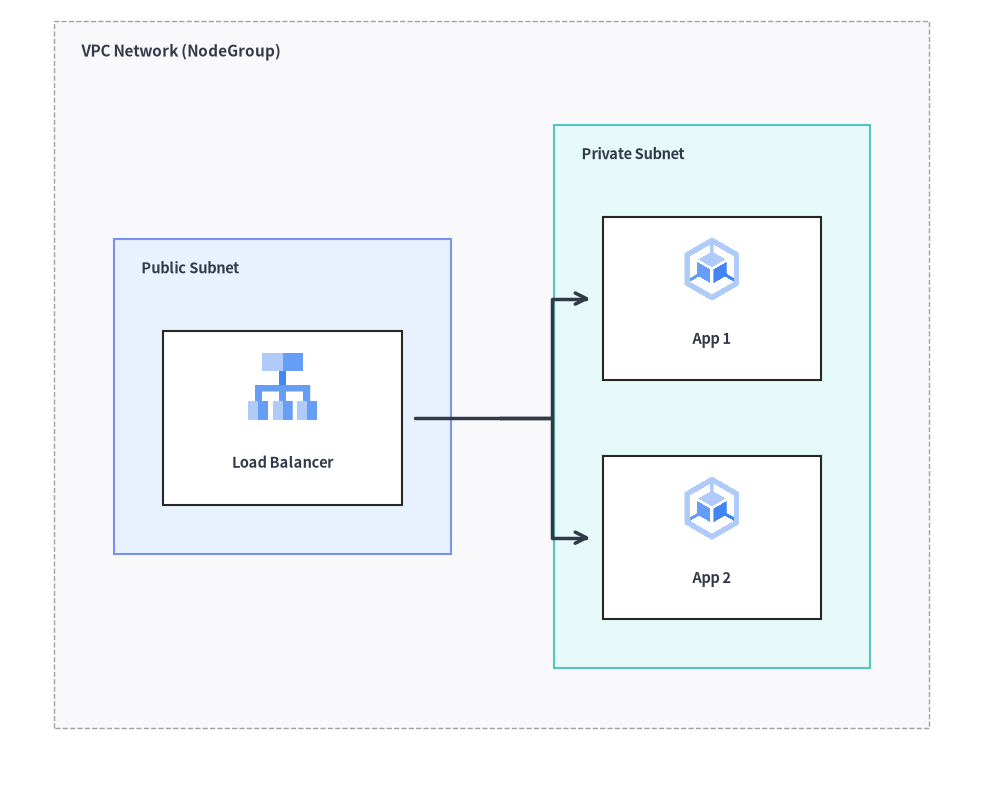
Source Code
from drawlib.canvas import save, setup
from drawlib.diagrams.architecture import ArchitectureDiagram, GcpIcon, Node, NodeGroup
from drawlib.styles import Styles

setup(width=92, height=74)

d = ArchitectureDiagram(
    node_style=Styles.Primary,
    node_text_style=Styles.DarkBold.patch(text_size=10.5),
    edge_style=Styles.DarkBold,
    edge_text_style=Styles.Dark.patch(text_size=10.5),
    node_card_style=Styles.Neutral,
)

vpc = d.add(
    NodeGroup(
        title="VPC Network (NodeGroup)",
        padding=5.5,
        text_style=Styles.DarkBold.patch(text_size=11.0, halign="left", valign="top"),
    ),
    xy=(3.0, 3.0),
)

pub_subnet = vpc.add(
    NodeGroup(
        title="Public Subnet",
        padding=4.5,
        style=Styles.PrimaryNeutral,
        text_style=Styles.DarkBold.patch(text_size=10.5, halign="left", valign="top"),
    ),
    xy=(5.5, 5.5),
)
lb = pub_subnet.add(
    Node("Load Balancer", width=22, height=16, icon=GcpIcon.CLOUD_LOAD_BALANCING, icon_size=7.0, card_style=Styles.White),
    xy=(14.5, 24.0),
)

priv_subnet = vpc.add(
    NodeGroup(
        title="Private Subnet",
        padding=4.5,
        style=Styles.SecondaryNeutral,
        text_style=Styles.DarkBold.patch(text_size=10.5, halign="left", valign="top"),
    ),
    xy=(46.0, 5.5),
)
app1 = priv_subnet.add(
    Node("App 1", width=20, height=15, icon=GcpIcon.GOOGLE_KUBERNETES_ENGINE, icon_size=6.5, card_style=Styles.White),
    xy=(13.5, 35.0),
)
app2 = priv_subnet.add(
    Node("App 2", width=20, height=15, icon=GcpIcon.GOOGLE_KUBERNETES_ENGINE, icon_size=6.5, card_style=Styles.White),
    xy=(13.5, 13.0),
)

lb.fork([app1, app2], at_x=43.0, padding=1.2)

d.draw(xy=(3.0, 3.0))
save()
1. 基本概念と基本的な使い方

ArchitectureDiagram は、各 Node をカード中心 (cx, cy) で配置する一方、NodeGroup コンテナおよび d.draw(xy) は左下 (x0, y0) 原点(または align="center" 指定時はダイアグラム中央)を基準に配置します。子要素の外接境界を自動算出する NodeGroup のネスト、グループ外周への直接エッジ接続、"orthogonal"・"direct"・"curved" ルーティングや .via() 中継点ルートの切り替え、さらに .fork() による 1 対 N 分岐を利用できます。
- カード中心基準の
Nodeと左下基準のNodeGroup/draw(xy):d.add(Node, xy)は 34 種類の組み込み*Icon列挙型(GcpIcon、AwsIcon、AzureIcon、PhosphorIconなど)を備えたカードの中心(cx, cy)を配置する一方、NodeGroupとd.draw(xy)は左下原点(x0, y0)を基準に配置します。 - 階層的な
NodeGroupの自動境界算出と外周エッジ接続: ネストされたNodeGroupコンテナは指定されたpaddingで子ノードやサブグループを自動的に囲むよう拡張され、グループ外周への直接接続(client.connect(vpc))もサポートします。 - 柔軟な
Edgeルーティングと.via()中継点: エッジ単位でroutingを直角折れ線の"orthogonal"、直線の"direct"、曲線の"curved"(arrow="->" | "<-" | "<->" | "-")から切り替えたり、.via((wx, wy), ...)をチェーンして障害物をきれいに迂回したりできます。 - 1 対 N の
.fork()、.showによる自動非表示、中央揃えスケーリング:node.fork(targets, at_x=..., at_y=...)で共有幹から分岐させたり、node.show = Falseでレイアウトをずらさずに接続エッジごと自動非表示にしたり、d.draw(xy, align="center", scale=...)で中央配置と拡大縮小を行ったりできます。
2. コンストラクタと主要クラス
from drawlib.diagrams.architecture import ArchitectureDiagram, GcpIcon, Node, NodeGroup, PhosphorIcon
from drawlib.styles import Styles

d = ArchitectureDiagram(
    node_style=Styles.Primary,
    node_text_style=Styles.DarkBold,
    edge_style=Styles.DarkBold,
    edge_text_style=Styles.Dark,
    node_card_style=Styles.Neutral,
    title="Production Multi-Tier Cloud VPC",
)
パラメータリファレンス
ArchitectureDiagram クラス
| パラメータ | 型 | デフォルト | 説明 |
|---|---|---|---|
node_style |
Style |
(必須) | ノードのアイコンおよび画像のデフォルトスタイル。 |
node_text_style |
Style |
(必須) | ノードのテキストラベルのデフォルトスタイル。 |
edge_style |
Style |
(必須) | 接続線および矢印のデフォルトスタイル。 |
edge_text_style |
Style |
(必須) | 接続線のテキストラベルのデフォルトスタイル。 |
node_card_style |
Style | None |
None |
ノードカード背景のデフォルトスタイル(None の場合は透明)。 |
title |
str |
"" |
ダイアグラム上部に表示する任意のバナータイトル。 |
title_style |
Style | None |
None |
ダイアグラムタイトルの任意のスタイル。 |
width |
float | None |
None |
明示的なダイアグラムキャンバス幅(None の場合は自動フィット)。 |
height |
float | None |
None |
明示的なダイアグラムキャンバス高さ(None の場合は自動フィット)。 |
style |
Style | None |
None |
ダイアグラム全体の背景および枠線スタイル。 |
Node クラスと CustomIcon
| パラメータ | 型 | デフォルト | 説明 |
|---|---|---|---|
text |
str |
"" |
ノードのラベルテキスト(\n による改行に対応)。 |
width |
float |
20.0 |
カード境界ボックスの幅(キャンバス単位)。 |
height |
float |
16.0 |
カード境界ボックスの高さ(キャンバス単位)。 |
icon |
IconType |
None |
34 種類の *Icon Enum(PhosphorIcon、GcpIcon、AwsIcon、AzureIcon、AiIcon〜OriginalWorkspaceIcon)、アイコン関数(gcp.cloud_run、ai.claude)、CustomIcon、Dimage、PIL.Image、または画像パス。 |
icon_size |
float |
8.0 |
アイコン/画像の外形幅・高さ。 |
style |
Style | None |
None |
アイコンまたは画像のスタイルオーバーライド(任意)。 |
text_style |
Style | None |
None |
ラベルテキストのスタイルオーバーライド(xy_shift、angle に対応)。 |
card_style |
Style | None |
None |
ノードカード背景・枠線のスタイルオーバーライド(None かつ node_card_style も None の場合は透明)。 |
show |
bool |
True |
表示フラグ(False の場合、接続されているエッジも自動非表示)。 |
- 34 種類の組み込みアイコン Enum (
drawlib.diagrams.architecture): 全 34 アイコンモジュールが、drawlib.diagrams.architecture(およびdrawlib.diagrams.sequence)内で 1 対 1 のStrEnumとして公開されています。- ベクター&クラウドプロバイダ:
PhosphorIcon(1,512)、GcpIcon(250)、AwsIcon(329)、AzureIcon(250) - 15 種類の公式ブランド Enum:
AiIcon(60)、BusinessIcon(48)、ClientIcon(60)、CloudIcon(45)、CnativeIcon(73)、CodeIcon(97)、DataIcon(70)、DevopsIcon(58)、FacilityIcon(49)、ItserviceIcon(44)、NetworkIcon(70)、SecurityIcon(74)、ServerIcon(82)、SocialIcon(50)、WorkspaceIcon(40) - 15 種類のオリジナル 2D フラットパステル Enum:
OriginalAiIcon(80)、OriginalBusinessIcon(76)、OriginalClientIcon(92)、OriginalCloudIcon(147)、OriginalCnativeIcon(73)、OriginalCodeIcon(121)、OriginalDataIcon(86)、OriginalDevopsIcon(78)、OriginalFacilityIcon(86)、OriginalItserviceIcon(64)、OriginalNetworkIcon(70)、OriginalSecurityIcon(103)、OriginalServerIcon(80)、OriginalSocialIcon(66)、OriginalWorkspaceIcon(57) - 全カタログの一覧は**アイコン概要**を参照してください。
- ベクター&クラウドプロバイダ:
CustomIcon(image: str | Path | Dimage | Image | CustomIcon): カスタムラスター画像パス、Dimage、またはPIL.Imageをラップして複数ノード間で再利用できるようにします(.dimageおよび.copy()を公開)。- ノード幾何情報の取得:
node.xy、node.center、node.left、node.right、node.top、node.bottom、node.get_bounds() -> tuple[float, float, float, float]、node.get_size() -> tuple[float, float]、およびnode.get_absolute_xy() -> tuple[float, float]。
NodeGroup クラス
| パラメータ | 型 | デフォルト | 説明 |
|---|---|---|---|
title |
str |
"" |
グループのバナータイトル(例: "VPC Network (10.0.0.0/16)")。 |
width |
float | None |
None |
固定幅(任意)。None の場合、内包要素+padding から自動計算。 |
height |
float | None |
None |
固定高さ(任意)。None の場合、内包要素+padding から自動計算。 |
padding |
float |
5.0 |
外接境界を自動計算する際の子ノード周囲の内側余白。 |
style |
Style | None |
None |
グループの背景塗りつぶしおよび境界枠線のスタイル。 |
text_style |
Style | None |
None |
グループヘッダータイトルテキストのスタイル。 |
show |
bool |
True |
表示フラグ(False の場合、外側の自動サイズ計算を維持したままグループ枠・子ノード・接続エッジを非表示)。 |
- 境界プロパティとメソッド:
group.xy: グループのローカル左下(x, y)原点。group.left、group.right、group.top、group.bottom、group.center: 外周アンカーおよび中心の(x, y)座標。group.get_bounds() -> tuple[float, float, float, float]: ローカルの(min_x, min_y, max_x, max_y)を返します。group.get_size() -> tuple[float, float]: グループ枠の(width, height)を返します。group.connect(target, label="", arrow="->", routing="orthogonal", style=None, padding=0.0, show=True) -> Edge: グループの外周境界を別のNode、NodeGroup、またはJunctionへ直接接続します。
Edge と Junction の API リファレンス
Edge コンストラクタとメソッド
Edge(
    start: Connectable,
    end: Connectable,
    label: str = "",
    arrow: Literal["->", "<-", "<->", "-"] = "->",
    routing: Literal["orthogonal", "direct", "curved"] = "orthogonal",
    style: Style | None = None,
    text_style: Style | None = None,
    padding: float | tuple[float, float] = 0.0,
    show: bool = True,
)
- 中継点ルーティングメソッド:
edge.points(waypoints: list[tuple[float, float]]) -> Edge: ダイアグラム相対の明示的な中間座標(x, y)のリストを設定し、メソッドチェーン用にselfを返します。edge.via(*waypoints: tuple[float, float]) -> Edge:.points(list(waypoints))の可変長引数ショートハンドです(例:d.connect(a, b).via((40, 20), (40, 50)))。edge.add_point(xy: tuple[float, float]) -> Junction:edge上の中継点としてxyを追加し、下流への分岐配線を接続できる登録済みJunctionを返します。
- ラベルおよび外観変更メソッド:
edge.set_label(text: str, pos: float = 0.5) -> Edge: エッジラベルとパス上の相対位置(0.0= 始点、0.5= 中点、1.0= 終点)を設定します。edge.set_arrow(arrow) -> Edge、edge.set_style(style) -> Edge、edge.set_text_style(text_style) -> Edge、edge.set_padding(padding) -> Edge。
要素登録・Junction・fork()・サイズ取得メソッド
d.add(item, xy=(x, y), *, show: bool | None = None) -> Node | NodeGroup | Junction(およびgroup.add(...)):Nodeを中心(x, y)に、またはNodeGroupを左下(x, y)に配置します。d.junction(xy: tuple[float, float], *, show: bool = True) -> Junction: サイズゼロの接続可能なJunction(xy, *, show=True)をxyに作成・登録します(j.connect(...)、.xy、.center、.top、.bottom、.left、.rightを公開)。d.connect(start, end, label="", arrow="->", routing="orthogonal", style=None, text_style=None, padding=0.0, show=True) -> Edge(およびnode.connect(...)、group.connect(...)、junction.connect(...)、d.add_edge(edge, *, show=None) -> Edge)。node.fork(targets: list[Connectable], at_x: float | None = None, at_y: float | None = None, style: Style | None = None, padding: float | tuple[float, float] = 0.0, show: bool = True) -> list[Edge]: 自動生成される(at_x, at_y)の中間Junctionを経由して、nodeから複数のターゲットへ一括分岐します。d.get_size() -> tuple[float, float]: ダイアグラム全体の(width, height)を返します。d.draw(xy=(0.0, 0.0), *, scale: float = 1.0) -> None: 左下xyを基準として、scale倍に比例スケーリングしてダイアグラムを描画します。
3. 本番環境向けクラウド VPC アーキテクチャ
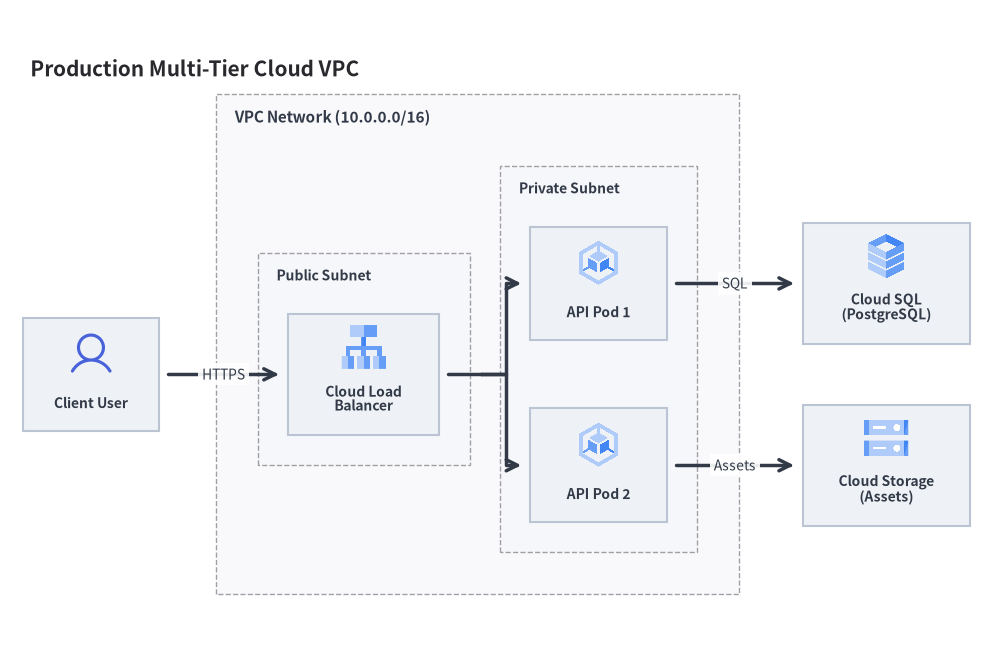
次の完全なサンプルでは、パブリックサブネットとプライベートサブネット、ロードバランサ、GKE Pod、Cloud SQL、および外部ユーザーを組み合わせた構成を描画しています。
from drawlib.canvas import save, setup
from drawlib.diagrams.architecture import ArchitectureDiagram, GcpIcon, Node, NodeGroup, PhosphorIcon
from drawlib.styles import Styles

setup(width=132, height=88)

d = ArchitectureDiagram(
    node_style=Styles.Primary,
    node_text_style=Styles.DarkBold.patch(text_size=10.0),
    edge_style=Styles.DarkBold,
    edge_text_style=Styles.Dark.patch(text_size=10.0),
    node_card_style=Styles.Neutral,
    title="Production Multi-Tier Cloud VPC",
)

# 1. Outer VPC Network Boundary
vpc = d.add(
    NodeGroup(
        title="VPC Network (10.0.0.0/16)",
        padding=5.5,
        text_style=Styles.DarkBold.patch(text_size=11.0, halign="left", valign="top"),
    ),
    xy=(28.0, 6.0),
)

# 2. Public Subnet with Load Balancer (local coordinates inside vpc)
public_subnet = vpc.add(
    NodeGroup(
        title="Public Subnet",
        padding=4.0,
        text_style=Styles.DarkBold.patch(text_size=10.0, halign="left", valign="top"),
    ),
    xy=(4.5, 4.5),
)
lb = public_subnet.add(
    Node("Cloud Load\nBalancer", width=20, height=16, icon=GcpIcon.CLOUD_LOAD_BALANCING, icon_size=6.5),
    xy=(12.5, 25.0),
)

# 3. Private Subnet with Application Pods (local coordinates inside vpc)
private_subnet = vpc.add(
    NodeGroup(
        title="Private Subnet",
        padding=4.0,
        text_style=Styles.DarkBold.patch(text_size=10.0, halign="left", valign="top"),
    ),
    xy=(36.5, 4.5),
)
gke1 = private_subnet.add(
    Node("API Pod 1", width=18, height=15, icon=GcpIcon.GOOGLE_KUBERNETES_ENGINE, icon_size=6.5),
    xy=(11.5, 37.0),
)
gke2 = private_subnet.add(
    Node("API Pod 2", width=18, height=15, icon=GcpIcon.GOOGLE_KUBERNETES_ENGINE, icon_size=6.5),
    xy=(11.5, 13.0),
)

# 4. External Actor and Managed Services (global diagram coordinates outside vpc)
user = d.add(Node("Client User", width=18, height=15, icon=PhosphorIcon.USER, icon_size=6.5), xy=(9.0, 35.5))
db = d.add(Node("Cloud SQL\n(PostgreSQL)", width=22, height=16, icon=GcpIcon.CLOUD_SQL, icon_size=6.5), xy=(114.0, 47.5))
storage = d.add(Node("Cloud Storage\n(Assets)", width=22, height=16, icon=GcpIcon.CLOUD_STORAGE, icon_size=6.5), xy=(114.0, 23.5))

# 5. Connections
d.connect(user, lb, label="HTTPS", padding=1.2)
lb.fork([gke1, gke2], at_x=60.5, padding=1.2)
d.connect(gke1, db, label="SQL", padding=1.2)
d.connect(gke2, storage, label="Assets", padding=1.2)

d.draw(xy=(3.0, 3.0))
save()
4. イベント駆動ストリーミングメッシュ
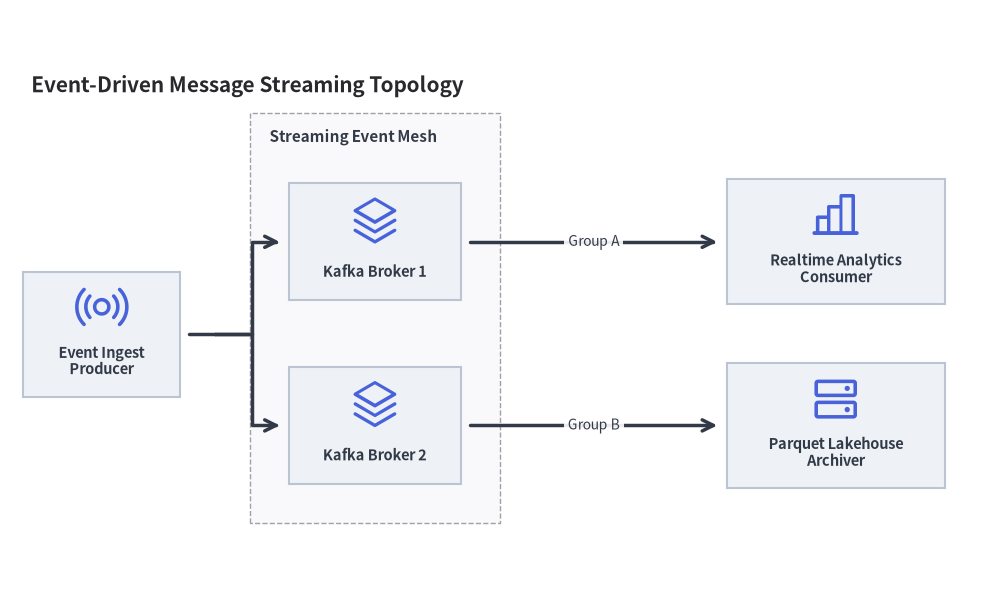
PhosphorIcon の汎用アーキテクチャアイコンを活用して、メッセージングキュー、Kafka クラスタ、分析エンジンなども柔軟にモデリングできます。
from drawlib.canvas import save, setup
from drawlib.diagrams.architecture import ArchitectureDiagram, Node, NodeGroup, PhosphorIcon
from drawlib.styles import Styles

setup(width=128, height=78)

d = ArchitectureDiagram(
    node_style=Styles.Primary,
    node_text_style=Styles.DarkBold.patch(text_size=10.5),
    edge_style=Styles.DarkBold,
    edge_text_style=Styles.Dark.patch(text_size=10.0),
    node_card_style=Styles.Neutral,
    title="Event-Driven Message Streaming Topology",
)

cluster = d.add(
    NodeGroup(
        title="Streaming Event Mesh",
        padding=5.0,
        text_style=Styles.DarkBold.patch(text_size=11.0, halign="left", valign="top"),
    ),
    xy=(29.0, 8.0),
)
broker1 = cluster.add(Node("Kafka Broker 1", width=22, height=15, icon=PhosphorIcon.STACK, icon_size=6.5), xy=(16.0, 36.0))
broker2 = cluster.add(Node("Kafka Broker 2", width=22, height=15, icon=PhosphorIcon.STACK, icon_size=6.5), xy=(16.0, 12.5))

pub = d.add(Node("Event Ingest\nProducer", width=20, height=16, icon=PhosphorIcon.BROADCAST, icon_size=7.0), xy=(10.0, 32.2))
analytics = d.add(
    Node("Realtime Analytics\nConsumer", width=28, height=16, icon=PhosphorIcon.CHART_BAR, icon_size=7.0),
    xy=(104.0, 44.0),
)
archiver = d.add(
    Node("Parquet Lakehouse\nArchiver", width=28, height=16, icon=PhosphorIcon.HARD_DRIVES, icon_size=7.0),
    xy=(104.0, 20.5),
)

pub.fork([broker1, broker2], at_x=24.5, padding=1.2)
d.connect(broker1, analytics, label="Group A", padding=1.2)
d.connect(broker2, archiver, label="Group B", padding=1.2)

d.draw(xy=(3.0, 3.0))
save()
5. ベストプラクティスとガイドライン
- ノード中心座標の整列: 複数のノードを横一列または縦一列に並べる際は、X 座標または Y 座標を完全に一致させることで、水平・垂直の接続線がまっすぐに描画されます。
- ファンアウトには
forkを使用: 1 つのノードから交差する複数の線を個別に引くのではなく、node.fork([n1, n2, ...], at_x=...)を使用して整然とした直角バス分岐を作成してください。 - 境界ボックスの余白確保:
NodeGroupには常に適切なpadding(通常5.0〜7.0)を設定し、内部コンポーネントと枠線の間に十分な余白を持たせてください。