RadialGraph: 同心円軌道とハブ&スポークトポロジ
RadialGraph は、中心ハブノードを原点(ring=0)に配置し、接続されたノードを同心円状の軌道リング(ring=1, 2, ...)上に配置します。サブツリーの大きさに応じて角度セクタが比例配分されるため、マルチホップのスポークが線交差なしに外側へ放射状に広がります。
イベント駆動のメッセージメッシュ、Pub/Sub ブローカートポロジ、マイクロサービスのハブ&スポークネットワーク、同心円状の依存関係レーダー向けに特化して設計されています。layout = g.get_layout(margin=...) を呼び出すことで、ノード中心座標(layout[id].xy)、放射状スポークのポリライン(layout.edges)、および同心円軌道の半径(layout.ring_radii)を取得できます。
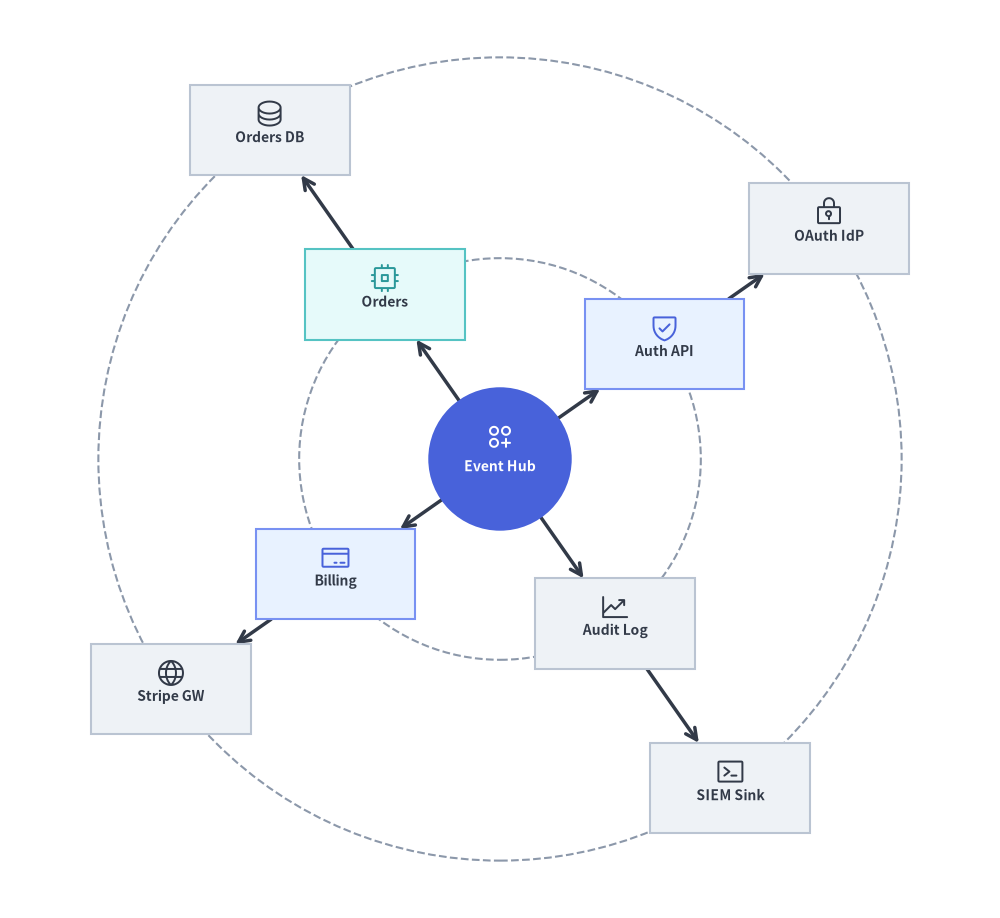
Source Code
from drawlib.canvas import save, setup
from drawlib.graph import RadialGraph
from drawlib.icons import phosphor
from drawlib.lines import lines
from drawlib.shapes import circle, rectangle
from drawlib.styles import Styles

setup(width=122, height=112)

g = RadialGraph(
    hub="core",
    radius_step=24.5,
    start_angle=35.0,
    default_node_width=19.5,
    default_node_height=11.0,
)

# Ring 0: Central Hub
g.node("core", width=17.5, height=17.5)

# Ring 1: Core Services
g.spoke("core", "auth", ring=1)
g.spoke("core", "orders", ring=1)
g.spoke("core", "billing", ring=1)
g.spoke("core", "audit", ring=1)

# Ring 2: Outer Adapters
g.spoke("auth", "idp", ring=2)
g.spoke("orders", "db", ring=2)
g.spoke("billing", "stripe", ring=2)
g.spoke("audit", "siem", ring=2)

# 1. Solve concentric coordinates & orbit ring radii
layout = g.get_layout(margin=5.0)
hub_n = layout["core"]

# 2. Draw dashed circular orbit guides from layout.ring_radii
for r in layout.ring_radii.values():
    circle(hub_n.xy, radius=r, style=Styles.MutedDashed)

# 3. Draw radial spoke edges (from hub center for ring 0->1 so lines meet the circular hub perimeter)
for e in layout.edges:
    pts = [hub_n.xy, e.dst_port] if e.src == "core" else e.points
    lines(pts, arrow_head="->", style=Styles.DarkBold)

# 4. Draw central circular hub and satellite cards with Phosphor icons
circle(
    hub_n.xy,
    radius=hub_n.width / 2,
    style=Styles.PrimaryFlat,
    text="\nEvent Hub",
    text_style=Styles.WhiteBold.patch(text_size=10.0),
)
phosphor.circles_three_plus((hub_n.x, hub_n.y + 2.7), width=3.8, style=Styles.White)

spokes = {
    "auth": ("\nAuth API", Styles.PrimaryNeutral, phosphor.shield_check, Styles.Primary),
    "orders": ("\nOrders", Styles.SecondaryNeutral, phosphor.cpu, Styles.Secondary),
    "billing": ("\nBilling", Styles.PrimaryNeutral, phosphor.credit_card, Styles.Primary),
    "audit": ("\nAudit Log", Styles.Neutral, phosphor.chart_line_up, Styles.Dark),
    "idp": ("\nOAuth IdP", Styles.Neutral, phosphor.lock_key, Styles.Dark),
    "db": ("\nOrders DB", Styles.Neutral, phosphor.database, Styles.Dark),
    "stripe": ("\nStripe GW", Styles.Neutral, phosphor.globe, Styles.Dark),
    "siem": ("\nSIEM Sink", Styles.Neutral, phosphor.terminal_window, Styles.Dark),
}

for nid, (label, box_st, icon_fn, ic_st) in spokes.items():
    n = layout[nid]
    rectangle(
        n.xy,
        width=n.width,
        height=n.height,
        style=box_st,
        text=label,
        text_style=Styles.DarkBold.patch(text_size=10.0),
    )
    icon_fn((n.x, n.y + 2.0), width=3.8, style=ic_st)

save()
1. 基本概念と基本的な使い方
RadialGraph は三角関数を手書きすることなく極座標のハブ&スポーク配置を計算します。中心ハブを ring=0 に置き、g.spoke(parent, child, ring=...) でサテライトノードを接続して g.get_layout(margin=...) を呼び出すと、カード中心座標(layout[id].xy)、境界クリップ済みの放射状エッジ(layout.edges)、および同心円軌道ガイドの半径(layout.ring_radii)が得られます。radius_step と start_angle でリング間隔と開始角度を調整したり、angle_range(180.0 や 110.0 など)を絞って指向性のある扇形(アークファン)を作ったり、計算済み座標を ArchitectureDiagram に直接渡して layout.offset(...) で微調整したりできます。

- 同心円リングの展開(
hub、g.spoke、ring_radii):RadialGraph(hub=...)は中心ハブをring=0に配置し、BFS ホップ距離(または明示的なring=指定)によってサテライトノードをring=1, 2, ...に割り当て、正確な軌道半径をlayout.ring_radiiとして公開します。 - 角度方向とリング間隔(
start_angle、radius_step):start_angleでスポークを軸方向(0.0)または対角象限(45.0)へ回転させ、radius_stepでコンパクト/広めのリング間隔を制御できます。 - 指向性アークファン(
angle_range):angle_rangeを360.0(全周)から180.0(半円ファン)やさらに狭い指向性レーダーコーンへと絞り、明示的なcenter=(cx, cy)を基点に扇状に展開できます。 ArchitectureDiagramカードとlayout.offset():layout[id].xyをPhosphorIcon/GcpIconバッジ付きのNodeカードに直接渡し、背面にcircle()の軌道ガイドを重ね、layout.offset(id, dx, dy)で個別のスポーク位置を微調整できます。
2. コンストラクタ、.spoke()、get_layout() API
from drawlib.graph import RadialGraph

g = RadialGraph(
    hub="core",                      # Central hub node ID (auto-detects highest degree if None)
    center=None,                     # Explicit (cx, cy) origin (defaults to canvas center)
    radius_step=36.0,                # Radial distance between rings (auto-scales if None)
    start_angle=0.0,                 # Starting angle in degrees (0.0 = East, 90.0 = North)
    angle_range=360.0,               # Total angular sweep (e.g. 360.0 full circle, 180.0 arc)
    default_node_width=22.0,
    default_node_height=11.0,
)

layout = g.get_layout(margin=8.0)
print(layout)                        # Inspect solved node coordinates & layout.ring_radii
パラメータリファレンス
| パラメータ | 型 | デフォルト | 説明 |
|---|---|---|---|
hub |
str | None |
None |
中心となる ring=0 ハブノードの ID。None の場合、接続次数が最も高いノードが選択されます。 |
center |
tuple[float, float] | None |
None |
同心円リングの中心座標 (cx, cy)。デフォルトは (width / 2, height / 2) です。 |
radius_step |
float | None |
None |
連続するリング間の固定半径ステップ。None の場合はキャンバスに合わせて自動スケーリングされます。 |
start_angle |
float |
0.0 |
度数法による開始角度(0.0 = 右/東、90.0 = 上/北)。 |
angle_range |
float |
360.0 |
度数法による全体の角度範囲(360.0 で全周軌道、180.0 で半円ファン)。 |
default_node_width |
float |
20.0 |
デフォルトのノード幅(キャンバス単位)。 |
default_node_height |
float |
12.0 |
デフォルトのノード高さ(キャンバス単位)。 |
g.spoke(...)、ring=、layout.ring_radii による軌道割り当て
g.node(id, *, ring=None, width=None, height=None) と g.edge(src, dst) に加え、RadialGraph はサテライトノードの登録と parent からの接続を 1 回の呼び出しで行う .spoke() を提供します。
g.spoke(
    parent: str,
    spoke_id: str,
    *,
    ring: int | None = None,
    width: float | None = None,
    height: float | None = None,
) -> Node
- BFS による自動リング割り当て: デフォルト(
ring=None)では、各ノードのリング番号はhubからの最短ホップ距離に一致します(ハブはring=0、直接の隣接ノードはring=1、2 ホップ先はring=2)。 - 明示的なリング割り当て(
ring=int):g.node(id, ring=...)またはg.spoke(parent, spoke_id, ring=...)にring=1やring=2を渡すことで、特定の同心円軌道にノードを固定できます。 - 軌道ガイド円(
layout.ring_radii):GraphLayout.ring_radii(dict[int, float])は各リング番号(1, 2, ...)からハブ中心からの計算済み半径へのマッピングを保持しており、circle(layout[hub].xy, radius=r, style=Styles.MutedDashed)で破線の軌道ガイド円を簡単に描画できます。
3. 単一リングのハブ&スポーク型マイクロサービスメッシュ
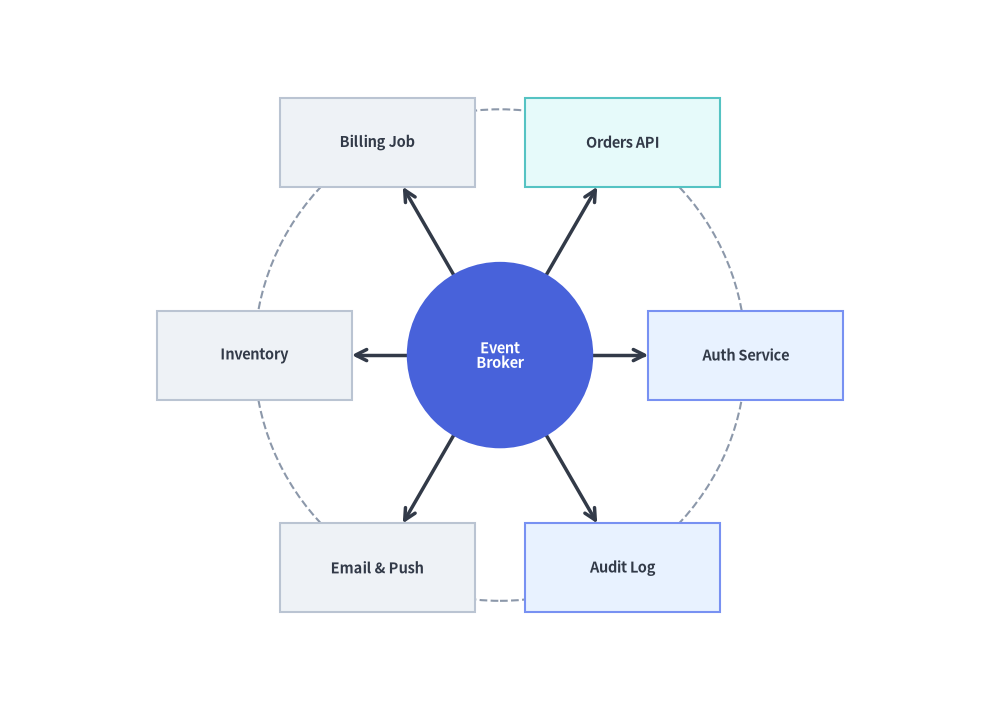
単一リングの RadialGraph は、中央のブローカーや API ゲートウェイの周囲にサテライトサービスを均等に配置します。
from drawlib.canvas import save, setup
from drawlib.graph import RadialGraph
from drawlib.lines import lines
from drawlib.shapes import circle, rectangle
from drawlib.styles import Styles

setup(width=118, height=84)

g = RadialGraph(
    hub="broker",
    radius_step=29.0,
    default_node_width=23.0,
    default_node_height=10.5,
)

# Central Hub (ring=0)
g.node("broker", width=22.0, height=22.0)

# 6 Spoke Microservices on Ring 1
for sid in ["auth", "orders", "billing", "inventory", "notify", "audit"]:
    g.spoke("broker", sid)

layout = g.get_layout(margin=8.0)
hub = layout["broker"]

# Draw dashed orbit guide circle
for r in layout.ring_radii.values():
    circle(hub.xy, radius=r, style=Styles.MutedDashed)

# Draw spoke edges
for e in layout.edges:
    lines([hub.xy, e.dst_port], arrow_head="->", style=Styles.DarkBold)

# Draw central hub circle
circle(
    hub.xy,
    radius=hub.width / 2,
    style=Styles.PrimaryFlat,
    text="Event\nBroker",
    text_style=Styles.WhiteBold.patch(text_size=10.5),
)

# Draw Ring 1 spoke cards (calm Neutral & Tinted-Neutral baseline)
for sid, label, st in [
    ("auth", "Auth Service", Styles.PrimaryNeutral),
    ("orders", "Orders API", Styles.SecondaryNeutral),
    ("billing", "Billing Job", Styles.Neutral),
    ("inventory", "Inventory", Styles.Neutral),
    ("notify", "Email & Push", Styles.Neutral),
    ("audit", "Audit Log", Styles.PrimaryNeutral),
]:
    nl = layout[sid]
    rectangle(
        nl.xy,
        width=nl.width,
        height=nl.height,
        style=st,
        text=label,
        text_style=Styles.DarkBold.patch(text_size=10.5),
    )

save()
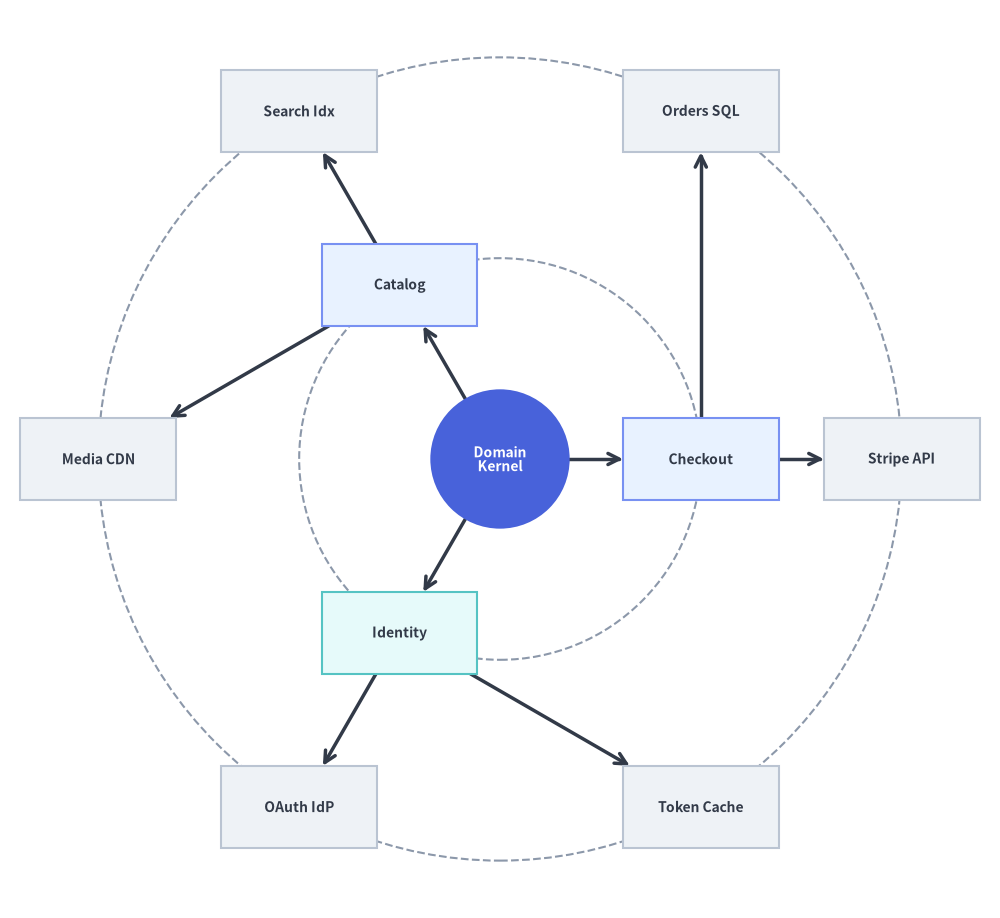
4. マルチリングの同心円依存関係レーダー (ring=0, 1, 2)
2 ホップ目のスポークを接続するか明示的に ring=2 を渡すことで、内側のリングがコアドメインサービス(ring=1)、外側のリングが外部アダプタやストレージエンジン(ring=2)を表すマルチリングの同心円アーキテクチャを構築できます。
from drawlib.canvas import save, setup
from drawlib.graph import RadialGraph
from drawlib.lines import lines
from drawlib.shapes import circle, rectangle
from drawlib.styles import Styles

setup(width=122, height=112)

g = RadialGraph(
    hub="domain_core",
    radius_step=24.5,
    default_node_width=19.0,
    default_node_height=10.0,
)

# Ring 0: Central Domain Kernel
g.node("domain_core", width=17.0, height=17.0)

# Ring 1: Application Services
g.spoke("domain_core", "checkout", ring=1)
g.spoke("domain_core", "catalog", ring=1)
g.spoke("domain_core", "identity", ring=1)

# Ring 2: External Infrastructure Adapters
g.spoke("checkout", "stripe", ring=2)
g.spoke("checkout", "orders_db", ring=2)
g.spoke("catalog", "elastic", ring=2)
g.spoke("catalog", "cdn", ring=2)
g.spoke("identity", "oauth", ring=2)
g.spoke("identity", "redis", ring=2)

layout = g.get_layout(margin=5.0)
hub = layout["domain_core"]

for r in layout.ring_radii.values():
    circle(hub.xy, radius=r, style=Styles.MutedDashed)

for e in layout.edges:
    pts = [hub.xy, e.dst_port] if e.src == "domain_core" else e.points
    lines(pts, arrow_head="->", style=Styles.DarkBold)

circle(
    hub.xy,
    radius=hub.width / 2,
    style=Styles.PrimaryFlat,
    text="Domain\nKernel",
    text_style=Styles.WhiteBold.patch(text_size=10.0),
)

for nid, label, st in [
    ("checkout", "Checkout", Styles.PrimaryNeutral),
    ("catalog", "Catalog", Styles.PrimaryNeutral),
    ("identity", "Identity", Styles.SecondaryNeutral),
    ("stripe", "Stripe API", Styles.Neutral),
    ("orders_db", "Orders SQL", Styles.Neutral),
    ("elastic", "Search Idx", Styles.Neutral),
    ("cdn", "Media CDN", Styles.Neutral),
    ("oauth", "OAuth IdP", Styles.Neutral),
    ("redis", "Token Cache", Styles.Neutral),
]:
    nl = layout[nid]
    rectangle(
        nl.xy,
        width=nl.width,
        height=nl.height,
        style=st,
        text=label,
        text_style=Styles.DarkBold.patch(text_size=10.0),
    )

save()
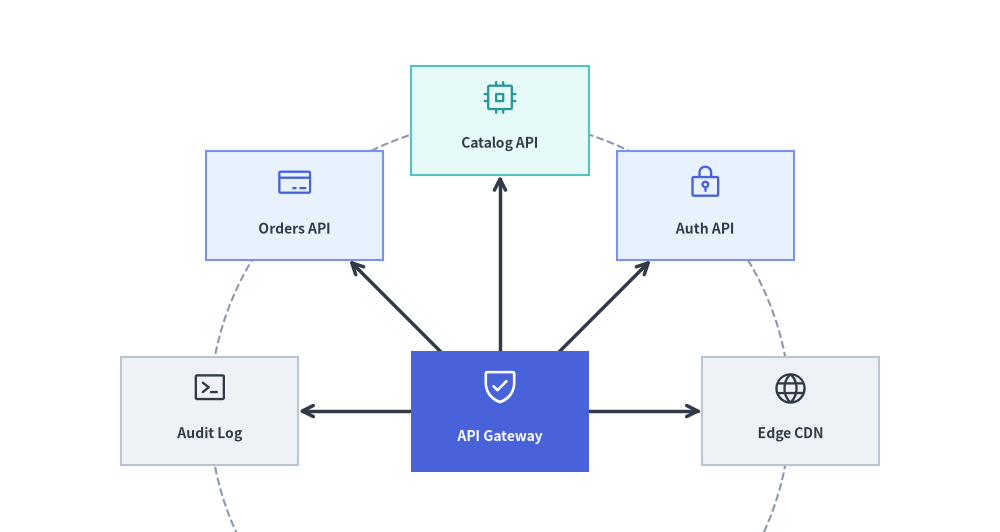
5. ArchitectureDiagram による半円依存関係ファン (angle_range=180.0)
360.0 度の全周軌道だけでなく、start_angle と angle_range(および明示的な center=(cx, cy) と radius_step)を使うことでスポークを半円や四分円の扇状に制限し、得られた座標を ArchitectureDiagram(Node + PhosphorIcon)と circle() で描画することもできます。
from drawlib.canvas import save, setup
from drawlib.diagrams.architecture import ArchitectureDiagram, Node, PhosphorIcon
from drawlib.graph import RadialGraph
from drawlib.lines import lines
from drawlib.shapes import circle
from drawlib.styles import Styles

setup(width=124, height=66)

g = RadialGraph(
    hub="gateway",
    center=(62.0, 15.0),
    radius_step=36.0,
    start_angle=0.0,
    angle_range=180.0,
    default_node_width=22.0,
    default_node_height=13.5,
)

# Hub anchored near the bottom center
g.node("gateway", width=22.0, height=15.0)

# 5 downstream services fanned across the upper 0°..180° arc
for sid in ["cdn", "auth", "catalog", "orders", "audit"]:
    g.spoke("gateway", sid)

layout = g.get_layout(margin=6.0)
hub = layout["gateway"]

# 1. Draw dashed orbit guide circle and radial spoke lines from layout
for r in layout.ring_radii.values():
    circle(hub.xy, radius=r, style=Styles.MutedDashed)

for e in layout.edges:
    lines([hub.xy, e.dst_port], arrow_head="->", style=Styles.DarkBold)

# 2. Place styled ArchitectureDiagram nodes at solved radial coordinates
d = ArchitectureDiagram(
    node_style=Styles.PrimaryFlat,
    node_text_style=Styles.DarkBold.patch(text_size=10.0),
    edge_style=Styles.DarkBold,
    edge_text_style=Styles.Dark.patch(text_size=9.5),
    node_card_style=Styles.Neutral,
)

d.add(
    Node(
        "API Gateway",
        width=hub.width,
        height=hub.height,
        icon=PhosphorIcon.SHIELD_CHECK,
        icon_size=5.0,
        style=Styles.White,
        text_style=Styles.WhiteBold.patch(text_size=10.0),
        card_style=Styles.PrimaryFlat,
    ),
    xy=hub.xy,
)

for sid, label, icon_enum, ic_st, card_st in [
    ("cdn", "Edge CDN", PhosphorIcon.GLOBE, Styles.Dark, Styles.Neutral),
    ("auth", "Auth API", PhosphorIcon.LOCK_KEY, Styles.Primary, Styles.PrimaryNeutral),
    ("catalog", "Catalog API", PhosphorIcon.CPU, Styles.Secondary, Styles.SecondaryNeutral),
    ("orders", "Orders API", PhosphorIcon.CREDIT_CARD, Styles.Primary, Styles.PrimaryNeutral),
    ("audit", "Audit Log", PhosphorIcon.TERMINAL_WINDOW, Styles.Dark, Styles.Neutral),
]:
    nl = layout[sid]
    d.add(
        Node(
            label,
            width=nl.width,
            height=nl.height,
            icon=icon_enum,
            icon_size=4.5,
            style=ic_st,
            card_style=card_st,
        ),
        xy=nl.xy,
    )

d.draw()
save()
6. ベストプラクティス
layout.ring_radiiで軌道リングのガイド線を描画する: エッジやノードを描画する前にlayout.ring_radii.values()を反復処理してcircle(layout[hub].xy, radius=r, style=Styles.MutedDashed)を描画することで、同心円の階層レベル(ring=1とring=2など)を一目で判別できるようになります。- 中央ハブには
circle()を使用する: 中央ハブを円(circle(hub.xy, radius=hub.width / 2, style=Styles.PrimaryFlat, ...))として描画すると、放射状に伸びるスポークの自然な視覚的アンカーになります。 - 外側リングには十分なキャンバス余白を確保する: 外周リングの上下左右の端にある矩形カードの周囲にゆとりを持たせるため、
g.get_layout(margin=8.0)のようにmargin=8.0(またはそれ以上)を渡してください。