MindMap(マインドマップ)
MindMapNode コンポーネントは、中心のルートトピックから放射状・多方向に広がるマインドマップや階層型機能マップを描画します。
ブランチは左・右・上・下の各方向へ展開でき、直角のエルボー接続線が自動的にルーティングされます。
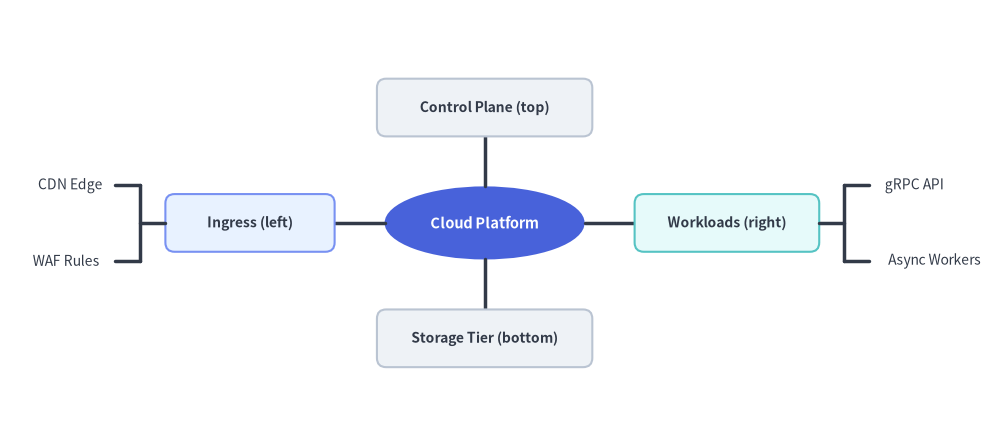
Source Code
from drawlib.canvas import save, setup
from drawlib.smartarts import MindMapNode
from drawlib.styles import Styles

setup(width=130, height=58)

root = MindMapNode(
    "Cloud Platform",
    shape="ellipse",
    width=26,
    height=9.5,
    style=Styles.PrimaryFlat,
    text_style=Styles.WhiteBold.patch(text_size=10.5),
    line_style=Styles.DarkBold,
    line_length=6.5,
    horizontal_margin=3.5,
    vertical_margin=3.8,
    children=[
        # Left Branch (shape="rectangle" + leaf shape="none")
        MindMapNode(
            "Ingress (left)",
            branch="left",
            shape="rectangle",
            width=22,
            height=7.5,
            style=Styles.PrimaryNeutral.patch(shape_r=1.2),
            text_style=Styles.DarkBold.patch(text_size=10.0),
            children=[
                MindMapNode("CDN Edge", shape="none", text_style=Styles.Dark.patch(text_size=10.0)),
                MindMapNode("WAF Rules", shape="none", text_style=Styles.Dark.patch(text_size=10.0)),
            ],
        ),
        # Right Branch (shape="rectangle" + leaf shape="none")
        MindMapNode(
            "Workloads (right)",
            branch="right",
            shape="rectangle",
            width=24,
            height=7.5,
            style=Styles.SecondaryNeutral.patch(shape_r=1.2),
            text_style=Styles.DarkBold.patch(text_size=10.0),
            children=[
                MindMapNode("gRPC API", shape="none", text_style=Styles.Dark.patch(text_size=10.0)),
                MindMapNode("Async Workers", shape="none", text_style=Styles.Dark.patch(text_size=10.0)),
            ],
        ),
        # Top Branch (branch="top")
        MindMapNode(
            "Control Plane (top)",
            branch="top",
            shape="rectangle",
            width=28,
            height=7.5,
            style=Styles.Neutral.patch(shape_r=1.2),
            text_style=Styles.DarkBold.patch(text_size=10.0),
        ),
        # Bottom Branch (branch="bottom")
        MindMapNode(
            "Storage Tier (bottom)",
            branch="bottom",
            shape="rectangle",
            width=28,
            height=7.5,
            style=Styles.Neutral.patch(shape_r=1.2),
            text_style=Styles.DarkBold.patch(text_size=10.0),
        ),
    ],
)

root.draw(xy=(63, 29))
save()
1. 基本概念と基本的な使い方
MindMapNode はルート中央 xy=(cx, cy) をアンカーとして放射状マインドマップや多方向階層図を描画し、2 パスのレイアウト計算でサブツリーの外接サイズを自動計測したうえで、line_length / 2 の位置で直交フォーク接続線をルーティングします。ブランチは "right"・"left"・"bottom"・"top" を自由に組み合わせて展開でき、"rectangle"・"ellipse"・枠線なし自動サイズ調整の "none" 形状の混在や、xy_shift・show・scale による位置微調整とアニメーション制御が可能です。

- ルート中央アンカーと
.add()(xy,add): ルートノードの中心をxy=(cx, cy)に固定し、サブツリーの高さ・幅を自動計測してline_length / 2の位置で直交フォーク接続線をルーティングします。 - 多方向ブランチ展開 (
branch): ツリー全体を右("right")・左("left")・下("bottom")・上("top")へ展開できるほか、同じルートの子ノードごとに方向を変えて左右対称のマインドマップも構築できます。 - ノード形状と余白設定 (
shape,line_length,vertical_margin):"rectangle"・"ellipse"・枠線なし自動サイズ計測の"none"テキストラベルを自在に組み合わせながら、接続線距離や兄弟ノード間の余白を制御できます。 - レイアウト後の位置シフト・表示制御・スケーリング (
xy_shift,show,scale):xy_shift=(dx, dy)で個別ブランチの位置を微調整し、node.show = Falseで兄弟ブランチをずらさずに非表示化し、scaleでxy基準の比例スケーリングを行えます。
2. クイックサンプル: アーキテクチャトポロジマップ
from drawlib.canvas import setup
from drawlib.smartarts import MindMapNode
from drawlib.styles import Styles

setup(width=130, height=40)

root = MindMapNode(
    "API Gateway",
    shape="ellipse",
    width=26,
    height=11,
    style=Styles.PrimaryFlat,
    text_style=Styles.WhiteBold.patch(text_size=11.0),
    line_style=Styles.DarkBold,
    line_length=7.5,
    horizontal_margin=4.0,
    vertical_margin=4.0,
    children=[
        MindMapNode(
            "Clients", branch="left", shape="rectangle", width=20, height=8, style=Styles.Neutral,
            text_style=Styles.DarkBold.patch(text_size=10.5),
            children=[
                MindMapNode("Web Browser", shape="none", text_style=Styles.Dark.patch(text_size=10.0)),
                MindMapNode("Mobile App", shape="none", text_style=Styles.Dark.patch(text_size=10.0)),
            ],
        ),
        MindMapNode(
            "Services", branch="right", shape="rectangle", width=20, height=8, style=Styles.SecondaryNeutral,
            text_style=Styles.DarkBold.patch(text_size=10.5),
            children=[
                MindMapNode("Auth Service", shape="none", text_style=Styles.Dark.patch(text_size=10.0)),
                MindMapNode("Order Service", shape="none", text_style=Styles.Dark.patch(text_size=10.0)),
            ],
        ),
    ],
)

root.draw(xy=(62, 20))
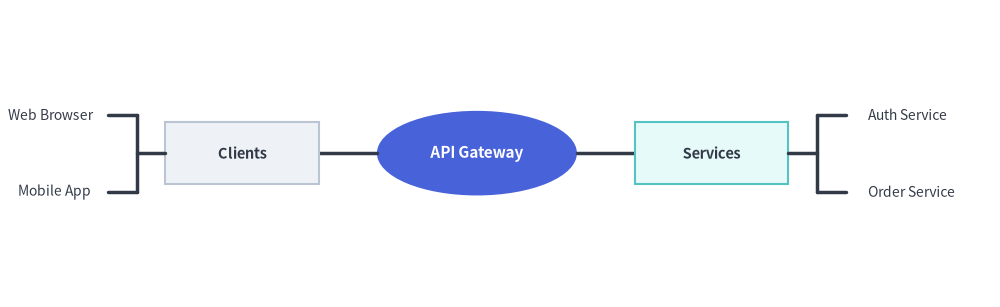
3. 命令的な構築 (.add()) とトップダウン階層 (branch="bottom", xy_shift)
コンストラクタにネストした children=[...] リストを渡す代わりに、parent.add(text, ...) -> MindMapNode を使ってマインドマップや組織ツリーを命令的に構築できます。root.draw(xy, branch="bottom") を呼び出すと、すべてのブランチはデフォルトで上から下(-y 方向)へと展開します。さらに xy_shift=(dx, dy) を使えば、自動計算された配置から任意のノードの位置を微調整できます。
from drawlib.canvas import save, setup
from drawlib.smartarts import MindMapNode
from drawlib.styles import Styles

setup(width=130, height=54)

root = MindMapNode(
    "Platform Engineering",
    shape="rectangle",
    width=34,
    height=9.5,
    style=Styles.PrimaryFlat.patch(shape_r=1.5),
    text_style=Styles.WhiteBold.patch(text_size=11.0),
    line_style=Styles.DarkBold,
    line_length=8.5,
    horizontal_margin=4.0,
    vertical_margin=3.5,
)

# 1. Left Subtree: Cloud Infrastructure
infra = root.add(
    "Cloud Infra",
    width=26,
    height=8.5,
    style=Styles.PrimaryNeutral.patch(shape_r=1.2),
    text_style=Styles.DarkBold.patch(text_size=10.5),
)
infra.add("EKS Clusters", shape="none", text_style=Styles.Dark.patch(text_size=10.0))
infra.add("Terraform IaC", shape="none", text_style=Styles.Dark.patch(text_size=10.0))

# 2. Center Subtree: Developer Experience (nudged slightly downward with xy_shift)
devex = root.add(
    "Developer Experience",
    width=31,
    height=8.5,
    style=Styles.SecondaryNeutral.patch(shape_r=1.2),
    text_style=Styles.DarkBold.patch(text_size=10.5),
    xy_shift=(0.0, -1.5),
)
devex.add("CI/CD Runners", shape="none", text_style=Styles.Dark.patch(text_size=10.0))
devex.add("Preview Envs", shape="none", text_style=Styles.Dark.patch(text_size=10.0))

# 3. Right Subtree: Security & SRE
sec = root.add(
    "Security & SRE",
    width=26,
    height=8.5,
    style=Styles.Neutral.patch(shape_r=1.2),
    text_style=Styles.DarkBold.patch(text_size=10.5),
)
sec.add("Zero-Trust Mesh", shape="none", text_style=Styles.Dark.patch(text_size=10.0))
sec.add("SLOs & Paging", shape="none", text_style=Styles.Dark.patch(text_size=10.0))

# Default branch direction in draw() is "bottom" (top-down org chart layout)
root.draw(xy=(65, 44), branch="bottom")
save()
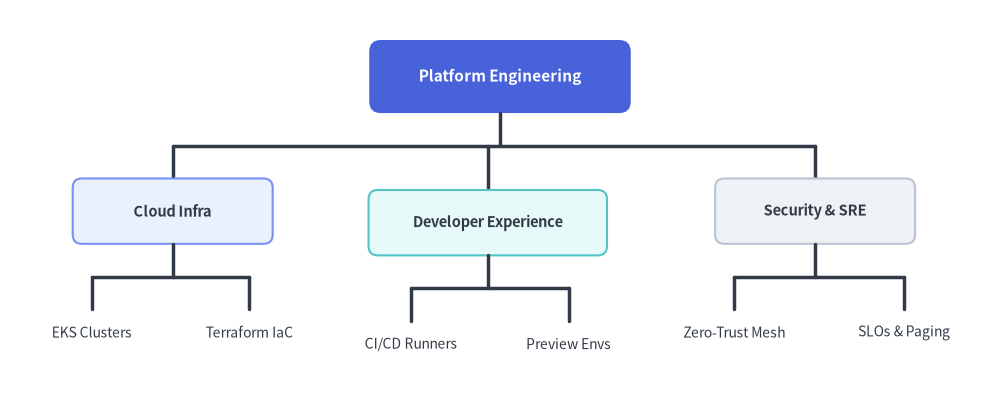
4. 幾何構造・カスケード継承・レイアウトメカニクス
- 中央アンカー
(cx, cy):root.draw(xy=...)に渡す座標は、ルートノードの正確な中心をアンカーとします。 - ルートノードの必須パラメータ: ルートの
MindMapNodeにはstyle、text_style、line_styleの指定が必須です(未指定のままroot.draw()を呼ぶとValueErrorが送出されます)。ルートで省略した場合のデフォルト値は、shape="rectangle"、width=20.0、height=8.0、horizontal_margin=4.0、vertical_margin=4.0、line_length=10.0です。すべての子孫ノードは、未指定のスタイル・形状・幅/高さ・余白パラメータを親ノードから自動的に継承します。 - 方向別ブランチ展開 (
branch):"bottom"(root.draw()のデフォルト): サブブランチが下方向(-y)へ伸びます。トップダウンの組織図や WBS ツリーに最適です。"top": サブブランチが上方向(+y)へ伸びます。"right": サブブランチが右方向(+x)へ伸びます。"left": サブブランチが左方向(-x)へ伸びます。- 個別の子ノードに
branch="left"・"right"・"top"・"bottom"を指定することで、1 つのルート上に複数方向を混在させることもできます。
- ノード形状とテキスト幅・高さの自動計測 (
shape,width,height):"rectangle": 角丸指定(style.shape_r)にも対応した長方形ボックス。"ellipse": ピル型/楕円形コンテナ。"none": 枠線なしのすっきりしたテキストラベル。shape="none"かつwidth=None/height=Noneの場合、MindMapNodeはtext_style.text_size(日本語などの CJK 全角文字幅補正を含む)からテキストの幅と高さを自動計測するため、兄弟ラベル同士が重なりません。
- レイアウト・余白パラメータ:
horizontal_margin:"bottom"または"top"展開時における隣接サブツリー間の水平ギャップ。vertical_margin:"left"または"right"展開時における隣接サブツリー間の垂直ギャップ。line_length: 親階層と子階層の間の直交接続線距離(直角のフォーク分岐点はline_length / 2に配置されます)。xy_shift: 自動レイアウト計算後に適用される任意の(dx, dy)座標オフセット。ノード位置の微調整に使用します。
5. API リファレンス
コンストラクタ (MindMapNode)
MindMapNode(
    text: str,
    *,
    branch: Literal["bottom", "top", "left", "right"] | None = None,
    shape: Literal["rectangle", "ellipse", "none"] | None = None,
    width: float | None = None,
    height: float | None = None,
    style: Style | None = None,
    text_style: Style | None = None,
    line_style: Style | None = None,
    horizontal_margin: float | None = None,
    vertical_margin: float | None = None,
    line_length: float | None = None,
    xy_shift: tuple[float, float] | None = None,
    children: list[MindMapNode] | None = None,
    show: bool = True,
)
| パラメータ | 型 | デフォルト | 説明 |
|---|---|---|---|
text |
str |
(必須) | このノード内に表示するテキスト内容。 |
branch |
Literal["bottom", "top", "left", "right"] | None |
None |
このノード/サブツリーの展開方向(None の場合は親ノードまたは draw(branch=...) の方向を継承)。 |
shape |
Literal["rectangle", "ellipse", "none"] | None |
None |
ノードの形状(ルートが None の場合は "rectangle"、子ノードは親の shape を継承)。 |
width |
float | None |
None |
ノードの幅(ルートのデフォルトは 20.0、shape="none" かつ width=None の場合はテキストから自動算出)。 |
height |
float | None |
None |
ノードの高さ(ルートのデフォルトは 8.0、shape="none" かつ height=None の場合はテキストから自動算出)。 |
style |
Style | None |
None |
ノード図形のスタイル(ルートでは必須、None の場合は親の設定を継承)。 |
text_style |
Style | None |
None |
ノードテキストのスタイル(ルートでは必須、None の場合は親の設定を継承)。 |
line_style |
Style | None |
None |
接続線のスタイル(ルートでは必須、None の場合は親の設定を継承)。 |
horizontal_margin |
float | None |
None |
兄弟サブツリー間の水平ギャップ(ルートのデフォルトは 4.0)。 |
vertical_margin |
float | None |
None |
兄弟サブツリー間の垂直ギャップ(ルートのデフォルトは 4.0)。 |
line_length |
float | None |
None |
親階層と子階層の間の接続線スパン(ルートのデフォルトは 10.0)。 |
xy_shift |
tuple[float, float] | None |
None |
2 パスのレイアウト計算後にこのノードへ加算する任意の (dx, dy) オフセット。 |
children |
list[MindMapNode] | None |
None |
初期の子 MindMapNode インスタンスのリスト。 |
show |
bool |
True |
このノードと接続線を描画するかどうか(False の場合もサブツリーのレイアウト領域を維持)。 |
子ノードの追加 (.add())
node.add(
    text: str,
    *,
    branch: Literal["bottom", "top", "left", "right"] | None = None,
    shape: Literal["rectangle", "ellipse", "none"] | None = None,
    width: float | None = None,
    height: float | None = None,
    style: Style | None = None,
    text_style: Style | None = None,
    line_style: Style | None = None,
    horizontal_margin: float | None = None,
    vertical_margin: float | None = None,
    line_length: float | None = None,
    xy_shift: tuple[float, float] | None = None,
    show: bool = True,
) -> MindMapNode
文字列 text: str から新しい子 MindMapNode を生成し(注: .add() が受け取るのは MindMapNode インスタンスではなく文字列 text です)、node.children に追加したうえで、その子 MindMapNode を返します。
描画とミュータブルプロパティ
root.draw(
    xy: tuple[float, float],
    branch: Literal["bottom", "top", "left", "right"] = "bottom",
    scale: float = 1.0,
) -> None
xy: ルートノードの中心座標(cx, cy)。branch:root.branchがNoneの場合に使われるデフォルトの展開方向("bottom","top","left","right"、デフォルト"bottom")。scale:xyを基準とした比例スケール倍率(> 0、デフォルト1.0)。- ミュータブルなノードプロパティ:
node.text: strnode.branch: Literal["bottom", "top", "left", "right"] | Nonenode.shape: Literal["rectangle", "ellipse", "none"] | Nonenode.width: float | Nonenode.height: float | Nonenode.style: Style | Nonenode.text_style: Style | Nonenode.line_style: Style | Nonenode.children -> list[MindMapNode]node.show: bool