Tree(ツリー図)
TreeNode コンポーネントは、コードベースのディレクトリツリー、組織階層図、タクソノミー分類などの階層型ツリー構造を描画します。
垂直方向のブランチ整列、インデント階層、ツリーの接続線を自動的にレイアウトします。
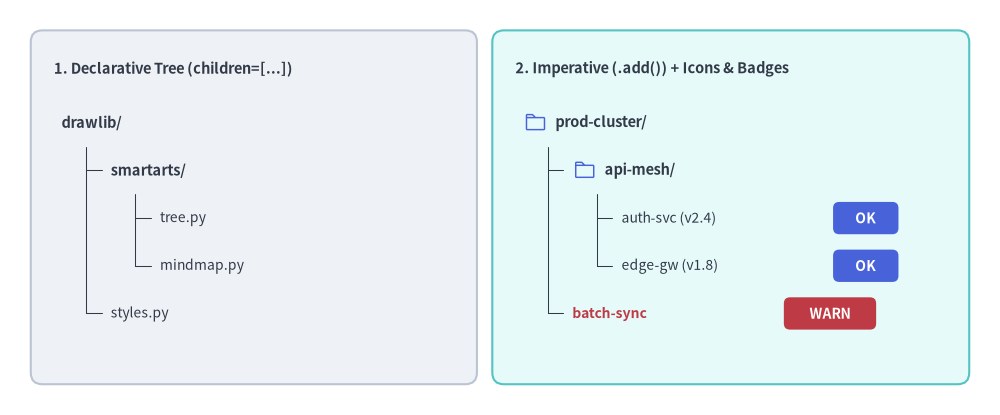
Source Code
from drawlib.canvas import save, setup
from drawlib.icons import phosphor
from drawlib.shapes import rectangle
from drawlib.smartarts import TreeNode
from drawlib.styles import Styles
from drawlib.text import text

setup(width=130, height=54)

# 1. Left Card: Declarative Nested Hierarchy (children=[...])
rectangle((33, 27), width=58, height=46, style=Styles.Neutral.patch(shape_r=1.5))
text((7, 45.0), "1. Declarative Tree (children=[...])", style=Styles.DarkBold.patch(text_size=10.5, halign="left"))

decl_root = TreeNode(
    "drawlib/",
    text_style=Styles.DarkBold.patch(text_size=10.5),
    line_style=Styles.DarkThin,
    line_horizontal_margin=3.2,
    line_horizontal_length=3.0,
    line_vertical_margin=6.2,
    children=[
        TreeNode(
            "smartarts/",
            children=[
                TreeNode("tree.py", text_style=Styles.Dark.patch(text_size=10.0)),
                TreeNode("mindmap.py", text_style=Styles.Dark.patch(text_size=10.0)),
            ],
        ),
        TreeNode("styles.py", text_style=Styles.Dark.patch(text_size=10.0)),
    ],
)
decl_root.draw(xy=(8, 38.0))

# 2. Right Card: Imperative (.add()) with Vector Icons & Trailing Badges
rectangle((95, 27), width=62, height=46, style=Styles.SecondaryNeutral.patch(shape_r=1.5))
text((67, 45.0), "2. Imperative (.add()) + Icons & Badges", style=Styles.DarkBold.patch(text_size=10.5, halign="left"))

TreeNode.register_drawing_item(
    name="hero_dir",
    location="before",
    padding_width=4.2,
    function=phosphor.folder,
    style=Styles.PrimaryFlat,
    args={"width": 3.0},
)
TreeNode.register_drawing_item(
    name="hero_ok",
    location="after",
    padding_width=27.5,
    function=rectangle,
    style=Styles.PrimaryFlat.patch(shape_r=0.8),
    args={"width": 8.5, "height": 4.2, "text": "OK", "text_style": Styles.WhiteBold.patch(text_size=10.0)},
)
TreeNode.register_drawing_item(
    name="hero_warn",
    location="after",
    padding_width=27.5,
    function=rectangle,
    style=Styles.DangerFlat.patch(shape_r=0.8),
    args={"width": 12.0, "height": 4.2, "text": "WARN", "text_style": Styles.WhiteBold.patch(text_size=10.0)},
)

imp_root = TreeNode(
    "prod-cluster/",
    text_style=Styles.DarkBold.patch(text_size=10.5),
    line_style=Styles.DarkThin,
    line_horizontal_margin=3.2,
    line_horizontal_length=3.0,
    line_vertical_margin=6.2,
).set_drawing_item("hero_dir")

api_group = imp_root.add("api-mesh/").set_drawing_item("hero_dir")
api_group.add("auth-svc (v2.4)", text_style=Styles.Dark.patch(text_size=10.0)).set_drawing_item("hero_ok")
api_group.add("edge-gw (v1.8)", text_style=Styles.Dark.patch(text_size=10.0)).set_drawing_item("hero_ok")
imp_root.add("batch-sync", text_style=Styles.DangerBold.patch(text_size=10.0), line_style=Styles.MutedDashed).set_drawing_item("hero_warn")

imp_root.draw(xy=(68, 38.0))
save()
1. 基本概念と基本的な使い方
TreeNode は左上 xy=(x, y)(ルートラベルの左端かつ垂直中央)をアンカーとしてディレクトリやタクソノミーの階層ツリーを構築し、直交ブランチ接続線とともに子階層を右方向に +2 * line_horizontal_margin、下方向に -line_vertical_margin ずつ自動配置します。中間ノードに指定したスタイルや余白のオーバーライドはサブツリー全体へカスケード継承され、register_drawing_item による "before" アイコンや "after" ステータスバッジの付与、および show/scale による表示制御と比例スケーリングもサポートしています。

- 左上アンカーと命令的な
.add()(xy,add): ルートラベルの左端かつ垂直中央をxy=(x, y)に固定し、子階層を右方向に+2 * line_horizontal_margin、下方向に-line_vertical_marginずつ配置します。 - 接続線マージンとカスケード継承: 縦幹のオフセット(
line_horizontal_margin)、横枝の長さ(line_horizontal_length)、行間隔(line_vertical_margin)を調整でき、中間ノードでの上書き設定はその子孫ノードへ自動的に引き継がれます。 - 再利用可能なアイコンと末尾バッジ (
register_drawing_item):.set_drawing_item(name)を使って、テキストをpadding_width分右へシフトする"before"ベクターアイコンや、x + padding_widthの位置に描画する"after"ステータスバッジを付与できます。 - レイアウト保持型の表示制御とスケーリング (
show,scale):node.show = Falseで兄弟ノードの Y 座標をずらさずにノードと接続枝を非表示にしたり、root.draw(xy, scale=...)にscaleを渡してxy基準で比例スケーリングしたりできます。
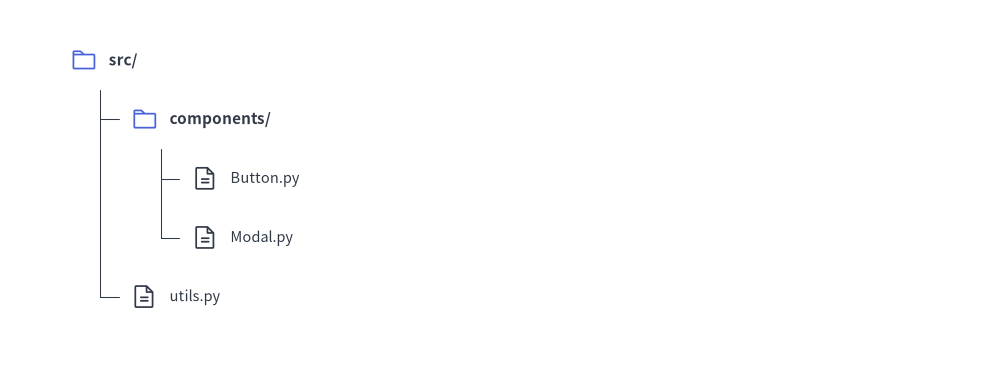
2. クイックサンプル: プロジェクトのディレクトリ階層
from drawlib.canvas import setup
from drawlib.smartarts import TreeNode
from drawlib.icons import phosphor
from drawlib.styles import Styles

setup(width=115, height=44)

# Register custom icons for folders and files
TreeNode.register_drawing_item(
    name="folder", location="before", padding_width=4.5, function=phosphor.folder,
    style=Styles.PrimaryFlat, args={"width": 3.2}
)
TreeNode.register_drawing_item(
    name="file", location="before", padding_width=4.5, function=phosphor.file_text,
    style=Styles.Dark, args={"width": 3.2}
)

root = TreeNode(
    "src/",
    text_style=Styles.DarkBold.patch(text_size=11.0),
    line_style=Styles.DarkThin,
    line_horizontal_margin=3.5,
    line_horizontal_length=3.2,
    line_vertical_margin=6.8,
    children=[
        TreeNode("components/", children=[
            TreeNode("Button.py", text_style=Styles.Dark.patch(text_size=10.5)).set_drawing_item("file"),
            TreeNode("Modal.py", text_style=Styles.Dark.patch(text_size=10.5)).set_drawing_item("file"),
        ]).set_drawing_item("folder"),
        TreeNode("utils.py", text_style=Styles.Dark.patch(text_size=10.5)).set_drawing_item("file"),
    ]
).set_drawing_item("folder")

root.draw(xy=(8, 37))
3. 命令的な構築 (.add())、カスケード継承、"after" ステータスバッジ
コンストラクタ内で children=[...] をネストする代わりに、parent.add(text, ...) -> TreeNode を使って命令的にツリーを組み立てることもできます。中間ノードで指定したスタイルやマージンのパラメータは、下位ノードで再度上書きされない限りそのサブツリー全体へ自動的にカスケード継承されます。また、location="after" を指定してステータスバッジやアイコンを登録することも可能です(この場合、padding_width はノード左端の x 座標からバッジまでの水平オフセットを表します)。
from drawlib.canvas import save, setup
from drawlib.icons import phosphor
from drawlib.shapes import rectangle
from drawlib.smartarts import TreeNode
from drawlib.styles import Styles

setup(width=115, height=58)

# Register trailing status badges (location="after" places the item at x + padding_width)
TreeNode.register_drawing_item(
    name="badge_live",
    location="after",
    padding_width=32.0,
    function=rectangle,
    style=Styles.PrimaryFlat.patch(shape_r=0.8),
    args={"width": 13.5, "height": 4.5, "text": "ACTIVE", "text_style": Styles.WhiteBold.patch(text_size=10.0)},
)
TreeNode.register_drawing_item(
    name="badge_warn",
    location="after",
    padding_width=33.5,
    function=phosphor.warning_circle,
    style=Styles.DangerFlat,
    args={"width": 3.8},
)

root = TreeNode(
    "production-cluster/",
    text_style=Styles.DarkBold.patch(text_size=11.0),
    line_style=Styles.DarkThin,
    line_horizontal_margin=3.8,
    line_horizontal_length=3.6,
    line_vertical_margin=6.8,
)

# 1. Core Services Subtree (inherits root margins, overrides text_style)
core = root.add("core-services/", text_style=Styles.DarkBold.patch(text_size=10.5))
core.add("auth-gateway (v2.4)", text_style=Styles.Dark.patch(text_size=10.0)).set_drawing_item("badge_live")
core.add("billing-worker (v1.9)", text_style=Styles.Dark.patch(text_size=10.0)).set_drawing_item("badge_live")

# 2. Legacy Subtree (overrides line_style and tighter vertical spacing for all its children)
legacy = root.add(
    "legacy-workers/",
    text_style=Styles.DarkBold.patch(text_size=10.5),
    line_style=Styles.MutedDashed,
    line_vertical_margin=6.2,
)
batch = legacy.add("nightly-sync (degraded)", text_style=Styles.DangerBold.patch(text_size=10.0))
batch.set_drawing_item("badge_warn")
legacy.add("csv-exporter (standby)", text_style=Styles.Muted.patch(text_size=10.0))

root.draw(xy=(8, 51))
save()
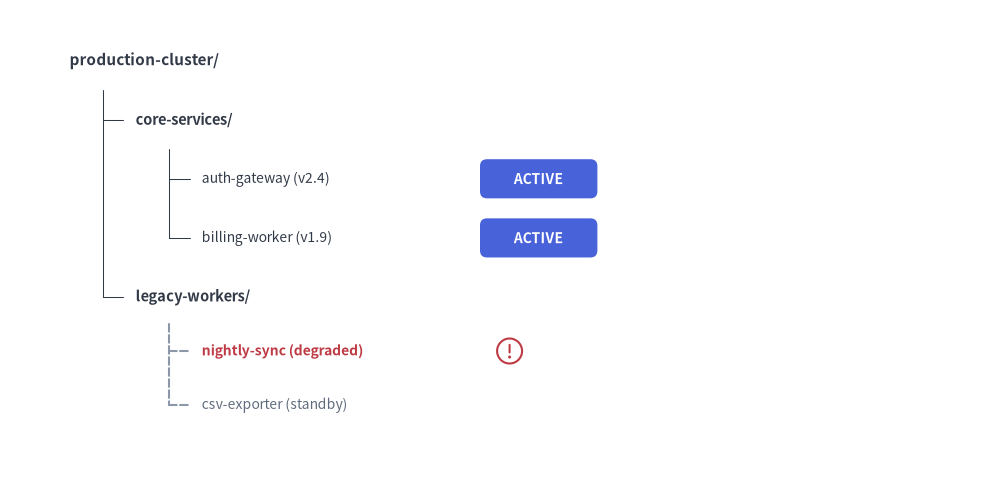
4. 幾何構造・ライフサイクル・座標メカニクス
- 左上アンカー
(x, y):root.draw(xy=..., scale=1.0)に渡す座標は、ルートノードラベルの左端かつ垂直中央を表します。scaleを渡すと、xyを基準としてインデント幅・行間隔・アイコン・テキストサイズが比例スケーリングされます。 - 下方向・右方向への展開: 子ノードは下方向(
child_y = current_y - line_vertical_margin)へ進み、右方向(child_x = parent_x + 2 * line_horizontal_margin)へインデントされます。 - レイアウト保持型の表示制御 (
show: bool = True):TreeNode(text, ..., show=True)とnode.add(text, ..., show=True)の両方でノードの表示・非表示を制御できます。node.show = Falseに設定すると、そのノード・接続枝・子孫ノードが非表示になりつつ、後続のすべての兄弟ノードの垂直 Y 座標はそのまま維持されます。
- ルートノードのスタイル・マージン必須要件:
ルートのTreeNodeには、基準となる 5 つの属性(text_style,line_style,line_horizontal_margin,line_horizontal_length,line_vertical_margin)をすべて指定する必要があります。子孫ノードは、個別に上書きしない限りこれらの設定をカスケード継承します。
5. API リファレンス
コンストラクタ (TreeNode)
TreeNode(
    text: str,
    *,
    text_style: Style | None = None,
    line_style: Style | None = None,
    line_horizontal_margin: float | None = None,
    line_horizontal_length: float | None = None,
    line_vertical_margin: float | None = None,
    children: list[TreeNode] | None = None,
    show: bool = True,
)
| パラメータ | 型 | デフォルト | 説明 |
|---|---|---|---|
text |
str |
(必須) | このツリーノードに表示するラベル文字列。 |
text_style |
Style | None |
None |
ノードラベルのテキストスタイル(ルートでは必須、None の場合は親の設定を継承)。 |
line_style |
Style | None |
None |
ブランチ接続線の線スタイル(ルートでは必須、None の場合は親の設定を継承)。 |
line_horizontal_margin |
float | None |
None |
親の x から垂直幹ラインまでの水平オフセット(> 0、ルートでは必須)。 |
line_horizontal_length |
float | None |
None |
水平接続枝の基準長パラメータ(> 0、ルートでは必須)。 |
line_vertical_margin |
float | None |
None |
連続する行間の垂直ステップ距離(> 0、ルートでは必須)。 |
children |
list[TreeNode] | None |
None |
初期の子 TreeNode インスタンスのリスト。 |
show |
bool |
True |
このノードと接続線を描画するかどうか(False の場合も垂直方向の行スロットを維持)。 |
子ノードの追加 (.add())
node.add(
    text: str,
    *,
    text_style: Style | None = None,
    line_style: Style | None = None,
    line_horizontal_margin: float | None = None,
    line_horizontal_length: float | None = None,
    line_vertical_margin: float | None = None,
    show: bool = True,
) -> TreeNode
ラベル text: str を持つ新しい子 TreeNode を生成して node.children に追加し、その生成された子 TreeNode インスタンスを返します。
カスタムアイコンとバッジ (register_drawing_item / set_drawing_item)
TreeNode.register_drawing_item(
    name: str,
    location: Literal["before", "after"],
    padding_width: float,
    function: Callable,
    style: Style,
    args: dict,
) -> None
| パラメータ | 型 | 説明 |
|---|---|---|
name |
str |
node.set_drawing_item(name) を呼び出す際に使用する一意の識別名。 |
location |
Literal["before", "after"] |
"before" は xy にアイコンを描画してテキストを padding_width 分右へシフトします。"after" は xy にテキストを描画し、x + padding_width の位置にアイコン/バッジを配置します。 |
padding_width |
float |
水平方向の配置オフセット幅(> 0)。 |
function |
Callable |
xy と style を受け取る任意の Drawlib 図形またはアイコン関数(例: phosphor.folder, rectangle)。 |
style |
Style |
function に渡されるスタイル(内部で halign="left", valign="center" がパッチ適用されます)。 |
args |
dict |
function に渡す追加キーワード引数(例: {"width": 3.0})。 |
node.set_drawing_item(name: str) -> TreeNode: 登録済みの描画アイテムをnodeに紐付け、メソッドチェーン用にselfを返します。
描画とミュータブルプロパティ
node.draw(xy: tuple[float, float], scale: float = 1.0) -> None: 左上xyを起点としてツリーを描画します(必要に応じてscaleで比例スケーリング可能)。- ミュータブルなノードプロパティ:
node.text: str— ノードラベル文字列の取得・変更。node.text_style: Style | None— ノードテキストスタイルの取得・変更。node.line_style: Style | None— ノード接続線スタイルの取得・変更。node.children -> list[TreeNode]— 子TreeNodeインスタンスのリストへのアクセス。node.show: bool—draw()の前または呼び出し間での、レイアウト保持型表示状態の切り替え。