Gantt Chart(ガントチャート):プロジェクトロードマップ・マイルストーン・依存関係
GanttChart(drawlib.charts.gantt)は、宣言的で高品質なベクター形式のプロジェクトロードマップ、スプリントスケジュール、マイルストーンタイムラインを提供します。横方向(X 軸)にタイムライン区間が並び、縦方向(Y 軸)にセクション区切りバナー、タスク行、マイルストーンが上から下へと順番に積み重なります。
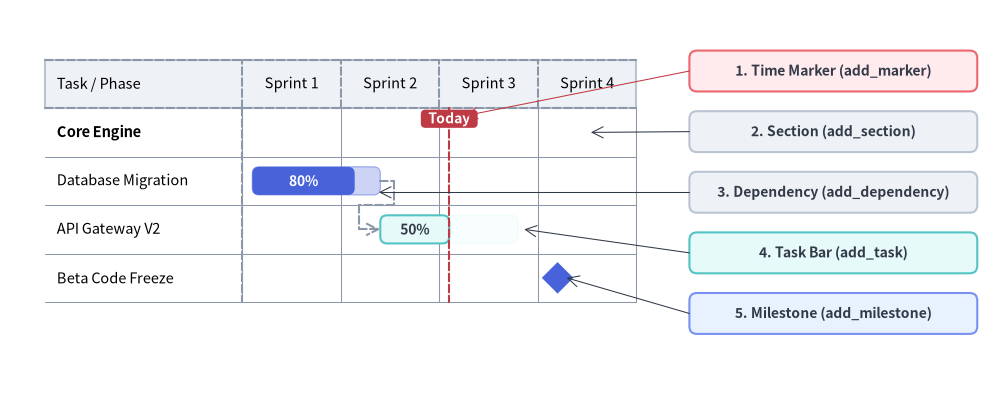
Source Code
from drawlib.canvas import save, setup
from drawlib.charts.gantt import GanttChart
from drawlib.lines import line
from drawlib.shapes import rectangle
from drawlib.styles import Styles

setup(width=132, height=52)

chart = GanttChart(
    columns=["Sprint 1", "Sprint 2", "Sprint 3", "Sprint 4"],
    axis_line_style=Styles.MutedDashed,
    axis_text_style=Styles.Black.patch(text_size=10.5),
    grid_style=Styles.MutedThin,
    header_style=Styles.Neutral,
    progress_text_style=Styles.WhiteBold.patch(text_size=10.0),
    width=82.0,
    label_width=26.0,
    header_height=6.4,
    row_height=6.4,
    bar_radius=0.9,
)

chart.add_section("Core Engine", text_style=Styles.BlackBold.patch(text_size=10.5))
t1 = chart.add_task("Database Migration", start=0.1, end=1.4, style=Styles.PrimaryFlat, progress=0.8)
t2 = chart.add_task(
    "API Gateway V2",
    start=1.4,
    end=2.8,
    style=Styles.SecondaryNeutral,
    progress=0.5,
    progress_text_style=Styles.DarkBold.patch(text_size=10.0),
)
chart.add_milestone("Beta Code Freeze", at=3.2, style=Styles.PrimaryFlat)
chart.add_dependency(t1, t2)
chart.add_marker(at=2.1, style=Styles.DangerDashed, label="Today", label_style=Styles.WhiteBold.patch(text_size=10.0))

chart.draw(xy=(4.0, 8.0))

# Compute exact row Y coordinates from chart.get_size()
_, chart_h = chart.get_size()
rows_top = 8.0 + chart_h - 2.0 - chart.header_height
row_cy = [rows_top - (i + 0.5) * chart.row_height for i in range(4)]

# Structural Callout Annotations on the Right
callouts = [
    (42.5, "1. Time Marker (add_marker)", Styles.DangerNeutral),
    (34.5, "2. Section (add_section)", Styles.Neutral),
    (26.5, "3. Dependency (add_dependency)", Styles.Neutral),
    (18.5, "4. Task Bar (add_task)", Styles.SecondaryNeutral),
    (10.5, "5. Milestone (add_milestone)", Styles.PrimaryNeutral),
]
for cy, label_txt, box_style in callouts:
    rectangle(
        (110.0, cy),
        width=38.0,
        height=5.4,
        style=box_style.patch(shape_r=1.0),
        text=label_txt,
        text_style=Styles.DarkBold.patch(text_size=10.0),
    )

line((91.0, 42.5), (61.4, rows_top - 1.0), arrow_head="->", style=Styles.DangerThin)
line((91.0, 34.5), (78.0, row_cy[0]), arrow_head="->", style=Styles.DarkThin)
line((91.0, 26.5), (50.0, row_cy[1] - 1.5), arrow_head="->", style=Styles.DarkThin)
line((91.0, 18.5), (69.2, row_cy[2]), arrow_head="->", style=Styles.DarkThin)
line((91.0, 10.5), (74.8, row_cy[3]), arrow_head="->", style=Styles.DarkThin)

save()
1. 基本概念と基本的な使い方
GanttChart は順序付きの columns に沿って横向きのタイムラインロードマップを構築します。デフォルトで左下 (x, y) を基準にアンカーし(align="center" で中央揃えも可)、height=None の場合は登録された行数からコンテナの height を自動算出します。列名または浮動小数点オフセットを使って .add_section(...) バナー配下に .add_task(...) バーをグループ化できるほか、2 トーンの進捗率塗り分け(progress)や交互の行ストライプ(zebra_style)、.add_dependency(...) 矢印、.add_milestone(...) ひし形マーカー、.add_marker(...) 基準線、さらに draw_ratio と show による部分描画アニメーションをサポートしています。

- セクション・タスク・時間インデックス指定(
columns,add_task,xy): スケジュールを左下xyにアンカーし(height=Noneの場合は行数から高さを自動算出)、列名文字列("W1")または浮動小数点オフセット(1.5..3.5)でstart/endを指定します。 - 2 トーンの進捗表示とゼブラストライプ(
progress,zebra_style):progress(0.0〜1.0)とprogress_text_styleラベルで濃淡 2 トーンの完了バーを描画し、header_styleと交互の行背景zebra_styleでスケジュール表を整えます。 - 依存関係・マイルストーン・マーカー(
add_dependency,add_milestone,add_marker): タスク間の直交 End-to-Start 矢印、専用行のひし形リリースゲート、および全高を貫く基準線("Now"など)を重ねて描画できます。 - 部分スイープと連動表示切替(
draw_ratio,show,align):draw_ratioでバーの伸長をアニメーション化したり、行スロットを維持しつつ関連する依存矢印も自動的に隠すtask.show = Falseを切り替えたり、draw(xy, align="center")で中央配置したりできます。
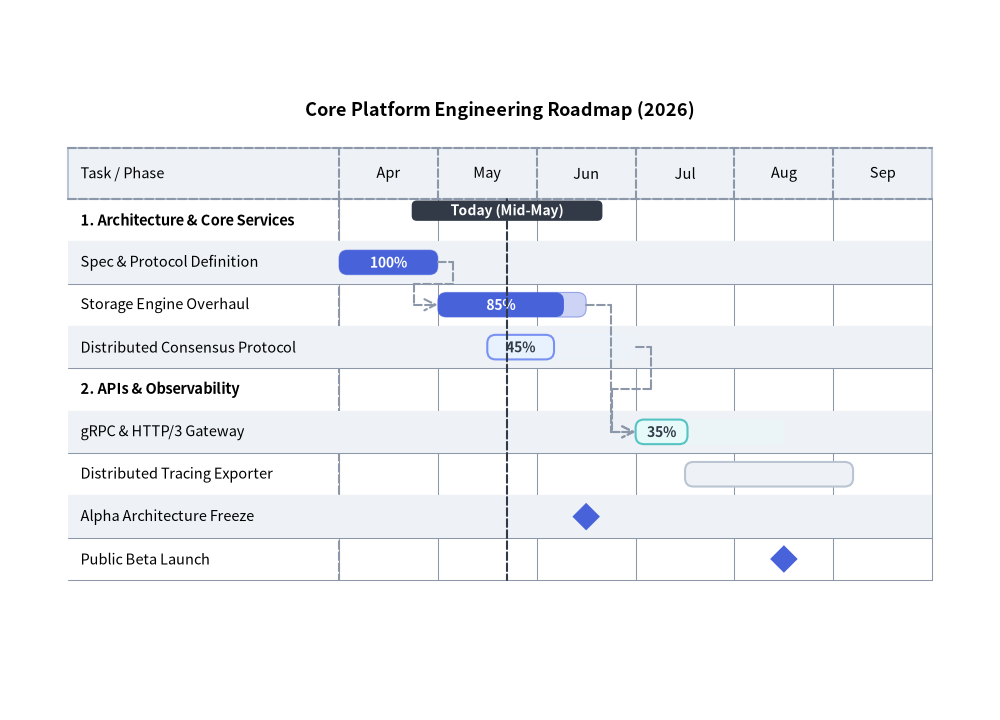
2. 依存関係付きのエンジニアリング・リリースロードマップ
次の例では、セクション分割、進捗インジケータ付きタスク、マイルストーン、直交ルーティングによる依存関係矢印、および垂直の "Today" マーカーを組み合わせています。
from drawlib.canvas import save, setup
from drawlib.charts.gantt import GanttChart
from drawlib.styles import Styles

setup(width=118, height=85)

chart = GanttChart(
    columns=["Apr", "May", "Jun", "Jul", "Aug", "Sep"],
    axis_line_style=Styles.MutedDashed,
    axis_text_style=Styles.Black.patch(text_size=10.5),
    grid_style=Styles.MutedThin,
    header_style=Styles.Neutral,
    zebra_style=Styles.NeutralFlat,
    progress_text_style=Styles.WhiteBold.patch(text_size=10.0),
    width=106.0,
    label_width=32.0,
    title="Core Platform Engineering Roadmap (2026)",
    title_style=Styles.BlackBold.patch(text_size=13.0),
    header_height=6.0,
    row_height=5.0,
    bar_radius=1.0,
)

# 1. Core Services Section
chart.add_section("1. Architecture & Core Services", text_style=Styles.BlackBold.patch(text_size=10.5))
t1 = chart.add_task("Spec & Protocol Definition", start="Apr", end=1.0, style=Styles.PrimaryFlat, progress=1.0)
t2 = chart.add_task("Storage Engine Overhaul", start=1.0, end=2.5, style=Styles.PrimaryFlat, progress=0.85)
t3 = chart.add_task(
    "Distributed Consensus Protocol",
    start=1.5,
    end=3.0,
    style=Styles.PrimaryNeutral,
    progress=0.45,
    progress_text_style=Styles.DarkBold.patch(text_size=10.0),
)

# 2. APIs & Observability Section
chart.add_section("2. APIs & Observability", text_style=Styles.BlackBold.patch(text_size=10.5))
t4 = chart.add_task(
    "gRPC & HTTP/3 Gateway",
    start=3.0,
    end=4.5,
    style=Styles.SecondaryNeutral,
    progress=0.35,
    progress_text_style=Styles.DarkBold.patch(text_size=10.0),
)
t5 = chart.add_task("Distributed Tracing Exporter", start=3.5, end=5.2, style=Styles.Neutral, progress=0.0)

# 3. Milestones, Dependencies & Today Marker
chart.add_milestone("Alpha Architecture Freeze", at="Jun", style=Styles.PrimaryFlat)
chart.add_milestone("Public Beta Launch", at=4.5, style=Styles.PrimaryFlat)

chart.add_dependency(t1, t2)
chart.add_dependency(t2, t4)
chart.add_dependency(t3, t4)
chart.add_marker(at=1.7, style=Styles.DarkDashed, label="Today (Mid-May)", label_style=Styles.WhiteBold.patch(text_size=10.0))

chart.draw(xy=(6.0, 10.0))
save()
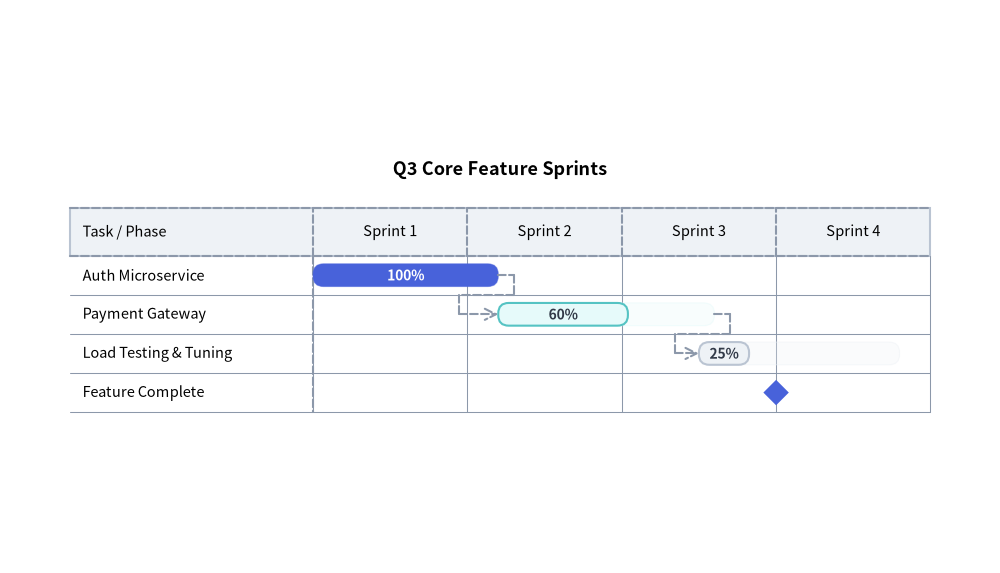
3. 時間座標の指定方法とアジャイル・スプリントスケジュール
GanttChart では、時間座標(start、end、at)を次のいずれかの方法で指定できます。
- 列名文字列:
columns内の文字列と完全一致させます(start="Apr"は"Apr"列の左端、end="Apr"は"Apr"列の右端、at="Jun"は"Jun"列の中央に解決されます)。 - 浮動小数点オフセット:
0.0が列0の左端、1.0が列0と列1の境界、1.5が列1の中央を表します。
from drawlib.canvas import save, setup
from drawlib.charts.gantt import GanttChart
from drawlib.styles import Styles

setup(width=115, height=66)

chart = GanttChart(
    columns=["Sprint 1", "Sprint 2", "Sprint 3", "Sprint 4"],
    axis_line_style=Styles.MutedDashed,
    axis_text_style=Styles.Black.patch(text_size=10.5),
    grid_style=Styles.MutedThin,
    header_style=Styles.Neutral,
    progress_text_style=Styles.WhiteBold.patch(text_size=10.0),
    width=103.0,
    label_width=28.0,
    title="Q3 Core Feature Sprints",
    title_style=Styles.BlackBold.patch(text_size=13.0),
    bar_radius=1.2,
)

s1 = chart.add_task("Auth Microservice", start=0.0, end=1.2, style=Styles.PrimaryFlat, progress=1.0)
s2 = chart.add_task(
    "Payment Gateway",
    start=1.2,
    end=2.6,
    style=Styles.SecondaryNeutral,
    progress=0.6,
    progress_text_style=Styles.DarkBold.patch(text_size=10.0),
)
s3 = chart.add_task(
    "Load Testing & Tuning",
    start=2.5,
    end=3.8,
    style=Styles.Neutral,
    progress=0.25,
    progress_text_style=Styles.DarkBold.patch(text_size=10.0),
)

chart.add_dependency(s1, s2)
chart.add_dependency(s2, s3)
chart.add_milestone("Feature Complete", at=3.0, style=Styles.PrimaryFlat)

chart.draw(xy=(6.0, 12.0))
save()
4. API リファレンス
コンストラクタ(GanttChart)
すべてのコンストラクタ引数はキーワード専用引数(*)です。
from drawlib.charts.gantt import Dependency, DrawDirection, GanttChart, Marker, Milestone, Section, Task

chart = GanttChart(
    *,
    columns: list[str],
    axis_line_style: Style,
    axis_text_style: Style | None = None,
    header_style: Style | None = None,
    grid_style: Style | None = None,
    zebra_style: Style | None = None,
    progress_text_style: Style | None = None,
    background_style: Style | None = None,
    title: str = "",
    title_style: Style | None = None,
    width: float = 90.0,
    height: float | None = None,
    row_height: float = 4.5,
    header_height: float = 5.5,
    label_width: float = 24.0,
    bar_radius: float = 0.8,
)
| パラメータ | 型 | デフォルト | 説明 |
|---|---|---|---|
columns |
list[str] |
必須 | 上部ヘッダー帯に沿った順序付きのタイムライン区間名リスト(最低 1 要素が必須)。 |
axis_line_style |
Style |
必須 | ヘッダー枠線および列区切り目盛りに用いる必須アンカースタイル。 |
axis_text_style |
Style | None |
None |
列ヘッダー名および左列の行ラベルのスタイル。None の場合は省略されます。 |
header_style |
Style | None |
None |
上部タイムラインヘッダー帯の背景カードスタイル。None の場合は背景塗りが省略されます。 |
grid_style |
Style | None |
None |
各行を縦断する垂直タイムライン列区切り線のスタイル。None の場合は省略されます。 |
zebra_style |
Style | None |
None |
1 行おきに描画される水平ゼブラストライプ背景のスタイル。None の場合は省略されます。 |
progress_text_style |
Style | None |
None |
progress > 0 のタスクに描画される完了率ラベル("85%" など)のデフォルトスタイル。 |
background_style |
Style | None |
None |
チャート外枠の背景カードのスタイル。None の場合は省略されます。 |
title |
str |
"" |
コンテナ上部に描画されるチャートタイトル文字列。 |
title_style |
Style | None |
None |
title のタイポグラフィスタイル。タイトルを描画するには必須です。 |
width |
float |
90.0 |
キャンバス単位でのチャート全体のバウンディングボックス幅。 |
height |
float | None |
None |
チャート全体のバウンディングボックス高さ。None (デフォルト) の場合、header_height + len(items) * row_height から動的に自動算出されます(最小 20.0)。 |
row_height |
float |
4.5 |
タスク、セクション、またはマイルストーン 1 行あたりに割り当てられる垂直高さ。 |
header_height |
float |
5.5 |
上部列ヘッダー帯の高さ。 |
label_width |
float |
24.0 |
左側のタスク/マイルストーン名カラムに確保される水平幅。 |
bar_radius |
float |
0.8 |
タスクバーの角丸半径(task.style.shape_r が None の場合に適用)。 |
メソッドとプロパティ
add_section(name: str, style: Style | None = None, text_style: Style | None = None, *, show: bool = True) -> Section: カテゴリ区切りのセクション行を末尾に追加し、変更可能なSectionインスタンスを返します(styleはバナー矩形の塗り・枠線を上書きし、text_styleはセクションタイトルに対してchart.axis_text_styleを上書きします)。add_task(name: str, start: str | float, end: str | float, style: Style, progress: float = 0.0, progress_text_style: Style | None = None, *, show: bool = True, draw_ratio: float = 1.0, draw_direction: DrawDirection = "left_to_right") -> Task: スケジュールされたタスクバー行を末尾に追加し、変更可能なTaskインスタンスを返します。progress:[0.0, 1.0]にクランプされる完了率。progress > 0の場合、予定期間全体がstyleの塗り色の半透明ティント(alpha=0.28)で描画され、完了部分(progress * width)が不透明なstyleで描画されます。progress_text_style: タスク単位での完了率ラベルのタイポグラフィ上書き(未指定時はchart.progress_text_styleにフォールバックします)。draw_ratio&draw_direction: 部分空間レンダリング制御("left_to_right"はstartからendに向かって水平にバーを伸ばし、"bottom_to_top"はバーの下端から垂直方向に成長させます)。
add_milestone(name: str, at: str | float, style: Style, *, show: bool = True) -> Milestone: 時刻atにひし形マーカーを配置したマイルストーン行を末尾に追加し、変更可能なMilestoneインスタンスを返します。add_marker(at: str | float, style: Style, label: str = "", label_style: Style | None = None, *, show: bool = True) -> Marker: 時刻atに全高の垂直基準線(および任意のピル型上部バッジlabel+label_style)を追加し、変更可能なMarkerインスタンスを返します。add_dependency(from_task: Task, to_task: Task, style: Style | None = None, *, show: bool = True) -> Dependency:from_taskからto_taskへの直交依存矢印を追加し(style=Noneの場合はchart.axis_line_styleにフォールバック)、変更可能なDependencyインスタンスを返します。from_task.show、to_task.show、またはdep.showがFalseの場合(あるいはいずれかのタスクのdraw_ratio <= 0.0の場合)は自動的に非表示になります。get_size() -> tuple[float, float]:(width, height)を返します。chart.height is Noneの場合は登録済み行数からheightを動的に算出します。draw(xy: tuple[float, float] = (0.0, 0.0), *, width: float | None = None, height: float | None = None, align: Literal["bottom_left", "center"] = "bottom_left", scale: float = 1.0) -> None: 左下xyを基準(align="center"の場合はxyを中心)としてガントチャートを描画します。一時的な寸法上書きや均一なscaleにも対応しています。- プロパティ:
chart.columns -> list[str]: タイムライン列ラベルのコピーを返します。chart.items -> list[Task | Section | Milestone]: 登録済みのスケジュール行を上から下の順序で格納したコピーを返します。chart.markers -> list[Marker]: 登録済みの垂直マーカーのコピーを返します。chart.dependencies -> list[Dependency]: 登録済みの依存関係コネクタのコピーを返します。