Phosphor ベクターアイコン
Drawlib は、drawlib.icons.phosphor を通じて Phosphor Icons(https://phosphoricons.com)のベクターグリフファミリー一式(5 種類のタイポグラフィウェイトに対応した 1,500 種類以上の鮮明なベクターアイコン)を標準搭載しているほか、任意のカスタム TrueType アイコンフォントを描画できる低レベル関数 font_icon() も提供します。
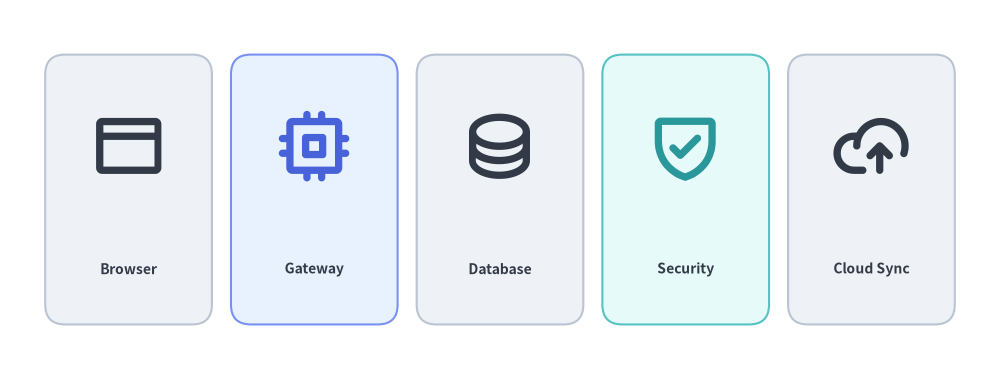
Source Code
from drawlib.canvas import save, setup
from drawlib.icons import phosphor
from drawlib.shapes import rectangle
from drawlib.styles import Styles
from drawlib.text import text

setup(width=126, height=48)

items = [
    ("Browser", phosphor.browser, Styles.Neutral, Styles.DarkBold),
    ("Gateway", phosphor.cpu, Styles.PrimaryNeutral, Styles.PrimaryBold),
    ("Database", phosphor.database, Styles.Neutral, Styles.DarkBold),
    ("Security", phosphor.shield_check, Styles.SecondaryNeutral, Styles.SecondaryBold),
    ("Cloud Sync", phosphor.cloud_arrow_up, Styles.Neutral, Styles.DarkBold),
]

for i, (label, icon_fn, card_st, icon_st) in enumerate(items):
    cx = 16.2 + i * 23.4
    rectangle((cx, 24), width=21, height=34, style=card_st.patch(shape_r=2.5))
    icon_fn((cx, 29.5), width=9.5, style=icon_st)
    text((cx, 14), label, style=Styles.DarkBold.patch(text_size=10.0))

save()
1. ベクターグリフの基本概念
静的なビットマップアイコンとは異なり、drawlib.icons.phosphor のすべての関数は組み込みの TrueType ベクターフォントから直接描画されます。1:1 のアスペクト比で無限に拡大縮小できると同時に、Style を通じて線のウェイト、テーマカラー、回転、不透明度、アンカー位置を動的に制御できます。5 種類のタイポグラフィウェイトにわたる icon_style の変化、ニュートラル面や強調面におけるセマンティックテーマプリセットの色付け、angle / alpha / halign / valign による xy 基準の配置変換、そして落ち着いたコンテナカードと角の確認バッジの組み合わせを以下のアニメーションで確認してください。

- 5 種類のタイポグラフィウェイト(
style.icon_style):style.patch(icon_style=...)またはプリセットバリアント(*Thin、基本のStyles.Primary、*Bold)により、あらゆる Phosphor グリフを"thin"、"light"、"regular"、"bold"、および塗りつぶしの"fill"の間で切り替えられます。 - セマンティックなベクター色変更(
style.icon_color): テーマプリセット(Styles.PrimaryBold、Styles.SecondaryBold、Styles.DangerFlat)で単色ベクターグリフを着色し、高彩度な*Flatバッジの上にStyles.WhiteBoldを重ねることで鮮明なコントラストを実現します。 - 回転・不透明度・アンカー位置揃え(
angle、alpha、halign、valign):xyを中心に反時計回りの度数法で回転させたり、alphaでスタンバイ状態のグリフを薄く表示したり、xyに対するwidth × widthのグリフ枠の基準位置を変更(またはxy_shiftでオフセット)したりできます。 - カードとバッジのレイヤー構成: 落ち着いたニュートラルコンテナカード(
Styles.PrimaryNeutral)の中央にメインアイコン(Styles.DarkBold)を配置し、カードの角に円形の確認バッジ(Styles.PrimaryFlat+Styles.WhiteBold)を重ねられます。
2. 関数シグネチャとスタイルパラメータ
すべての Phosphor アイコンは、snake_case のアイコン名を関数名として公開されています。
from drawlib.icons import phosphor

phosphor.<icon_name>(
    xy: tuple[float, float],
    width: float,
    *,
    style: Style,
) -> None
| パラメータ / スタイルフィールド | 型 | デフォルト | 説明 |
|---|---|---|---|
xy |
tuple[float, float] |
必須 | アイコンのアンカー座標 (x, y)(デフォルトは中心揃え)。 |
width |
float |
必須 | キャンバス単位でのアイコン幅(高さは 1:1 のアスペクト比で比例スケーリングされます)。 |
style |
Style |
必須 | ウェイト、色、位置揃え、オフセット、回転、不透明度を制御するプリセットまたはパッチ適用済みの Style。 |
style.icon_style |
"thin" | "light" | "regular" | "bold" | "fill" |
"thin" |
Phosphor グリフのタイポグラフィウェイト(線の太さ・塗り)。 |
style.icon_color |
tuple[int, int, int] | Color |
テーマカラー | グリフの色(Styles.PrimaryBold、Styles.DarkBold、Styles.WhiteBold などのプリセットスタイルで自動マッピングされます)。 |
style.halign |
"left" | "center" | "right" |
"center" |
xy[0] に対する水平方向のアンカー位置揃え。 |
style.valign |
"bottom" | "center" | "top" |
"center" |
xy[1] に対する垂直方向のアンカー位置揃え。 |
style.xy_shift |
tuple[float, float] | None |
None |
angle と連動して回転する相対 (dx, dy) 座標オフセット。 |
style.xy_abs_shift |
tuple[float, float] | None |
None |
angle に依存しない絶対 (dx, dy) 座標オフセット。 |
style.angle |
float |
0.0 |
xy を中心とする反時計回りの回転角度(度数法)。 |
style.alpha |
float |
1.0 |
0.0(完全透明)から 1.0(完全不透明)までの不透明度。 |
3. タイポグラフィウェイト(thin、light、regular、bold、fill)
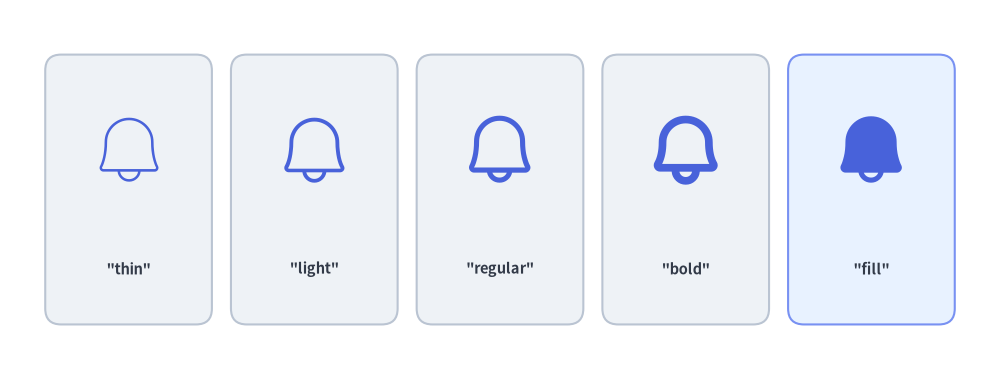
Phosphor ベクターアイコンは、style.patch(icon_style=...) またはプリセットスタイルのサフィックス(*Light -> "light"、*Bold -> "bold"、*Flat -> "fill")で制御できる 5 種類のタイポグラフィウェイトをサポートしています。
"thin": 控えめな背景透かし(ウォーターマーク)に適した極細のストローク。"light": 情報密度の高い技術スキーマに適した繊細な線幅。"regular": 一般的なダイアグラムノードに適したバランスの良い標準ストローク。"bold": 主要なゲートウェイやサービスに適した力強い太線ストローク。"fill": アクティブ状態、バッジ、アラートに適した塗りつぶしシルエット。
from drawlib.canvas import save, setup
from drawlib.icons import phosphor
from drawlib.shapes import rectangle
from drawlib.styles import Styles
from drawlib.text import text

setup(width=126, height=48)

weights = ["thin", "light", "regular", "bold", "fill"]

for i, w_name in enumerate(weights):
    cx = 16.2 + i * 23.4
    card_st = Styles.PrimaryNeutral if w_name == "fill" else Styles.Neutral
    rectangle((cx, 24), width=21, height=34, style=card_st.patch(shape_r=2))
    phosphor.bell((cx, 29), width=10, style=Styles.Primary.patch(icon_style=w_name))
    text((cx, 14), f'"{w_name}"', style=Styles.DarkBold.patch(text_size=10.5))

save()
4. セマンティックカラー・回転・不透明度
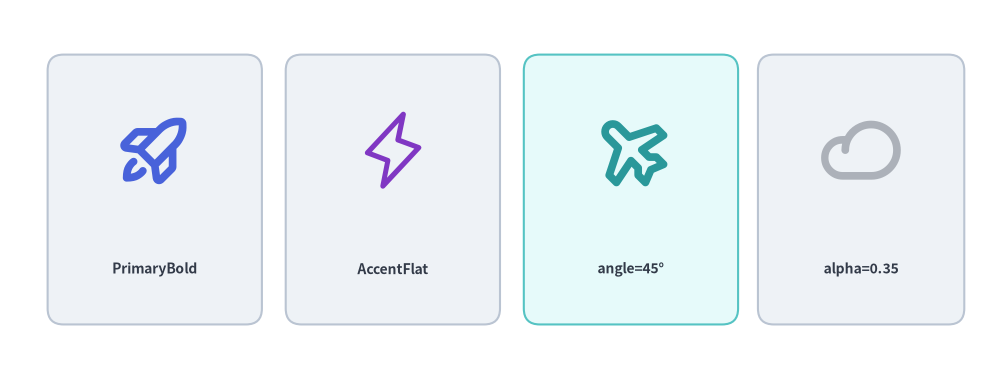
Phosphor アイコンはベクターグリフとして描画されるため、任意のプリセットテーマスタイル(Styles.PrimaryBold、Styles.SecondaryBold、Styles.DarkBold、Styles.WhiteBold)で着色したり、angle で回転させたり、alpha で半透明にしたりできます。
from drawlib.canvas import save, setup
from drawlib.icons import phosphor
from drawlib.shapes import rectangle
from drawlib.styles import Styles
from drawlib.text import text

setup(width=126, height=48)

# 1. Semantic PrimaryBold
rectangle((19.5, 24), width=27, height=34, style=Styles.Neutral.patch(shape_r=2))
phosphor.rocket_launch((19.5, 29), width=10, style=Styles.PrimaryBold)
text((19.5, 14), "PrimaryBold", style=Styles.DarkBold.patch(text_size=10.0))

# 2. Filled Accent Silhouette
rectangle((49.5, 24), width=27, height=34, style=Styles.Neutral.patch(shape_r=2))
phosphor.lightning((49.5, 29), width=10, style=Styles.AccentFlat)
text((49.5, 14), "AccentFlat", style=Styles.DarkBold.patch(text_size=10.0))

# 3. Rotated Icon (angle=45)
rectangle((79.5, 24), width=27, height=34, style=Styles.SecondaryNeutral.patch(shape_r=2))
phosphor.airplane((79.5, 29), width=10, style=Styles.SecondaryBold.patch(angle=45))
text((79.5, 14), "angle=45°", style=Styles.DarkBold.patch(text_size=10.0))

# 4. Semi-Transparent Icon (alpha=0.35)
rectangle((108.5, 24), width=26, height=34, style=Styles.Neutral.patch(shape_r=2))
phosphor.cloud((108.5, 29), width=10, style=Styles.DarkBold.patch(alpha=0.35))
text((108.5, 14), "alpha=0.35", style=Styles.DarkBold.patch(text_size=10.0))

save()
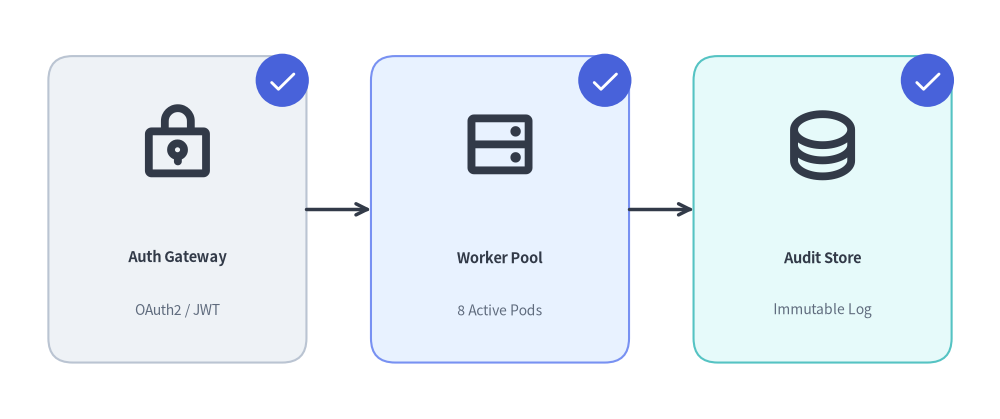
5. Phosphor アイコンと図形・バッジの組み合わせ
アーキテクチャ図やパイプライン図では、Phosphor アイコンをニュートラルなコンテナカード(rectangle)および角の円形バッジ(circle)と組み合わせて構成します。
from drawlib.canvas import save, setup
from drawlib.icons import phosphor
from drawlib.lines import line
from drawlib.shapes import circle, rectangle
from drawlib.styles import Styles
from drawlib.text import text

setup(width=124, height=52)

stages = [
    (22, "Auth Gateway", "OAuth2 / JWT", phosphor.lock_key, Styles.Neutral),
    (62, "Worker Pool", "8 Active Pods", phosphor.hard_drives, Styles.PrimaryNeutral),
    (102, "Audit Store", "Immutable Log", phosphor.database, Styles.SecondaryNeutral),
]

for cx, title, subtitle, icon_fn, card_st in stages:
    # 1. Container card
    rectangle((cx, 26), width=32, height=38, style=card_st.patch(shape_r=3))
    # 2. Main Phosphor icon
    icon_fn((cx, 34), width=10, style=Styles.DarkBold)
    # 3. Title & subtitle labels
    text((cx, 20), title, style=Styles.DarkBold.patch(text_size=10.5))
    text((cx, 13.5), subtitle, style=Styles.Muted.patch(text_size=10.0))
    # 4. Corner check badge
    bx, by = cx + 13, 42
    circle((bx, by), radius=3.3, style=Styles.PrimaryFlat)
    phosphor.check((bx, by), width=3.8, style=Styles.WhiteBold)

line((38, 26), (46, 26), arrow_head="->", style=Styles.DarkBold)
line((78, 26), (86, 26), arrow_head="->", style=Styles.DarkBold)

save()
6. カスタムアイコンフォント用の低レベル font_icon()
カスタムフォントやサードパーティ製 .ttf アイコンフォント(FontAwesome や社内アイコンフォントなど)のグリフを描画するには、drawlib.icons の font_icon() を使用します。
from drawlib.icons import font_icon
from drawlib.styles import Styles

font_icon(
    xy=(50, 25),
    width=12,
    code="\uf09b",  # Unicode glyph code point
    file="assets/fonts/fa-brands-400.ttf",  # Path to .ttf font file
    style=Styles.DarkBold,
)
7. カテゴリ別の頻出 Phosphor アイコン一覧
| カテゴリ | 代表的な phosphor.<name> 関数 |
|---|---|
| コンピューティング・システム | cpu, hard_drive, hard_drives, desktop, laptop, device_mobile, terminal_window, code, browser, globe |
| クラウド・ストレージ | cloud, cloud_arrow_up, cloud_arrow_down, cloud_check, database, folder, file_text, file_code, archive |
| ネットワーク・Git | broadcast, wifi_high, arrows_left_right, git_branch, git_commit, git_merge, git_pull_request, share_network |
| セキュリティ・ユーザー | lock, lock_key, shield, shield_check, shield_warning, key, fingerprint, user, users, user_circle |
| ステータス・分析 | check, check_circle, warning, warning_circle, info, gear, bell, magnifying_glass, chart_bar, chart_line_up |
[!TIP] Google Cloud (GCP) アイコン、Amazon Web Services (AWS) アイコン、Microsoft Azure アイコン、クラウド・オリジナルクラウドアイコン、AI・機械学習アイコン、データ・データベースアイコン、**コード・言語・フレームワークアイコンなど、全 34 アイコンモジュール(合計 4,538 アイコン)の全体像については、アイコン概要**を参照してください。