Bar Chart(棒グラフ):縦棒・横棒・集合・積み上げ
BarChart コンポーネント(drawlib.charts.bar)は、1 つ以上の系列にわたる離散カテゴリ指標を比較するための縦棒(カラム)または横棒を描画します。並列の集合棒グラフ、累積の積み上げ棒グラフ、外端角丸め(bar_r)、インライン数値ラベル、向きに応じた軸プロパティ、および分離配置型の凡例描画をサポートしています。
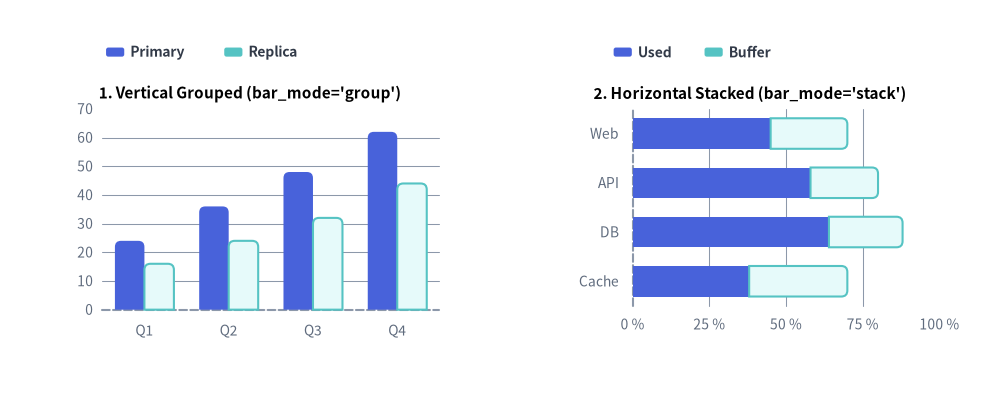
Source Code
from drawlib.canvas import save, setup
from drawlib.charts.bar import BarChart
from drawlib.styles import Styles

setup(width=132, height=52)

# Left: Vertical Grouped (orientation="vertical", bar_mode="group")
vert_chart = BarChart(
    categories=["Q1", "Q2", "Q3", "Q4"],
    axis_line_style=Styles.MutedDashed,
    axis_text_style=Styles.Muted.patch(text_size=10.0),
    grid_style=Styles.MutedThin,
    width=56.0,
    height=36.0,
    orientation="vertical",
    bar_mode="group",
    bar_r=0.8,
    title="1. Vertical Grouped (bar_mode='group')",
    title_style=Styles.BlackBold.patch(text_size=11.0),
)
vert_chart.add_series("Primary", [24.0, 36.0, 48.0, 62.0], style=Styles.PrimaryFlat)
vert_chart.add_series("Replica", [16.0, 24.0, 32.0, 44.0], style=Styles.SecondaryNeutral)
vert_chart.draw(xy=(5.0, 6.0))
vert_chart.draw_legend(xy=(14.0, 45.0), text_style=Styles.DarkBold.patch(text_size=10.0), orientation="horizontal")

# Right: Horizontal Stacked (orientation="horizontal", bar_mode="stack")
horiz_chart = BarChart(
    categories=["Web", "API", "DB", "Cache"],
    axis_line_style=Styles.MutedDashed,
    axis_text_style=Styles.Muted.patch(text_size=10.0),
    grid_style=Styles.MutedThin,
    width=56.0,
    height=36.0,
    orientation="horizontal",
    bar_mode="stack",
    bar_width_ratio=0.62,
    bar_r=0.8,
    title="2. Horizontal Stacked (bar_mode='stack')",
    title_style=Styles.BlackBold.patch(text_size=11.0),
)
horiz_chart.add_series("Used", [45.0, 58.0, 64.0, 38.0], style=Styles.PrimaryFlat)
horiz_chart.add_series("Buffer", [25.0, 22.0, 24.0, 32.0], style=Styles.SecondaryNeutral)
horiz_chart.configure_x_axis(min_value=0, max_value=100, tick_step=25, unit="%")
horiz_chart.draw(xy=(71.0, 6.0))
horiz_chart.draw_legend(xy=(81.0, 45.0), text_style=Styles.DarkBold.patch(text_size=10.0), orientation="horizontal")

save()
1. 基本概念と基本的な使い方
BarChart はデフォルトでコンテナの左下 (x, y) を基準にアンカーされ(align="center" で中央基準も可)、.add_series(...) でカテゴリデータ系列を段階的に登録します。並列クラスタ表示(bar_mode="group")、累積積み上げ表示(bar_mode="stack")、横向きトポロジ("horizontal")をシームレスに切り替えられるほか、スロット占有幅(bar_width_ratio)、外端角丸め(bar_r)、インライン数値ラベルの調整や、部分描画(draw_ratio)・系列の表示切り替え(.show)によるアニメーションにも対応しています。

- 左下アンカーと複数系列の構築(
xy,add_series,draw_legend):BarChart.draw(xy)はデフォルトでコンテナの左下角にピン留めされ(align="bottom_left")、登録された各Seriesをカテゴリごとに配置しつつ、独立したdraw_legend(...)と組み合わせられます。 - トポロジと向き(
bar_mode,orientation):bar_modeで並列クラスタの"group"と累積合計の"stack"を切り替えたり、orientation="horizontal"を指定して左 Y 軸から右方向へ棒を伸ばしたりできます(value_axisも自動的にy_axisからx_axisへ切り替わります)。 - スロット幅・先端角丸め・数値ラベル(
bar_width_ratio,bar_r,value_text_style): カテゴリスロットの占有比率(0.1〜1.0)を調整し、棒の外端 2 角のみにbar_rの角丸めを適用(積み上げ棒の内側境界はフラットに維持)し、フォーマット済みの先端ラベルを表示できます。 - 空間スイープ・表示制御・中央配置(
draw_ratio,.show,align="center"):draw_ratioによる伸長アニメーション(縦向き時はデフォルトで"bottom_to_top"、横向き時は"left_to_right"。直交方向を指定すればカテゴリ順の順次表示)、軸スケールを変えないs.show = Falseでの非表示化、align="center"によるxy中心配置に対応しています。
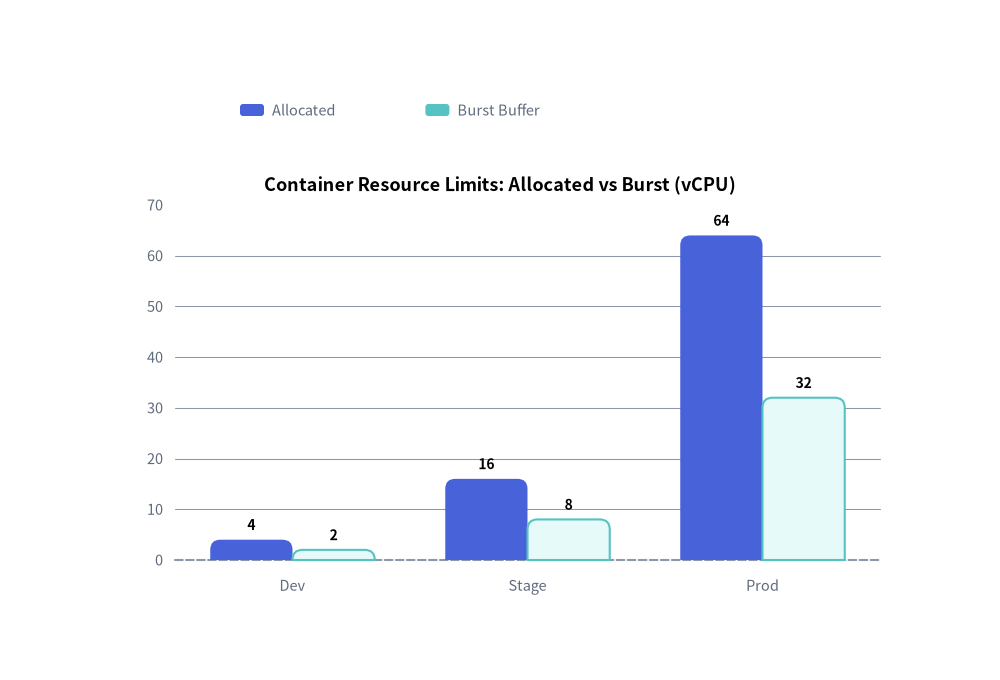
2. クイック例:縦向き集合棒グラフによるリソース割り当て
from drawlib.canvas import save, setup
from drawlib.charts.bar import BarChart
from drawlib.styles import Styles

setup(width=100, height=68)

chart = BarChart(
    categories=["Dev", "Stage", "Prod"],
    axis_line_style=Styles.MutedDashed,
    axis_text_style=Styles.Muted.patch(text_size=10.5),
    grid_style=Styles.MutedThin,
    value_text_style=Styles.BlackBold.patch(text_size=10.0),
    width=82,
    height=45,
    title="Container Resource Limits: Allocated vs Burst (vCPU)",
    title_style=Styles.BlackBold.patch(text_size=13.0),
    bar_mode="group",
    bar_r=1.0,
)
chart.add_series("Allocated", [4.0, 16.0, 64.0], style=Styles.PrimaryFlat)
chart.add_series("Burst Buffer", [2.0, 8.0, 32.0], style=Styles.SecondaryNeutral)

chart.draw(xy=(9, 7))
chart.draw_legend(xy=(24, 57), text_style=Styles.Muted.patch(text_size=10.5), orientation="horizontal")
save()
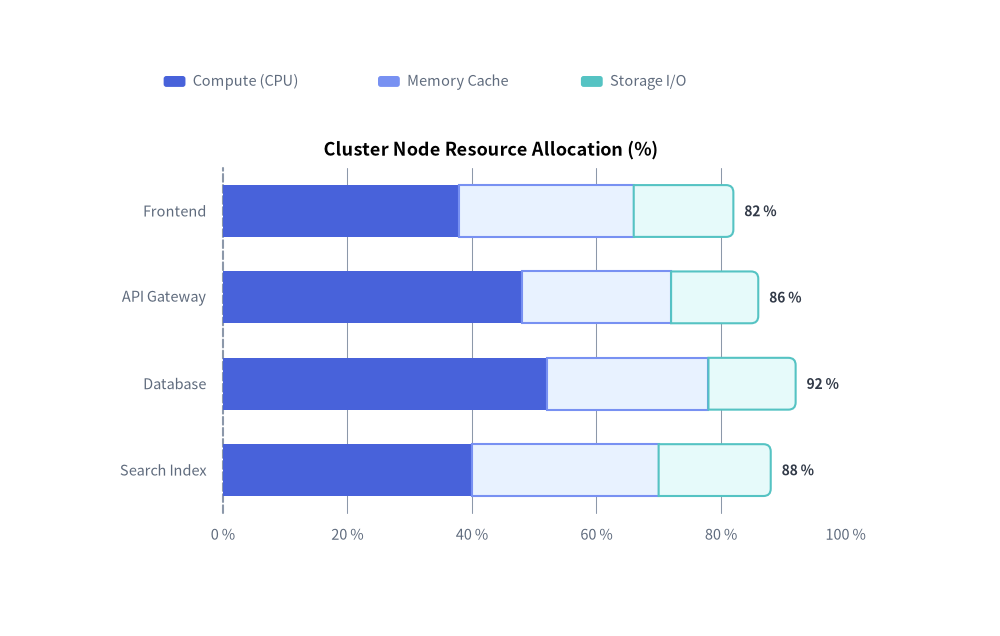
3. 横向き棒グラフとパーセンテージ軸フォーマット
orientation="horizontal" を設定すると、カテゴリ軸が左側の Y 軸に、数値軸が下側の X 軸に回転します。value_format と configure_x_axis(min_value=0, max_value=100, tick_step=20, unit="%") を組み合わせることで、すっきりとしたリソース使用率やベンチマーク内訳チャートを構築できます。
from drawlib.canvas import save, setup
from drawlib.charts.bar import BarChart
from drawlib.styles import Styles

setup(width=110, height=70)

chart = BarChart(
    axis_line_style=Styles.MutedDashed,
    categories=["Frontend", "API Gateway", "Database", "Search Index"],
    width=84.0,
    height=48.0,
    orientation="horizontal",
    bar_mode="stack",
    bar_width_ratio=0.6,
    bar_r=0.8,
    title="Cluster Node Resource Allocation (%)",
    title_style=Styles.BlackBold.patch(text_size=13.0),
    axis_text_style=Styles.Muted.patch(text_size=10.5),
    grid_style=Styles.MutedThin,
    value_text_style=Styles.DarkBold.patch(text_size=10.0),
    value_format="{:.0f}%",
)
chart.add_series("Compute (CPU)", [38.0, 48.0, 52.0, 40.0], style=Styles.PrimaryFlat)
chart.add_series("Memory Cache", [28.0, 24.0, 26.0, 30.0], style=Styles.PrimaryNeutral)
chart.add_series("Storage I/O", [16.0, 14.0, 14.0, 18.0], style=Styles.SecondaryNeutral)

chart.configure_x_axis(min_value=0, max_value=100, tick_step=20, unit="%")
chart.draw(xy=(12.0, 8.0))
chart.draw_legend(xy=(18.0, 61.0), text_style=Styles.Muted.patch(text_size=10.5), orientation="horizontal")
save()
4. API リファレンス
コンストラクタ(BarChart)
すべてのコンストラクタ引数はキーワード専用引数(*)です。
from drawlib.charts.bar import Axis, BarChart, DrawDirection, FormatterType, Mode, Orientation, Series

chart = BarChart(
    *,
    axis_line_style: Style,
    width: float = 60.0,
    height: float = 40.0,
    categories: list[str] | None = None,
    orientation: Orientation = "vertical",
    bar_mode: Mode = "group",
    bar_width_ratio: float = 0.7,
    bar_r: float = 0.0,
    axis_text_style: Style | None = None,
    grid_style: Style | None = None,
    value_text_style: Style | None = None,
    value_format: FormatterType = None,
    background_style: Style | None = None,
    title: str = "",
    title_style: Style | None = None,
)
| パラメータ | 型 | デフォルト | 説明 |
|---|---|---|---|
axis_line_style |
Style |
必須 | 座標ベースラインのストロークに用いる必須アンカースタイル。 |
width / height |
float |
60.0 / 40.0 |
キャンバス単位でのチャート全体のバウンディングボックス寸法。 |
categories |
list[str] | None |
None |
カテゴリ軸に沿った順序付きカテゴリ名リスト(例:["Q1", "Q2", "Q3"])。 |
orientation |
"vertical" | "horizontal" |
"vertical" |
棒の伸長方向(縦向き/横向き)。 |
bar_mode |
"group" | "stack" |
"group" |
複数系列の配置モード(Mode)。 |
bar_width_ratio |
float |
0.7 |
各カテゴリスロットのうち棒が占める幅の割合(0.1〜1.0)。 |
bar_r |
float |
0.0 |
棒の外端 2 角に適用される角丸半径。 |
axis_text_style |
Style | None |
None |
目盛りラベルおよびカテゴリ名のスタイル。None の場合は省略されます。 |
grid_style |
Style | None |
None |
背景の数値グリッド線のスタイル。None の場合は省略されます。 |
value_text_style |
Style | None |
None |
棒の先端外側に描画される数値ラベルのスタイル。None の場合は省略されます。 |
value_format |
FormatterType |
None |
数値ラベル用のフォーマット文字列(例:"{:.1f}%")または関数 Callable[[float], str]。 |
background_style |
Style | None |
None |
チャート外枠の背景カードのスタイル。None の場合は省略されます。 |
title |
str |
"" |
コンテナ上部に描画されるチャートタイトル文字列。 |
title_style |
Style | None |
None |
title のタイポグラフィスタイル。タイトルを描画するには必須です。 |
メソッドとプロパティ
add_series(name: str, values: list[float], style: Style, legend_text_style: Style | None = None, *, show: bool = True, draw_ratio: float = 1.0, draw_direction: DrawDirection | None = None) -> Series: データ系列を登録し、変更可能なSeriesインスタンスを返します。draw_directionがNoneの場合、縦向きチャートでは"bottom_to_top"、横向きチャートでは"left_to_right"がデフォルトになります。configure_y_axis(...) -> Axis/configure_x_axis(...) -> Axis: 軸スケール("linear"または"log")、上下限(min_value、max_value)、目盛り(ticks、tick_step)、フォーマット(format、unit)、およびタイトル(label)を設定します。詳細は 軸・スケール・凡例 を参照してください。get_size() -> tuple[float, float]: チャートコンテナの(width, height)を返します。draw(xy: tuple[float, float] = (0.0, 0.0), *, width: float | None = None, height: float | None = None, scale: float = 1.0) -> None: 左下角xyを基準としてチャートを描画します。呼び出し単位での一時的な寸法上書きや一様な比例スケーリングscaleにも対応しています。draw_legend(xy: tuple[float, float], text_style: Style, orientation: Orientation = "vertical", swatch_width: float = 2.4, swatch_height: float = 1.2, item_gap: float = 4.0, *, scale: float = 1.0) -> None: 分離配置された系列凡例をxyに描画します。- プロパティ:
chart.series -> list[Series]: 登録済みSeriesオブジェクトのコピーを返します。chart.value_axis -> Axis: アクティブな数値軸(縦向き時はy_axis、横向き時はx_axis)を返します。chart.category_axis -> Axis: アクティブなカテゴリ軸(縦向き時はx_axis、横向き時はy_axis)を返します。chart.x_axis -> Axis/chart.y_axis -> Axis: 水平軸・垂直軸のAxisインスタンスへの直接アクセスを提供します。