カタログプロジェクトガイド (drawlib init project catalog)
catalog スターターテンプレートは、API/SDK リファレンス、CLI/設定パラメータ辞書、DB/イベントスキーマ台帳、マイクロサービス一覧、Lint/ポリシールール集、エラーコード&ランブックなど、定型アイテムを横断検索する 2 カラム構成の図解付きカタログ&リファレンスサイト(1 Markdown = 1 HTML ページ)を構築します。各ファイルの # H1 が左ペインのカテゴリ見出し、## H2 がセマンティックバッジ& / クイックフィルタ付きのアイテム一覧として自動抽出されます。
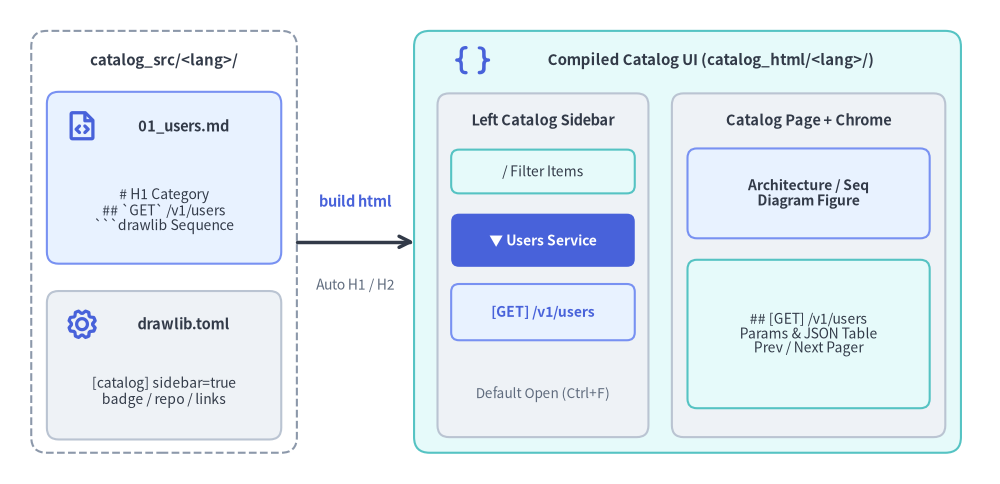
Source Code
from drawlib.canvas import save, setup
from drawlib.icons import phosphor
from drawlib.lines import line
from drawlib.shapes import rectangle
from drawlib.styles import Styles
from drawlib.text import text

setup(width=128, height=62)

# Left: Source directory container (No navbar.md needed)
rectangle((21, 31), width=34, height=54, style=Styles.MutedDashed.patch(shape_r=2.0))
text((21, 54.2), "catalog_src/<lang>/", style=Styles.DarkBold.patch(text_size=10.8))

rectangle((21, 39.2), width=30, height=22, style=Styles.PrimaryNeutral.patch(shape_r=1.5))
phosphor.file_code((10.5, 45.8), width=4.4, style=Styles.PrimaryBold)
text((23.5, 45.8), "01_users.md", style=Styles.DarkBold.patch(text_size=10.5))
text((21, 35.0), "# H1 Category\n## `GET` /v1/users\n```drawlib Sequence", style=Styles.Dark.patch(text_size=10.0))

rectangle((21, 15.2), width=30, height=19, style=Styles.Neutral.patch(shape_r=1.5))
phosphor.gear((10.5, 20.5), width=4.4, style=Styles.PrimaryBold)
text((23.5, 20.5), "drawlib.toml", style=Styles.DarkBold.patch(text_size=10.5))
text((21, 11.8), "[catalog] sidebar=true\nbadge / repo / links", style=Styles.Dark.patch(text_size=10.0))

# Middle: Compiler step
line((38, 31), (53, 31), arrow_head="->", style=Styles.DarkBold)
text((45.5, 36.2), "build html", style=Styles.PrimaryBold.patch(text_size=10.5))
text((45.5, 25.5), "Auto H1 / H2", style=Styles.Muted.patch(text_size=10.0))

# Right: Compiled Two-Column Catalog UI (catalog_html/<lang>/)
rectangle((88, 31), width=70, height=54, style=Styles.SecondaryNeutral.patch(shape_r=2.0))
phosphor.brackets_curly((60.5, 54.2), width=4.6, style=Styles.PrimaryBold)
text((91.0, 54.2), "Compiled Catalog UI (catalog_html/<lang>/)", style=Styles.DarkBold.patch(text_size=10.8))

# Left Sticky Sidebar (Single divider + Default Open <details>)
rectangle((69.5, 28.0), width=27, height=44, style=Styles.Neutral.patch(shape_r=1.5))
text((69.5, 46.5), "Left Catalog Sidebar", style=Styles.DarkBold.patch(text_size=10.5))
rectangle(
    (69.5, 40.0),
    width=23.5,
    height=5.6,
    style=Styles.SecondaryNeutral.patch(shape_r=1.0),
    text="/ Filter Items",
    text_style=Styles.Dark.patch(text_size=10.0),
)
rectangle(
    (69.5, 31.2),
    width=23.5,
    height=6.8,
    style=Styles.PrimaryFlat.patch(shape_r=1.0),
    text="▼ Users Service",
    text_style=Styles.WhiteBold.patch(text_size=10.0),
)
rectangle(
    (69.5, 22.0),
    width=23.5,
    height=7.2,
    style=Styles.PrimaryNeutral.patch(shape_r=1.0),
    text="[GET] /v1/users",
    text_style=Styles.PrimaryBold.patch(text_size=10.0),
)
text((69.5, 11.5), "Default Open (Ctrl+F)", style=Styles.Muted.patch(text_size=9.8))

# Right Main Content Pane
rectangle((103.5, 28.0), width=35, height=44, style=Styles.Neutral.patch(shape_r=1.5))
text((103.5, 46.5), "Catalog Page + Chrome", style=Styles.DarkBold.patch(text_size=10.5))
rectangle(
    (103.5, 37.2),
    width=31,
    height=11.5,
    style=Styles.PrimaryNeutral.patch(shape_r=1.2),
    text="Architecture / Seq\nDiagram Figure",
    text_style=Styles.DarkBold.patch(text_size=10.0),
)
rectangle(
    (103.5, 19.2),
    width=31,
    height=19.0,
    style=Styles.SecondaryNeutral.patch(shape_r=1.2),
    text="## [GET] /v1/users\nParams & JSON Table\nPrev / Next Pager",
    text_style=Styles.Dark.patch(text_size=10.0),
)

save()
1. site と catalog の使い分け(主なユースケース)
概念ガイドやチュートリアル中心のドキュメントサイト(site)の navbar.md に、数百個の SDK 関数・REST エンドポイント・CLI フラグ・DB テーブル・マイクロサービス・エラーコードを混在させると、左サイドバーが肥大化してどちらも探しにくくなります。catalog プロジェクトを使うと、Drawlib の図解埋め込み機能をそのまま活かしながら、辞書・台帳・リファレンス専用の検索性に優れたサイトを分離構築できます。
| 機能・特性 | site プロジェクト (docs_src/) |
catalog プロジェクト (catalog_src/) |
|---|---|---|
| 主な用途 | 概念ガイド、チュートリアル、オンボーディング、設計ポータル | 構造化されたアイテムカタログ、技術リファレンス、運用辞書・台帳 |
| サイドバー定義 | <lang>/navbar.md を手動で編集・管理 |
navbar.md 不要 — 各 .md の # H1 と ## H2 から自動抽出 |
| 左ペインの階層 | ## セクション 配下のページリンク一覧 |
# H1 単位の開閉 <details> カテゴリ + ## H2 の #slug アイテム一覧 |
| セマンティックバッジ | 通常の見出しテキスト | 先頭インラインコードに応じた色分けバッジ(def, GET, cmd, service, table, rule, error 等) |
| 画面検索・絞り込み | ページ単位のナビゲーション | デフォルト全展開(ブラウザの Ctrl+F 検索に対応)+ / キー即時フィルタ |
代表的な活用シナリオ:
- API & SDK リファレンス: Python / TypeScript / Go のモジュール索引、REST / GraphQL / gRPC エンドポイント仕様、シーケンス図。
- CLI・設定・フラグ辞書: サブコマンド(
cmd)、環境変数(env)、フィーチャーフラグ(flag)、TOML/YAML 設定キー(config)。 - データ・イベント・スキーマカタログ: RDB/BigQuery テーブル定義(
table)、ビュー(view)、イベントスキーマ(event)と ER 図。 - マイクロサービス・基盤台帳: 社内開発者ポータル向けのサービス一覧(
service)、バッチ/パイプライン(pipeline)、依存構成図・SLO。 - Lint ルール・セキュリティポリシー・ADR 集: 静的解析ルール(
rule)、ポリシー検査項目(policy)、設計意思決定記録(adr)。 - エラーコード辞書・SRE ランブック: エラーコード(
error)、アラート対応手順書(alert)、復旧判断フローチャート。 - デザインシステム・アセットカタログ: カラー/スタイルトークン(
token,style)、UI コンポーネント(component)、アイコン・テンプレート集(icon,asset)。
2. スキャフォールディングとディレクトリ構成
drawlib init project catalog で単一言語または複数言語のカタログプロジェクトを初期化できます。
# デフォルトの英語カタログプロジェクトを作成 (catalog_src/en/):
uv run drawlib init project catalog

# カスタム名 (例: api_src/{en,ja}/ や services_src/{en,ja}/) + Google テーマで作成:
uv run drawlib init project catalog api -l en,ja -s google

# HTML・GitHub Markdown・抽出画像を一括ビルド:
./catalog_src/build.sh

# 全ページ・全アンカーリンクの整合性をヘッドレス検証:
uv run drawlib serve catalog_html/ --check
生成されるディレクトリ構成は以下の通りです。
catalog_src/
├── drawlib.toml            # プロジェクトマニフェスト (type = "catalog", [i18n], [catalog], 任意の [seo])
├── styles.py               # 図解全体のカラーパレット・フォント設定
├── utils.py                # 再利用可能な Python 描画ヘルパー関数
├── style.css               # 2 カラム カタログ専用スタイルシート (Light/Dark 対応)
├── template.html           # Jinja2 カタログレイアウト (フィルタ、スクロール追従、ヘッダーリンク、ページャ)
├── _assets/                # ロゴ・favicon.png 等の静的アセット (catalog_html/_assets/ へ自動コピー)
├── en/                     # ロケール別 Markdown ページ (00_, 01_, 02_ の自然順ソート)
│   ├── 00_overview.md      # 全体トポロジ構成図 (ArchitectureDiagram) と共通規約
│   ├── 01_users.md         # エンドポイント/サービス項目 (`GET`/`POST`/`DELETE`) と SequenceDiagram
│   └── 02_models.md        # スキーマ・クラス・設定項目 (`class`/`def`) と ERDiagram
├── build.sh                # マスタービルドスクリプト (HTML + Markdown + Images)
├── build_html.sh           # HTML 高速ビルド -> catalog_html/
├── build_markdown.sh       # GitHub Flavored Markdown 出力 -> catalog_markdown/
├── build_image.sh          # 図解 PNG 単体抽出 -> catalog_images/
└── serve.sh                # ローカルプレビュー HTTP サーバー
補足:
siteと同様、マルチページ型のcatalogプロジェクトはhtml・markdown・imageターゲットに出力します(drawlib build pdfおよびdrawlib build docxはリニア構成のdoc/slideプロジェクト向けです)。
3. 見出しマッピングとセマンティックバッジ (# H1 / ## H2)
catalog_src/<lang>/ 配下の各 Markdown ファイルは 1:1 で HTML ページへ変換され、見出し階層から左ペインのナビゲーションツリーが自動構築されます。
# H1(カテゴリ/ドメイン見出し): 左サイドバーの<details class="catalog-nav-group">見出しおよびページ本文の<h1 class="catalog-page-title">になります。# drawlib.shapesや# billing.v1のようなドット区切りの識別子は自動的に等幅フォントで表示されます。## H2(カタログアイテム/シンボル一覧):## H2の先頭にインラインコード`BADGE`を記述すると、左サイドバーと本文見出しの両方に色分けされたセマンティックバッジが付与され、決定論的な#slugパーマリンクが生成されます。### H3/#### H4(詳細サブセクション): 左サイドバーを肥大化させないよう左ペインには表示せず、本文内のid="..."アンカーのみを自動付与します。
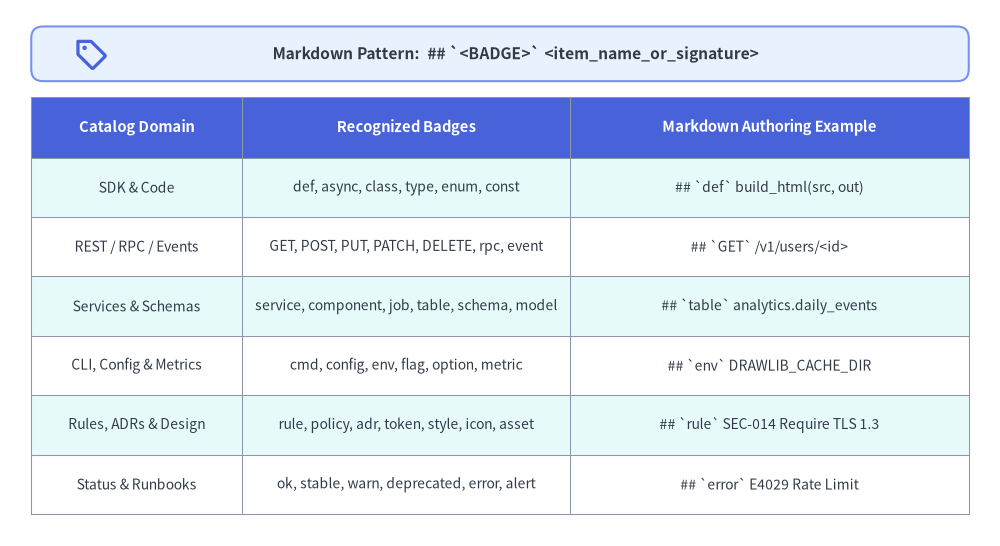
Source Code
from drawlib.canvas import save, setup
from drawlib.icons import phosphor
from drawlib.shapes import rectangle
from drawlib.smartarts import Table
from drawlib.styles import Colors, Styles
from drawlib.text import text

setup(width=128, height=70)

rectangle((64, 63.0), width=120, height=7.0, style=Styles.PrimaryNeutral.patch(shape_r=1.5))
phosphor.tag((11.5, 63.0), width=4.4, style=Styles.PrimaryBold)
text(
    (66.0, 63.0),
    "Markdown Pattern:  ## `<BADGE>` <item_name_or_signature>",
    style=Styles.DarkBold.patch(text_size=11.2),
)

tbl = Table(
    cell_style=Styles.White,
    text_style=Styles.Dark.patch(text_size=10.0),
    header_cell_style=Styles.PrimaryFlat,
    header_text_style=Styles.WhiteBold.patch(text_size=10.6),
    border_style=Styles.MutedThin,
    has_header=True,
)
tbl.set_style_cell_evenodd(
    even_color=Colors.White,
    even_text_style=Styles.Dark.patch(text_size=10.0),
    odd_color=Styles.SecondaryNeutral.shape_fill_color or Colors.White,
    odd_text_style=Styles.Dark.patch(text_size=10.0),
)
tbl.set_style_cell_header(
    background_color=Styles.PrimaryFlat.shape_fill_color or Colors.Primary,
    text_style=Styles.WhiteBold.patch(text_size=10.6),
)
tbl.draw_flexible(
    xy=(4, 57.5),
    column_widths=[27.0, 42.0, 51.0],
    row_heights=[7.8, 7.6, 7.6, 7.6, 7.6, 7.6, 7.6],
    data=[
        ["Catalog Domain", "Recognized Badges", "Markdown Authoring Example"],
        ["SDK & Code", "def, async, class, type, enum, const", "## `def` build_html(src, out)"],
        ["REST / RPC / Events", "GET, POST, PUT, PATCH, DELETE, rpc, event", "## `GET` /v1/users/<id>"],
        ["Services & Schemas", "service, component, job, table, schema, model", "## `table` analytics.daily_events"],
        ["CLI, Config & Metrics", "cmd, config, env, flag, option, metric", "## `env` DRAWLIB_CACHE_DIR"],
        ["Rules, ADRs & Design", "rule, policy, adr, token, style, icon, asset", "## `rule` SEC-014 Require TLS 1.3"],
        ["Status & Runbooks", "ok, stable, warn, deprecated, error, alert", "## `error` E4029 Rate Limit"],
    ],
)

save()
Markdown 記述例 (01_users.md):
# Users Service

HTTPS 経由でワークスペースのユーザーアカウントを作成・取得・失効します。

```drawlib align=center code=fold file=users_provisioning_sequence.png caption="POST /v1/users アカウント作成シーケンス"
from drawlib.canvas import save, setup
from drawlib.diagrams.sequence import Participant, PhosphorIcon, SequenceDiagram
from drawlib.styles import Styles

setup(width=120, height=62)
sd = SequenceDiagram(
    node_style=Styles.Dark,
    node_text_style=Styles.DarkBold.patch(text_size=10.5),
    edge_style=Styles.Dark.patch(line_width=1.4),
    edge_text_style=Styles.Dark.patch(text_size=10.0),
    node_card_style=Styles.Neutral,
    col_width=34.0,
    step_y=7.5,
)
client = sd.add(Participant("SDK Client", icon=PhosphorIcon.LAPTOP, width=22, card_style=Styles.PrimaryNeutral))
api = sd.add(
    Participant(
        "Users API",
        icon=PhosphorIcon.SHIELD_CHECK,
        width=22,
        style=Styles.White,
        text_style=Styles.WhiteBold.patch(text_size=10.5),
        card_style=Styles.PrimaryFlat,
    )
)
db = sd.add(Participant("PostgreSQL", icon=PhosphorIcon.DATABASE, width=22, card_style=Styles.Neutral))
client.request(api, "POST /v1/users")
api.request(db, "INSERT INTO users")
db.reply(api, "201 Created")
api.reply(client, "User JSON")
sd.draw(xy=(60, 31), align="center")
save()
```

## `GET` /v1/users/<id>

一意の識別子 `<id>` を指定して単一ユーザーのプロファイルを取得します。

| パラメータ | 位置 | 型 | 説明 |
| :--- | :--- | :--- | :--- |
| `id` | `path` | `string` | 一意のユーザー ID(`usr_...`)。 |

## `POST` /v1/users

新規ユーザーアカウントを作成し、招待トークンを送信します。
山括弧プレースホルダの保護 (
<id>,<T>):/v1/users/<id>のようなパスパラメータやResult<T>のようなジェネリクス型表記は、HTML タグとして消去されることなく、左サイドバーと<h2>見出しの両方で安全にエスケープ表示されます。
4. drawlib.toml の [catalog] 設定リファレンス
template.html を直接編集することなく、catalog_src/drawlib.toml の [catalog] セクションから左ペインの初期展開状態・パンくずルート名・バージョンバッジ・リポジトリリンク・右上ヘッダーリンクを制御できます。
[project]
name = "platform_catalog"
type = "catalog"
title = "Platform Catalog"
description = "Internal services, REST APIs, event schemas, and SRE runbooks."
style = "google"

[i18n]
default_lang = "en"
langs = ["en", "ja"]

[catalog]
# ブラウザの画面検索 (Ctrl+F / Cmd+F) で全アイテムに即ジャンプできるようデフォルト展開:
sidebar_expanded = true

# 上部バーのルートパンくずラベル(省略時は「Catalog」/「カタログ」):
breadcrumb_root = { en = "Platform Catalog", ja = "基盤カタログ" }

# 左ペイン上部に表示する任意のバージョン/ステータスバッジ(単一文字列または言語別テーブル):
badge_text = { en = "v2.4 · Production", ja = "v2.4 · 本番稼働" }
badge_url = "00_overview.html"

# 左ペイン上部に表示する任意の GitHub / GitLab リポジトリアイコンリンク (http:// または https://):
repo_url = "https://github.com/example/platform-catalog"

# 右上ヘッダーバーに表示する任意のナビゲーションリンク(単一文字列または言語別ラベル):
header_links = [
    { label = { en = "Architecture Guide", ja = "設計ガイド" }, url = "https://docs.example.com" },
    { label = "Data Schemas", url = "02_models.html" },
]
[catalog] 設定キー一覧:
| キー | 型 | 既定値 | 動作 |
|---|---|---|---|
sidebar_expanded |
bool |
true |
true(既定値・未定義時のフォールバック)の場合、すべてのカテゴリ <details> を最初から開いた状態で出力し、ブラウザ標準のページ内検索(Ctrl+F / Cmd+F)で全ページのアイテム名をそのままヒットさせます。false に設定すると、閲覧中ページのカテゴリのみを開き、他カテゴリを折りたたんで出力します。 |
breadcrumb_root |
str | dict[lang, str] |
"Catalog"(言語別) |
上部トップバーのルートパンくず名(例: "API Reference"、"Service Catalog"、"エラー辞書")を上書きします。 |
badge_text |
str | dict[lang, str] |
None |
ブランドタイトル直下のサブバーにバージョン/ステータスピルを表示します。badge_text と repo_url の両方を省略した場合、サブバー自体が非表示となり、タイトル下の横線が二重にならない単一区切り線レイアウトを維持します。 |
badge_url |
str |
None |
バージョンピルをクリックした際のリンク先(http(s):// またはロケール相対パス)。 |
repo_url |
str |
None |
サブバー右端に表示するソースリポジトリの http:// または https:// URL。 |
header_links |
list[{label, url}] |
[] |
右上トップバーに言語スイッチャーと並べて表示するリンク配列(外部 http(s):// リンクは別タブ+↗ アイコン付きで開き、相対リンクはサブディレクトリ階層に応じて自動補正されます)。 |