Custom Font Files (FontFile)
While Drawlib ships with 13 curated cross-platform font families (Font, FontRoboto, FontJapanese, etc.), organizations and design teams frequently need to render diagrams using corporate brand typefaces, display fonts, or local .ttf / .otf assets. FontFile lets you load any TrueType or OpenType font file directly from your project's _assets/ directory and apply it to individual labels, shapes, or your entire project theme.
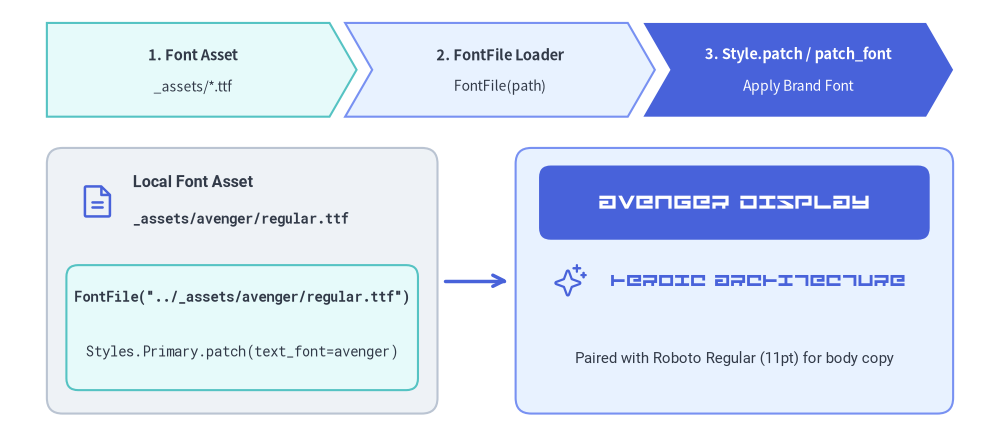
Source Code
from drawlib.canvas import save, setup
from drawlib.fonts import FontFile, FontMonoSpace, FontRoboto
from drawlib.icons import phosphor
from drawlib.lines import line
from drawlib.shapes import rectangle
from drawlib.smartarts import ChevronProcess
from drawlib.styles import Styles
from drawlib.text import text

setup(width=128, height=56)

avenger = FontFile("../_assets/avenger/regular.ttf")

# Top pipeline banner using ChevronProcess
pipeline = ChevronProcess(
    style=Styles.SecondaryNeutral,
    text_style=Styles.DarkBold.patch(text_size=10.5),
    description_style=Styles.Dark.patch(text_size=10.0),
    corner_angle=60.0,
    spacing=2.0,
    flat_left_end=True,
)
pipeline.add("1. Font Asset", description="_assets/*.ttf")
pipeline.add("2. FontFile Loader", description="FontFile(path)", style=Styles.PrimaryNeutral)
pipeline.add(
    "3. Style.patch / patch_font",
    description="Apply Brand Font",
    style=Styles.PrimaryFlat,
    text_style=Styles.WhiteBold.patch(text_size=10.5),
    description_style=Styles.White.patch(text_size=10.0),
)
pipeline.draw(xy=(6.0, 41.0), width=116.0, height=12.0)

# Left Card: Local Font File Asset & Code
rectangle((31, 20.0), width=50, height=34, style=Styles.Neutral.patch(shape_r=2.0))
phosphor.file_text((12.5, 30.2), width=5.0, style=Styles.Primary)
text(
    (17.0, 32.5),
    "Local Font Asset",
    style=Styles.DarkBold.patch(text_font=FontRoboto.ROBOTO_BOLD, text_size=11.5, halign="left"),
)
text(
    (17.0, 28.0),
    "_assets/avenger/regular.ttf",
    style=Styles.Dark.patch(text_font=FontMonoSpace.ROBOTO_MONO_BOLD, text_size=10.0, halign="left"),
)

rectangle((31, 14.0), width=45, height=16.0, style=Styles.SecondaryNeutral.patch(shape_r=1.5))
text(
    (31, 18.0),
    'FontFile("../_assets/avenger/regular.ttf")',
    style=Styles.Dark.patch(text_font=FontMonoSpace.ROBOTO_MONO_BOLD, text_size=10.0),
)
text(
    (31, 11.0),
    "Styles.Primary.patch(text_font=avenger)",
    style=Styles.Dark.patch(text_font=FontMonoSpace.ROBOTO_MONO_REGULAR, text_size=10.0),
)

# Connector arrow
line((57, 20.0), (65, 20.0), arrow_head="->", style=Styles.PrimaryBold)

# Right Card: Live Avenger Font Specimen (Hero Showcase)
rectangle((94, 20.0), width=56, height=34, style=Styles.PrimaryNeutral.patch(shape_r=2.0))
rectangle(
    (94, 30.0),
    width=50,
    height=9.5,
    style=Styles.PrimaryFlat.patch(shape_r=1.5),
    text="AVENGER DISPLAY",
    text_style=Styles.White.patch(text_font=avenger, text_size=15.0),
)
phosphor.sparkle((73.0, 20.0), width=4.5, style=Styles.Primary)
text(
    (97, 20.0),
    "HEROIC ARCHITECTURE",
    style=Styles.Primary.patch(text_font=avenger, text_size=13.0),
)
text(
    (94, 10.0),
    "Paired with Roboto Regular (11pt) for body copy",
    style=Styles.Dark.patch(text_font=FontRoboto.ROBOTO_REGULAR, text_size=10.5),
)

save()
1. FontFile API & Path Resolution
Import FontFile from drawlib.fonts and pass the path to your font file:
from drawlib.fonts import FontFile

avenger_font = FontFile("../_assets/avenger/regular.ttf")
| Parameter | Type | Required | Description |
|---|---|---|---|
file |
str | Path |
Yes | Path to a local .ttf, .otf, .woff, or .woff2 font file. Validated immediately on construction (FileNotFoundError is raised if the file does not exist). |
How Relative Paths Are Resolved
When you pass a relative path to FontFile(file=...), Drawlib resolves it automatically:
- Relative to the calling
.pyscript or.mdfile directory: For example, insidedocs_src/02_drawing_primitives/font_file.md,"../_assets/avenger/regular.ttf"points todocs_src/_assets/avenger/regular.ttf. - Automatic parent directory search: If the relative path is not found in the immediate directory of the Markdown/Python file, Drawlib walks up to 3 parent directories to locate project-root assets. This means
FontFile("_assets/avenger/regular.ttf")andFontFile("../_assets/avenger/regular.ttf")both work seamlessly from chapter subdirectories.
2. Applying FontFile to Text and Shapes
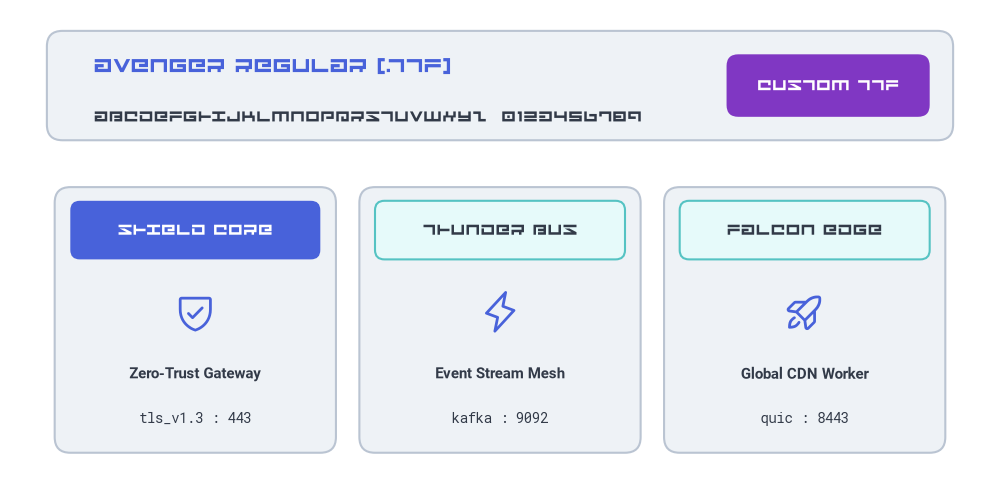
Pass a FontFile instance to style.patch(text_font=...) on any text() call, geometric shape (rectangle, circle, etc.), or badge.
The example below loads _assets/avenger/regular.ttf and pairs it as a display typeface alongside FontRoboto and FontMonoSpace:
from drawlib.canvas import save, setup
from drawlib.fonts import FontFile, FontMonoSpace, FontRoboto
from drawlib.icons import phosphor
from drawlib.shapes import rectangle
from drawlib.styles import Styles
from drawlib.text import text

setup(width=128, height=62)

# Load custom TrueType font from _assets/avenger/regular.ttf
avenger = FontFile("../_assets/avenger/regular.ttf")

# 1. Top Display Specimen Banner
rectangle((64, 51), width=116, height=14, style=Styles.Neutral.patch(shape_r=2.0))
text(
    (12, 53.5),
    "AVENGER REGULAR (.TTF)",
    style=Styles.Primary.patch(text_font=avenger, text_size=15.0, halign="left"),
)
text(
    (12, 47.0),
    "ABCDEFGHIJKLMNOPQRSTUVWXYZ  0123456789",
    style=Styles.Dark.patch(text_font=avenger, text_size=11.5, halign="left"),
)
rectangle(
    (106, 51),
    width=26,
    height=8,
    style=Styles.AccentFlat.patch(shape_r=1.5),
    text="CUSTOM TTF",
    text_style=Styles.White.patch(text_font=avenger, text_size=11.5),
)

# 2. Three Feature Cards Mixing Custom Display Headers with Clean Body Copy
cards = [
    (25, Styles.PrimaryFlat, Styles.White, phosphor.shield_check, "SHIELD CORE", "Zero-Trust Gateway", "tls_v1.3 : 443"),
    (64, Styles.SecondaryNeutral, Styles.Dark, phosphor.lightning, "THUNDER BUS", "Event Stream Mesh", "kafka : 9092"),
    (103, Styles.SecondaryNeutral, Styles.Dark, phosphor.rocket_launch, "FALCON EDGE", "Global CDN Worker", "quic : 8443"),
]

for cx, hdr_style, hdr_text_style, icon_fn, banner_label, subtitle, endpoint in cards:
    # Outer neutral card
    rectangle((cx, 21), width=36, height=34, style=Styles.Neutral.patch(shape_r=2.0))
    # Header bar rendered with custom Avenger font
    rectangle(
        (cx, 32.5),
        width=32,
        height=7.5,
        style=hdr_style.patch(shape_r=1.2),
        text=banner_label,
        text_style=hdr_text_style.patch(text_font=avenger, text_size=11.5),
    )
    # Icon + standard Roboto & Monospace metadata
    icon_fn((cx, 22.0), width=5.5, style=Styles.Primary)
    text((cx, 14.0), subtitle, style=Styles.DarkBold.patch(text_font=FontRoboto.ROBOTO_BOLD, text_size=10.5))
    text((cx, 8.5), endpoint, style=Styles.Dark.patch(text_font=FontMonoSpace.ROBOTO_MONO_REGULAR, text_size=10.0))

save()
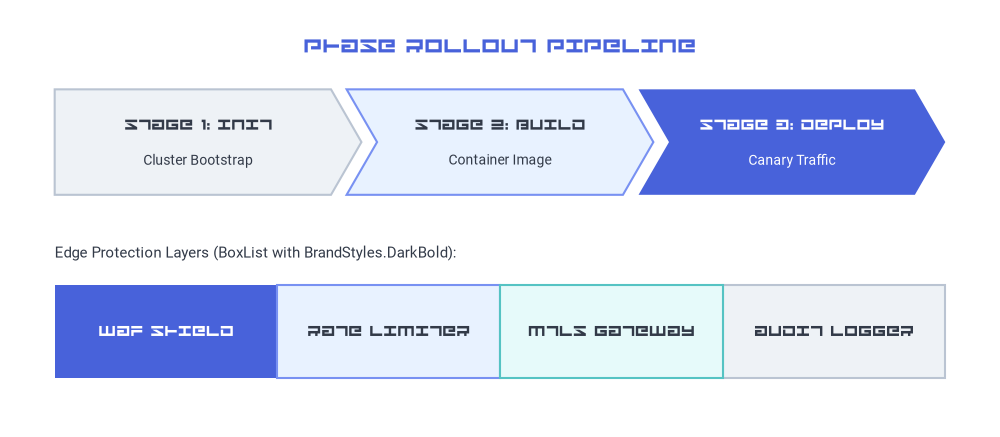
3. Project-Wide Custom Fonts with Styles.patch_font()
Instead of patching text_font on every shape, call Styles.patch_font() to create a custom Styles catalog that applies your FontFile across high-level components such as SmartArts, Diagrams, and Shapes.
- Display Headers + Standard Body: Pass
bold=avengerwhile keepingregular=FontRoboto.ROBOTO_REGULARso component titles (*Boldstyles) render in your custom display typeface while descriptions remain clean and readable. - Full Custom Brand Family: Pass
regular=FontFile("..."), bold=FontFile("..."), thin=FontFile("...")instyles.pyto switch every preset style token across the entire project.
from drawlib.canvas import save, setup
from drawlib.fonts import FontFile, FontRoboto
from drawlib.smartarts import BoxList, ChevronProcess
from drawlib.styles import Styles
from drawlib.text import text

setup(width=128, height=56)

avenger = FontFile("../_assets/avenger/regular.ttf")

# Create a themed Styles catalog where Bold tokens use Avenger and Regular tokens use Roboto
BrandStyles = Styles.patch_font(
    regular=FontRoboto.ROBOTO_REGULAR,
    bold=avenger,
)

text(
    (64, 50.0),
    "PHASE ROLLOUT PIPELINE",
    style=BrandStyles.PrimaryBold.patch(text_size=15.0),
)

# 1. ChevronProcess using BrandStyles.DarkBold (Avenger) for stage headers and Roboto for descriptions
proc = ChevronProcess(
    style=BrandStyles.Neutral,
    text_style=BrandStyles.DarkBold.patch(text_size=11.0),
    description_style=BrandStyles.Dark.patch(text_size=10.0),
    corner_angle=60.0,
    spacing=2.0,
    flat_left_end=True,
)
proc.add("STAGE 1: INIT", description="Cluster Bootstrap")
proc.add("STAGE 2: BUILD", description="Container Image", style=BrandStyles.PrimaryNeutral)
proc.add(
    "STAGE 3: DEPLOY",
    description="Canary Traffic",
    style=BrandStyles.PrimaryFlat,
    text_style=BrandStyles.WhiteBold.patch(text_size=11.0),
    description_style=BrandStyles.White.patch(text_size=10.0),
)
proc.draw(xy=(7.0, 31.0), width=114.0, height=13.5)

# 2. Contiguous BoxList using BrandStyles
text(
    (7.0, 23.5),
    "Edge Protection Layers (BoxList with BrandStyles.DarkBold):",
    style=BrandStyles.Dark.patch(text_size=10.5, halign="left"),
)
boxes = BoxList(
    style=BrandStyles.Neutral,
    text_style=BrandStyles.DarkBold.patch(text_size=11.0),
)
boxes.add("WAF SHIELD", style=BrandStyles.PrimaryFlat, text_style=BrandStyles.WhiteBold.patch(text_size=11.0))
boxes.add("RATE LIMITER", style=BrandStyles.PrimaryNeutral)
boxes.add("MTLS GATEWAY", style=BrandStyles.SecondaryNeutral)
boxes.add("AUDIT LOGGER", style=BrandStyles.Neutral)
boxes.draw(xy=(7.0, 7.5), box_width=28.5, box_height=12.0, align="bottom_left")

save()
Configuring styles.py for an Entire Project
To apply corporate font files to every diagram in a doc, site, slide, or images project without repeating FontFile imports in each file, place your font files in _assets/fonts/ and update styles.py:
# styles.py
from drawlib.fonts import FontFile, FontSourceCode
from drawlib.styles import Styles

Styles = Styles.patch_font(
    regular=FontFile("_assets/avenger/regular.ttf"),
    bold=FontFile("_assets/avenger/regular.ttf"),
    thin=FontFile("_assets/avenger/regular.ttf"),
    sourcecode=FontSourceCode.SOURCECODEPRO,
)
4. Asset Organization & Build Caching
- Store Fonts Under
_assets/: Keep custom.ttf/.otffiles inside your project's_assets/directory (for example,docs_src/_assets/avenger/regular.ttf). Duringdrawlib build htmlanddrawlib build markdown,_assets/is automatically copied to the output directory. - Incremental Cache Tracking (
.drawlib/cache.db): Drawlib's build cache hashes local files referenced under_assets/. If you replace or update_assets/avenger/regular.ttf,drawlib builddetects the file checksum change and re-renders affected diagrams automatically. - See Also:
- Fonts & Multilingual Catalog — Built-in
Font,FontRoboto,FontJapanese, and 10+ regional font classes. - Text & Typography — Positioning, alignment, rotation, and bounding boxes with
text(). - Styles & Theming — Preset style tokens and
Styles.patch_font().
- Fonts & Multilingual Catalog — Built-in