Calendar (MonthCalendar, WeekCalendar, DayCalendar)
The MonthCalendar, WeekCalendar, and DayCalendar components render Outlook and Google Calendar-style schedule grids for release planning, sprint tracking, on-call shifts, and incident runbooks.
All three classes share a strict ISO 8601 date/datetime interface (only "YYYY-MM-DD" and "YYYY-MM-DD HH:MM" are accepted) and standard Style tokens (cell_style, text_style, header_style, header_text_style, border_style).
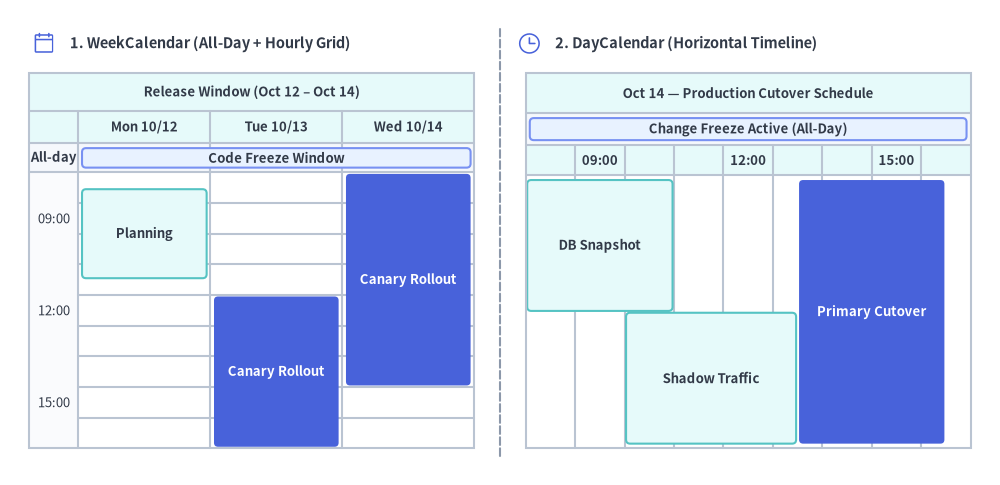
Source Code
from drawlib.canvas import save, setup
from drawlib.icons import phosphor
from drawlib.lines import line
from drawlib.smartarts import DayCalendar, WeekCalendar
from drawlib.styles import Styles
from drawlib.text import text

setup(width=136, height=66)

line((68.0, 4.0), (68.0, 62.0), style=Styles.MutedDashed)

# 1. Left Panel: WeekCalendar (3-Day Release Window with Top All-Day Bar + Timed Slots)
phosphor.calendar_blank(xy=(6.0, 60.0), width=3.4, style=Styles.PrimaryFlat)
text((9.5, 60.0), "1. WeekCalendar (All-Day + Hourly Grid)", style=Styles.DarkBold.patch(text_size=10.5, halign="left"))

wcal = WeekCalendar(
    start_date="2026-10-12",
    end_date="2026-10-14",
    start_hour=9,
    end_hour=18,
    hour_step=3,
    show_all_day=None,
    title="Release Window (Oct 12 – Oct 14)",
    cell_style=Styles.White,
    text_style=Styles.Dark.patch(text_size=9.5),
    header_style=Styles.SecondaryNeutral,
    header_text_style=Styles.DarkBold.patch(text_size=9.5),
    border_style=Styles.Neutral,
    event_style=Styles.SecondaryNeutral,
    event_text_style=Styles.DarkBold.patch(text_size=9.5),
)
wcal.add("2026-10-12", "2026-10-14", text="Code Freeze Window", style=Styles.PrimaryNeutral)
wcal.add("2026-10-12 09:30", "2026-10-12 12:30", text="Planning")
wcal.add(
    "2026-10-13 13:00",
    "2026-10-14 16:00",
    text="Canary Rollout",
    span_mode="columns",
    style=Styles.PrimaryFlat,
    text_style=Styles.WhiteBold.patch(text_size=9.5),
)
wcal.draw(xy=(4.0, 5.0), width=60.5, height=51.0)

# 2. Right Panel: DayCalendar (Horizontal Timeline)
phosphor.clock(xy=(72.0, 60.0), width=3.4, style=Styles.PrimaryFlat)
text((75.5, 60.0), "2. DayCalendar (Horizontal Timeline)", style=Styles.DarkBold.patch(text_size=10.5, halign="left"))

dcal = DayCalendar(
    date="2026-10-14",
    direction="horizontal",
    start_hour=9,
    end_hour=18,
    hour_step=3,
    show_all_day=None,
    title="Oct 14 — Production Cutover Schedule",
    cell_style=Styles.White,
    text_style=Styles.Dark.patch(text_size=9.5),
    header_style=Styles.SecondaryNeutral,
    header_text_style=Styles.DarkBold.patch(text_size=9.5),
    border_style=Styles.Neutral,
    event_style=Styles.SecondaryNeutral,
    event_text_style=Styles.DarkBold.patch(text_size=9.5),
)
dcal.add("2026-10-14", text="Change Freeze Active (All-Day)", style=Styles.PrimaryNeutral)
dcal.add("2026-10-14 09:00", "2026-10-14 12:00", text="DB Snapshot")
dcal.add("2026-10-14 11:00", "2026-10-14 14:30", text="Shadow Traffic")
dcal.add(
    "2026-10-14 14:30",
    "2026-10-14 17:30",
    text="Primary Cutover",
    style=Styles.PrimaryFlat,
    text_style=Styles.WhiteBold.patch(text_size=9.5),
)
dcal.draw(xy=(71.5, 5.0), width=60.5, height=51.0)

save()
1. Strict ISO 8601 Date & Datetime Format
To avoid ambiguity across multi-day spans and leap years (2024-02-29), all Calendar classes accept only two strict ISO 8601 formats (slash-separated dates "2026/10/10" or time-only strings "09:00" raise a ValueError):
"YYYY-MM-DD"(e.g."2026-10-10"): Treated automatically as an All-Day (全日) date or multi-day date span."YYYY-MM-DD HH:MM"(e.g."2026-10-10 09:00"): Treated automatically as a Timed (時間指定) slot or multi-day continuous datetime span.
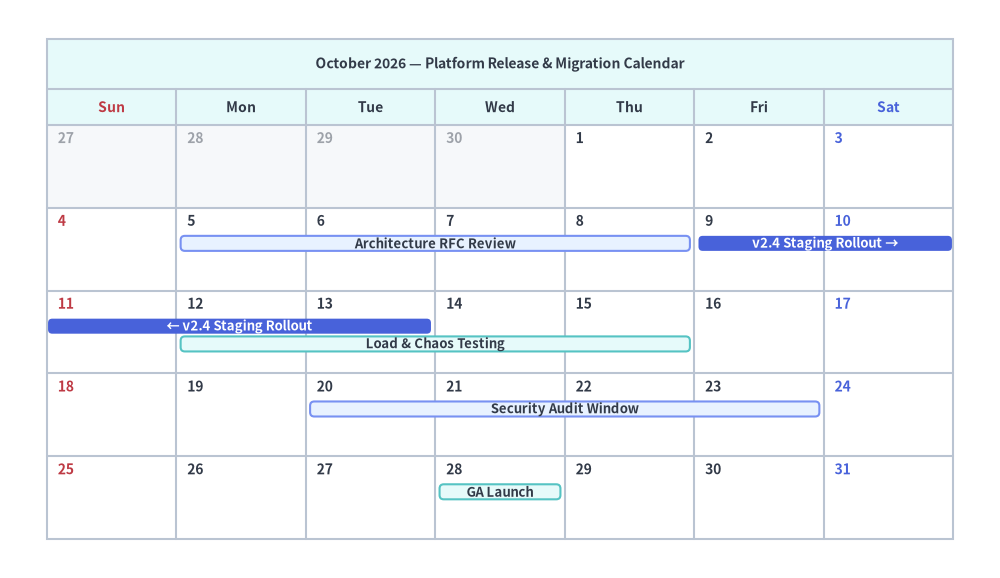
2. MonthCalendar (Monthly & Multi-Week Cross-Month Grids)
MonthCalendar renders a 7-column calendar grid (first_weekday="sun" | "mon"). When end_date=None (default), it displays the full calendar month of start_date. Passing an explicit end_date="YYYY-MM-DD" constructs a multi-week grid spanning across month or year boundaries. Multi-day events automatically wrap across week rows (← / →) and stack into non-overlapping vertical tracks.
from drawlib.canvas import save, setup
from drawlib.smartarts import MonthCalendar
from drawlib.styles import Styles

setup(width=128, height=74)

mcal = MonthCalendar(
    start_date="2026-10-01",
    first_weekday="sun",
    lang="en",
    title="October 2026 — Platform Release & Migration Calendar",
    cell_style=Styles.White,
    text_style=Styles.DarkBold.patch(text_size=10.0),
    header_style=Styles.SecondaryNeutral,
    header_text_style=Styles.DarkBold.patch(text_size=10.0),
    border_style=Styles.Neutral,
    event_style=Styles.SecondaryNeutral,
    event_text_style=Styles.DarkBold.patch(text_size=9.5),
    sunday_text_style=Styles.DangerBold.patch(text_size=10.0),
    saturday_text_style=Styles.PrimaryBold.patch(text_size=10.0),
)

mcal.add("2026-10-05", "2026-10-08", text="Architecture RFC Review", style=Styles.PrimaryNeutral)
# Crosses Fri Oct 9 – Sat Oct 10 into the next week row (Sun Oct 11 – Tue Oct 13)
mcal.add(
    "2026-10-09",
    "2026-10-13",
    text="v2.4 Staging Rollout",
    style=Styles.PrimaryFlat,
    text_style=Styles.WhiteBold.patch(text_size=9.5),
)
# Overlapping dates automatically stack on the next track
mcal.add("2026-10-12", "2026-10-15", text="Load & Chaos Testing")
mcal.add("2026-10-20", "2026-10-23", text="Security Audit Window", style=Styles.PrimaryNeutral)
mcal.add("2026-10-28", text="GA Launch")

mcal.draw(xy=(6.0, 5.0), width=116.0, height=64.0)

save()
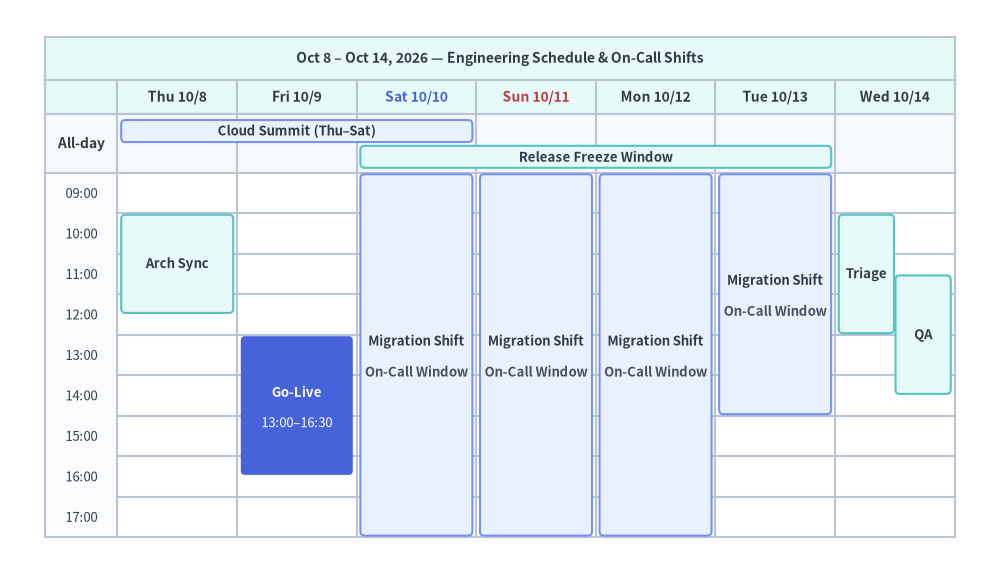
3. WeekCalendar (Top All-Day Field + Hourly Time Grid)
WeekCalendar displays a 7-day week (or any custom N-day range via end_date or num_days) with an hourly vertical axis (start_hour=9, end_hour=18, hour_step=1).
- Top All-Day (
全日) Field (show_all_day=None | True | False): Whenshow_all_day=None(default), the All-Day row is hidden if 0 all-day items exist and automatically appears when 1 or more all-day items ("YYYY-MM-DD") are added (countingitem.show=Falseitems sodrawlib.animframes keep fixed layout coordinates). - Multi-Day Timed Spans (
span_mode="columns" | "box" | "all_day"): An event from"2026-10-10 09:00"to"2026-10-13 15:00"fills 10th (09:00..end_hour), 11th–12th (start_hour..end_hour), and 13th (start_hour..15:00) in"columns"mode, or draws a unified cross-column rectangle in"box"mode.
from drawlib.canvas import save, setup
from drawlib.smartarts import WeekCalendar
from drawlib.styles import Styles

setup(width=132, height=76)

wcal = WeekCalendar(
    start_date="2026-10-08",
    end_date="2026-10-14",
    start_hour=9,
    end_hour=18,
    hour_step=1,
    show_all_day=None,
    title="Oct 8 – Oct 14, 2026 — Engineering Schedule & On-Call Shifts",
    cell_style=Styles.White,
    text_style=Styles.Dark.patch(text_size=9.5),
    header_style=Styles.SecondaryNeutral,
    header_text_style=Styles.DarkBold.patch(text_size=10.0),
    border_style=Styles.Neutral,
    event_style=Styles.SecondaryNeutral,
    event_text_style=Styles.DarkBold.patch(text_size=9.5),
    sunday_text_style=Styles.DangerBold.patch(text_size=10.0),
    saturday_text_style=Styles.PrimaryBold.patch(text_size=10.0),
)

# 1. All-Day X-axis spanning bars in the top field
wcal.add("2026-10-08", "2026-10-10", text="Cloud Summit (Thu–Sat)", style=Styles.PrimaryNeutral)
wcal.add("2026-10-10", "2026-10-13", text="Release Freeze Window")

# 2. Multi-day timed span ("2026-10-10 09:00" to "2026-10-13 15:00")
wcal.add(
    "2026-10-10 09:00",
    "2026-10-13 15:00",
    text="Migration Shift",
    description="On-Call Window",
    span_mode="columns",
    style=Styles.PrimaryNeutral,
)

# 3. Single-day and overlapping timed events
wcal.add("2026-10-08 10:00", "2026-10-08 12:30", text="Arch Sync")
wcal.add(
    "2026-10-09 13:00",
    "2026-10-09 16:30",
    text="Go-Live",
    description="13:00–16:30",
    style=Styles.PrimaryFlat,
    text_style=Styles.WhiteBold.patch(text_size=9.5),
    description_style=Styles.White.patch(text_size=9.5),
)
wcal.add("2026-10-14 10:00", "2026-10-14 13:00", text="Triage")
wcal.add("2026-10-14 11:30", "2026-10-14 14:30", text="QA")

wcal.draw(xy=(6.0, 5.0), width=120.0, height=66.0)

save()
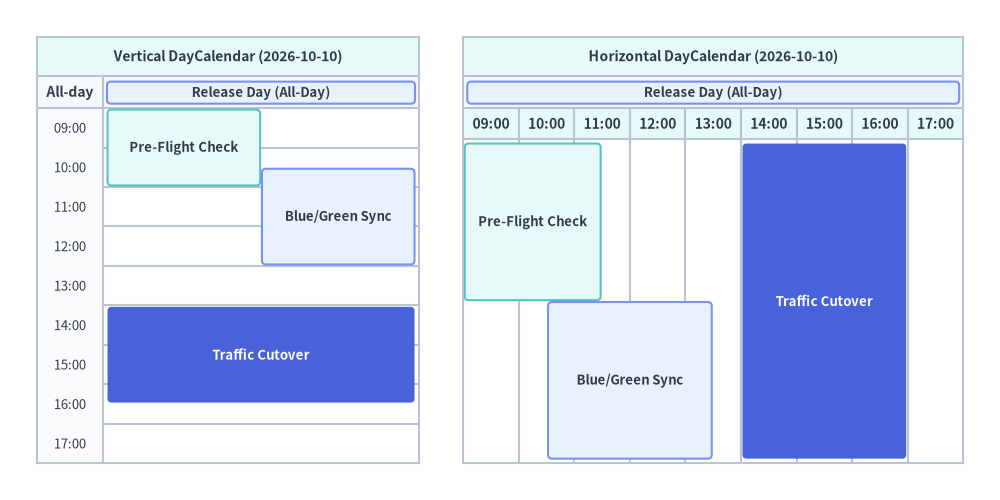
4. DayCalendar (Vertical & Horizontal Orientations)
DayCalendar renders a single-day schedule in either:
direction="vertical"(default): Time flows top-to-bottom, and overlapping time ranges split horizontally into parallel side-by-side columns.direction="horizontal": Time flows left-to-right, and overlapping time ranges stack vertically into parallel lanes—ideal for wide banners and 16:9 presentation slides.
from drawlib.canvas import save, setup
from drawlib.smartarts import DayCalendar
from drawlib.styles import Styles

setup(width=136, height=68)

# 1. Left: Vertical DayCalendar (direction="vertical")
d_vert = DayCalendar(
    date="2026-10-10",
    direction="vertical",
    start_hour=9,
    end_hour=18,
    hour_step=1,
    title="Vertical DayCalendar (2026-10-10)",
    cell_style=Styles.White,
    text_style=Styles.Dark.patch(text_size=9.5),
    header_style=Styles.SecondaryNeutral,
    header_text_style=Styles.DarkBold.patch(text_size=10.0),
    border_style=Styles.Neutral,
    event_style=Styles.SecondaryNeutral,
    event_text_style=Styles.DarkBold.patch(text_size=9.5),
)
d_vert.add("2026-10-10", text="Release Day (All-Day)", style=Styles.PrimaryNeutral)
d_vert.add("2026-10-10 09:00", "2026-10-10 11:00", text="Pre-Flight Check")
d_vert.add("2026-10-10 10:30", "2026-10-10 13:00", text="Blue/Green Sync", style=Styles.PrimaryNeutral)
d_vert.add(
    "2026-10-10 14:00",
    "2026-10-10 16:30",
    text="Traffic Cutover",
    style=Styles.PrimaryFlat,
    text_style=Styles.WhiteBold.patch(text_size=9.5),
)
d_vert.draw(xy=(5.0, 5.0), width=52.0, height=58.0)

# 2. Right: Horizontal DayCalendar (direction="horizontal")
d_horiz = DayCalendar(
    date="2026-10-10",
    direction="horizontal",
    start_hour=9,
    end_hour=18,
    hour_step=1,
    title="Horizontal DayCalendar (2026-10-10)",
    cell_style=Styles.White,
    text_style=Styles.Dark.patch(text_size=9.5),
    header_style=Styles.SecondaryNeutral,
    header_text_style=Styles.DarkBold.patch(text_size=10.0),
    border_style=Styles.Neutral,
    event_style=Styles.SecondaryNeutral,
    event_text_style=Styles.DarkBold.patch(text_size=9.5),
)
d_horiz.add("2026-10-10", text="Release Day (All-Day)", style=Styles.PrimaryNeutral)
d_horiz.add("2026-10-10 09:00", "2026-10-10 11:30", text="Pre-Flight Check")
d_horiz.add("2026-10-10 10:30", "2026-10-10 13:30", text="Blue/Green Sync", style=Styles.PrimaryNeutral)
d_horiz.add(
    "2026-10-10 14:00",
    "2026-10-10 17:00",
    text="Traffic Cutover",
    style=Styles.PrimaryFlat,
    text_style=Styles.WhiteBold.patch(text_size=9.5),
)
d_horiz.draw(xy=(63.0, 5.0), width=68.0, height=58.0)

save()