Architecture Diagrams: Cloud Topologies, Microservices & VPC Boundaries
ArchitectureDiagram visualizes distributed systems, cloud networks, microservices topologies, and infrastructure boundaries. It pairs icon-centric nodes with automatic hierarchical boundary boxes (NodeGroup) and multi-way branch routing.
1. Overview & Key Concepts
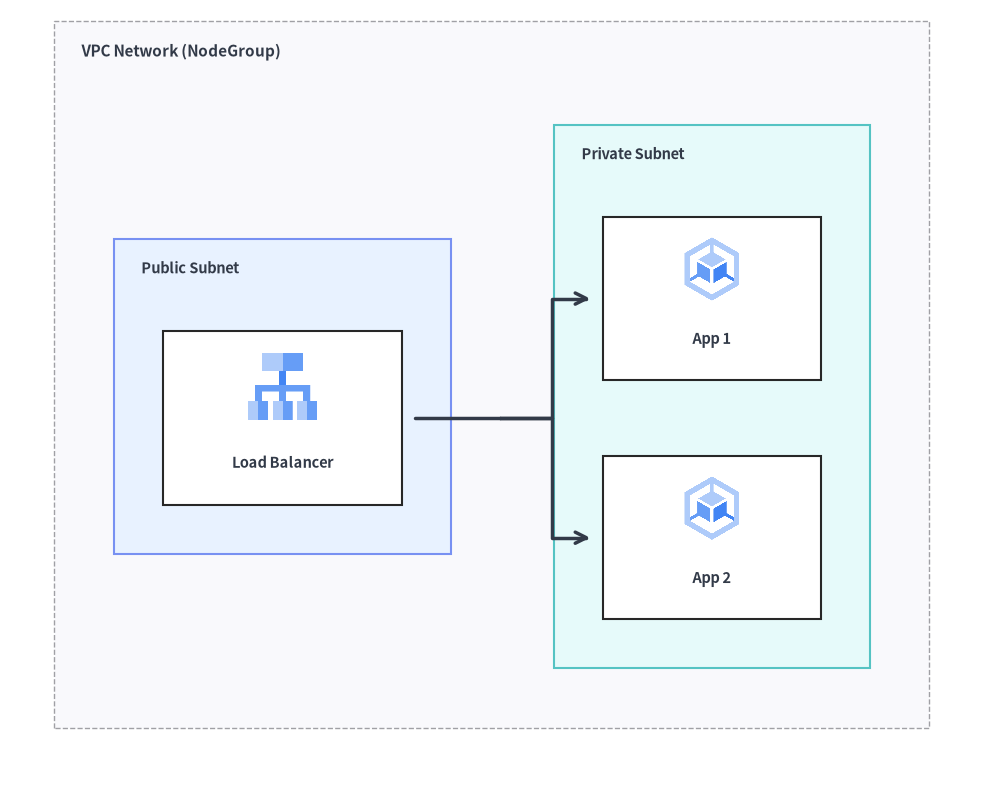
Source Code
from drawlib.canvas import save, setup
from drawlib.diagrams.architecture import ArchitectureDiagram, GcpIcon, Node, NodeGroup
from drawlib.styles import Styles

setup(width=92, height=74)

d = ArchitectureDiagram(
    node_style=Styles.Primary,
    node_text_style=Styles.DarkBold.patch(text_size=10.5),
    edge_style=Styles.DarkBold,
    edge_text_style=Styles.Dark.patch(text_size=10.5),
    node_card_style=Styles.Neutral,
)

vpc = d.add(
    NodeGroup(
        title="VPC Network (NodeGroup)",
        padding=5.5,
        text_style=Styles.DarkBold.patch(text_size=11.0, halign="left", valign="top"),
    ),
    xy=(3.0, 3.0),
)

pub_subnet = vpc.add(
    NodeGroup(
        title="Public Subnet",
        padding=4.5,
        style=Styles.PrimaryNeutral,
        text_style=Styles.DarkBold.patch(text_size=10.5, halign="left", valign="top"),
    ),
    xy=(5.5, 5.5),
)
lb = pub_subnet.add(
    Node("Load Balancer", width=22, height=16, icon=GcpIcon.CLOUD_LOAD_BALANCING, icon_size=7.0, card_style=Styles.White),
    xy=(14.5, 24.0),
)

priv_subnet = vpc.add(
    NodeGroup(
        title="Private Subnet",
        padding=4.5,
        style=Styles.SecondaryNeutral,
        text_style=Styles.DarkBold.patch(text_size=10.5, halign="left", valign="top"),
    ),
    xy=(46.0, 5.5),
)
app1 = priv_subnet.add(
    Node("App 1", width=20, height=15, icon=GcpIcon.GOOGLE_KUBERNETES_ENGINE, icon_size=6.5, card_style=Styles.White),
    xy=(13.5, 35.0),
)
app2 = priv_subnet.add(
    Node("App 2", width=20, height=15, icon=GcpIcon.GOOGLE_KUBERNETES_ENGINE, icon_size=6.5, card_style=Styles.White),
    xy=(13.5, 13.0),
)

lb.fork([app1, app2], at_x=43.0, padding=1.2)

d.draw(xy=(3.0, 3.0))
save()
- Card-Centric Coordinates: When placing a node via
d.add(node, xy=(x, y)), the coordinate defines the center of the node card (width,height). When bothiconandtextare present, the icon is positioned in the upper middle and the text label in the lower portion (adjustable viatext_style=Styles.DarkBold.patch(xy_shift=...)). If neithernode_card_stylenorcard_styleis provided, the card background is transparent. - Hierarchical Auto-Bounding (
NodeGroup): Groups automatically compute their outer boundary boxes to enclose all enclosed nodes and nested sub-groups with configurable padding. - Connectable Boundaries: You can connect edges directly to or from a group's perimeter box as well as individual nodes.
- 1-to-N Fan-Out (
fork): Easily split a single connection line into multiple downstream destinations using an automatic intermediate bus line.
2. Constructor & Core Classes
from drawlib.diagrams.architecture import ArchitectureDiagram, GcpIcon, Node, NodeGroup, PhosphorIcon
from drawlib.styles import Styles

d = ArchitectureDiagram(
    node_style=Styles.Primary,
    node_text_style=Styles.DarkBold,
    edge_style=Styles.DarkBold,
    edge_text_style=Styles.Dark,
    node_card_style=Styles.Neutral,
    title="Production Multi-Tier Cloud VPC",
)
Parameter Reference
ArchitectureDiagram Class
| Parameter | Type | Default | Description |
|---|---|---|---|
node_style |
Style |
(Required) | Default style for node icons and images. |
node_text_style |
Style |
(Required) | Default style for node text labels. |
edge_style |
Style |
(Required) | Default style for connection lines and arrowheads. |
edge_text_style |
Style |
(Required) | Default style for connection text labels. |
node_card_style |
Style | None |
None |
Default style for node card backgrounds (transparent if None). |
title |
str |
"" |
Optional banner title for the diagram. |
title_style |
Style | None |
None |
Optional style for diagram title. |
width |
float | None |
None |
Explicit diagram canvas width, or None for auto-fit. |
height |
float | None |
None |
Explicit diagram canvas height, or None for auto-fit. |
style |
Style | None |
None |
Overall diagram background and border style. |
Node Class & CustomIcon
| Parameter | Type | Default | Description |
|---|---|---|---|
text |
str |
"" |
Node label text (supports \n). |
width |
float |
20.0 |
Card bounding box width in canvas units. |
height |
float |
16.0 |
Card bounding box height in canvas units. |
icon |
IconType |
None |
Any of the 34 *Icon Enums (PhosphorIcon, GcpIcon, AwsIcon, AzureIcon, AiIcon..OriginalWorkspaceIcon), icon callable (gcp.cloud_run, ai.claude), CustomIcon, Dimage, PIL.Image, or path. |
icon_size |
float |
8.0 |
Outer width and height of the icon/image. |
style |
Style | None |
None |
Optional style override for the icon or image. |
text_style |
Style | None |
None |
Optional style override for the label text (supports xy_shift, angle). |
card_style |
Style | None |
None |
Optional style override for the node card background/border (transparent if None and node_card_style is None). |
show |
bool |
True |
Visibility flag (connected edges auto-hide when False). |
- 34 Built-In Icon Enums (
drawlib.diagrams.architecture): All 34 icon modules expose a 1-to-1StrEnumindrawlib.diagrams.architecture(anddrawlib.diagrams.sequence):- Vector & Cloud Providers:
PhosphorIcon(1,512),GcpIcon(250),AwsIcon(329),AzureIcon(250) - 15 Official Brand Enums:
AiIcon(60),BusinessIcon(48),ClientIcon(60),CloudIcon(45),CnativeIcon(73),CodeIcon(97),DataIcon(70),DevopsIcon(58),FacilityIcon(49),ItserviceIcon(44),NetworkIcon(70),SecurityIcon(74),ServerIcon(82),SocialIcon(50),WorkspaceIcon(40) - 15 Original 2D Pastel Enums:
OriginalAiIcon(80),OriginalBusinessIcon(76),OriginalClientIcon(92),OriginalCloudIcon(147),OriginalCnativeIcon(73),OriginalCodeIcon(121),OriginalDataIcon(86),OriginalDevopsIcon(78),OriginalFacilityIcon(86),OriginalItserviceIcon(64),OriginalNetworkIcon(70),OriginalSecurityIcon(103),OriginalServerIcon(80),OriginalSocialIcon(66),OriginalWorkspaceIcon(57) - See Icons Overview for full catalogs.
- Vector & Cloud Providers:
CustomIcon(image: str | Path | Dimage | Image | CustomIcon): Wraps a custom raster image path,Dimage, orPIL.Imagefor reuse across nodes (exposes.dimageand.copy()).- Node Geometry Queries:
node.xy,node.center,node.left,node.right,node.top,node.bottom,node.get_bounds() -> tuple[float, float, float, float],node.get_size() -> tuple[float, float], andnode.get_absolute_xy() -> tuple[float, float].
NodeGroup Class
| Parameter | Type | Default | Description |
|---|---|---|---|
title |
str |
"" |
Group banner title (e.g. "VPC Network (10.0.0.0/16)"). |
width |
float | None |
None |
Optional fixed width. If None, auto-computed from enclosed items + padding. |
height |
float | None |
None |
Optional fixed height. If None, auto-computed from enclosed items + padding. |
padding |
float |
5.0 |
Inner margin around enclosed child nodes when auto-calculating bounds. |
style |
Style | None |
None |
Style for group background fill and boundary border. |
text_style |
Style | None |
None |
Style for the group header title text. |
show |
bool |
True |
Visibility flag (hides group box, child nodes, and connected edges when False, while preserving outer auto-bounds). |
- Boundary Properties & Methods:
group.xy: Local(x, y)bottom-left origin of the group.group.left,group.right,group.top,group.bottom,group.center: Perimeter anchor and center(x, y)coordinates.group.get_bounds() -> tuple[float, float, float, float]: Returns local(min_x, min_y, max_x, max_y).group.get_size() -> tuple[float, float]: Returns(width, height)of the group box.group.connect(target, label="", arrow="->", routing="orthogonal", style=None, padding=0.0, show=True) -> Edge: Connects the group's outer boundary directly to anotherNode,NodeGroup, orJunction.
Edge & Junction API Reference
Edge Constructor & Methods
Edge(
    start: Connectable,
    end: Connectable,
    label: str = "",
    arrow: Literal["->", "<-", "<->", "-"] = "->",
    routing: Literal["orthogonal", "direct", "curved"] = "orthogonal",
    style: Style | None = None,
    text_style: Style | None = None,
    padding: float | tuple[float, float] = 0.0,
    show: bool = True,
)
- Waypoint Routing Methods:
edge.points(waypoints: list[tuple[float, float]]) -> Edge: Sets explicit intermediate(x, y)waypoints relative to the diagram and returnsselffor chaining.edge.via(*waypoints: tuple[float, float]) -> Edge: Unpacked variadic shorthand for.points(list(waypoints))(e.g.,d.connect(a, b).via((40, 20), (40, 50))).edge.add_point(xy: tuple[float, float]) -> Junction: Appendsxyas an intermediate waypoint onedgeand returns a registeredJunctionatxyfor branching downstream lines.
- Label & Appearance Mutators:
edge.set_label(text: str, pos: float = 0.5) -> Edge: Sets the edge label and its fractional position along the path (0.0= start,0.5= midpoint,1.0= end).edge.set_arrow(arrow) -> Edge,edge.set_style(style) -> Edge,edge.set_text_style(text_style) -> Edge,edge.set_padding(padding) -> Edge.
Registration, Junction, fork(), and Sizing Methods
d.add(item, xy=(x, y), *, show: bool | None = None) -> Node | NodeGroup | Junction(alsogroup.add(...)): Places aNodeat center(x, y)or aNodeGroupat bottom-left(x, y).d.junction(xy: tuple[float, float], *, show: bool = True) -> Junction: Creates and registers a zero-size connectableJunction(xy, *, show=True)atxy(exposesj.connect(...),.xy,.center,.top,.bottom,.left,.right).d.connect(start, end, label="", arrow="->", routing="orthogonal", style=None, text_style=None, padding=0.0, show=True) -> Edge(alsonode.connect(...),group.connect(...),junction.connect(...), andd.add_edge(edge, *, show=None) -> Edge).node.fork(targets: list[Connectable], at_x: float | None = None, at_y: float | None = None, style: Style | None = None, padding: float | tuple[float, float] = 0.0, show: bool = True) -> list[Edge]: Branches fromnodeto multiple targets through an automatically created intermediateJunctionat(at_x, at_y).d.get_size() -> tuple[float, float]: Returns the overall(width, height)of the diagram.d.draw(xy=(0.0, 0.0), *, scale: float = 1.0) -> None: Renders the diagram anchored at bottom-leftxy, scaled proportionally byscale.
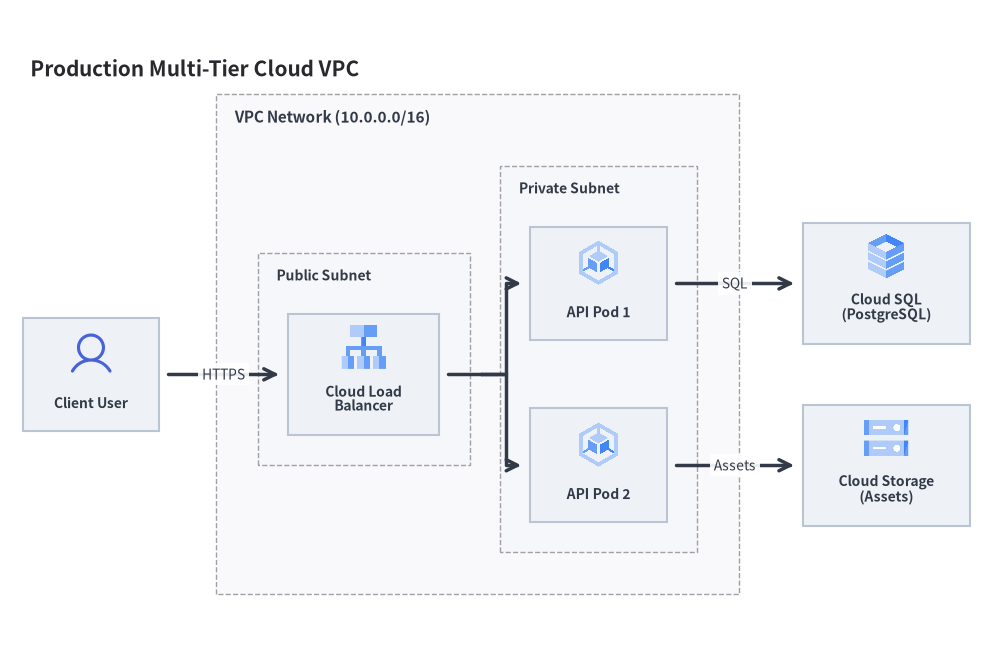
3. Production Cloud VPC Architecture
The following complete example demonstrates public and private subnets, load balancing, GKE pods, Cloud SQL, and external users:
from drawlib.canvas import save, setup
from drawlib.diagrams.architecture import ArchitectureDiagram, GcpIcon, Node, NodeGroup, PhosphorIcon
from drawlib.styles import Styles

setup(width=132, height=88)

d = ArchitectureDiagram(
    node_style=Styles.Primary,
    node_text_style=Styles.DarkBold.patch(text_size=10.0),
    edge_style=Styles.DarkBold,
    edge_text_style=Styles.Dark.patch(text_size=10.0),
    node_card_style=Styles.Neutral,
    title="Production Multi-Tier Cloud VPC",
)

# 1. Outer VPC Network Boundary
vpc = d.add(
    NodeGroup(
        title="VPC Network (10.0.0.0/16)",
        padding=5.5,
        text_style=Styles.DarkBold.patch(text_size=11.0, halign="left", valign="top"),
    ),
    xy=(28.0, 6.0),
)

# 2. Public Subnet with Load Balancer (local coordinates inside vpc)
public_subnet = vpc.add(
    NodeGroup(
        title="Public Subnet",
        padding=4.0,
        text_style=Styles.DarkBold.patch(text_size=10.0, halign="left", valign="top"),
    ),
    xy=(4.5, 4.5),
)
lb = public_subnet.add(
    Node("Cloud Load\nBalancer", width=20, height=16, icon=GcpIcon.CLOUD_LOAD_BALANCING, icon_size=6.5),
    xy=(12.5, 25.0),
)

# 3. Private Subnet with Application Pods (local coordinates inside vpc)
private_subnet = vpc.add(
    NodeGroup(
        title="Private Subnet",
        padding=4.0,
        text_style=Styles.DarkBold.patch(text_size=10.0, halign="left", valign="top"),
    ),
    xy=(36.5, 4.5),
)
gke1 = private_subnet.add(
    Node("API Pod 1", width=18, height=15, icon=GcpIcon.GOOGLE_KUBERNETES_ENGINE, icon_size=6.5),
    xy=(11.5, 37.0),
)
gke2 = private_subnet.add(
    Node("API Pod 2", width=18, height=15, icon=GcpIcon.GOOGLE_KUBERNETES_ENGINE, icon_size=6.5),
    xy=(11.5, 13.0),
)

# 4. External Actor and Managed Services (global diagram coordinates outside vpc)
user = d.add(Node("Client User", width=18, height=15, icon=PhosphorIcon.USER, icon_size=6.5), xy=(9.0, 35.5))
db = d.add(Node("Cloud SQL\n(PostgreSQL)", width=22, height=16, icon=GcpIcon.CLOUD_SQL, icon_size=6.5), xy=(114.0, 47.5))
storage = d.add(Node("Cloud Storage\n(Assets)", width=22, height=16, icon=GcpIcon.CLOUD_STORAGE, icon_size=6.5), xy=(114.0, 23.5))

# 5. Connections
d.connect(user, lb, label="HTTPS", padding=1.2)
lb.fork([gke1, gke2], at_x=60.5, padding=1.2)
d.connect(gke1, db, label="SQL", padding=1.2)
d.connect(gke2, storage, label="Assets", padding=1.2)

d.draw(xy=(3.0, 3.0))
save()
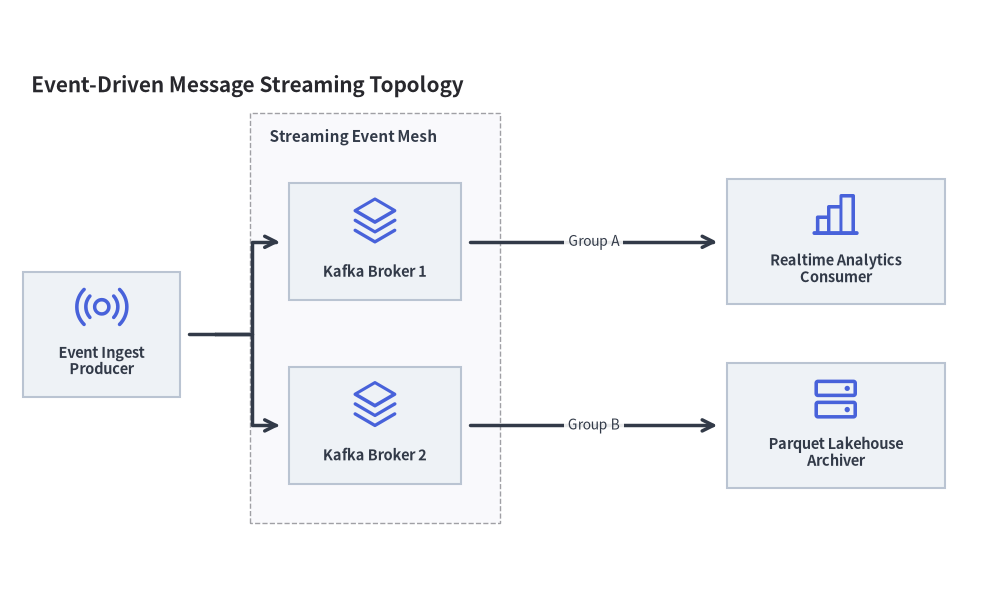
4. Event-Driven Streaming Mesh
You can also use general architecture icons from PhosphorIcon to model messaging queues, Kafka clusters, and analytics engines:
from drawlib.canvas import save, setup
from drawlib.diagrams.architecture import ArchitectureDiagram, Node, NodeGroup, PhosphorIcon
from drawlib.styles import Styles

setup(width=128, height=78)

d = ArchitectureDiagram(
    node_style=Styles.Primary,
    node_text_style=Styles.DarkBold.patch(text_size=10.5),
    edge_style=Styles.DarkBold,
    edge_text_style=Styles.Dark.patch(text_size=10.0),
    node_card_style=Styles.Neutral,
    title="Event-Driven Message Streaming Topology",
)

cluster = d.add(
    NodeGroup(
        title="Streaming Event Mesh",
        padding=5.0,
        text_style=Styles.DarkBold.patch(text_size=11.0, halign="left", valign="top"),
    ),
    xy=(29.0, 8.0),
)
broker1 = cluster.add(Node("Kafka Broker 1", width=22, height=15, icon=PhosphorIcon.STACK, icon_size=6.5), xy=(16.0, 36.0))
broker2 = cluster.add(Node("Kafka Broker 2", width=22, height=15, icon=PhosphorIcon.STACK, icon_size=6.5), xy=(16.0, 12.5))

pub = d.add(Node("Event Ingest\nProducer", width=20, height=16, icon=PhosphorIcon.BROADCAST, icon_size=7.0), xy=(10.0, 32.2))
analytics = d.add(
    Node("Realtime Analytics\nConsumer", width=28, height=16, icon=PhosphorIcon.CHART_BAR, icon_size=7.0),
    xy=(104.0, 44.0),
)
archiver = d.add(
    Node("Parquet Lakehouse\nArchiver", width=28, height=16, icon=PhosphorIcon.HARD_DRIVES, icon_size=7.0),
    xy=(104.0, 20.5),
)

pub.fork([broker1, broker2], at_x=24.5, padding=1.2)
d.connect(broker1, analytics, label="Group A", padding=1.2)
d.connect(broker2, archiver, label="Group B", padding=1.2)

d.draw(xy=(3.0, 3.0))
save()
5. Best Practices & Guidelines
- Align Node Centers: When aligning multiple nodes in a row or column, give them the exact same X or Y coordinate so horizontal and vertical connections stay straight.
- Use
forkfor Fan-Out: Avoid drawing multiple crossing lines from a single node. Usenode.fork([n1, n2, ...], at_x=...)to create clean right-angle bus routes. - Padded Boundaries: Always set
paddingonNodeGroup(typically5.0to7.0) to give enclosed components breathing room from the border lines.