The 3D Containers, Flow & Grouping category of drawlib.shapes provides 6 architectural and pipeline primitives: 3D multi-disk storage cylinders (cylinder), 3D shaded isometric cubes (cube), single or stacked document/file cards (document), data filtering and conversion funnels (funnel), cubic-Bézier cloud nodes and VPC boundaries (cloud), and curly/square/round grouping brackets (brace).
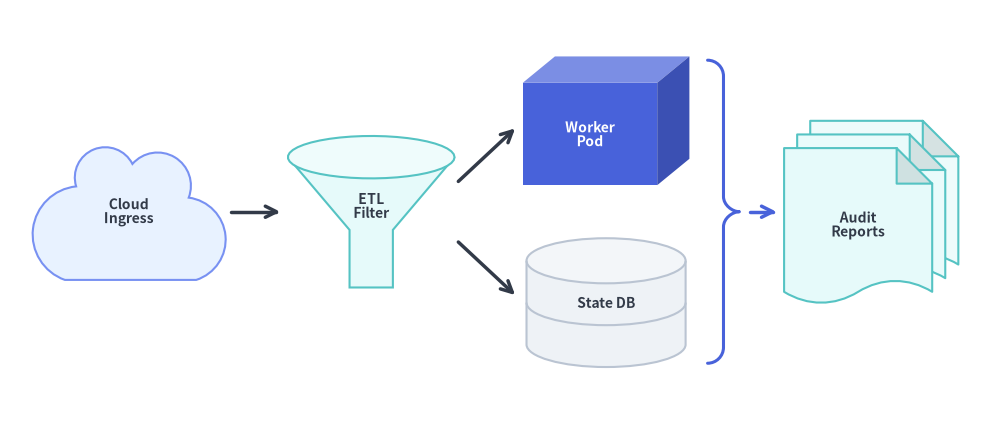
Combining Cloud Ingress, 3D Filtering Funnels, Cubes, Database Cylinders, Braces, and Stacked DocumentsSource Code
fromdrawlib.canvasimportsave,setupfromdrawlib.linesimportlinefromdrawlib.shapesimportbrace,cloud,cube,cylinder,document,funnelfromdrawlib.stylesimportStylesfromdrawlib.textimporttextsetup(width=132,height=58)lbl_dark=Styles.DarkBold.patch(text_size=10.0)lbl_white=Styles.WhiteBold.patch(text_size=10.0)# 1. Cloud Ingresscloud((17,30),width=26,height=18,variant="flat",style=Styles.PrimaryNeutral,text="Cloud\nIngress",text_style=lbl_dark,)# 2. 3D Filtering Funnelfunnel((49,30),width=22,height=20,variant="3d",style=Styles.SecondaryNeutral,text="ETL\nFilter",text_style=lbl_dark.patch(xy_shift=(0,-1.8)),)# 3. 3D Worker Cube & 2-Disk State DB Cylindercube((80,42),width=22,height=17,depth_ratio=0.25,style=Styles.PrimaryFlat,text="Worker\nPod",text_style=lbl_white,)cylinder((80,18),width=21,height=17,disks=2,style=Styles.Neutral,text="State DB",text_style=lbl_dark,)# 4. Curly Brace + Stacked Audit Documentsbrace((95.5,30),width=4.2,height=40,symbol="}",style=Styles.PrimaryBold.patch(line_width=2.2),)document((115,30),width=23,height=24,variant="folded_wave",stacked=3,style=Styles.SecondaryNeutral,text="Audit\nReports",text_style=lbl_dark,)line((30.5,30),(37,30),arrow_head="->",style=Styles.DarkBold)line((60.5,34),(68,41),arrow_head="->",style=Styles.DarkBold)line((60.5,26),(68,19),arrow_head="->",style=Styles.DarkBold)line((99,30),(102.5,30),arrow_head="->",style=Styles.PrimaryBold)save()
1. Quick Comparison of 3D Container, Flow & Grouping Primitives
Function
Default Anchor
Primary Architectural Role
Variants & Key Geometry Arguments
Shading & Text Placement
cylinder
Center (cx, cy)
Relational DBs, disk arrays, object stores, FIFO queues
disks: int = 1, style.patch(angle=-90)
Top elliptical cap automatically lightened; text centered on body.
cube
Center (cx, cy)
3D compute nodes, containers, hardware appliances
depth_ratio: float | None = None (default 0.25)
3-face automatic shading (front, lightened top, darkened right); text centered on front face.
Smooth cubic-Bézier lobes strictly normalized to (width, height).
brace
Center (cx, cy)
Curly, square, and round grouping brackets/braces
symbol ("{}", "[]", "()"), direction ("left", "right", "top", "bottom"), tip_ratio, tip_position_ratio
Open vector stroke controlled by style.line_width and style.line_color.
2. 3D Cylinders & Database Stacks (cylinder)
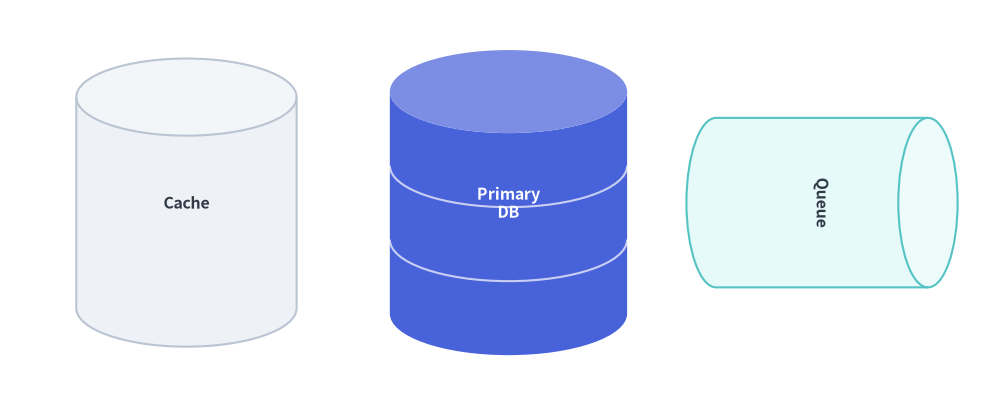
For relational databases, object storage buckets, disk arrays, and message queues, cylinder renders a 3D cylindrical container with an automatically lightened elliptical top cap:
Center coordinate (x, y) of the outer cylinder bounding box.
width
float
Required
Total horizontal width of the cylinder (> 0).
height
float
Required
Total vertical height of the cylinder, including top and bottom elliptical caps (> 0).
disks
int
1
Number of stacked storage disk tiers (>= 1). When disks >= 2, curved horizontal divider seams are drawn along the cylinder body to represent multi-platter database storage.
style
Style
Required
Shape fill and border style. The top elliptical cap is automatically lightened from style.shape_fill_color. Set style.patch(angle=-90) to rotate the cylinder horizontally for FIFO message queues or pipelines.
text / text_style
str / Style | None
"" / None
Centered text label and optional typography override.
Center coordinate (x, y) of the outer 3D bounding box.
width
float
Required
Exact outer horizontal width of the 3D box, including the right-side oblique projection (> 0).
height
float
Required
Exact outer vertical height of the 3D box, including the top-face oblique projection (> 0).
depth_ratio
float | None
None
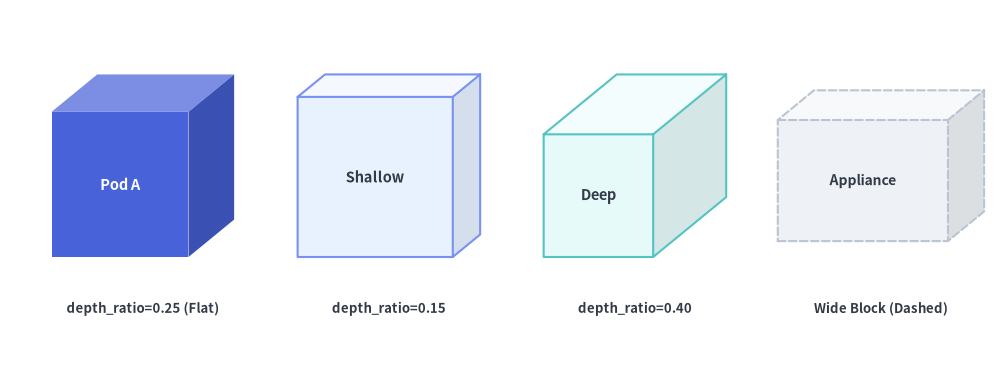
3D oblique depth fraction in (0.0, 1.0) relative to min(width, height). Defaults to 0.25 when None. Smaller values (0.15) produce a shallow 3D card; larger values (0.40) produce a deep isometric block.
style
Style
Required
Fill, border (shape_line_color, shape_line_width, shape_line_style), and rotation (angle) style.
text / text_style
str / Style | None
"" / None
Label automatically centered on the front face (rather than the outer bounding box) so text never collides with the 3D seam lines.
3-Face Automatic Shading & Stroke Mechanics
Automatic Face Shading: From style.shape_fill_color, Drawlib automatically computes three distinct face shades:
Front Face: Base style.shape_fill_color.
Top Face: Lightened toward white (+28% on standard fills, +55% on high-luminance neutral fills) to simulate overhead lighting.
Right Side Face: Darkened (×0.82 on standard fills, ×0.92 on neutral fills) to create natural depth shadow.
Unified Stroke Path: The outer perimeter and the three internal Y-seams are drawn in a single unified PathPatch, ensuring that Dashed or Dotted line styles never double-overlap on shared edges.
fromdrawlib.canvasimportsave,setupfromdrawlib.shapesimportcubefromdrawlib.stylesimportStylesfromdrawlib.textimporttextsetup(width=126,height=48)# 1. Standard Flat Cube (depth_ratio=0.25 default)cube((18,27),width=23,height=23,style=Styles.PrimaryFlat,text="Pod A",text_style=Styles.WhiteBold.patch(text_size=10.5),)text((18,9),"depth_ratio=0.25 (Flat)",style=Styles.DarkBold.patch(text_size=9.5))# 2. Shallow 3D Block (depth_ratio=0.15)cube((49,27),width=23,height=23,depth_ratio=0.15,style=Styles.PrimaryNeutral,text="Shallow",text_style=Styles.DarkBold.patch(text_size=10.5),)text((49,9),"depth_ratio=0.15",style=Styles.DarkBold.patch(text_size=9.5))# 3. Deep 3D Cube (depth_ratio=0.40)cube((80,27),width=23,height=23,depth_ratio=0.40,style=Styles.SecondaryNeutral,text="Deep",text_style=Styles.DarkBold.patch(text_size=10.5),)text((80,9),"depth_ratio=0.40",style=Styles.DarkBold.patch(text_size=9.5))# 4. Wide Hardware Appliance Block (26x19, dashed)cube((111,27),width=26,height=19,depth_ratio=0.24,style=Styles.Neutral.patch(shape_line_style="dashed"),text="Appliance",text_style=Styles.DarkBold.patch(text_size=10.0),)text((111,9),"Wide Block (Dashed)",style=Styles.DarkBold.patch(text_size=9.5))save()
3D Cubes and Rectangular Blocks Across Styles and depth_ratio Values
Center coordinate (x, y) of the outer document bounding box (including all stacked sheets).
width
float
Required
Total horizontal width of the document bounding box (> 0).
height
float
Required
Total vertical height of the document bounding box (> 0).
variant
DocumentVariant
"wave"
Silhouette style of the document sheet (see Document variant Reference below).
stacked
int
1
Number of overlapping document sheets (>= 1). When stacked > 1 (e.g. 2 or 3), sheets cascade from back-top-right to front-bottom-left inside (width, height), with background sheets automatically lightened.
wave_ratio
float | None
None
Wave peak-to-trough amplitude fraction in (0.0, 1.0) relative to sheet height. Defaults to 0.14. Effective on "wave", "double_wave", and "folded_wave".
fold_ratio
float | None
None
Top-right dog-ear corner fold size fraction in (0.0, 1.0) relative to min(sheet_w, sheet_h). Defaults to 0.24. Effective on "folded" and "folded_wave".
style
Style
Required
Fill, border, and rotation (angle) style. On folded variants, the triangular corner flap is automatically darkened for 3D contrast.
text / text_style
str / Style | None
"" / None
Text label optically centered on the front-most sheet (automatically shifted away from bottom waves and top-right corner folds).
Document variant Reference
variant
Accepted Aliases
Top Edge
Bottom Edge
Active Ratio Args
Typical Use Cases
"wave"(default)
"standard"
Straight
Cubic-Bézier S-wave
wave_ratio
Classic ISO flowchart document/printout symbol, invoices, generated artifacts.
Continuous log streams (access.log), truncated text excerpts, data stream chunks.
"folded_wave"
"report"
Top-right dog-ear fold
Cubic-Bézier S-wave
wave_ratio, fold_ratio
Multi-page technical reports, specifications, and audit logs combining file and wave cues.
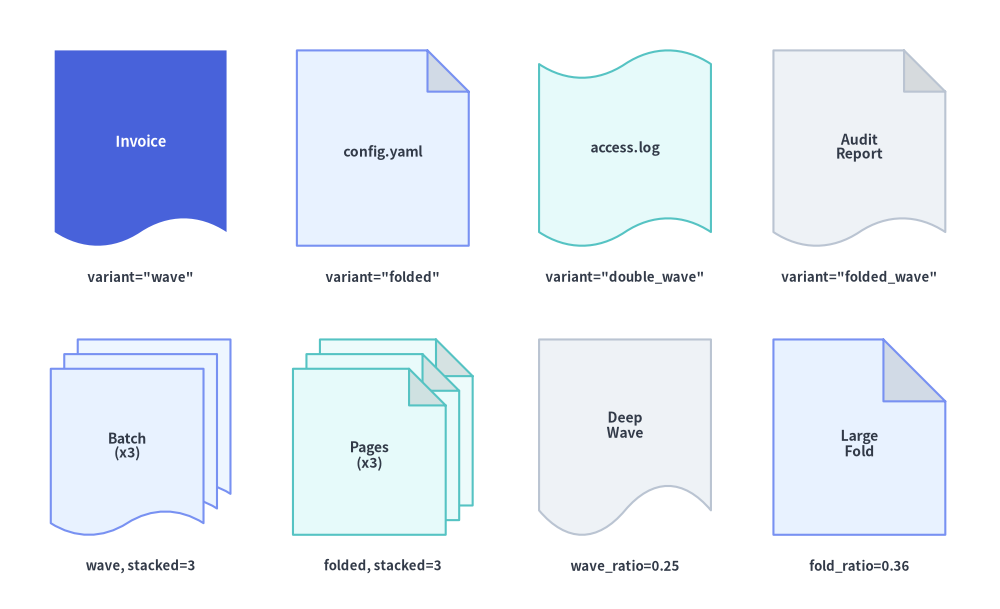
fromdrawlib.canvasimportsave,setupfromdrawlib.shapesimportdocumentfromdrawlib.stylesimportStylesfromdrawlib.textimporttextsetup(width=128,height=78)# Row 1: The 4 Document Variants (stacked=1)row1=[("wave","Invoice",18,Styles.PrimaryFlat,Styles.WhiteBold.patch(text_size=10.5),'variant="wave"'),("folded","config.yaml",49,Styles.PrimaryNeutral,Styles.DarkBold.patch(text_size=10.0),'variant="folded"'),("double_wave","access.log",80,Styles.SecondaryNeutral,Styles.DarkBold.patch(text_size=10.0),'variant="double_wave"'),("folded_wave","Audit\nReport",110,Styles.Neutral,Styles.DarkBold.patch(text_size=10.0),'variant="folded_wave"'),]forvar,lbl,cx,st,tst,capinrow1:document((cx,59),width=22,height=25,variant=var,style=st,text=lbl,text_style=tst)text((cx,42.5),cap,style=Styles.DarkBold.patch(text_size=9.5))# Row 2: Multi-sheet stacking (stacked=3) and wave_ratio / fold_ratio customizationdocument((18,22),width=23,height=25,variant="wave",stacked=3,style=Styles.PrimaryNeutral,text="Batch\n(x3)",text_style=Styles.DarkBold.patch(text_size=10.0),)text((18,5.5),"wave, stacked=3",style=Styles.DarkBold.patch(text_size=9.5))document((49,22),width=23,height=25,variant="folded",stacked=3,style=Styles.SecondaryNeutral,text="Pages\n(x3)",text_style=Styles.DarkBold.patch(text_size=10.0),)text((49,5.5),"folded, stacked=3",style=Styles.DarkBold.patch(text_size=9.5))document((80,22),width=22,height=25,variant="wave",wave_ratio=0.25,style=Styles.Neutral,text="Deep\nWave",text_style=Styles.DarkBold.patch(text_size=10.0),)text((80,5.5),"wave_ratio=0.25",style=Styles.DarkBold.patch(text_size=9.5))document((110,22),width=22,height=25,variant="folded",fold_ratio=0.36,style=Styles.PrimaryNeutral,text="Large\nFold",text_style=Styles.DarkBold.patch(text_size=10.0),)text((110,5.5),"fold_ratio=0.36",style=Styles.DarkBold.patch(text_size=9.5))save()
The Four Document Variants (Row 1) and Multi-Sheet Stacking & Ratio Customizations (Row 2)
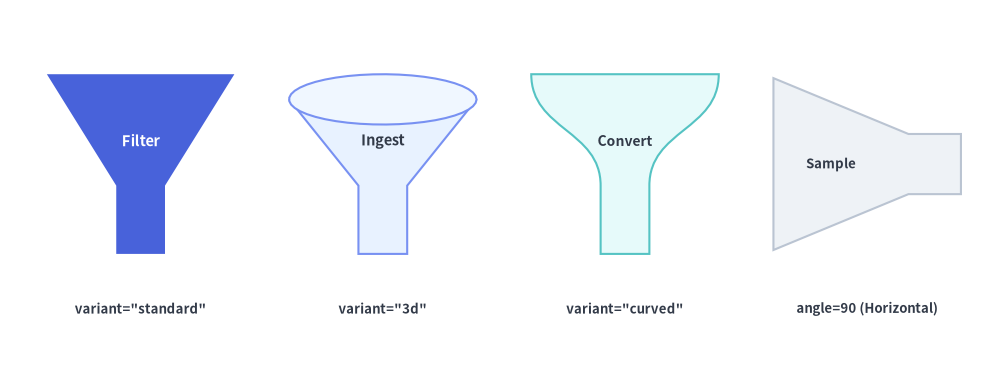
5. Data Filtering & Conversion Funnels (funnel)
For ETL data filtering pipelines, event deduplication stages, rate limiters, and conversion funnels, funnel renders a wide upper cone tapering into a narrow lower spout:
Center coordinate (x, y) of the cloud bounding box.
width
float
Required
Exact outer horizontal width of the cloud (> 0).
height
float
Required
Exact outer vertical height of the cloud (> 0).
variant
CloudVariant
"standard"
Cloud silhouette style (see Cloud variant Reference below).
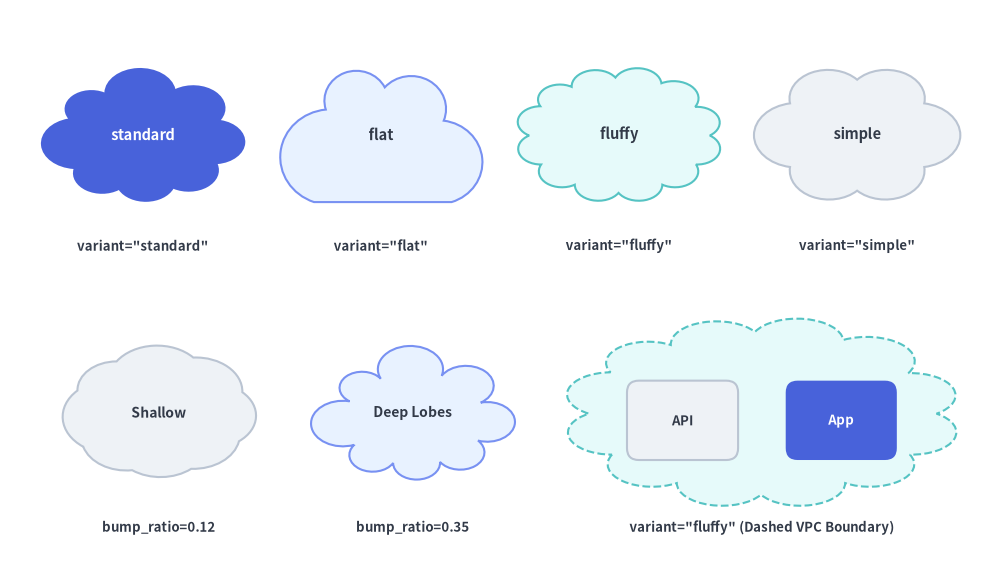
bump_ratio
float | None
None
Outward lobe bulge depth ratio in (0.0, 1.0). When None, uses the optimal default for the selected variant (0.20–0.24). Lower values (0.12) create a subtle, shallow cloud; higher values (0.34) create deep, pronounced lobes.
style
Style
Required
Fill, border (Dashed is ideal for VPC/subnet enclosures), and rotation (angle) style.
text / text_style
str / Style | None
"" / None
Centered text label and optional typography override.
Cloud variant Reference
variant
Accepted Aliases
Lobe Structure
Default bump_ratio
Typical Use Cases
"standard"(default)
—
8 asymmetric lobes around the full perimeter
0.22
General-purpose "Internet", SaaS, or external network nodes.
"flat"
"flat_bottom"
Flat horizontal base + 4 upper domes
0.24
Standalone cloud service cards and gateway nodes with strong visual grounding for internal text/icons.
"fluffy"
"dense"
12 fine lobes around the full perimeter
0.20
Large VPC, WAN, or multi-node cluster boundary enclosures (especially with shape_line_style="dashed").
"simple"
"minimal"
6 wide, symmetric lobes
0.24
Compact cloud badges, small icons, or thought bubbles.
fromdrawlib.canvasimportsave,setupfromdrawlib.shapesimportcloud,rectanglefromdrawlib.stylesimportStylesfromdrawlib.textimporttextsetup(width=126,height=74)# Row 1: The 4 Cloud Variantsvariants=[("standard",18,Styles.PrimaryFlat,Styles.WhiteBold.patch(text_size=10.5)),("flat",48,Styles.PrimaryNeutral,Styles.DarkBold.patch(text_size=10.5)),("fluffy",78,Styles.SecondaryNeutral,Styles.DarkBold.patch(text_size=10.5)),("simple",108,Styles.Neutral,Styles.DarkBold.patch(text_size=10.5)),]forv_name,cx,st,tstinvariants:cloud((cx,57),width=26,height=17,variant=v_name,style=st,text=v_name,text_style=tst)text((cx,43),f'variant="{v_name}"',style=Styles.DarkBold.patch(text_size=9.5))# Row 2 Left: Shallow vs Deep bump_ratiocloud((20,22),width=26,height=17,variant="standard",bump_ratio=0.12,style=Styles.Neutral,text="Shallow",text_style=Styles.DarkBold.patch(text_size=10.0),)text((20,7.5),"bump_ratio=0.12",style=Styles.DarkBold.patch(text_size=9.5))cloud((52,22),width=26,height=17,variant="standard",bump_ratio=0.35,style=Styles.PrimaryNeutral,text="Deep Lobes",text_style=Styles.DarkBold.patch(text_size=10.0),)text((52,7.5),"bump_ratio=0.35",style=Styles.DarkBold.patch(text_size=9.5))# Row 2 Right: Large fluffy dashed VPC enclosure containing service cardscloud((96,22),width=50,height=24,variant="fluffy",style=Styles.SecondaryNeutral.patch(shape_line_style="dashed"))rectangle((86,21),width=14,height=10,style=Styles.Neutral.patch(shape_r=1.5),text="API",text_style=Styles.DarkBold.patch(text_size=9.5))rectangle((106,21),width=14,height=10,style=Styles.PrimaryFlat.patch(shape_r=1.5),text="App",text_style=Styles.WhiteBold.patch(text_size=9.5))text((96,7.5),'variant="fluffy" (Dashed VPC Boundary)',style=Styles.DarkBold.patch(text_size=9.5))save()
Four Cloud Variants (Row 1) and bump_ratio Comparison & VPC Boundary Usage (Row 2)
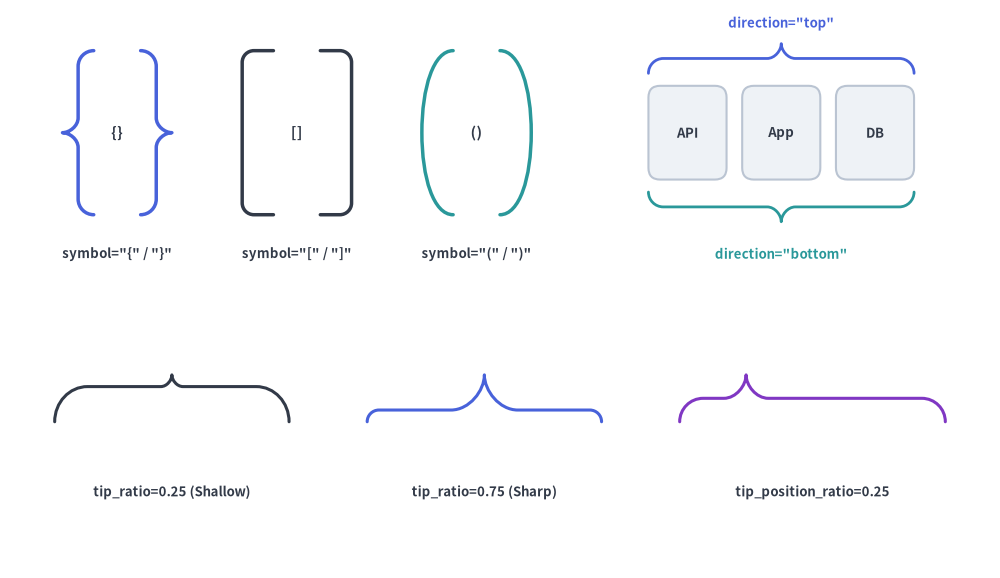
7. Grouping Braces & Brackets (brace)
brace renders a curly ({, }), square ([, ]), or round ((, )) grouping bracket in any of four directions ("left", "right", "top", "bottom"), with stroke thickness controlled via style.line_width:
Center coordinate (x, y) of the brace bounding box.
width
float
Required
Horizontal width of the brace bounding box (> 0). For vertical braces ("left" / "right"), width is the bracket depth; for horizontal braces ("top" / "bottom"), width is the span length.
height
float
Required
Vertical height of the brace bounding box (> 0). For vertical braces ("left" / "right"), height is the span length; for horizontal braces ("top" / "bottom"), height is the bracket depth.
symbol
BraceSymbol
"{"
Bracket family and default orientation (see symbol Variants below).
direction
BraceDirection | None
None
Which side of a grouped region the bracket is placed on (the direction the outer spine/tip points toward): "left", "right", "top", or "bottom" (see direction Variants below).
tip_ratio
float | None
None
Curly brace ({}) only: Fraction of the bracket depth occupied by the central outward tip in (0.0, 1.0). Defaults to 0.50. Higher values (0.70) create a sharp protruding tip; lower values (0.25) create a subtle tip.
tip_position_ratio
float | None
None
Curly brace ({}) only: Position of the central tip along the span axis in (0.0, 1.0) (measured bottom-to-top for "left"/"right", or left-to-right for "top"/"bottom"). Defaults to 0.50 (symmetric center).
style
Style
Required
Stroke thickness is controlled via style.line_width (or style.shape_line_width), color via style.line_color (or style.shape_line_color), line pattern via style.line_style, and rotation via style.angle. On "square" brackets ([, ]), style.shape_r rounds the two $90^\circ$ corners.
text / text_style
str / Style | None
"" / None
Optional text label centered at xy and typography override.