Callouts, Badges & Status
The Callouts, Badges & Status category of drawlib.shapes provides 8 annotation, security, and verification primitives: directional speech bubble callouts (bubblespeech), location/pointer pins (pin), release and classification tags (tag), 3D stepped milestone ribbons (ribbon), security/governance shields (shield), access-control prohibition badges (forbidden), verification checkmarks (checkmark), and comic/incident burst callouts (explosion).
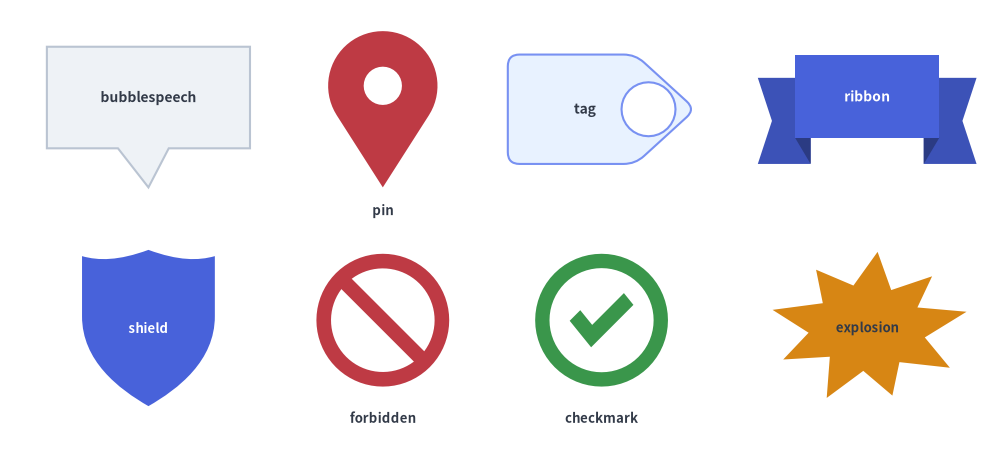
Source Code
from drawlib.canvas import save, setup
from drawlib.shapes import (
    bubblespeech,
    checkmark,
    explosion,
    forbidden,
    pin,
    ribbon,
    shield,
    tag,
)
from drawlib.styles import Styles
from drawlib.text import text

setup(width=128, height=58)

lbl_dark = Styles.DarkBold.patch(text_size=10.0)
lbl_white = Styles.WhiteBold.patch(text_size=10.0)
cap_st = Styles.DarkBold.patch(text_size=9.5)

# Row 1: bubblespeech, pin, tag, ribbon
bubblespeech(
    xy=(6, 39),
    width=26,
    height=13,
    tail_edge="bottom",
    tail_start_ratio=0.35,
    tail_end_ratio=0.60,
    tail_vertex_xy=(19, 34),
    style=Styles.Neutral,
    text="bubblespeech",
    text_style=lbl_dark,
)
pin(
    (49, 44),
    width=14,
    height=20,
    variant="teardrop",
    hole_ratio=0.35,
    style=Styles.DangerFlat,
)
text((49, 31), "pin", style=cap_st)

tag(
    (77, 44),
    width=24,
    height=14,
    variant="angled",
    style=Styles.PrimaryNeutral.patch(shape_r=1.5),
    text="tag",
    text_style=lbl_dark,
)
ribbon(
    (111, 44),
    width=28,
    height=14,
    variant="down",
    style=Styles.PrimaryFlat,
    text="ribbon",
    text_style=lbl_white,
)

# Row 2: shield, forbidden, checkmark, explosion
shield(
    (19, 16),
    width=17,
    height=20,
    variant="classic",
    style=Styles.PrimaryFlat,
    text="shield",
    text_style=Styles.WhiteBold.patch(text_size=9.5),
)
forbidden((49, 17), radius=8.5, variant="slash", style=Styles.DangerFlat)
text((49, 4.5), "forbidden", style=cap_st)

checkmark((77, 17), width=17, variant="circle", style=Styles.SuccessFlat)
text((77, 4.5), "checkmark", style=cap_st)

explosion(
    (111, 16),
    width=26,
    height=20,
    variant="irregular",
    style=Styles.WarningFlat,
    text="explosion",
    text_style=Styles.DarkBold.patch(text_size=9.5),
)

save()
1. Quick Comparison of Callouts, Badges & Status Primitives
| Function | Default Anchor | Variants | Key Geometry Arguments | Primary Diagram Use Cases |
|---|---|---|---|---|
bubblespeech |
Bottom-Left (x0, y0) |
4 tail_edge sides ("left", "top", "right", "bottom") |
tail_start_ratio, tail_end_ratio, tail_vertex_xy |
Code annotations, architectural review notes, sequence/actor commentary. |
pin |
Center (cx, cy) |
"pointer" ("standard"), "teardrop" ("drop"), "pin" ("badge") |
hole_ratio (0.0–0.8), style.angle |
GeoMap location markers, timeline pointers, numbered inspection pins. |
tag |
Center (cx, cy) |
"angled" ("standard"), "chamfered" ("beveled"), "rounded" |
mirror=False, hole_ratio (0.0–0.7), style.shape_r |
Git release tags (v2.4.0), resource labels, key-value metadata badges. |
ribbon |
Center (cx, cy) |
"down" ("standard"), "up", "flat" ("banner") |
tail_width_ratio, drop_ratio |
Section headers, milestone banners, award titles, certificate headings. |
shield |
Center (cx, cy) |
"classic" ("standard"), "flat" ("heater"), "round" |
width, height |
WAF firewalls, IAM auth gates, TLS encryption, security trust boundaries. |
forbidden |
Center (cx, cy) |
"slash" ("standard"), "backslash", "cross", "no_entry" ("minus") |
radius, thickness_ratio (default 0.22) |
Blocked ports, firewall deny rules, deprecated paths, anti-patterns. |
checkmark |
Center (cx, cy) |
"standard" ("check"), "circle", "solid_circle" |
width, height, thickness_ratio (default 0.24), style.shape_r |
CI/CD pass gates, SLA compliance checks, verified security controls. |
explosion |
Center (cx, cy) |
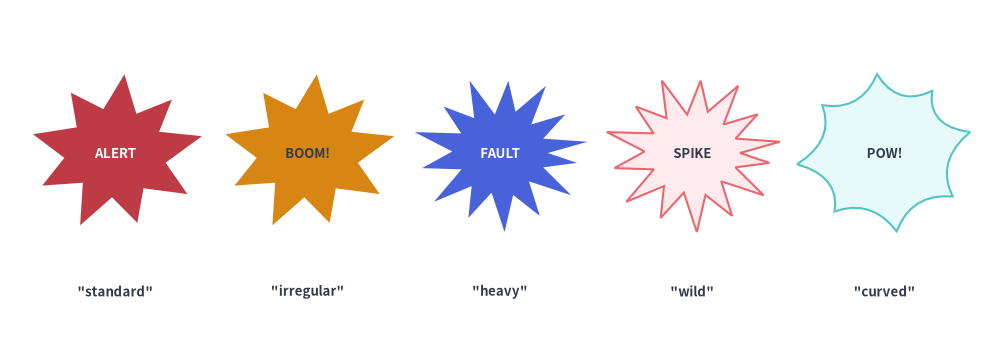
"standard", "irregular", "heavy", "wild", "curved", "comic" |
width, height, style.shape_r |
Incident/outage bursts, fault injection points, anomaly callouts. |
2. Callout Speech Bubbles (bubblespeech)
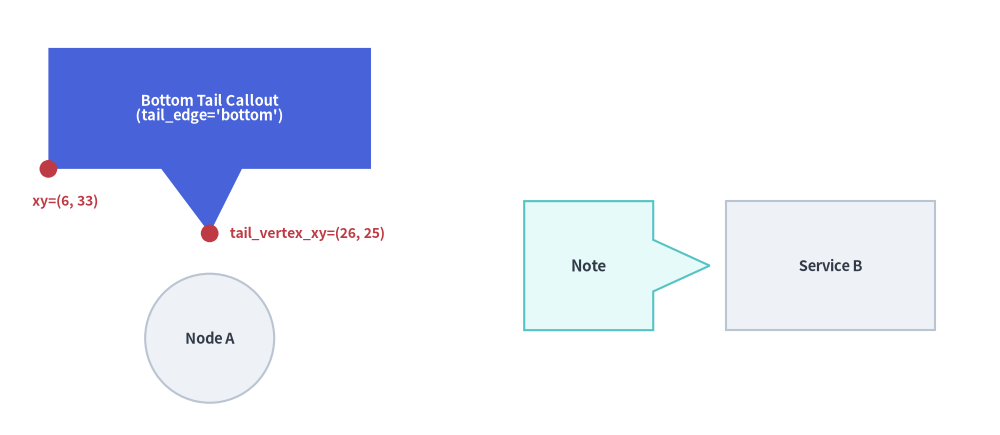
bubblespeech draws a rectangular callout box with an integrated triangular pointer tail that originates from any of the four edges ("left", "top", "right", "bottom") and points to an exact target coordinate tail_vertex_xy:
bubblespeech(
    xy: tuple[float, float],
    width: float,
    height: float,
    tail_edge: Literal["left", "top", "right", "bottom"],
    tail_start_ratio: float,
    tail_vertex_xy: tuple[float, float],
    tail_end_ratio: float,
    *,
    style: Style,
    text: str = "",
    text_style: Style | None = None,
) -> None
Parameter Reference
| Parameter | Type | Description |
|---|---|---|
xy |
tuple[float, float] |
Bottom-left corner (x0, y0) of the rectangular bubble body (always bottom-left anchored regardless of style.halign/valign). |
width / height |
float |
Width and height of the rectangular bubble body (> 0). |
tail_edge |
"left" | "top" | "right" | "bottom" |
Which edge of the bubble body the pointer tail attaches to. |
tail_start_ratio |
float |
Start attachment position along tail_edge in [0.0, 1.0] (measured from bottom-to-top for "left"/"right", or left-to-right for "top"/"bottom"). Must be < tail_end_ratio. |
tail_vertex_xy |
tuple[float, float] |
Absolute canvas coordinate (x, y) where the tip of the pointer tail points (must lie outside the bubble body). |
tail_end_ratio |
float |
End attachment position along tail_edge in [0.0, 1.0]. Must be > tail_start_ratio. |
style / text / text_style |
Style / str / Style | None |
Bubble fill/stroke style and centered annotation text. Note: bubblespeech ignores style.shape_r, style.angle, and style.halign/valign. |
from drawlib.canvas import save, setup
from drawlib.shapes import bubblespeech, circle, rectangle
from drawlib.styles import Styles
from drawlib.text import text

setup(width=124, height=54)

# Target nodes
circle((26, 12), radius=8.0, style=Styles.Neutral, text="Node A", text_style=Styles.DarkBold.patch(text_size=10.5))
rectangle((103, 21), width=26, height=16, style=Styles.Neutral, text="Service B", text_style=Styles.DarkBold.patch(text_size=10.5))

# 1. Callout with bottom tail pointing down to Node A
bubblespeech(
    xy=(6, 33),
    width=40,
    height=15,
    tail_edge="bottom",
    tail_start_ratio=0.35,
    tail_end_ratio=0.60,
    tail_vertex_xy=(26, 25),
    style=Styles.PrimaryFlat,
    text="Bottom Tail Callout\n(tail_edge='bottom')",
    text_style=Styles.WhiteBold.patch(text_size=10.5),
)

# Coordinate indicators for bottom-left anchor xy and tail_vertex_xy
circle((6, 33), radius=1.1, style=Styles.DangerFlat)
text((4, 29.0), "xy=(6, 33)", style=Styles.DangerBold.patch(text_size=10.0, halign="left"))

circle((26, 25), radius=1.1, style=Styles.DangerFlat)
text((28.5, 25.0), "tail_vertex_xy=(26, 25)", style=Styles.DangerBold.patch(text_size=10.0, halign="left"))

# 2. Callout with right tail pointing to Service B
bubblespeech(
    xy=(65, 13),
    width=16,
    height=16,
    tail_edge="right",
    tail_start_ratio=0.30,
    tail_end_ratio=0.70,
    tail_vertex_xy=(88, 21),
    style=Styles.SecondaryNeutral,
    text="Note",
    text_style=Styles.DarkBold.patch(text_size=11.0),
)

save()
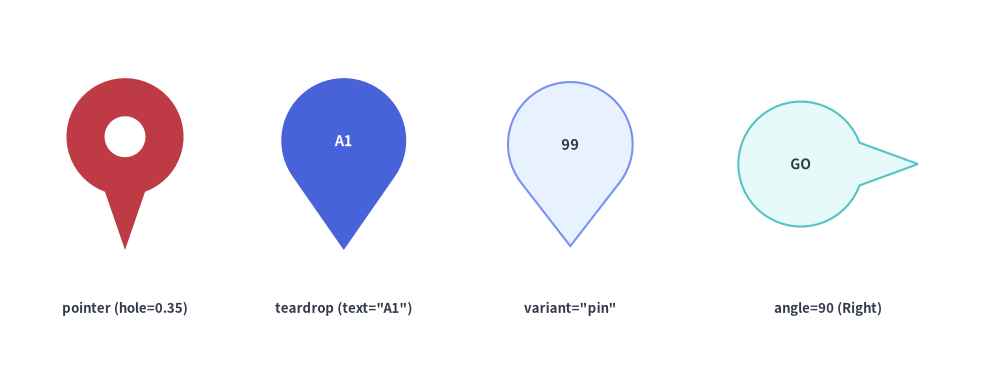
3. Location Pins & Directional Markers (pin)
pin renders a map marker or directional pointer badge with an optional circular center cutout (hole_ratio) and optical text centering inside the upper circular head:
pin(
    xy: tuple[float, float],
    width: float,
    height: float,
    *,
    variant: Literal[
        "pointer", "standard",
        "teardrop", "drop",
        "pin", "badge",
    ] = "pointer",
    hole_ratio: float | None = None,
    style: Style,
    text: str = "",
    text_style: Style | None = None,
) -> None
| Parameter | Type | Default | Description |
|---|---|---|---|
xy |
tuple[float, float] |
Required | Center coordinate (x, y) of the pin bounding box (use style.patch(valign="bottom") to anchor the bottom tip at xy). |
width / height |
float |
Required | Outer horizontal width (> 0) and vertical height (> 0). |
variant |
PinVariant |
"pointer" |
Pin silhouette: • "pointer" (or "standard"): Circular head with straight tangent cone sides meeting at a sharp bottom tip.• "teardrop" (or "drop"): Smooth cubic-Bézier teardrop curve.• "pin" (or "badge"): Large circular badge head with a short pointer triangle at the base. |
hole_ratio |
float | None |
None |
Optional center hole radius ratio in (0.0, 0.8) relative to the head radius (e.g. hole_ratio=0.35 for a classic map pin ring). Omit hole_ratio when placing text inside the head. |
style.angle |
float |
0.0 |
Rotates the pin counterclockwise (e.g. angle=90 points right, angle=180 points up). |
text / text_style |
str / Style | None |
"" / None |
Label automatically centered inside the circular upper head rather than the overall bounding-box center. |
from drawlib.canvas import save, setup
from drawlib.shapes import pin
from drawlib.styles import Styles
from drawlib.text import text

setup(width=128, height=48)

lbl = Styles.DarkBold.patch(text_size=9.5)

# 1. Pointer with hole_ratio=0.35
pin((16, 27), width=15, height=22, variant="pointer", hole_ratio=0.35, style=Styles.DangerFlat)
text((16, 8.5), 'pointer (hole=0.35)', style=lbl)

# 2. Teardrop with embedded text (auto-centered in head)
pin(
    (44, 27),
    width=16,
    height=22,
    variant="teardrop",
    style=Styles.PrimaryFlat,
    text="A1",
    text_style=Styles.WhiteBold.patch(text_size=10.5),
)
text((44, 8.5), 'teardrop (text="A1")', style=lbl)

# 3. Badge / Pin variant (large circular head + short pointer tip)
pin(
    (73, 27),
    width=17,
    height=21,
    variant="pin",
    style=Styles.PrimaryNeutral,
    text="99",
    text_style=Styles.DarkBold.patch(text_size=10.5),
)
text((73, 8.5), 'variant="pin"', style=lbl)

# 4. Rotated pointer pin (angle=90 points right, text kept horizontal with angle=0)
pin(
    (106, 27),
    width=16,
    height=23,
    variant="pointer",
    style=Styles.SecondaryNeutral.patch(angle=90),
    text="GO",
    text_style=Styles.DarkBold.patch(text_size=10.0, angle=0),
)
text((106, 8.5), "angle=90 (Right)", style=lbl)

save()
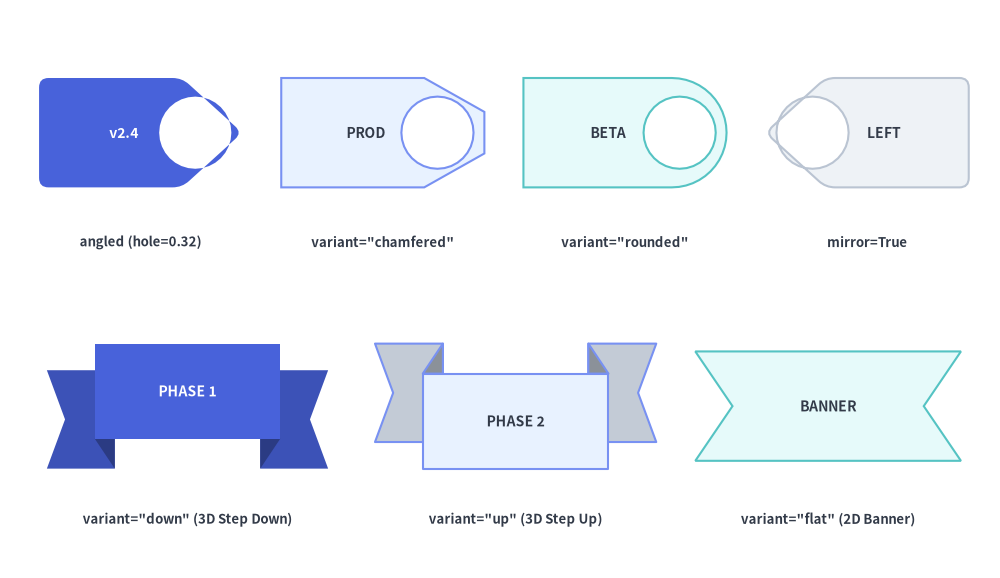
4. Release Tags & Ribbon Banners (tag, ribbon)
4.1. Release & Metadata Tags (tag)
tag renders a price/label/version tag with a pointed or beveled collar, an optional punch hole (hole_ratio), and optical text centering inside the rectangular body:
tag(
    xy: tuple[float, float],
    width: float,
    height: float,
    *,
    variant: Literal[
        "angled", "standard",
        "chamfered", "beveled",
        "rounded",
    ] = "angled",
    mirror: bool = False,
    hole_ratio: float | None = None,
    style: Style,
    text: str = "",
    text_style: Style | None = None,
) -> None
| Parameter | Type | Default | Description |
|---|---|---|---|
xy |
tuple[float, float] |
Required | Center coordinate (x, y) of the tag bounding box. |
width / height |
float |
Required | Outer horizontal width (> 0) and vertical height (> 0). |
variant |
TagVariant |
"angled" |
Collar silhouette: • "angled" (or "standard"): 5-vertex tag with a triangular pointed tip on the right ($+X$).• "chamfered" (or "beveled"): 6-vertex tag with $45^\circ$ beveled corners and a flat tip edge.• "rounded": Smooth cubic-Bézier rounded collar on the right and rounded body corners on the left. |
mirror |
bool |
False |
If True, flips the tag horizontally so the collar/hole points left ($-X$). |
hole_ratio |
float | None |
None |
Optional circular punch hole radius ratio in (0.0, 0.7) placed inside the collar tip. |
style |
Style |
Required | Supports style.angle rotation and style.shape_r vertex rounding (on "angled" and "chamfered"). |
text / text_style |
str / Style | None |
"" / None |
Label automatically shifted slightly away from the pointed collar so it centers cleanly in the main rectangular body. |
4.2. Stepped 3D & Swallowtail Ribbon Banners (ribbon)
ribbon renders a celebratory or structural banner with swallowtail V-notched ends:
ribbon(
    xy: tuple[float, float],
    width: float,
    height: float,
    *,
    variant: Literal[
        "down", "standard",
        "up",
        "flat", "banner",
    ] = "down",
    tail_width_ratio: float | None = None,
    drop_ratio: float | None = None,
    style: Style,
    text: str = "",
    text_style: Style | None = None,
) -> None
| Parameter | Type | Default | Description |
|---|---|---|---|
xy |
tuple[float, float] |
Required | Center coordinate (x, y) of the outer ribbon bounding box. |
width / height |
float |
Required | Total horizontal span (> 0) and vertical height (> 0). |
variant |
RibbonVariant |
"down" |
Ribbon structure: • "down" (or "standard"): 3D stepped ribbon where the central banner sits on top and the left/right swallowtail ends step downward behind darkened 3D fold triangles.• "up": 3D stepped ribbon where the central banner sits at the bottom and the swallowtail ends step upward.• "flat" (or "banner"): Single-piece 2D swallowtail banner without 3D steps. |
tail_width_ratio |
float | None |
None |
Horizontal fraction of width occupied by each side tail in [0.10, 0.35] (default 0.22). |
drop_ratio |
float | None |
None |
Vertical step offset fraction of height in [0.10, 0.45] on "down" and "up" variants (default 0.25). |
text / text_style |
str / Style | None |
"" / None |
Centered on the front central banner (automatically shifted upward on "down" and downward on "up"). |
from drawlib.canvas import save, setup
from drawlib.shapes import ribbon, tag
from drawlib.styles import Styles
from drawlib.text import text

setup(width=128, height=74)

lbl = Styles.DarkBold.patch(text_size=9.5)

# Row 1: Tag variants (angled, chamfered, rounded, mirrored + hole_ratio)
tag(
    (18, 57),
    width=26,
    height=14,
    variant="angled",
    hole_ratio=0.32,
    style=Styles.PrimaryFlat.patch(shape_r=1.2),
    text="v2.4",
    text_style=Styles.WhiteBold.patch(text_size=10.0),
)
text((18, 43), 'angled (hole=0.32)', style=lbl)

tag(
    (49, 57),
    width=26,
    height=14,
    variant="chamfered",
    hole_ratio=0.32,
    style=Styles.PrimaryNeutral,
    text="PROD",
    text_style=Styles.DarkBold.patch(text_size=10.0),
)
text((49, 43), 'variant="chamfered"', style=lbl)

tag(
    (80, 57),
    width=26,
    height=14,
    variant="rounded",
    hole_ratio=0.32,
    style=Styles.SecondaryNeutral,
    text="BETA",
    text_style=Styles.DarkBold.patch(text_size=10.0),
)
text((80, 43), 'variant="rounded"', style=lbl)

tag(
    (111, 57),
    width=26,
    height=14,
    variant="angled",
    mirror=True,
    hole_ratio=0.32,
    style=Styles.Neutral.patch(shape_r=1.2),
    text="LEFT",
    text_style=Styles.DarkBold.patch(text_size=10.0),
)
text((111, 43), "mirror=True", style=lbl)

# Row 2: Ribbon variants ("down", "up", "flat")
ribbon(
    (24, 22),
    width=36,
    height=16,
    variant="down",
    style=Styles.PrimaryFlat,
    text="PHASE 1",
    text_style=Styles.WhiteBold.patch(text_size=10.0),
)
text((24, 7.5), 'variant="down" (3D Step Down)', style=lbl)

ribbon(
    (66, 22),
    width=36,
    height=16,
    variant="up",
    style=Styles.PrimaryNeutral,
    text="PHASE 2",
    text_style=Styles.DarkBold.patch(text_size=10.0),
)
text((66, 7.5), 'variant="up" (3D Step Up)', style=lbl)

ribbon(
    (106, 22),
    width=34,
    height=14,
    variant="flat",
    style=Styles.SecondaryNeutral,
    text="BANNER",
    text_style=Styles.DarkBold.patch(text_size=10.0),
)
text((106, 7.5), 'variant="flat" (2D Banner)', style=lbl)

save()
5. Security & Governance Shields (shield)
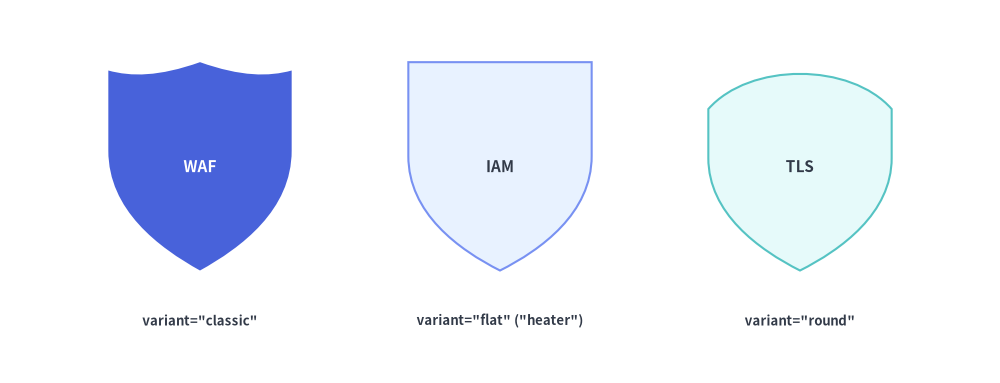
For Web Application Firewalls (WAF), IAM policy gates, zero-trust boundaries, and encryption badges, shield provides three classic heraldic silhouettes:
shield(
    xy: tuple[float, float],
    width: float,
    height: float,
    *,
    variant: Literal[
        "classic", "standard",
        "flat", "heater",
        "round",
    ] = "classic",
    style: Style,
    text: str = "",
    text_style: Style | None = None,
) -> None
| Parameter | Type | Default | Description |
|---|---|---|---|
xy |
tuple[float, float] |
Required | Center coordinate (x, y) of the shield bounding box. |
width / height |
float |
Required | Outer horizontal width (> 0) and vertical height (> 0). |
variant |
ShieldVariant |
"classic" |
Shield crest silhouette: • "classic" (or "standard"): 3-segment scalloped top crest with a central peak and curved sides tapering to a bottom point.• "flat" (or "heater"): Straight horizontal top edge with smooth cubic-Bézier sides meeting at a pointed base.• "round": Arched convex top with a wide, rounded U-shaped base. |
style |
Style |
Required | Fill, border, and rotation (angle) style. |
text / text_style |
str / Style | None |
"" / None |
Label optically shifted slightly upward (+0.04 * height) into the broader upper body of the shield. |
from drawlib.canvas import save, setup
from drawlib.shapes import shield
from drawlib.styles import Styles
from drawlib.text import text

setup(width=120, height=46)

lbl = Styles.DarkBold.patch(text_size=9.5)

# 1. Classic scalloped crest shield
shield(
    (24, 26),
    width=22,
    height=25,
    variant="classic",
    style=Styles.PrimaryFlat,
    text="WAF",
    text_style=Styles.WhiteBold.patch(text_size=11.0),
)
text((24, 7.5), 'variant="classic"', style=lbl)

# 2. Flat-top heater shield
shield(
    (60, 26),
    width=22,
    height=25,
    variant="flat",
    style=Styles.PrimaryNeutral,
    text="IAM",
    text_style=Styles.DarkBold.patch(text_size=11.0),
)
text((60, 7.5), 'variant="flat" ("heater")', style=lbl)

# 3. Round-bottom shield
shield(
    (96, 26),
    width=22,
    height=25,
    variant="round",
    style=Styles.SecondaryNeutral,
    text="TLS",
    text_style=Styles.DarkBold.patch(text_size=11.0),
)
text((96, 7.5), 'variant="round"', style=lbl)

save()
6. Access Control & Verification Badges (forbidden, checkmark)
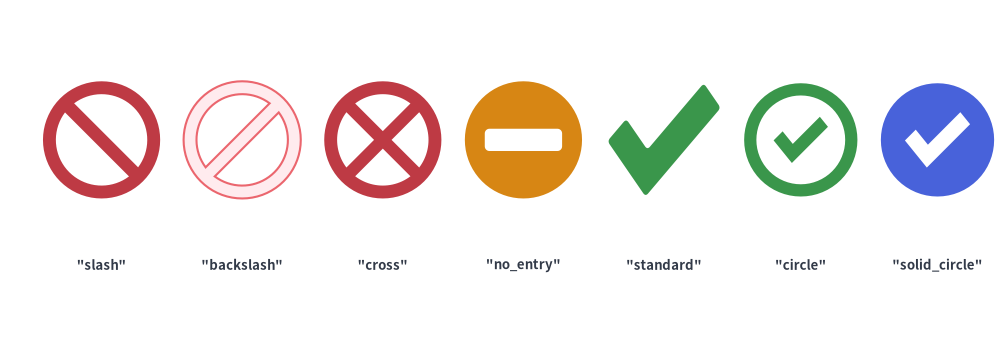
For firewall rules, access control matrices, CI/CD verification gates, and audit checklists, forbidden and checkmark render crisp compound-path vector status symbols:
forbidden(
    xy: tuple[float, float],
    radius: float,
    *,
    variant: Literal[
        "slash", "standard",
        "backslash",
        "cross",
        "no_entry", "minus",
    ] = "slash",
    thickness_ratio: float | None = None,
    style: Style,
    text: str = "",
    text_style: Style | None = None,
) -> None

checkmark(
    xy: tuple[float, float],
    width: float,
    height: float | None = None,
    *,
    variant: Literal[
        "standard", "check",
        "circle",
        "solid_circle",
    ] = "standard",
    thickness_ratio: float | None = None,
    style: Style,
    text: str = "",
    text_style: Style | None = None,
) -> None
| Function | Parameter | Type | Default | Description |
|---|---|---|---|---|
forbidden |
xy / radius |
tuple / float |
Required | Center coordinate (cx, cy) and outer circle radius (> 0). |
variant |
ForbiddenVariant |
"slash" |
• "slash" ("standard"): Annular ring with top-left to bottom-right diagonal bar (two D-shaped cutouts).• "backslash": Annular ring with bottom-left to top-right diagonal bar.• "cross": Annular ring with an 'X' cross (four sector cutouts).• "no_entry" ("minus"): Solid circle with a horizontal rectangular cutout bar. |
|
thickness_ratio |
float | None |
None |
Ring and bar thickness ratio in (0.0, 0.5) relative to radius (default 0.22). |
|
checkmark |
xy / width |
tuple / float |
Required | Center coordinate (x, y) and horizontal width (> 0). height defaults to width when None. |
variant |
CheckmarkVariant |
"standard" |
• "standard" ("check"): Standalone 6-vertex L-shaped tick polygon (supports style.shape_r).• "circle": Outer circular ring combined with an inner checkmark polygon.• "solid_circle": Solid circular badge with a transparent checkmark cutout. |
|
thickness_ratio |
float | None |
None |
Stroke thickness ratio in (0.0, 0.5) relative to min(width, height) (default 0.24). |
from drawlib.canvas import save, setup
from drawlib.shapes import checkmark, forbidden
from drawlib.styles import Styles
from drawlib.text import text

setup(width=128, height=44)

lbl = Styles.DarkBold.patch(text_size=9.5)

# Forbidden variants
for i, (var, st) in enumerate([
    ("slash", Styles.DangerFlat),
    ("backslash", Styles.DangerNeutral),
    ("cross", Styles.DangerFlat),
    ("no_entry", Styles.WarningFlat),
]):
    cx = 13 + i * 18
    forbidden((cx, 26), radius=7.5, variant=var, style=st)
    text((cx, 10), f'"{var}"', style=lbl)

# Checkmark variants
for i, (var, st) in enumerate([
    ("standard", Styles.SuccessFlat.patch(shape_r=0.5)),
    ("circle", Styles.SuccessFlat),
    ("solid_circle", Styles.PrimaryFlat),
]):
    cx = 85 + i * 17.5
    checkmark((cx, 26), width=14.5, variant=var, style=st)
    text((cx, 10), f'"{var}"', style=lbl)

save()
7. Impact & Incident Bursts (explosion)
For chaos engineering fault points, outage callouts, anomaly alerts, and high-impact promotional badges, explosion provides six starburst silhouettes fitted to (width, height):
explosion(
    xy: tuple[float, float],
    width: float,
    height: float,
    *,
    variant: Literal[
        "standard",
        "irregular",
        "heavy",
        "wild",
        "curved", "comic",
    ] = "standard",
    style: Style,
    text: str = "",
    text_style: Style | None = None,
) -> None
variant |
Spike Count & Geometry | Supports style.shape_r |
Typical Use Cases |
|---|---|---|---|
"standard" (default) |
12-spike burst with deterministic alternating major/minor spike depths | Yes (float or 24-tuple) |
Standard alert bursts, "NEW!" badges, and impact callouts. |
"irregular" |
11-spike asymmetric burst with organic angular spacing | Yes (float or 22-tuple) |
Crash/collision indicators, chaos fault injection markers. |
"heavy" |
8-spike broad, heavy-Impact burst | Yes (float or 16-tuple) |
Compact outage badges with ample interior room for text labels. |
"wild" |
16-spike dense, high-energy burst with deep valleys | Yes (float or 32-tuple) |
High-severity incident callouts, DDoS/traffic spike indicators. |
"curved" / "comic" |
10-spike burst with inward-curved quadratic Bézier valleys | — (Curved Bézier arcs) | Comic-style blast callouts and expressive presentation highlights. |
from drawlib.canvas import save, setup
from drawlib.shapes import explosion
from drawlib.styles import Styles
from drawlib.text import text

setup(width=130, height=46)

lbl = Styles.DarkBold.patch(text_size=9.5)
txt_w = Styles.WhiteBold.patch(text_size=9.5)
txt_d = Styles.DarkBold.patch(text_size=9.5)

specs = [
    ("standard", 15, Styles.DangerFlat, "ALERT", txt_w),
    ("irregular", 40, Styles.WarningFlat, "BOOM!", txt_d),
    ("heavy", 65, Styles.PrimaryFlat, "FAULT", txt_w),
    ("wild", 90, Styles.DangerNeutral, "SPIKE", txt_d),
    ("curved", 115, Styles.SecondaryNeutral, "POW!", txt_d),
]

for var, cx, st, inner, tst in specs:
    explosion((cx, 26), width=23, height=21, variant=var, style=st, text=inner, text_style=tst)
    text((cx, 8), f'"{var}"', style=lbl)

save()