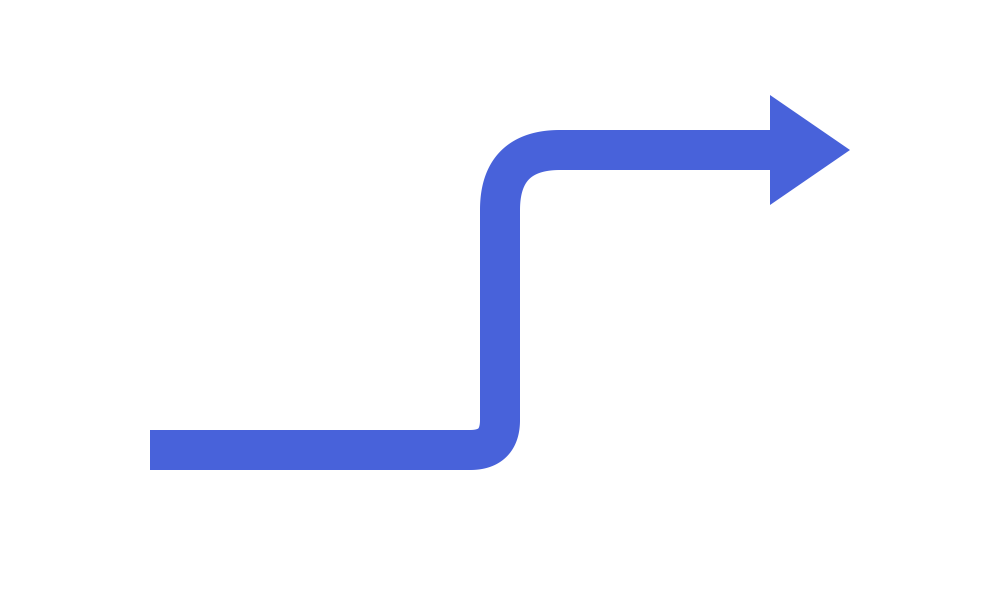
Block Arrows & Chevrons
In addition to 1D stroke connectors (drawlib.lines), the Block Arrows & Chevrons category of drawlib.shapes provides 6 closed 2D polygon arrow primitives: point-to-point straight block arrows (arrow), sequential process chevrons (chevron), $90^\circ$ L-turn arrows (arrow_l), $180^\circ$ U-turn feedback arrows (arrow_u), circular/elliptical arc arrows (arrow_arc), and multi-waypoint routed block arrows (arrow_polyline).
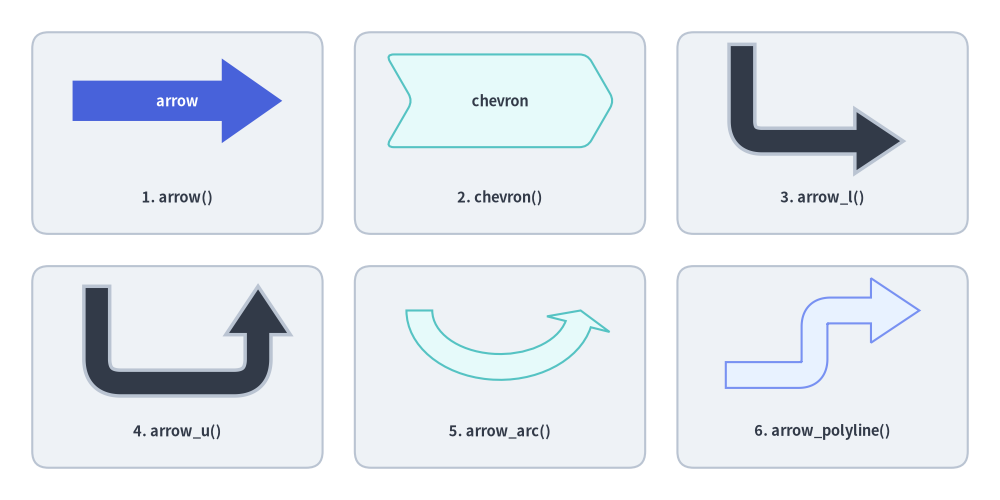
Source Code
from drawlib.canvas import save, setup
from drawlib.shapes import arrow, arrow_arc, arrow_l, arrow_polyline, arrow_u, chevron, rectangle
from drawlib.styles import Styles
from drawlib.text import text

setup(width=124, height=62)

# Subtle background cards for 3x2 grid
for cx in (22, 62, 102):
    for cy in (45.5, 16.5):
        rectangle((cx, cy), width=36, height=25, style=Styles.Neutral.patch(shape_r=2))

lbl = Styles.DarkBold.patch(text_size=10.5)

# 1. Straight Block Arrow (Hero)
arrow(
    (9, 49.5),
    (35, 49.5),
    tail_width=5.0,
    head_width=10.5,
    head_length=7.5,
    style=Styles.PrimaryFlat,
    text="arrow",
    text_style=Styles.WhiteBold.patch(text_size=10.5),
)
text((22, 37.5), "1. arrow()", style=lbl)

# 2. Chevron
chevron(
    (62, 49.5),
    width=25,
    height=11.5,
    corner_angle=60,
    style=Styles.SecondaryNeutral.patch(shape_r=1),
    text="chevron",
    text_style=Styles.DarkBold.patch(text_size=10.5),
)
text((62, 37.5), "2. chevron()", style=lbl)

# 3. L-shaped Arrow
arrow_l(
    (102, 50.5),
    width=20,
    height=12,
    tail_width=3.2,
    head_width=8,
    head_length=6,
    style=Styles.DarkBold.patch(shape_r=2.5),
)
text((102, 37.5), "3. arrow_l()", style=lbl)

# 4. U-turn Arrow
arrow_u(
    (22, 20.5),
    width=20,
    height=12,
    tail_width=3.2,
    head_width=8,
    head_length=6,
    style=Styles.DarkBold.patch(shape_r=3),
)
text((22, 8.5), "4. arrow_u()", style=lbl)

# 5. Arrow Arc (Circular flow)
arrow_arc(
    (62, 23.5),
    width=20,
    height=14,
    angle_start=180,
    angle_end=0,
    tail_width=3.2,
    head_width=8,
    head_angle=14,
    style=Styles.SecondaryNeutral,
)
text((62, 8.5), "5. arrow_arc()", style=lbl)

# 6. Multi-Point Polyline Arrow
arrow_polyline(
    [(90, 15.5), (101, 15.5), (101, 23.5), (114, 23.5)],
    tail_width=3.2,
    head_width=8,
    head_length=6,
    style=Styles.PrimaryNeutral.patch(shape_r=2),
)
text((102, 8.5), "6. arrow_polyline()", style=lbl)

save()
1. Quick Comparison of Block Arrow Primitives
| Function | Coordinate Anchor | Direction Control | Corner Rounding (style.shape_r) |
Embedded text Support |
|---|---|---|---|---|
arrow |
xy1 (tail) $\to$ xy2 (tip) |
head: "->", "<-", "<->" |
— | Yes (auto-rotated along shaft) |
chevron |
Center xy (width, height) |
mirror=False | True, style.angle |
Scalar float or 6-tuple |
Yes (centered in chevron) |
arrow_l |
Center xy (width, height) |
head: "->", "<-", "<->", style.angle |
Scalar float or 1-tuple (elbow) |
No (use standalone text()) |
arrow_u |
Center xy (width, height) |
head: "->", "<-", "<->", style.angle |
Scalar float or 2-tuple (r1, r2) |
No (use standalone text()) |
arrow_arc |
Center xy (width, height) |
angle_start, angle_end, head, style.angle |
— (Smooth elliptical arc) | No (use standalone text()) |
arrow_polyline |
Waypoints xys=[(x1,y1), ...] |
head: "->", "<-", "<->" |
Scalar float or (len(xys)-2)-tuple |
No (use standalone text()) |
[!TIP] When to Use Block Arrows vs.
drawlib.linesvs.ChevronProcess:
- Use Block Arrows (
drawlib.shapes) when the transition itself is a visual container (e.g. a wide data bus carrying a label like"ETL Stream", a prominent stage transition, or a bold cyclic arrow).- Use Lines & Connectors (
drawlib.lines) for thin point-to-point network/API connectors between component cards.- Use
ChevronProcess(drawlib.smartarts) when building a multi-stage horizontal pipeline with automatic spacing, descriptions, and theme alternation.
2. Straight Block Arrow (arrow)
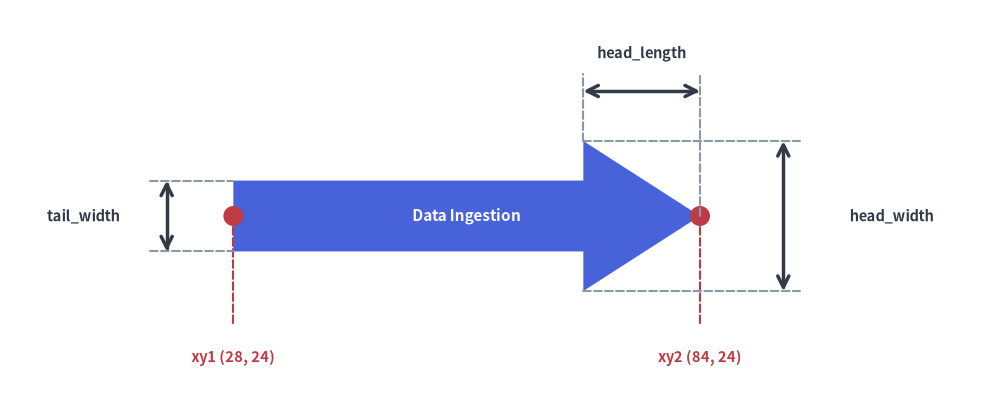
arrow draws a directed 2D block arrow between two arbitrary coordinates xy1 and xy2, automatically computing the shaft angle and rotating any embedded text to align with the shaft:
arrow(
    xy1: tuple[float, float],
    xy2: tuple[float, float],
    tail_width: float,
    head_width: float,
    head_length: float,
    head: Literal["->", "<-", "<->"] = "->",
    *,
    style: Style,
    text: str = "",
    text_style: Style | None = None,
) -> None
| Parameter | Type | Default | Description |
|---|---|---|---|
xy1 |
tuple[float, float] |
Required | Base center coordinate of the arrow tail (x1, y1) (or backward arrowhead tip when head="<-" / "<->"). |
xy2 |
tuple[float, float] |
Required | Tip coordinate of the forward arrowhead (x2, y2). |
tail_width |
float |
Required | Transverse width of the rectangular shaft (> 0). |
head_width |
float |
Required | Full transverse width of the arrowhead base (> tail_width). |
head_length |
float |
Required | Axial length of the arrowhead from base to tip (> 0). Must be shorter than the total distance $|xy_2 - xy_1|$. |
head |
Literal["->", "<-", "<->"] |
"->" |
Arrowhead direction: forward at xy2 ("->"), backward at xy1 ("<-"), or bidirectional at both ends ("<->"). |
style |
Style |
Required | Shape fill (shape_fill_color) and border (shape_line_color, shape_line_width, shape_line_style). |
text / text_style |
str / Style | None |
"" / None |
Embedded label centered at the midpoint between xy1 and xy2 and automatically rotated along the shaft. |
from drawlib.canvas import save, setup
from drawlib.lines import line
from drawlib.shapes import arrow, circle
from drawlib.styles import Styles
from drawlib.text import text

setup(width=120, height=50)

# Primary straight block arrow from xy1=(28, 24) to xy2=(84, 24)
arrow(
    (28, 24),
    (84, 24),
    tail_width=8.5,
    head_width=18,
    head_length=14,
    head="->",  # "->", "<-", or "<->"
    style=Styles.PrimaryFlat,
    text="Data Ingestion",
    text_style=Styles.WhiteBold.patch(text_size=11.0),
)

# Endpoint markers for xy1 and xy2
circle((28, 24), radius=1.2, style=Styles.DangerFlat)
line((28, 24), (28, 11), style=Styles.DangerDashed)
text((28, 7.0), "xy1 (28, 24)", style=Styles.DangerBold.patch(text_size=10.5))

circle((84, 24), radius=1.2, style=Styles.DangerFlat)
line((84, 24), (84, 11), style=Styles.DangerDashed)
text((84, 7.0), "xy2 (84, 24)", style=Styles.DangerBold.patch(text_size=10.5))

# Dimension: tail_width (shaft y = 19.75..28.25)
line((18, 19.75), (28, 19.75), style=Styles.MutedDashed)
line((18, 28.25), (28, 28.25), style=Styles.MutedDashed)
line((20, 19.75), (20, 28.25), arrow_head="<->", style=Styles.DarkBold)
text((10, 24), "tail_width", style=Styles.DarkBold.patch(text_size=10.5))

# Dimension: head_length (x = 70..84)
line((70, 33), (70, 41), style=Styles.MutedDashed)
line((84, 24), (84, 41), style=Styles.MutedDashed)
line((70, 39), (84, 39), arrow_head="<->", style=Styles.DarkBold)
text((77, 43.5), "head_length", style=Styles.DarkBold.patch(text_size=10.5))

# Dimension: head_width (arrowhead base y = 15..33)
line((70, 15), (96, 15), style=Styles.MutedDashed)
line((70, 33), (96, 33), style=Styles.MutedDashed)
line((94, 15), (94, 33), arrow_head="<->", style=Styles.DarkBold)
text((107, 24), "head_width", style=Styles.DarkBold.patch(text_size=10.5))

save()
3. Process Chevron (chevron) & Direction Reversal (head, mirror)
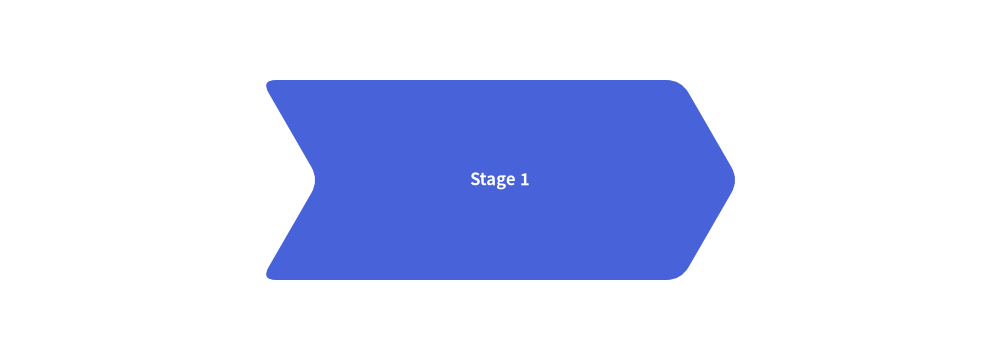
chevron draws an interlocking 6-vertex arrowhead-shaped block with an indented rear V-notch, ideal for sequential stage diagrams:
chevron(
    xy: tuple[float, float],
    width: float,
    height: float,
    corner_angle: float,
    mirror: bool = False,
    *,
    style: Style,
    text: str = "",
    text_style: Style | None = None,
) -> None
| Parameter | Type | Default | Description |
|---|---|---|---|
xy |
tuple[float, float] |
Required | Anchor coordinate (x, y) (center by default with preset Styles.*). |
width / height |
float |
Required | Horizontal body width and vertical height (> 0). |
corner_angle |
float |
Required | Front tip and rear V-notch slope angle in degrees (0 < corner_angle < 90, typically 55–70). |
mirror |
bool |
False |
If True, mirrors the chevron horizontally so it points left ($-X$). |
style |
Style |
Required | Fill, stroke, rotation (style.angle), and vertex rounding (style.shape_r as a scalar float or 6-tuple of per-vertex radii). |
text / text_style |
str / Style | None |
"" / None |
Centered text label and optional typography override. |
from drawlib.canvas import save, setup
from drawlib.shapes import chevron
from drawlib.styles import Styles

setup(width=100, height=36)
chevron(
    (50, 18),
    width=42,
    height=20,
    corner_angle=60,  # Tip acute angle
    style=Styles.PrimaryFlat.patch(shape_r=1.5),
    text="Stage 1",
    text_style=Styles.WhiteBold.patch(text_size=12.0),
)
save()
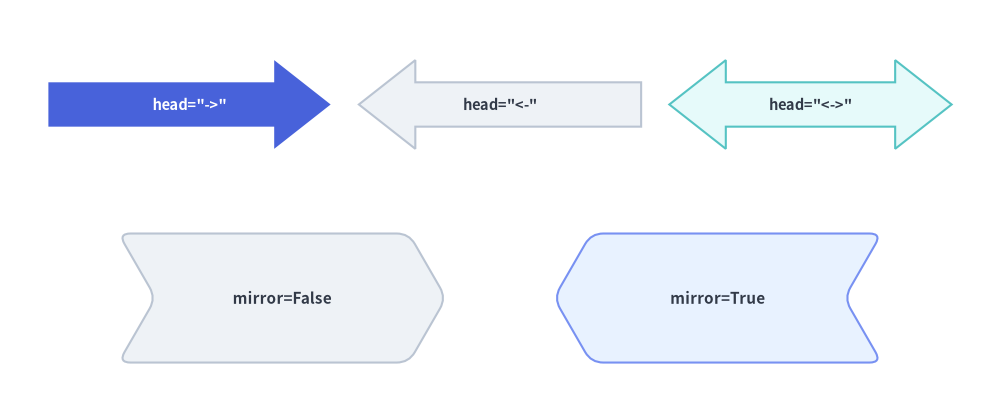
Arrowhead Directions (head) & Mirrored Chevrons (mirror=True)
All five directed block arrows (arrow, arrow_l, arrow_u, arrow_arc, arrow_polyline) support head="->", head="<-", and head="<->", while chevron() supports horizontal reversal via mirror=True:
from drawlib.canvas import save, setup
from drawlib.shapes import arrow, chevron
from drawlib.styles import Styles

setup(width=124, height=52)

# Top row: head="->", head="<-", head="<->"
arrow(
    (6, 39),
    (41, 39),
    tail_width=5.5,
    head_width=11,
    head_length=7,
    head="->",
    style=Styles.PrimaryFlat,
    text='head="->"',
    text_style=Styles.WhiteBold.patch(text_size=10.5),
)
arrow(
    (44.5, 39),
    (79.5, 39),
    tail_width=5.5,
    head_width=11,
    head_length=7,
    head="<-",
    style=Styles.Neutral,
    text='head="<-"',
    text_style=Styles.DarkBold.patch(text_size=10.5),
)
arrow(
    (83, 39),
    (118, 39),
    tail_width=5.5,
    head_width=11,
    head_length=7,
    head="<->",
    style=Styles.SecondaryNeutral,
    text='head="<->"',
    text_style=Styles.DarkBold.patch(text_size=10.5),
)

# Bottom row: Standard chevron (mirror=False) vs Mirrored chevron (mirror=True)
chevron(
    (35, 15),
    width=36,
    height=16,
    corner_angle=60,
    mirror=False,
    style=Styles.Neutral.patch(shape_r=1.5),
    text="mirror=False",
    text_style=Styles.DarkBold.patch(text_size=11.0),
)
chevron(
    (89, 15),
    width=36,
    height=16,
    corner_angle=60,
    mirror=True,
    style=Styles.PrimaryNeutral.patch(shape_r=1.5),
    text="mirror=True",
    text_style=Styles.DarkBold.patch(text_size=11.0),
)

save()
4. Orthogonal Routed Block Arrows (arrow_l, arrow_u)
[!NOTE]
arrow_l()andarrow_u()do not accepttextortext_style. Use standalonedrawlib.text.text()to place labels near the elbow or shaft.
4.1. L-Shaped Corner Arrow (arrow_l)
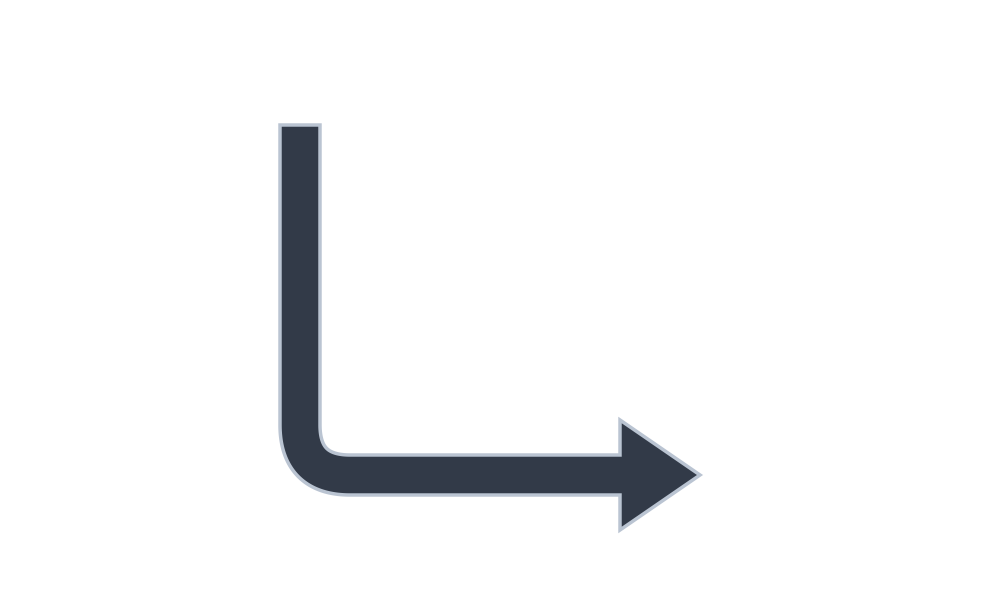
Draws a $90^\circ$ right-angled block arrow centered at xy within a bounding box (width, height). By default (angle=0), the tail starts at the bottom-left and turns right toward the top-right; use style.patch(angle=90 | 180 | 270) to orient the L-turn in any quadrant:
arrow_l(
    xy: tuple[float, float],
    width: float,
    height: float,
    tail_width: float,
    head_width: float,
    head_length: float,
    head: Literal["->", "<-", "<->"] = "->",
    *,
    style: Style,
) -> None
| Parameter | Type | Default | Description |
|---|---|---|---|
xy |
tuple[float, float] |
Required | Center coordinate (x, y) of the L-arrow bounding box. |
width / height |
float |
Required | Bounding box horizontal width and vertical height (> 0). |
tail_width |
float |
Required | Shaft width (> 0). |
head_width / head_length |
float |
Required | Arrowhead base width and axial length (> 0). |
head |
Literal["->", "<-", "<->"] |
"->" |
Arrowhead direction ("->", "<-", or "<->"). |
style |
Style |
Required | Fill, stroke, rotation (style.angle), and elbow rounding radius (style.shape_r as a scalar float or 1-tuple). |
from drawlib.canvas import save, setup
from drawlib.shapes import arrow_l
from drawlib.styles import Styles

setup(width=100, height=60)
arrow_l(
    (50, 30),
    width=40,
    height=35,
    tail_width=4,
    head_width=11,
    head_length=8,
    # Corner rounding radius
    style=Styles.DarkBold.patch(shape_r=5),
)
save()
4.2. U-Turn Feedback Arrow (arrow_u)
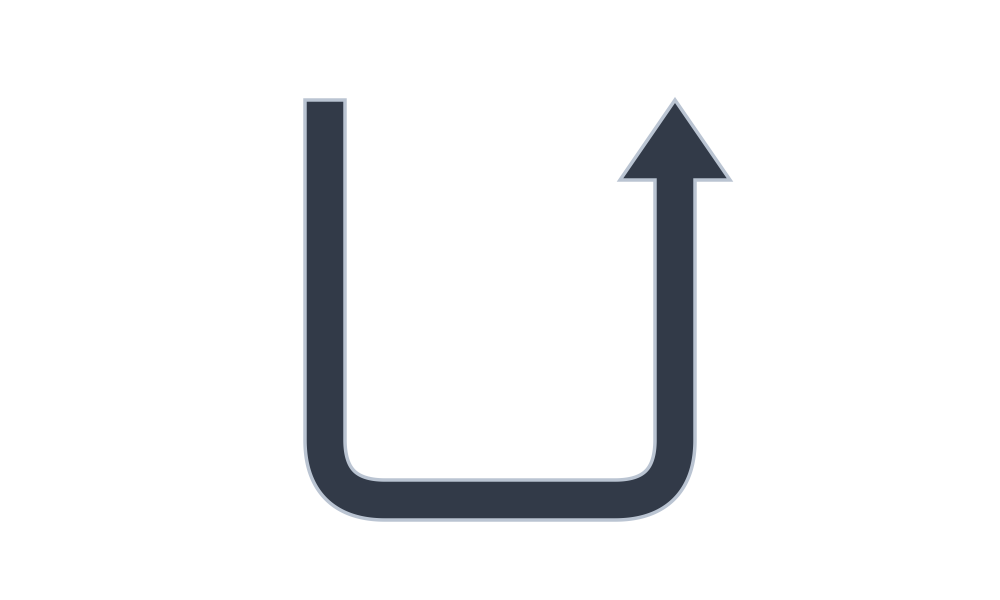
Draws a $180^\circ$ turnaround block arrow centered at xy, ideal for retry loops, rollbacks, and request-response turnaround channels:
arrow_u(
    xy: tuple[float, float],
    width: float,
    height: float,
    tail_width: float,
    head_width: float,
    head_length: float,
    head: Literal["->", "<-", "<->"] = "->",
    *,
    style: Style,
) -> None
| Parameter | Type | Default | Description |
|---|---|---|---|
xy |
tuple[float, float] |
Required | Center coordinate (x, y) of the U-arrow bounding box. |
width / height |
float |
Required | Bounding box horizontal width and vertical height (> 0). |
tail_width |
float |
Required | Shaft width (> 0). |
head_width / head_length |
float |
Required | Arrowhead width and axial length (> 0). |
head |
Literal["->", "<-", "<->"] |
"->" |
Arrowhead direction ("->", "<-", or "<->"). |
style |
Style |
Required | Fill, stroke, rotation (style.angle), and turn rounding radius (style.shape_r as a scalar float or 2-tuple (r1, r2) for the two corners). |
from drawlib.canvas import save, setup
from drawlib.shapes import arrow_u
from drawlib.styles import Styles

setup(width=100, height=60)
arrow_u(
    (50, 30),
    width=35,
    height=40,
    tail_width=4,
    head_width=11,
    head_length=8,
    # Corner rounding radius (scalar or 2-tuple)
    style=Styles.DarkBold.patch(shape_r=6),
)
save()
5. Circular Arc & Multi-Point Polyline Block Arrows (arrow_arc, arrow_polyline)
[!NOTE]
arrow_arc()andarrow_polyline()do not accepttextortext_style. Use standalonedrawlib.text.text()to place labels inside or alongside the curve/path.
5.1. Circular & Elliptical Arc Arrow (arrow_arc)
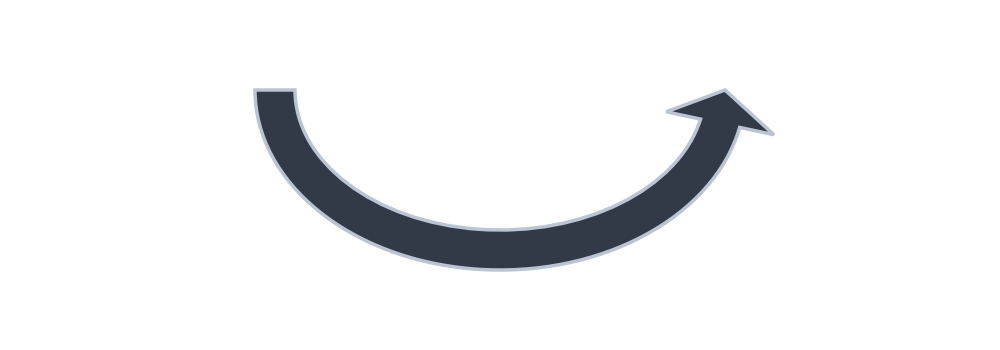
Draws a curved 2D block arrow sweeping along an elliptical perimeter between angle_start and angle_end (in degrees counterclockwise from $+X$). If angle_start < angle_end, the arrow sweeps counterclockwise; if angle_start > angle_end (e.g. 180 to 0), the arrow sweeps clockwise:
arrow_arc(
    xy: tuple[float, float],
    width: float,
    height: float,
    tail_width: float,
    head_width: float,
    head_angle: float = 10,
    head: Literal["->", "<-", "<->"] = "->",
    angle_start: float = 0,
    angle_end: float = 180,
    *,
    style: Style,
) -> None
| Parameter | Type | Default | Description |
|---|---|---|---|
xy |
tuple[float, float] |
Required | Center coordinate (x, y) of the underlying ellipse. |
width / height |
float |
Required | Horizontal and vertical diameters of the arc ellipse (> 0). |
tail_width / head_width |
float |
Required | Curved shaft width and arrowhead base width (> 0). |
head_angle |
float |
10 |
Angular span of the arrowhead in degrees (> 0). |
head |
Literal["->", "<-", "<->"] |
"->" |
Arrowhead direction ("->", "<-", or "<->"). |
angle_start / angle_end |
float |
0 / 180 |
Starting and ending angles in degrees counterclockwise (CCW). |
style |
Style |
Required | Fill, stroke, and whole-arc rotation (style.angle). |
from drawlib.canvas import save, setup
from drawlib.shapes import arrow_arc
from drawlib.styles import Styles

setup(width=100, height=35)
arrow_arc(
    (50, 26),
    width=45,
    height=32,
    tail_width=4,
    head_width=11,
    head_angle=12,
    head="->",
    angle_start=180,
    angle_end=0,
    style=Styles.DarkBold,
)
save()
5.2. Multi-Point Polyline Arrow (arrow_polyline)
Draws a complex routed 2D block arrow passing through an arbitrary list of waypoint coordinates xys=[(x1, y1), (x2, y2), ...], with automatic miter or rounded fillet joints at every intermediate corner:
arrow_polyline(
    xys: list[tuple[float, float]],
    tail_width: float,
    head_width: float,
    head_length: float,
    head: Literal["->", "<-", "<->"] = "->",
    *,
    style: Style,
) -> None
| Parameter | Type | Default | Description |
|---|---|---|---|
xys |
list[tuple[float, float]] |
Required | Sequence of at least 2 waypoint coordinates [(x1, y1), (x2, y2), ...]. |
tail_width |
float |
Required | Width of the polyline shaft (> 0). |
head_width / head_length |
float |
Required | Arrowhead width and axial length (> 0). |
head |
Literal["->", "<-", "<->"] |
"->" |
Arrowhead direction ("->", "<-", or "<->"). |
style |
Style |
Required | Fill, stroke, and joint corner rounding (style.shape_r as a scalar float or a (len(xys) - 2)-tuple of per-joint radii). |
from drawlib.canvas import save, setup
from drawlib.shapes import arrow_polyline
from drawlib.styles import Styles

setup(width=100, height=60)
arrow_polyline(
    [(15, 15), (50, 15), (50, 45), (85, 45)],
    tail_width=4,
    head_width=11,
    head_length=8,
    head="->",
    # Uniform scalar radius or (len(xys) - 2)-tuple per intermediate joint
    style=Styles.PrimaryFlat.patch(shape_r=(3, 6)),
)
save()