TreeGraph: Balanced Hierarchies & Decomposition Trees
TreeGraph implements the Reingold-Tilford / Buchheim compact tree layout algorithm, computing balanced (cx, cy) node centers and branch waypoints so that every parent node is symmetrically centered over (or beside) its children while sibling subtrees are packed tightly without ever colliding.
Use TreeGraph whenever your topology is a strict tree (every node has at most one parent), such as organization charts, Abstract Syntax Trees (ASTs), call hierarchies, taxonomy breakdowns, or fault trees. Call layout = g.get_layout(margin=...) to solve coordinates and render with FlowDiagram, ArchitectureDiagram, or drawlib.shapes and drawlib.lines.
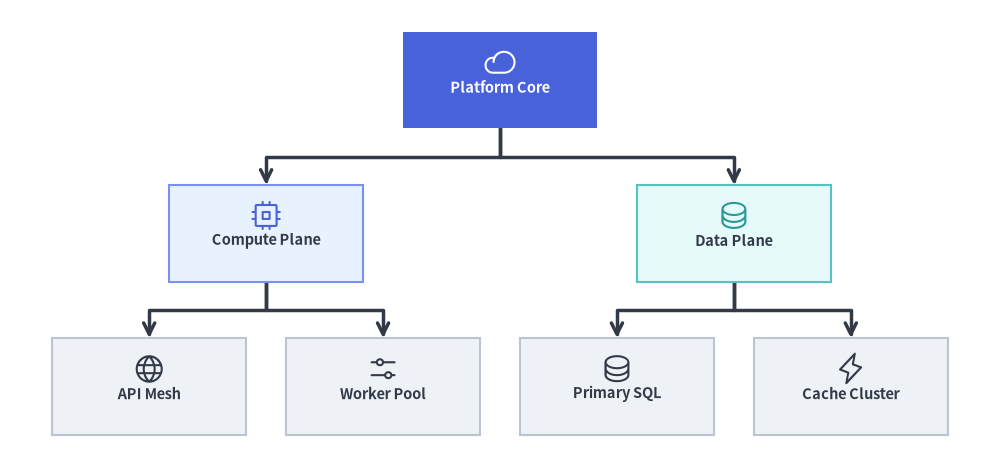
Source Code
from drawlib.canvas import save, setup
from drawlib.graph import TreeGraph
from drawlib.icons import phosphor
from drawlib.lines import lines
from drawlib.shapes import rectangle
from drawlib.styles import Styles

setup(width=124, height=58)

g = TreeGraph(
    root="core",
    direction="TB",
    level_sep=7.0,
    sibling_sep=5.0,
    edge_routing="orthogonal",
    default_node_width=24.0,
    default_node_height=12.0,
)

# Level 0: Root Node
g.node("core")

# Level 1: Division Branches
g.child("core", "compute")
g.child("core", "data")

# Level 2: Leaf Subsystems
g.child("compute", "api")
g.child("compute", "workers")
g.child("data", "sql")
g.child("data", "cache")

# 1. Compute balanced tree coordinates & orthogonal branch waypoints
layout = g.get_layout(margin=4.5)

# 2. Render orthogonal tree branches from layout.edges
for e in layout.edges:
    lines(e.points, arrow_head="->", style=Styles.DarkBold)

# 3. Render node cards & Phosphor icons at solved (cx, cy) coordinates
node_meta = {
    "core": ("\nPlatform Core", Styles.PrimaryFlat, Styles.WhiteBold, phosphor.cloud, Styles.White),
    "compute": ("\nCompute Plane", Styles.PrimaryNeutral, Styles.DarkBold, phosphor.cpu, Styles.Primary),
    "data": ("\nData Plane", Styles.SecondaryNeutral, Styles.DarkBold, phosphor.database, Styles.Secondary),
    "api": ("\nAPI Mesh", Styles.Neutral, Styles.DarkBold, phosphor.globe, Styles.Dark),
    "workers": ("\nWorker Pool", Styles.Neutral, Styles.DarkBold, phosphor.sliders_horizontal, Styles.Dark),
    "sql": ("\nPrimary SQL", Styles.Neutral, Styles.DarkBold, phosphor.database, Styles.Dark),
    "cache": ("\nCache Cluster", Styles.Neutral, Styles.DarkBold, phosphor.lightning, Styles.Dark),
}

for nid, (label, box_st, txt_st, icon_fn, ic_st) in node_meta.items():
    n = layout[nid]
    rectangle(
        n.xy,
        width=n.width,
        height=n.height,
        style=box_st,
        text=label,
        text_style=txt_st.patch(text_size=10.5),
    )
    icon_fn((n.x, n.y + 2.2), width=4.0, style=ic_st)

save()
1. Constructor, .child(), & get_layout() API
from drawlib.graph import TreeGraph

g = TreeGraph(
    root="vp",                       # Explicit root node ID (auto-detected if None)
    direction="TB",                  # "TB" (Top-to-Bottom) or "LR" (Left-to-Right)
    level_sep=12.0,                  # Fixed gap between tree depths (auto-scales if None)
    sibling_sep=6.0,                 # Minimum gap between sibling nodes (auto-scales if None)
    edge_routing="orthogonal",       # "orthogonal" or "straight"
    default_node_width=24.0,
    default_node_height=11.0,
)

layout = g.get_layout(margin=5.0)
print(layout)                        # Inspect solved node centers & branch waypoints
Parameter Reference
| Parameter | Type | Default | Description |
|---|---|---|---|
root |
str | None |
None |
Explicit root node ID. If None, automatically detects all nodes with in-degree 0 and lays out multi-root forests side-by-side. |
direction |
Literal["TB", "LR"] |
"TB" |
Tree growth orientation ("TB" top-to-bottom or "LR" left-to-right). |
level_sep |
float | None |
None |
Fixed distance between successive tree depths. Auto-scales to canvas if None. |
sibling_sep |
float | None |
None |
Fixed minimum separation between adjacent siblings. Auto-scales to canvas if None. |
edge_routing |
Literal["orthogonal", "straight"] |
"orthogonal" |
Edge path routing ("orthogonal" right-angled tree branches or "straight" Euclidean segments) stored in edge_layout.points. |
default_node_width |
float |
22.0 |
Default node width in canvas units. |
default_node_height |
float |
12.0 |
Default node height in canvas units. |
Concise Tree Construction with g.child(...)
In addition to g.node(id, *, width=None, height=None) and g.edge(src, dst), TreeGraph provides a single-call .child() helper that registers a child node and connects it from parent in one step:
g.child(
    parent: str,
    child_id: str,
    *,
    width: float | None = None,
    height: float | None = None,
) -> Node
Note:
- Multi-Root Forests (
root=None): Whenroot=Noneand multiple nodes have in-degree0(no incoming edges),TreeGraphautomatically creates a virtual super-root during layout calculation and arranges the independent trees side-by-side as a balanced forest.- Strict Tree Validation:
TreeGraphvalidates that the graph is a strict acyclic tree (at most one parent per node). If a node has multiple parents (a diamond DAG), useLayerGraphorArchitectureGraphinstead.
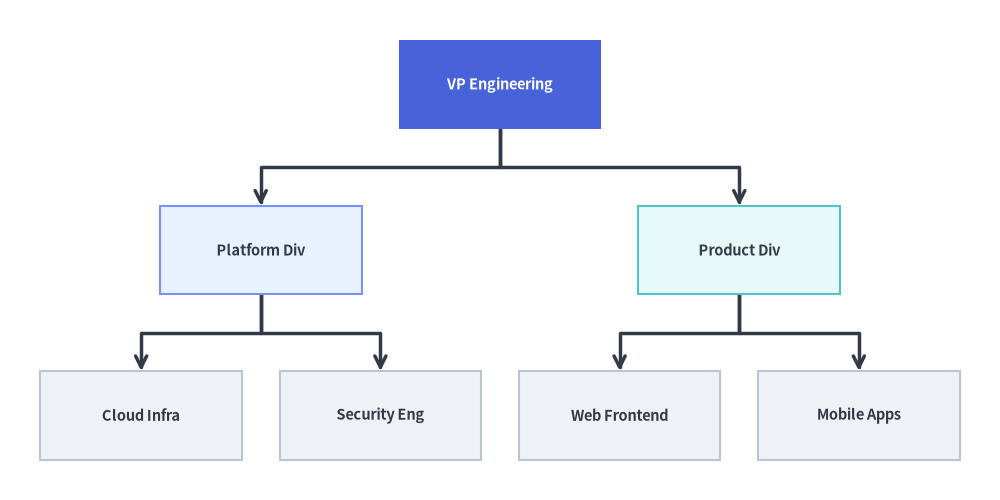
2. Top-Down (TB) Engineering Organization Hierarchy with FlowDiagram
A top-down (direction="TB") tree is ideal for organizational structures, class taxonomies, and ASTs. Notice how the Buchheim contour solver (g.get_layout()) centers VP Engineering over the two division heads and evenly spaces the four leaf teams, while FlowDiagram (Process + fork()) renders the styled cards and orthogonal tree forks:
from drawlib.canvas import save, setup
from drawlib.diagrams.flow import FlowDiagram, Process
from drawlib.graph import TreeGraph
from drawlib.styles import Styles

setup(width=124, height=62)

# Step 1: Declare tree topology & solve coordinates
g = TreeGraph(
    root="vp",
    direction="TB",
    default_node_width=25.0,
    default_node_height=11.0,
)
g.node("vp")
g.child("vp", "plat")
g.child("vp", "prod")
g.child("plat", "infra")
g.child("plat", "sec")
g.child("prod", "web")
g.child("prod", "mob")

layout = g.get_layout(margin=5.0)

# Step 2: Place Process nodes at solved layout[id].xy centers in FlowDiagram
fd = FlowDiagram(
    node_style=Styles.Neutral.patch(text_size=10.5),
    edge_style=Styles.DarkBold,
    edge_text_style=Styles.Dark.patch(text_size=10.0),
)

nodes = {}
for nid, label, st, tst in [
    ("vp", "VP Engineering", Styles.PrimaryFlat, Styles.WhiteBold),
    ("plat", "Platform Div", Styles.PrimaryNeutral, Styles.DarkBold),
    ("prod", "Product Div", Styles.SecondaryNeutral, Styles.DarkBold),
    ("infra", "Cloud Infra", Styles.Neutral, Styles.DarkBold),
    ("sec", "Security Eng", Styles.Neutral, Styles.DarkBold),
    ("web", "Web Frontend", Styles.Neutral, Styles.DarkBold),
    ("mob", "Mobile Apps", Styles.Neutral, Styles.DarkBold),
]:
    nl = layout[nid]
    nodes[nid] = fd.add(
        Process(
            label,
            width=nl.width,
            height=nl.height,
            style=st,
            text_style=tst.patch(text_size=10.5),
        ),
        xy=nl.xy,
    )

for e in layout.edges:
    fd.connect(nodes[e.src], nodes[e.dst], start_side="bottom", end_side="top")

fd.draw()
save()
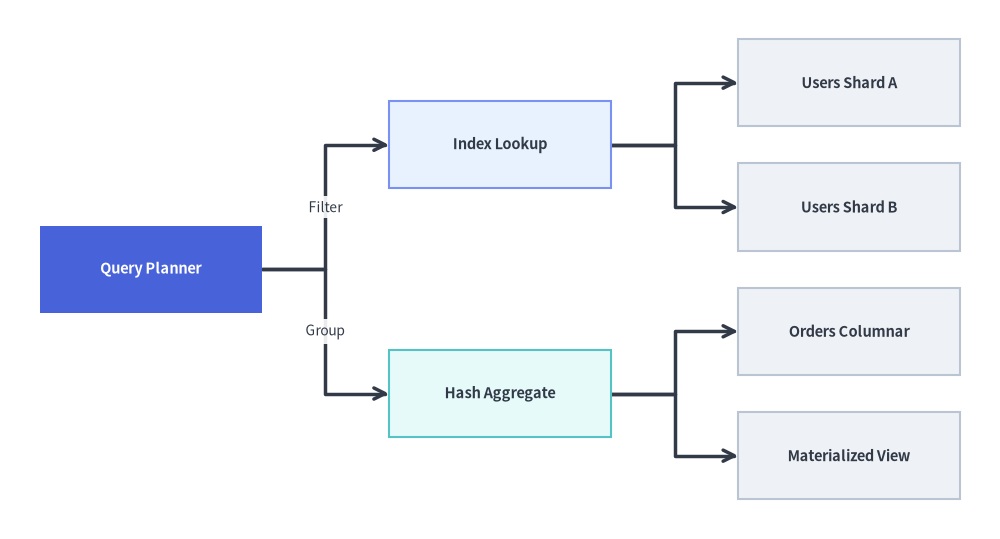
3. Left-to-Right (LR) Service Decomposition & Call Tree
Switching to direction="LR" grows the hierarchy horizontally from left to right. This layout works exceptionally well for API request fan-out trees, work breakdown structures (WBS), and query execution plans where labels are wider than they are tall:
from drawlib.canvas import save, setup
from drawlib.diagrams.flow import FlowDiagram, Process
from drawlib.graph import TreeGraph
from drawlib.styles import Styles

setup(width=126, height=68)

# Step 1: Solve Left-to-Right tree coordinates
g = TreeGraph(
    root="query_plan",
    direction="LR",
    default_node_width=28.0,
    default_node_height=11.0,
)
g.node("query_plan")
g.child("query_plan", "index_scan")
g.child("query_plan", "agg_stage")
g.child("index_scan", "shard_1")
g.child("index_scan", "shard_2")
g.child("agg_stage", "col_store")
g.child("agg_stage", "cache_hit")

layout = g.get_layout(margin=5.0)

# Step 2: Render with FlowDiagram and labeled branch connectors
fd = FlowDiagram(
    node_style=Styles.Neutral.patch(text_size=10.5),
    edge_style=Styles.DarkBold,
    edge_text_style=Styles.Dark.patch(text_size=10.0),
)

nodes = {}
for nid, label, st, tst in [
    ("query_plan", "Query Planner", Styles.PrimaryFlat, Styles.WhiteBold),
    ("index_scan", "Index Lookup", Styles.PrimaryNeutral, Styles.DarkBold),
    ("agg_stage", "Hash Aggregate", Styles.SecondaryNeutral, Styles.DarkBold),
    ("shard_1", "Users Shard A", Styles.Neutral, Styles.DarkBold),
    ("shard_2", "Users Shard B", Styles.Neutral, Styles.DarkBold),
    ("col_store", "Orders Columnar", Styles.Neutral, Styles.DarkBold),
    ("cache_hit", "Materialized View", Styles.Neutral, Styles.DarkBold),
]:
    nl = layout[nid]
    nodes[nid] = fd.add(
        Process(
            label,
            width=nl.width,
            height=nl.height,
            style=st,
            text_style=tst.patch(text_size=10.5),
        ),
        xy=nl.xy,
    )

fd.connect(nodes["query_plan"], nodes["index_scan"], label="Filter", start_side="right", end_side="left")
fd.connect(nodes["query_plan"], nodes["agg_stage"], label="Group", start_side="right", end_side="left")
fd.connect(nodes["index_scan"], nodes["shard_1"], start_side="right", end_side="left")
fd.connect(nodes["index_scan"], nodes["shard_2"], start_side="right", end_side="left")
fd.connect(nodes["agg_stage"], nodes["col_store"], start_side="right", end_side="left")
fd.connect(nodes["agg_stage"], nodes["cache_hit"], start_side="right", end_side="left")

fd.draw()
save()
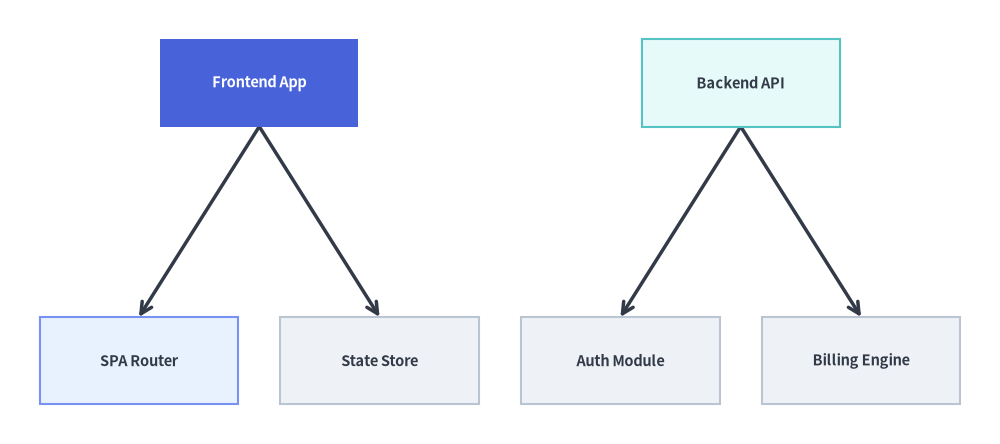
4. Automatic Multi-Root Forest (root=None) & Straight Edge Routing
When root=None, TreeGraph automatically identifies all nodes with in-degree 0 and arranges multiple independent trees side-by-side as a balanced forest. Passing edge_routing="straight" populates edge_layout.points with direct Euclidean line segments between parent and child ports:
from drawlib.canvas import save, setup
from drawlib.graph import TreeGraph
from drawlib.lines import lines
from drawlib.shapes import rectangle
from drawlib.styles import Styles

setup(width=126, height=56)

g = TreeGraph(
    direction="TB",
    root=None,
    edge_routing="straight",
    default_node_width=25.0,
    default_node_height=11.0,
)

# Tree 1: Frontend App Hierarchy (Root 1)
g.node("fe_app")
g.child("fe_app", "fe_router")
g.child("fe_app", "fe_store")

# Tree 2: Backend API Hierarchy (Root 2)
g.node("be_api")
g.child("be_api", "be_auth")
g.child("be_api", "be_billing")

layout = g.get_layout(margin=5.0)

for e in layout.edges:
    lines(e.points, arrow_head="->", style=Styles.DarkBold)

for nid, label, st, tst in [
    ("fe_app", "Frontend App", Styles.PrimaryFlat, Styles.WhiteBold),
    ("fe_router", "SPA Router", Styles.PrimaryNeutral, Styles.DarkBold),
    ("fe_store", "State Store", Styles.Neutral, Styles.DarkBold),
    ("be_api", "Backend API", Styles.SecondaryNeutral, Styles.DarkBold),
    ("be_auth", "Auth Module", Styles.Neutral, Styles.DarkBold),
    ("be_billing", "Billing Engine", Styles.Neutral, Styles.DarkBold),
]:
    nl = layout[nid]
    rectangle(
        nl.xy,
        width=nl.width,
        height=nl.height,
        style=st,
        text=label,
        text_style=tst.patch(text_size=10.5),
    )

save()
5. Best Practices
- Choose
TreeGraphvs.SmartArts.TreeNode:- Use
TreeGraph(drawlib.graph) when you want balanced node-and-edge graph coordinates (layout = g.get_layout()) to render withFlowDiagram,ArchitectureDiagram, or custom primitives. - Use
TreeNode(drawlib.smartarts) when you want a compact file-explorer / indented directory tree list.
- Use
- Use
direction="LR"for Wide Trees: When a tree has many leaf nodes (6+leaves),direction="LR"stacks leaves vertically so labels never crowd horizontally.