Linear Document Project Guide (drawlib init doc)
The doc starter template is designed for authoring linear technical documents — such as specifications, Request for Comments (RFCs), system architecture proposals, whitepapers, thesis papers, and formal engineering reports.
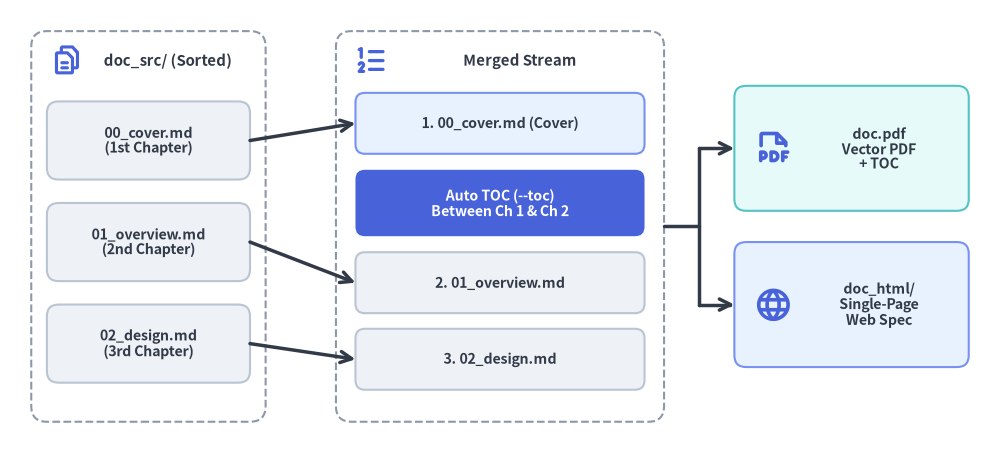
By unifying single-page specs and multi-chapter reports into a single archetype, Drawlib allows you to compile HTML, PDF, Markdown, and standalone images from the same Markdown source files.
Source Code
from drawlib.canvas import save, setup
from drawlib.icons import phosphor
from drawlib.lines import line
from drawlib.shapes import rectangle
from drawlib.styles import Styles
from drawlib.text import text

setup(width=128, height=58)

# Left Container: doc_src/ Lexicographical Source Chapters
rectangle((19, 29), width=30, height=50, style=Styles.MutedDashed.patch(shape_r=2.0))
phosphor.files((8.5, 50.2), width=4.2, style=Styles.PrimaryBold)
text((21.5, 50.2), "doc_src/ (Sorted)", style=Styles.DarkBold.patch(text_size=10.8))

src_chapters = [
    (40.0, "00_cover.md\n(1st Chapter)"),
    (27.0, "01_overview.md\n(2nd Chapter)"),
    (14.0, "02_design.md\n(3rd Chapter)"),
]
for sy, label in src_chapters:
    rectangle(
        (19, sy),
        width=26,
        height=10.0,
        style=Styles.Neutral.patch(shape_r=1.5),
        text=label,
        text_style=Styles.DarkBold.patch(text_size=10.2),
    )

# Center Container: Merged Linear Document Stream (--page-break)
rectangle((64, 29), width=42, height=50, style=Styles.MutedDashed.patch(shape_r=2.0))
phosphor.list_numbers((47.5, 50.2), width=4.4, style=Styles.PrimaryBold)
text((66.5, 50.2), "Merged Stream", style=Styles.DarkBold.patch(text_size=10.8))

rectangle(
    (64, 42.2),
    width=37,
    height=7.8,
    style=Styles.PrimaryNeutral.patch(shape_r=1.2),
    text="1. 00_cover.md (Cover)",
    text_style=Styles.DarkBold.patch(text_size=10.2),
)
rectangle(
    (64, 32.0),
    width=37,
    height=8.5,
    style=Styles.PrimaryFlat.patch(shape_r=1.2),
    text="Auto TOC (--toc)\nBetween Ch 1 & Ch 2",
    text_style=Styles.WhiteBold.patch(text_size=10.2),
)
rectangle(
    (64, 21.8),
    width=37,
    height=7.8,
    style=Styles.Neutral.patch(shape_r=1.2),
    text="2. 01_overview.md",
    text_style=Styles.DarkBold.patch(text_size=10.2),
)
rectangle(
    (64, 12.0),
    width=37,
    height=7.8,
    style=Styles.Neutral.patch(shape_r=1.2),
    text="3. 02_design.md",
    text_style=Styles.DarkBold.patch(text_size=10.2),
)

# Arrows: Source -> Merged Stream
line((32, 40.0), (45.5, 42.2), arrow_head="->", style=Styles.DarkBold)
line((32, 27.0), (45.5, 21.8), arrow_head="->", style=Styles.DarkBold)
line((32, 14.0), (45.5, 12.0), arrow_head="->", style=Styles.DarkBold)

# Right: Exported Linear Deliverables
rectangle((109, 39.0), width=30, height=16, style=Styles.SecondaryNeutral.patch(shape_r=1.5))
phosphor.file_pdf((99.0, 39.0), width=4.8, style=Styles.PrimaryBold)
text((112.5, 39.0), "doc.pdf\nVector PDF\n+ TOC", style=Styles.DarkBold.patch(text_size=10.2))

rectangle((109, 19.0), width=30, height=16, style=Styles.PrimaryNeutral.patch(shape_r=1.5))
phosphor.globe((99.0, 19.0), width=4.8, style=Styles.PrimaryBold)
text((112.5, 19.0), "doc_html/\nSingle-Page\nWeb Spec", style=Styles.DarkBold.patch(text_size=10.2))

# Connectors: Merged Stream -> Deliverables
line((85, 29.0), (89.5, 29.0), style=Styles.DarkBold)
line((89.5, 19.0), (89.5, 39.0), style=Styles.DarkBold)
line((89.5, 39.0), (94.0, 39.0), arrow_head="->", style=Styles.DarkBold)
line((89.5, 19.0), (94.0, 19.0), arrow_head="->", style=Styles.DarkBold)

save()
1. Project Initialization
Scaffold a linear document project using drawlib init:
# Scaffold standard doc project in current directory (creates 'doc_src/'):
drawlib init doc

# With custom target name, theme, and language (creates 'my_report_src/'):
drawlib init doc my_report -s google -l en
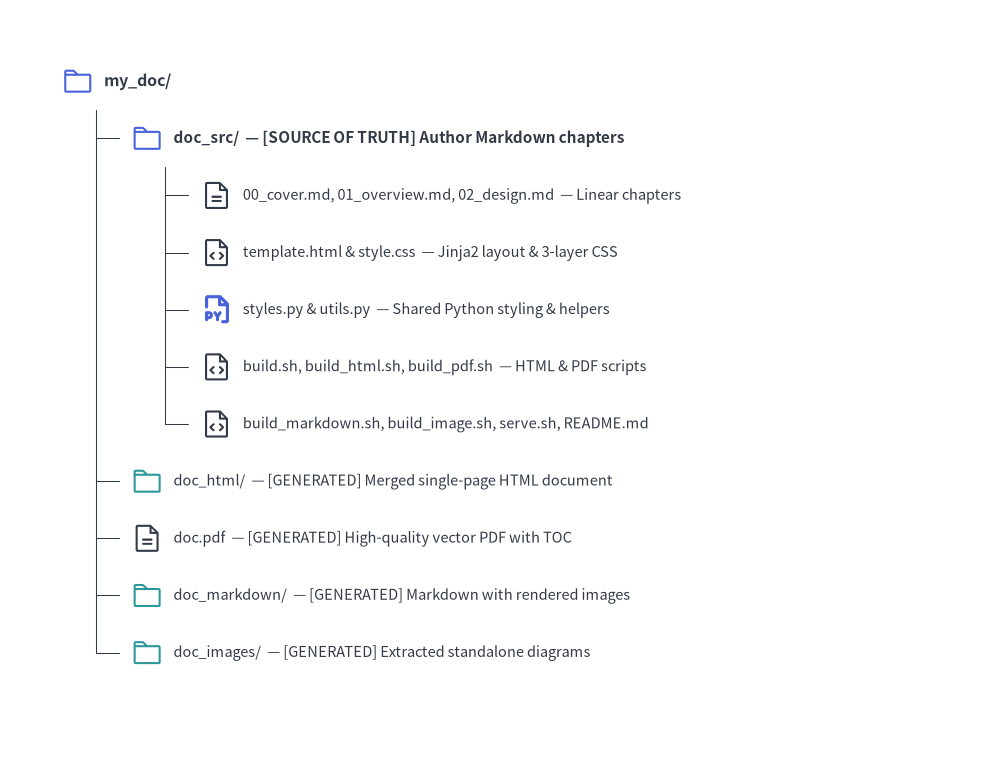
2. Directory Layout & Anatomy
Source Code
from drawlib.canvas import save, setup
from drawlib.icons import phosphor
from drawlib.smartarts import TreeNode
from drawlib.styles import Styles

setup(width=98, height=76)

TreeNode.register_drawing_item(
    name="folder",
    location="before",
    padding_width=4.2,
    function=phosphor.folder,
    style=Styles.PrimaryFlat,
    args={"width": 3.2},
)
TreeNode.register_drawing_item(
    name="folder_out",
    location="before",
    padding_width=4.2,
    function=phosphor.folder,
    style=Styles.Secondary,
    args={"width": 3.2},
)
TreeNode.register_drawing_item(
    name="md",
    location="before",
    padding_width=4.2,
    function=phosphor.file_text,
    style=Styles.Dark,
    args={"width": 3.2},
)
TreeNode.register_drawing_item(
    name="py",
    location="before",
    padding_width=4.2,
    function=phosphor.file_py,
    style=Styles.PrimaryBold,
    args={"width": 3.2},
)
TreeNode.register_drawing_item(
    name="code",
    location="before",
    padding_width=4.2,
    function=phosphor.file_code,
    style=Styles.Dark,
    args={"width": 3.2},
)

root = TreeNode(
    "my_doc/",
    text_style=Styles.DarkBold.patch(text_size=11.5),
    line_style=Styles.DarkThin,
    line_horizontal_margin=3.4,
    line_horizontal_length=3.4,
    line_vertical_margin=5.6,
).set_drawing_item("folder")

src = root.add(
    "doc_src/  — [SOURCE OF TRUTH] Author Markdown chapters",
    text_style=Styles.DarkBold.patch(text_size=11.0),
).set_drawing_item("folder")
src.add(
    "00_cover.md, 01_overview.md, 02_design.md  — Linear chapters",
    text_style=Styles.Dark.patch(text_size=10.5),
).set_drawing_item("md")
src.add(
    "template.html & style.css  — Jinja2 layout & 3-layer CSS",
    text_style=Styles.Dark.patch(text_size=10.5),
).set_drawing_item("code")
src.add(
    "styles.py & utils.py  — Shared Python styling & helpers",
    text_style=Styles.Dark.patch(text_size=10.5),
).set_drawing_item("py")
src.add(
    "build.sh, build_html.sh, build_pdf.sh  — HTML & PDF scripts",
    text_style=Styles.Dark.patch(text_size=10.5),
).set_drawing_item("code")
src.add(
    "build_markdown.sh, build_image.sh, serve.sh, README.md",
    text_style=Styles.Dark.patch(text_size=10.5),
).set_drawing_item("code")

root.add(
    "doc_html/  — [GENERATED] Merged single-page HTML document",
    text_style=Styles.Dark.patch(text_size=10.5),
).set_drawing_item("folder_out")
root.add(
    "doc.pdf  — [GENERATED] High-quality vector PDF with TOC",
    text_style=Styles.Dark.patch(text_size=10.5),
).set_drawing_item("md")
root.add(
    "doc_markdown/  — [GENERATED] Markdown with rendered images",
    text_style=Styles.Dark.patch(text_size=10.5),
).set_drawing_item("folder_out")
root.add(
    "doc_images/  — [GENERATED] Extracted standalone diagrams",
    text_style=Styles.Dark.patch(text_size=10.5),
).set_drawing_item("folder_out")

root.draw(xy=(6, 68))
save()
3. Four Target Outputs from One Source
A doc project compiles into 4 distinct target artifacts:
| Output Target | Target Audience | Primary Use Case | Build Script |
|---|---|---|---|
doc_html/ |
Web Browsers | Fast local preview, web publishing, internal documentation wikis | build_html.sh |
doc.pdf |
Print & Distribution | Formal whitepapers, client deliverables, printable reports with Table of Contents | build_pdf.sh |
doc_markdown/ |
GitHub & Version Control | Direct viewing in GitHub/GitLab repositories with rendered image links | build_markdown.sh |
doc_images/ |
Presentations & Messaging | Drag-and-drop into Google Slides, Keynote, PowerPoint, Slack, or PRs | build_image.sh |
4. Chapter Ordering, Cover Page & Table of Contents Mechanics
Because a doc project does not use a navbar.md sidebar file, Drawlib merges all .md files in doc_src/ (excluding README.md) into a single linear document for both doc_html/index.html and doc.pdf:
- Lexicographical Chapter Sorting: Name your chapter files with numeric prefixes (
00_cover.md,01_overview.md,02_design.md,03_benchmarks.md) so they are merged in deterministic reading order. - Cover Page Convention (
00_cover.md): The first file in sorted order acts as the document cover page. When--toc(--generate-index) is passed todrawlib build pdf, the automated Table of Contents is inserted cleanly between the 1st document (00_cover.md) and the 2nd document (01_overview.md). - Chapter Page Breaks (
--page-break): By default in PDF compilation (--page-break), each merged.mdfile begins on a new A4 page (page-break-before: always). Pass--no-page-breakif you prefer continuous flow without forced page breaks between files.
5. Modular Build Scripts Architecture
Each project contains specialized scripts alongside a master orchestrator:
build_html.sh: Compiles and merges Markdown chapters into a standalone HTML document (doc_html/index.html). Extremely fast for local verification.build_pdf.sh: Renders the merged document into an A4 vector PDF via headless Chromium (page.pdf()). Supports automatic Table of Contents (--toc) and clean chapter page breaks (--page-break).build_markdown.sh: Converts inlinedrawlibblocks into standard Markdown image tags pointing to rendered diagrams indoc_markdown/<chapter>_images/.build_image.sh: Scans all Markdown files, extracts embeddeddrawlibblocks, and renders them cleanly intodoc_images/<chapter>_images/without risk of name collisions.build.sh(Master Script): Runs all of the above target builds in sequence to produce a complete set of release artifacts.
6. Direct CLI Commands
You can also run the build commands directly from the terminal:
# 1. Compile to HTML:
drawlib build html doc_src/ -o doc_html/

# 2. Compile to PDF with Cover and Table of Contents:
drawlib build pdf doc_src/ -o doc.pdf --toc --page-break

# 3. Compile to GitHub-ready Markdown:
drawlib build markdown doc_src/ -o doc_markdown/

# 4. Extract diagram images from Markdown:
drawlib build image doc_src/ -o doc_images/
7. Parallel Multi-Agent Chapter Authoring
Because a doc project separates chapters into numbered Markdown files (00_cover.md, 01_overview.md, 02_architecture.md, 03_security.md, etc.), AI coding agents can author multi-chapter whitepapers and specifications in parallel:
- Phase 1 (Parent Setup): Scaffold
doc_src/(drawlib init doc), finalizestyles.py,utils.py, and00_cover.md, and establish the numbered chapter filenames. - Phase 2 (Parallel Subagents): Delegate individual chapters (
doc_src/0N_<topic>.md) to parallel subagents. Each subagent authors its assigned chapter (2+diagrams, Chapter Hero atLines 5–15) and verifies its diagrams with unique grid preview paths (-o .drawlib/scratch/0N_<diagram>_grid.png). - Phase 3 (Unified Compilation): After all subagents complete their chapters, the parent agent runs
./doc_src/build.shonce to merge all chapters intodoc_html/index.htmlanddoc.pdf.