RadialGraph: Concentric Orbits & Hub-and-Spoke Topologies
RadialGraph places a central hub node at the origin (ring=0) and arranges connected nodes on concentric orbital rings (ring=1, 2, ...). Angular sectors are allocated proportionally to subtree sizes so multi-hop spokes radiate outward without crossing lines.
It is purpose-built for event-driven message meshes, Pub/Sub broker topologies, microservice hub-and-spoke networks, and concentric dependency radars. Call layout = g.get_layout(margin=...) to obtain node centers (layout[id].xy), radial spoke polylines (layout.edges), and concentric orbit radii (layout.ring_radii).
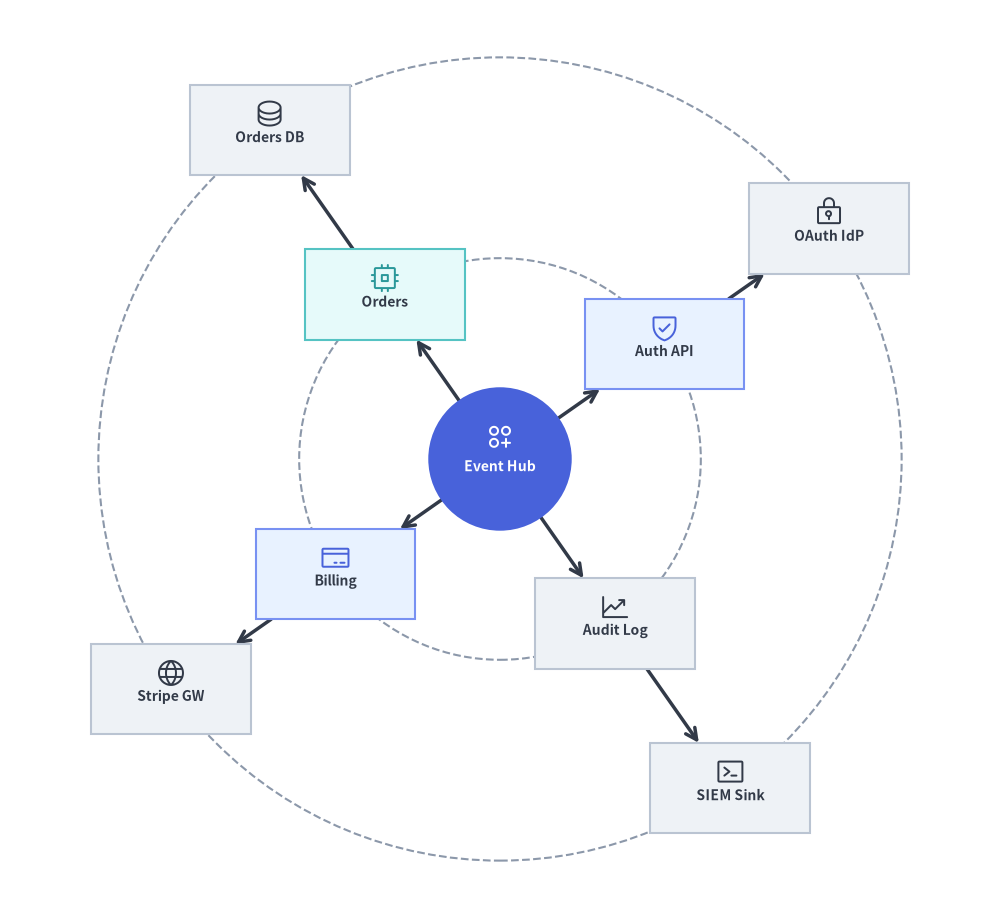
Source Code
from drawlib.canvas import save, setup
from drawlib.graph import RadialGraph
from drawlib.icons import phosphor
from drawlib.lines import lines
from drawlib.shapes import circle, rectangle
from drawlib.styles import Styles

setup(width=122, height=112)

g = RadialGraph(
    hub="core",
    radius_step=24.5,
    start_angle=35.0,
    default_node_width=19.5,
    default_node_height=11.0,
)

# Ring 0: Central Hub
g.node("core", width=17.5, height=17.5)

# Ring 1: Core Services
g.spoke("core", "auth", ring=1)
g.spoke("core", "orders", ring=1)
g.spoke("core", "billing", ring=1)
g.spoke("core", "audit", ring=1)

# Ring 2: Outer Adapters
g.spoke("auth", "idp", ring=2)
g.spoke("orders", "db", ring=2)
g.spoke("billing", "stripe", ring=2)
g.spoke("audit", "siem", ring=2)

# 1. Solve concentric coordinates & orbit ring radii
layout = g.get_layout(margin=5.0)
hub_n = layout["core"]

# 2. Draw dashed circular orbit guides from layout.ring_radii
for r in layout.ring_radii.values():
    circle(hub_n.xy, radius=r, style=Styles.MutedDashed)

# 3. Draw radial spoke edges (from hub center for ring 0->1 so lines meet the circular hub perimeter)
for e in layout.edges:
    pts = [hub_n.xy, e.dst_port] if e.src == "core" else e.points
    lines(pts, arrow_head="->", style=Styles.DarkBold)

# 4. Draw central circular hub and satellite cards with Phosphor icons
circle(
    hub_n.xy,
    radius=hub_n.width / 2,
    style=Styles.PrimaryFlat,
    text="\nEvent Hub",
    text_style=Styles.WhiteBold.patch(text_size=10.0),
)
phosphor.circles_three_plus((hub_n.x, hub_n.y + 2.7), width=3.8, style=Styles.White)

spokes = {
    "auth": ("\nAuth API", Styles.PrimaryNeutral, phosphor.shield_check, Styles.Primary),
    "orders": ("\nOrders", Styles.SecondaryNeutral, phosphor.cpu, Styles.Secondary),
    "billing": ("\nBilling", Styles.PrimaryNeutral, phosphor.credit_card, Styles.Primary),
    "audit": ("\nAudit Log", Styles.Neutral, phosphor.chart_line_up, Styles.Dark),
    "idp": ("\nOAuth IdP", Styles.Neutral, phosphor.lock_key, Styles.Dark),
    "db": ("\nOrders DB", Styles.Neutral, phosphor.database, Styles.Dark),
    "stripe": ("\nStripe GW", Styles.Neutral, phosphor.globe, Styles.Dark),
    "siem": ("\nSIEM Sink", Styles.Neutral, phosphor.terminal_window, Styles.Dark),
}

for nid, (label, box_st, icon_fn, ic_st) in spokes.items():
    n = layout[nid]
    rectangle(
        n.xy,
        width=n.width,
        height=n.height,
        style=box_st,
        text=label,
        text_style=Styles.DarkBold.patch(text_size=10.0),
    )
    icon_fn((n.x, n.y + 2.0), width=3.8, style=ic_st)

save()
1. Constructor, .spoke(), & get_layout() API
from drawlib.graph import RadialGraph

g = RadialGraph(
    hub="core",                      # Central hub node ID (auto-detects highest degree if None)
    center=None,                     # Explicit (cx, cy) origin (defaults to canvas center)
    radius_step=36.0,                # Radial distance between rings (auto-scales if None)
    start_angle=0.0,                 # Starting angle in degrees (0.0 = East, 90.0 = North)
    angle_range=360.0,               # Total angular sweep (e.g. 360.0 full circle, 180.0 arc)
    default_node_width=22.0,
    default_node_height=11.0,
)

layout = g.get_layout(margin=8.0)
print(layout)                        # Inspect solved node coordinates & layout.ring_radii
Parameter Reference
| Parameter | Type | Default | Description |
|---|---|---|---|
hub |
str | None |
None |
ID of the central ring=0 hub node. If None, selects the node with highest connectivity. |
center |
tuple[float, float] | None |
None |
Center (cx, cy) of the concentric rings. Defaults to (width / 2, height / 2). |
radius_step |
float | None |
None |
Fixed radial gap between successive rings. Auto-scales to canvas if None. |
start_angle |
float |
0.0 |
Starting angle in degrees (0.0 = right/east, 90.0 = top/north). |
angle_range |
float |
360.0 |
Total angular sweep in degrees (360.0 for full orbit, 180.0 for semicircular fan). |
default_node_width |
float |
20.0 |
Default node width in canvas units. |
default_node_height |
float |
12.0 |
Default node height in canvas units. |
Assigning Orbits with g.spoke(...), ring=, and layout.ring_radii
In addition to g.node(id, *, ring=None, width=None, height=None) and g.edge(src, dst), RadialGraph provides .spoke() to register a satellite node and connect it from parent in a single call:
g.spoke(
    parent: str,
    spoke_id: str,
    *,
    ring: int | None = None,
    width: float | None = None,
    height: float | None = None,
) -> Node
- Automatic BFS Ring Assignment: By default (
ring=None), each node's ring index equals its shortest hop distance fromhub(ring=0for the hub,ring=1for direct neighbors,ring=2for second-hop neighbors). - Explicit Ring Assignment (
ring=int): Passring=1orring=2tog.node(id, ring=...)org.spoke(parent, spoke_id, ring=...)to pin a node to a specific concentric orbit. - Orbit Guide Circles (
layout.ring_radii):GraphLayout.ring_radii(dict[int, float]) maps each ring index (1, 2, ...) to its computed radial distance from the hub center, making it trivial to draw dashed guide circles viacircle(layout[hub].xy, radius=r, style=Styles.MutedDashed).
2. Single-Ring Hub-and-Spoke Microservice Mesh
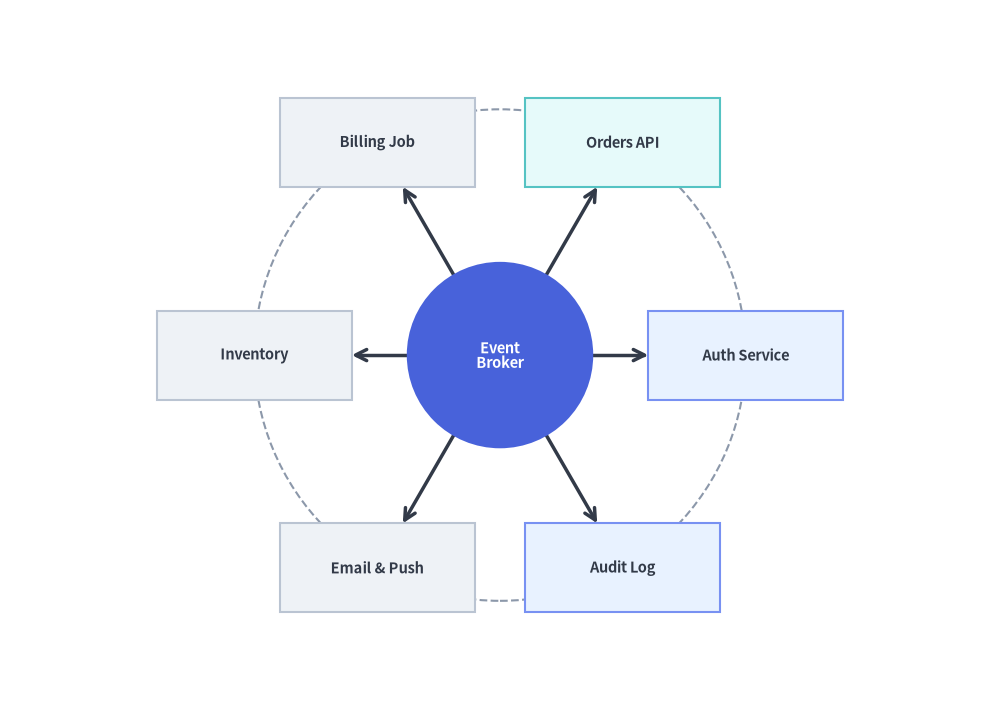
A single-ring RadialGraph arranges satellite services evenly around a central broker or API gateway:
from drawlib.canvas import save, setup
from drawlib.graph import RadialGraph
from drawlib.lines import lines
from drawlib.shapes import circle, rectangle
from drawlib.styles import Styles

setup(width=118, height=84)

g = RadialGraph(
    hub="broker",
    radius_step=29.0,
    default_node_width=23.0,
    default_node_height=10.5,
)

# Central Hub (ring=0)
g.node("broker", width=22.0, height=22.0)

# 6 Spoke Microservices on Ring 1
for sid in ["auth", "orders", "billing", "inventory", "notify", "audit"]:
    g.spoke("broker", sid)

layout = g.get_layout(margin=8.0)
hub = layout["broker"]

# Draw dashed orbit guide circle
for r in layout.ring_radii.values():
    circle(hub.xy, radius=r, style=Styles.MutedDashed)

# Draw spoke edges
for e in layout.edges:
    lines([hub.xy, e.dst_port], arrow_head="->", style=Styles.DarkBold)

# Draw central hub circle
circle(
    hub.xy,
    radius=hub.width / 2,
    style=Styles.PrimaryFlat,
    text="Event\nBroker",
    text_style=Styles.WhiteBold.patch(text_size=10.5),
)

# Draw Ring 1 spoke cards (calm Neutral & Tinted-Neutral baseline)
for sid, label, st in [
    ("auth", "Auth Service", Styles.PrimaryNeutral),
    ("orders", "Orders API", Styles.SecondaryNeutral),
    ("billing", "Billing Job", Styles.Neutral),
    ("inventory", "Inventory", Styles.Neutral),
    ("notify", "Email & Push", Styles.Neutral),
    ("audit", "Audit Log", Styles.PrimaryNeutral),
]:
    nl = layout[sid]
    rectangle(
        nl.xy,
        width=nl.width,
        height=nl.height,
        style=st,
        text=label,
        text_style=Styles.DarkBold.patch(text_size=10.5),
    )

save()
3. Multi-Ring Concentric Dependency Radar (ring=0, 1, 2)
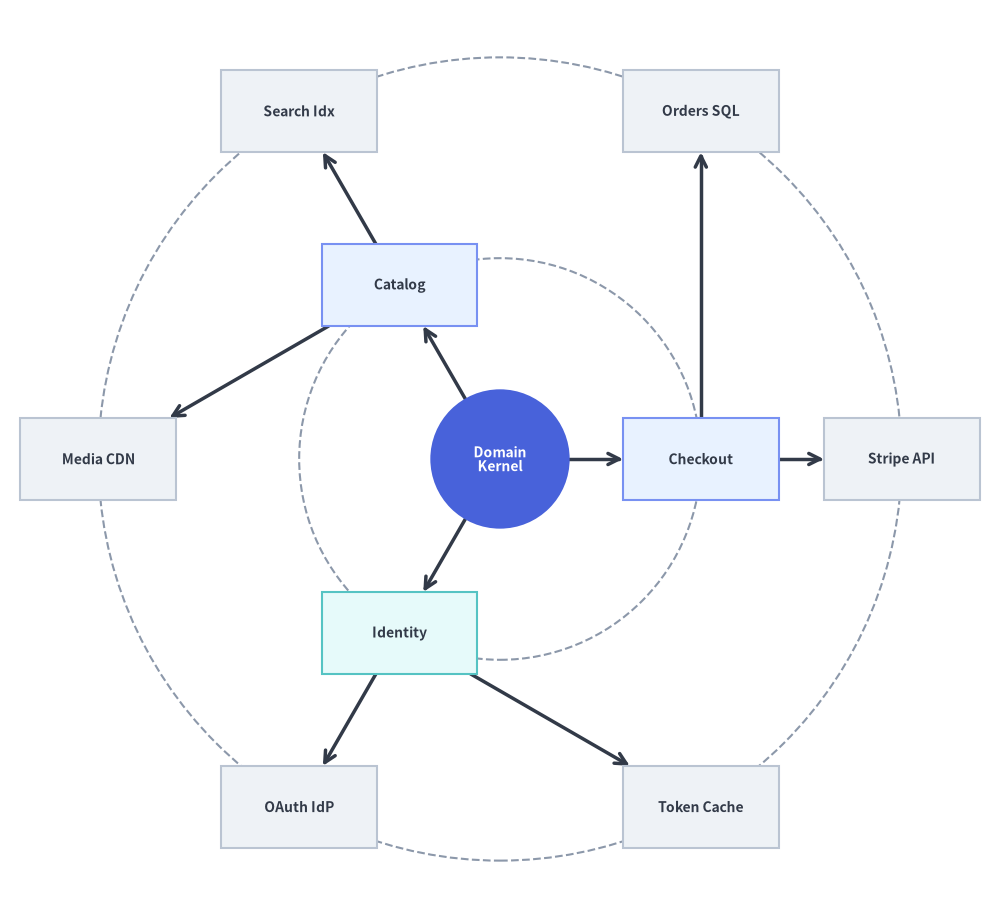
By connecting second-hop spokes or explicitly passing ring=2, RadialGraph constructs multi-ring concentric architectures where inner rings represent core domain services (ring=1) and outer rings represent external adapters or storage engines (ring=2):
from drawlib.canvas import save, setup
from drawlib.graph import RadialGraph
from drawlib.lines import lines
from drawlib.shapes import circle, rectangle
from drawlib.styles import Styles

setup(width=122, height=112)

g = RadialGraph(
    hub="domain_core",
    radius_step=24.5,
    default_node_width=19.0,
    default_node_height=10.0,
)

# Ring 0: Central Domain Kernel
g.node("domain_core", width=17.0, height=17.0)

# Ring 1: Application Services
g.spoke("domain_core", "checkout", ring=1)
g.spoke("domain_core", "catalog", ring=1)
g.spoke("domain_core", "identity", ring=1)

# Ring 2: External Infrastructure Adapters
g.spoke("checkout", "stripe", ring=2)
g.spoke("checkout", "orders_db", ring=2)
g.spoke("catalog", "elastic", ring=2)
g.spoke("catalog", "cdn", ring=2)
g.spoke("identity", "oauth", ring=2)
g.spoke("identity", "redis", ring=2)

layout = g.get_layout(margin=5.0)
hub = layout["domain_core"]

for r in layout.ring_radii.values():
    circle(hub.xy, radius=r, style=Styles.MutedDashed)

for e in layout.edges:
    pts = [hub.xy, e.dst_port] if e.src == "domain_core" else e.points
    lines(pts, arrow_head="->", style=Styles.DarkBold)

circle(
    hub.xy,
    radius=hub.width / 2,
    style=Styles.PrimaryFlat,
    text="Domain\nKernel",
    text_style=Styles.WhiteBold.patch(text_size=10.0),
)

for nid, label, st in [
    ("checkout", "Checkout", Styles.PrimaryNeutral),
    ("catalog", "Catalog", Styles.PrimaryNeutral),
    ("identity", "Identity", Styles.SecondaryNeutral),
    ("stripe", "Stripe API", Styles.Neutral),
    ("orders_db", "Orders SQL", Styles.Neutral),
    ("elastic", "Search Idx", Styles.Neutral),
    ("cdn", "Media CDN", Styles.Neutral),
    ("oauth", "OAuth IdP", Styles.Neutral),
    ("redis", "Token Cache", Styles.Neutral),
]:
    nl = layout[nid]
    rectangle(
        nl.xy,
        width=nl.width,
        height=nl.height,
        style=st,
        text=label,
        text_style=Styles.DarkBold.patch(text_size=10.0),
    )

save()
4. Semicircular Dependency Fan (angle_range=180.0) with ArchitectureDiagram
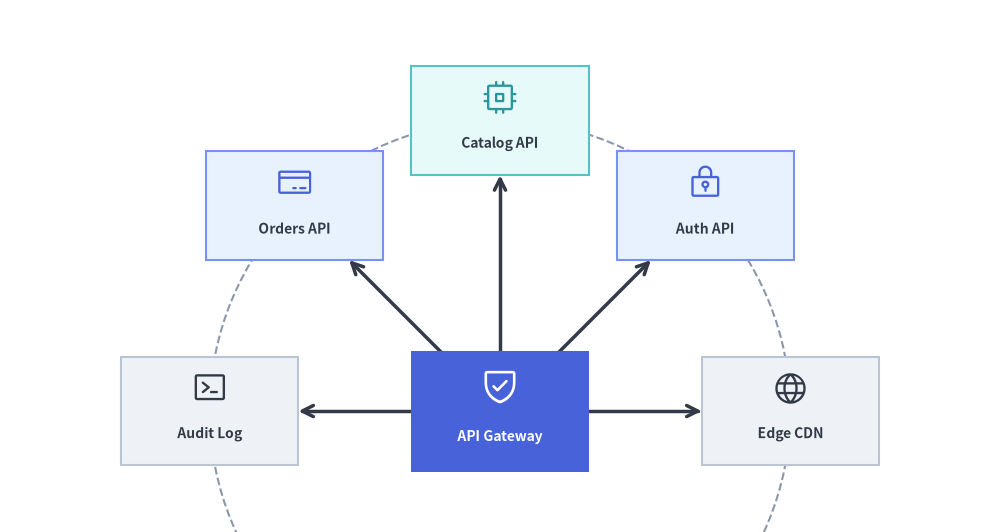
Instead of a full 360.0 degree orbit, you can restrict spokes to a semicircular or quadrant fan using start_angle and angle_range (along with an explicit center=(cx, cy) and radius_step), and render the resulting coordinates using ArchitectureDiagram (Node + PhosphorIcon) and circle():
from drawlib.canvas import save, setup
from drawlib.diagrams.architecture import ArchitectureDiagram, Node, PhosphorIcon
from drawlib.graph import RadialGraph
from drawlib.lines import lines
from drawlib.shapes import circle
from drawlib.styles import Styles

setup(width=124, height=66)

g = RadialGraph(
    hub="gateway",
    center=(62.0, 15.0),
    radius_step=36.0,
    start_angle=0.0,
    angle_range=180.0,
    default_node_width=22.0,
    default_node_height=13.5,
)

# Hub anchored near the bottom center
g.node("gateway", width=22.0, height=15.0)

# 5 downstream services fanned across the upper 0°..180° arc
for sid in ["cdn", "auth", "catalog", "orders", "audit"]:
    g.spoke("gateway", sid)

layout = g.get_layout(margin=6.0)
hub = layout["gateway"]

# 1. Draw dashed orbit guide circle and radial spoke lines from layout
for r in layout.ring_radii.values():
    circle(hub.xy, radius=r, style=Styles.MutedDashed)

for e in layout.edges:
    lines([hub.xy, e.dst_port], arrow_head="->", style=Styles.DarkBold)

# 2. Place styled ArchitectureDiagram nodes at solved radial coordinates
d = ArchitectureDiagram(
    node_style=Styles.PrimaryFlat,
    node_text_style=Styles.DarkBold.patch(text_size=10.0),
    edge_style=Styles.DarkBold,
    edge_text_style=Styles.Dark.patch(text_size=9.5),
    node_card_style=Styles.Neutral,
)

d.add(
    Node(
        "API Gateway",
        width=hub.width,
        height=hub.height,
        icon=PhosphorIcon.SHIELD_CHECK,
        icon_size=5.0,
        style=Styles.White,
        text_style=Styles.WhiteBold.patch(text_size=10.0),
        card_style=Styles.PrimaryFlat,
    ),
    xy=hub.xy,
)

for sid, label, icon_enum, ic_st, card_st in [
    ("cdn", "Edge CDN", PhosphorIcon.GLOBE, Styles.Dark, Styles.Neutral),
    ("auth", "Auth API", PhosphorIcon.LOCK_KEY, Styles.Primary, Styles.PrimaryNeutral),
    ("catalog", "Catalog API", PhosphorIcon.CPU, Styles.Secondary, Styles.SecondaryNeutral),
    ("orders", "Orders API", PhosphorIcon.CREDIT_CARD, Styles.Primary, Styles.PrimaryNeutral),
    ("audit", "Audit Log", PhosphorIcon.TERMINAL_WINDOW, Styles.Dark, Styles.Neutral),
]:
    nl = layout[sid]
    d.add(
        Node(
            label,
            width=nl.width,
            height=nl.height,
            icon=icon_enum,
            icon_size=4.5,
            style=ic_st,
            card_style=card_st,
        ),
        xy=nl.xy,
    )

d.draw()
save()
5. Best Practices
- Draw Orbit Ring Guides via
layout.ring_radii: Iterate overlayout.ring_radii.values()and drawcircle(layout[hub].xy, radius=r, style=Styles.MutedDashed)before drawing edges and nodes to make concentric hierarchy levels (ring=1vs.ring=2) immediately legible. - Use
circle()for the Central Hub: Rendering the center hub as a circle (circle(hub.xy, radius=hub.width / 2, style=Styles.PrimaryFlat, ...)) creates a natural visual anchor for radial spokes. - Give Outer Rings Generous Canvas Margin: Pass
margin=8.0(or higher) tog.get_layout(margin=8.0)so rectangular cards at the top, bottom, left, and right extremes of the outer ring have comfortable breathing room.