ArchitectureGraph: Cloud Topologies & Nested Containers
ArchitectureGraph is a declarative two-level macro/micro coordinate solver purpose-built for cloud infrastructure, VPC topologies, and multi-zone microservice architectures.
Unlike generic DAG solvers that flatten nested groups or scramble boundary boxes, ArchitectureGraph solves coordinates in two hierarchical phases: packing internal nodes and child clusters inside parent containers (Micro Layout), then arranging top-level containers across a 5-zone compass (pos="left" | "center" | "right" | "top" | "bottom") with orthogonal highway routing (Macro Layout). Pair layout = g.get_layout() with ArchitectureDiagram to render official cloud icon cards (GcpIcon, PhosphorIcon) and nested NodeGroup boundaries at the solved coordinates.
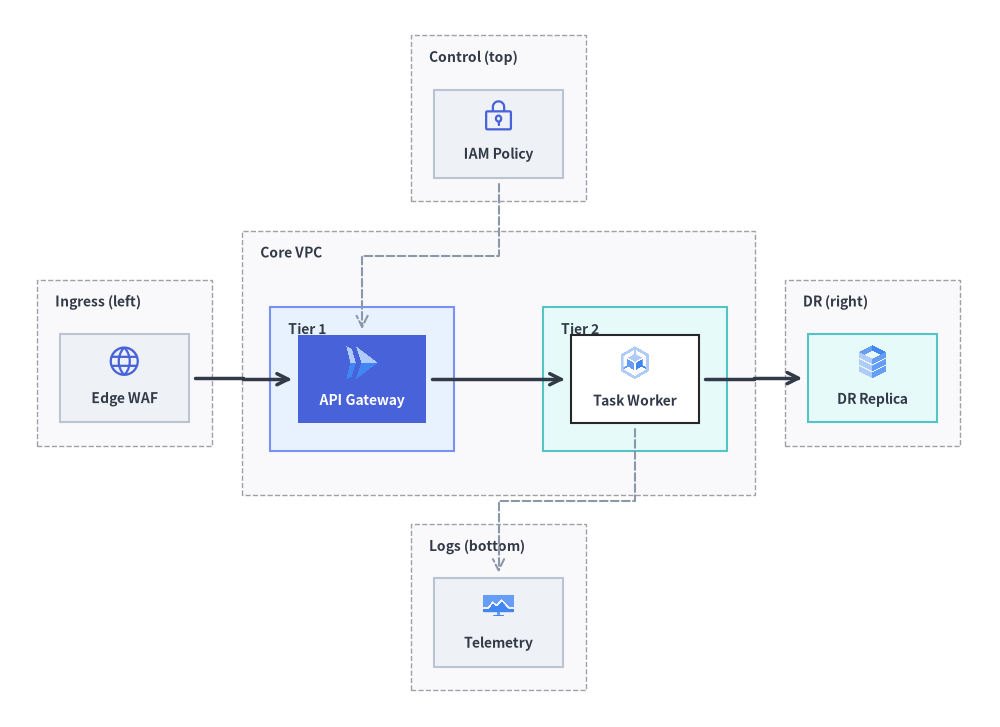
Source Code
from drawlib.canvas import save, setup
from drawlib.diagrams.architecture import ArchitectureDiagram, GcpIcon, Node, NodeGroup, PhosphorIcon
from drawlib.graph import ArchitectureGraph
from drawlib.styles import Styles

setup(width=136, height=99)

# Step 1: Solve 5-zone compass & nested container coordinates
g = ArchitectureGraph(
    direction="LR",
    container_sep=4.0,
    default_node_width=17.5,
    default_node_height=12.0,
)

# 1. Top Zone (pos="top")
g.cluster("top_zone", ["iam"], pos="top", padding=3.2, header_height=4.2)

# 2. Left Zone (pos="left")
g.cluster("left_zone", ["waf"], pos="left", padding=3.2, header_height=4.2)

# 3. Center Zone (pos="center") with two nested sub-clusters (parent="core", order=1 & 2)
g.group("core", pos="center", padding=3.8, header_height=4.5)
g.cluster("tier1", ["api"], parent="core", order=1, padding=3.8, header_height=4.2)
g.cluster("tier2", ["worker"], parent="core", order=2, padding=3.8, header_height=4.2)

# 4. Right Zone (pos="right")
g.cluster("right_zone", ["dr_replica"], pos="right", padding=3.2, header_height=4.2)

# 5. Bottom Zone (pos="bottom")
g.cluster("bottom_zone", ["obs"], pos="bottom", padding=3.2, header_height=4.2)

# Connect across all 5 compass zones
g.edge("waf", "api")
g.edge("api", "worker")
g.edge("worker", "dr_replica")
g.edge("iam", "api")
g.edge("worker", "obs")

layout = g.get_layout()

# Step 2: Render containers and cloud icon nodes with ArchitectureDiagram
d = ArchitectureDiagram(
    node_style=Styles.Primary,
    node_text_style=Styles.DarkBold.patch(text_size=10.0),
    edge_style=Styles.DarkBold,
    edge_text_style=Styles.Dark.patch(text_size=10.0),
    node_card_style=Styles.Neutral,
)
hdr_st = Styles.DarkBold.patch(text_size=10.0, halign="left", valign="top")

c_top = layout.clusters["top_zone"]
grp_top = d.add(NodeGroup("Control (top)", width=c_top.width, height=c_top.height, text_style=hdr_st), xy=c_top.bottom_left)

c_left = layout.clusters["left_zone"]
grp_left = d.add(NodeGroup("Ingress (left)", width=c_left.width, height=c_left.height, text_style=hdr_st), xy=c_left.bottom_left)

c_core = layout.clusters["core"]
grp_core = d.add(
    NodeGroup("Core VPC", width=c_core.width, height=c_core.height, text_style=hdr_st),
    xy=c_core.bottom_left,
)

c_t1 = layout.clusters["tier1"]
grp_t1 = grp_core.add(
    NodeGroup("Tier 1", width=c_t1.width, height=c_t1.height, style=Styles.PrimaryNeutral, text_style=hdr_st),
    xy=c_t1.local_bottom_left,
)

c_t2 = layout.clusters["tier2"]
grp_t2 = grp_core.add(
    NodeGroup("Tier 2", width=c_t2.width, height=c_t2.height, style=Styles.SecondaryNeutral, text_style=hdr_st),
    xy=c_t2.local_bottom_left,
)

c_right = layout.clusters["right_zone"]
grp_right = d.add(NodeGroup("DR (right)", width=c_right.width, height=c_right.height, text_style=hdr_st), xy=c_right.bottom_left)

c_bot = layout.clusters["bottom_zone"]
grp_bot = d.add(NodeGroup("Logs (bottom)", width=c_bot.width, height=c_bot.height, text_style=hdr_st), xy=c_bot.bottom_left)

n_iam = grp_top.add(Node("IAM Policy", *layout["iam"].size, icon=PhosphorIcon.LOCK_KEY, icon_size=4.8), xy=layout["iam"].local_xy)
n_waf = grp_left.add(Node("Edge WAF", *layout["waf"].size, icon=PhosphorIcon.GLOBE, icon_size=4.8), xy=layout["waf"].local_xy)
n_api = grp_t1.add(
    Node(
        "API Gateway",
        *layout["api"].size,
        icon=GcpIcon.CLOUD_RUN,
        icon_size=5.0,
        style=Styles.White,
        text_style=Styles.WhiteBold.patch(text_size=10.0),
        card_style=Styles.PrimaryFlat,
    ),
    xy=layout["api"].local_xy,
)
n_wrk = grp_t2.add(
    Node("Task Worker", *layout["worker"].size, icon=GcpIcon.GOOGLE_KUBERNETES_ENGINE, icon_size=5.0, card_style=Styles.White),
    xy=layout["worker"].local_xy,
)
n_dr = grp_right.add(
    Node("DR Replica", *layout["dr_replica"].size, icon=GcpIcon.CLOUD_SQL, icon_size=5.0, card_style=Styles.SecondaryNeutral),
    xy=layout["dr_replica"].local_xy,
)
n_obs = grp_bot.add(
    Node("Telemetry", *layout["obs"].size, icon=GcpIcon.CLOUD_MONITORING, icon_size=4.8),
    xy=layout["obs"].local_xy,
)

d.connect(n_waf, n_api, padding=0.8)
d.connect(n_api, n_wrk, padding=0.8)
d.connect(n_wrk, n_dr, padding=0.8)
d.connect(n_iam, n_api, style=Styles.MutedDashed, padding=0.8)
d.connect(n_wrk, n_obs, style=Styles.MutedDashed, padding=0.8)

d.draw(xy=(-5.0, -5.0))
save()
1. Constructor & Container Methods
from drawlib.graph import ArchitectureGraph

g = ArchitectureGraph(
    direction="LR",                  # "LR" (Left-to-Right) or "TB" (Top-to-Bottom)
    container_sep=None,              # Gap between top-level containers (auto-scales if None)
    edge_routing="orthogonal",       # "orthogonal" or "straight"
    default_node_width=24.0,
    default_node_height=12.0,
)
Parameter Reference
| Parameter | Type | Default | Description |
|---|---|---|---|
direction |
Literal["LR", "TB"] |
"LR" |
Primary macro flow axis ("LR" left-to-right or "TB" top-to-bottom). |
container_sep |
float | None |
None |
Fixed separation between top-level containers (auto-scales to fit canvas if None). |
edge_routing |
Literal["orthogonal", "straight"] |
"orthogonal" |
Edge path routing strategy ("orthogonal" right-angled highway routing or "straight"). |
default_node_width |
float |
24.0 |
Default node width in canvas units. |
default_node_height |
float |
12.0 |
Default node height in canvas units. |
Nested Clusters, 5-Zone Compass Placement & ArchitectureDiagram Mapping
You can organize nodes into single-level or nested two-level containers using g.group() and g.cluster(), or by passing group="..." and subgroup="..." directly on g.node():
g.group(id, *, nodes=None, padding=4.0, header_height=3.5, parent=None, order=None, pos=None) -> Cluster: Creates a top-level or parent container (such as a Cloud VPC) that can hold child clusters (parent=id).g.cluster(id, nodes=None, *, padding=4.0, header_height=3.5, parent=None, order=None, pos=None) -> Cluster: Encloses a list ofnodesinside a container bounding box withpaddingon all sides andheader_heightreserved at the top for a group title.parent: ID of the enclosing parent group (e.g.parent="vpc").order: Integer rank (1,2, ...) controlling the sequence of sibling tiers inside a parent container.pos: Compass zone ("left","center","right","top","bottom") for macro placement on the canvas.
- Inline Node Membership (
g.node(id, *, width=None, height=None, group="...", subgroup="...")): Duringget_layout(),ArchitectureGraphinspects each node'sgroupandsubgroupattributes. Any referenced cluster ID that has not been explicitly created viag.group()org.cluster()is automatically registered, the node is appended to the innermost container, and if bothgroupandsubgroupare provided,subgroup.parentis automatically linked togroup(subgroup.parent = node.group). - Seamless Coordinate Mapping to
ArchitectureDiagram:- Top-Level
NodeGroup:c = layout.clusters["vpc"]→vpc = d.add(NodeGroup("VPC", width=c.width, height=c.height), xy=c.bottom_left) - Nested
NodeGroup:sub = layout.clusters["tier1"]→t1 = vpc.add(NodeGroup("Tier 1", width=sub.width, height=sub.height), xy=sub.local_bottom_left) - Child
Nodeinside aNodeGroup:n = layout.nodes["api"]→t1.add(Node("API", *n.size, icon=...), xy=n.local_xy) - Top-Level
Node:n = layout.nodes["client"]→d.add(Node("Client", *n.size, icon=...), xy=n.xy)
- Top-Level
2. Multi-VPC / Multi-Tier Cloud Topology with Nested Clusters
The following example calculates coordinates for a complete cloud architecture—featuring an external client zone (pos="left"), a central production VPC (pos="center") with nested Compute and Data tiers (parent="prod_vpc", order=1, 2), and an observability zone (pos="bottom")—and renders it with ArchitectureDiagram:
from drawlib.canvas import save, setup
from drawlib.diagrams.architecture import ArchitectureDiagram, GcpIcon, Node, NodeGroup, PhosphorIcon
from drawlib.graph import ArchitectureGraph
from drawlib.styles import Styles

setup(width=118, height=96)

# 1. Declare multi-tier topology and solve layout coordinates
g = ArchitectureGraph(
    direction="LR",
    container_sep=5.5,
    default_node_width=19.0,
    default_node_height=12.0,
)

# External client zone pinned to the left (vertically stacked)
g.cluster("ext_zone", ["web_client", "mobile_client"], pos="left", padding=3.5, header_height=4.5)

# Central Production VPC with nested Compute and Data tiers
g.group("prod_vpc", pos="center", padding=4.0, header_height=4.8)
g.cluster(
    "compute_subnet",
    ["api_gw", "order_svc"],
    parent="prod_vpc",
    order=1,
    padding=4.0,
    header_height=4.5,
)
g.cluster(
    "data_subnet",
    ["orders_db", "redis_cache"],
    parent="prod_vpc",
    order=2,
    padding=4.0,
    header_height=4.5,
)

# Shared observability platform pinned to the bottom
g.cluster("obs_zone", ["prometheus"], pos="bottom", padding=3.5, header_height=4.2)

g.edge("web_client", "api_gw")
g.edge("mobile_client", "order_svc")
g.edge("api_gw", "orders_db")
g.edge("order_svc", "redis_cache")
g.edge("order_svc", "prometheus")

layout = g.get_layout()

# 2. Render with ArchitectureDiagram using c.bottom_left, c.local_bottom_left, and n.local_xy
d = ArchitectureDiagram(
    node_style=Styles.Primary,
    node_text_style=Styles.DarkBold.patch(text_size=10.0),
    edge_style=Styles.DarkBold,
    edge_text_style=Styles.Dark.patch(text_size=10.0),
    node_card_style=Styles.Neutral,
)
hdr_st = Styles.DarkBold.patch(text_size=10.0, halign="left", valign="top")

c_ext = layout.clusters["ext_zone"]
grp_ext = d.add(NodeGroup("Clients", width=c_ext.width, height=c_ext.height, text_style=hdr_st), xy=c_ext.bottom_left)

c_vpc = layout.clusters["prod_vpc"]
grp_vpc = d.add(
    NodeGroup("Production VPC (10.0.0.0/16)", width=c_vpc.width, height=c_vpc.height, text_style=hdr_st),
    xy=c_vpc.bottom_left,
)

c_comp = layout.clusters["compute_subnet"]
grp_comp = grp_vpc.add(
    NodeGroup("Compute Subnet", width=c_comp.width, height=c_comp.height, style=Styles.PrimaryNeutral, text_style=hdr_st),
    xy=c_comp.local_bottom_left,
)

c_data = layout.clusters["data_subnet"]
grp_data = grp_vpc.add(
    NodeGroup("Data Subnet", width=c_data.width, height=c_data.height, style=Styles.SecondaryNeutral, text_style=hdr_st),
    xy=c_data.local_bottom_left,
)

c_obs = layout.clusters["obs_zone"]
grp_obs = d.add(NodeGroup("Telemetry", width=c_obs.width, height=c_obs.height, text_style=hdr_st), xy=c_obs.bottom_left)

web = grp_ext.add(Node("Web App", *layout["web_client"].size, icon=PhosphorIcon.BROWSER, icon_size=5.0), xy=layout["web_client"].local_xy)
mob = grp_ext.add(Node("Mobile App", *layout["mobile_client"].size, icon=PhosphorIcon.DEVICE_MOBILE, icon_size=5.0), xy=layout["mobile_client"].local_xy)

api = grp_comp.add(
    Node(
        "API Gateway",
        *layout["api_gw"].size,
        icon=GcpIcon.CLOUD_RUN,
        icon_size=5.5,
        style=Styles.White,
        text_style=Styles.WhiteBold.patch(text_size=10.0),
        card_style=Styles.PrimaryFlat,
    ),
    xy=layout["api_gw"].local_xy,
)
wrk = grp_comp.add(
    Node("Order Worker", *layout["order_svc"].size, icon=GcpIcon.GOOGLE_KUBERNETES_ENGINE, icon_size=5.5, card_style=Styles.White),
    xy=layout["order_svc"].local_xy,
)

db = grp_data.add(
    Node("Primary SQL", *layout["orders_db"].size, icon=GcpIcon.CLOUD_SQL, icon_size=5.5, card_style=Styles.White),
    xy=layout["orders_db"].local_xy,
)
cache = grp_data.add(
    Node("Redis Cache", *layout["redis_cache"].size, icon=GcpIcon.MEMORYSTORE, icon_size=5.5, card_style=Styles.White),
    xy=layout["redis_cache"].local_xy,
)

prom = grp_obs.add(
    Node("Metrics & Logs", *layout["prometheus"].size, icon=GcpIcon.CLOUD_MONITORING, icon_size=5.0),
    xy=layout["prometheus"].local_xy,
)

d.connect(web, api, label="HTTPS", padding=0.8)
d.connect(mob, wrk, label="gRPC", padding=0.8)
d.connect(api, db, label="SQL", padding=0.8)
d.connect(wrk, cache, label="Cache", padding=0.8)
d.connect(wrk, prom, style=Styles.MutedDashed, padding=0.8)

d.draw(xy=(-4.0, -5.0))
save()
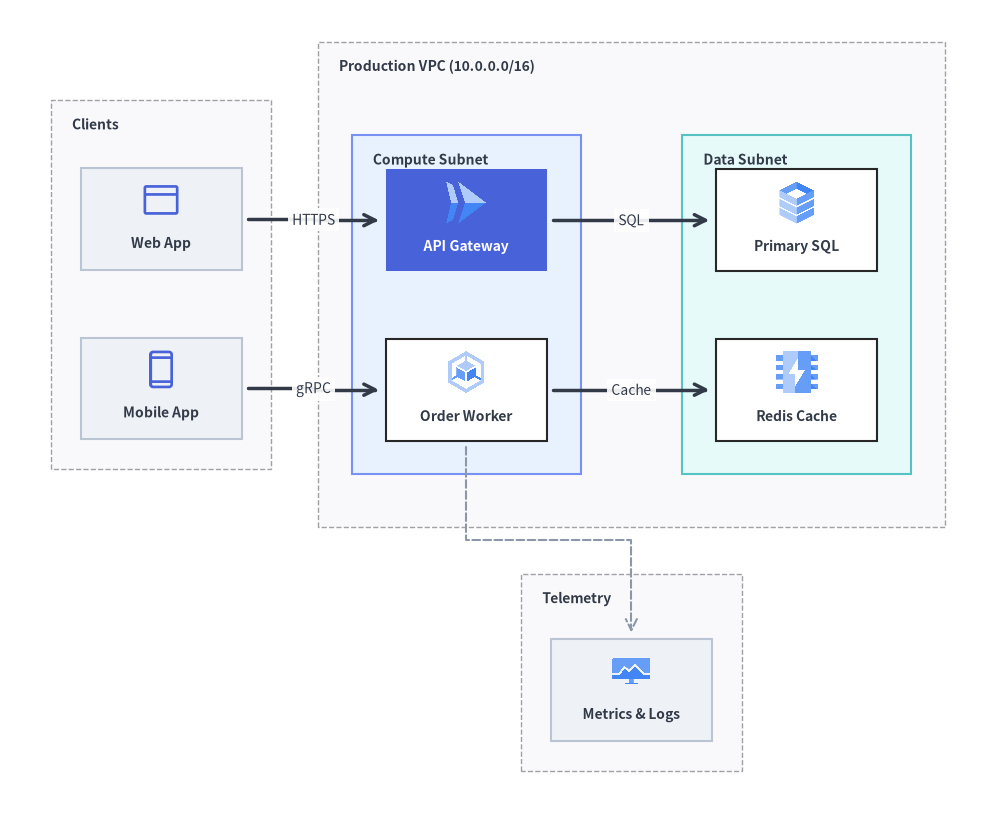
3. Post-Layout Fine-Tuning with get_layout() and offset()
When an automatically calculated topology needs a subtle coordinate adjustment—or when you want to attach custom drawlib.shapes badges at exact node coordinates—call layout = g.get_layout(), apply layout.offset(node_id, dx=..., dy=...) (which updates both .xy and .local_xy), and then render via ArchitectureDiagram:
from drawlib.canvas import save, setup
from drawlib.diagrams.architecture import ArchitectureDiagram, GcpIcon, Node, NodeGroup, PhosphorIcon
from drawlib.graph import ArchitectureGraph
from drawlib.shapes import rectangle
from drawlib.styles import Styles

setup(width=124, height=68)

g = ArchitectureGraph(
    direction="LR",
    container_sep=5.5,
    default_node_width=20.0,
    default_node_height=12.0,
)

# Declare containers with subgroup padding and inline node membership
g.cluster("dmz", ["edge_lb"], pos="left", padding=3.8, header_height=4.5)
g.group("vpc", pos="center", padding=4.0, header_height=4.8)
g.cluster("app", ["core_api"], parent="vpc", order=1, padding=7.0, header_height=4.5)
g.cluster("storage", ["worker", "AnalyticsDB"], parent="vpc", order=2, padding=4.2, header_height=4.5)

g.node("edge_lb", group="dmz")
g.node("core_api", group="vpc", subgroup="app")
g.node("worker", group="vpc", subgroup="storage")
g.node("AnalyticsDB", group="vpc", subgroup="storage")

g.edge("edge_lb", "core_api")
g.edge("core_api", "worker")
g.edge("core_api", "AnalyticsDB")

# 1. Compute layout geometry
layout = g.get_layout()

# 2. Nudge the Core API node slightly downward so a badge fits cleanly inside the App Tier
layout.offset("core_api", dx=0.0, dy=-3.5)

# 3. Render with ArchitectureDiagram
d = ArchitectureDiagram(
    node_style=Styles.Primary,
    node_text_style=Styles.DarkBold.patch(text_size=10.0),
    edge_style=Styles.DarkBold,
    edge_text_style=Styles.Dark.patch(text_size=10.0),
    node_card_style=Styles.Neutral,
)
hdr_st = Styles.DarkBold.patch(text_size=10.0, halign="left", valign="top")

c_dmz = layout.clusters["dmz"]
grp_dmz = d.add(NodeGroup("DMZ (left)", width=c_dmz.width, height=c_dmz.height, text_style=hdr_st), xy=c_dmz.bottom_left)

c_vpc = layout.clusters["vpc"]
grp_vpc = d.add(NodeGroup("Production VPC", width=c_vpc.width, height=c_vpc.height, text_style=hdr_st), xy=c_vpc.bottom_left)

c_app = layout.clusters["app"]
grp_app = grp_vpc.add(
    NodeGroup("App Tier", width=c_app.width, height=c_app.height, style=Styles.PrimaryNeutral, text_style=hdr_st),
    xy=c_app.local_bottom_left,
)

c_sto = layout.clusters["storage"]
grp_sto = grp_vpc.add(
    NodeGroup("Worker & Data", width=c_sto.width, height=c_sto.height, style=Styles.SecondaryNeutral, text_style=hdr_st),
    xy=c_sto.local_bottom_left,
)

lb = grp_dmz.add(Node("Edge Router", *layout["edge_lb"].size, icon=PhosphorIcon.SHIELD_CHECK, icon_size=5.0), xy=layout["edge_lb"].local_xy)
api = grp_app.add(
    Node(
        "Core API",
        *layout["core_api"].size,
        icon=GcpIcon.CLOUD_RUN,
        icon_size=5.5,
        style=Styles.White,
        text_style=Styles.WhiteBold.patch(text_size=10.0),
        card_style=Styles.PrimaryFlat,
    ),
    xy=layout["core_api"].local_xy,
)
wrk = grp_sto.add(
    Node("Async Worker", *layout["worker"].size, icon=GcpIcon.GOOGLE_KUBERNETES_ENGINE, icon_size=5.2, card_style=Styles.White),
    xy=layout["worker"].local_xy,
)
adb = grp_sto.add(
    Node("Analytics DB", *layout["AnalyticsDB"].size, icon=GcpIcon.BIGQUERY, icon_size=5.2, card_style=Styles.White),
    xy=layout["AnalyticsDB"].local_xy,
)

ox, oy = -4.0, -5.0
d.connect(lb, api, label="TLS 1.3", padding=0.8)
api.fork([wrk, adb], at_x=85.5, padding=0.8)
d.draw(xy=(ox, oy))

# 4. Overlay an SLA status badge right above the Core API node using computed global coordinates
api_box = layout.nodes["core_api"]
rectangle(
    (api_box.x + ox, api_box.top + oy + 2.8),
    width=20.0,
    height=4.4,
    style=Styles.SuccessNeutral.patch(shape_r=1.0),
    text="SLA: 99.99%",
    text_style=Styles.DarkBold.patch(text_size=10.0),
)

save()
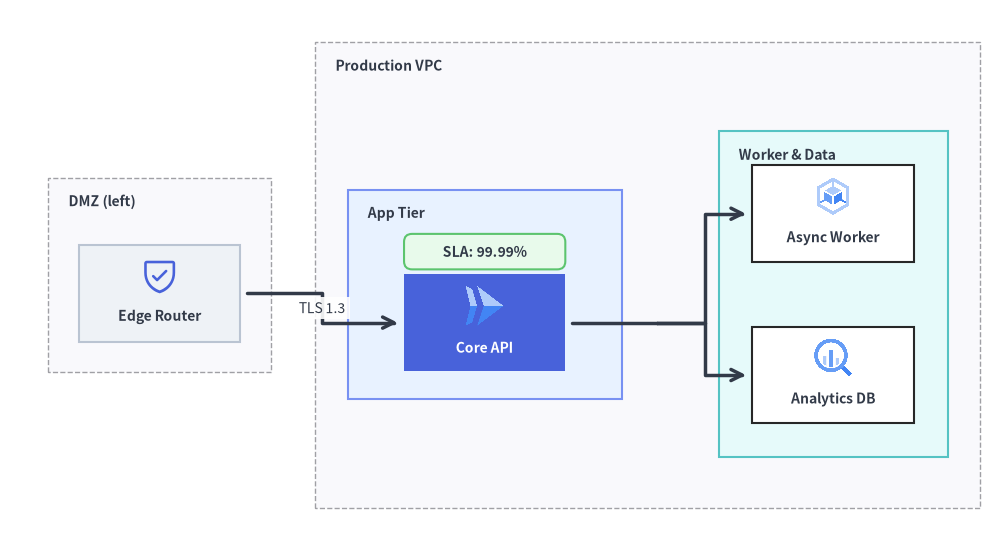
4. Best Practices
- Use
posfor Peripheral Zones: Keep the main request pipeline inpos="center"(orpos="left"->pos="center"->pos="right") and place cross-cutting concerns like CI/CD, IAM, or Observability inpos="bottom"orpos="top". - Reserve Header Clearance with
header_height: When rendering solved clusters asNodeGroupcontainers inArchitectureDiagram, passheader_height=4.2to4.8ong.cluster()andg.group()so child cards never collide with top-left group titles. - Use
.local_bottom_leftand.local_xyInside Nested Groups: BecauseArchitectureDiagrampositions child elements relative to their parentNodeGroup's bottom-left corner, always passxy=cluster.local_bottom_leftwhen adding a nestedNodeGroupandxy=node.local_xywhen adding aNodeto aNodeGroup.