SmartArts Overview
Drawing structured diagrams (such as process flows, comparison tables, directory trees, or mindmaps) using raw shapes and lines often requires calculating hundreds of manual coordinates.
The drawlib.smartarts module eliminates this boilerplate by providing high-level, declarative layout components.
1. What SmartArts Can Do
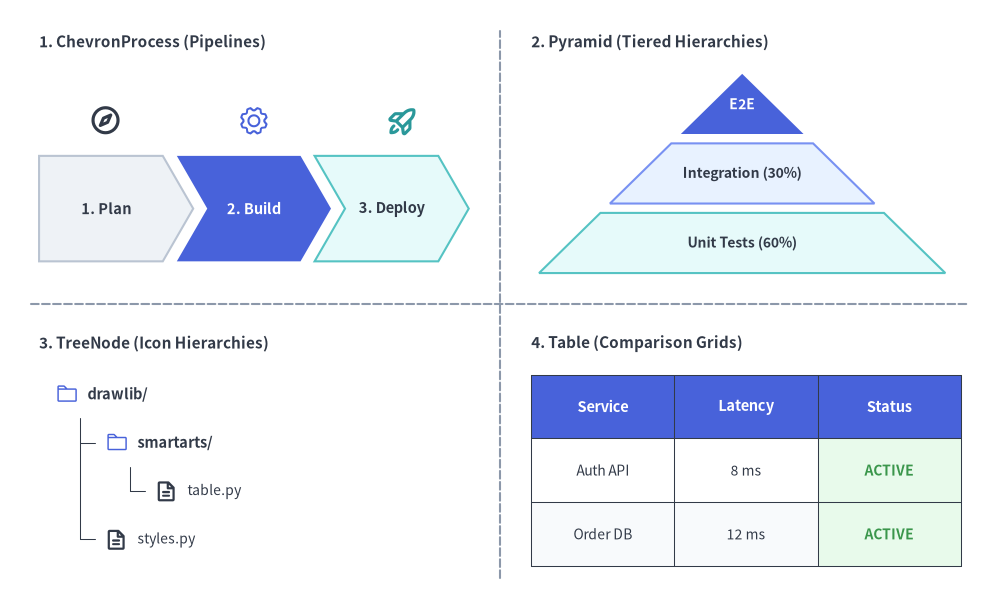
Source Code
from drawlib.canvas import save, setup
from drawlib.icons import phosphor
from drawlib.lines import line
from drawlib.smartarts import ChevronProcess, Pyramid, Table, TreeNode
from drawlib.styles import Colors, Styles
from drawlib.text import text

setup(width=128, height=78)

# Subtle 2x2 quadrant dividers
line((64, 4), (64, 74), style=Styles.MutedDashed)
line((4, 39), (124, 39), style=Styles.MutedDashed)

# 1. Top-Left: ChevronProcess (Sequential Pipelines + Stage Icons)
text((5, 72.5), "1. ChevronProcess (Pipelines)", style=Styles.DarkBold.patch(text_size=11.0, halign="left"))
proc = ChevronProcess(
    style=Styles.Neutral,
    text_style=Styles.DarkBold.patch(text_size=10.5),
    description_style=Styles.Dark.patch(text_size=10.0),
    flat_left_end=True,
    spacing=1.8,
)
proc.add("1. Plan")
proc.add("2. Build", style=Styles.PrimaryFlat, text_style=Styles.WhiteBold.patch(text_size=10.5))
proc.add("3. Deploy", style=Styles.SecondaryNeutral)
proc.draw(xy=(5, 44.5), width=55, height=13.5)

phosphor.compass(xy=(13.5, 62.5), width=4.2, style=Styles.DarkBold)
phosphor.gear(xy=(32.5, 62.5), width=4.2, style=Styles.PrimaryFlat)
phosphor.rocket_launch(xy=(51.5, 62.5), width=4.2, style=Styles.SecondaryBold)

# 2. Top-Right: Pyramid (Tiered Hierarchies)
text((68, 72.5), "2. Pyramid (Tiered Hierarchies)", style=Styles.DarkBold.patch(text_size=11.0, halign="left"))
pyr = Pyramid(
    style=Styles.Neutral,
    text_style=Styles.DarkBold.patch(text_size=10.0),
)
pyr.add("E2E", style=Styles.PrimaryFlat, text_style=Styles.WhiteBold.patch(text_size=10.0))
pyr.add("Integration (30%)", style=Styles.PrimaryNeutral)
pyr.add("Unit Tests (60%)", style=Styles.SecondaryNeutral)
pyr.draw(xy=(69, 43.0), width=52, height=25.5, margin=1.2)

# 3. Bottom-Left: TreeNode (Hierarchies with Phosphor Icons)
text((5, 34.0), "3. TreeNode (Icon Hierarchies)", style=Styles.DarkBold.patch(text_size=11.0, halign="left"))
TreeNode.register_drawing_item(
    name="sc_dir",
    location="before",
    padding_width=4.2,
    function=phosphor.folder,
    style=Styles.PrimaryFlat,
    args={"width": 3.0},
)
TreeNode.register_drawing_item(
    name="sc_file",
    location="before",
    padding_width=4.2,
    function=phosphor.file_text,
    style=Styles.DarkBold,
    args={"width": 3.0},
)
tree = TreeNode(
    "drawlib/",
    text_style=Styles.DarkBold.patch(text_size=10.5),
    line_style=Styles.DarkThin,
    line_horizontal_margin=3.2,
    line_horizontal_length=3.0,
    line_vertical_margin=6.2,
    children=[
        TreeNode(
            "smartarts/",
            children=[
                TreeNode("table.py", text_style=Styles.Dark.patch(text_size=10.0)).set_drawing_item("sc_file"),
            ],
        ).set_drawing_item("sc_dir"),
        TreeNode("styles.py", text_style=Styles.Dark.patch(text_size=10.0)).set_drawing_item("sc_file"),
    ],
).set_drawing_item("sc_dir")
tree.draw(xy=(7, 27.5))

# 4. Bottom-Right: Table (Comparison & Status Grids)
text((68, 34.0), "4. Table (Comparison Grids)", style=Styles.DarkBold.patch(text_size=11.0, halign="left"))
tbl = Table(
    cell_style=Styles.White,
    text_style=Styles.Dark.patch(text_size=10.0),
    header_cell_style=Styles.PrimaryFlat,
    header_text_style=Styles.WhiteBold.patch(text_size=10.5),
    border_style=Styles.DarkThin,
)
tbl.set_style_cell_evenodd(
    even_color=Colors.Muted1,
    even_text_style=Styles.Dark.patch(text_size=10.0),
    odd_color=Colors.White,
    odd_text_style=Styles.Dark.patch(text_size=10.0),
)
tbl.set_style_cell_header(
    background_color=Colors.Primary,
    text_style=Styles.WhiteBold.patch(text_size=10.5),
)
tbl.set_style_cell(
    background_color=Colors.Success1,
    text_style=Styles.SuccessBold.patch(text_size=10.0),
    rows=[1, 2],
    columns=[2],
)
data = [
    ["Service", "Latency", "Status"],
    ["Auth API", "8 ms", "ACTIVE"],
    ["Order DB", "12 ms", "ACTIVE"],
]
tbl.draw(xy=(68, 30.0), width=55, height=24.5, data=data)
save()
2. Public Exports (drawlib.smartarts)
All SmartArts components, mutable item/configuration models, and helper function aliases are exported directly from drawlib.smartarts:
from drawlib.smartarts import (
    # Primary SmartArt Components
    BoxList,
    BulletPoints,
    CardList,
    ChevronProcess,
    Cycle,
    DayCalendar,
    GeoMap,
    GridLayout,
    KpiCard,
    KpiCards,
    MindMapNode,
    MonthCalendar,
    Panel,
    Pyramid,
    Roadmap,
    SourceCode,
    Table,
    TreeNode,
    WeekCalendar,
    # Mutable Item & Style Models
    BoxListItem,
    BulletPointItem,
    CalendarItem,
    CardListItem,
    ChevronItem,
    CycleCenter,
    CycleItem,
    GridItem,
    KpiCardItem,
    PyramidItem,
    RoadmapItem,
    SourceCodeStyles,
    # Function Aliases
    get_source_code_styles,
    sourcecode,
)
3. Component Catalog Matrix
| Component | Primary Use Case | Anchor System | Key Methods & Item Models |
|---|---|---|---|
ChevronProcess |
Phased pipelines, CI/CD stages, migration roadmaps | Bottom-Left / Center | add(...) -> ChevronItem, items, draw(..., align="bottom_left", scale=1.0) |
Cycle |
PDCA devops loops, circular lifecycles, state loops | Center / Bottom-Left | add(...) -> CycleItem, set_center() -> CycleCenter, items, center, draw(..., align="center") |
Table |
Service SLAs, specification matrices, DB schemas | Top-Left / Bottom-Left / Center | set_style_cell_*(), set_style_border(), reset_styles(), draw(..., align="top_left"), draw_flexible(...) |
TreeNode |
Directory hierarchies, org charts, taxonomy trees | Top-Left (x, y) |
add(...) -> TreeNode, register_drawing_item(), set_drawing_item(), draw(...) |
MindMapNode |
Brainstorming nodes, radial feature maps, org trees | Center (cx, cy) |
add(...) -> MindMapNode, draw(xy, branch="bottom", scale=1.0) |
GridLayout |
Layered architectures, dashboard card grids | Bottom-Left / Center | add(...) -> GridItem, items, draw(..., align="bottom_left"), draw_flexible(...) |
Pyramid |
Testing pyramids, tiered memory/cache hierarchies | Bottom-Left / Center | add(...) -> PyramidItem, items, draw(..., direction="bottom", align="bottom_left"), draw_flexible(...) |
BoxList |
Linear horizontal or vertical card sequences | Bottom-Left / Center | add(...) -> BoxListItem, items, draw(..., direction="left", align="bottom_left", scale=1.0) |
KpiCards |
Metric highlight cards, SLO/benchmark summaries | Bottom-Left / Center | add(...) -> KpiCardItem, items, draw(xy, width, height, columns=1, align="bottom_left", scale=1.0) |
CardList |
Icon/badge feature stacks and arrow step cards | Bottom-Left / Center | add(...) -> CardListItem, items, draw(xy, width, height, align="bottom_left", scale=1.0) |
Roadmap |
Straight/curved timelines and milestone roadmaps | Bottom-Left / Center | add(...) -> RoadmapItem, items, draw(xy, width, height, align="bottom_left", scale=1.0) |
Panel |
Titled container frames with header bands & content box math | Bottom-Left / Center | draw(xy, width, height, align="bottom_left", scale=1.0), get_content_box(xy, width, height, padding=..., align="bottom_left", content_align=None) |
Calendar |
Monthly, weekly, and daily ("vertical" / "horizontal") calendars |
Bottom-Left / Center / Top-Left | MonthCalendar, WeekCalendar, DayCalendar, add(...) -> CalendarItem, draw(xy, width, height) |
BulletPoints |
Architectural takeaways, RFC key points, checklists | Top-Left (x, y) |
set_indent(), set_bullet_style(), add(...) -> BulletPointItem, items, draw(...) |
SourceCode |
Syntax-highlighted code blocks in diagrams | Top-Left / Bottom-Left / Center | SourceCode.draw(..., align="top_left") / sourcecode(...), SourceCode.get_text(), SourceCodeStyles.get() |
GeoMap |
Geographical maps (GeoMap.World.*, GeoMap.Countries.*, GeoMap.Cities.*) |
Bottom-Left / Center | get_areas(), set_area_styles(), draw(..., align="bottom_left"), get_area_xy(), lonlat_to_xy(), data |
Looking for speech bubbles & callouts? The
bubblespeech()primitive is part ofdrawlib.shapesand is documented in Callouts, Badges & Status.
4. Coordinate Anchor & Normalization Cheat Sheet
Understanding anchor conventions is essential when combining multiple SmartArts onto a single canvas:
- Top-Left Anchored by Default (
Table,TreeNode,BulletPoints,SourceCode):
You specify the top-left coordinate(x, y)(TableandSourceCodealso acceptalign="bottom_left"oralign="center"). Content flows horizontally to the right (+x) and vertically downward (-y). - Bottom-Left Anchored by Default (
ChevronProcess,GridLayout,Pyramid,BoxList,KpiCards,CardList,Roadmap,Panel,MonthCalendar,WeekCalendar,DayCalendar,GeoMap):
You specify the bottom-left coordinate(x, y)(or passalign="center"to anchor by the bounding-box center(cx, cy)). The bounding container extends rightward (+x) and upward (+y). - Center Anchored by Default (
Cycle,MindMapNode):
You specify the center coordinate(cx, cy)(or passalign="bottom_left"toCycle.draw()). The diagram expands symmetrically or radially around the center.
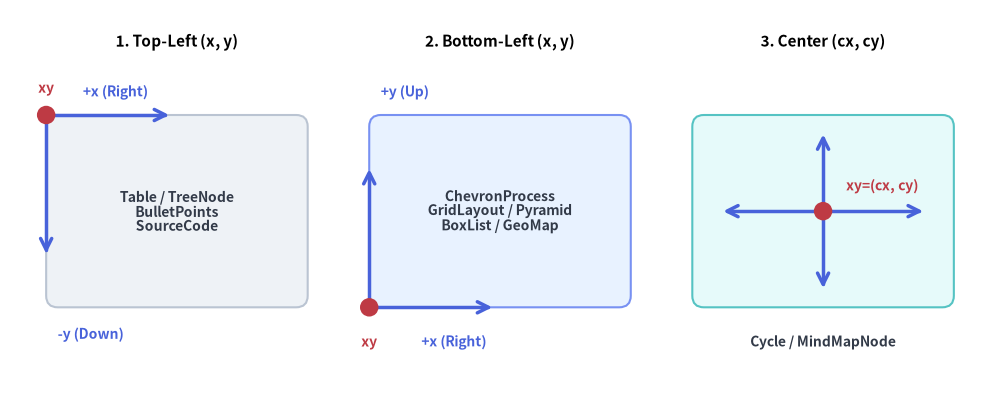
Source Code
from drawlib.canvas import save, setup
from drawlib.lines import line
from drawlib.shapes import circle, rectangle
from drawlib.styles import Styles
from drawlib.text import text

setup(width=130, height=54)

# 1. Left Panel: Top-Left Anchored (x, y)
text((23.0, 48.5), "1. Top-Left (x, y)", style=Styles.BlackBold.patch(text_size=11.0))
rectangle(
    (23.0, 26.5),
    width=34.0,
    height=25.0,
    style=Styles.Neutral.patch(shape_r=1.5),
    text="Table / TreeNode\nBulletPoints\nSourceCode",
    text_style=Styles.DarkBold.patch(text_size=10.0),
)
# Growth arrows from top-left (6.0, 39.0)
line((6.0, 39.0), (22.0, 39.0), arrow_head="->", style=Styles.PrimaryBold)
text((15.0, 42.0), "+x (Right)", style=Styles.PrimaryBold.patch(text_size=10.0))
line((6.0, 39.0), (6.0, 21.0), arrow_head="->", style=Styles.PrimaryBold)
text((7.5, 10.5), "-y (Down)", style=Styles.PrimaryBold.patch(text_size=10.0, halign="left"))
circle((6.0, 39.0), radius=1.2, style=Styles.DangerFlat)
text((6.0, 42.5), "xy", style=Styles.DangerBold.patch(text_size=10.0))

# 2. Middle Panel: Bottom-Left Anchored (x, y)
text((65.0, 48.5), "2. Bottom-Left (x, y)", style=Styles.BlackBold.patch(text_size=11.0))
rectangle(
    (65.0, 26.5),
    width=34.0,
    height=25.0,
    style=Styles.PrimaryNeutral.patch(shape_r=1.5),
    text="ChevronProcess\nGridLayout / Pyramid\nBoxList / GeoMap",
    text_style=Styles.DarkBold.patch(text_size=10.0),
)
# Growth arrows from bottom-left (48.0, 14.0)
line((48.0, 14.0), (64.0, 14.0), arrow_head="->", style=Styles.PrimaryBold)
text((59.0, 9.5), "+x (Right)", style=Styles.PrimaryBold.patch(text_size=10.0))
line((48.0, 14.0), (48.0, 32.0), arrow_head="->", style=Styles.PrimaryBold)
text((49.5, 42.0), "+y (Up)", style=Styles.PrimaryBold.patch(text_size=10.0, halign="left"))
circle((48.0, 14.0), radius=1.2, style=Styles.DangerFlat)
text((48.0, 9.5), "xy", style=Styles.DangerBold.patch(text_size=10.0))

# 3. Right Panel: Center Anchored (cx, cy)
text((107.0, 48.5), "3. Center (cx, cy)", style=Styles.BlackBold.patch(text_size=11.0))
rectangle(
    (107.0, 26.5),
    width=34.0,
    height=25.0,
    style=Styles.SecondaryNeutral.patch(shape_r=1.5),
)
# Radial expansion arrows from center (107.0, 26.5)
line((107.0, 26.5), (120.0, 26.5), arrow_head="->", style=Styles.PrimaryBold)
line((107.0, 26.5), (94.0, 26.5), arrow_head="->", style=Styles.PrimaryBold)
line((107.0, 26.5), (107.0, 36.5), arrow_head="->", style=Styles.PrimaryBold)
line((107.0, 26.5), (107.0, 16.5), arrow_head="->", style=Styles.PrimaryBold)
circle((107.0, 26.5), radius=1.2, style=Styles.DangerFlat)
text((110.0, 29.8), "xy=(cx, cy)", style=Styles.DangerBold.patch(text_size=10.0, halign="left"))
text((107.0, 9.5), "Cycle / MindMapNode", style=Styles.DarkBold.patch(text_size=10.0))

save()
To align components of size (W, H) on the same canvas grid, either pass align="bottom_left" / align="center" directly to draw(), or convert between Top-Left (left_x, top_left_y), Bottom-Left (left_x, bottom_y), and Center (center_x, center_y) anchors using:
center_x = left_x + W / 2.0
center_y = bottom_y + H / 2.0
top_left_y = bottom_y + H
| Component | Default xy Meaning |
Supported align Options |
To Align with Bottom-Left (X, Y) |
|---|---|---|---|
Table, SourceCode |
Top-Left (x, y) |
"top_left", "bottom_left", "center" |
Pass align="bottom_left" or (X, Y + H) |
TreeNode, BulletPoints |
Top-Left (x, y) |
(Fixed Top-Left) | Pass (X, Y + H) |
ChevronProcess, GridLayout, Pyramid, BoxList, KpiCards, CardList, Roadmap, Panel, GeoMap |
Bottom-Left (x, y) |
"bottom_left", "center" |
Pass (X, Y) directly |
MindMapNode |
Root Center (cx, cy) |
(Fixed Root Center) | Pass (X + W/2, Y + H/2) |
Cycle |
Orbit Center (cx, cy) |
"center", "bottom_left" |
Pass align="bottom_left" or (X + R, Y + R) |
5. Unified Deferred Mutation Lifecycle (add(), items, show, and scale)
Stateful SmartArt components follow a unified 4-phase deferred mutation lifecycle:
- Instantiate (
__init__): Initialize the component with default styles, spacing, and layout parameters. - Register Content (
add(..., show: bool = True)): Populate stages, cells, tiers, cards, or child nodes. Every.add(...)call returns a mutable item instance (ChevronItem,CycleItem,GridItem,PyramidItem,BoxListItem,BulletPointItem,TreeNode, orMindMapNode), and all registered items remain accessible via.items(or.childrenfor trees/mindmaps, and.centerforCycleCenter). - Mutate Before or Between
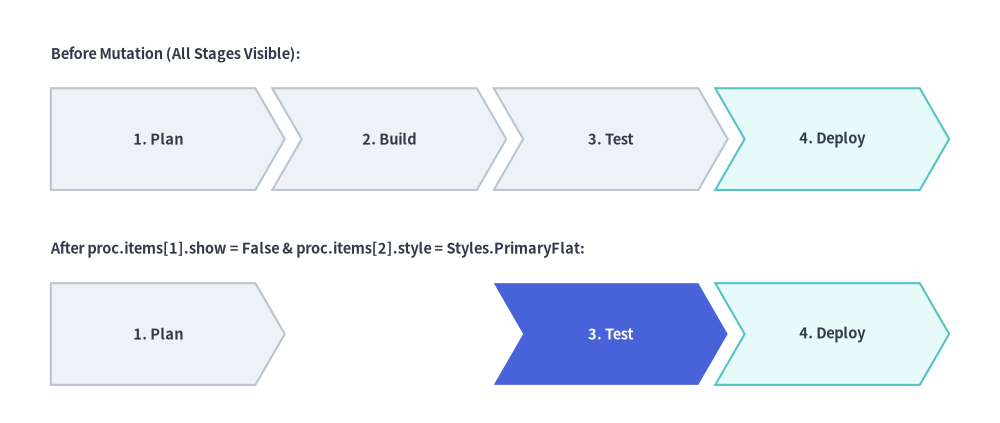
draw()Calls: Because item attributes (.style,.text_style,.text,.description,.show) are evaluated lazily insidedraw(), you can mutate any item's style, label, or visibility before callingdraw()—or between multipledraw()frames (such as step-by-step animations or multi-state diagrams) without reconstructing the component:
from drawlib.canvas import save, setup
from drawlib.smartarts import ChevronProcess
from drawlib.styles import Styles
from drawlib.text import text

setup(width=118, height=50)

proc = ChevronProcess(
    style=Styles.Neutral,
    text_style=Styles.DarkBold.patch(text_size=10.5),
    description_style=Styles.Dark.patch(text_size=10.0),
    flat_left_end=True,
    spacing=2.0,
)
proc.add("1. Plan")
proc.add("2. Build")
proc.add("3. Test")
proc.add("4. Deploy", style=Styles.SecondaryNeutral)

# Top Row: Initial Render (All 4 stages visible)
text((6, 43.5), "Before Mutation (All Stages Visible):", style=Styles.DarkBold.patch(text_size=10.5, halign="left"))
proc.draw(xy=(6, 27.5), width=106, height=12)

# Mutate items in-place between draw() calls—sibling coordinates never shift!
proc.items[1].show = False
proc.items[2].style = Styles.PrimaryFlat
proc.items[2].text_style = Styles.WhiteBold.patch(text_size=10.5)

# Bottom Row: Re-render after mutating items[1] and items[2]
text((6, 20.5), "After proc.items[1].show = False & proc.items[2].style = Styles.PrimaryFlat:", style=Styles.DarkBold.patch(text_size=10.5, halign="left"))
proc.draw(xy=(6, 4.5), width=106, height=12)
save()
- Render (
draw(xy=..., ..., scale: float = 1.0)): Render the component onto the canvas at anchorxy(or statelessly viaSourceCode.draw(xy, width, ...)). Passingscale(e.g.scale=0.8orscale=1.2) proportionally scales all dimensions, margins, corner radii, line widths, and font sizes relative toxy.