GridGraph: 2D Matrix Layouts & Channel Edge Routing
GridGraph places nodes into a structured 2D (row, col) matrix and routes edges cleanly between cells. While adjacent horizontal or vertical neighbors connect directly, non-adjacent cross-edges are automatically routed through inter-row and inter-column highway channels (edge_routing="smart") so lines never cut across intermediate nodes.
Use GridGraph when you want tabular alignment across rows and columns—such as multi-tier service matrices, state grids, periodic/catalog topologies, or grid-aligned component architectures. Call layout = g.get_layout(margin=...) to obtain cell coordinates (layout[id].xy / .local_xy), row/column cluster bounding boxes (layout.clusters[cid].bottom_left), and channel-routed edge waypoints (layout.edges).
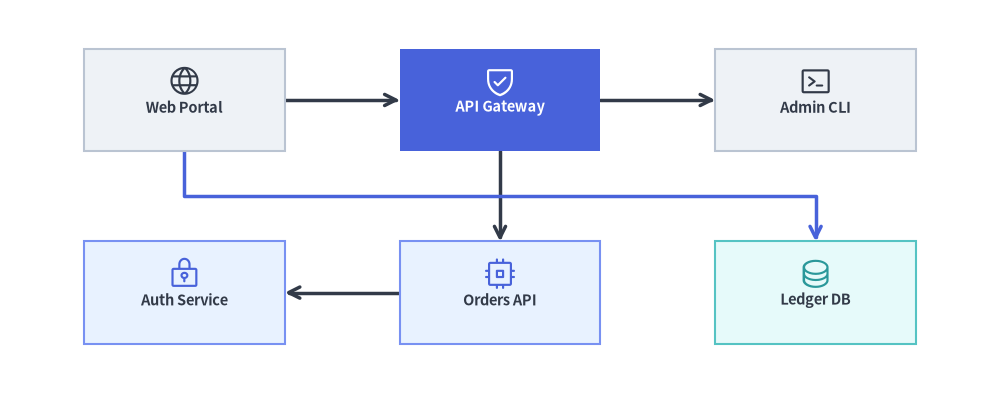
Source Code
from drawlib.canvas import save, setup
from drawlib.graph import GridGraph
from drawlib.icons import phosphor
from drawlib.lines import lines
from drawlib.shapes import rectangle
from drawlib.styles import Styles

setup(width=122, height=48)

g = GridGraph(
    columns=3,
    col_sep=14.0,
    row_sep=11.0,
    edge_routing="smart",
    default_node_width=24.5,
    default_node_height=12.5,
)

# Row 0: Ingress & Routing Tier
g.cell("web", row=0, col=0)
g.cell("gateway", row=0, col=1)
g.cell("admin", row=0, col=2)

# Row 1: Service & Persistence Tier
g.cell("auth", row=1, col=0)
g.cell("orders", row=1, col=1)
g.cell("ledger", row=1, col=2)

# Direct grid edges + smart channel-routed edge through the inter-row corridor
g.edge("web", "gateway")
g.edge("gateway", "admin")
g.edge("gateway", "orders")
g.edge("orders", "auth")
g.edge("web", "ledger")

# 1. Solve 2D grid coordinates & smart inter-channel edge polylines
layout = g.get_layout(margin=5.0)

# 2. Render edges (highlighting the smart channel-routed cross-edge web -> ledger)
for e in layout.edges:
    edge_st = Styles.PrimaryBold if (e.src, e.dst) == ("web", "ledger") else Styles.DarkBold
    lines(e.points, arrow_head="->", style=edge_st)

# 3. Render cell cards & Phosphor icons
cells = {
    "web": ("\nWeb Portal", Styles.Neutral, Styles.DarkBold, phosphor.globe, Styles.Dark),
    "gateway": ("\nAPI Gateway", Styles.PrimaryFlat, Styles.WhiteBold, phosphor.shield_check, Styles.White),
    "admin": ("\nAdmin CLI", Styles.Neutral, Styles.DarkBold, phosphor.terminal_window, Styles.Dark),
    "auth": ("\nAuth Service", Styles.PrimaryNeutral, Styles.DarkBold, phosphor.lock_key, Styles.Primary),
    "orders": ("\nOrders API", Styles.PrimaryNeutral, Styles.DarkBold, phosphor.cpu, Styles.Primary),
    "ledger": ("\nLedger DB", Styles.SecondaryNeutral, Styles.DarkBold, phosphor.database, Styles.Secondary),
}

for cid, (label, box_st, txt_st, icon_fn, ic_st) in cells.items():
    n = layout[cid]
    rectangle(
        n.xy,
        width=n.width,
        height=n.height,
        style=box_st,
        text=label,
        text_style=txt_st.patch(text_size=10.5),
    )
    icon_fn((n.x, n.y + 2.3), width=4.2, style=ic_st)

save()
1. Constructor, Matrix Helpers, & get_layout() API
from drawlib.graph import GridGraph

g = GridGraph(
    columns=3,                       # Number of grid columns (default: 3)
    rows=None,                       # Optional fixed row count (used in column-major mode)
    order="row-major",               # Auto-flow fill order: "row-major" or "column-major"
    col_sep=16.0,                    # Horizontal gap between columns (auto-scales if None)
    row_sep=14.0,                    # Vertical gap between rows (auto-scales if None)
    edge_routing="smart",            # "smart" (channel routing), "orthogonal", or "straight"
    default_node_width=24.0,
    default_node_height=12.0,
)

layout = g.get_layout(margin=7.5)
print(layout)                        # Inspect solved cell centers, row/column clusters & edges
Parameter Reference
| Parameter | Type | Default | Description |
|---|---|---|---|
columns |
int |
3 |
Number of columns in the grid matrix. |
rows |
int | None |
None |
Optional fixed number of rows (primarily used when order="column-major"). |
order |
Literal["row-major", "column-major"] |
"row-major" |
Automatic slot assignment order for nodes without explicit (row, col) coordinates. |
col_sep |
float | None |
None |
Fixed horizontal gap between columns. Auto-scales to canvas if None. |
row_sep |
float | None |
None |
Fixed vertical gap between rows. Auto-scales to canvas if None. |
edge_routing |
Literal["smart", "orthogonal", "straight"] |
"smart" |
"smart" routes non-adjacent edges through inter-cell channels; "orthogonal" uses standard Z/L bends; "straight" draws direct lines. |
default_node_width |
float |
20.0 |
Default node width in canvas units. |
default_node_height |
float |
12.0 |
Default node height in canvas units. |
Matrix Cell & Row/Column Cluster Methods
g.cell(cell_id, row=None, col=None, *, width=None, height=None) -> Node: Registers a node pinned to(row, col)(0-based, whererow=0, col=0is the top-left cell), or leavesrow/colasNoneto auto-flow into the next available slot.g.cluster_row(row, cluster_id, *, padding=4.0, header_height=3.5) -> Cluster: Automatically encloses all nodes placed inrowinside a horizontal band container (ClusterLayout), setting each cell'sparent_idandlocal_xyrelative to the row container'sbottom_left.g.cluster_column(col, cluster_id, *, padding=4.0, header_height=3.5) -> Cluster: Automatically encloses all nodes placed incolinside a vertical column container (ClusterLayout), setting each cell'sparent_idandlocal_xyrelative to the column container'sbottom_left.g.cluster(id, nodes=None, *, padding=4.0, header_height=3.5, parent=None, order=None, pos=None) -> Cluster: StandardBaseGraph.cluster()can also be used alongsidecluster_row()andcluster_column()to enclose any arbitrary subset of grid cells inside a bounding rectangle.
2. Explicit (row, col) Component Matrix with Row Clusters & Cross-Edges
By pinning nodes to explicit (row, col) coordinates and grouping rows with g.cluster_row(...), you can model layered client/service/storage matrices where ArchitectureDiagram renders the NodeGroup row bands (xy=cl.bottom_left) and Node cards (xy=nl.local_xy), while layout.edges routes cross-column edges cleanly around neighboring cells:
from drawlib.canvas import save, setup
from drawlib.diagrams.architecture import ArchitectureDiagram, Node, NodeGroup
from drawlib.graph import GridGraph
from drawlib.lines import lines
from drawlib.styles import Styles

setup(width=124, height=78)

g = GridGraph(
    columns=3,
    col_sep=11.0,
    row_sep=11.5,
    default_node_width=24.0,
    default_node_height=10.5,
)

# Row 0: Client Interfaces
g.cell("fe_web", row=0, col=0)
g.cell("fe_mob", row=0, col=1)
g.cell("fe_cli", row=0, col=2)

# Row 1: Core Services
g.cell("svc_auth", row=1, col=0)
g.cell("svc_core", row=1, col=1)
g.cell("svc_bill", row=1, col=2)

# Row 2: Persistence Layer
g.cell("db_users", row=2, col=0)
g.cell("db_main", row=2, col=1)
g.cell("db_ledger", row=2, col=2)

# Enclose rows in horizontal containers
g.cluster_row(0, "row_clients", padding=3.2)
g.cluster_row(1, "row_services", padding=3.2)
g.cluster_row(2, "row_storage", padding=3.2)

# Direct vertical/horizontal edges + non-adjacent channel-routed cross-edges
g.edge("fe_web", "svc_auth")
g.edge("fe_mob", "svc_core")
g.edge("fe_cli", "svc_core")
g.edge("svc_core", "svc_auth")
g.edge("svc_core", "svc_bill")
g.edge("svc_auth", "db_users")
g.edge("svc_core", "db_main")
g.edge("svc_bill", "db_ledger")
g.edge("svc_auth", "db_ledger")

layout = g.get_layout(margin=7.5)

# Render NodeGroups and Nodes with ArchitectureDiagram
d = ArchitectureDiagram(
    node_style=Styles.PrimaryFlat,
    node_text_style=Styles.DarkBold.patch(text_size=10.5),
    edge_style=Styles.DarkBold,
    edge_text_style=Styles.Dark.patch(text_size=10.0),
    node_card_style=Styles.Neutral,
)

groups = {}
for cid, title in [
    ("row_clients", "Client Tier"),
    ("row_services", "Service Tier"),
    ("row_storage", "Data Tier"),
]:
    cl = layout.clusters[cid]
    groups[cid] = d.add(
        NodeGroup(title=title, width=cl.width, height=cl.height, style=Styles.MutedDashed),
        xy=cl.bottom_left,
    )

for nid, label, card_st, txt_st in [
    ("fe_web", "Web Portal", Styles.Neutral, Styles.DarkBold),
    ("fe_mob", "Mobile App", Styles.Neutral, Styles.DarkBold),
    ("fe_cli", "Admin CLI", Styles.Neutral, Styles.DarkBold),
    ("svc_auth", "Auth Service", Styles.PrimaryNeutral, Styles.DarkBold),
    ("svc_core", "Core API", Styles.PrimaryFlat, Styles.WhiteBold),
    ("svc_bill", "Billing API", Styles.PrimaryNeutral, Styles.DarkBold),
    ("db_users", "Identity DB", Styles.SecondaryNeutral, Styles.DarkBold),
    ("db_main", "Primary SQL", Styles.SecondaryNeutral, Styles.DarkBold),
    ("db_ledger", "Ledger Store", Styles.SecondaryNeutral, Styles.DarkBold),
]:
    nl = layout[nid]
    groups[nl.parent_id].add(
        Node(
            label,
            width=nl.width,
            height=nl.height,
            card_style=card_st,
            text_style=txt_st.patch(text_size=10.5),
        ),
        xy=nl.local_xy,
    )

d.draw()

# Overlay smart channel-routed edges from layout.edges
edge_styles = {
    ("fe_cli", "svc_core"): Styles.PrimaryBold,
    ("svc_auth", "db_ledger"): Styles.DangerDashed,
}
for e in layout.edges:
    st = edge_styles.get((e.src, e.dst), Styles.DarkBold)
    lines(e.points, arrow_head="->", style=st)

save()
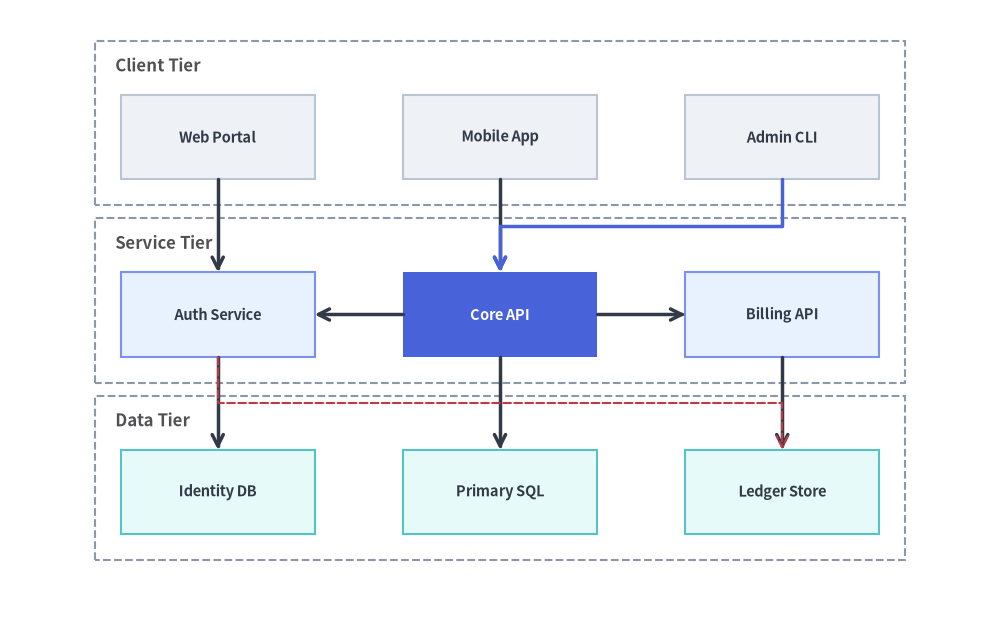
3. Auto-Flow Grid Topology with Column Clusters
When you omit row and col on g.node() or g.cell(), GridGraph automatically streams nodes into successive grid cells in "row-major" (left-to-right, top-to-bottom) or "column-major" (top-to-bottom, left-to-right) order:
from drawlib.canvas import save, setup
from drawlib.diagrams.architecture import ArchitectureDiagram, Node, NodeGroup
from drawlib.graph import GridGraph
from drawlib.lines import lines
from drawlib.styles import Styles
from drawlib.text import text

setup(width=124, height=62)

# Column-major order fills each 2-row column top-to-bottom before moving right
g = GridGraph(
    columns=3,
    rows=2,
    order="column-major",
    col_sep=12.0,
    row_sep=10.0,
    default_node_width=24.0,
    default_node_height=11.0,
)

# Column 0 (Ingest Zone)
g.cell("webhook")
g.cell("poller")

# Column 1 (Processing Zone)
g.cell("validator")
g.cell("enricher")

# Column 2 (Sink Zone)
g.cell("dlq")
g.cell("warehouse")

# Group by column
g.cluster_column(0, "col_in", padding=3.2)
g.cluster_column(1, "col_proc", padding=3.2)
g.cluster_column(2, "col_out", padding=3.2)

g.edge("webhook", "validator")
g.edge("poller", "enricher")
g.edge("validator", "enricher")
g.edge("validator", "dlq")
g.edge("enricher", "warehouse")

layout = g.get_layout(margin=8.0)

d = ArchitectureDiagram(
    node_style=Styles.PrimaryFlat,
    node_text_style=Styles.DarkBold.patch(text_size=10.5),
    edge_style=Styles.DarkBold,
    edge_text_style=Styles.Dark.patch(text_size=10.0),
    node_card_style=Styles.Neutral,
)

col_groups = {}
for cid, title in [
    ("col_in", "Ingest"),
    ("col_proc", "Transform"),
    ("col_out", "Sinks"),
]:
    cl = layout.clusters[cid]
    col_groups[cid] = d.add(
        NodeGroup(title=title, width=cl.width, height=cl.height, style=Styles.MutedDashed),
        xy=cl.bottom_left,
    )

for nid, label, card_st, txt_st in [
    ("webhook", "Webhook In", Styles.Neutral, Styles.DarkBold),
    ("poller", "S3 Poller", Styles.Neutral, Styles.DarkBold),
    ("validator", "Schema Check", Styles.PrimaryNeutral, Styles.DarkBold),
    ("enricher", "Enrich Engine", Styles.PrimaryFlat, Styles.WhiteBold),
    ("dlq", "Dead-Letter Q", Styles.WarningNeutral, Styles.DarkBold),
    ("warehouse", "BigQuery Sink", Styles.SecondaryNeutral, Styles.DarkBold),
]:
    nl = layout[nid]
    col_groups[nl.parent_id].add(
        Node(
            label,
            width=nl.width,
            height=nl.height,
            card_style=card_st,
            text_style=txt_st.patch(text_size=10.5),
        ),
        xy=nl.local_xy,
    )

d.draw()

for e in layout.edges:
    is_dlq = (e.src, e.dst) == ("validator", "dlq")
    lines(e.points, arrow_head="->", style=Styles.WarningDashed if is_dlq else Styles.DarkBold)
    if is_dlq:
        text((e.mid_xy[0], e.mid_xy[1] + 2.2), "Invalid", style=Styles.Dark.patch(text_size=9.5))
    elif (e.src, e.dst) == ("enricher", "warehouse"):
        text((e.mid_xy[0], e.mid_xy[1] + 2.2), "Valid", style=Styles.Dark.patch(text_size=9.5))

save()
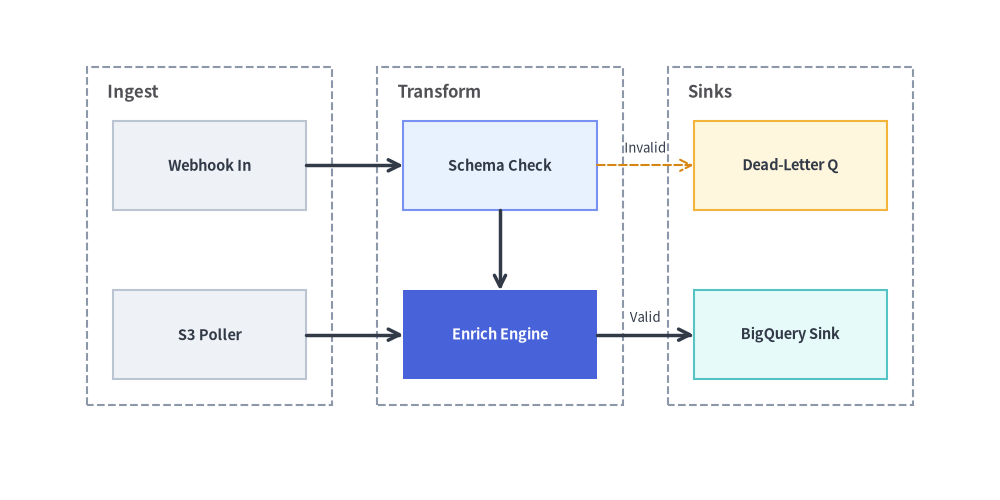
4. Best Practices
- Choose
GridGraphvs.SmartArts.GridLayout:- Use
GridGraph(drawlib.graph) when cells are connected by directed edges (g.edge()) or grouped into row/column clusters (g.cluster_row()/g.cluster_column()). - Use
GridLayout(drawlib.smartarts) when displaying unlinked feature cards with headers and bullet points.
- Use
- Avoid Mixing Both
cluster_rowandcluster_columnon the Same Cell: Choose eithercluster_row(...)(horizontal tier bands) orcluster_column(...)(vertical stage columns) so dashed container borders do not intersect over the same cells.